ECU JEEP WAGONEER 2023 Owner's Manual
[x] Cancel search | Manufacturer: JEEP, Model Year: 2023, Model line: WAGONEER, Model: JEEP WAGONEER 2023Pages: 396, PDF Size: 15.17 MB
Page 86 of 396

84GETTING TO KNOW YOUR VEHICLE
Opening And Closing The Sunroof
The sunroof has two programmed automatic stops for the
sunroof open position: a comfort stop position and a full
open position. The comfort stop position will minimize
wind buffeting in the interior. Express Open/Close
To open the sunroof, push OPEN on the sunroof switch
and release it within one-half second. The sunroof will
open to the comfort stop position and stop automatically.
Push and release OPEN again to continue to the full open
position.
To close the sunroof, push CLOSE on the sunroof switch
and release it within one-half second. The sunroof will
close automatically from any position.
During Express Open or Express Close operation, any
other actuation of the sunroof switch will stop the sunroof.
Manual Open/Close
To open the sunroof, push and hold OPEN on the sunroof
switch. The sunroof will open to the comfort stop position,
then automatically stop. Release the switch then push and
hold again to continue to the full open position.
To close the sunroof, push and hold CLOSE on the sunroof
switch.
Any release of the switch during open or close operation
will stop the sunroof movement in a partially open
position.
Express Venting The Sunroof
To vent the sunroof, push TILT on the vent switch and
release within one half second. The sunroof will open to
the vent position regardless of its initial position. During
Express Vent operation, any other actuation of the switch
will stop the sunroof.
NOTE:If the sunshade is in the closed position when Express/
Manual Open or Vent operation is initiated, the sunshade
will automatically open to the half open position prior to
the sunroof opening.
Opening And Closing The Power Sunshade
The sunshade has two programmed open positions: half
open and full open positions. When operating the
sunshade from the closed position, the sunshade will
always stop at the half open position regardless of express
or manual open operation. The switch must be pushed
again to continue on to full open position.
If the sunroof is open or vented, the sunshade cannot be
closed beyond the half open position. Pushing the
sunshade close switch when the sunroof is open/vented
and the sunshade is at half open position will first
automatically close the sunroof prior to the sunshade
closing.
Express Open/Close
To open the sunshade, push OPEN on the sunshade
switch and release it within one-half second, the
sunshade will open to the half open position and stop
automatically. Push and release OPEN again to continue
to open the sunshade to the full open position.
To close the sunshade, push CLOSE on the sunshade
switch and release it within one-half second.
During Express Open or Express Close operation, any
other actuation of the sunroof switches will stop the
sunshade in a partially open position.
WARNING!
Never leave children unattended in a vehicle, or with
access to an unlocked vehicle. Never leave the key
fob in or near the vehicle, or in a location accessible
to children. Do not leave the Keyless Enter ‘n Go™
Ignition in the ON/RUN position. Occupants, particu -
larly unattended children, can become entrapped by
the power sunroof while operating the power sunroof
switch. Such entrapment may result in serious injury
or death.
In a collision, there is a greater risk of being thrown
from a vehicle with an open sunroof. You could also
be seriously injured or killed. Always fasten your seat
belt properly and make sure all passengers are also
properly secured.
Do not allow small children to operate the sunroof.
Never allow your fingers, other body parts, or any
object, to project through the sunroof opening. Injury
may result.
23_WS_OM_EN_USC_t.book Page 84
Page 87 of 396
GETTING TO KNOW YOUR VEHICLE85
Manual Open/Close
To open the sunshade, push and hold OPEN on the
sunshade switch, the sunshade will open to the half open
position and stop automatically. Push and hold OPEN
again to continue to open the sunshade to the full open
position.
To close the sunshade, push and hold CLOSE on the
sunshade switch.
Releasing the switch while the sunshade is in motion will
stop the sunshade in a partially open position.
Pinch Protect Feature
This feature will detect an obstruction in the opening of
the sunroof during Express Close operation. If an
obstruction in the path of the sunroof is detected, the
sunroof will automatically retract. Remove the obstruction
if this occurs.
NOTE:If three consecutive sunroof close attempts result in Pinch
Protect reversals, Pinch Protect will disable and the
sunroof must be closed in Manual Mode.
Ignition Off Operation — If Equipped
The power sunroof switch will remain active for up to
approximately 10 minutes after the ignition switch is
placed in the OFF position. Opening either front door will
cancel this feature.
NOTE:If equipped with this setting, the Ignition Off timing is
programmable through the Uconnect system
Úpage 197.
Third Row Sunroof
The sunroof over the third row seating has a single fixed
glass pane with a manual sunshade. To open the
sunshade, pull the handle toward the front of the vehicle.
To close the sunshade, pull the handle toward the rear of
the vehicle.
Sunroof Maintenance
Use only a non-abrasive cleaner and a soft cloth to clean
the glass panel. Periodically check for and clear out any
debris that may have collected in the tracks.
HOOD
OPENING THE HOOD
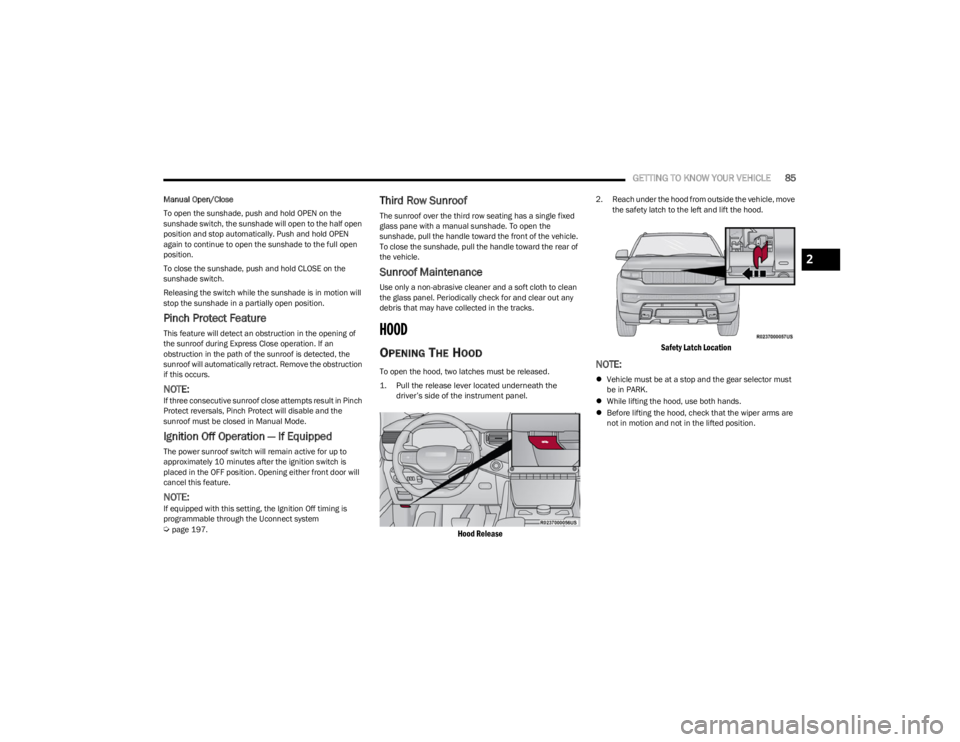
To open the hood, two latches must be released.
1. Pull the release lever located underneath the
driver’s side of the instrument panel.
Hood Release
2. Reach under the hood from outside the vehicle, move the safety latch to the left and lift the hood.
Safety Latch Location
NOTE:
Vehicle must be at a stop and the gear selector must
be in PARK.
While lifting the hood, use both hands.
Before lifting the hood, check that the wiper arms are
not in motion and not in the lifted position.
2
23_WS_OM_EN_USC_t.book Page 85
Page 91 of 396
GETTING TO KNOW YOUR VEHICLE89
(Continued)
CARGO AREA FEATURES
Cargo Storage
The load floor is designed for a maximum load of 300 lb
(136 kg), and should be uniformly distributed over the
load floor.
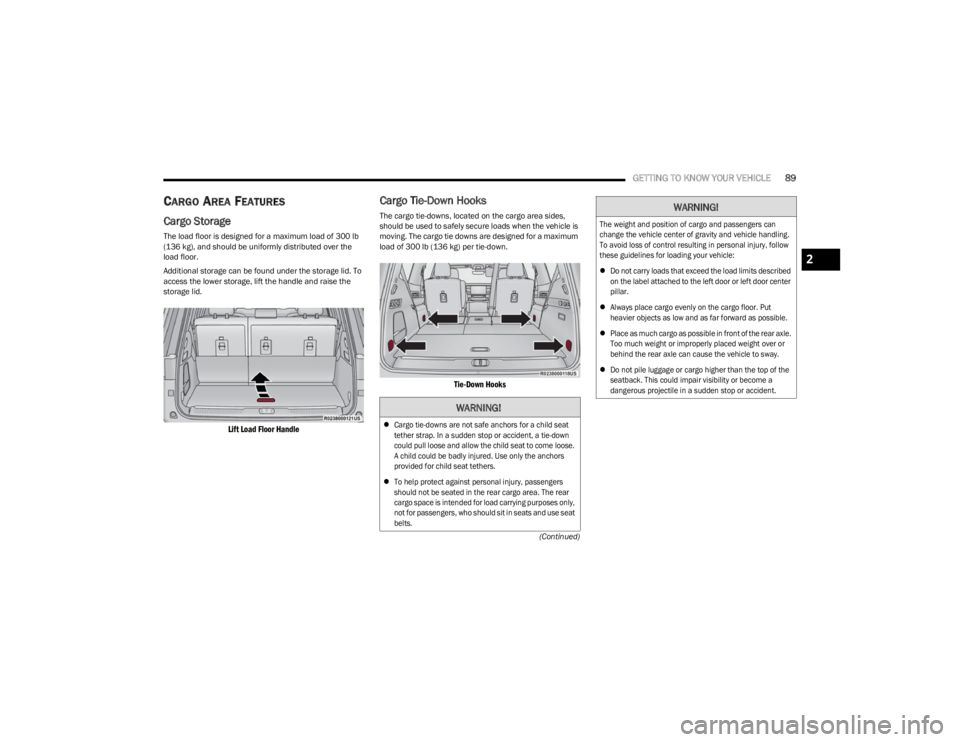
Additional storage can be found under the storage lid. To
access the lower storage, lift the handle and raise the
storage lid.
Lift Load Floor Handle
Cargo Tie-Down Hooks
The cargo tie-downs, located on the cargo area sides,
should be used to safely secure loads when the vehicle is
moving. The cargo tie downs are designed for a maximum
load of 300 lb (136 kg) per tie-down.
Tie-Down Hooks
WARNING!
Cargo tie-downs are not safe anchors for a child seat
tether strap. In a sudden stop or accident, a tie-down
could pull loose and allow the child seat to come loose.
A child could be badly injured. Use only the anchors
provided for child seat tethers.
To help protect against personal injury, passengers
should not be seated in the rear cargo area. The rear
cargo space is intended for load carrying purposes only,
not for passengers, who should sit in seats and use seat
belts.
The weight and position of cargo and passengers can
change the vehicle center of gravity and vehicle handling.
To avoid loss of control resulting in personal injury, follow
these guidelines for loading your vehicle:
Do not carry loads that exceed the load limits described
on the label attached to the left door or left door center
pillar.
Always place cargo evenly on the cargo floor. Put
heavier objects as low and as far forward as possible.
Place as much cargo as possible in front of the rear axle.
Too much weight or improperly placed weight over or
behind the rear axle can cause the vehicle to sway.
Do not pile luggage or cargo higher than the top of the
seatback. This could impair visibility or become a
dangerous projectile in a sudden stop or accident.
WARNING!
2
23_WS_OM_EN_USC_t.book Page 89
Page 92 of 396
90GETTING TO KNOW YOUR VEHICLE
Foldable Cargo Area Cover — If Equipped
The purpose of this cover is for privacy, not to secure
loads. It will not prevent cargo from shifting or protect
passengers from loose cargo.
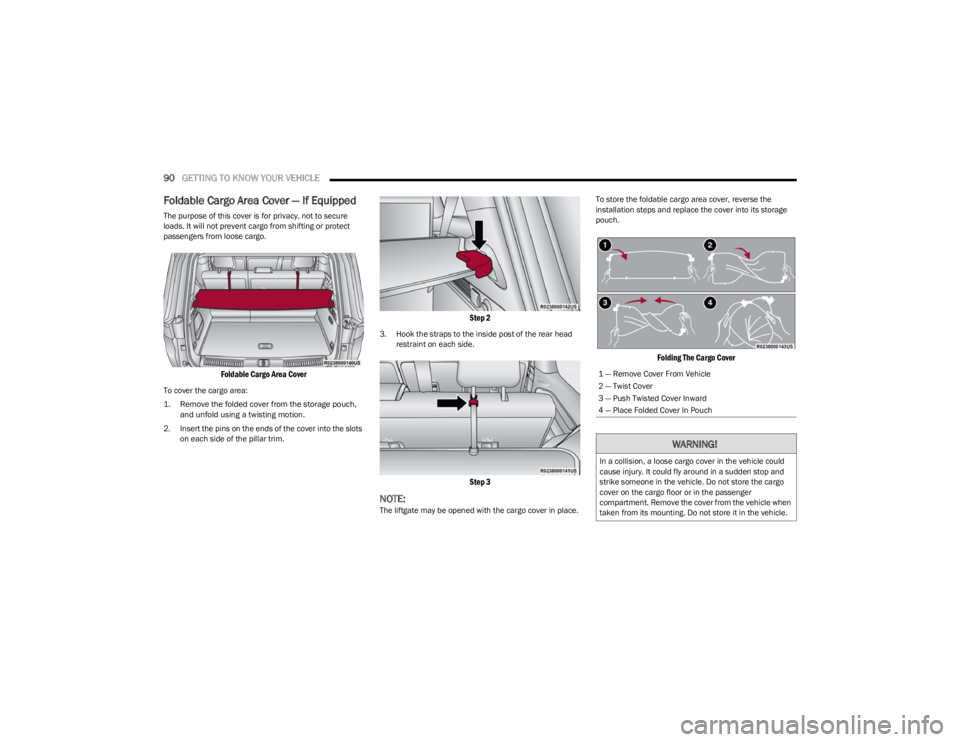
Foldable Cargo Area Cover
To cover the cargo area:
1. Remove the folded cover from the storage pouch,
and unfold using a twisting motion.
2. Insert the pins on the ends of the cover into the slots on each side of the pillar trim.
Step 2
3. Hook the straps to the inside post of the rear head restraint on each side.
Step 3
NOTE:The liftgate may be opened with the cargo cover in place. To store the foldable cargo area cover, reverse the
installation steps and replace the cover into its storage
pouch.
Folding The Cargo Cover
1 — Remove Cover From Vehicle
2 — Twist Cover
3 — Push Twisted Cover Inward
4 — Place Folded Cover In Pouch
WARNING!
In a collision, a loose cargo cover in the vehicle could
cause injury. It could fly around in a sudden stop and
strike someone in the vehicle. Do not store the cargo
cover on the cargo floor or in the passenger
compartment. Remove the cover from the vehicle when
taken from its mounting. Do not store it in the vehicle.
23_WS_OM_EN_USC_t.book Page 90
Page 93 of 396
GETTING TO KNOW YOUR VEHICLE91
Retractable Cargo Area Cover —
If Equipped
The purpose of this cover is for privacy, not to secure
loads. It will not prevent cargo from shifting or protect
passengers from loose cargo.
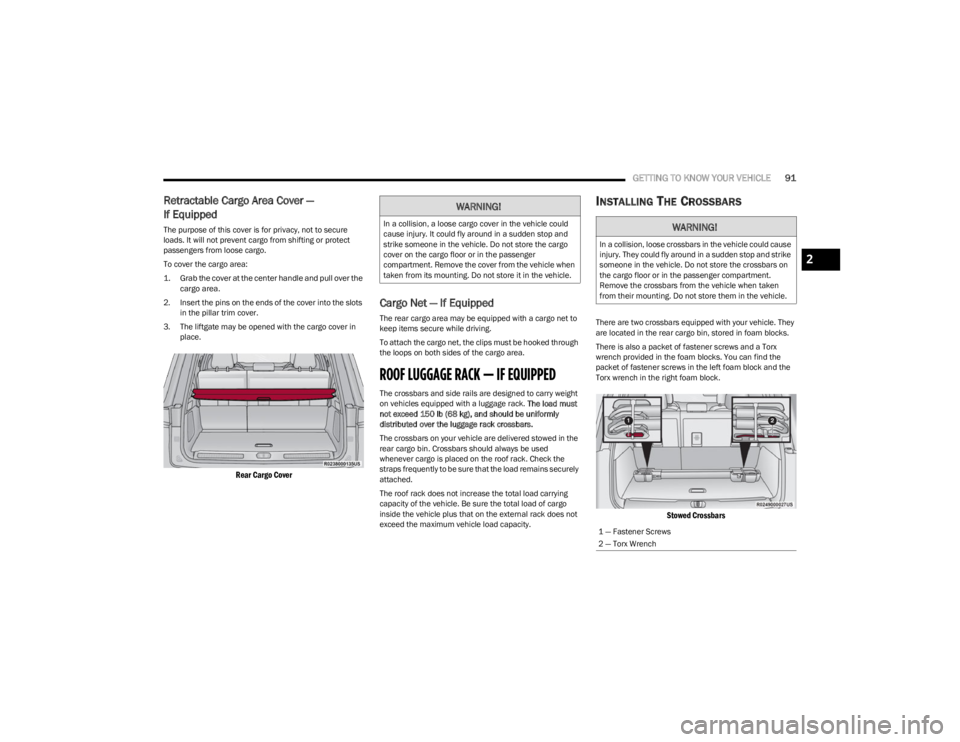
To cover the cargo area:
1. Grab the cover at the center handle and pull over the
cargo area.
2. Insert the pins on the ends of the cover into the slots in the pillar trim cover.
3. The liftgate may be opened with the cargo cover in place.
Rear Cargo Cover
Cargo Net — If Equipped
The rear cargo area may be equipped with a cargo net to
keep items secure while driving.
To attach the cargo net, the clips must be hooked through
the loops on both sides of the cargo area.
ROOF LUGGAGE RACK — IF EQUIPPED
The crossbars and side rails are designed to carry weight
on vehicles equipped with a luggage rack. The load must
not exceed 150 lb (68 kg), and should be uniformly
distributed over the luggage rack crossbars.
The crossbars on your vehicle are delivered stowed in the
rear cargo bin. Crossbars should always be used
whenever cargo is placed on the roof rack. Check the
straps frequently to be sure that the load remains securely
attached.
The roof rack does not increase the total load carrying
capacity of the vehicle. Be sure the total load of cargo
inside the vehicle plus that on the external rack does not
exceed the maximum vehicle load capacity.
INSTALLING THE CROSSBARS
There are two crossbars equipped with your vehicle. They
are located in the rear cargo bin, stored in foam blocks.
There is also a packet of fastener screws and a Torx
wrench provided in the foam blocks. You can find the
packet of fastener screws in the left foam block and the
Torx wrench in the right foam block.
Stowed Crossbars
WARNING!
In a collision, a loose cargo cover in the vehicle could
cause injury. It could fly around in a sudden stop and
strike someone in the vehicle. Do not store the cargo
cover on the cargo floor or in the passenger
compartment. Remove the cover from the vehicle when
taken from its mounting. Do not store it in the vehicle.WARNING!
In a collision, loose crossbars in the vehicle could cause
injury. They could fly around in a sudden stop and strike
someone in the vehicle. Do not store the crossbars on
the cargo floor or in the passenger compartment.
Remove the crossbars from the vehicle when taken
from their mounting. Do not store them in the vehicle.
1 — Fastener Screws
2 — Torx Wrench
2
23_WS_OM_EN_USC_t.book Page 91
Page 95 of 396
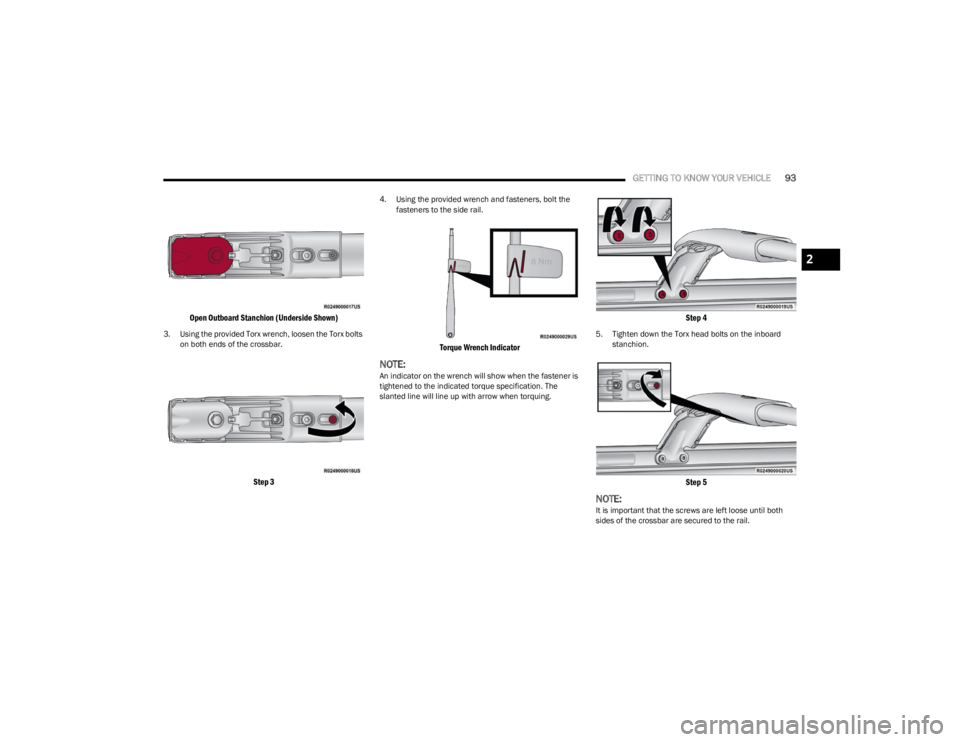
GETTING TO KNOW YOUR VEHICLE93
Open Outboard Stanchion (Underside Shown)
3. Using the provided Torx wrench, loosen the Torx bolts
on both ends of the crossbar.
Step 3
4. Using the provided wrench and fasteners, bolt the fasteners to the side rail.
Torque Wrench Indicator
NOTE:An indicator on the wrench will show when the fastener is
tightened to the indicated torque specification. The
slanted line will line up with arrow when torquing.
Step 4
5. Tighten down the Torx head bolts on the inboard stanchion.
Step 5
NOTE:It is important that the screws are left loose until both
sides of the crossbar are secured to the rail.
2
23_WS_OM_EN_USC_t.book Page 93
Page 96 of 396
94GETTING TO KNOW YOUR VEHICLE
(Continued)
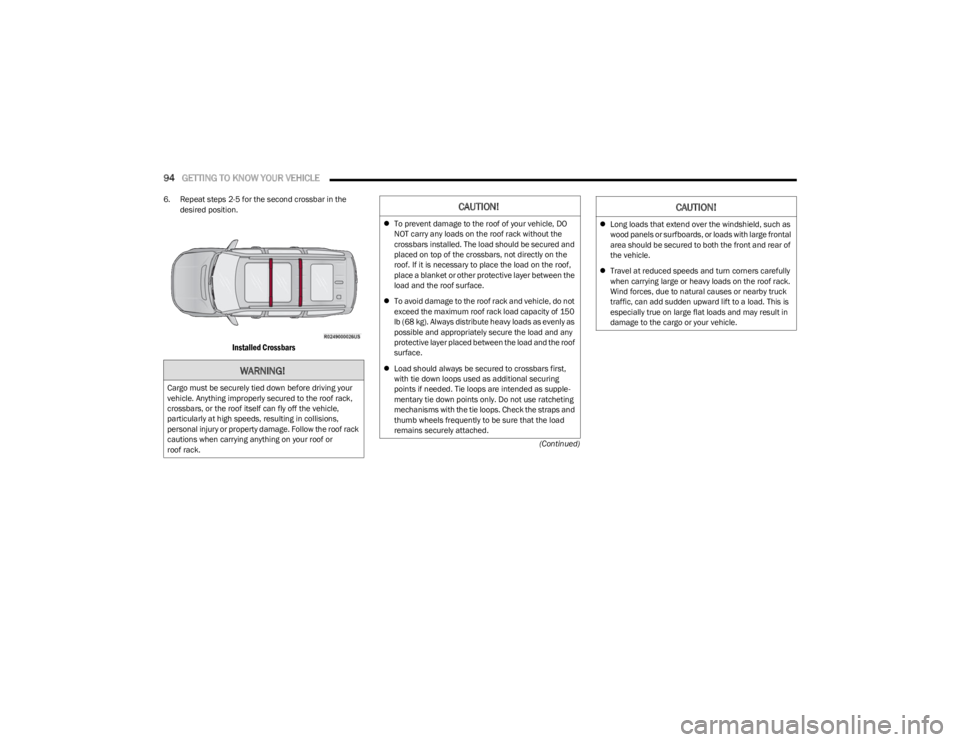
6. Repeat steps 2-5 for the second crossbar in the
desired position.
Installed Crossbars
WARNING!
Cargo must be securely tied down before driving your
vehicle. Anything improperly secured to the roof rack,
crossbars, or the roof itself can fly off the vehicle,
particularly at high speeds, resulting in collisions,
personal injury or property damage. Follow the roof rack
cautions when carrying anything on your roof or
roof rack.
CAUTION!
To prevent damage to the roof of your vehicle, DO
NOT carry any loads on the roof rack without the
crossbars installed. The load should be secured and
placed on top of the crossbars, not directly on the
roof. If it is necessary to place the load on the roof,
place a blanket or other protective layer between the
load and the roof surface.
To avoid damage to the roof rack and vehicle, do not
exceed the maximum roof rack load capacity of 150
lb (68 kg). Always distribute heavy loads as evenly as
possible and appropriately secure the load and any
protective layer placed between the load and the roof
surface.
Load should always be secured to crossbars first,
with tie down loops used as additional securing
points if needed. Tie loops are intended as supple -
mentary tie down points only. Do not use ratcheting
mechanisms with the tie loops. Check the straps and
thumb wheels frequently to be sure that the load
remains securely attached. Long loads that extend over the windshield, such as
wood panels or surfboards, or loads with large frontal
area should be secured to both the front and rear of
the vehicle.
Travel at reduced speeds and turn corners carefully
when carrying large or heavy loads on the roof rack.
Wind forces, due to natural causes or nearby truck
traffic, can add sudden upward lift to a load. This is
especially true on large flat loads and may result in
damage to the cargo or your vehicle.
CAUTION!
23_WS_OM_EN_USC_t.book Page 94
Page 97 of 396
GETTING TO KNOW YOUR VEHICLE95
REMOVING THE CROSSBARS
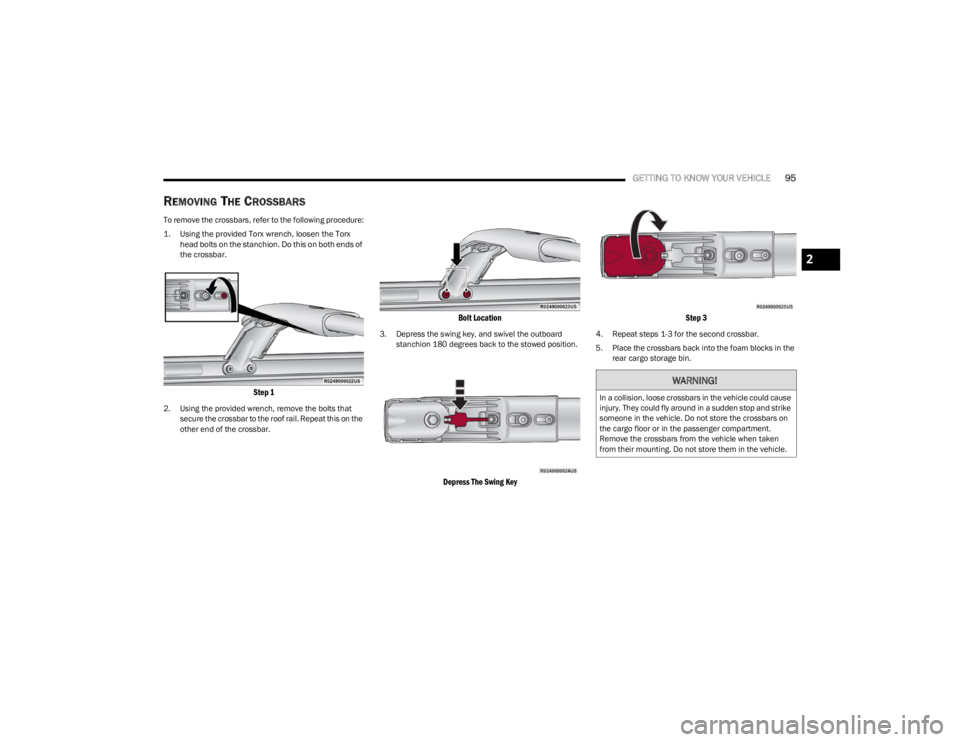
To remove the crossbars, refer to the following procedure:
1. Using the provided Torx wrench, loosen the Torx
head bolts on the stanchion. Do this on both ends of
the crossbar.
Step 1
2. Using the provided wrench, remove the bolts that secure the crossbar to the roof rail. Repeat this on the
other end of the crossbar.
Bolt Location
3. Depress the swing key, and swivel the outboard stanchion 180 degrees back to the stowed position.
Depress The Swing Key Step 3
4. Repeat steps 1-3 for the second crossbar.
5. Place the crossbars back into the foam blocks in the
rear cargo storage bin.
WARNING!
In a collision, loose crossbars in the vehicle could cause
injury. They could fly around in a sudden stop and strike
someone in the vehicle. Do not store the crossbars on
the cargo floor or in the passenger compartment.
Remove the crossbars from the vehicle when taken
from their mounting. Do not store them in the vehicle.
2
23_WS_OM_EN_USC_t.book Page 95
Page 110 of 396

108GETTING TO KNOW YOUR INSTRUMENT PANEL
When load reduction is activated, the message “Battery
Saver On” or “Battery Saver Mode” will appear in the
instrument cluster.
These messages indicate the vehicle battery has a low
state of charge and continues to lose electrical charge at
a rate that the charging system cannot sustain.
NOTE:
The charging system is independent from load reduc -
tion. The charging system performs a diagnostic on the
charging system continuously.
If the Battery Charge Warning Light is on it may indicate
a problem with the charging system
Úpage 109.
The electrical loads that may be switched off (if equipped),
and vehicle functions which can be affected by load
reduction:
Heated Seat/Vented Seats/Heated Wheel
Rear Defroster And Heated Mirrors
HVAC System
115 Volt AC Power Inverter System
Audio and Telematics System
Loss of the battery charge may indicate one or more of the
following conditions:
The charging system cannot deliver enough electrical
power to the vehicle system because the electrical
loads are larger than the capability of the charging
system. The charging system is still functioning
properly.
Turning on all possible vehicle electrical loads (e.g.
HVAC to max settings, exterior and interior lights, over -
loaded power outlets +12 Volt, 115 Volt AC, USB ports)
during certain driving conditions (city driving, towing,
frequent stopping, etc.).
Installing options like additional lights, upfitter elec -
trical accessories, audio systems, alarms and similar
devices.
Unusual driving cycles (short trips separated by long
parking periods).
The vehicle was parked for an extended period of time
(weeks, months).
The battery was recently replaced and was not charged
completely.
The battery was discharged by an electrical load left on
when the vehicle was parked.
The battery was used for an extended period with the
engine not running to supply radio, lights, chargers,
+12 Volt portable appliances like vacuum cleaners,
game consoles and similar devices.
What to do when an electrical load reduction action
message is present (“Battery Saver On” or “Battery Saver
Mode”)
During a trip:
Reduce power to unnecessary loads if possible:
Turn off redundant lights (interior or exterior)
Check what may be plugged in to power outlets
+12 Volt, 115 Volt AC, USB ports
Check HVAC settings (blower, temperature)
Check the audio settings (volume) After a trip:
Check if any aftermarket equipment was installed
(additional lights, upfitter electrical accessories, audio
systems, alarms) and review specifications if any (load
and Ignition Off Draw currents).
Evaluate the latest driving cycles (distance, driving
time and parking time).
The vehicle should have service performed if the
message is still present during consecutive trips, and if
the evaluation and driving pattern of the vehicle did not
help to identify the cause.WARNING LIGHTS AND MESSAGES
The warning/indicator lights will illuminate in the
instrument panel together with a dedicated message and/
or acoustic signal when applicable. These indications are
indicative and precautionary and as such must not be
considered as exhaustive and/or alternative to the
information contained in the Owner’s Manual, which you
are advised to read carefully in all cases. Always refer to
the information in this chapter in the event of a failure
indication. All active telltales will display first if applicable.
The system check menu may appear different based upon
equipment options and current vehicle status. Some
telltales are optional and may not appear.
23_WS_OM_EN_USC_t.book Page 108
Page 113 of 396
GETTING TO KNOW YOUR INSTRUMENT PANEL111
Night Vision Pedestrian Detected Warning
Light — If Equipped
The Night Vision Pedestrian Warning Light will
illuminate in red when a pedestrian is detected
directly in the vehicle’s path, near the
headlights, and a collision is possible.
If enabled, a chime will sound and a video pop-up may
display when a detection occurs.
Oil Pressure Warning Light
This warning light will illuminate to indicate low
engine oil pressure. If the light turns on while
driving, stop the vehicle, shut off the engine as
soon as possible, and contact an authorized
dealer. A chime will sound when this light turns on.
Do not operate the vehicle until the cause is corrected.
This light does not indicate how much oil is in the engine.
Oil Temperature Warning Light
This warning light will illuminate to indicate the
engine oil temperature is high. If the light turns
on while driving, safely pull over and stop the
vehicle (keep engine running). If the
temperature does not return to normal after a few
minutes, turn off the engine and call for service.
Seat Belt Reminder Warning Light
This warning light indicates when the driver or
passenger seat belt is unbuckled. When the
ignition is first placed in the ON/RUN position
and if the driver’s seat belt is unbuckled, a
chime will sound and the light will turn on. When driving, if the driver or front passenger seat belt
remains unbuckled, the Seat Belt Reminder Light will flash
or remain on continuously and a chime will sound
Úpage 256.
Transmission Temperature Warning
Light — If Equipped
This warning light will illuminate to warn of a
high transmission fluid temperature. This may
occur with strenuous usage such as trailer
towing. If this light turns on, stop the vehicle
and run the engine at idle or slightly faster, with the
transmission in PARK (P) or NEUTRAL (N), until the light
turns off. Once the light turns off, you may continue to
drive normally.
Vehicle Security Warning Light —
If Equipped
This light will flash at a fast rate for
approximately 15 seconds when the vehicle
security system is arming, and then will flash
slowly until the vehicle is disarmed.
YELLOW WARNING LIGHTS
Anti-Lock Brake System (ABS)
Warning Light
This warning light monitors the ABS. The light
will turn on when the ignition is placed in the
ON/RUN position and may stay on for as long
as four seconds.
If the ABS light remains on or turns on while driving, then
the Anti-Lock portion of the brake system is not
functioning and service is required as soon as possible.
However, the conventional brake system will continue to
operate normally, assuming the Brake Warning Light is not
also on.
If the ABS light does not turn on when the ignition is placed
in the ON/RUN position, have the brake system inspected
by an authorized dealer.
WARNING!
If you continue operating the vehicle when the
Transmission Temperature Warning Light is illuminated
you could cause the fluid to boil over, come in contact
with hot engine or exhaust components and cause a
fire.
CAUTION!
Continuous driving with the Transmission Temperature
Warning Light illuminated will eventually cause severe
transmission damage or transmission failure.
3
23_WS_OM_EN_USC_t.book Page 111