ECU JEEP WAGONEER 2023 User Guide
[x] Cancel search | Manufacturer: JEEP, Model Year: 2023, Model line: WAGONEER, Model: JEEP WAGONEER 2023Pages: 396, PDF Size: 15.17 MB
Page 27 of 396

GETTING TO KNOW YOUR VEHICLE25
The Vehicle Security system is designed to protect your
vehicle. However, you can create conditions where the
system will give you a false alarm. If one of the previously
described arming sequences has occurred, the Vehicle
Security system will arm regardless of whether you are in
the vehicle or not. If you remain in the vehicle and open a
door, the alarm will sound. If this occurs, disarm the
Vehicle Security system.
If the Vehicle Security system is armed and the battery
becomes disconnected, the Vehicle Security system will
remain armed when the battery is reconnected; the
exterior lights will flash, and the horn will sound. If this
occurs, disarm the Vehicle Security system.
REARMING OF THE SYSTEM
If something triggers the alarm and no action is taken to
disarm it, the Vehicle Security system will turn the horn off
after a 29 second cycle (with five seconds between cycles
and up to eight cycles if the trigger remains active) and
then rearm itself.
SECURITY SYSTEM MANUAL OVERRIDE
The Vehicle Security system will not arm if you lock the
doors using the manual door lock, or an emergency lock
lever
Úpage 26.
TAMPER ALERT
If something has triggered the Vehicle Security system in
your absence, the horn will sound three times and the
exterior lights will blink three times when you disarm the
Vehicle Security system.
DELUXE VEHICLE SECURITY SYSTEM —
IF EQUIPPED
The Deluxe Vehicle Security system monitors the doors,
hood latch, and liftgate for unauthorized entry and the
ignition switch for unauthorized operation. The system
also includes a dual function intrusion sensor and vehicle
tilt sensor. The intrusion sensor monitors the vehicle
interior for motion. The vehicle tilt sensor monitors the
vehicle for any tilting actions (tow away, tire removal, ferry
transport, etc.).
If a perimeter violation triggers the security system, the
horn will sound for 29 seconds and the exterior lights will
flash followed by approximately five seconds of no activity.
This will continue for eight cycles if no action is taken to
disarm the system.
TO ARM THE SYSTEM
Follow these steps to arm the security system:
1. If any doors, windows, or the sunroof (if equipped)
are open, close them.
2. Make sure the vehicle ignition system is OFF.
3. Perform one of the following methods to lock the vehicle:
Push lock on the interior power door lock switch
with the driver and/or passenger door open.
Touch the lock button on the exterior Passive Entry
door handle with a key fob available in the same
exterior zone
Úpage 167.
Push the lock button on the key fob.
NOTE:
When armed, the interior motion sensor detects move -
ment within the vehicle's interior, including moving
objects (i.e. people and pets) and air currents through
open windows or the sunroof. The windows and
sunroof should be closed, and moving objects should
not be left in the vehicle when the intrusion detection
is armed, otherwise false alarms can occur.
Once the security system is armed, it remains in that
state until you disarm it by following either of the
disarming procedures described. If a power loss occurs
after arming the system, you must disarm the system
after restoring power to prevent alarm activation.
The ultrasonic intrusion sensor (motion detector)
actively monitors your vehicle every time you arm the
Vehicle Security system. If you prefer, you can turn off
the ultrasonic intrusion sensor when arming the
Vehicle Security system. To do so, push the lock button
on the key fob three times within 15 seconds of arming
the system (while the Vehicle Security Light is flashing
rapidly). The vehicle will remain locked but will disable
the alarm in the case of repeated false alarms due to
ambient conditions.
TO DISARM THE SYSTEM
The Vehicle Security system can be disarmed using any of
the following methods:
Push the unlock button on the key fob.
Grab the Passive Entry door handle to unlock the door
Úpage 167.
Cycle the vehicle ignition system out of the OFF position
by pushing the START/STOP ignition button (requires at
least one valid key fob in the vehicle).
2
23_WS_OM_EN_USC_t.book Page 25
Page 28 of 396
26GETTING TO KNOW YOUR VEHICLE
NOTE:
The driver's door key cylinder and the liftgate button on
the key fob cannot arm or disarm the Vehicle Security
system.
The Vehicle Security system remains armed during
power liftgate entry. If a valid key fob or the Passive
Entry liftgate button is used to open the liftgate, the
motion sensing will be suppressed until after the lift -
gate is closed. If someone enters the vehicle through
the opened liftgate, then opens any door, the alarm will
sound.
When the Vehicle Security system is armed, the interior
power door lock switches will not unlock the doors.
The ultrasonic intrusion sensor (motion detector)
actively monitors your vehicle every time you arm the
Vehicle Security system. If you prefer, you can turn off
the ultrasonic intrusion sensor when arming the
Vehicle Security system. To do so, push the lock button
on the key fob three times within 15 seconds of arming
the system (while the Vehicle Security Light is flashing
rapidly). The vehicle will remain locked but will disable
the alarm in the case of repeated false alarms due to
ambient conditions. The Vehicle Security system is designed to protect your
vehicle; however, you can create conditions where the
system will give you a false alarm. If one of the previously
described arming sequences has occurred, the Vehicle
Security system will arm regardless of whether you are in
the vehicle or not. If you remain in the vehicle and open a
door, the alarm will sound. If this occurs, disarm the
Vehicle Security system.
If the Vehicle Security system is armed and the battery
becomes disconnected, the Vehicle Security system will
remain armed when the battery is reconnected; the
exterior lights will flash and the horn will sound. If this
occurs, disarm the Vehicle Security system.
SECURITY SYSTEM MANUAL OVERRIDE
The Vehicle Security system will not arm if you lock the
doors using the manual door lock, or an emergency lock
lever
Úpage 26.
DOORS
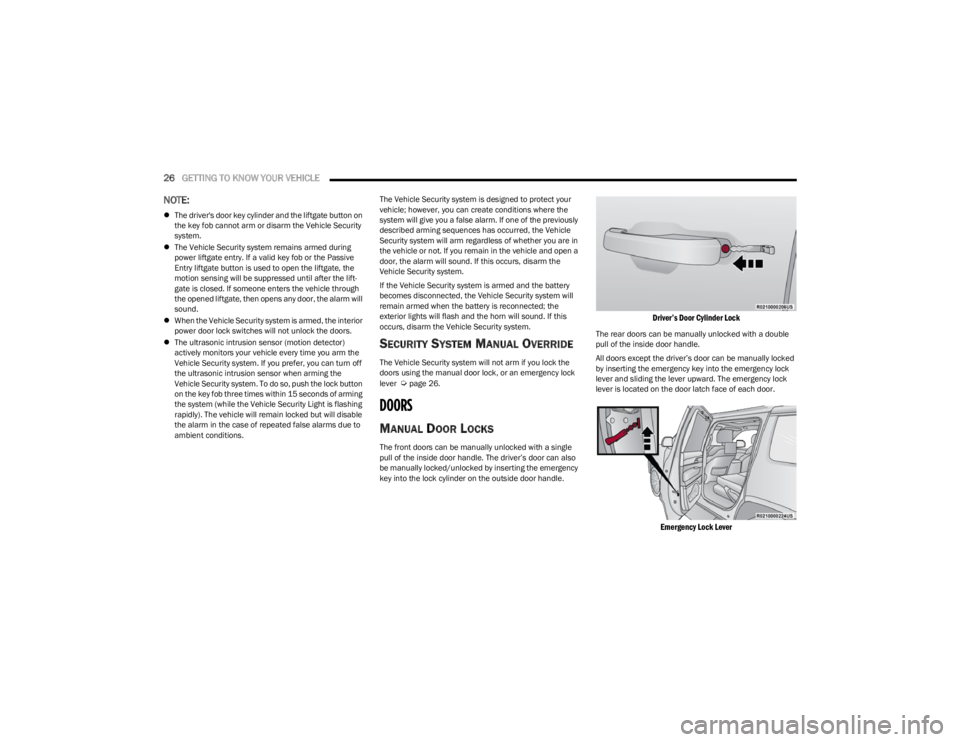
MANUAL DOOR LOCKS
The front doors can be manually unlocked with a single
pull of the inside door handle. The driver’s door can also
be manually locked/unlocked by inserting the emergency
key into the lock cylinder on the outside door handle.
Driver’s Door Cylinder Lock
The rear doors can be manually unlocked with a double
pull of the inside door handle.
All doors except the driver’s door can be manually locked
by inserting the emergency key into the emergency lock
lever and sliding the lever upward. The emergency lock
lever is located on the door latch face of each door.
Emergency Lock Lever
23_WS_OM_EN_USC_t.book Page 26
Page 29 of 396
GETTING TO KNOW YOUR VEHICLE27
NOTE:
The emergency lock lever is only accessible when the
door is open.
Manually locking the vehicle will not arm the Vehicle
Security system.
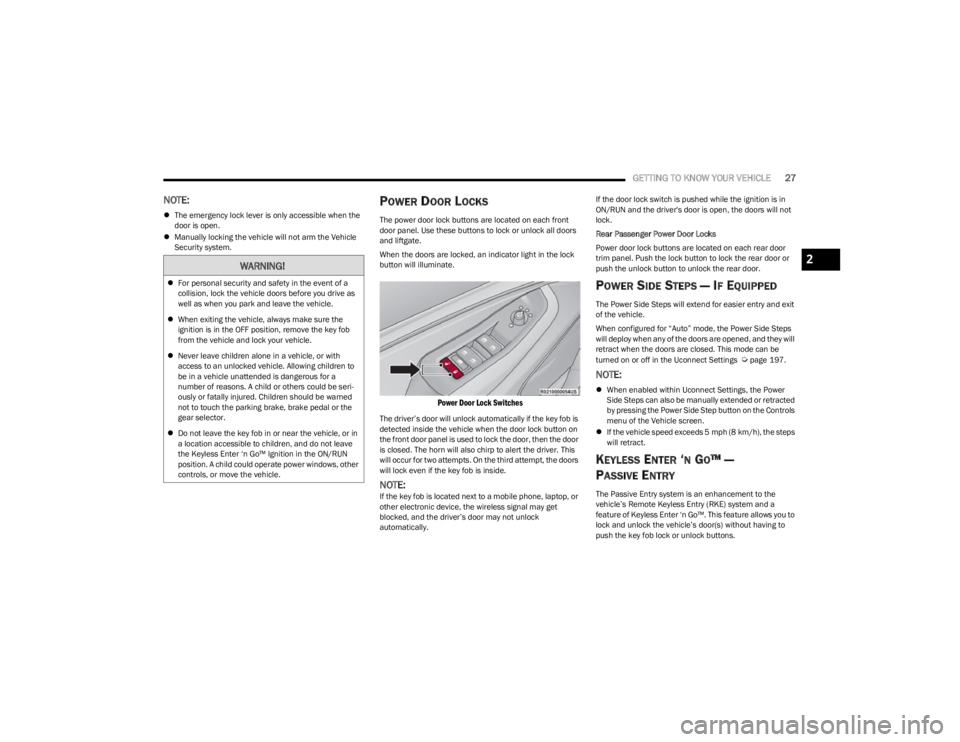
POWER DOOR LOCKS
The power door lock buttons are located on each front
door panel. Use these buttons to lock or unlock all doors
and liftgate.
When the doors are locked, an indicator light in the lock
button will illuminate.
Power Door Lock Switches
The driver’s door will unlock automatically if the key fob is
detected inside the vehicle when the door lock button on
the front door panel is used to lock the door, then the door
is closed. The horn will also chirp to alert the driver. This
will occur for two attempts. On the third attempt, the doors
will lock even if the key fob is inside.
NOTE:If the key fob is located next to a mobile phone, laptop, or
other electronic device, the wireless signal may get
blocked, and the driver’s door may not unlock
automatically. If the door lock switch is pushed while the ignition is in
ON/RUN and the driver's door is open, the doors will not
lock.
Rear Passenger Power Door Locks
Power door lock buttons are located on each rear door
trim panel. Push the lock button to lock the rear door or
push the unlock button to unlock the rear door.
POWER SIDE STEPS — IF EQUIPPED
The Power Side Steps will extend for easier entry and exit
of the vehicle.
When configured for “Auto” mode, the Power Side Steps
will deploy when any of the doors are opened, and they will
retract when the doors are closed. This mode can be
turned on or off in the Uconnect Settings
Úpage 197.
NOTE:
When enabled within Uconnect Settings, the Power
Side Steps can also be manually extended or retracted
by pressing the Power Side Step button on the Controls
menu of the Vehicle screen.
If the vehicle speed exceeds 5 mph (8 km/h), the steps
will retract.
KEYLESS ENTER ‘N GO™ —
P
ASSIVE ENTRY
The Passive Entry system is an enhancement to the
vehicle’s Remote Keyless Entry (RKE) system and a
feature of Keyless Enter ‘n Go™. This feature allows you to
lock and unlock the vehicle’s door(s) without having to
push the key fob lock or unlock buttons.
WARNING!
For personal security and safety in the event of a
collision, lock the vehicle doors before you drive as
well as when you park and leave the vehicle.
When exiting the vehicle, always make sure the
ignition is in the OFF position, remove the key fob
from the vehicle and lock your vehicle.
Never leave children alone in a vehicle, or with
access to an unlocked vehicle. Allowing children to
be in a vehicle unattended is dangerous for a
number of reasons. A child or others could be seri -
ously or fatally injured. Children should be warned
not to touch the parking brake, brake pedal or the
gear selector.
Do not leave the key fob in or near the vehicle, or in
a location accessible to children, and do not leave
the Keyless Enter ‘n Go™ Ignition in the ON/RUN
position. A child could operate power windows, other
controls, or move the vehicle.
2
23_WS_OM_EN_USC_t.book Page 27
Page 30 of 396
28GETTING TO KNOW YOUR VEHICLE
If equipped, the rear doors will also have Passive Entry
capabilities.
NOTE:
Passive Entry may be programmed on/off through
Uconnect Settings Úpage 197.
The key fob may not be detected by the vehicle Passive
Entry system if it is located next to a mobile phone,
laptop or other electronic device; these devices may
block the key fob's wireless signal and prevent the
Passive Entry handle from locking/unlocking the
vehicle.
Passive Entry Unlock initiates illuminated approach
(low beams, license plate lamp, parking lights, door
handle pocket lights [if equipped]) for whichever dura -
tion is set between 0, 30, 60 or 90 seconds. Passive
Entry Unlock also initiates two flashes of the turn
signals.
If wearing gloves, if it has been raining/snowing, or if
there is salt/dirt covering the Passive Entry door
handle, the unlock and lock sensitivity can be affected,
resulting in a slower response time.
The doors may lock and unlock when water is sprayed
on the Passive Entry door handles, if the key fob is
located outside of the vehicle within 5 ft (1.5 m) of the
handle.
Passive Entry lock initiates one horn chirp and one
flash of turn signals. These settings can be
programmed on/off within Uconnect Settings
Úpage 197.
If the vehicle is unlocked by Passive Entry and no door
is opened within 60 seconds, the vehicle will relock and
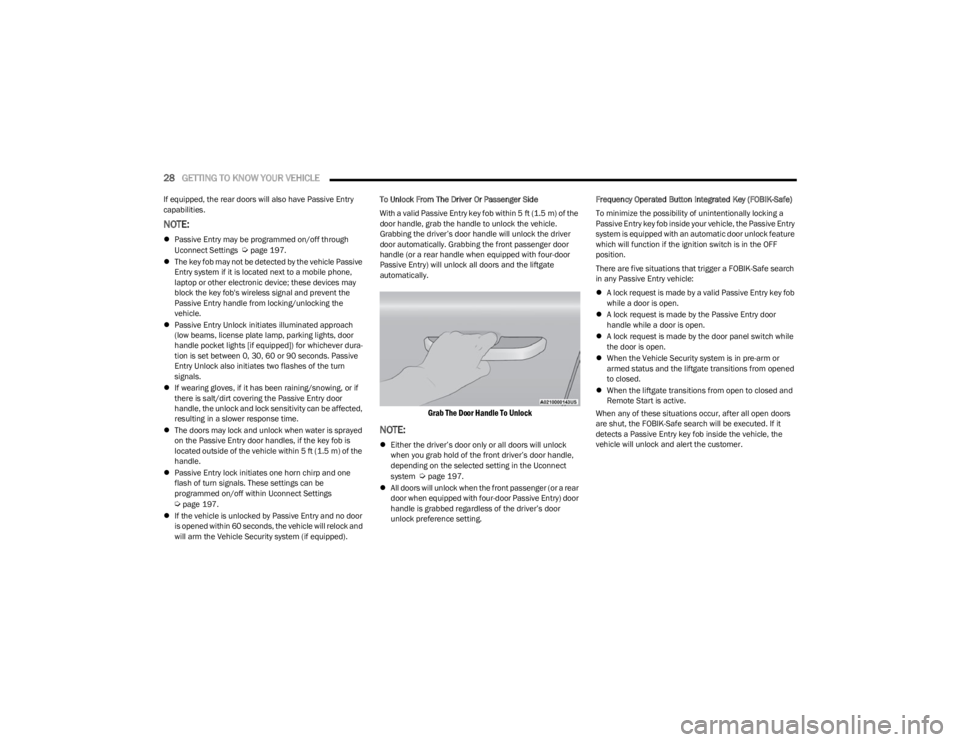
will arm the Vehicle Security system (if equipped). To Unlock From The Driver Or Passenger Side
With a valid Passive Entry key fob within 5 ft (1.5 m) of the
door handle, grab the handle to unlock the vehicle.
Grabbing the driver’s door handle will unlock the driver
door automatically. Grabbing the front passenger door
handle (or a rear handle when equipped with four-door
Passive Entry) will unlock all doors and the liftgate
automatically.
Grab The Door Handle To Unlock
NOTE:
Either the driver’s door only or all doors will unlock
when you grab hold of the front driver’s door handle,
depending on the selected setting in the Uconnect
system
Úpage 197.
All doors will unlock when the front passenger (or a rear
door when equipped with four-door Passive Entry) door
handle is grabbed regardless of the driver’s door
unlock preference setting. Frequency Operated Button Integrated Key (FOBIK-Safe)
To minimize the possibility of unintentionally locking a
Passive Entry key fob inside your vehicle, the Passive Entry
system is equipped with an automatic door unlock feature
which will function if the ignition switch is in the OFF
position.
There are five situations that trigger a FOBIK-Safe search
in any Passive Entry vehicle:
A lock request is made by a valid Passive Entry key fob
while a door is open.
A lock request is made by the Passive Entry door
handle while a door is open.
A lock request is made by the door panel switch while
the door is open.
When the Vehicle Security system is in pre-arm or
armed status and the liftgate transitions from opened
to closed.
When the liftgate transitions from open to closed and
Remote Start is active.
When any of these situations occur, after all open doors
are shut, the FOBIK-Safe search will be executed. If it
detects a Passive Entry key fob inside the vehicle, the
vehicle will unlock and alert the customer.
23_WS_OM_EN_USC_t.book Page 28
Page 37 of 396
GETTING TO KNOW YOUR VEHICLE35
Second Row Bench Seat Folded Flat
To lower the center seatback, pull the recline strap,
located on the left side of the seatback, and let the
seatback fold forward automatically.
Center Seat Recline Strap
To raise the seatback, fold the seatback up into its original
position and lock it into place.
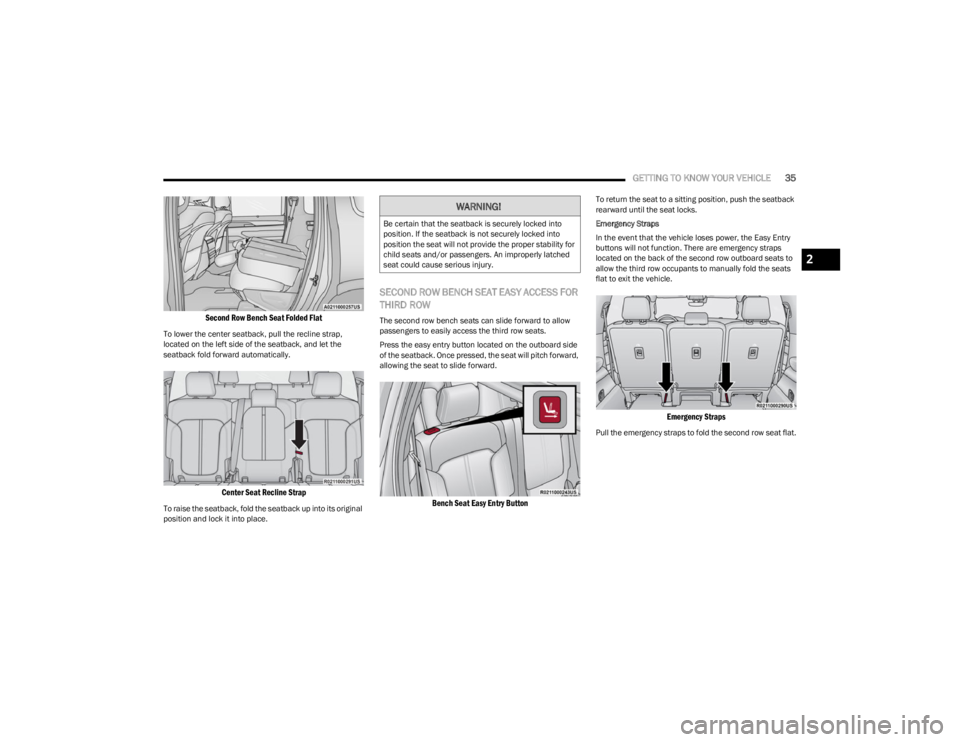
SECOND ROW BENCH SEAT EASY ACCESS FOR
THIRD ROW
The second row bench seats can slide forward to allow
passengers to easily access the third row seats.
Press the easy entry button located on the outboard side
of the seatback. Once pressed, the seat will pitch forward,
allowing the seat to slide forward.
Bench Seat Easy Entry Button
To return the seat to a sitting position, push the seatback
rearward until the seat locks.
Emergency Straps
In the event that the vehicle loses power, the Easy Entry
buttons will not function. There are emergency straps
located on the back of the second row outboard seats to
allow the third row occupants to manually fold the seats
flat to exit the vehicle.
Emergency Straps
Pull the emergency straps to fold the second row seat flat.
WARNING!
Be certain that the seatback is securely locked into
position. If the seatback is not securely locked into
position the seat will not provide the proper stability for
child seats and/or passengers. An improperly latched
seat could cause serious injury.
2
23_WS_OM_EN_USC_t.book Page 35
Page 38 of 396
36GETTING TO KNOW YOUR VEHICLE
Second Row Captain’s Chairs —
If Equipped
SECOND ROW CAPTAIN’S CHAIRS FORWARD/
REARWARD ADJUSTMENT
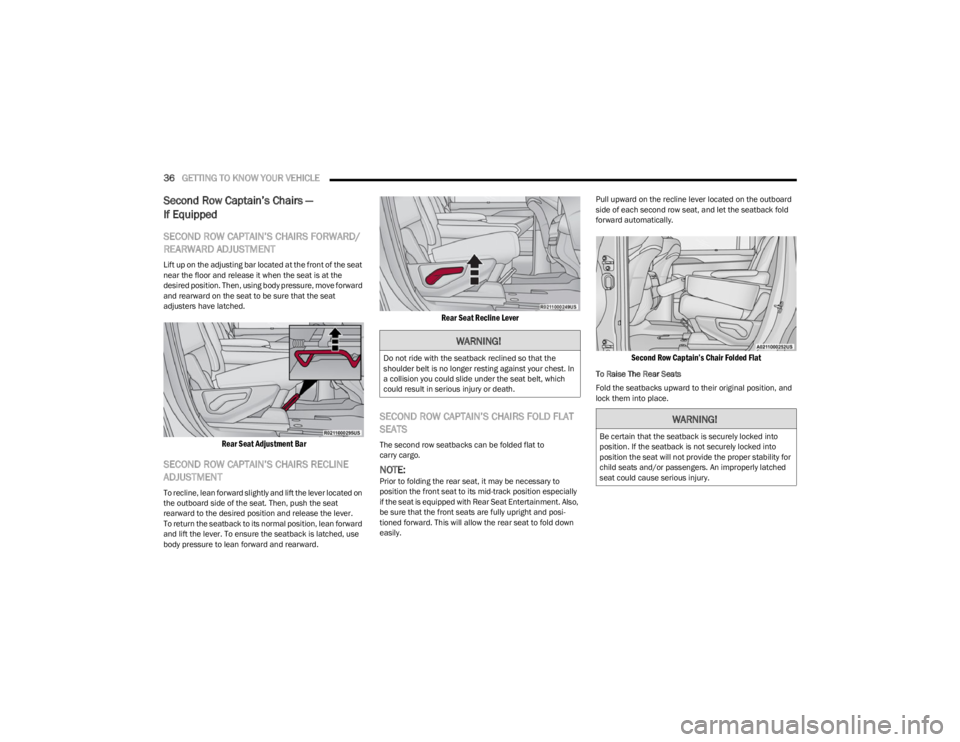
Lift up on the adjusting bar located at the front of the seat
near the floor and release it when the seat is at the
desired position. Then, using body pressure, move forward
and rearward on the seat to be sure that the seat
adjusters have latched.
Rear Seat Adjustment Bar
SECOND ROW CAPTAIN’S CHAIRS RECLINE
ADJUSTMENT
To recline, lean forward slightly and lift the lever located on
the outboard side of the seat. Then, push the seat
rearward to the desired position and release the lever.
To return the seatback to its normal position, lean forward
and lift the lever. To ensure the seatback is latched, use
body pressure to lean forward and rearward.
Rear Seat Recline Lever
SECOND ROW CAPTAIN’S CHAIRS FOLD FLAT
SEATS
The second row seatbacks can be folded flat to
carry cargo.
NOTE:Prior to folding the rear seat, it may be necessary to
position the front seat to its mid-track position especially
if the seat is equipped with Rear Seat Entertainment. Also,
be sure that the front seats are fully upright and posi -
tioned forward. This will allow the rear seat to fold down
easily. Pull upward on the recline lever located on the outboard
side of each second row seat, and let the seatback fold
forward automatically.
Second Row Captain’s Chair Folded Flat
To Raise The Rear Seats
Fold the seatbacks upward to their original position, and
lock them into place.
WARNING!
Do not ride with the seatback reclined so that the
shoulder belt is no longer resting against your chest. In
a collision you could slide under the seat belt, which
could result in serious injury or death.
WARNING!
Be certain that the seatback is securely locked into
position. If the seatback is not securely locked into
position the seat will not provide the proper stability for
child seats and/or passengers. An improperly latched
seat could cause serious injury.
23_WS_OM_EN_USC_t.book Page 36
Page 40 of 396
38GETTING TO KNOW YOUR VEHICLE
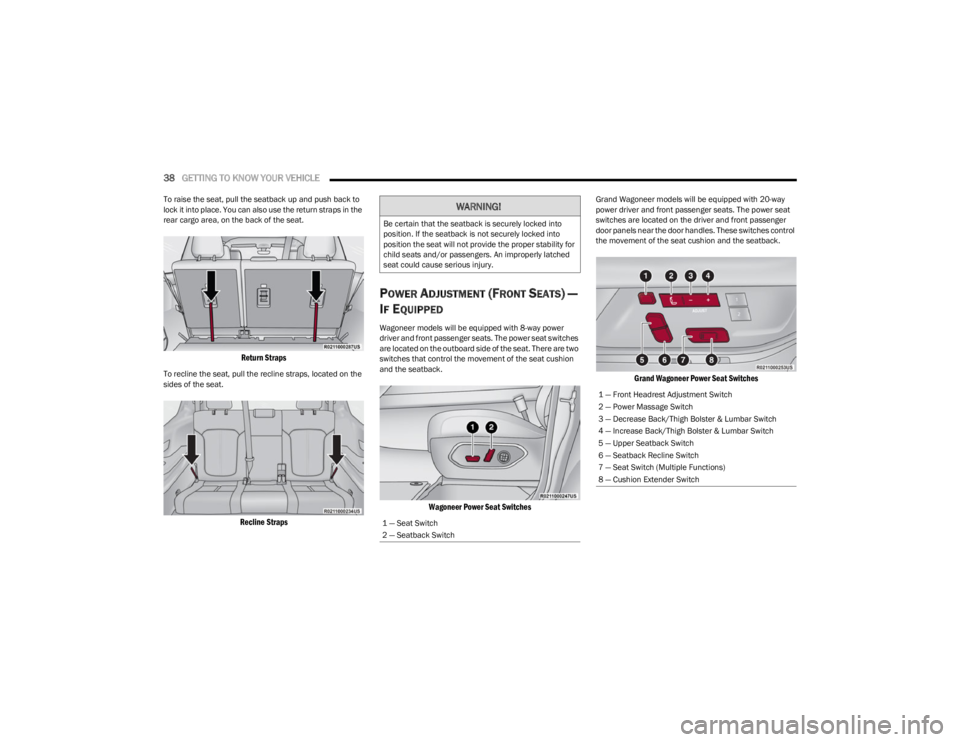
To raise the seat, pull the seatback up and push back to
lock it into place. You can also use the return straps in the
rear cargo area, on the back of the seat.
Return Straps
To recline the seat, pull the recline straps, located on the
sides of the seat.
Recline Straps
POWER ADJUSTMENT (FRONT SEATS) —
I
F EQUIPPED
Wagoneer models will be equipped with 8-way power
driver and front passenger seats. The power seat switches
are located on the outboard side of the seat. There are two
switches that control the movement of the seat cushion
and the seatback.
Wagoneer Power Seat Switches
Grand Wagoneer models will be equipped with 20-way
power driver and front passenger seats. The power seat
switches are located on the driver and front passenger
door panels near the door handles. These switches control
the movement of the seat cushion and the seatback.
Grand Wagoneer Power Seat Switches
WARNING!
Be certain that the seatback is securely locked into
position. If the seatback is not securely locked into
position the seat will not provide the proper stability for
child seats and/or passengers. An improperly latched
seat could cause serious injury.
1 — Seat Switch
2 — Seatback Switch
1 — Front Headrest Adjustment Switch
2 — Power Massage Switch
3 — Decrease Back/Thigh Bolster & Lumbar Switch
4 — Increase Back/Thigh Bolster & Lumbar Switch
5 — Upper Seatback Switch
6 — Seatback Recline Switch
7 — Seat Switch (Multiple Functions)
8 — Cushion Extender Switch
23_WS_OM_EN_USC_t.book Page 38
Page 55 of 396
GETTING TO KNOW YOUR VEHICLE53
NOTE:If the mirrors were folded manually by using the power
folding mirror switch on the driver’s door panel, they will
not automatically unfold.
HEATED MIRRORS
These mirrors are heated to melt frost or ice.
This feature will be activated whenever you
turn on the rear window defroster (if equipped)
Úpage 64.
TILT SIDE MIRRORS IN REVERSE
Tilt Side Mirrors In Reverse provides automatic outside
mirror positioning which will aid the driver’s view of the
ground rearward of the front doors. Outside mirrors will
move slightly downward from the present position when
the vehicle is shifted into REVERSE. Outside mirrors will
then return to the original position when the vehicle is
shifted out of REVERSE position. Each stored memory
setting will have an associated Tilt Side Mirrors In Reverse
position.
NOTE:The Tilt Side Mirrors In Reverse feature can be turned on
and off using the Uconnect system Úpage 197.
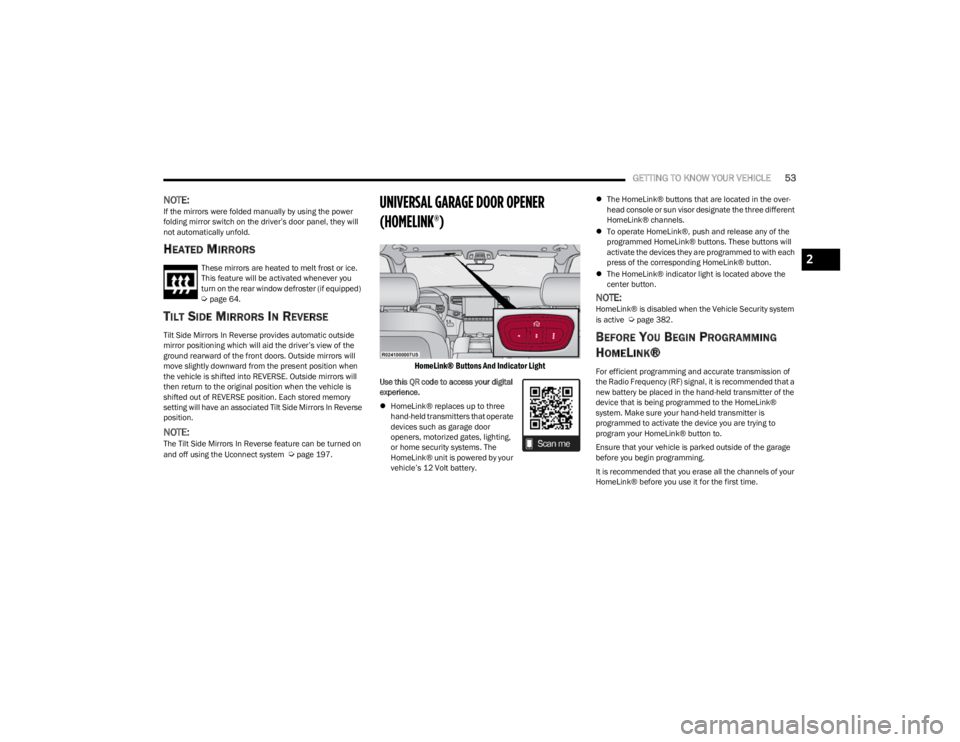
UNIVERSAL GARAGE DOOR OPENER
(HOMELINK®)
HomeLink® Buttons And Indicator Light
Use this QR code to access your digital
experience.
HomeLink® replaces up to three
hand-held transmitters that operate
devices such as garage door
openers, motorized gates, lighting,
or home security systems. The
HomeLink® unit is powered by your
vehicle’s 12 Volt battery.
The HomeLink® buttons that are located in the over -
head console or sun visor designate the three different
HomeLink® channels.
To operate HomeLink®, push and release any of the
programmed HomeLink® buttons. These buttons will
activate the devices they are programmed to with each
press of the corresponding HomeLink® button.
The HomeLink® indicator light is located above the
center button.
NOTE:HomeLink® is disabled when the Vehicle Security system
is active Úpage 382.
BEFORE YOU BEGIN PROGRAMMING
H
OMELINK®
For efficient programming and accurate transmission of
the Radio Frequency (RF) signal, it is recommended that a
new battery be placed in the hand-held transmitter of the
device that is being programmed to the HomeLink®
system. Make sure your hand-held transmitter is
programmed to activate the device you are trying to
program your HomeLink® button to.
Ensure that your vehicle is parked outside of the garage
before you begin programming.
It is recommended that you erase all the channels of your
HomeLink® before you use it for the first time.
2
23_WS_OM_EN_USC_t.book Page 53
Page 58 of 396

56GETTING TO KNOW YOUR VEHICLE
4. Watch for the HomeLink® indicator to change flash
rates. When it changes, it is programmed. It may take
up to 30 seconds or longer in rare cases. The garage
door may open and close while you are programming.
5. Push and hold the programmed HomeLink® button and observe the indicator light.
NOTE:
If the indicator light stays on constantly, program -
ming is complete and the garage door/device
should activate when the HomeLink® button is
pushed.
To program the two remaining HomeLink®
buttons, repeat each step for each remaining
button. DO NOT erase the channels.
If you unplugged the garage door opener/device for
programming, plug it back in at this time.
Reprogramming A Single HomeLink® Button
(Canadian/Gate Operator)
To reprogram a channel that has been previously trained,
follow these steps:
1. Place the ignition in the ON/RUN position.
2. Press and hold the desired HomeLink® button until the indicator light begins to flash after 20 seconds.
Do not release the button. 3. Without releasing the button, proceed with
“Canadian/Gate Operator Programming” Step 2 and
follow all remaining steps.
SECURITY
It is advised to erase all channels before you sell or turn in
your vehicle.
To do this, push and hold the two outside buttons for
20 seconds until the indicator flashes. Note that all
channels will be erased. Individual channels cannot be
erased.
The HomeLink® universal transmitter is disabled when
the Vehicle Security system is active.
TROUBLESHOOTING TIPS
If you are having trouble programming HomeLink®, here
are some of the most common solutions:
Replace the battery in the garage door opener
hand-held transmitter.
Push the LEARN button on the garage door opener to
complete the training for a rolling code.
Did you unplug the device for programming and
remember to plug it back in? If you have any problems, or require assistance, please
call toll-free 1-800-355-3515 or on the Internet at
HomeLink.com for information or assistance.
WARNING!
Vehicle exhaust contains carbon monoxide, a
dangerous gas. Do not run your vehicle in the garage
while programming the transmitter. Exhaust gas can
cause serious injury or death.
Your motorized door or gate will open and close while
you are programming the universal transmitter. Do
not program the transmitter if people, pets or other
objects are in the path of the door or gate. Only use
this transmitter with a garage door opener that has a
“stop and reverse” feature as required by Federal
safety standards. This includes most garage door
opener models manufactured after 1982. Do not use
a garage door opener without these safety features.
23_WS_OM_EN_USC_t.book Page 56
Page 61 of 396

GETTING TO KNOW YOUR VEHICLE59
PARKING LIGHTS AND PANEL LIGHTS
To turn on the parking lights and instrument panel lights,
rotate the headlight switch clockwise. To turn off the
parking lights, rotate the headlight switch back to the O
(off) position.
NOTE:Vehicles sold in Canada are equipped with a headlight
switch with an AUTO and ON detent but without an OFF
detent. Headlights will be deactivated when the headlight
switch is placed in the parking lights position. However,
the Daytime Running Lights (DRLs) will be activated along
with the front and rear marker lights. The DRLs may be
deactivated when the parking brake is engaged.
HEADLIGHTS ON AUTOMATICALLY WITH
W
IPERS
If your vehicle is equipped with Automatic Headlights, it
also has this customer-programmable feature. When your
headlights are in the automatic mode and the engine is
running, they will automatically turn on when the wiper
system is on. This feature is programmable through the
Uconnect system
Úpage 197.
NOTE:When your headlights come on during the daytime, the
vehicle will monitor outside brightness and decide if the
instrument panel needs to be dimmed or not
Úpage 60.
HEADLIGHT ILLUMINATION ON
A
PPROACH
When enabled, the headlights, exterior door handle
pocket lights (if equipped), and interior lights will
illuminate when the unlock button on the key fob is
pushed as the operator is approaching the vehicle. This
feature can be turned on/off, and the length of time the
headlights stay on can be programmed for up to
90 seconds within Uconnect Settings
Úpage 197.
Proximity Wake-Up — If Equipped
This feature is enabled/disabled within the Uconnect
system, and is activated when the operator approaches
the driver’s door, passenger’s door, or liftgate with a valid
key fob on their person. Some exterior and interior lights
will illuminate in order to provide an increased sense of
welcome and security as the operator approaches the
vehicle in the dark. “Headlight Illumination On Approach”
must be selected and set to a time value other than zero
within Uconnect Settings for Proximity Wake-Up to
activate.
The doors may be locked or unlocked for this feature to
activate, as long as the ignition is in the OFF position, or
during a Remote Start event. It will not activate if the doors
are locked and the ignition was placed in the ON/RUN
position.
NOTE:Proximity Wake-Up may not activate under the following
conditions:
After numerous consecutive activations, in order to
conserve the vehicle’s battery
After the vehicle’s engine has been off for several days Headlight Animation — If Equipped
When “Headlight Illumination On Approach” is turned on,
and set to a time value above zero, the exterior lights
illuminate in a theatrical manner during approach to the
vehicle. This feature is activated in the following
situations:
Proximity Wake-Up (if equipped) is activated
Remote Start is activated
The unlock button on the key fob is pushed
NOTE:For Headlight Animation to activate with Remote Start or
with the push of the unlock button, “Greeting Lights” must
also be selected within the Uconnect system.
HEADLIGHT DELAY
To aid in your exit, your vehicle is equipped with a
headlight delay that will leave the headlights on for
approximately 90 seconds. This delay is initiated when the
ignition is placed in the OFF position while the headlight
switch is on, and then the headlight switch is cycled off.
Headlight delay can be canceled by either turning the
headlight switch on then off, or by placing the ignition in
the ON position.
NOTE:The headlight delay time is programmable through
Uconnect Settings Úpage 197.
LIGHTS-ON REMINDER
If the headlights or parking lights are left on after the
ignition is placed in the OFF position, a chime will sound
when the driver’s door is opened.
2
23_WS_OM_EN_USC_t.book Page 59