auxiliary battery JEEP WAGONEER 2023 Owners Manual
[x] Cancel search | Manufacturer: JEEP, Model Year: 2023, Model line: WAGONEER, Model: JEEP WAGONEER 2023Pages: 396, PDF Size: 15.17 MB
Page 8 of 396

6
SAFETY
SAFETY FEATURES........................................................... 239
Anti-Lock Brake System (ABS) ................................. 239Rear Seat Reminder Alert (RSRA) ............................ 240
Drowsy Driver Detection (DDD) — If Equipped ........ 240
Electronic Brake Control (EBC) System .................. 241
AUXILIARY DRIVING SYSTEMS ...................................... 247 Blind Spot Monitoring (BSM) .................................... 247
Forward Collision Warning (FCW)
With Mitigation .......................................................... 250
Tire Pressure Monitoring System (TPMS) ................ 252
OCCUPANT RESTRAINT SYSTEMS ................................ 256 Occupant Restraint Systems Features ................... 256Important Safety Precautions .................................. 256Seat Belt Systems .................................................... 257
Supplemental Restraint Systems (SRS) .................. 264Child Restraints ........................................................ 275
SAFETY TIPS ..................................................................... 287 Transporting Passengers .......................................... 287
Transporting Pets ...................................................... 287Connected Vehicles .................................................. 287
Safety Checks You Should Make Inside
The Vehicle ............................................................... 287
Periodic Safety Checks You Should Make
Outside The Vehicle .................................................. 289
Exhaust Gas .............................................................. 289Carbon Monoxide Warnings ..................................... 289
IN CASE OF EMERGENCY
HAZARD WARNING FLASHERS ..................................... 290
ASSIST AND SOS SYSTEM— IF EQUIPPED ................... 290
JACKING AND TIRE CHANGING...................................... 293 Preparations For Jacking ......................................... 293
Jack And Tools Location ........................................... 294Spare Tire Stowage................................................... 295
Spare Tire Removal .................................................. 295Jacking Instructions ................................................. 296
JUMP STARTING ............................................................. 300 Preparations For Jump Start .................................... 300Jump Starting Procedure.......................................... 301
REFUELING IN EMERGENCY........................................... 302
IF YOUR ENGINE OVERHEATS ........................................ 303
MANUAL PARK RELEASE .............................................. 303
FREEING A STUCK VEHICLE .......................................... 305
TOWING A DISABLED VEHICLE ..................................... 306 Rear-Wheel Drive Models......................................... 307
Four-Wheel Drive Models ......................................... 307
Emergency Tow Hooks — If Equipped ..................... 308
ENHANCED ACCIDENT RESPONSE SYSTEM
(EARS) .............................................................................. 308
EVENT DATA RECORDER (EDR) ..................................... 308
SERVICING AND MAINTENANCE
SCHEDULED SERVICING .................................................. 309 Maintenance Plan ..................................................... 310
ENGINE COMPARTMENT ................................................. 313 3.0L Engine................................................................ 313
5.7L Engine................................................................ 314
6.4L Engine................................................................ 315
Checking Oil Level — 3.0L Engines .......................... 316
Checking Oil Level — 5.7L & 6.4L Engines .............. 317
Adding Washer Fluid ................................................ 317
Maintenance-Free Battery ....................................... 318Pressure Washing ..................................................... 318
VEHICLE MAINTENANCE .................................................. 318 Engine Oil .................................................................. 319
Engine Oil Filter ....................................................... 319
Engine Air Cleaner Filter ........................................ 319Air Conditioner Maintenance ................................. 320
Accessory Drive Belt Inspection ............................... 323Body Lubrication ....................................................... 323
Windshield Wiper Blades ......................................... 324
Exhaust System ........................................................ 325
Cooling System .......................................................... 326
Brake System ........................................................... 328
Automatic Transmission ........................................... 329
Front/Rear Axle Fluid ............................................... 330Transfer Case ............................................................ 330Fuses .......................................................................... 331Bulb Replacement .................................................... 349
23_WS_OM_EN_USC_t.book Page 6
Page 80 of 396
78GETTING TO KNOW YOUR VEHICLE
Once a device is connected to the USB port, it will begin
charging and is ready for use with the system. Type C and
Type A charge-only USB ports can be used at the same
time but cannot be used simultaneously while playing
media. When both Type C and Type A charge-only USB
ports are in use they will be charged at a reduced rate.
If equipped, your vehicle may have additional charge-only
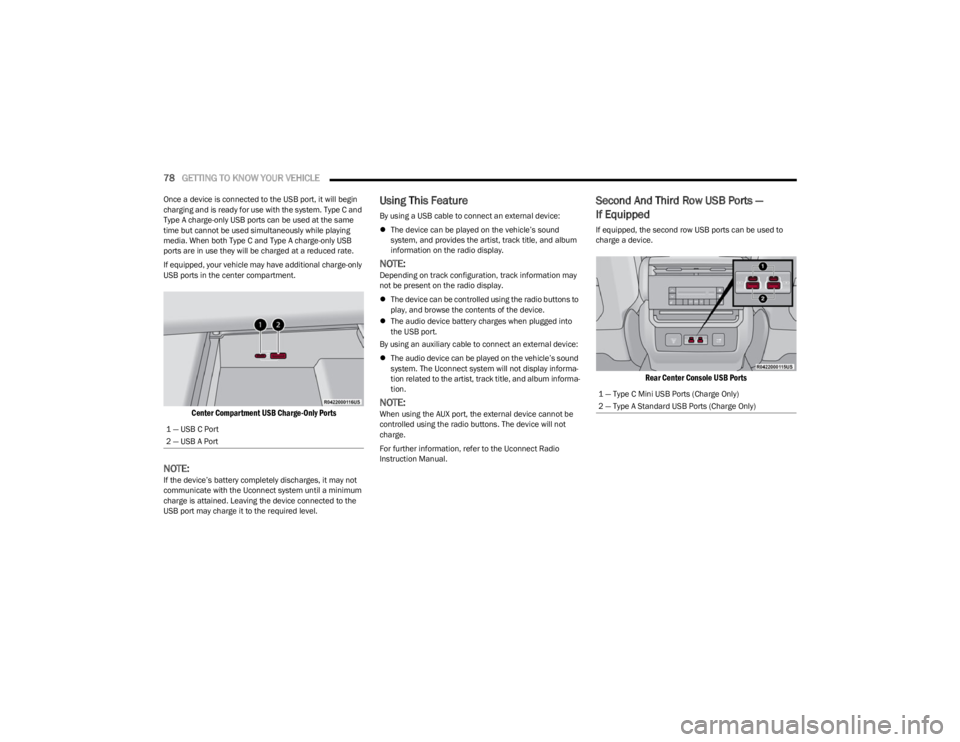
USB ports in the center compartment.
Center Compartment USB Charge-Only Ports
NOTE:If the device’s battery completely discharges, it may not
communicate with the Uconnect system until a minimum
charge is attained. Leaving the device connected to the
USB port may charge it to the required level.
Using This Feature
By using a USB cable to connect an external device:
The device can be played on the vehicle’s sound
system, and provides the artist, track title, and album
information on the radio display.
NOTE:Depending on track configuration, track information may
not be present on the radio display.
The device can be controlled using the radio buttons to
play, and browse the contents of the device.
The audio device battery charges when plugged into
the USB port.
By using an auxiliary cable to connect an external device:
The audio device can be played on the vehicle’s sound
system. The Uconnect system will not display informa -
tion related to the artist, track title, and album informa -
tion.
NOTE:When using the AUX port, the external device cannot be
controlled using the radio buttons. The device will not
charge.
For further information, refer to the Uconnect Radio
Instruction Manual.
Second And Third Row USB Ports —
If Equipped
If equipped, the second row USB ports can be used to
charge a device.
Rear Center Console USB Ports
1 — USB C Port
2 — USB A Port
1 — Type C Mini USB Ports (Charge Only)
2 — Type A Standard USB Ports (Charge Only)
23_WS_OM_EN_USC_t.book Page 78