high JEEP WAGONEER 2023 Owners Manual
[x] Cancel search | Manufacturer: JEEP, Model Year: 2023, Model line: WAGONEER, Model: JEEP WAGONEER 2023Pages: 396, PDF Size: 15.17 MB
Page 2 of 396

WARNING: Operating, servicing and maintaining a passenger vehicle or off-highway
motor vehicle can expose you to chemicals including engine exhaust, carbon monoxide,
phthalates, and lead, which are known to the State of California to cause cancer and
birth defects or other reproductive harm. To minimize exposure, avoid breathing exhaust,
do not idle the engine except as necessary, service your vehicle in a well-ventilated area and wear
gloves or wash your hands frequently when servicing your vehicle. For more information go to
www.P65Warnings.ca.gov/passenger-vehicle.
This Owner ’s Manual illustrates and describes the operation of features and equipment that are either standard or optional on this vehicle. This manual may also
include a description of features and equipment that are no longer available or were not ordered on this vehicle. Please disregard any features and equipment
described in this manual that are not on this vehicle. FCA US LLC reserves the right to make changes in design and specifications, and/or make additions to or
improvements to its products without imposing any obligation upon itself to install them on products previously manufactured.
With respect to any vehicles sold in Canada, the name FCA US LLC shall be deemed to be deleted and the name FCA Canada Inc. used in substitution therefore.
This Owner ’s Manual is intended to familiarize you with the important features of your vehicle. Your most up-to-date Owner ’s Manual, Radio Instruction Manual and
Warranty Booklet can be found by visiting the website on the back cover. The driver ’s primary responsibility is the safe operation of the vehicle. Driving while distracted can result in loss of vehicle control, resulting in an accident and
personal injury. FCA US LLC strongly recommends that the driver use extreme caution when using any device or feature that may take their attention off the road.
Use of any electrical devices, such as cellular telephones, computers, portable radios, vehicle navigation or other devices by the driver while the vehicle is moving
is dangerous and could lead to a serious accident. Texting while driving is also dangerous and should never be done while the vehicle is moving. If you find yourself
unable to devote your full attention to vehicle operation, pull off the road to a safe location and stop your vehicle. Some states or provinces prohibit the use of
cellular telephones or texting while driving. It is always the driver ’s responsibility to comply with all local laws.
This Owner ’s Manual has been prepared to help you get acquainted with your new Wagoneer vehicle and to provide a convenient reference source for common
questions.
Not all features shown in this manual may apply to your vehicle. For additional information, visit
mopar.com/om (USA), owners.mopar.ca (Canada) or your local
Chrysler, Dodge, Jeep®, or Ram dealer.
U.S. Residents: If you are the first registered retail owner of your vehicle, you may obtain a complimentary printed copy of the Warranty Booklet by
calling 1-833-667-4825 or by contacting your dealer. Replacement kits can be purchased by visiting www.techauthority.com.
Canadian Residents: If you are the first registered retail owner of your vehicle, you may obtain a complimentary printed copy of the Warranty Booklet or purchase
a replacement kit by calling 1-800-387-1143 or by contacting your dealer.
DRIVING AND ALCOHOL
Drunk driving is one of the most frequent causes of accidents. Your driving ability can be seriously impaired with blood alcohol levels far below the legal
minimum. If you are drinking, don’t drive. Ride with a designated non-drinking driver, call a cab, a rideshare, a friend or use public transportation.
WARNING
Driving after drinking can lead to an accident. Your perceptions are less sharp, your reflexes are slower and your judgment is impaired when you have been
drinking. Never drink and then drive.
FCA US LLC reserves the right to modify the terms or discontinue the Roadside Assistance Program at any time. The Roadside Assistance Program is subject to restrictions and conditions of use, that are
determined solely by FCA US LLC.
ROADSIDE ASSISTANCE
24 HOURS, 7 DAYS A WEEK AT YOUR SERVICE. CALL 1-833-667-4825 (USA)
CALL 1-800-363-4869 (CANADA)
SERVICES: Flat Tire Service, Out Of Gas/Fuel Delivery, Battery Jump Assistance, Lockout Service and Towing Service
Please see the Customer Assistance chapter in this Owner ’s Manual for further information.
Page 5 of 396

3
EXTERIOR LIGHTS ..............................................................57Headlight Switch ........................................................ 57
Multifunction Lever ..................................................... 58
Daytime Running Lights (DRLs) ................................. 58
High/Low Beam Switch .............................................. 58
Automatic High Beams — If Equipped ....................... 58
Flash-To-Pass ............................................................ 58
Automatic Headlights ................................................ 58
Parking Lights And Panel Lights................................. 59
Headlights On Automatically With Wipers ................. 59
Headlight Illumination On Approach .......................... 59
Headlight Delay ........................................................... 59
Lights-On Reminder .................................................... 59
Fog Lights .................................................................... 60
Turn Signals................................................................. 60
Lane Change Assist — If Equipped............................. 60
Battery Saver ............................................................... 60
INTERIOR LIGHTS ...............................................................60 Courtesy Lights............................................................ 60
Illuminated Entry — If Equipped ................................. 62
WINDSHIELD WIPERS AND WASHERS ........................... 62 Windshield Wiper Operation....................................... 62
Rain Sensing Wipers — If Equipped .......................... 63
Rear Wiper And Washer ............................................ 64
Windshield Wiper De-Icer — If Equipped ................... 64
CLIMATE CONTROLS ..........................................................64 Automatic Climate Control Descriptions And
Functions ..................................................................... 64
Automatic Temperature Control (ATC) ....................... 71
Climate Voice Recognition.......................................... 71
Operating Tips ............................................................ 71 INTERIOR STORAGE AND EQUIPMENT ............................ 73
Storage ......................................................................... 73
Center Console Cooler —
If Equipped ................................................................... 75
Center Console Safe — If Equipped ............................ 75
Sun Screens — If Equipped ......................................... 76
USB/AUX Control ......................................................... 76
Electrical Power Outlets ..............................................79
Power Inverter ............................................................. 80
Wireless Charging Pad — If Equipped......................... 81
WINDOWS .......................................................................... 82 Power Window Controls............................................... 82
Wind Buffeting ............................................................ 83
Radio Signal Devices On Windshield —
If Equipped ................................................................... 83
POWER SUNROOF — IF EQUIPPED................................... 83 Tri-Pane Power Sunroof............................................... 83
HOOD.................................................................................... 85 Opening The Hood .......................................................85
Closing The Hood ......................................................... 86
LIFTGATE .............................................................................. 86 To Unlock/Open The Liftgate ......................................86
To Lock/Close The Liftgate ......................................... 86
Adjustable Power Liftgate Height ............................... 87
Hands-Free Liftgate .................................................... 87
Cargo Area Features ................................................... 89
ROOF LUGGAGE RACK — IF EQUIPPED ........................... 91 Installing The Crossbars ..............................................91
Removing The Crossbars ............................................ 95GETTING TO KNOW YOUR
INSTRUMENT PANEL
BASE INSTRUMENT CLUSTER .......................................... 96 Instrument Cluster Descriptions ................................ 97
PREMIUM INSTRUMENT CLUSTER .................................. 98 Instrument Cluster Descriptions ................................ 99
INSTRUMENT CLUSTER DISPLAY ..................................... 99 Location And Controls ................................................. 99
Engine Oil Life Reset ................................................ 101
Display And Messages .............................................. 102Instrument Cluster Display Menu Items ................. 104Head Up Display (HUD) — If Equipped ..................... 106
Battery Saver On/Battery Saver Mode
Message — Electrical Load Reduction
Actions (If Equipped) ................................................ 107
WARNING LIGHTS AND MESSAGES ..............................108 Red Warning Lights ................................................... 109
Yellow Warning Lights ............................................... 111Yellow Indicator Lights .............................................. 114Green Indicator Lights............................................... 115White Indicator Lights ............................................... 116Blue Indicator Lights ................................................. 117
Gray Indicator Lights ................................................. 117
ONBOARD DIAGNOSTIC SYSTEM — OBD II ................... 117 Onboard Diagnostic System
(OBD II) Cybersecurity ............................................... 118
EMISSIONS INSPECTION AND MAINTENANCE
PROGRAMS ......................................................................118
23_WS_OM_EN_USC_t.book Page 3
Page 9 of 396

7
TIRES ................................................................................. 349Tire Safety Information ............................................. 349
Tires — General Information ..................................... 357
Tire Types................................................................... 360
Spare Tires — If Equipped......................................... 361Wheel And Wheel Trim Care ..................................... 362
Snow Traction Devices ............................................. 364
Tire Rotation Recommendations ............................ 366
DEPARTMENT OF TRANSPORTATION UNIFORM
TIRE QUALITY GRADES ................................................... 366 Treadwear .................................................................. 367
Traction Grades ......................................................... 367
Temperature Grades................................................. 367
STORING THE VEHICLE.................................................... 368
BODYWORK ...................................................................... 368 Protection From Atmospheric Agents ...................... 368
Body And Underbody Maintenance ......................... 368Preserving The Bodywork ......................................... 368
INTERIORS ....................................................................... 369 Seats And Fabric Parts ............................................. 369
Plastic And Coated Parts .......................................... 369
Leather Surfaces....................................................... 370Glass Surfaces ......................................................... 370TECHNICAL SPECIFICATIONS
VEHICLE IDENTIFICATION NUMBER (VIN)..................... 371
BRAKE SYSTEM ............................................................... 371
WHEEL AND TIRE TORQUE SPECIFICATIONS .............. 371 Torque Specifications ............................................... 371
FUEL REQUIREMENTS ..................................................... 372 3.0L Standard Output Engine .................................. 372
3.0L High Output Engine .......................................... 3725.7L Engine ............................................................... 3726.4L Engine ............................................................... 373Reformulated Gasoline ............................................ 373
Materials Added To Fuel .......................................... 373Gasoline/Oxygenate Blends .................................... 373Do Not Use E-85 In Non-Flex Fuel Vehicles ............ 374
CNG And LP Fuel System Modifications.................. 374
Methylcyclopentadienyl Manganese
Tricarbonyl (MMT) In Gasoline ................................. 374
Fuel System Cautions ............................................... 374
FLUID CAPACITIES ........................................................... 375
ENGINE FLUIDS AND LUBRICANTS ............................... 376
CHASSIS FLUIDS AND LUBRICANTS ............................. 377
CUSTOMER ASSISTANCE
SUGGESTIONS FOR OBTAINING SERVICE FOR YOUR
VEHICLE ............................................................................378 Prepare For The Appointment .................................. 378
Prepare A List ............................................................ 378Be Reasonable With Requests ................................. 378
IF YOU NEED ASSISTANCE .............................................378 Roadside Assistance ................................................. 378
FCA US LLC Customer Center ................................... 379
Wagoneer Client Services Canada ........................... 379
Mexico ........................................................................ 380
Puerto Rico And US Virgin Islands............................ 380
Customer Assistance For The Hearing Or Speech
Impaired (TDD/TTY)................................................... 380
Service Contract ....................................................... 380
WARRANTY INFORMATION.............................................380
MOPAR® PARTS ..............................................................381
REPORTING SAFETY DEFECTS ......................................381 In The 50 United States And Washington, D.C........ 381
In Canada................................................................... 381
PUBLICATION ORDER FORMS .......................................381
CHANGE OF OWNERSHIP OR ADDRESS.......................382
GENERAL INFORMATION................................................. 382
23_WS_OM_EN_USC_t.book Page 7
Page 10 of 396

8
INTRODUCTION
Dear Customer,
Congratulations on the purchase of your new Wagoneer/Grand Wagoneer. Be assured that it represents precision workmanship, distinctive styling, and high quality.
The Wagoneer/Grand Wagoneer is a specialized utility vehicle. It can go places and perform tasks that are not intended for conventional passenger vehicles. It handles and maneuvers
differently from many passenger vehicles both on-road and off-road, so take time to become familiar with your vehicle. If equipped, the two-wheel drive version of this vehicle was
designed for on-road use only. It is not intended for off-road driving on rugged terrain or use in other severe conditions suited for a four-wheel drive vehicle. Before you drive this vehicle,
read the Owner’s Manual. Be sure you are familiar with all vehicle controls, particularly those used for braking, steering, transmission, and transfer case shifting. Learn how your vehicle
handles on different road surfaces. Driving skills improve with experience. When driving off-road, or working the vehicle, don’t overload the vehicle or expect the vehicle to overcome
the natural laws of physics. Always observe federal, state, provincial and local laws wherever you drive. As with other vehicles of this type, failure to operate this vehicle correctly may
result in loss of control or a collision
Úpage 193.
This Owner's Manual has been prepared with the assistance of service and engineering specialists to acquaint you with the operation and maintenance of your vehicle. It is
supplemented by customer-oriented documents. Within this information, you will find a description of the services that FCA US LLC offers to its customers as well as the details of the
terms and conditions for maintaining its validity. Please take the time to read all of these publications carefully before driving your vehicle for the first time. Following the instructions,
recommendations, tips, and important warnings in this manual will help ensure safe and enjoyable operation of your vehicle.
This Owner's Manual describes all versions of this vehicle. Options and equipment dedicated to specific markets or versions are not expressly indicated in the text. Therefore, you should
only consider the information that is related to the trim level, engine, and version that you have purchased. Any content introduced throughout the Owner's Information, which may or
may not be applicable to your vehicle, will be identified with the wording “If Equipped”. All data contained in this publication are intended to help you use your vehicle in the best possible
way. FCA US LLC aims at a constant improvement of the vehicles produced. For this reason, it reserves the right to make changes to the model described for technical and/or commercial
reasons. For further information, contact an authorized dealer.
When it comes to service, remember that authorized dealers know your vehicle best, have factory-trained technicians, genuine Mopar® parts, and care about your satisfaction.
23_WS_OM_EN_USC_t.book Page 8
Page 12 of 396
10
SYMBOLS KEY
If you do not read the entire Owner’s Manual, you may miss important information.
Observe all Cautions and Warnings.
ROLLOVER WARNING
Utility vehicles have a significantly higher rollover rate than other types of vehicles. This
vehicle has a higher ground clearance and a higher center of gravity than many passenger
vehicles. It is capable of performing better in a wide variety of off-road applications. Driven
in an unsafe manner, all vehicles can go out of control. Because of the higher center of
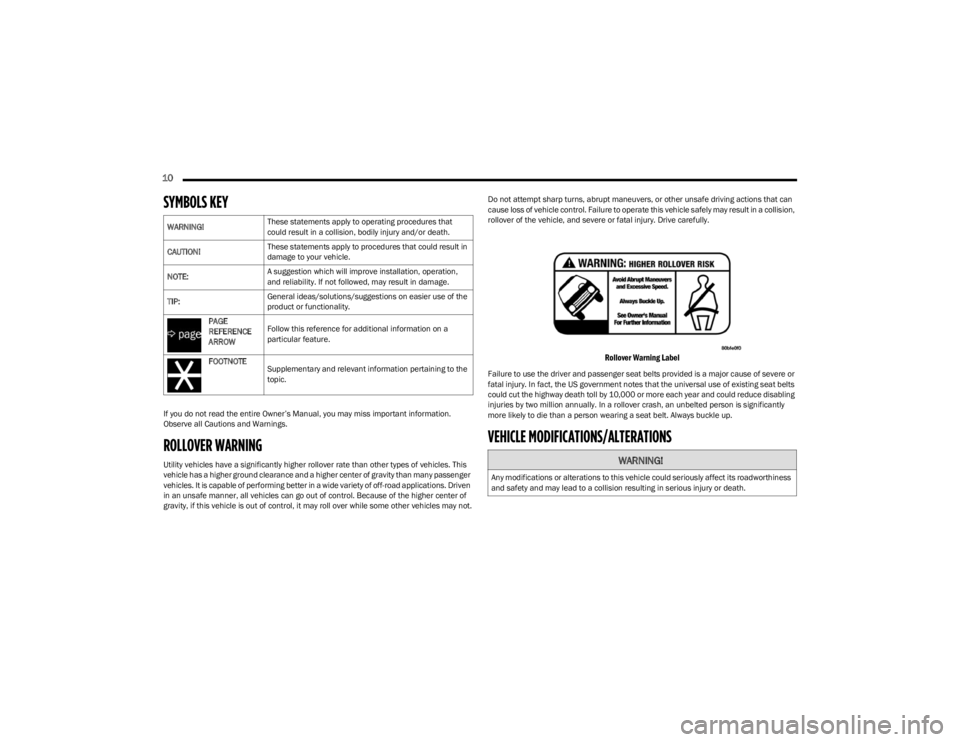
gravity, if this vehicle is out of control, it may roll over while some other vehicles may not.Do not attempt sharp turns, abrupt maneuvers, or other unsafe driving actions that can
cause loss of vehicle control. Failure to operate this vehicle safely may result in a collision,
rollover of the vehicle, and severe or fatal injury. Drive carefully.
Rollover Warning Label
Failure to use the driver and passenger seat belts provided is a major cause of severe or
fatal injury. In fact, the US government notes that the universal use of existing seat belts
could cut the highway death toll by 10,000 or more each year and could reduce disabling
injuries by two million annually. In a rollover crash, an unbelted person is significantly
more likely to die than a person wearing a seat belt. Always buckle up.
VEHICLE MODIFICATIONS/ALTERATIONS
WARNING!
These statements apply to operating procedures that
could result in a collision, bodily injury and/or death.
CAUTION! These statements apply to procedures that could result in
damage to your vehicle.
NOTE: A suggestion which will improve installation, operation,
and reliability. If not followed, may result in damage.
TIP: General ideas/solutions/suggestions on easier use of the
product or functionality.
PAGE
REFERENCE
ARROW Follow this reference for additional information on a
particular feature.
FOOTNOTE Supplementary and relevant information pertaining to the
topic.
WARNING!
Any modifications or alterations to this vehicle could seriously affect its roadworthiness
and safety and may lead to a collision resulting in serious injury or death.
23_WS_OM_EN_USC_t.book Page 10
Page 17 of 396
15
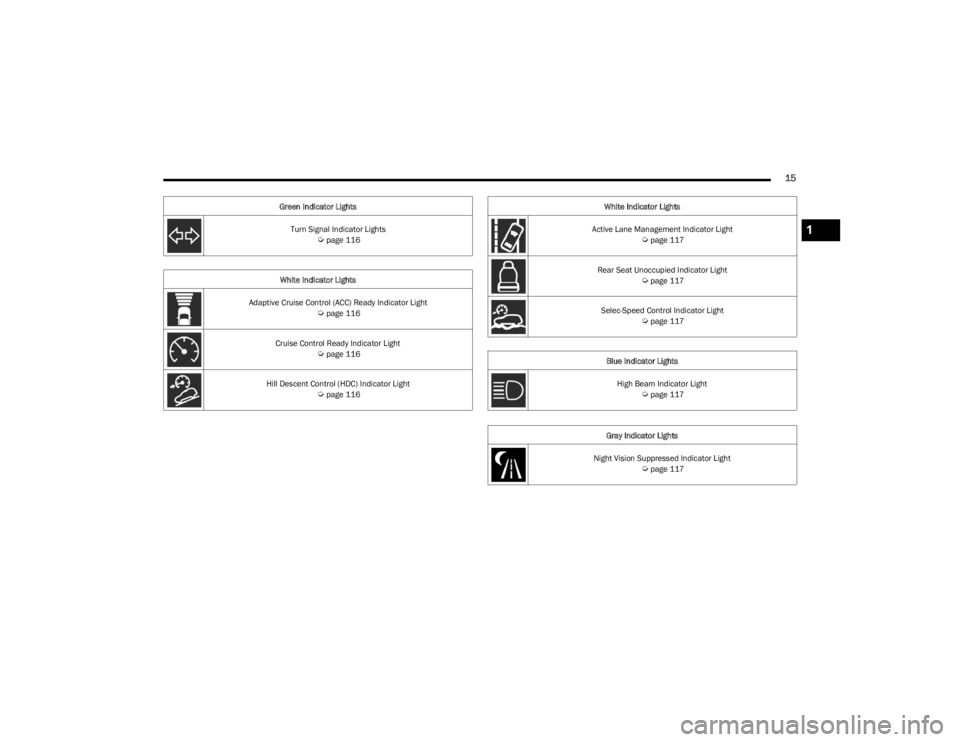
Turn Signal Indicator Lights Úpage 116
White Indicator Lights
Adaptive Cruise Control (ACC) Ready Indicator Light
Úpage 116
Cruise Control Ready Indicator Light
Úpage 116
Hill Descent Control (HDC) Indicator Light
Úpage 116
Green Indicator Lights
Active Lane Management Indicator Light
Úpage 117
Rear Seat Unoccupied Indicator Light
Úpage 117
Selec-Speed Control Indicator Light
Úpage 117
Blue Indicator Lights High Beam Indicator Light
Úpage 117
Gray Indicator Lights
Night Vision Suppressed Indicator Light
Úpage 117
White Indicator Lights
1
23_WS_OM_EN_USC_t.book Page 15
Page 35 of 396

GETTING TO KNOW YOUR VEHICLE33
LINKING AND UNLINKING THE KEY FOB
T
O MEMORY
Your key fobs can be programmed to recall one of two
saved driver’s side memory profiles.
NOTE:Before programming your key fobs you must select the
“Personal Settings Linked To Key Fob” feature through the
Uconnect Settings
Úpage 197.
To program your key fobs, perform the following:
Wagoneer
1. Place the vehicle’s ignition in the OFF position.
2. Select a desired driver’s side memory profile, 1 or 2.
3. Once the profile has been recalled, push and release the set (S) button on the memory switch.
4. Within five seconds, push and release button (1) or (2) accordingly. “Memory Profile Set” (1 or 2) will
display in the instrument cluster.
5. Push and release the lock button on the key fob within 10 seconds.
NOTE:Your key fobs can be unlinked from your driver’s side
memory settings by pushing the set (S) button, and within
10 seconds, pushing the unlock button on the key fob.
Grand Wagoneer
1. Place the vehicle’s ignition in the OFF position.
2. Recall the desired memory profile (1 or 2). 3. Press the memory button (1) or (2) (according to the
previous selection) for two seconds or more, and
release.
4. Push and hold the lock button on the key fob within 10 seconds.
NOTE:Your key fobs can be unlinked from your driver’s side
memory settings by pushing the memory button (1) or (2)
for two seconds or more and releasing, and then within 10
seconds, pushing and holding the unlock button on the
key fob.
MEMORY POSITION RECALL
NOTE:Memory Recall is available when not in PARK, if the
vehicle speed is below 5 mph (8 km/h).
To recall a memory settings using the memory
switches, push memory button (1) or (2) on the
memory switch.
To recall the driver’s side memory settings using the
key fob, push the unlock button on the key fob linked
to memory position 1 or 2.
A recall can be canceled by pushing any of the memory
buttons during a recall, or by pushing any of the seat
adjustment switches. When a recall is canceled, the seat
and power tilt/telescopic steering column will stop
moving. A delay of one second will occur before another
recall can be selected.
SEATS
Seats are a part of the Occupant Restraint system of the
vehicle.
MANUAL ADJUSTMENT (REAR SEATS)
NOTE:You may experience deformation in the seat cushion from
the seat belt buckles if the seats are left folded for an
extended period of time. This is normal and by simply
unfolding the seats to the open position, over time the
seat cushion will return to its normal shape.
WARNING!
It is dangerous to ride in a cargo area, inside or
outside of a vehicle. In a collision, people riding in
these areas are more likely to be seriously injured or
killed.
Do not allow people to ride in any area of your vehicle
that is not equipped with seats and seat belts. In a
collision, people riding in these areas are more likely
to be seriously injured or killed.
Be sure everyone in your vehicle is in a seat and
using a seat belt properly.
WARNING!
Do not pile luggage or cargo higher than the top of the
seatback. This could impair visibility or become a
dangerous projectile in a sudden stop or collision.
2
23_WS_OM_EN_USC_t.book Page 33
Page 40 of 396
38GETTING TO KNOW YOUR VEHICLE
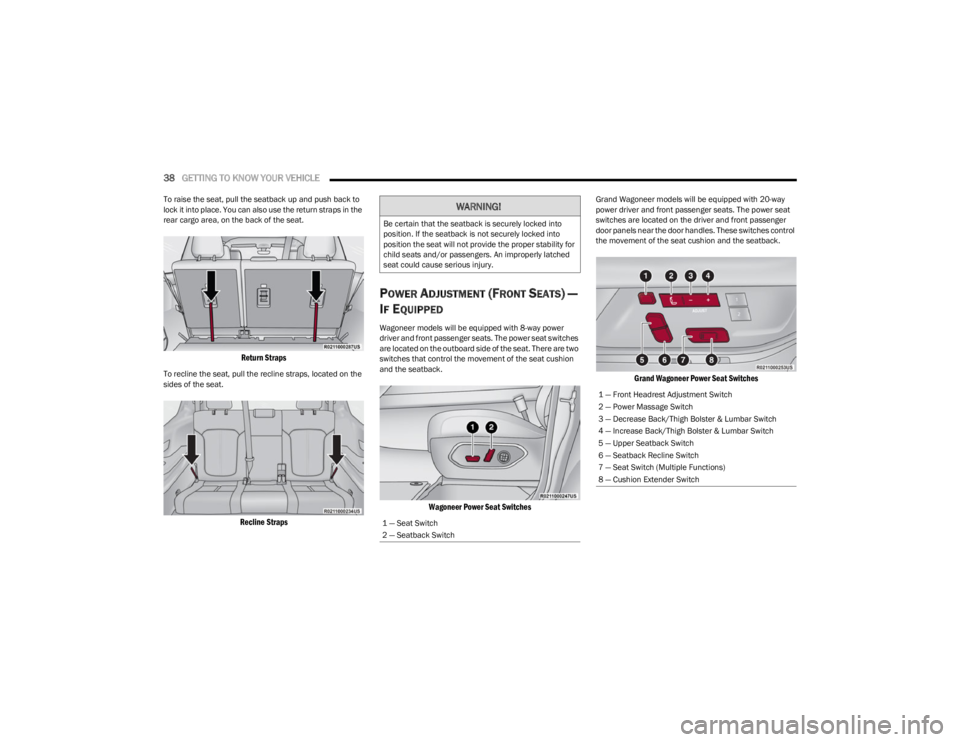
To raise the seat, pull the seatback up and push back to
lock it into place. You can also use the return straps in the
rear cargo area, on the back of the seat.
Return Straps
To recline the seat, pull the recline straps, located on the
sides of the seat.
Recline Straps
POWER ADJUSTMENT (FRONT SEATS) —
I
F EQUIPPED
Wagoneer models will be equipped with 8-way power
driver and front passenger seats. The power seat switches
are located on the outboard side of the seat. There are two
switches that control the movement of the seat cushion
and the seatback.
Wagoneer Power Seat Switches
Grand Wagoneer models will be equipped with 20-way
power driver and front passenger seats. The power seat
switches are located on the driver and front passenger
door panels near the door handles. These switches control
the movement of the seat cushion and the seatback.
Grand Wagoneer Power Seat Switches
WARNING!
Be certain that the seatback is securely locked into
position. If the seatback is not securely locked into
position the seat will not provide the proper stability for
child seats and/or passengers. An improperly latched
seat could cause serious injury.
1 — Seat Switch
2 — Seatback Switch
1 — Front Headrest Adjustment Switch
2 — Power Massage Switch
3 — Decrease Back/Thigh Bolster & Lumbar Switch
4 — Increase Back/Thigh Bolster & Lumbar Switch
5 — Upper Seatback Switch
6 — Seatback Recline Switch
7 — Seat Switch (Multiple Functions)
8 — Cushion Extender Switch
23_WS_OM_EN_USC_t.book Page 38
Page 42 of 396
40GETTING TO KNOW YOUR VEHICLE
When either the (+) or the (–) switch is pushed, the Front
Comfort And Convenience Display Úpage 64 will change
to the Seat menu. The last selected seat item of lumbar
in/out, lumbar up/down, back bolster, or thigh bolster will
be retained. Select the desired adjustment type, and then
press the (+) or (–) switch to adjust.
NOTE:If the Front Comfort And Convenience Display is in the
stowed position, the Seat menu will appear in the main
Uconnect display.
Cushion Extender — If Equipped
In Grand Wagoneer models, the cushion can be extended
forward a couple inches (centimeters) to increase thigh
support. Push the cushion extender switch forward or
rearward to extend or retract the cushion. Release the
switch when the desired position has been reached.
Power Lumbar — If Equipped
The front driver and passenger seats may be equipped
with power lumbar adjustment.
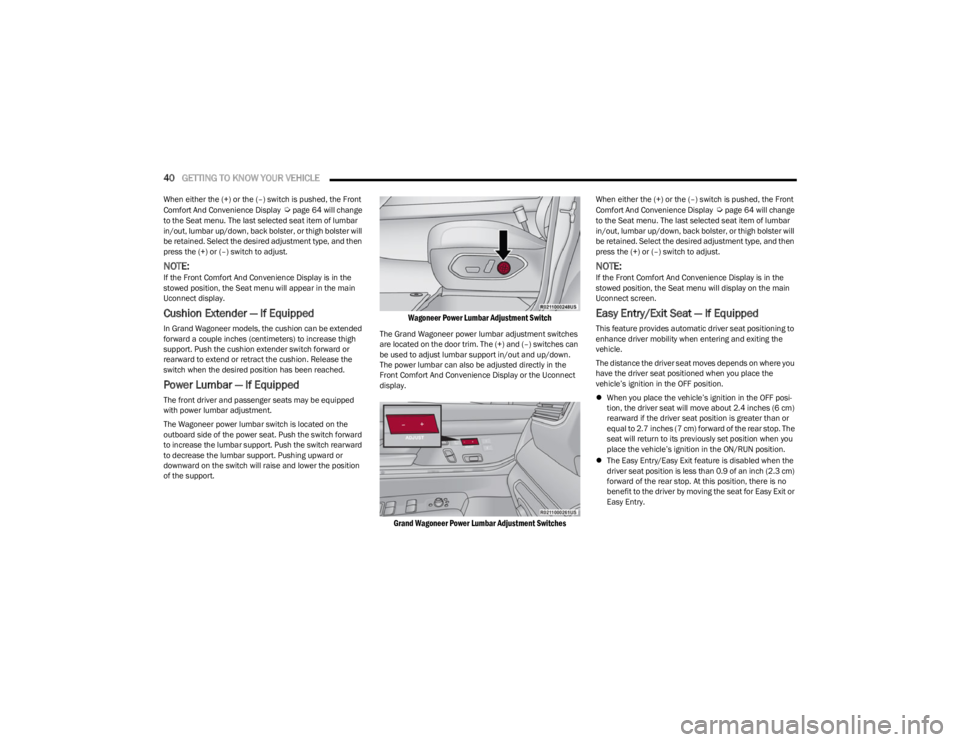
The Wagoneer power lumbar switch is located on the
outboard side of the power seat. Push the switch forward
to increase the lumbar support. Push the switch rearward
to decrease the lumbar support. Pushing upward or
downward on the switch will raise and lower the position
of the support.
Wagoneer Power Lumbar Adjustment Switch
The Grand Wagoneer power lumbar adjustment switches
are located on the door trim. The (+) and (–) switches can
be used to adjust lumbar support in/out and up/down.
The power lumbar can also be adjusted directly in the
Front Comfort And Convenience Display or the Uconnect
display.
Grand Wagoneer Power Lumbar Adjustment Switches
When either the (+) or the (–) switch is pushed, the Front
Comfort And Convenience Display Úpage 64 will change
to the Seat menu. The last selected seat item of lumbar
in/out, lumbar up/down, back bolster, or thigh bolster will
be retained. Select the desired adjustment type, and then
press the (+) or (–) switch to adjust.
NOTE:If the Front Comfort And Convenience Display is in the
stowed position, the Seat menu will display on the main
Uconnect screen.
Easy Entry/Exit Seat — If Equipped
This feature provides automatic driver seat positioning to
enhance driver mobility when entering and exiting the
vehicle.
The distance the driver seat moves depends on where you
have the driver seat positioned when you place the
vehicle’s ignition in the OFF position.
When you place the vehicle’s ignition in the OFF posi -
tion, the driver seat will move about 2.4 inches (6 cm)
rearward if the driver seat position is greater than or
equal to 2.7 inches (7 cm) forward of the rear stop. The
seat will return to its previously set position when you
place the vehicle’s ignition in the ON/RUN position.
The Easy Entry/Easy Exit feature is disabled when the
driver seat position is less than 0.9 of an inch (2.3 cm)
forward of the rear stop. At this position, there is no
benefit to the driver by moving the seat for Easy Exit or
Easy Entry.
23_WS_OM_EN_USC_t.book Page 40
Page 44 of 396
42GETTING TO KNOW YOUR VEHICLE
NOTE:The third row seat belts may interfere with the power
folding of the seat. Place the seat belt webbing behind the
stow clip before stowing or opening the seat. When the
seat is in the desired position, remove the webbing from
the stow clip so that it is ready for use. Never leave the
seat belt in the stow clip when it is used to restrain an
occupant.
NOTE:
The head restraints will lower automatically as neces -
sary when the power seat begins to move Úpage 44.
The head restraint can also be lowered manually using
the pull strap located at the back of the seat.
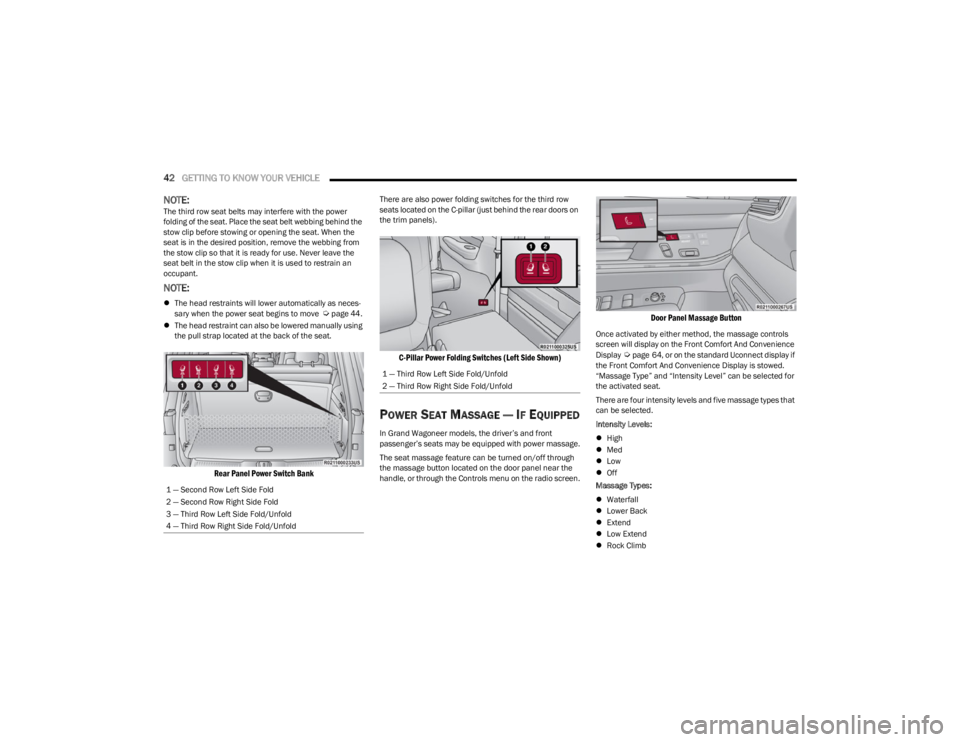
Rear Panel Power Switch Bank
There are also power folding switches for the third row
seats located on the C-pillar (just behind the rear doors on
the trim panels).
C-Pillar Power Folding Switches (Left Side Shown)
POWER SEAT MASSAGE — IF EQUIPPED
In Grand Wagoneer models, the driver’s and front
passenger’s seats may be equipped with power massage.
The seat massage feature can be turned on/off through
the massage button located on the door panel near the
handle, or through the Controls menu on the radio screen.
Door Panel Massage Button
Once activated by either method, the massage controls
screen will display on the Front Comfort And Convenience
Display
Úpage 64, or on the standard Uconnect display if
the Front Comfort And Convenience Display is stowed.
“Massage Type” and “Intensity Level” can be selected for
the activated seat.
There are four intensity levels and five massage types that
can be selected.
Intensity Levels:
High
Med
Low
Off
Massage Types:
Waterfall
Lower Back
Extend
Low Extend
Rock Climb
1 — Second Row Left Side Fold
2 — Second Row Right Side Fold
3 — Third Row Left Side Fold/Unfold
4 — Third Row Right Side Fold/Unfold
1 — Third Row Left Side Fold/Unfold
2 — Third Row Right Side Fold/Unfold
23_WS_OM_EN_USC_t.book Page 42