instrument cluster JEEP WAGONEER 2023 Owners Manual
[x] Cancel search | Manufacturer: JEEP, Model Year: 2023, Model line: WAGONEER, Model: JEEP WAGONEER 2023Pages: 396, PDF Size: 15.17 MB
Page 5 of 396

3
EXTERIOR LIGHTS ..............................................................57Headlight Switch ........................................................ 57
Multifunction Lever ..................................................... 58
Daytime Running Lights (DRLs) ................................. 58
High/Low Beam Switch .............................................. 58
Automatic High Beams — If Equipped ....................... 58
Flash-To-Pass ............................................................ 58
Automatic Headlights ................................................ 58
Parking Lights And Panel Lights................................. 59
Headlights On Automatically With Wipers ................. 59
Headlight Illumination On Approach .......................... 59
Headlight Delay ........................................................... 59
Lights-On Reminder .................................................... 59
Fog Lights .................................................................... 60
Turn Signals................................................................. 60
Lane Change Assist — If Equipped............................. 60
Battery Saver ............................................................... 60
INTERIOR LIGHTS ...............................................................60 Courtesy Lights............................................................ 60
Illuminated Entry — If Equipped ................................. 62
WINDSHIELD WIPERS AND WASHERS ........................... 62 Windshield Wiper Operation....................................... 62
Rain Sensing Wipers — If Equipped .......................... 63
Rear Wiper And Washer ............................................ 64
Windshield Wiper De-Icer — If Equipped ................... 64
CLIMATE CONTROLS ..........................................................64 Automatic Climate Control Descriptions And
Functions ..................................................................... 64
Automatic Temperature Control (ATC) ....................... 71
Climate Voice Recognition.......................................... 71
Operating Tips ............................................................ 71 INTERIOR STORAGE AND EQUIPMENT ............................ 73
Storage ......................................................................... 73
Center Console Cooler —
If Equipped ................................................................... 75
Center Console Safe — If Equipped ............................ 75
Sun Screens — If Equipped ......................................... 76
USB/AUX Control ......................................................... 76
Electrical Power Outlets ..............................................79
Power Inverter ............................................................. 80
Wireless Charging Pad — If Equipped......................... 81
WINDOWS .......................................................................... 82 Power Window Controls............................................... 82
Wind Buffeting ............................................................ 83
Radio Signal Devices On Windshield —
If Equipped ................................................................... 83
POWER SUNROOF — IF EQUIPPED................................... 83 Tri-Pane Power Sunroof............................................... 83
HOOD.................................................................................... 85 Opening The Hood .......................................................85
Closing The Hood ......................................................... 86
LIFTGATE .............................................................................. 86 To Unlock/Open The Liftgate ......................................86
To Lock/Close The Liftgate ......................................... 86
Adjustable Power Liftgate Height ............................... 87
Hands-Free Liftgate .................................................... 87
Cargo Area Features ................................................... 89
ROOF LUGGAGE RACK — IF EQUIPPED ........................... 91 Installing The Crossbars ..............................................91
Removing The Crossbars ............................................ 95GETTING TO KNOW YOUR
INSTRUMENT PANEL
BASE INSTRUMENT CLUSTER .......................................... 96 Instrument Cluster Descriptions ................................ 97
PREMIUM INSTRUMENT CLUSTER .................................. 98 Instrument Cluster Descriptions ................................ 99
INSTRUMENT CLUSTER DISPLAY ..................................... 99 Location And Controls ................................................. 99
Engine Oil Life Reset ................................................ 101
Display And Messages .............................................. 102Instrument Cluster Display Menu Items ................. 104Head Up Display (HUD) — If Equipped ..................... 106
Battery Saver On/Battery Saver Mode
Message — Electrical Load Reduction
Actions (If Equipped) ................................................ 107
WARNING LIGHTS AND MESSAGES ..............................108 Red Warning Lights ................................................... 109
Yellow Warning Lights ............................................... 111Yellow Indicator Lights .............................................. 114Green Indicator Lights............................................... 115White Indicator Lights ............................................... 116Blue Indicator Lights ................................................. 117
Gray Indicator Lights ................................................. 117
ONBOARD DIAGNOSTIC SYSTEM — OBD II ................... 117 Onboard Diagnostic System
(OBD II) Cybersecurity ............................................... 118
EMISSIONS INSPECTION AND MAINTENANCE
PROGRAMS ......................................................................118
23_WS_OM_EN_USC_t.book Page 3
Page 6 of 396

4
STARTING AND OPERATING
STARTING THE ENGINE ................................................. 119
Automatic Transmission ........................................... 119
Keyless Enter ‘n Go™ — Ignition .............................. 119
Normal Starting ...................................................... 119AutoPark .................................................................... 120Extended Park Starting............................................. 121
If Engine Fails To Start ............................................. 121
Cold Weather Operation
(Below –22°F Or −30°C) ........................................ 122After Starting ............................................................. 122Turbocharger “Cool Down” —
3.0L Engine Only ....................................................... 122
ENGINE BLOCK HEATER — IF EQUIPPED ..................... 122
ENGINE BREAK-IN RECOMMENDATIONS ..................... 122
PARKING BRAKE ........................................................... 122 Electric Park Brake (EPB) ....................................... 122
AUTOMATIC TRANSMISSION ........................................ 125 Ignition Park Interlock............................................... 126Brake/Transmission Shift Interlock (BTSI)
System ...................................................................... 126
8-Speed Automatic Transmission ........................... 126
FOUR-WHEEL DRIVE OPERATION ................................. 129 Quadra-Trac I Operating Instructions/
Precautions — If Equipped........................................ 129Quadra-Trac II Operating Instructions/
Precautions — If Equipped........................................ 130Shift Positions ........................................................... 130
Shifting Procedures .................................................. 130
Quadra-Drive II System — If Equipped ..................... 131
SELEC-TERRAIN — IF EQUIPPED .................................... 131 Selec-Terrain Mode Selection .................................. 131Instrument Cluster Display Messages ..................... 132 QUADRA-LIFT — IF EQUIPPED ........................................ 132
Description ................................................................ 132Air Suspension Modes.............................................. 134
Instrument Cluster Display Messages .................... 134
Operation................................................................... 135
FUEL SAVER TECHNOLOGY 5.7L AND 6.4L
ONLY — IF EQUIPPED ...................................................... 135
POWER STEERING ........................................................... 135
STOP/START SYSTEM — IF EQUIPPED ......................... 136 Autostop Mode.......................................................... 136
Possible Reasons The Engine Does
Not Autostop ............................................................. 136
To Start The Engine While In Autostop Mode ......... 136
To Manually Turn Off The
Stop/Start System .................................................... 137
To Manually Turn On The
Stop/Start System .................................................... 137
System Malfunction.................................................. 137
CRUISE CONTROL SYSTEMS — IF EQUIPPED .............. 137 Cruise Control ........................................................... 138
Adaptive Cruise Control (ACC).................................. 139
TRAFFIC SIGN ASSIST SYSTEM —
IF EQUIPPED ..................................................................... 146 Activation/Deactivation ............................................ 147
Traffic Sign Assist Modes ......................................... 147
Indications On The Display....................................... 147
ACTIVE DRIVING ASSIST SYSTEM —
IF EQUIPPED ..................................................................... 148 Operation................................................................... 148
Turning Active Driving Assist On Or Off ................... 150
Indications On The Display....................................... 152
System Status ........................................................... 152
System Operation/Limitations................................. 153 PARKSENSE FRONT/REAR PARK
ASSIST SYSTEM ................................................................ 154
ParkSense Sensors ................................................... 154
ParkSense Display .................................................... 154
ParkSense Warning Display...................................... 157Enabling And Disabling ParkSense .......................... 157
Service The ParkSense Park Assist System ............ 157
Cleaning The ParkSense System ............................. 157
ParkSense System Usage Precautions .................... 158
Side Distance Warning System —
If Equipped................................................................. 158
PARKSENSE ACTIVE PARK ASSIST
SYSTEM — IF EQUIPPED .................................................. 160 Enabling And Disabling The ParkSense
Active Park Assist System ......................................... 161
ParkSense Automated Parking —
If Equipped................................................................. 162
Semi-Automatic ParkSense Active
Park Assist — If Equipped ......................................... 165
ACTIVE LANE MANAGEMENT SYSTEM —
IF EQUIPPED......................................................................167 Active Lane Management Operation ....................... 167
Turning Active Lane Management On Or Off ........... 168Active Lane Management Warning Message .......... 168Changing Active Lane Management Status ............ 170
PARKVIEW REAR BACK UP CAMERA ........................... 170 Zoom View ................................................................. 171
Viewing At Speed ....................................................... 171
FAMCAM SYSTEM — IF EQUIPPED ................................171
NIGHT VISION CAMERA SYSTEM —
IF EQUIPPED ....................................................................172 Detection Range ........................................................ 173
Service The Night Vision System .............................. 174
Night Vision System Limitations ............................... 174
23_WS_OM_EN_USC_t.book Page 4
Page 18 of 396
16
GETTING TO KNOW YOUR VEHICLE
KEYS
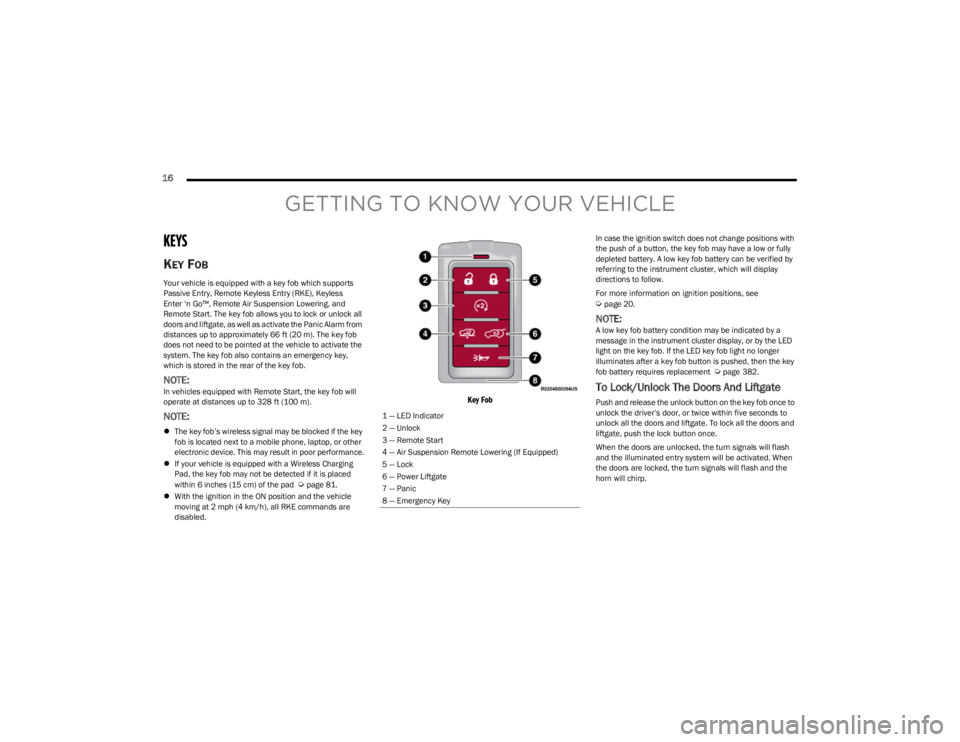
KEY FOB
Your vehicle is equipped with a key fob which supports
Passive Entry, Remote Keyless Entry (RKE), Keyless
Enter ‘n Go™, Remote Air Suspension Lowering, and
Remote Start. The key fob allows you to lock or unlock all
doors and liftgate, as well as activate the Panic Alarm from
distances up to approximately 66 ft (20 m). The key fob does not need to be pointed at the vehicle to activate the
system. The key fob also contains an emergency key,
which is stored in the rear of the key fob.
NOTE:In vehicles equipped with Remote Start, the key fob will
operate at distances up to 328 ft (100 m).
NOTE:
The key fob’s wireless signal may be blocked if the key
fob is located next to a mobile phone, laptop, or other
electronic device. This may result in poor performance.
If your vehicle is equipped with a Wireless Charging
Pad, the key fob may not be detected if it is placed
within 6 inches (15 cm) of the pad
Úpage 81.
With the ignition in the ON position and the vehicle
moving at 2 mph (4 km/h), all RKE commands are
disabled.
Key Fob
In case the ignition switch does not change positions with
the push of a button, the key fob may have a low or fully
depleted battery. A low key fob battery can be verified by
referring to the instrument cluster, which will display
directions to follow.
For more information on ignition positions, see
Úpage 20.
NOTE:A low key fob battery condition may be indicated by a
message in the instrument cluster display, or by the LED
light on the key fob. If the LED key fob light no longer
illuminates after a key fob button is pushed, then the key
fob battery requires replacement
Úpage 382.
To Lock/Unlock The Doors And Liftgate
Push and release the unlock button on the key fob once to
unlock the driver’s door, or twice within five seconds to
unlock all the doors and liftgate. To lock all the doors and
liftgate, push the lock button once.
When the doors are unlocked, the turn signals will flash
and the illuminated entry system will be activated. When
the doors are locked, the turn signals will flash and the
horn will chirp.
1 — LED Indicator
2 — Unlock
3 — Remote Start
4 — Air Suspension Remote Lowering (If Equipped)
5 — Lock
6 — Power Liftgate
7 — Panic
8 — Emergency Key
23_WS_OM_EN_USC_t.book Page 16
Page 19 of 396

GETTING TO KNOW YOUR VEHICLE17
NOTE:
If the vehicle is equipped with the Auto Relock feature,
and is unlocked with the key fob, and no door is opened
within 60 seconds, the vehicle will relock and the
Vehicle Security system will arm (if equipped). This
feature can be enabled/disabled within Uconnect
Settings.
If one or more doors are open, or the liftgate is open,
the doors will lock. The doors will unlock again auto -
matically if the key fob is left inside the passenger
compartment, otherwise the doors will stay locked.
All doors can be programmed to unlock on the first push
of the unlock button through Uconnect Settings
Úpage 197.
Using The Panic Feature
To turn the Panic feature on or off, push the Panic button
on the key fob. When the Panic feature is activated, the
turn signals will flash, the horn may pulse on and off (if
equipped with horn alarm), and the interior lights will turn
on.
The Panic feature will stay on for three minutes unless you
turn it off by either pushing the Panic button a second time
or drive the vehicle at a speed of 15 mph (24 km/h) or
greater.
NOTE:
The interior lights will turn off if you place the ignition in
the ON/RUN position while the Panic feature is acti -
vated. However, the exterior lights and horn (if
equipped with horn alarm) will remain on.
You may need to be closer than 66 ft (20 m) from the
vehicle when using the key fob to turn off the Panic
feature due to the radio frequency noises emitted by
the system.
Key Left Vehicle Feature
If a valid key fob is no longer detected inside the vehicle
while the vehicle’s ignition system is in the ON/RUN or
START position, the message “Key Fob Has Left The
Vehicle” will be shown in the instrument cluster display
along with an interior chime. An exterior audible and visual
alert will also be activated to warn the driver.
The vehicle’s horn will rapidly chirp three times along with
a single flash of the vehicle’s exterior lights.
NOTE:
The doors have to be open and then closed in order for
the vehicle to detect a key fob; the Key Left Vehicle
feature will not activate until all of the doors are closed.
These alerts will not be activated in situations where
the vehicle’s engine is left running with the key fob
inside.
Air Suspension (Remote Lowering Of The
Vehicle) — If Equipped
For easy entry and loading, your vehicle can be
lowered to Entry/Exit height by pushing the key
fob air suspension button two times. When air
suspension lowering is requested using the key
fob, the vehicle will send a series of chirps and flashes
(when enabled within Uconnect Settings) to alert the
customer that the operation has begun and will continue
these alerts until it successfully lowers. The following conditions must be met for the vehicle to
lower remotely:
The vehicle must not already be in Entry/Exit (Park) ride
height.
The vehicle battery must be fully charged.
All doors must be closed.
The key fob must be out of the vehicle.
NOTE:Ensure the vehicle is clear of all objects, pets, and people
prior to remote lowering.
Canceling Remote Lowering
Vehicle lowering can be canceled at anytime. When
vehicle lowering is canceled, the vehicle will raise up to the
next defined level and lock out the remote lowering
feature for five seconds before a new request can be
made.
To cancel vehicle lowering, push the key fob air
suspension button one time during the lowering process.
When vehicle lowering is canceled, the horn will chirp two
times and the turn signals will flash four times. Once
raising is completed, the horn will chirp one time.
NOTE:For more information on Air Suspension, see Úpage 132.
2
23_WS_OM_EN_USC_t.book Page 17
Page 23 of 396
GETTING TO KNOW YOUR VEHICLE21
(Continued)
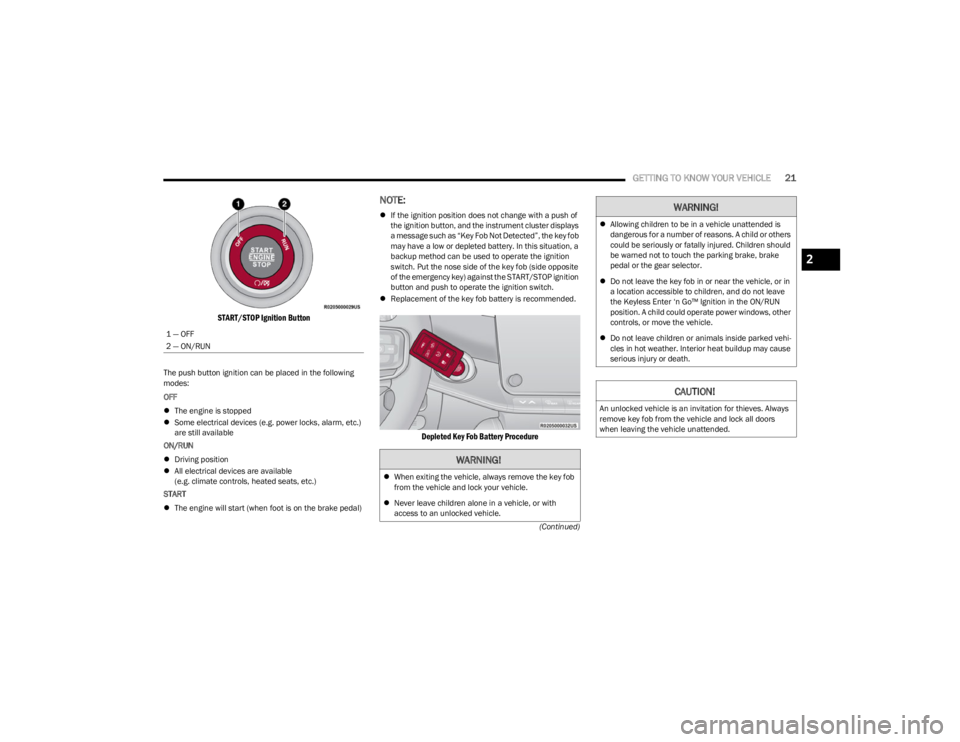
START/STOP Ignition Button
The push button ignition can be placed in the following
modes:
OFF
The engine is stopped
Some electrical devices (e.g. power locks, alarm, etc.)
are still available
ON/RUN
Driving position
All electrical devices are available
(e.g. climate controls, heated seats, etc.)
START
The engine will start (when foot is on the brake pedal)
NOTE:
If the ignition position does not change with a push of
the ignition button, and the instrument cluster displays
a message such as “Key Fob Not Detected”, the key fob
may have a low or depleted battery. In this situation, a
backup method can be used to operate the ignition
switch. Put the nose side of the key fob (side opposite
of the emergency key) against the START/STOP ignition
button and push to operate the ignition switch.
Replacement of the key fob battery is recommended.
Depleted Key Fob Battery Procedure
1 — OFF
2 — ON/RUN
WARNING!
When exiting the vehicle, always remove the key fob
from the vehicle and lock your vehicle.
Never leave children alone in a vehicle, or with
access to an unlocked vehicle.
Allowing children to be in a vehicle unattended is
dangerous for a number of reasons. A child or others
could be seriously or fatally injured. Children should
be warned not to touch the parking brake, brake
pedal or the gear selector.
Do not leave the key fob in or near the vehicle, or in
a location accessible to children, and do not leave
the Keyless Enter ‘n Go™ Ignition in the ON/RUN
position. A child could operate power windows, other
controls, or move the vehicle.
Do not leave children or animals inside parked vehi -
cles in hot weather. Interior heat buildup may cause
serious injury or death.
CAUTION!
An unlocked vehicle is an invitation for thieves. Always
remove key fob from the vehicle and lock all doors
when leaving the vehicle unattended.
WARNING!
2
23_WS_OM_EN_USC_t.book Page 21
Page 26 of 396

24GETTING TO KNOW YOUR VEHICLE
REMOTE START ABORT MESSAGE
One of the following messages will display in the
instrument cluster display if the vehicle fails to remote
start or exits Remote Start prematurely:
Remote Start Canceled — Door Open
Remote Start Canceled — Hood Open
Remote Start Canceled — Liftgate Open
Remote Start Canceled — Fuel Low
Remote Start Canceled — System Fault
Remote Start Disabled — Start Vehicle to Reset
The instrument cluster display message stays active until
the ignition is placed in the ON/RUN position.
VEHICLE SECURITY SYSTEM — IF EQUIPPED
The Vehicle Security system monitors the vehicle doors,
hood, liftgate, and the Keyless Enter ‘n Go™ Ignition for
unauthorized operation. While the Vehicle Security system
is armed, interior switches for door locks and liftgate
release handle are disabled. If something triggers the
alarm, the Vehicle Security system will provide the
following audible and visible signals:
The horn will pulse
The turn signals will flash
The Vehicle Security Light in the instrument cluster
will flash
TO ARM THE SYSTEM
Follow these steps to arm the Vehicle Security system:
1. Make sure the vehicle’s ignition is placed in the OFF
position.
For vehicles equipped with Keyless Entry, make
sure the vehicle’s keyless ignition system is OFF.
2. Perform one of the following methods to lock the vehicle:
Push lock on the interior power door lock switch
with the driver and/or passenger door open.
Touch the lock button on the exterior Passive Entry
door handle with a valid key fob available in the
same exterior zone
Úpage 167.
Push the lock button on the key fob.
3. If any doors are open, close them.
When the Vehicle Security system is armed, the Vehicle
Security Light (located in the lower right portion of the
instrument cluster display) will begin to flash every two
seconds until it is disarmed.
NOTE:If the system is armed by pushing the lock button on the
interior door panel, the Vehicle Security Light will flash
rapidly for about 15 seconds once the door is closed, then
slow down to every two seconds.
TO DISARM THE SYSTEM
The Vehicle Security system can be disarmed using any of
the following methods:
Push the unlock button on the key fob.
Grab the Passive Entry door handle to unlock the door
Úpage 167.
Cycle the ignition out of the OFF position to disarm the
system.
NOTE:
The driver's door key cylinder cannot arm or disarm the
Vehicle Security system. Use of the door key cylinder
when the alarm is armed will sound the alarm when the
door is opened.
The Vehicle Security system remains armed when the
power liftgate is opened using the liftgate button on the
key fob. If someone enters the vehicle through the
opened liftgate, then opens any door from the inside,
the alarm will sound.
If Passive Entry (if equipped) is used to unlock the lift -
gate, the Vehicle Security system is disarmed and the
rest of the vehicle doors will remain locked unless all
doors are set to unlock on first press within Uconnect
Settings.
When the Vehicle Security system is armed, the interior
power door lock switches will not unlock the doors.
23_WS_OM_EN_USC_t.book Page 24
Page 34 of 396
32GETTING TO KNOW YOUR VEHICLE
Passenger’s Side (If Equipped)
Seat position
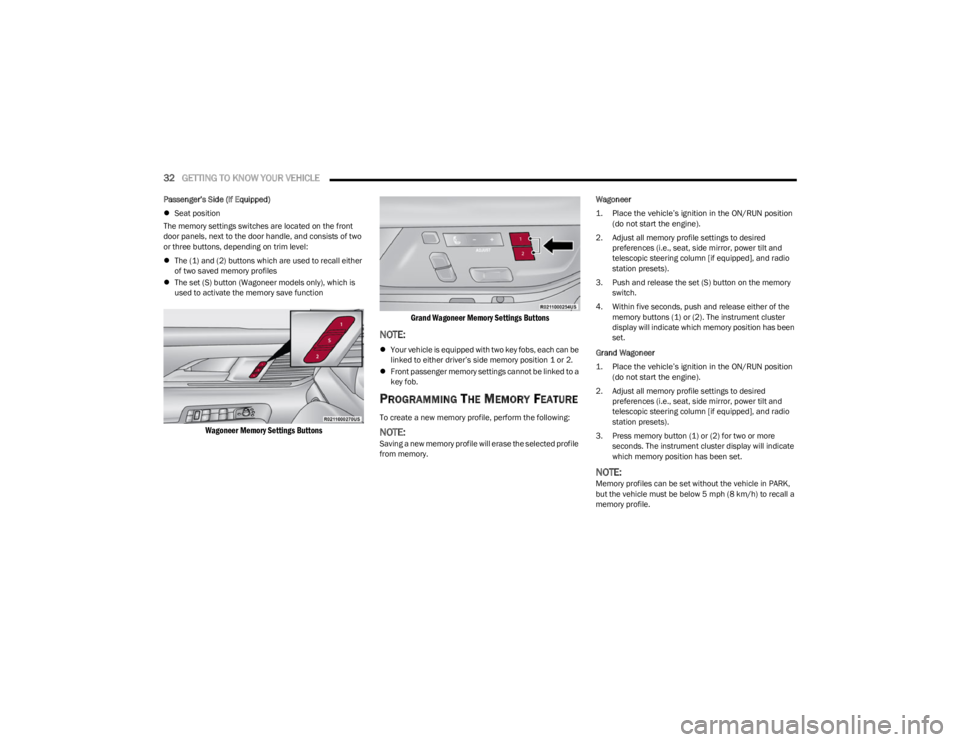
The memory settings switches are located on the front
door panels, next to the door handle, and consists of two
or three buttons, depending on trim level:
The (1) and (2) buttons which are used to recall either
of two saved memory profiles
The set (S) button (Wagoneer models only), which is
used to activate the memory save function
Wagoneer Memory Settings Buttons Grand Wagoneer Memory Settings Buttons
NOTE:
Your vehicle is equipped with two key fobs, each can be
linked to either driver’s side memory position 1 or 2.
Front passenger memory settings cannot be linked to a
key fob.
PROGRAMMING THE MEMORY FEATURE
To create a new memory profile, perform the following:
NOTE:Saving a new memory profile will erase the selected profile
from memory. Wagoneer
1. Place the vehicle’s ignition in the ON/RUN position
(do not start the engine).
2. Adjust all memory profile settings to desired preferences (i.e., seat, side mirror, power tilt and
telescopic steering column [if equipped], and radio
station presets).
3. Push and release the set (S) button on the memory switch.
4. Within five seconds, push and release either of the memory buttons (1) or (2). The instrument cluster
display will indicate which memory position has been
set.
Grand Wagoneer
1. Place the vehicle’s ignition in the ON/RUN position (do not start the engine).
2. Adjust all memory profile settings to desired preferences (i.e., seat, side mirror, power tilt and
telescopic steering column [if equipped], and radio
station presets).
3. Press memory button (1) or (2) for two or more seconds. The instrument cluster display will indicate
which memory position has been set.
NOTE:Memory profiles can be set without the vehicle in PARK,
but the vehicle must be below 5 mph (8 km/h) to recall a
memory profile.
23_WS_OM_EN_USC_t.book Page 32
Page 35 of 396

GETTING TO KNOW YOUR VEHICLE33
LINKING AND UNLINKING THE KEY FOB
T
O MEMORY
Your key fobs can be programmed to recall one of two
saved driver’s side memory profiles.
NOTE:Before programming your key fobs you must select the
“Personal Settings Linked To Key Fob” feature through the
Uconnect Settings
Úpage 197.
To program your key fobs, perform the following:
Wagoneer
1. Place the vehicle’s ignition in the OFF position.
2. Select a desired driver’s side memory profile, 1 or 2.
3. Once the profile has been recalled, push and release the set (S) button on the memory switch.
4. Within five seconds, push and release button (1) or (2) accordingly. “Memory Profile Set” (1 or 2) will
display in the instrument cluster.
5. Push and release the lock button on the key fob within 10 seconds.
NOTE:Your key fobs can be unlinked from your driver’s side
memory settings by pushing the set (S) button, and within
10 seconds, pushing the unlock button on the key fob.
Grand Wagoneer
1. Place the vehicle’s ignition in the OFF position.
2. Recall the desired memory profile (1 or 2). 3. Press the memory button (1) or (2) (according to the
previous selection) for two seconds or more, and
release.
4. Push and hold the lock button on the key fob within 10 seconds.
NOTE:Your key fobs can be unlinked from your driver’s side
memory settings by pushing the memory button (1) or (2)
for two seconds or more and releasing, and then within 10
seconds, pushing and holding the unlock button on the
key fob.
MEMORY POSITION RECALL
NOTE:Memory Recall is available when not in PARK, if the
vehicle speed is below 5 mph (8 km/h).
To recall a memory settings using the memory
switches, push memory button (1) or (2) on the
memory switch.
To recall the driver’s side memory settings using the
key fob, push the unlock button on the key fob linked
to memory position 1 or 2.
A recall can be canceled by pushing any of the memory
buttons during a recall, or by pushing any of the seat
adjustment switches. When a recall is canceled, the seat
and power tilt/telescopic steering column will stop
moving. A delay of one second will occur before another
recall can be selected.
SEATS
Seats are a part of the Occupant Restraint system of the
vehicle.
MANUAL ADJUSTMENT (REAR SEATS)
NOTE:You may experience deformation in the seat cushion from
the seat belt buckles if the seats are left folded for an
extended period of time. This is normal and by simply
unfolding the seats to the open position, over time the
seat cushion will return to its normal shape.
WARNING!
It is dangerous to ride in a cargo area, inside or
outside of a vehicle. In a collision, people riding in
these areas are more likely to be seriously injured or
killed.
Do not allow people to ride in any area of your vehicle
that is not equipped with seats and seat belts. In a
collision, people riding in these areas are more likely
to be seriously injured or killed.
Be sure everyone in your vehicle is in a seat and
using a seat belt properly.
WARNING!
Do not pile luggage or cargo higher than the top of the
seatback. This could impair visibility or become a
dangerous projectile in a sudden stop or collision.
2
23_WS_OM_EN_USC_t.book Page 33
Page 62 of 396
60GETTING TO KNOW YOUR VEHICLE
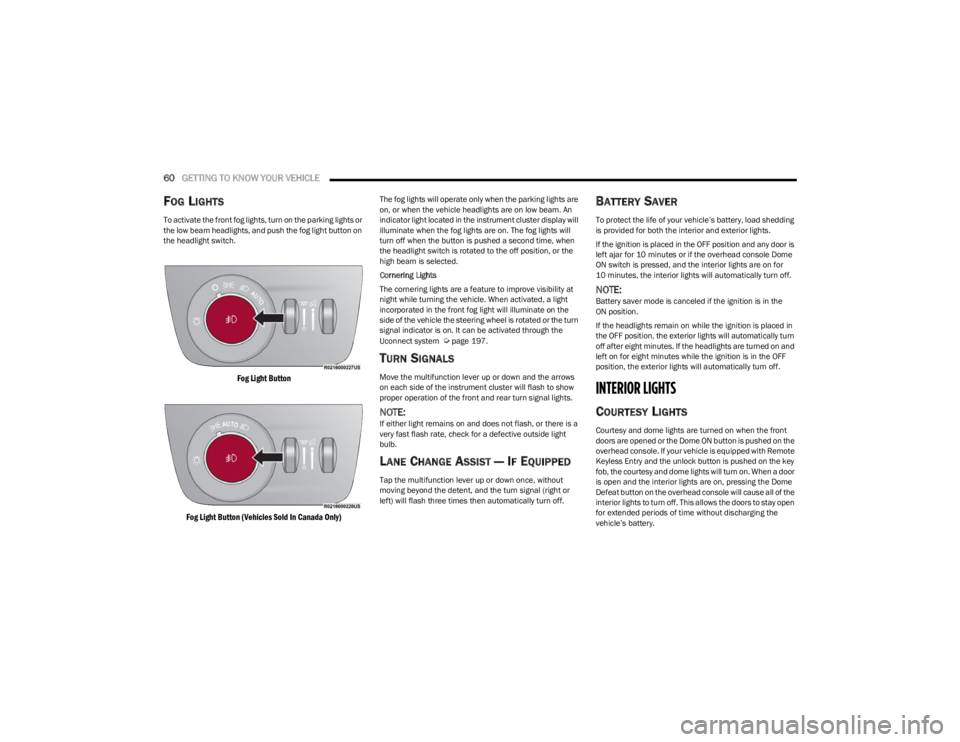
FOG LIGHTS
To activate the front fog lights, turn on the parking lights or
the low beam headlights, and push the fog light button on
the headlight switch.
Fog Light Button
Fog Light Button (Vehicles Sold In Canada Only)
The fog lights will operate only when the parking lights are
on, or when the vehicle headlights are on low beam. An
indicator light located in the instrument cluster display will
illuminate when the fog lights are on. The fog lights will
turn off when the button is pushed a second time, when
the headlight switch is rotated to the off position, or the
high beam is selected.
Cornering Lights
The cornering lights are a feature to improve visibility at
night while turning the vehicle. When activated, a light
incorporated in the front fog light will illuminate on the
side of the vehicle the steering wheel is rotated or the turn
signal indicator is on. It can be activated through the
Uconnect system
Úpage 197.
TURN SIGNALS
Move the multifunction lever up or down and the arrows
on each side of the instrument cluster will flash to show
proper operation of the front and rear turn signal lights.
NOTE:If either light remains on and does not flash, or there is a
very fast flash rate, check for a defective outside light
bulb.
LANE CHANGE ASSIST — IF EQUIPPED
Tap the multifunction lever up or down once, without
moving beyond the detent, and the turn signal (right or
left) will flash three times then automatically turn off.
BATTERY SAVER
To protect the life of your vehicle’s battery, load shedding
is provided for both the interior and exterior lights.
If the ignition is placed in the OFF position and any door is
left ajar for 10 minutes or if the overhead console Dome
ON switch is pressed, and the interior lights are on for
10 minutes, the interior lights will automatically turn off.
NOTE:Battery saver mode is canceled if the ignition is in the
ON position.
If the headlights remain on while the ignition is placed in
the OFF position, the exterior lights will automatically turn
off after eight minutes. If the headlights are turned on and
left on for eight minutes while the ignition is in the OFF
position, the exterior lights will automatically turn off.
INTERIOR LIGHTS
COURTESY LIGHTS
Courtesy and dome lights are turned on when the front
doors are opened or the Dome ON button is pushed on the
overhead console. If your vehicle is equipped with Remote
Keyless Entry and the unlock button is pushed on the key
fob, the courtesy and dome lights will turn on. When a door
is open and the interior lights are on, pressing the Dome
Defeat button on the overhead console will cause all of the
interior lights to turn off. This allows the doors to stay open
for extended periods of time without discharging the
vehicle’s battery.
23_WS_OM_EN_USC_t.book Page 60
Page 63 of 396
GETTING TO KNOW YOUR VEHICLE61
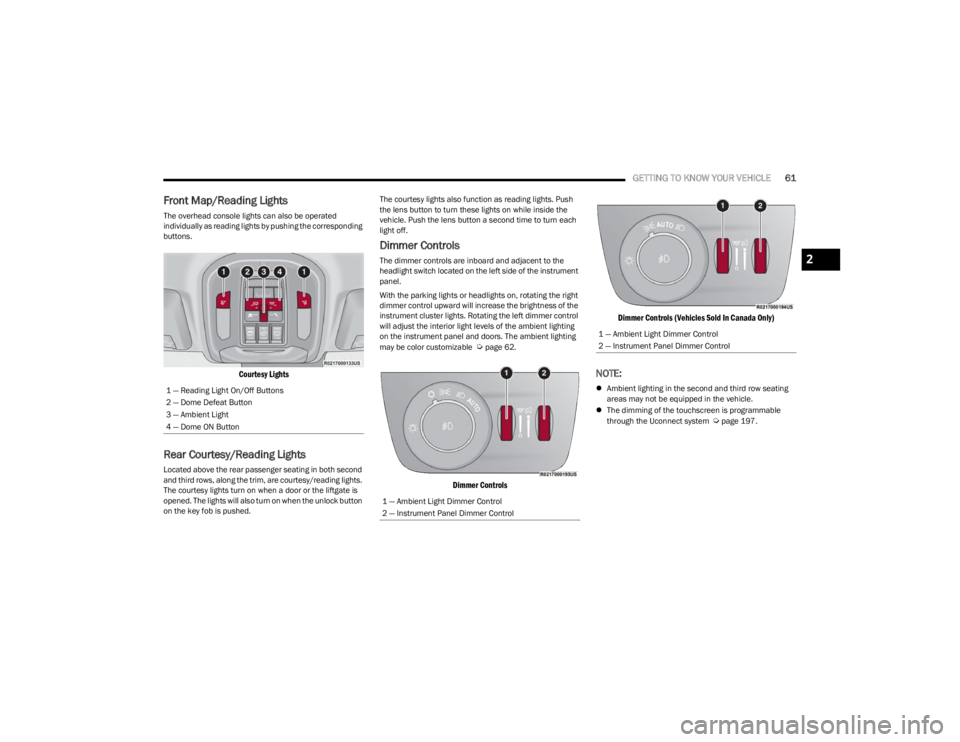
Front Map/Reading Lights
The overhead console lights can also be operated
individually as reading lights by pushing the corresponding
buttons.
Courtesy Lights
Rear Courtesy/Reading Lights
Located above the rear passenger seating in both second
and third rows, along the trim, are courtesy/reading lights.
The courtesy lights turn on when a door or the liftgate is
opened. The lights will also turn on when the unlock button
on the key fob is pushed. The courtesy lights also function as reading lights. Push
the lens button to turn these lights on while inside the
vehicle. Push the lens button a second time to turn each
light off.
Dimmer Controls
The dimmer controls are inboard and adjacent to the
headlight switch located on the left side of the instrument
panel.
With the parking lights or headlights on, rotating the right
dimmer control upward will increase the brightness of the
instrument cluster lights. Rotating the left dimmer control
will adjust the interior light levels of the ambient lighting
on the instrument panel and doors. The ambient lighting
may be color customizable
Úpage 62.
Dimmer Controls
Dimmer Controls (Vehicles Sold In Canada Only)
NOTE:
Ambient lighting in the second and third row seating
areas may not be equipped in the vehicle.
The dimming of the touchscreen is programmable
through the Uconnect system
Úpage 197.
1 — Reading Light On/Off Buttons
2 — Dome Defeat Button
3 — Ambient Light
4 — Dome ON Button
1 — Ambient Light Dimmer Control
2 — Instrument Panel Dimmer Control
1 — Ambient Light Dimmer Control
2 — Instrument Panel Dimmer Control
2
23_WS_OM_EN_USC_t.book Page 61