park assist JEEP WAGONEER 2023 Owners Manual
[x] Cancel search | Manufacturer: JEEP, Model Year: 2023, Model line: WAGONEER, Model: JEEP WAGONEER 2023Pages: 396, PDF Size: 15.17 MB
Page 5 of 396

3
EXTERIOR LIGHTS ..............................................................57Headlight Switch ........................................................ 57
Multifunction Lever ..................................................... 58
Daytime Running Lights (DRLs) ................................. 58
High/Low Beam Switch .............................................. 58
Automatic High Beams — If Equipped ....................... 58
Flash-To-Pass ............................................................ 58
Automatic Headlights ................................................ 58
Parking Lights And Panel Lights................................. 59
Headlights On Automatically With Wipers ................. 59
Headlight Illumination On Approach .......................... 59
Headlight Delay ........................................................... 59
Lights-On Reminder .................................................... 59
Fog Lights .................................................................... 60
Turn Signals................................................................. 60
Lane Change Assist — If Equipped............................. 60
Battery Saver ............................................................... 60
INTERIOR LIGHTS ...............................................................60 Courtesy Lights............................................................ 60
Illuminated Entry — If Equipped ................................. 62
WINDSHIELD WIPERS AND WASHERS ........................... 62 Windshield Wiper Operation....................................... 62
Rain Sensing Wipers — If Equipped .......................... 63
Rear Wiper And Washer ............................................ 64
Windshield Wiper De-Icer — If Equipped ................... 64
CLIMATE CONTROLS ..........................................................64 Automatic Climate Control Descriptions And
Functions ..................................................................... 64
Automatic Temperature Control (ATC) ....................... 71
Climate Voice Recognition.......................................... 71
Operating Tips ............................................................ 71 INTERIOR STORAGE AND EQUIPMENT ............................ 73
Storage ......................................................................... 73
Center Console Cooler —
If Equipped ................................................................... 75
Center Console Safe — If Equipped ............................ 75
Sun Screens — If Equipped ......................................... 76
USB/AUX Control ......................................................... 76
Electrical Power Outlets ..............................................79
Power Inverter ............................................................. 80
Wireless Charging Pad — If Equipped......................... 81
WINDOWS .......................................................................... 82 Power Window Controls............................................... 82
Wind Buffeting ............................................................ 83
Radio Signal Devices On Windshield —
If Equipped ................................................................... 83
POWER SUNROOF — IF EQUIPPED................................... 83 Tri-Pane Power Sunroof............................................... 83
HOOD.................................................................................... 85 Opening The Hood .......................................................85
Closing The Hood ......................................................... 86
LIFTGATE .............................................................................. 86 To Unlock/Open The Liftgate ......................................86
To Lock/Close The Liftgate ......................................... 86
Adjustable Power Liftgate Height ............................... 87
Hands-Free Liftgate .................................................... 87
Cargo Area Features ................................................... 89
ROOF LUGGAGE RACK — IF EQUIPPED ........................... 91 Installing The Crossbars ..............................................91
Removing The Crossbars ............................................ 95GETTING TO KNOW YOUR
INSTRUMENT PANEL
BASE INSTRUMENT CLUSTER .......................................... 96 Instrument Cluster Descriptions ................................ 97
PREMIUM INSTRUMENT CLUSTER .................................. 98 Instrument Cluster Descriptions ................................ 99
INSTRUMENT CLUSTER DISPLAY ..................................... 99 Location And Controls ................................................. 99
Engine Oil Life Reset ................................................ 101
Display And Messages .............................................. 102Instrument Cluster Display Menu Items ................. 104Head Up Display (HUD) — If Equipped ..................... 106
Battery Saver On/Battery Saver Mode
Message — Electrical Load Reduction
Actions (If Equipped) ................................................ 107
WARNING LIGHTS AND MESSAGES ..............................108 Red Warning Lights ................................................... 109
Yellow Warning Lights ............................................... 111Yellow Indicator Lights .............................................. 114Green Indicator Lights............................................... 115White Indicator Lights ............................................... 116Blue Indicator Lights ................................................. 117
Gray Indicator Lights ................................................. 117
ONBOARD DIAGNOSTIC SYSTEM — OBD II ................... 117 Onboard Diagnostic System
(OBD II) Cybersecurity ............................................... 118
EMISSIONS INSPECTION AND MAINTENANCE
PROGRAMS ......................................................................118
23_WS_OM_EN_USC_t.book Page 3
Page 6 of 396

4
STARTING AND OPERATING
STARTING THE ENGINE ................................................. 119
Automatic Transmission ........................................... 119
Keyless Enter ‘n Go™ — Ignition .............................. 119
Normal Starting ...................................................... 119AutoPark .................................................................... 120Extended Park Starting............................................. 121
If Engine Fails To Start ............................................. 121
Cold Weather Operation
(Below –22°F Or −30°C) ........................................ 122After Starting ............................................................. 122Turbocharger “Cool Down” —
3.0L Engine Only ....................................................... 122
ENGINE BLOCK HEATER — IF EQUIPPED ..................... 122
ENGINE BREAK-IN RECOMMENDATIONS ..................... 122
PARKING BRAKE ........................................................... 122 Electric Park Brake (EPB) ....................................... 122
AUTOMATIC TRANSMISSION ........................................ 125 Ignition Park Interlock............................................... 126Brake/Transmission Shift Interlock (BTSI)
System ...................................................................... 126
8-Speed Automatic Transmission ........................... 126
FOUR-WHEEL DRIVE OPERATION ................................. 129 Quadra-Trac I Operating Instructions/
Precautions — If Equipped........................................ 129Quadra-Trac II Operating Instructions/
Precautions — If Equipped........................................ 130Shift Positions ........................................................... 130
Shifting Procedures .................................................. 130
Quadra-Drive II System — If Equipped ..................... 131
SELEC-TERRAIN — IF EQUIPPED .................................... 131 Selec-Terrain Mode Selection .................................. 131Instrument Cluster Display Messages ..................... 132 QUADRA-LIFT — IF EQUIPPED ........................................ 132
Description ................................................................ 132Air Suspension Modes.............................................. 134
Instrument Cluster Display Messages .................... 134
Operation................................................................... 135
FUEL SAVER TECHNOLOGY 5.7L AND 6.4L
ONLY — IF EQUIPPED ...................................................... 135
POWER STEERING ........................................................... 135
STOP/START SYSTEM — IF EQUIPPED ......................... 136 Autostop Mode.......................................................... 136
Possible Reasons The Engine Does
Not Autostop ............................................................. 136
To Start The Engine While In Autostop Mode ......... 136
To Manually Turn Off The
Stop/Start System .................................................... 137
To Manually Turn On The
Stop/Start System .................................................... 137
System Malfunction.................................................. 137
CRUISE CONTROL SYSTEMS — IF EQUIPPED .............. 137 Cruise Control ........................................................... 138
Adaptive Cruise Control (ACC).................................. 139
TRAFFIC SIGN ASSIST SYSTEM —
IF EQUIPPED ..................................................................... 146 Activation/Deactivation ............................................ 147
Traffic Sign Assist Modes ......................................... 147
Indications On The Display....................................... 147
ACTIVE DRIVING ASSIST SYSTEM —
IF EQUIPPED ..................................................................... 148 Operation................................................................... 148
Turning Active Driving Assist On Or Off ................... 150
Indications On The Display....................................... 152
System Status ........................................................... 152
System Operation/Limitations................................. 153 PARKSENSE FRONT/REAR PARK
ASSIST SYSTEM ................................................................ 154
ParkSense Sensors ................................................... 154
ParkSense Display .................................................... 154
ParkSense Warning Display...................................... 157Enabling And Disabling ParkSense .......................... 157
Service The ParkSense Park Assist System ............ 157
Cleaning The ParkSense System ............................. 157
ParkSense System Usage Precautions .................... 158
Side Distance Warning System —
If Equipped................................................................. 158
PARKSENSE ACTIVE PARK ASSIST
SYSTEM — IF EQUIPPED .................................................. 160 Enabling And Disabling The ParkSense
Active Park Assist System ......................................... 161
ParkSense Automated Parking —
If Equipped................................................................. 162
Semi-Automatic ParkSense Active
Park Assist — If Equipped ......................................... 165
ACTIVE LANE MANAGEMENT SYSTEM —
IF EQUIPPED......................................................................167 Active Lane Management Operation ....................... 167
Turning Active Lane Management On Or Off ........... 168Active Lane Management Warning Message .......... 168Changing Active Lane Management Status ............ 170
PARKVIEW REAR BACK UP CAMERA ........................... 170 Zoom View ................................................................. 171
Viewing At Speed ....................................................... 171
FAMCAM SYSTEM — IF EQUIPPED ................................171
NIGHT VISION CAMERA SYSTEM —
IF EQUIPPED ....................................................................172 Detection Range ........................................................ 173
Service The Night Vision System .............................. 174
Night Vision System Limitations ............................... 174
23_WS_OM_EN_USC_t.book Page 4
Page 8 of 396

6
SAFETY
SAFETY FEATURES........................................................... 239
Anti-Lock Brake System (ABS) ................................. 239Rear Seat Reminder Alert (RSRA) ............................ 240
Drowsy Driver Detection (DDD) — If Equipped ........ 240
Electronic Brake Control (EBC) System .................. 241
AUXILIARY DRIVING SYSTEMS ...................................... 247 Blind Spot Monitoring (BSM) .................................... 247
Forward Collision Warning (FCW)
With Mitigation .......................................................... 250
Tire Pressure Monitoring System (TPMS) ................ 252
OCCUPANT RESTRAINT SYSTEMS ................................ 256 Occupant Restraint Systems Features ................... 256Important Safety Precautions .................................. 256Seat Belt Systems .................................................... 257
Supplemental Restraint Systems (SRS) .................. 264Child Restraints ........................................................ 275
SAFETY TIPS ..................................................................... 287 Transporting Passengers .......................................... 287
Transporting Pets ...................................................... 287Connected Vehicles .................................................. 287
Safety Checks You Should Make Inside
The Vehicle ............................................................... 287
Periodic Safety Checks You Should Make
Outside The Vehicle .................................................. 289
Exhaust Gas .............................................................. 289Carbon Monoxide Warnings ..................................... 289
IN CASE OF EMERGENCY
HAZARD WARNING FLASHERS ..................................... 290
ASSIST AND SOS SYSTEM— IF EQUIPPED ................... 290
JACKING AND TIRE CHANGING...................................... 293 Preparations For Jacking ......................................... 293
Jack And Tools Location ........................................... 294Spare Tire Stowage................................................... 295
Spare Tire Removal .................................................. 295Jacking Instructions ................................................. 296
JUMP STARTING ............................................................. 300 Preparations For Jump Start .................................... 300Jump Starting Procedure.......................................... 301
REFUELING IN EMERGENCY........................................... 302
IF YOUR ENGINE OVERHEATS ........................................ 303
MANUAL PARK RELEASE .............................................. 303
FREEING A STUCK VEHICLE .......................................... 305
TOWING A DISABLED VEHICLE ..................................... 306 Rear-Wheel Drive Models......................................... 307
Four-Wheel Drive Models ......................................... 307
Emergency Tow Hooks — If Equipped ..................... 308
ENHANCED ACCIDENT RESPONSE SYSTEM
(EARS) .............................................................................. 308
EVENT DATA RECORDER (EDR) ..................................... 308
SERVICING AND MAINTENANCE
SCHEDULED SERVICING .................................................. 309 Maintenance Plan ..................................................... 310
ENGINE COMPARTMENT ................................................. 313 3.0L Engine................................................................ 313
5.7L Engine................................................................ 314
6.4L Engine................................................................ 315
Checking Oil Level — 3.0L Engines .......................... 316
Checking Oil Level — 5.7L & 6.4L Engines .............. 317
Adding Washer Fluid ................................................ 317
Maintenance-Free Battery ....................................... 318Pressure Washing ..................................................... 318
VEHICLE MAINTENANCE .................................................. 318 Engine Oil .................................................................. 319
Engine Oil Filter ....................................................... 319
Engine Air Cleaner Filter ........................................ 319Air Conditioner Maintenance ................................. 320
Accessory Drive Belt Inspection ............................... 323Body Lubrication ....................................................... 323
Windshield Wiper Blades ......................................... 324
Exhaust System ........................................................ 325
Cooling System .......................................................... 326
Brake System ........................................................... 328
Automatic Transmission ........................................... 329
Front/Rear Axle Fluid ............................................... 330Transfer Case ............................................................ 330Fuses .......................................................................... 331Bulb Replacement .................................................... 349
23_WS_OM_EN_USC_t.book Page 6
Page 62 of 396
60GETTING TO KNOW YOUR VEHICLE
FOG LIGHTS
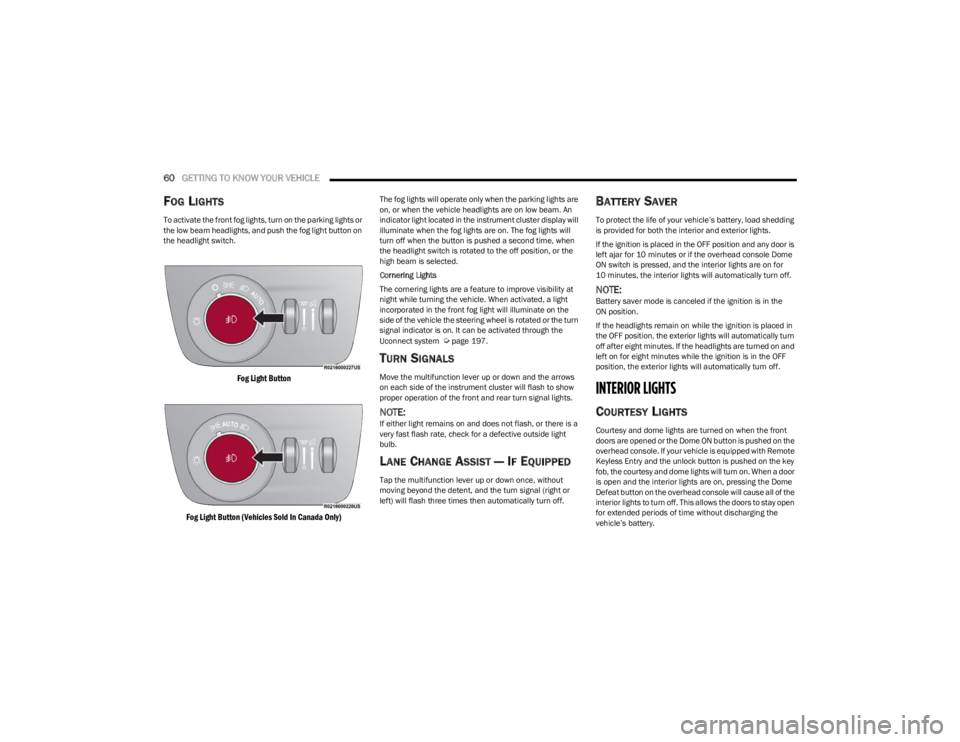
To activate the front fog lights, turn on the parking lights or
the low beam headlights, and push the fog light button on
the headlight switch.
Fog Light Button
Fog Light Button (Vehicles Sold In Canada Only)
The fog lights will operate only when the parking lights are
on, or when the vehicle headlights are on low beam. An
indicator light located in the instrument cluster display will
illuminate when the fog lights are on. The fog lights will
turn off when the button is pushed a second time, when
the headlight switch is rotated to the off position, or the
high beam is selected.
Cornering Lights
The cornering lights are a feature to improve visibility at
night while turning the vehicle. When activated, a light
incorporated in the front fog light will illuminate on the
side of the vehicle the steering wheel is rotated or the turn
signal indicator is on. It can be activated through the
Uconnect system
Úpage 197.
TURN SIGNALS
Move the multifunction lever up or down and the arrows
on each side of the instrument cluster will flash to show
proper operation of the front and rear turn signal lights.
NOTE:If either light remains on and does not flash, or there is a
very fast flash rate, check for a defective outside light
bulb.
LANE CHANGE ASSIST — IF EQUIPPED
Tap the multifunction lever up or down once, without
moving beyond the detent, and the turn signal (right or
left) will flash three times then automatically turn off.
BATTERY SAVER
To protect the life of your vehicle’s battery, load shedding
is provided for both the interior and exterior lights.
If the ignition is placed in the OFF position and any door is
left ajar for 10 minutes or if the overhead console Dome
ON switch is pressed, and the interior lights are on for
10 minutes, the interior lights will automatically turn off.
NOTE:Battery saver mode is canceled if the ignition is in the
ON position.
If the headlights remain on while the ignition is placed in
the OFF position, the exterior lights will automatically turn
off after eight minutes. If the headlights are turned on and
left on for eight minutes while the ignition is in the OFF
position, the exterior lights will automatically turn off.
INTERIOR LIGHTS
COURTESY LIGHTS
Courtesy and dome lights are turned on when the front
doors are opened or the Dome ON button is pushed on the
overhead console. If your vehicle is equipped with Remote
Keyless Entry and the unlock button is pushed on the key
fob, the courtesy and dome lights will turn on. When a door
is open and the interior lights are on, pressing the Dome
Defeat button on the overhead console will cause all of the
interior lights to turn off. This allows the doors to stay open
for extended periods of time without discharging the
vehicle’s battery.
23_WS_OM_EN_USC_t.book Page 60
Page 112 of 396
110GETTING TO KNOW YOUR INSTRUMENT PANEL
Drowsy Driver Detected Warning Light —
If Equipped
The Drowsy Driver Detected (DDD) system,
monitors certain vehicle movement and driver
interactions to identify patterns suggesting
drowsiness. If detected, the system sends the
driver an auditory and visual signal to take precaution. A
pop-up will display continuously until the driver presses
the OK button to clear.
Once the pop-up message is cleared, it is stored until the
condition is no longer true
Úpage 240.
Electric Power Steering (EPS) Fault
Warning Light
This warning light will turn on when there's a
fault with the EPS system Úpage 135.
Electronic Throttle Control (ETC) Warning
Light
This warning light will illuminate to indicate a
problem with the ETC system. If a problem is
detected while the vehicle is running, the light
will either stay on or flash depending on the
nature of the problem. Cycle the ignition when the vehicle is safely and
completely stopped and the transmission is placed in the
PARK position. The light should turn off. If the light
remains on with the vehicle running, your vehicle will
usually be drivable; however, see an authorized dealer for
service as soon as possible.
NOTE:This light may turn on if the accelerator and brake pedals
are pressed at the same time.
If the light continues to flash when the vehicle is running,
immediate service is required and you may experience
reduced performance, an elevated/rough idle, or engine
stall and your vehicle may require towing. The light will
come on when the ignition is placed in the ON/RUN
position and remain on briefly as a bulb check. If the light
does not come on during starting, have the system
checked by an authorized dealer.
Engine Coolant Temperature Warning
Light
This warning light warns of an overheated
engine condition. If the engine coolant
temperature is too high, this indicator will
illuminate and a single chime will sound. If the
temperature reaches the upper limit, a continuous chime
will sound for four minutes or until the engine is able to
cool; whichever comes first.
If the light turns on while driving, safely pull over and stop
the vehicle. If the Air Conditioning (A/C) system is on, turn
it off. Also, shift the transmission into NEUTRAL (N) and
idle the vehicle. If the temperature reading does not return
to normal, turn the engine off immediately and call for
service
Úpage 303.
Hood Open Warning Light
This warning light will illuminate when the hood
is left open and not fully closed.
NOTE:If the vehicle is moving, there will also be a single chime.
Liftgate Open Warning Light
This warning light will illuminate when the
liftgate is open.
NOTE:If the vehicle is moving, there will also be a single chime.
Night Vision Animal Detected Warning
Light — If Equipped
The Night Vision Animal Warning Light will
illuminate in red when an animal is detected
directly in the vehicle’s path, near the
headlights, and a collision is possible.
If enabled, a chime will sound and a video pop-up may
display when a detection occurs.WARNING!
Continued operation with reduced assist could pose a
safety risk to yourself and others. Service should be
obtained as soon as possible.
23_WS_OM_EN_USC_t.book Page 110
Page 122 of 396

120STARTING AND OPERATING
4. If the gear selector is not in PARK and the ENGINE
START/STOP button is pushed once with the vehicle
speed above 5 mph (8 km/h), the instrument cluster will display a “ Vehicle Not In Park ” message and the
engine will remain running. Never leave a vehicle out
of the PARK position, or it could roll.
NOTE:If the gear selector is not in PARK, and the ENGINE START/
STOP button is pushed once with the vehicle speed below
5 mph (8 km/h), the engine will shut off and the ignition
will remain in the ON/RUN position. If vehicle speed drops
below 1.2 mph (1.9 km/h), the vehicle may AutoPark
Úpage 120.
ENGINE START/STOP Button Functions — With Driver’s
Foot Off The Brake Pedal (In PARK Or NEUTRAL Position)
The ENGINE START/STOP button operates similar to an
ignition switch. It has two positions: OFF, and RUN. To
change the ignition positions without starting the vehicle
and use the accessories, follow these directions:
1. Start with the ignition in the OFF position.
2. Push the ENGINE START/STOP button once to place the ignition in the ON/RUN position.
3. Push the ENGINE START/STOP button a second time to return the ignition to the OFF position.
NOTE:Only press one pedal at a time while driving the vehicle.
Torque performance of the vehicle could be reduced if
both pedals are pressed at the same time. If pressure is
detected on both pedals simultaneously, a warning
message will display in the instrument cluster
Úpage 96.
AUTOPARK
AutoPark is a supplemental feature to assist in placing the
vehicle in PARK (P) should the situations on the following
pages occur. It is a back-up system and should not be
relied upon as the primary method by which the driver
shifts the vehicle into PARK.
The conditions under which AutoPark will engage are
outlined on the following pages.
If the vehicle is not in PARK and the driver turns off the
engine, the vehicle may AutoPark.
AutoPark will engage when all of these conditions are met:
Vehicle is equipped with an 8-speed transmission
Vehicle is not in PARK
Vehicle speed is 1.2 mph (1.9 km/h) or less
Ignition is switched from RUN to OFF
NOTE:For Keyless Enter ‘n Go™ equipped vehicles, the engine
will turn off and the ignition switch will change to ON/RUN
position. After 30 minutes the ignition switches to OFF
automatically, unless the driver turns the ignition
switch OFF.
If the vehicle is not in PARK and the driver exits the vehicle
with the engine running, the vehicle may AutoPark.
AutoPark will engage when all of these conditions are met:
Vehicle is equipped with an 8-speed transmission
Vehicle is not in PARK
Vehicle speed is 1.2 mph (1.9 km/h) or less
Driver’s seat belt is unbuckled
Driver’s door is ajar
Brake pedal is not pressed
The message “ AutoPark Engaged Shift To P Then Shift To
Gear ” will display in the instrument cluster.
NOTE:In some cases the ParkSense graphic will be displayed in
the instrument cluster. In these cases, the gear selector
must be returned to “P” to select desired gear.
If the driver shifts into PARK while moving, the vehicle may
AutoPark.
AutoPark will engage ONLY when vehicle speed is 1.2 mph
(1.9 km/h) or less.
The message “ Vehicle Speed Is Too High To Shift To P ” will
be displayed in the instrument cluster if vehicle speed is
above 1.2 mph (1.9 km/h).
WARNING!
Driver inattention could lead to failure to place the
vehicle in PARK. ALWAYS DO A VISUAL CHECK that
your vehicle is in PARK by verifying that a solid (not
blinking) “P” is indicated in the instrument cluster
display and on the gear selector. If the "P" indicator is
blinking, your vehicle is not in PARK. As an added
precaution, always apply the parking brake when
exiting the vehicle.
AutoPark is a supplemental feature. It is not
designed to replace the need to shift your vehicle
into PARK. It is a back up system and should not be
relied upon as the primary method by which the
driver shifts the vehicle into PARK.
23_WS_OM_EN_USC_t.book Page 120
Page 127 of 396

STARTING AND OPERATING125
(Continued)
The following conditions must be met for Auto Hold to
activate:
Driver’s door is closed
Driver's seat belt is fastened
Vehicle is at a standstill
Forward gear is selected
ACC is not engaged
EPB is not applied
ParkSense Active Park Assist System auto parking
maneuver is not activated
Brake Maintenance Mode
We recommend having your brakes serviced by an
authorized dealer. You should only make repairs for which
you have the knowledge and the right equipment. You
should only enter Brake Maintenance mode during brake
service.
When servicing your rear brakes, it may be necessary for
you or your technician to push the rear piston into the rear
caliper bore. With the EPB system, this can only be done
after retracting the EPB actuator. Fortunately, actuator
retraction can be done easily by entering the Brake
Maintenance mode through the Uconnect Settings in your
vehicle. This menu-based system will guide you through
the steps necessary to retract the EPB actuator in order to
perform rear brake service. Maintenance mode has requirements that must be met in
order to be activated:
The vehicle must be at a standstill.
The parking brake must be unapplied.
The transmission must be in PARK or NEUTRAL.
While in Maintenance mode, the EPB Warning Light will
flash continuously while the ignition is ON.
When brake service work is complete, the following steps
must be followed to reset the parking brake system to
normal operation:
Ensure the vehicle is at a standstill.
Press the brake pedal with moderate force.
Apply the EPB switch.
AUTOMATIC TRANSMISSION
You must press and hold the brake pedal while shifting out
of PARK.
WARNING!
You can be badly injured working on or around a motor
vehicle. Do only that service work for which you have
the knowledge and the right equipment. If you have any
doubt about your ability to perform a service job, take
your vehicle to a competent mechanic.
WARNING!
Never use the PARK (P) position as a substitute for
the parking brake. Always apply the parking brake
fully when exiting the vehicle to guard against vehicle
movement and possible injury or damage.
Your vehicle could move and injure you and others if
it is not in PARK. Check by trying to move the trans -
mission gear selector out of PARK with the brake
pedal released. Make sure the transmission is in
PARK before exiting the vehicle.
The transmission may not engage PARK if the vehicle
is moving. Always bring the vehicle to a complete
stop before shifting to PARK, and verify that the
transmission gear position indicator solidly indicates
PARK without blinking. Ensure that the vehicle is
completely stopped, and the PARK position is prop -
erly indicated, before exiting the vehicle.
It is dangerous to shift out of PARK or NEUTRAL (N) if
the engine speed is higher than idle speed. If your
foot is not firmly pressing the brake pedal, the
vehicle could accelerate quickly forward or in
reverse. You could lose control of the vehicle and hit
someone or something. Only shift into gear when the
engine is idling normally and your foot is firmly
pressing the brake pedal.
4
23_WS_OM_EN_USC_t.book Page 125
Page 135 of 396

STARTING AND OPERATING133
Normal Ride Height (NRH) – This is the standard posi -
tion of the suspension and is meant for normal driving.
Off-Road 1 (OR1) (Raises the vehicle approximately
1.2 inches [30 mm]) – This is the primary position for
all off-road driving until OR2 is needed. A smoother and
more comfortable ride will result. Push the toggle
switch forward once from the NRH position while the
vehicle speed is below 38 mph (61 km/h). When in the
OR1 position, if the vehicle speed remains between
40 mph (64 km/h) and 50 mph (80 km/h) for greater than 20 seconds or if the vehicle speed exceeds
50 mph (80 km/h), the vehicle will be automatically
lowered to NRH
Úpage 193. OR1 is unavailable on
4x2 air suspension vehicles.
Off-Road 2 (OR2) (Raises the vehicle approximately
2.0 inches [51 mm]) – This position is intended for
off-roading use only where maximum ground clearance
is required. To enter OR2, push the toggle switch
forward twice from the NRH position or once from the
OR1 position while vehicle speed is below 20 mph
(32 km/h). While in OR2, if the vehicle speed exceeds
25 mph (40 km/h) the vehicle height will be automati -
cally lowered to OR1
Úpage 193. OR2 is unavailable
on 4x2 air suspension vehicles.
Aero Height (Lowers the vehicle approximately
-0.6 inches [-15 mm]) – This position provides
improved aerodynamics by lowering the vehicle. The
vehicle will automatically enter Aero Height when the
vehicle speed remains between 62 mph (100 km/h)
and 66 mph (106 km/h) for greater than 20 seconds
or if the vehicle speed exceeds 66 mph (106 km/h). The vehicle will return to Default Ride Height from Aero
Height if the vehicle speed remains between 30 mph
(48 km/h) and 35 mph (56 km/h) for greater than
20 seconds or if the vehicle speed falls below 30 mph
(48 km/h). The vehicle will enter Aero Height, regard
-
less of vehicle speed if the vehicle is in “SPORT” mode.
Entry/Exit Height (Lowers the vehicle approximately
-1.6 inches [-40 mm]) – This position lowers the
vehicle for easier passenger entry and exit as well as
lowering the rear of the vehicle for easier loading and
unloading of cargo. To enter Entry/Exit Height, push the
toggle switch down twice from NRH while the vehicle
speed is below 6 mph (10 km/h). To exit Entry/Exit
Height, push the UP button once while in Entry/Exit
Height or drive the vehicle over 4 mph (6 km/h).
NOTE:Automatic lowering of the vehicle into Entry/Exit Height
can be enabled through the Uconnect Touchscreen Radio.
If this feature is enabled, the vehicle will only lower if the
gear selector is in PARK, the terrain switch is in AUTO, the
transfer case is in AUTO and the vehicle level is either in
Normal or Aero Height. The vehicle will not automatically
lower if the air suspension level is in OR2 or OR1. When
towing, the automatic Entry/Exit feature may be disabled
through the Uconnect Touchscreen Radio to prevent
vehicle and trailer movement when gear selector is moved
to PARK. The Selec-Terrain system will automatically change the
vehicle to the proper height based on the position of the
Selec-Terrain switch. The height can be changed from the
default Selec-Terrain setting by normal use of the air
suspension buttons
Úpage 131.
The system requires that the engine be running for all
changes. When lowering the vehicle all of the doors,
including the liftgate, must be closed. If a door is opened
at any time while the vehicle is lowering the change will not
be completed until the open door(s) is/are closed.
The Quadra-Lift Air Suspension system uses a lifting and
lowering pattern which keeps the headlights from
incorrectly shining into oncoming traffic. When raising the
vehicle, the rear of the vehicle will move up first and then
the front. When lowering the vehicle, the front will move
down first and then the rear.
After the engine is turned off, it may be noticed that the air
suspension system operates briefly; this is normal. The
system is correcting the position of the vehicle to ensure a
proper appearance.
To assist with changing a spare tire, the Quadra-Lift Air
Suspension system has a feature which allows the
automatic leveling to be disabled
Úpage 197.
4
23_WS_OM_EN_USC_t.book Page 133
Page 136 of 396

134STARTING AND OPERATING
NOTE:Default Ride Height:
Select Aero Height or Normal Ride Height as the default
for all vehicle speeds and operation. This is the
selected height that the suspension will level for speed
changes (e.g. raising from Entry/Exit Height at speed,
lowering from Off Road Height at speed, etc.).
Default ride height can be changed by manually
adjusting the Quadra-Lift switch to Normal Ride Height
or Aero Ride Height and stay in the selected height for
2.5 seconds. It will be stored as the default ride height
and the height will be maintained until a new default
ride height is selected.
If equipped with a Uconnect Touchscreen Radio, all
enabling/disabling of air suspension features must be
done through the radio
Úpage 197.
AIR SUSPENSION MODES
The Air Suspension system has multiple modes to protect
the system in unique situations: Tire/Jack Mode
To assist with changing a spare tire, the air suspension
system has a feature which allows the automatic leveling
to be disabled
Úpage 197. Tire/Jack mode is used for
connecting a trailer with a weight-distributing hitch
Úpage 179.
NOTE:This mode is intended to be enabled with the engine
running.
Auto Entry/Exit Mode
To assist in entering and exiting the vehicle, the air
suspension system has a feature which automatically
lowers the vehicle to Entry/Exit Height
Úpage 197.
NOTE:This mode is intended to be enabled with the engine
running. When towing, the automatic Entry/Exit feature
may be disabled through the Uconnect Touchscreen Radio
to prevent vehicle and trailer movement when the gear
selector is moved to PARK.
Transport Mode
To assist with flatbed towing, the air suspension system
has a feature which will put the vehicle into Entry/Exit
Height and disable the automatic load leveling system
Úpage 197.
NOTE:This mode is intended to be enabled with engine running. Suspension Display Messages Mode
The “Suspension Display Messages” setting allows you to
only display suspension warnings instead of all
suspension messages (i.e., “Normal Height Achieved”)
Úpage 197.
NOTE:This mode is intended to be enabled with the engine
running.
Wheel Alignment Mode
Before performing a wheel alignment this mode must be
enabled which will move the vehicle to Normal Ride Height
and disable the air suspension during the alignment
Úpage 197.
NOTE:This mode is intended to be enabled with the engine
running.
If equipped with a Uconnect Touchscreen Radio, all
enabling/disabling of air suspension features must be
done through the radio
Úpage 197.
INSTRUMENT CLUSTER DISPLAY
M
ESSAGES
When the appropriate conditions exist, a message will
appear in the instrument cluster Úpage 99.
WARNING!
The air suspension system uses a high pressure
volume of air to operate the system. To avoid personal
injury or damage to the system, see an authorized
dealer for service.
23_WS_OM_EN_USC_t.book Page 134
Page 137 of 396
STARTING AND OPERATING135
OPERATION
The indicator lamps 1 through 5 will illuminate to show the
current position of the vehicle. Flashing indicator lamps
will show a position which the system is working to
achieve. When raising, if multiple indicator lamps are
flashing while raising, the highest flashing indicator lamp
is the position the system is working to achieve. When
lowering, if multiple indicators are flashing while lowering
the lowest solid indicator lamp is the position the system
is working to achieve.
Toggle up once moves the suspension one position higher
from the current position, assuming all conditions are met
(i.e., engine running, speed below threshold, etc.). Toggle
up can be pushed multiple times. Each toggle up will raise
the requested level by one position up to a maximum
position of OR2 or the highest position allowed based on
current conditions (i.e., vehicle speed, etc.).
Toggle down once moves the suspension one position
lower from the current level, assuming all conditions are
met (i.e., engine running, doors closed, speed below
threshold, etc.). Toggle down can be pushed multiple
times. Each toggle down will lower the requested level by
one position down to a minimum of Park mode or the
lowest position allowed based on current conditions (i.e.,
vehicle speed, etc.) Automatic height changes will occur based on vehicle
speed and the current vehicle height. The indicator lamps
and instrument cluster display messages will operate the
same for automatic changes and user requested changes.
Off-Road 2 (OR2) – Indicator lamps 1 through 5 will be
illuminated.
Off-Road 1 (OR1) – Indicator lamps 2 through 5 will be
illuminated.
Normal Ride Height (NRH) – Indicator lamps 3 through
5 will be illuminated.
Aero Height – Indicator lamps 4 and 5 will be illumi -
nated.
Entry/Exit Height – Indicator lamp 5 will be illuminated.
Transport Mode – No indicator lamps will be illumi -
nated. Driving or deselecting the mode in the Uconnect
system will disable Transport mode.
Tire/Jack Mode – Indicator lamps 1 and 5 will be illumi -
nated. Driving or deselecting the mode in the Uconnect
system will disable Tire/Jack mode.
Wheel Alignment Mode – Indicator lamps 4 and 5 will
be illuminated. Driving or deselecting the mode in the
Uconnect system will disable Wheel Alignment mode.
FUEL SAVER TECHNOLOGY 5.7L AND 6.4L
ONLY — IF EQUIPPED
This feature offers improved fuel economy by shutting off
four of the engine's eight cylinders during light load and
cruise conditions. The system is automatic with no driver
inputs or additional driving skills required.
NOTE:This system may take some time to return to full function -
ality after a battery disconnect.
POWER STEERING
The electric power steering system is designed to provide
increased vehicle response and ease of maneuverability
in tight spaces. The power steering system adapts to
different driving conditions. If the electric power steering
system experiences a fault that prevents it from providing
assist, you will still have the ability to steer the vehicle
manually.
NOTE:Alternate electric power steering efforts can be selected
through the Uconnect System Úpage 197.
If the Electric Power Steering warning icon is
displayed and the “SERVICE POWER
STEERING” or the “POWER STEERING ASSIST
OFF – SERVICE SYSTEM” message is displayed
within the instrument cluster display, this indicates the
vehicle needs to be taken to an authorized dealer for
service
Úpage 108.
WARNING!
Continued operation with reduced assist could pose a
safety risk to yourself and others. Service should be
obtained as soon as possible.
4
23_WS_OM_EN_USC_t.book Page 135