clock JEEP WRANGLER 2010 JK / 3.G User Guide
[x] Cancel search | Manufacturer: JEEP, Model Year: 2010, Model line: WRANGLER, Model: JEEP WRANGLER 2010 JK / 3.GPages: 554, PDF Size: 10.76 MB
Page 299 of 554
INFO Button
Press the INFO button for an RDS station (one with call
letters displayed). The radio will return a Radio Text
message broadcast from an FM station (FM mode only).
RW/FF
Pressing the RW (Rewind) or FF (Fast Forward) buttons
causes the tuner to search for the next frequency in the
direction of the arrows. This feature operates in either
AM or FM frequencies.
TUNE Control
Turn the rotary TUNE/SCROLL control knob clockwise
to increase or counterclockwise to decrease the frequency.
Setting the Tone, Balance, and Fade
Push the rotary TUNE/SCROLL control knob and BASS
will display. Turn the TUNE/SCROLL control knob to
the right or left to increase or decrease the bass tones.Push the rotary TUNE/SCROLL control knob a second
time and MID will display. Turn the TUNE/SCROLL
control knob to the right or left to increase or decrease the
mid-range tones.
Push the rotary TUNE/SCROLL control knob a third
time and TREBLE will display. Turn the TUNE/SCROLL
control knob to the right or left to increase or decrease the
treble tones.
Push the rotary TUNE/SCROLL control knob a fourth
time and BALANCE will display. Turn the TUNE/
SCROLL control knob to the right or left to adjust the
sound level from the right or left side speakers.
Push the rotary TUNE/SCROLL control knob a fifth time
and FADE will display. Turn the TUNE/SCROLL control
knob to the left or right to adjust the sound level between
the front and rear speakers.
298 UNDERSTANDING YOUR INSTRUMENT PANEL
Page 301 of 554
Program Type16-Digit Character Dis-
play
Soft Soft
Soft Rock Soft Rck
Soft Rhythm and Blues Soft R&B
Sports Sports
Talk Talk
Top 40 Top 40
Weather Weather
By pressing the SEEK button when the Music Type icon
is displayed, the radio will be tuned to the next frequency
station with the same selected Music Type name. The
Music Type function only operates when in the FM
mode.
If a preset button is activated while in the Music Type
(Program Type) mode, the Music Type mode will be
exited and the radio will tune to the preset station.SETUP Button
Pressing the SETUP button allows you to select between
the following items:
•Set Clock — Pressing the SELECT button will allow
you to set the clock. Adjust the hours by turning the
TUNE/SCROLL control knob. After adjusting the
hours, press the TUNE/SCROLL control knob to set
the minutes. The minutes will begin to blink. Adjust
the minutes using the right side TUNE/SCROLL
control knob. Press the TUNE/SCROLL control knob
to save time change.
AM/FM Button
Press the button to select either AM or FM mode.
SET/RND Button — To Set the Pushbutton
Memory
When you are receiving a station that you wish to
commit to pushbutton memory, press the SET/RND
button. The symbol SET 1 will now show in the display
300 UNDERSTANDING YOUR INSTRUMENT PANEL
Page 311 of 554
additional three seconds will make the radio display the
Song Title all of the time (press and hold again to return
to normal display).
RW/FF
Pressing the RW (Rewind) or FF (Fast Forward) buttons
causes the tuner to search for the next channel in the
direction of the arrows.
TUNE Control (Rotary)
Turn the rotary TUNE/SCROLL control knob clockwise
to increase or counterclockwise to decrease the channel.
MUSIC TYPE Button
Pressing this button once will turn on the Music Type
mode for five seconds. Pressing the MUSIC TYPE button
or turning the TUNE/SCROLL control knob within five
seconds will allow the program format type to be se-
lected.Toggle the MUSIC TYPE button again to select the music
type.
By pressing the SEEK button when the Music Type
function is active, the radio will be tuned to the next
channel with the same selected Music Type name.
If a preset button is activated while in the Music Type
(Program Type) mode, the Music Type mode will be
exited and the radio will tune to the preset channel.
SETUP Button
Pressing the SETUP button allows you to select the
following items:
•Display Sirius ID number — Press the AUDIO/
SELECT button to display the Sirius ID number. This
number is used to activate, deactivate, or change the
Sirius subscription.
310 UNDERSTANDING YOUR INSTRUMENT PANEL
Page 315 of 554
SEEK Buttons
Press and release the SEEK buttons to search for the next
channel in Satellite mode. Press the right switch to seek
up and the left switch to seek down. The radio will
remain tuned to the new channel until you make another
selection. Holding either button will bypass channels
without stopping until you release it.
SCAN Button (When Equipped)
Pressing the SCAN button causes the tuner to search for
the next channel, pausing for eight seconds before con-
tinuing to the next. To stop the search, press the SCAN
button a second time.
INFO Button — Except REU Radio
Pressing the INFO button will cycle the display informa-
tion between Artist, Song Title, and Composer (if avail-
able). Also, pressing and holding the INFO button for an
additional three seconds will make the radio display the
song title all of the time (press and hold again to return to
normal display).
INFO Button — REU Radio
Pressing the INFO button will display information about
Artist, Song Title, and Composer (if available). Pressing
the INFO button again will close the INFO screen.
RW/FF
Pressing the RW (Rewind) or FF (Fast Forward) buttons
causes the tuner to search for the next channel in the
direction of the arrows.
TUNE Control (Rotary)
Turn the rotary TUNE/SCROLL control knob clockwise
to increase or counterclockwise to decrease the channel.
MUSIC TYPE Button — Except REU Radio
Pressing this button once will turn on the Music Type
mode for five seconds. Pressing the MUSIC TYPE button
or turning the TUNE/SCROLL control knob within five
seconds will allow the program format type to be se-
lected.
314 UNDERSTANDING YOUR INSTRUMENT PANEL
Page 379 of 554
WARNING! (Continued)
•HSA is not a parking brake. If you stop the vehicle
on a hill without putting the transmission in
PARK and using the parking brake, it will roll
down the hill and could cause a collision with
another vehicle or object. Always remember to use
the parking brake while parking on a hill, and that
the driver is responsible for braking the vehicle.
HSA Off
If you wish to turn off the HSA system, follow this
procedure:
1. Start with the engine off and vehicle in PARK (auto-
matic transmission) or NEUTRAL with clutch out
(manual transmission) with wheels straight. Apply park-
ing brake on manual transmission vehicle.
2. Start the engine.3. With the engine running, the brake applied, and the
clutch out, rotate the steering wheel 180° counterclock-
wise from center.
4. Press the ESP OFF switch four times within twenty
seconds.
5. Rotate the steering wheel 360° clockwise (180° clock-
wise from center).
6. Cycle ignition switch OFF then ON.
7. If the sequence was completed properly, the “ESP/
TCS Indicator Light” will blink several times to confirm
HSA is off.
Steps 1-7 must be completed within 90 seconds to turn off
HSA. Repeat steps 1-7 to re-enable HSA functionality.
Electronic Roll Mitigation (ERM)
This system anticipates the potential for wheel lift by
monitoring the driver ’s steering wheel input and the
378 STARTING AND OPERATING
Page 386 of 554
The following procedure will disable (or re-enable) ESP
functionality in the vehicle:
1. Shift the transfer case into the 4H range position.
2. Turn the steering wheel until it is centered and the
wheels are pointed straight ahead.
3. Cycle the ignition key OFF to ON.
4. Wait approximately five seconds for the system bulb
check.
5. Turn and hold the steering wheel one-half turn to the
right (clockwise).
6. Press and hold the ESP OFF button for seven seconds.
7. Turn the steering wheel back to center, and turn and
hold an additional one-half turn to the left (counterclock-
wise).
8. Press and hold the ESP OFF button for seven seconds.9. Turn the steering wheel back to center.
10. Press and hold the ESP OFF button for seven seconds.
11. Cycle the ignition key to OFF.
After performing the ESP disable procedure correctly,
“ESP OFF” will be displayed in the odometer for approxi-
mately 12 seconds each time the ignition is moved to ON.
Repeating the ESP disable procedure will re-enable nor-
mal ESP operation.
ESP/BAS Warning Light
The malfunction indicator lamp for the ESP is
combined with the BAS indicator. The “ESP/
BAS Warning Light” in the instrument cluster
comes on when the ignition switch is turned to
the “ON” position. It should go out with the engine
running.
5
STARTING AND OPERATING 385
Page 444 of 554
Spare Tire Stowage
To remove the spare tire from the carrier, remove the tire
cover, if equipped, and remove the lug nuts with the lug
wrench turning them counterclockwise.
NOTE:If you have added aftermarket accessories to the
spare tire mounted carrier, it cannot exceed a gross
weight of 50 lbs (23 kg) including the weight of the spare
tire.
Preparations For Jacking
1. Park on a firm, level surface. Avoid ice or slippery
areas.
WARNING!
Do not attempt to change a tire on the side of the
vehicle close to moving traffic. Pull far enough off
the road to avoid being hit when operating the jack
or changing the wheel. 2. Turn on the Hazard Warning flasher.
3. Set the parking brake.
4. Shift the automatic transmission into PARK, or a
manual transmission into REVERSE.
5. Turn the ignition to LOCK.
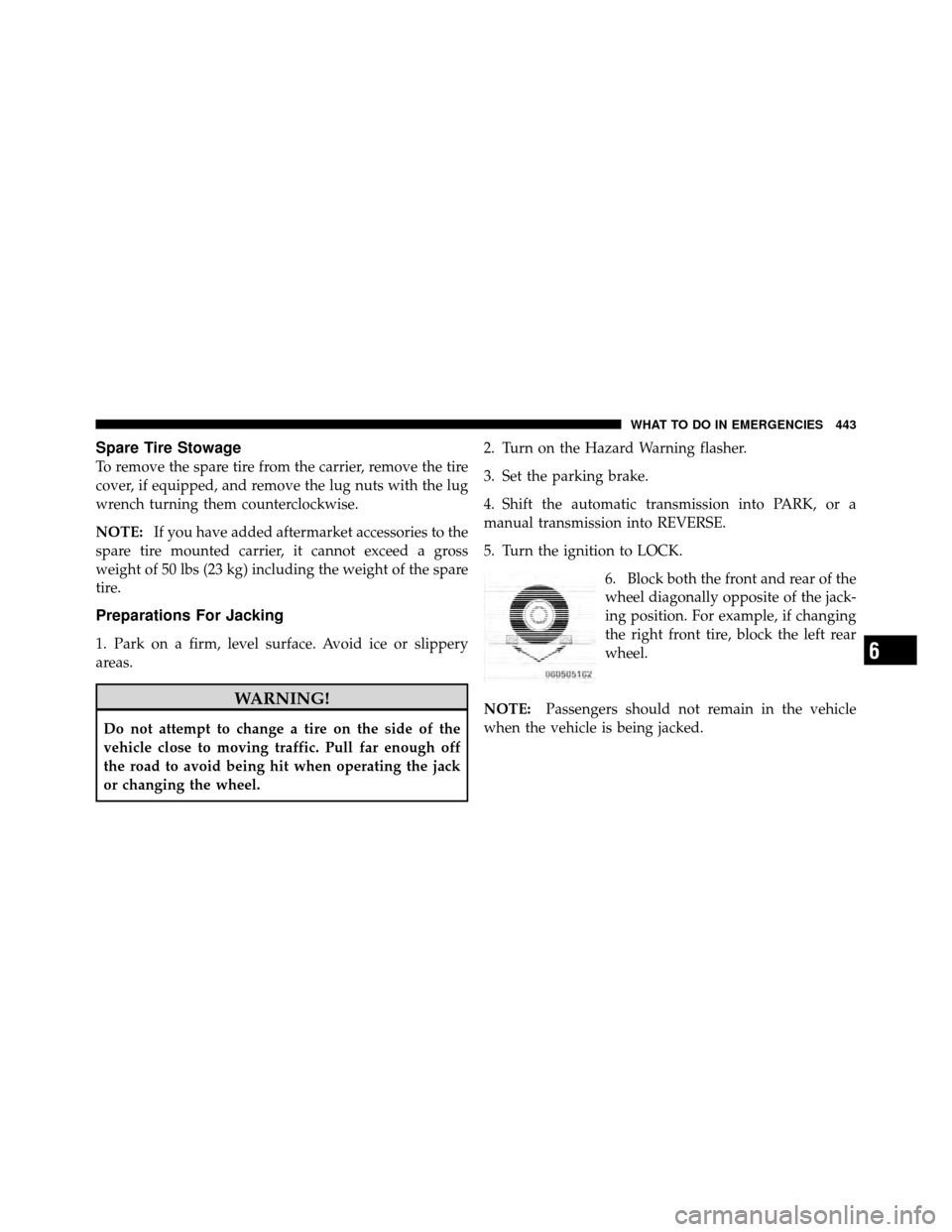
6. Block both the front and rear of the
wheel diagonally opposite of the jack-
ing position. For example, if changing
the right front tire, block the left rear
wheel.
NOTE: Passengers should not remain in the vehicle
when the vehicle is being jacked.
6
WHAT TO DO IN EMERGENCIES 443
Page 447 of 554
WARNING!
Raising the vehicle higher than necessary can make
the vehicle less stable and cause an accident. It could
slip off the jack and hurt someone near it. Raise the
vehicle only enough to remove the tire.
6. Remove the lug nuts and wheel.
7. Position the spare wheel/tire on the vehicle and install
the lug nuts with the cone-shaped end toward the wheel.
Lightly tighten the lug nuts clockwise. To avoid the risk
of forcing the vehicle off the jack, do not tighten the nuts
fully until the vehicle has been lowered.
8. Lower the vehicle by turning the jack screw to the left,
and remove the jack and wheel blocks.
9. Finish tightening the lug nuts. Push down on the
wrench while tightening for increased leverage. Alternate
nuts until each nut has been tightened twice. The correct wheel nut tightness is 95 ft lbs (130 N·m). If in doubt
about the correct tightness, have them checked with a
torque wrench by your authorized dealer or at a service
station.
10. Remove the jack assembly and wheel blocks.
11. Secure the tire, jack, and tools in their proper
locations.
WARNING!
A loose tire or jack, thrown forward in a collision or
hard stop, could endanger the occupants of the ve-
hicle. Always stow the jack parts and the spare tire in
the places provided.
JUMP-STARTING PROCEDURES
If your vehicle has a discharged battery it can be jump-
started using a set of jumper cables and a battery in
another vehicle or by using a portable battery booster
446 WHAT TO DO IN EMERGENCIES
Page 499 of 554
BULB REPLACEMENT
NOTE:Lens fogging can occur under certain atmo-
spheric conditions. This will usually clear as atmospheric
conditions change to allow the condensation to change
back into a vapor. Turning the lamps on will usually
accelerate the clearing process.
Headlamp
1. Open hood and support using prop rod.
2. Remove the front grille. Turn the retainers along the
top 1/4 turn counterclockwise and remove.
3. Pull the bottom of the grille away starting at one side
and working toward the other.
4. Turn both park and turn signal socket assemblies 1/4
turn counterclockwise and remove.
5. Remove the four screws holding the metal retaining
ring. 6. Remove the lamp from the collar.
7. Grasp the bulb and turn 1/4 turn counterclockwise.
8. Pull the bulb from the housing.
9. Push connector locking tab to the unlock position.
10. Remove connector from bulb.
11. Push connector onto new bulb base, and push the
connector locking tab to the lock position.
CAUTION!
Do not touch the new bulb with your fingers. Oil
contamination will severely shorten bulb life. If the
bulb comes in contact with any oily surface, clean the
bulb with rubbing alcohol.
12. Reinstall bulb housing. Rotate the bulb 1/4 turn
clockwise.
498 MAINTAINING YOUR VEHICLE
Page 500 of 554
Front Park/Turn Signal
1. Remove the front grille. Turn the retainers along the
top 1/4 turn counterclockwise and remove.
2. Pull the bottom of the grille away starting at one side
and working toward the other.
3. Turn the socket assembly 1/4 turn counterclockwise
and remove from housing. Pull the bulb straight from the
socket to replace.
Front Side Marker
1. Reach under the front fender flare and locate the front
side marker socket.
2. Turn the socket assembly counterclockwise 1/3 turn
and remove it from the housing. Pull the bulb straight
from the socket to replace.
Front Fog Lamp
1. Locate the front fog lamp in the front fascia, and
disconnect the electrical connector from underneath.
2. Squeeze locking tabs on bulb inward toward center of
the bulb. Pull bulb straight out of housing.
CAUTION!
Do not touch the new bulb with your fingers. Oil
contamination will severely shorten bulb life. If the
bulb comes in contact with any oily surface, clean the
bulb with rubbing alcohol.
7
MAINTAINING YOUR VEHICLE 499