ignition JEEP WRANGLER 2010 User Guide
[x] Cancel search | Manufacturer: JEEP, Model Year: 2010, Model line: WRANGLER, Model: JEEP WRANGLER 2010Pages: 554, PDF Size: 10.16 MB
Page 59 of 554
The ORC determines if a side collision requires the
side airbags to inflate based on the severity and type of
collision.
Based on the severity and type of collision, the side
airbag inflator on the crash side of the vehicle is trig-
gered, releasing a quantity of non-toxic gas. The inflating
side airbag exits through the seat seam into the space
between the occupant and the door. The side airbags fully
inflate in about 10 milliseconds. The side airbag moves at
a very high speed and with such a high force, that it
could injure you if you are not seated properly, or if items
are positioned in the area where the side airbag inflates.
This especially applies to children.
•The Knee Impact Bolsters help protect the knees of
the driver and the front passenger, and position front
occupants for the best interaction with the Advanced
Front Airbag.
Enhanced Accident Response System
In the event of an impact causing airbag deployment, if
the communication network remains intact, and the
power remains intact, depending on the nature of the
event the ORC will determine whether to have the
Enhanced Accident Response System perform the follow-
ing functions:
•Cut off fuel to the engine.
•Flash hazard lights as long as the battery has power or
until the ignition key is turned off.
•Turn on the interior lights, which remain on as long as
the battery has power or until the ignition key is
removed.
•Unlock the doors automatically.
If a Deployment Occurs
The front airbags are designed to deflate immediately
after deployment.
58 THINGS TO KNOW BEFORE STARTING YOUR VEHICLE
Page 139 of 554
NOTE:
•If either light remains on and does not flash, or there is
a very fast flash rate, check for a defective outside light
bulb. If an indicator fails to light when the lever is
moved, it would suggest that the indicator bulb is
defective.
•A tone will chime if the turn signals are left on for
more than 1 mile (2 km).
Lane Change Assist
Tap the lever up or down once, without moving beyond
the detent, and the turn signal (right or left) will flash
three times then automatically turn off.
Lights-On Reminder
If the headlights or parking lights are on after the ignition
is turned OFF, a chime will sound when the driver’s door
is opened.
High/Low Beam Switch
Push the multifunction lever away from you to switch
the headlights to high beam. Pull the lever toward you to
switch the headlights back to low beam.
Flash-To-Pass
You can signal another vehicle with your headlights by
lightly pulling the multifunction lever toward the steer-
ing wheel. This will turn on the high beam headlights
until the lever is released.
Front Fog Lights — If Equipped
The front fog light switch is located on the multi-
function lever. To activate the front fog lights, turn
on the parking or low beam headlights and pull
out the end of the lever.
NOTE: The fog lights will only operate with the parking
lights or the headlights on low beam. Selecting high
beam headlights will turn off the fog lights.
Page 141 of 554
Interior Lights
The overhead light will turn on when a door is opened. It
may also be turned on by rotating the control for the
dimmer switch on the multifunction lever fully upward.
The overhead light will automatically turn off in approxi-
mately 10 minutes if a door is left open or the dimmer
control is left in the dome light position. Turn the ignition
switch ON to restore the overhead light operation.
Cargo Lamp
The courtesy and dome lights will turn on when the front
doors are opened, by rotating the control for the dimmer
switch on the multifunction lever fully upward, or if
equipped, when the UNLOCK button is pressed on the
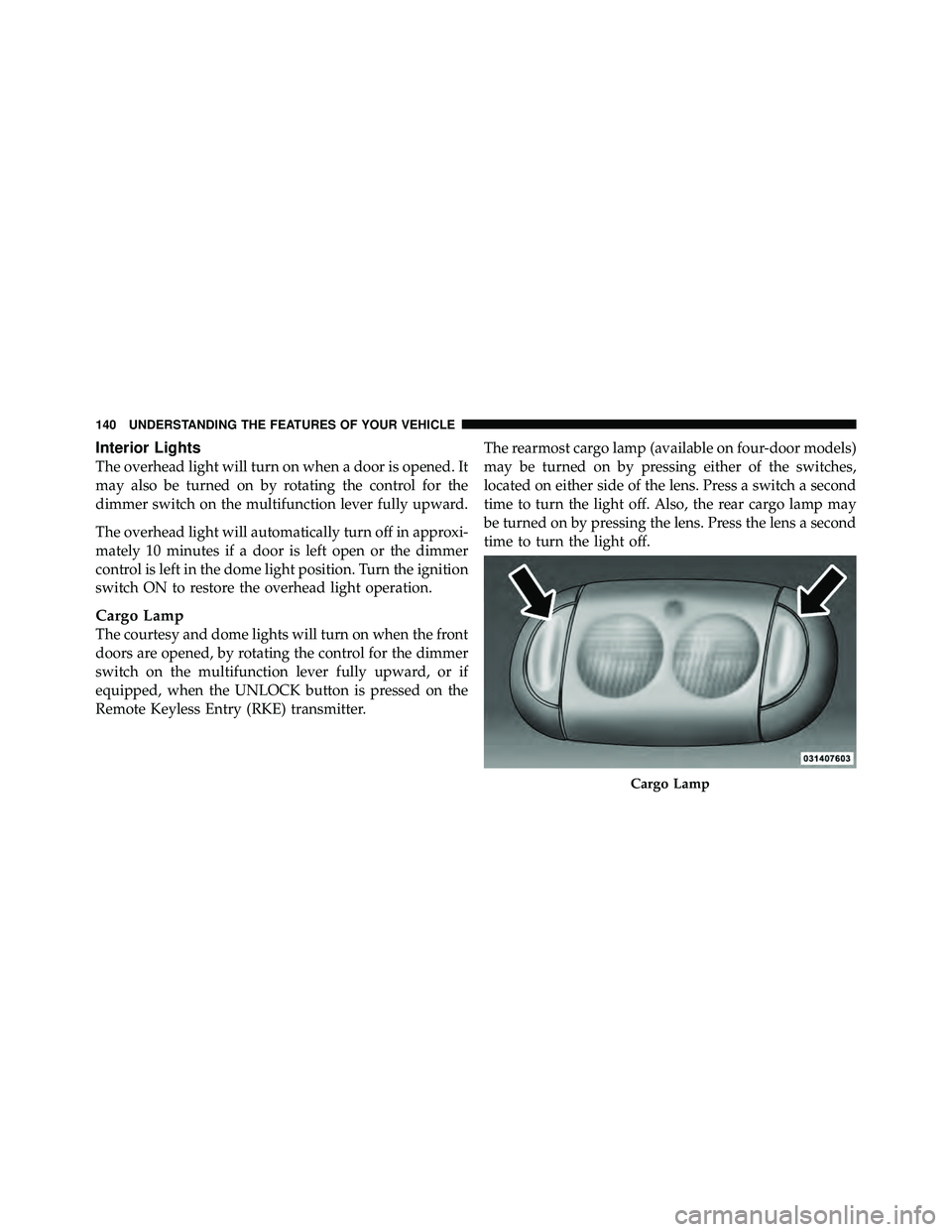
Remote Keyless Entry (RKE) transmitter.The rearmost cargo lamp (available on four-door models)
may be turned on by pressing either of the switches,
located on either side of the lens. Press a switch a second
time to turn the light off. Also, the rear cargo lamp may
be turned on by pressing the lens. Press the lens a second
time to turn the light off.
Page 239 of 554
REAR WINDOW FEATURES — HARD TOP ONLY
Rear Window Wiper/Washer — If Equipped
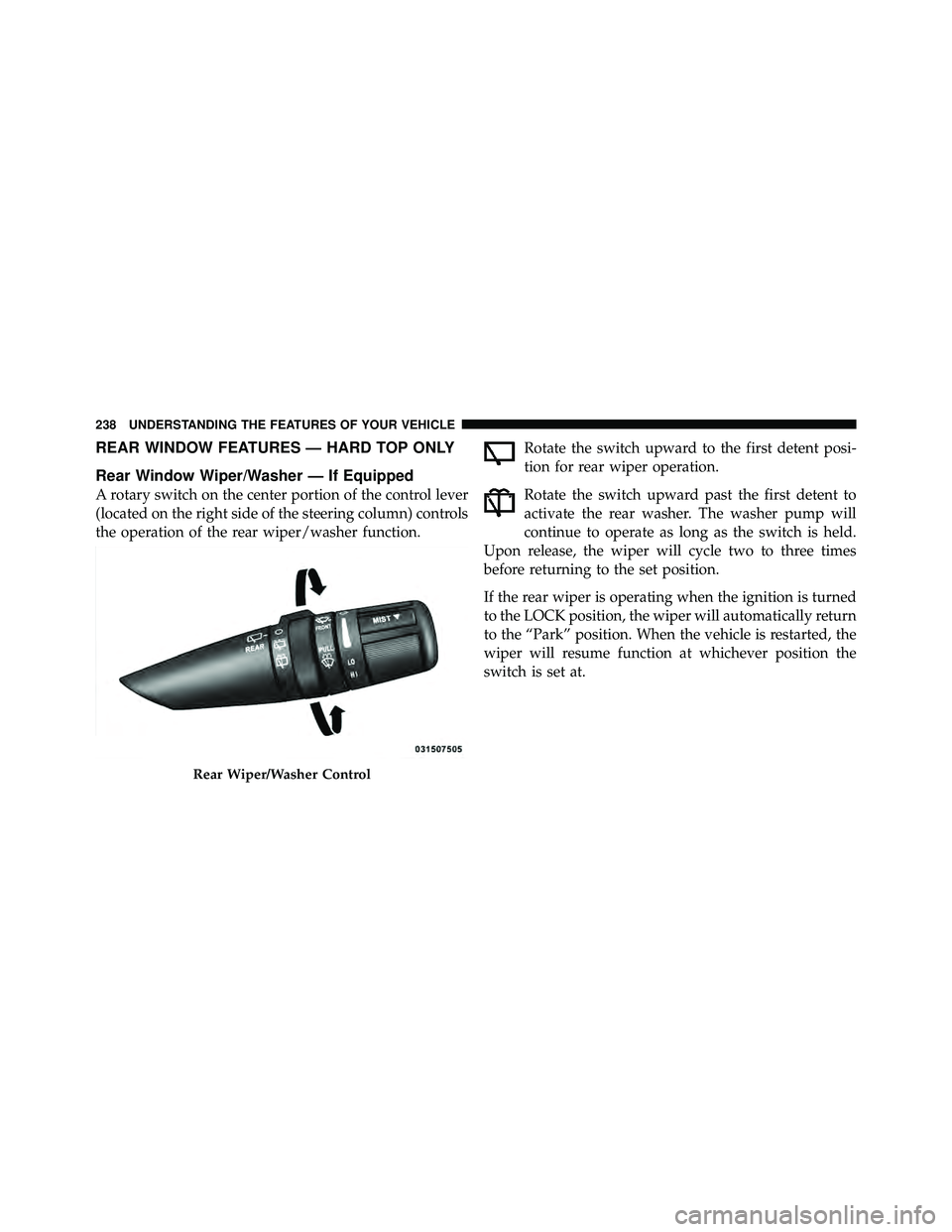
A rotary switch on the center portion of the control lever
(located on the right side of the steering column) controls
the operation of the rear wiper/washer function.Rotate the switch upward to the first detent posi-
tion for rear wiper operation.
Rotate the switch upward past the first detent to
activate the rear washer. The washer pump will
continue to operate as long as the switch is held.
Upon release, the wiper will cycle two to three times
before returning to the set position.
If the rear wiper is operating when the ignition is turned
to the LOCK position, the wiper will automatically return
to the “Park” position. When the vehicle is restarted, the
wiper will resume function at whichever position the
switch is set at.
Page 247 of 554
INSTRUMENT CLUSTER DESCRIPTIONS
1. Fuel Gauge
The pointer shows the level of fuel in the fuel tank.
NOTE:When the ignition switch is turned to OFF, the
fuel gauge and temperature gauge may not show accu-
rate readings. When the engine is not running, turn the
ignition switch to ON to obtain accurate readings.
2. Charging System Light This light shows the status of the electrical charg-
ing system. The light should come on when the
ignition switch is first turned ON, and remain on briefly
as a bulb check. If the light stays on or comes on while
driving, turn off some of the vehicle’s non-essential
electrical devices or increase engine speed (if at idle). If
the charging system light remains on, it means that the
vehicle is experiencing a problem with the charging
system. Obtain SERVICE IMMEDIATELY. See an autho-
rized dealer. If jump starting is required, refer to “Jump Starting
Procedures” in “What To Do In Emergencies”.
3. Front Fog Light Indicator — If Equipped
This indicator will illuminate when the front fog
lights are on.
4. Low Fuel Warning Light When the fuel level reaches approximately 2.8 gal
(10.6L) this light will turn on and a single chime
will sound.
5. Speedometer
Indicates vehicle speed.
6. Front Axle Lock Indicator — If Equipped Indicates when the front axle lock has been
activated.
Page 251 of 554
13. Airbag Warning LightThis light will turn on for four to eight seconds
as a bulb check when the ignition switch is first
turned ON. If the light is either not on during
starting, stays on, or turns on while driving,
then have the system inspected at an authorized dealer as
soon as possible. Refer to “Occupant Restraints” in
“Things To Know Before Starting Your Vehicle” for
further information.
14. Rear Axle Lock Indicator — If Equipped This light indicates when the rear axle lock has
been activated.
15. Tachometer
Indicates the engine speed in revolutions per minute
(RPM).
Page 257 of 554
gASCAP
If the vehicle diagnostic system determines that the fuel
filler cap is loose, improperly installed, or damaged, a
“gASCAP” message will display in the odometer display
area. Tighten the fuel filler cap properly and press the
TRIP ODOMETER button to turn off the message. If the
problem continues, the message will appear the next time
the vehicle is started.
noFUSE
If the vehicle diagnostic system determines that the
Ignition Off Draw (IOD) fuse is improperly installed, or
damaged, a “noFUSE” message will display in the odom-
eter display area. For further information on fuses and
fuse locations refer to “Fuses” in “Maintaining Your
Vehicle”.CHAngE OIL Message
Your vehicle is equipped with an engine oil change
indicator system. The “CHANgE OIL” message will flash
in the instrument cluster odometer for approximately
12 seconds after a single chime has sounded to indicate
the next scheduled oil change interval. The engine oil
change indicator system is duty-cycle based, which
means the engine oil change interval may fluctuate
dependent upon your personal driving style.
Unless reset, this message will continue to display each
time you turn the ignition switch to the ON/RUN
position. To turn off the message temporarily, press and
release the Trip Odometer button on the instrument
cluster. To reset the oil change indicator system (after
performing the scheduled maintenance), refer to the
following procedure:
256 UNDERSTANDING YOUR INSTRUMENT PANEL
Page 259 of 554
WARNING!
A malfunctioning catalytic converter, as referenced
above, can reach higher temperatures than in normal
operating conditions. This can cause a fire if you
drive slowly or park over flammable substances such
as dry plants or wood or cardboard, etc. This could
result in death or serious injury to the driver, occu-
pants or others.
26. Electronic Stability Control (ESC) Activation/
Malfunction Indicator Light — If Equipped The “ESC Activation/Malfunction Indicator
Light” in the instrument cluster will come on
when the ignition switch is turned to the ON
position. It should go out with the engine
running. If the “ESC Activation/Malfunction Indicator
Light” comes on continuously with the engine running, a
malfunction has been detected in the ESC system. If this light remains on after several ignition cycles, and the
vehicle has been driven several miles (kilometers) at
speeds greater than 30 mph (48 km/h), see your autho-
rized dealer as soon as possible to have the problem
diagnosed and corrected.
NOTE:
•The “ESC Off Indicator Light” and the “ESC
Activation/Malfunction Indicator Light” come on mo-
mentarily each time the ignition switch is turned ON.
•Each time the ignition is turned ON, the ESC system
will be ON even if it was turned off previously.
•The ESC system will make buzzing or clicking sounds
when it is active. This is normal; the sounds will stop
when ESC becomes inactive following the maneuver
that caused the ESC activation.
Page 261 of 554
WARNING!
If a warning light remains on the system may not be
working and you will not have the benefit of ESP or
BAS. Under certain driving conditions, where ESP or
BAS would be beneficial, you - if you have not
adjusted your driving speeds and stopping in or to
account for the lack of the feature, may be in acci-
dent.
30. Electronic Throttle Control (ETC) Light This light informs you of a problem with the
Electronic Throttle Control (ETC) system. If a
problem is detected while the engine is run-
ning, the light will either stay on or flash
depending on the nature of the problem. Cycle the
ignition key when the vehicle is safely and completely
stopped and the shift lever is placed in the PARK
position. The light should turn off. If the light remains on with the engine running, your vehicle will usually be
drivable; however, see an authorized dealer for service as
soon as possible.
If the light continues to flash when the engine is running,
immediate service is required and you may experience
reduced performance, an elevated/rough idle, or engine
stall and your vehicle may require towing. The light will
come on when the ignition is first turned ON and remain
on briefly as a bulb check. If the light does not come on
during starting, have the system checked by an autho-
rized dealer.
31. Compass / Mini-Trip Computer Display — If
Equipped
When the appropriate conditions exist, this display
shows the Mini-Trip Computer messages. Refer to “Mini-
Trip Computer”.
Page 263 of 554
displayed temperature, therefore temperature readings
are not updated when the vehicle is not moving.
Press and release the left button (on the instrument
cluster) to access the computer displays.
Press and hold the left button (on the instrument cluster)
for two to three seconds to switch from English to Metric
displays.
Reset / Change Display
Press and hold the left button (on the instrument cluster)
while function is being displayed to reset or change the
display.
The following trip displays can be reset or changed:
•AVG ECO (changes to present fuel economy)
•ET (will reset display)
Trip Conditions
Average Fuel Economy (AVG ECO)
This display shows the average fuel economy.
Estimated Range (DTE)
This display shows the estimated distance that can be
traveled with the fuel remaining in the tank. This esti-
mated distance is based on the most recent trip informa-
tion: (Average Fuel Economy) x (Fuel Remaining).
This display cannot be reset.
Elapsed Time (ET)
This display shows the accumulated ignition ON time
since the last reset.
262 UNDERSTANDING YOUR INSTRUMENT PANEL