instrument cluster JEEP WRANGLER 2010 Owners Manual
[x] Cancel search | Manufacturer: JEEP, Model Year: 2010, Model line: WRANGLER, Model: JEEP WRANGLER 2010Pages: 554, PDF Size: 10.16 MB
Page 19 of 554
To Set the Alarm
The Vehicle Security Alarm will set when you use the
Remote Keyless Entry (RKE) transmitter to lock the doors
and swing gate, or when you use the power door lock
switch while the door is open. After all the doors are
locked and closed, the Vehicle Security Light (located on
the instrument cluster) will flash rapidly for about 16 sec-
onds to signal that the Vehicle Security Alarm is arming.
During this 16 second arming period, opening any door
or the swing gate will cancel the arming. If the Vehicle
Security Alarm successfully arms, the Vehicle Security
Light will flash at a slower rate to indicate the Vehicle
Security Alarm is set.
To Disarm the System
To disarm the Vehicle Security Alarm, you will need to
press the UNLOCK button on the RKE transmitter, or
turn the ignition key to the ON position. If something hastriggered the Vehicle Security Alarm in your absence, the
horn will sound three times when you unlock the doors.
Check the vehicle for tampering.
The Vehicle Security Alarm is designed to protect your
vehicle; however, you can create conditions where the
Vehicle Security Alarm will arm unexpectedly. If you
remain in the vehicle and lock the doors with the RKE
transmitter, once the Vehicle Security Alarm is armed
(after 16 seconds), when you pull the door handle to exit,
the alarm will sound. If this occurs, press the UNLOCK
button on the RKE transmitter to disarm the Vehicle
Security Alarm. You may also accidentally disarm the
Vehicle Security Alarm by unlocking the driver’s door
with the key and then locking it. The door will be locked
but the Vehicle Security Alarm will not arm.
18 THINGS TO KNOW BEFORE STARTING YOUR VEHICLE
Page 247 of 554
INSTRUMENT CLUSTER DESCRIPTIONS
1. Fuel Gauge
The pointer shows the level of fuel in the fuel tank.
NOTE:When the ignition switch is turned to OFF, the
fuel gauge and temperature gauge may not show accu-
rate readings. When the engine is not running, turn the
ignition switch to ON to obtain accurate readings.
2. Charging System Light This light shows the status of the electrical charg-
ing system. The light should come on when the
ignition switch is first turned ON, and remain on briefly
as a bulb check. If the light stays on or comes on while
driving, turn off some of the vehicle’s non-essential
electrical devices or increase engine speed (if at idle). If
the charging system light remains on, it means that the
vehicle is experiencing a problem with the charging
system. Obtain SERVICE IMMEDIATELY. See an autho-
rized dealer. If jump starting is required, refer to “Jump Starting
Procedures” in “What To Do In Emergencies”.
3. Front Fog Light Indicator — If Equipped
This indicator will illuminate when the front fog
lights are on.
4. Low Fuel Warning Light When the fuel level reaches approximately 2.8 gal
(10.6L) this light will turn on and a single chime
will sound.
5. Speedometer
Indicates vehicle speed.
6. Front Axle Lock Indicator — If Equipped Indicates when the front axle lock has been
activated.
Page 253 of 554
21. Odometer / Trip Odometer / ECO (Fuel Saver
Indicator) Button
Press this button to change the display from odometer to
either of the two trip odometer settings or the “ECO”
display. Trip A or Trip B will appear when in the trip
odometer mode. Press and hold the button for two
seconds to reset the trip odometer to 0 miles or kilome-
ters. The odometer must be in trip mode to reset.
22. Shift Lever Indicator
The Shift Lever Indicator is self-contained within the
instrument cluster. It displays the gear position of the
automatic transmission.
23. Tire Pressure Monitoring Telltale LightEach tire, including the spare (if provided),
should be checked monthly, when cold and
inflated to the inflation pressure recommended
by the vehicle manufacturer on the vehicle
placard or tire inflation pressure label. (If your vehicle has tires of a different size than the size indicated on the
vehicle placard or tire inflation pressure label, you should
determine the proper tire inflation pressure for those
tires.)
As an added safety feature, your vehicle has been
equipped with a Tire Pressure Monitoring System
(TPMS) that illuminates a low tire pressure telltale when
one or more of your tires is significantly under-inflated.
Accordingly, when the low tire pressure telltale illumi-
nates, you should stop and check your tires as soon as
possible, and inflate them to the proper pressure. Driving
on a significantly under-inflated tire causes the tire to
overheat and can lead to tire failure. Under-inflation also
reduces fuel efficiency and tire tread life, and may affect
the vehicle’s handling and stopping ability.
Please note that the TPMS is not a substitute for proper
tire maintenance, and it is the driver ’s responsibility to
Page 257 of 554
gASCAP
If the vehicle diagnostic system determines that the fuel
filler cap is loose, improperly installed, or damaged, a
“gASCAP” message will display in the odometer display
area. Tighten the fuel filler cap properly and press the
TRIP ODOMETER button to turn off the message. If the
problem continues, the message will appear the next time
the vehicle is started.
noFUSE
If the vehicle diagnostic system determines that the
Ignition Off Draw (IOD) fuse is improperly installed, or
damaged, a “noFUSE” message will display in the odom-
eter display area. For further information on fuses and
fuse locations refer to “Fuses” in “Maintaining Your
Vehicle”.CHAngE OIL Message
Your vehicle is equipped with an engine oil change
indicator system. The “CHANgE OIL” message will flash
in the instrument cluster odometer for approximately
12 seconds after a single chime has sounded to indicate
the next scheduled oil change interval. The engine oil
change indicator system is duty-cycle based, which
means the engine oil change interval may fluctuate
dependent upon your personal driving style.
Unless reset, this message will continue to display each
time you turn the ignition switch to the ON/RUN
position. To turn off the message temporarily, press and
release the Trip Odometer button on the instrument
cluster. To reset the oil change indicator system (after
performing the scheduled maintenance), refer to the
following procedure:
256 UNDERSTANDING YOUR INSTRUMENT PANEL
Page 259 of 554
WARNING!
A malfunctioning catalytic converter, as referenced
above, can reach higher temperatures than in normal
operating conditions. This can cause a fire if you
drive slowly or park over flammable substances such
as dry plants or wood or cardboard, etc. This could
result in death or serious injury to the driver, occu-
pants or others.
26. Electronic Stability Control (ESC) Activation/
Malfunction Indicator Light — If Equipped The “ESC Activation/Malfunction Indicator
Light” in the instrument cluster will come on
when the ignition switch is turned to the ON
position. It should go out with the engine
running. If the “ESC Activation/Malfunction Indicator
Light” comes on continuously with the engine running, a
malfunction has been detected in the ESC system. If this light remains on after several ignition cycles, and the
vehicle has been driven several miles (kilometers) at
speeds greater than 30 mph (48 km/h), see your autho-
rized dealer as soon as possible to have the problem
diagnosed and corrected.
NOTE:
•The “ESC Off Indicator Light” and the “ESC
Activation/Malfunction Indicator Light” come on mo-
mentarily each time the ignition switch is turned ON.
•Each time the ignition is turned ON, the ESC system
will be ON even if it was turned off previously.
•The ESC system will make buzzing or clicking sounds
when it is active. This is normal; the sounds will stop
when ESC becomes inactive following the maneuver
that caused the ESC activation.
Page 263 of 554
displayed temperature, therefore temperature readings
are not updated when the vehicle is not moving.
Press and release the left button (on the instrument
cluster) to access the computer displays.
Press and hold the left button (on the instrument cluster)
for two to three seconds to switch from English to Metric
displays.
Reset / Change Display
Press and hold the left button (on the instrument cluster)
while function is being displayed to reset or change the
display.
The following trip displays can be reset or changed:
•AVG ECO (changes to present fuel economy)
•ET (will reset display)
Trip Conditions
Average Fuel Economy (AVG ECO)
This display shows the average fuel economy.
Estimated Range (DTE)
This display shows the estimated distance that can be
traveled with the fuel remaining in the tank. This esti-
mated distance is based on the most recent trip informa-
tion: (Average Fuel Economy) x (Fuel Remaining).
This display cannot be reset.
Elapsed Time (ET)
This display shows the accumulated ignition ON time
since the last reset.
262 UNDERSTANDING YOUR INSTRUMENT PANEL
Page 267 of 554
Setting the Compass Variance
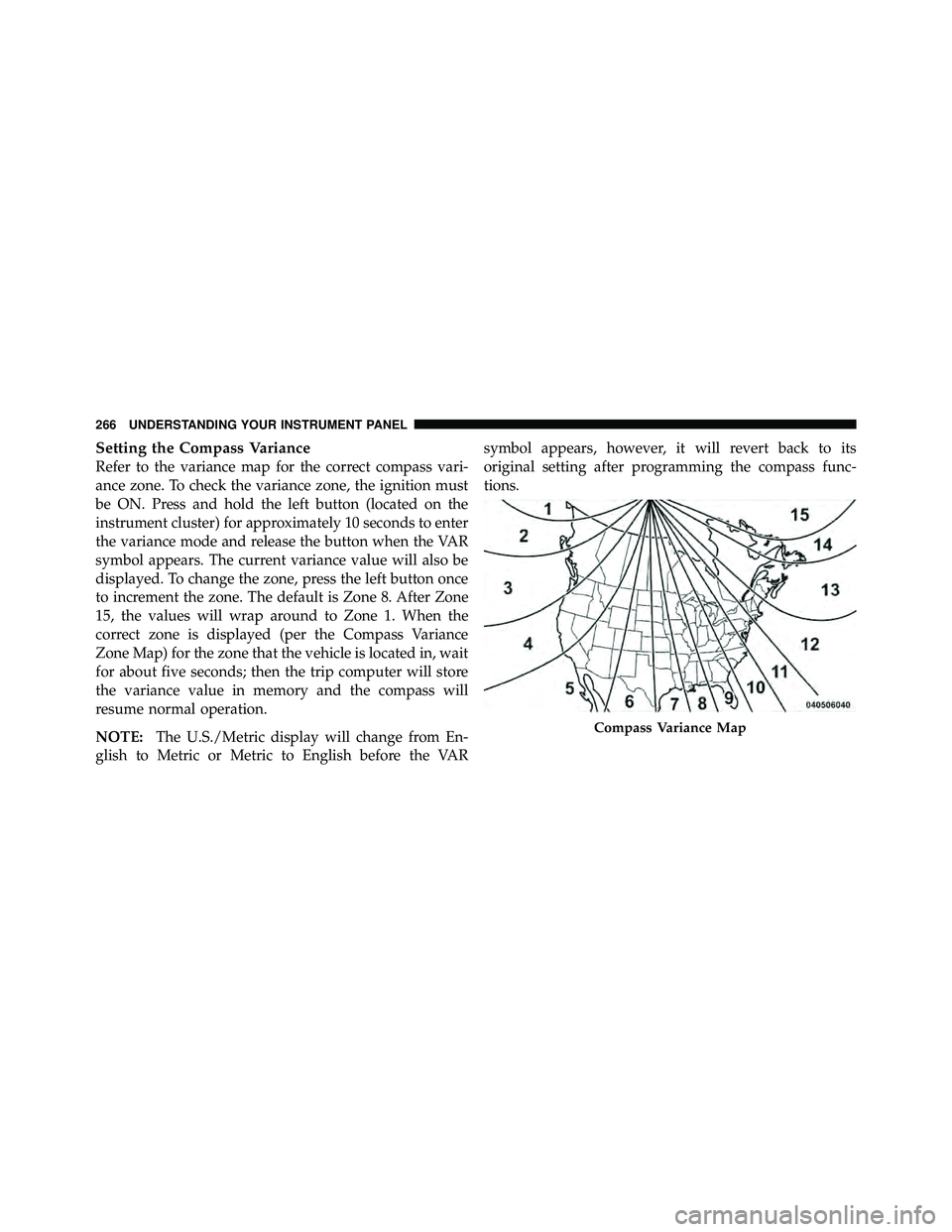
Refer to the variance map for the correct compass vari-
ance zone. To check the variance zone, the ignition must
be ON. Press and hold the left button (located on the
instrument cluster) for approximately 10 seconds to enter
the variance mode and release the button when the VAR
symbol appears. The current variance value will also be
displayed. To change the zone, press the left button once
to increment the zone. The default is Zone 8. After Zone
15, the values will wrap around to Zone 1. When the
correct zone is displayed (per the Compass Variance
Zone Map) for the zone that the vehicle is located in, wait
for about five seconds; then the trip computer will store
the variance value in memory and the compass will
resume normal operation.
NOTE:The U.S./Metric display will change from En-
glish to Metric or Metric to English before the VAR symbol appears, however, it will revert back to its
original setting after programming the compass func-
tions.
Page 347 of 554
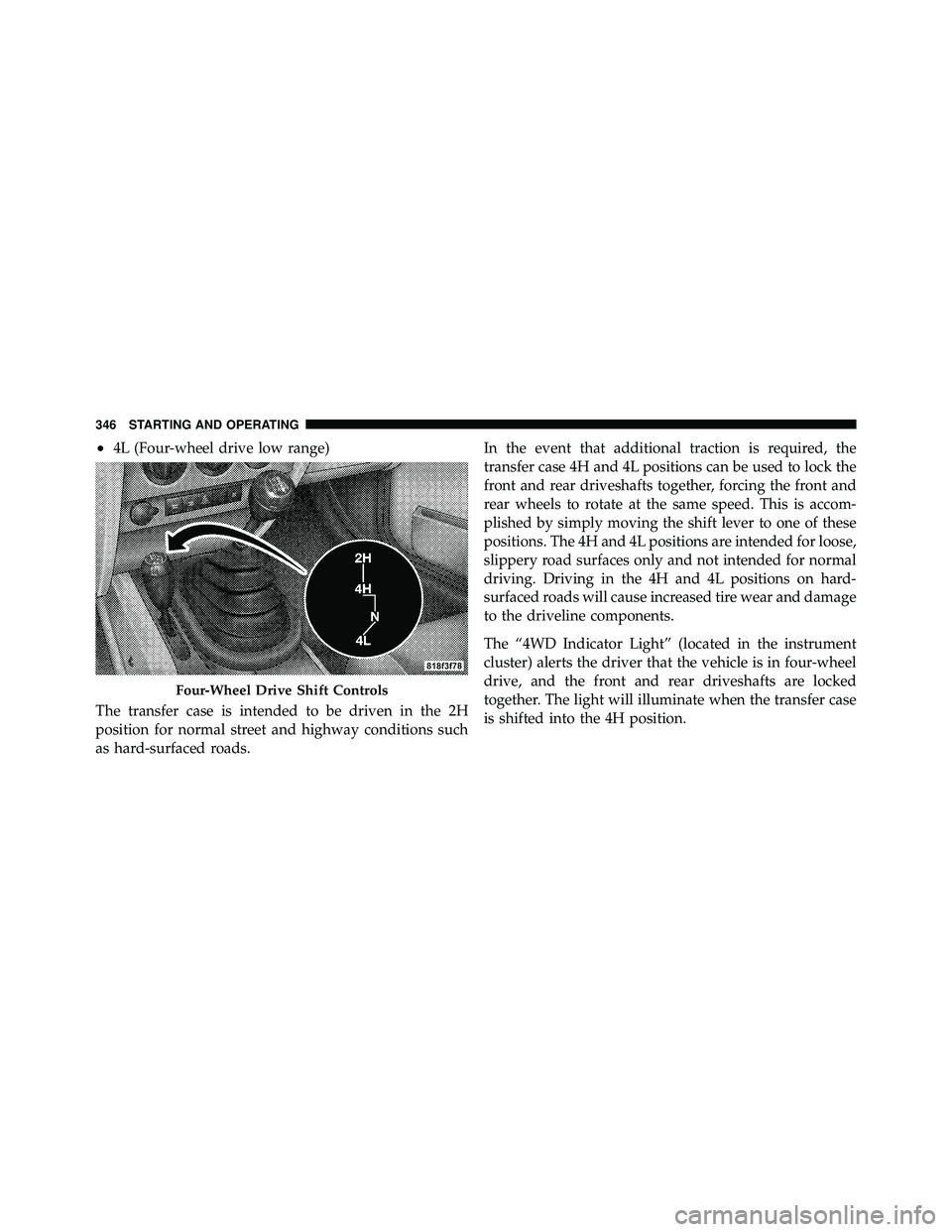
•4L (Four-wheel drive low range)
The transfer case is intended to be driven in the 2H
position for normal street and highway conditions such
as hard-surfaced roads. In the event that additional traction is required, the
transfer case 4H and 4L positions can be used to lock the
front and rear driveshafts together, forcing the front and
rear wheels to rotate at the same speed. This is accom-
plished by simply moving the shift lever to one of these
positions. The 4H and 4L positions are intended for loose,
slippery road surfaces only and not intended for normal
driving. Driving in the 4H and 4L positions on hard-
surfaced roads will cause increased tire wear and damage
to the driveline components.
The “4WD Indicator Light” (located in the instrument
cluster) alerts the driver that the vehicle is in four-wheel
drive, and the front and rear driveshafts are locked
together. The light will illuminate when the transfer case
is shifted into the 4H position.
Page 349 of 554
4H Position
This range locks the front and rear driveshafts together,
forcing the front and rear wheels to rotate at the same
speed. This range (4H) provides additional traction for
loose, slippery road surfaces and should not be used on
wet or dry pavement.
The “4WD Indicator Light” (located in the instrument
cluster) will illuminate when the transfer case is shifted
into the 4H position.
N (Neutral) Position
This range disengages the front and rear driveshafts from
the powertrain. It is to be used for flat towing behind
another vehicle. Refer to “Recreational Towing” in “Start-
ing and Operating” for further information.
4L Position
This range locks the front and rear driveshafts together,
forcing the front and rear wheels to rotate at the samespeed. This range (4L) provides additional traction and
maximum pulling power for loose, slippery road surfaces
only. Do not exceed 25 mph (40 km/h).
The “4WD Indicator Light” (located in the instrument
cluster) will illuminate when the transfer case is shifted
into the 4L position.
Shifting Procedure
2H to 4H or 4H to 2H
Shifting between 2H and 4H can be made with the
vehicle stopped or in motion. If the vehicle is in motion,
shifts can be made up to 50 mph (80 km/h). With the
vehicle in motion, the transfer case will engage/
disengage faster if you momentarily release the accelera-
tor pedal after completing the shift. Apply a constant
force when shifting the transfer case lever.
348 STARTING AND OPERATING
Page 353 of 554
The rear axle lock will disengage if the vehicle is taken
out of 4L (Low) range, or the ignition switch is turned to
the LOCK position.
ELECTRONIC SWAY BAR DISCONNECT — IF
EQUIPPED
Your vehicle may be equipped with an electronic discon-
necting stabilizer/sway bar. This system allows greater
front suspension travel in off-road situations.
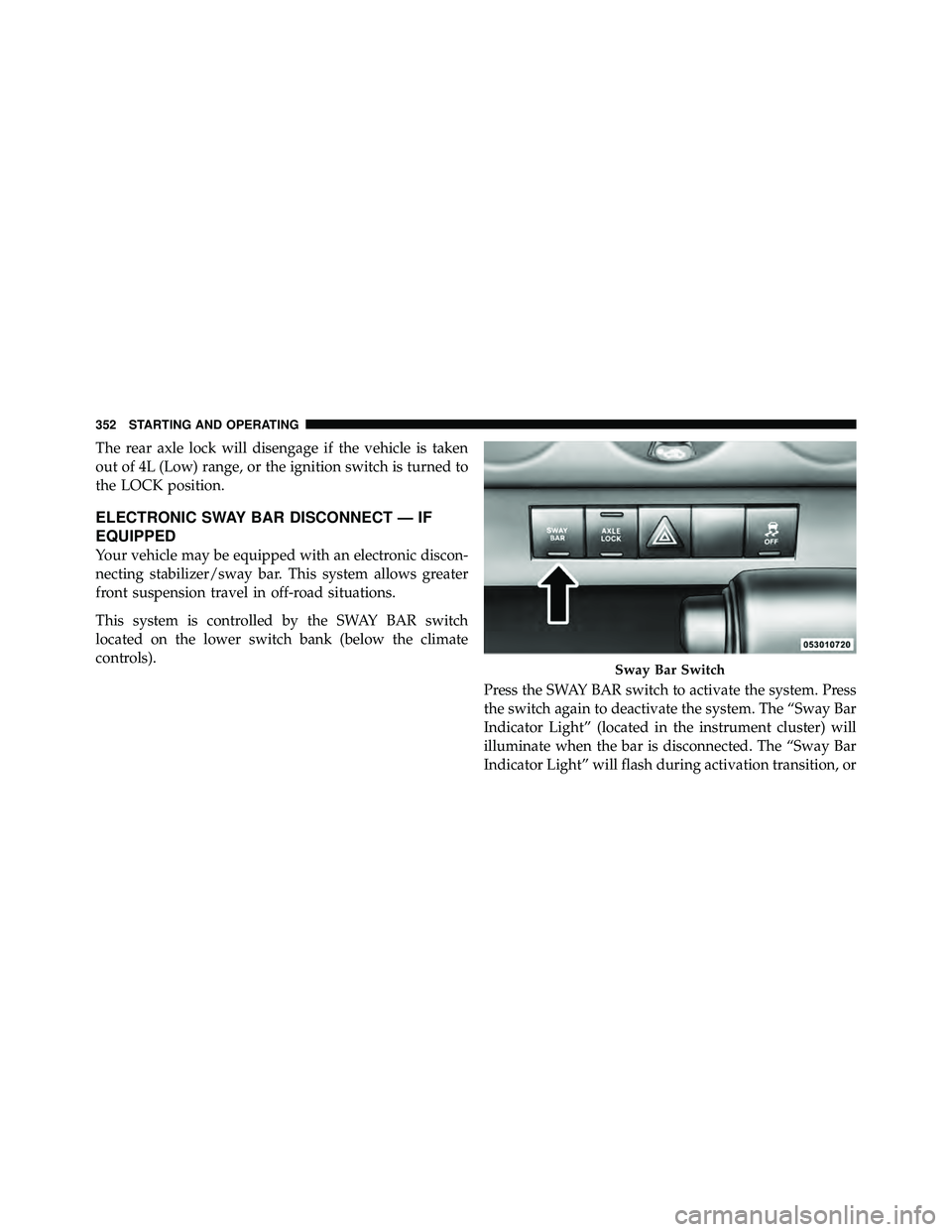
This system is controlled by the SWAY BAR switch
located on the lower switch bank (below the climate
controls).Press the SWAY BAR switch to activate the system. Press
the switch again to deactivate the system. The “Sway Bar
Indicator Light” (located in the instrument cluster) will
illuminate when the bar is disconnected. The “Sway Bar
Indicator Light” will flash during activation transition, or