turn JEEP WRANGLER 2013 JK / 3.G Owner's Guide
[x] Cancel search | Manufacturer: JEEP, Model Year: 2013, Model line: WRANGLER, Model: JEEP WRANGLER 2013 JK / 3.GPages: 666, PDF Size: 5.16 MB
Page 121 of 666
Help Command
If you need assistance at any prompt, or if you want to
know your options at any prompt, say “Help” following
the beep. The Uconnect® Phone will play all the options
at any prompt if you ask for help.
To activate the Uconnect® Phone from idle, simply press
the
button and follow the audible prompts for direc-
tions. All Uconnect® Phone sessions begin with a press of
the
button on the radio control head.
Cancel Command
At any prompt, after the beep, you can say “Cancel” and
you will be returned to the main menu. However, in a
few instances the system will take you back to the
previous menu.
Pair (Link) Uconnect® Phone to a Mobile Phone
To begin using your Uconnect® Phone, you must pair
your compatible Bluetooth® enabled mobile phone.
To complete the pairing process, you will need to reference
your mobile phone Owner’s Manual. The Uconnect® web-
site may also provide detailed instructions for pairing.
The following are general phone to Uconnect® Phone
pairing instructions:
• Press the
button to begin.
• After the “Ready” prompt and the following beep, say
“Setup Phone Pairing”.
• When prompted, after the beep, say “Pair a Phone”
and follow the audible prompts.
• You will be asked to say a four-digit Personal Identi-
fication Number (PIN), which you will later need to
enter into your mobile phone. You can enter any
four-digit PIN. You will not need to remember this PIN
after the initial pairing process.3
UNDERSTANDING THE FEATURES OF YOUR VEHICLE 119
Page 124 of 666
•Only the phonebook of the currently connected mobile
phone is accessible.
• Only the mobile phone’s phonebook is downloaded.
SIM card phonebook is not part of the Mobile
phonebook.
• This downloaded phonebook cannot be edited or
deleted on the Uconnect® Phone. These can only be
edited on the mobile phone. The changes are trans-
ferred and updated to Uconnect® Phone on the next
phone connection.
Add Names to Your Uconnect® Phonebook
NOTE: Adding names to the Uconnect® Phonebook is
recommended when the vehicle is not in motion.
• Press the
button to begin.
• After the “Ready” prompt and the following beep, say
“Phonebook New Entry”. •
When prompted, say the name of the new entry. Use of
long names helps the Voice Command and it is recom-
mended. For example, say “Robert Smith” or “Robert”
instead of “Bob”.
• When prompted, enter the number designation (e.g.,
“Home”, “Work”, “Mobile”, or “Other”). This will
allow you to store multiple numbers for each phone-
book entry, if desired.
• When prompted, recite the phone number for the
phonebook entry that you are adding.
After you are finished adding an entry into the phone-
book, you will be given the opportunity to add more
phone numbers to the current entry or to return to the
main menu.
122 UNDERSTANDING THE FEATURES OF YOUR VEHICLE
Page 125 of 666
The Uconnect® Phone will allow you to enter up to 32
names in the phonebook with each name having up to
four associated phone numbers and designations. Each
language has a separate 32-name phonebook accessible
only in that language. In addition, if equipped and
supported by your phone, Uconnect® Phone automati-
cally downloads your mobile phone’s phonebook.
Edit Uconnect® Phonebook Entries
NOTE:
•Editing names in the phonebook is recommended
when the vehicle is not in motion.
• Automatic downloaded phonebook entries cannot be
deleted or edited.
• Press the
button to begin.
• After the “Ready” prompt and the following beep, say
“Phonebook Edit”. •
You will then be asked for the name of the phonebook
entry that you wish to edit.
• Next, choose the number designation (home, work,
mobile, or other) that you wish to edit.
• When prompted, recite the new phone number for the
phonebook entry that you are editing.
After you are finished editing an entry in the phonebook,
you will be given the opportunity to edit another entry in
the phonebook, call the number you just edited, or return
to the main menu.
“Phonebook Edit” can be used to add another phone
number to a name entry that already exists in the
phonebook. For example, the entry John Doe may have a
mobile and a home number, but you can add “John
Doe’s” work number later using the “Phonebook Edit”
feature.
3
UNDERSTANDING THE FEATURES OF YOUR VEHICLE 123
Page 132 of 666
•The Uconnect® Phone does slightly lower your
chances of successfully making a phone call as to that
for the mobile phone directly.
WARNING!
To use you Uconnect® Phone System in an emer-
gency, your mobile phone must be:
• turned on,
• paired to the Uconnect® System,
• and have network coverage.
Towing Assistance
If you need towing assistance:
• Press the
button to begin.
• After the “Ready” prompt and the following beep, say
“Towing Assistance”. NOTE:
•
The towing assistance number dialed is based on the
country where the vehicle is purchased (1-800-528-2069
for the U.S., 1-877-213-4525 for Canada, 55-14-3454 for
Mexico City and 1-800-712-3040 for outside Mexico City
in Mexico). Please refer to the 24-Hour Towing Assistance
coverage details on the DVD in the Warranty Information
Booklet and the 24-Hour Towing Assistance references.
• If supported, this number may be programmable on
some systems. To do this, press the
button and say
“Setup”, followed by “Towing Assistance”.
Paging
To learn how to page, refer to “Working with Automated
Systems”. Paging works properly except for pagers of
certain companies, which time out a little too soon to
work properly with the Uconnect® Phone.
130 UNDERSTANDING THE FEATURES OF YOUR VEHICLE
Page 134 of 666
NOTE:
•You may not hear all of the tones due to mobile phone
network configurations. This is normal.
• Some paging and voice mail systems have system time
out settings that are too short and may not allow the
use of this feature.
Barge In - Overriding Prompts
The “Voice Command” button can be used when you
wish to skip part of a prompt and issue your voice
command immediately. For example, if a prompt is
asking “Would you like to pair a phone, clear a...,” you
could press the
button and say, “Pair a Phone” to
select that option without having to listen to the rest of
the voice prompt.
Turning Confirmation Prompts On/Off
Turning confirmation prompts off will stop the system
from confirming your choices (e.g., the Uconnect® Phone
will not repeat a phone number before you dial it).
• Press the
button to begin.
• After the “Ready” prompt and the following beep, say:
– “Setup Confirmations Prompts On”
– “Setup Confirmations Prompts Off”
Phone and Network Status Indicators
If available on the radio and/or on a premium display
such as the instrument panel cluster, and supported by
your mobile phone, the Uconnect® Phone will provide
notification to inform you of your phone and network
status when you are attempting to make a phone call
using Uconnect® Phone. The status is given for roaming,
network signal strength, phone battery strength, etc.
132 UNDERSTANDING THE FEATURES OF YOUR VEHICLE
Page 137 of 666
Select Another Mobile Phone
This feature allows you to select and start using another
phone paired with the Uconnect® Phone.
•Press the
button to begin.
• After the “Ready” prompt and the following beep, say
“Setup Select Phone” and follow the prompts.
• You can also press the
button at any time while
the list is being played, and then choose the phone that
you wish to select.
• The selected phone will be used for the next phone
call. If the selected phone is not available, the
Uconnect® Phone will return to using the highest
priority phone present in or near (approximately
within 30 ft (9 m)) the vehicle.
Delete Uconnect® Phone Paired Mobile Phones
• Press thebutton to begin.
• After the “Ready” prompt and the following beep, say
“Setup Phone Pairing”.
• At the next prompt, say “Delete” and follow the
prompts.
• You can also press the
button at any time while
the list is being played, and then choose the phone you
wish to delete.
Things You Should Know About Your Uconnect®
Phone
Uconnect® Phone Tutorial
To hear a brief tutorial of the system features, press the
button and say “Uconnect® Tutorial”.
3
UNDERSTANDING THE FEATURES OF YOUR VEHICLE 135
Page 143 of 666
Turn SMS Incoming Announcement ON/OFF
Turning the SMS Incoming Announcement OFF will stop
the system from announcing the new incoming mes-
sages.
•Press the
button.
• After the “Ready” prompt and the following beep, say
“Setup, Incoming Message Announcement,” you will
then be given a choice to change it.
Bluetooth® Communication Link
Mobile phones have been found to lose connection to the
Uconnect® Phone. When this happens, the connection
can generally be reestablished by switching the phone
off/on. Your mobile phone is recommended to remain in
Bluetooth® ON mode.
Power-Up
After switching the ignition key from OFF to either the
ON or ACC position, or after a language change, you
must wait at least fifteen seconds prior to using the
system.
3
UNDERSTANDING THE FEATURES OF YOUR VEHICLE 141
Page 148 of 666
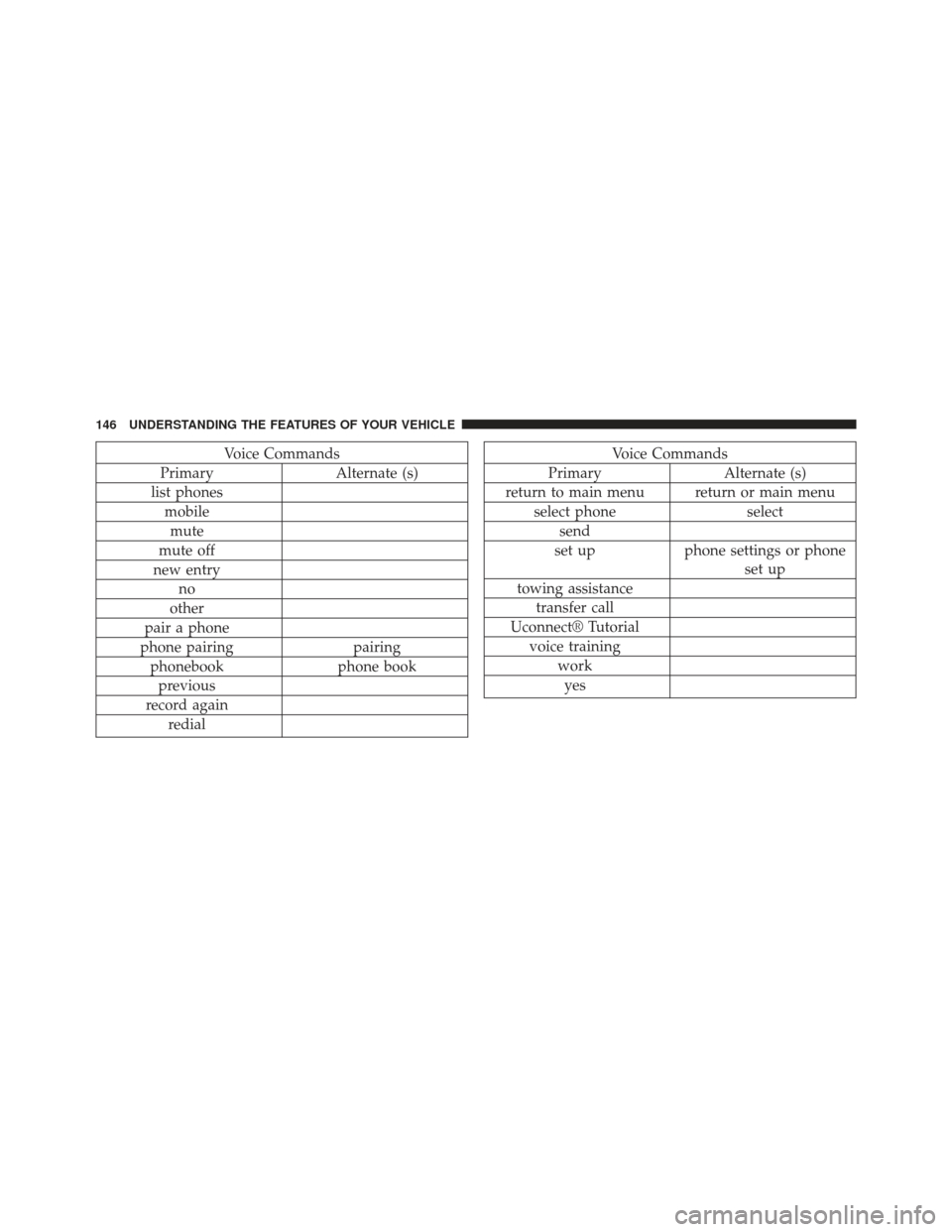
Voice Commands
Primary Alternate (s)
list phones mobilemute
mute off
new entry no
other
pair a phone
phone pairing pairing
phonebook phone book
previous
record again redialVoice Commands
Primary Alternate (s)
return to main menu return or main menu select phone select
send
set up phone settings or phone
set up
towing assistance transfer call
Uconnect® Tutorial voice training workyes
146 UNDERSTANDING THE FEATURES OF YOUR VEHICLE
Page 158 of 666
Front Seatback Recline
Lean forward before lifting the handle, then lean back to
the desired position and release the handle. Lift the
handle to return the seatback to an upright position.
WARNING!
Do not ride with the seatback reclined so that the
shoulder belt is no longer resting against your chest.
In a collision you could slide under the seat belt,
which could result in serious injury or death.
Front Passenger Easy Entry Seat — Two-Door
Models
Pull upward on the recline lever (toward the rear of the
vehicle) and slide the entire seat forward.
Recline Lever
156 UNDERSTANDING THE FEATURES OF YOUR VEHICLE
Page 159 of 666
To return the seat to a sitting position, rotate the seatback
upright until it locks and push the seat rearward until the
track locks.
Easy Entry LeverEasy Entry Seat
3
UNDERSTANDING THE FEATURES OF YOUR VEHICLE 157