ESP JEEP WRANGLER 2015 JK / 3.G User Guide
[x] Cancel search | Manufacturer: JEEP, Model Year: 2015, Model line: WRANGLER, Model: JEEP WRANGLER 2015 JK / 3.GPages: 695, PDF Size: 20.64 MB
Page 147 of 695
General Information
This device complies with Part 15 of the FCC rules and
RSS 210 of Industry Canada. Operation is subject to the
following conditions:
•Changes or modifications not expressly approved by
the party responsible for compliance could void the
user’s authority to operate the equipment.
•This device may not cause harmful interference.
•This device must accept any interference received,
including interference that may cause undesired op-
eration.
VOICE COMMAND — IF EQUIPPED
Voice Command System Operation
The Uconnect® Voice Command system allows
you to control your AM, FM radio, disk player,
USB mass storage class device, iPod® family of
devices, Bluetooth® Streaming Audio Device,
satellite radio, and a memo recorder.
NOTE:Take care to speak into the Voice Interface System
as calmly and normally as possible. The ability of the
Voice Interface System to recognize user voice commands
may be negatively affected by rapid speaking or a raised
voice level.
3
UNDERSTANDING THE FEATURES OF YOUR VEHICLE 145
Page 161 of 695
two to one, indicating the change. The LOW-level setting
will turn OFF automatically after approximately 30 min-
utes.
NOTE:When a heat setting is selected, heat will be felt
within two to five minutes.
WARNING!
•Persons who are unable to feel pain to the skin
because of advanced age, chronic illness, diabetes,
spinal cord injury, medication, alcohol use, exhaus-
tion or other physical condition must exercise care
when using the seat heater. It may cause burns
even at low temperatures, especially if used for
long periods of time.
(Continued)
WARNING!(Continued)
•Do not place anything on the seat or seatback that
insulates against heat, such as a blanket or cushion.
This may cause the seat heater to overheat. Sitting
in a seat that has been overheated could cause
serious burns due to the increased surface tempera-
ture of the seat.
Head Restraints
Head restraints are designed to reduce the risk of injury
by restricting head movement in the event of a rear
impact. Head restraints should be adjusted so that the top
of the head restraint is located above the top of your ear.
3
UNDERSTANDING THE FEATURES OF YOUR VEHICLE 159
Page 320 of 695
26. Hill Decent Indicator
This indicator shows when the Hill Descent
Control (HDC) feature is turned on. The lamp
will be on solid when HDC is armed. HDC can
only be armed when the transfer case is in the
“4WD LOW” position and the vehicle speed is less then
30 mph (48 km/h). If these conditions are not met while
attempting to use the HDC feature, the HDC indicator
light will flash on/off.
27. Cruise Indicator
This indicator shows when the electronic speed
control system is turned on.
28. Tire Pressure Monitoring Telltale Light
Each tire, including the spare (if provided),
should be checked monthly when cold and
inflated to the inflation pressure recommended
by the vehicle manufacturer on the vehicle
placard or tire inflation pressure label. (If your vehicle
has tires of a different size than the size indicated on the
vehicle placard or tire inflation pressure label, you should
determine the proper tire inflation pressure for those
tires.)
As an added safety feature, your vehicle has been
equipped with a Tire Pressure Monitoring System
(TPMS) that illuminates a low tire pressure telltale when
one or more of your tires is significantly under-inflated.
Accordingly, when the low tire pressure telltale illumi-
nates, you should stop and check your tires as soon as
possible, and inflate them to the proper pressure. Driving
on a significantly under-inflated tire causes the tire to
overheat and can lead to tire failure. Under-inflation also
reduces fuel efficiency and tire tread life, and may affect
the vehicle’s handling and stopping ability.
Please note that the TPMS is not a substitute for proper
tire maintenance, and it is the driver ’s responsibility to
318 UNDERSTANDING YOUR INSTRUMENT PANEL
Page 340 of 695
the DOWN button when SYSTEM WARNINGS PRES-
ENT is displayed will display each stored warning for
each button push. Push and release the MENU button to
return to the Main Menu.
Personal Settings (Customer-Programmable
Features)
Personal Settings allows the driver to set and recall
features when the vehicle speed is at 0 mph (0 km/h)
(manual transmission) or when the shift lever is in PARK
(auto transmission).
Push and release the MENU button until Personal Set-
tings displays in the EVIC.
Use the DOWN button to display one of the following
choices:
Language
When in this display you may select one of five lan-
guages for all display nomenclature, including the trip
functions and the navigation system (if equipped). Press
the SELECT button while in this display to select English,
Espanol or Francais. Then, as you continue, the informa-
tion will display in the selected language.
Auto Lock Doors
When this feature is selected, all doors will lock automati-
cally when the vehicle reaches a speed of 15 mph (24 km/h).
The auto door lock feature can be enabled or disabled, to
make your selection, press and release the SELECT button
until a check-mark appears next to the feature showing the
system has been activated or the check-mark is removed
showing the system has been deactivated.
Auto Unlk On Exit
When ON is selected, all doors will unlock when the
vehicle is stopped and the transmission is in the PARK or
NEUTRAL position and the driver’s door is opened. To
make your selection, press and release the SELECT
button until “On” or “Off” appears.
338 UNDERSTANDING YOUR INSTRUMENT PANEL
Page 352 of 695
SET Button — To Set The Pushbutton Memory
When you are receiving a station that you wish to
commit to pushbutton memory, push the SET button. The
symbol SET 1 will now show in the display window.
Select the button (1-6) you wish to lock onto this station
and push and release that button. If a button is not
selected within five seconds after pushing the SET but-
ton, the station will continue to play but will not be
stored into pushbutton memory.
You may add a second station to each pushbutton by
repeating the above procedure with this exception: Push
the SET button twice and SET 2 will show in the display
window. Each button can be set for SET 1 and SET 2 in both
AM and FM. This allows a total of 12 AM, 12 FM, and 12
Satellite (if equipped) stations to be stored into pushbutton
memory. The stations stored in SET 2 memory can be
selected by pushing the pushbutton twice.
Every time a preset button is used, a corresponding
button number will display.
Buttons1-6
These buttons tune the radio to the stations that you
commit to pushbutton memory {12 AM, 12 FM, and 12
Satellite (if equipped) stations}.
DISC Button
Pushing the DISC button will allow you to switch from
AM/FM modes to Disc modes.
Operation Instructions — DISC Mode For CD And
MP3/WMA Audio Play, DVD – Video
The radio DVD player and many DVD discs are coded by
geographic region. These region codes must match for
the disc to play. If the region code for the DVD disc does
not match the region code for the radio DVD player, it
will not play the disc. Customers may take their vehicle
350 UNDERSTANDING YOUR INSTRUMENT PANEL
Page 353 of 695
to an authorized dealer to change the region code of the
player a maximum of five times.
CAUTION!
The radio may shut down during extremely hot condi-
tions. When this occurs, the radio will indicate “Disc
Hot” and shut off until a safe temperature is reached.
This shutdown is necessary to protect the optics of the
DVD player and other radio internal components.
NOTE:The ignition switch must be in the ON or ACC
position to operate the radio.
LOAD Button — Loading Compact Disc(s)
Push the LOAD button and the pushbutton with the
corresponding number (1-6) where the CD is being loaded.
The radio will display PLEASE WAIT and prompt when to
INSERT DISC. After the radio displays#INSERT DISC,#
insert the CD into the player.
Radio display will show#LOADING DISC#when the disc
is loading and “READING DISC” when the radio is
reading the disc.
CAUTION!
This CD player will accept 4–3/4 in (12 cm) discs only.
The use of other sized discs may damage the CD
player mechanism.
Eject Button — Ejecting Compact Disc(s)
Push the EJECT button and the pushbutton
with the corresponding number (1-6) where the
CD was loaded and the disc will unload and
move to the entrance for easy removal. Radio
display will show#EJECTING DISC#when the disc is
being ejected and prompt the user to remove the disc.
4
UNDERSTANDING YOUR INSTRUMENT PANEL 351
Page 364 of 695
Every time a preset button is used, a corresponding
button number will display.
Buttons1-6
These buttons tune the radio to the channels that you
commit to pushbutton memory (12 Satellite stations).
Uconnect® 730N/430/430N CD/DVD/HDD/NAV —
IF EQUIPPED
Refer to your Uconnect® Supplement Manual for de-
tailed operating instructions.
Operating Instructions (Voice Command System) —
If Equipped
Refer to “Voice Command” for further details.
Operating Instructions (Uconnect® Phone) — If
Equipped
Refer to “Uconnect® Phone” for further details.
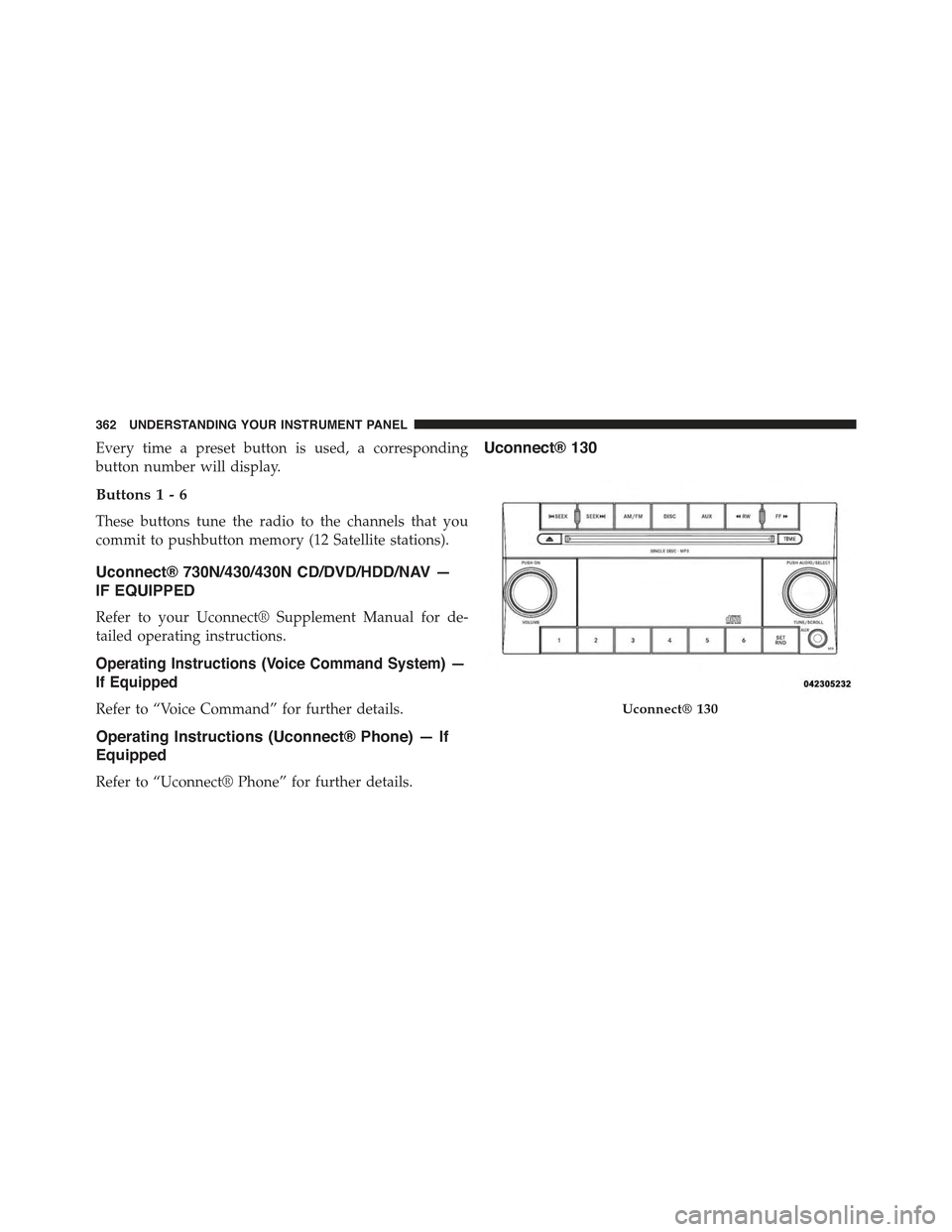
Uconnect® 130
Uconnect® 130
362 UNDERSTANDING YOUR INSTRUMENT PANEL
Page 367 of 695
Push the rotary TUNE/SCROLL control knob a fifth time
and FADE will display. Turn the TUNE/SCROLL control
knob to the left or right to adjust the sound level between
the front and rear speakers.
Push the rotary TUNE/SCROLL control knob again to
exit setting tone, balance, and fade.
AM/FM Button
Push the buttons to select either AM or FM mode.
SET/RND Button — To Set The Pushbutton
Memory
When you are receiving a station that you wish to
commit to pushbutton memory, push the SET/RND
button. The symbol SET 1 will now show in the display
window. Select the button (1 to 6) you wish to lock onto
this station and push and release that button. If a button
is not selected within five seconds after pushing the
SET/RND button, the station will continue to play but
will not be stored into pushbutton memory.
You may add a second station to each pushbutton by
repeating the above procedure with this exception: Push
the SET/RND button twice and SET 2 will show in the
display window. Each button can be set for SET 1 and
SET 2 in both AM and FM. This allows a total of 12 AM
and 12 FM stations to be stored into pushbutton memory.
The stations stored in SET 2 memory can be selected by
pushing the pushbutton twice.
Every time a preset button is used, a corresponding
button number will display.
Buttons1-6
These buttons tune the radio to the stations that you
commit to pushbutton memory (12 AM and 12 FM
stations).
4
UNDERSTANDING YOUR INSTRUMENT PANEL 365
Page 380 of 695
the SET/RND button twice and SET 2 will show in the
display window. Each button can be set for SET 1 and
SET 2 in both AM and FM. This allows a total of 12 AM
and 12 FM stations to be stored into pushbutton memory.
The stations stored in SET 2 memory can be selected by
pushing the pushbutton twice.
Every time a preset button is used, a corresponding
button number will display.
Buttons1-6
These buttons tune the radio to the stations that you
commit to pushbutton memory (12 AM and 12 FM
stations).
DISC/AUX Button
Pushing the DISC/AUX button will allow you to switch
from AM/FM modes to DISC/AUX mode.
Operation Instructions — CD MODE For CD And
MP3 Audio Play
NOTE:
•The ignition switch must be in the ON or ACC position
to operate the radio.
•This radio is capable of playing compact discs (CD),
recordable compact discs (CD-R), rewritable compact
discs (CD-RW), compact discs with MP3 tracks and
multisession compact discs with CD and MP3 tracks.
Inserting Compact Disc(s)
Gently insert one CD into the CD player with the CD
label facing up. The CD will automatically be pulled into
the CD player and the CD icon will illuminate on the
radio display. If a CD does not go into the slot more than
1.0 in (2.5 cm), a disc may already be loaded and must be
ejected before a new disc can be loaded.
378 UNDERSTANDING YOUR INSTRUMENT PANEL
Page 390 of 695
SETUP Button
Pushing the SETUP button allows you to select the
following items:
•Display Sirius ID number — Push the AUDIO/
SELECT button to display the Sirius ID number. This
number is used to activate, deactivate, or change the
Sirius subscription.
SET Button — To Set The Pushbutton Memory
When you are receiving a channel that you wish to
commit to pushbutton memory, push the SET button. The
symbol SET 1 will now show in the display window.
Select the button (1-6) you wish to lock onto this channel
and push and release that button. If a button is not
selected within five seconds after pushing the SET but-
ton, the channel will continue to play but will not be
stored into pushbutton memory.
You may add a second channel to each pushbutton by
repeating the above procedure with this exception: Push
the SET button twice and SET 2 will show in the display
window. Each button can be set for SET 1 and SET 2. This
allows a total of 12 Satellite channels to be stored into
pushbutton memory. The channels stored in SET 2
memory can be selected by pushing the pushbutton
twice.
Every time a preset button is used, a corresponding
button number will display.
Buttons1-6
These buttons tune the radio to the channels that you
commit to pushbutton memory (12 Satellite stations).
Operating Instructions (Uconnect® Phone) — If
Equipped
Refer to “Uconnect® Phone” in “Understanding The
Features Of Your Vehicle”.
388 UNDERSTANDING YOUR INSTRUMENT PANEL