reset JEEP WRANGLER 2015 JK / 3.G User Guide
[x] Cancel search | Manufacturer: JEEP, Model Year: 2015, Model line: WRANGLER, Model: JEEP WRANGLER 2015 JK / 3.GPages: 695, PDF Size: 20.64 MB
Page 327 of 695
To Set The Variance
Start the engine and leave the transmission gear selector
lever in the PARK position. Press and hold the RESET
button on the steering wheel (for approximately ten
seconds) until the current variance zone number is dis-
played. To change the zone, press and release the STEP
button to increase the variance one step. Repeat as
necessary until the desired variance is achieved.
NOTE:The factory default zone is 8. During program-
ming, the zone value will wrap around from zone 15 to
zone 1.
Manual Compass Calibration
If the compass appears erratic, inaccurate or abnormal,
you may wish to calibrate the compass. Prior to calibrat-
ing the compass, make sure the proper zone is selected.
1. Start the engine and leave the transmission in the
PARK position.
2. Press and hold the RESET button (for approximately
10 seconds) until the current variance zone number is
displayed.
3. Release the RESET button, then press and hold again
for approximately 10 seconds, until the direction is
displayed, with the CAL indicator on continuously in
the display.
4. To complete the compass calibration, drive the vehicle
in one or more complete 360–degree circles, under
5 mph (8 km/h) in an area free from power lines and
large metallic objects, until the CAL indicator turns
off. The compass will now function normally.
NOTE:
•A good calibration requires a level surface and an
environment free from large metallic objects such as
buildings, bridges, underground cables, railroad
tracks, etc.
4
UNDERSTANDING YOUR INSTRUMENT PANEL 325
Page 328 of 695
•Magnetic materials should be kept away from the top
of the center of the instrument panel. This is where the
compass sensor is located.
Average Fuel Economy / Distance To Empty (DTE)
/ Elapsed Time
•Average Fuel Economy
Shows the average fuel economy since the last reset.
When the fuel economy is reset, the digits will go blank
while the history information is erased. The averaging
will restart when enough new distance and fuel data is
accumulated.
•Distance To Empty (DTE)
Shows the estimated distance that can be traveled with
the fuel remaining in the tank. This estimated distance is
determined by a weighted average of the instantaneous
and average fuel economy, according to the current fuel
tank level. DTE cannot be reset.
•Elapsed Time
Shows the total elapsed time of travel since the last reset.
Elapsed time will increment when the ignition switch is
in the RUN or START positions. The elapsed timer
displays minutes:seconds. After 59minutes:59seconds, it
displays hours:minutes:seconds.
Trip Conditions
Trip Odometer (ODO) / ECO (Fuel Saver Indicator)
— If Equipped
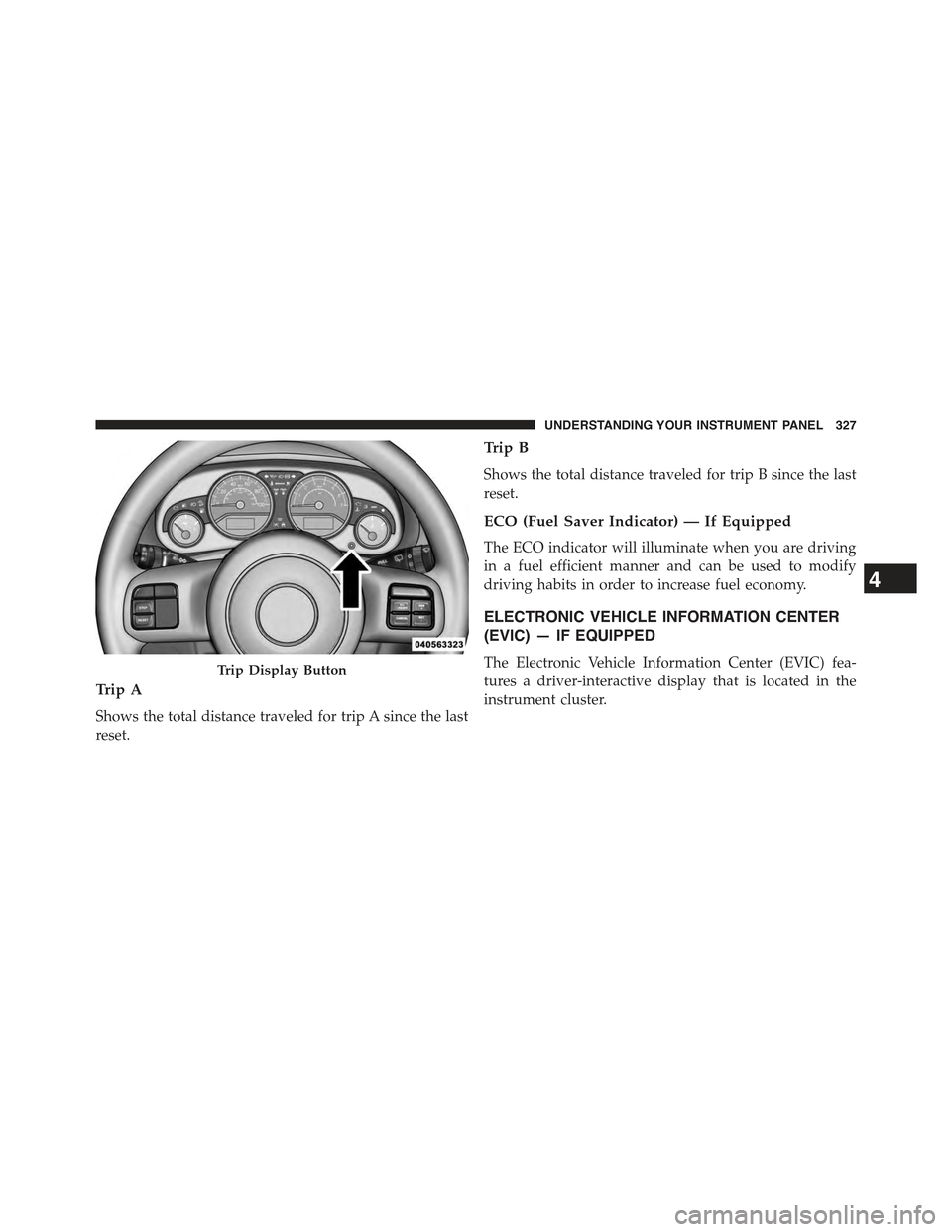
This display shows the distance traveled since the last
reset. Push and release the right button (on the instru-
ment cluster) to switch from odometer to Trip A or Trip B
or to ECO. Push and hold the right button while the
odometer/trip odometer is displayed to reset.
326 UNDERSTANDING YOUR INSTRUMENT PANEL
Page 329 of 695
Trip A
Shows the total distance traveled for trip A since the last
reset.
Trip B
Shows the total distance traveled for trip B since the last
reset.
ECO (Fuel Saver Indicator) — If Equipped
The ECO indicator will illuminate when you are driving
in a fuel efficient manner and can be used to modify
driving habits in order to increase fuel economy.
ELECTRONIC VEHICLE INFORMATION CENTER
(EVIC) — IF EQUIPPED
The Electronic Vehicle Information Center (EVIC) fea-
tures a driver-interactive display that is located in the
instrument cluster.
Trip Display Button
4
UNDERSTANDING YOUR INSTRUMENT PANEL 327
Page 332 of 695
•SELECT Button
Push and release the SELECT button when
prompted by the EVIC to Reset Main Menu
features with a reset capability or to change
Personal Settings.
•DOWN Button
Push and release the DOWN button when
prompted by the EVIC to step through stored
system warning messages or Personal Settings
features.
Electronic Vehicle Information Center (EVIC)
Displays
When the appropriate conditions exist, the EVIC displays
the following messages:
•Low Tire Pressure
•Low Fuel
•Service TPM System (refer to#Tire Pressure Monitor-
ing System#in#Starting and Operating#)
•Premium TPM System Graphic Display
•Damaged Key
•Key in Ignition
•Turn Signal On (with a continuous warning chime)
•Left Front Turn Signal Lamp Out (with a single chime)
•Left Rear Turn Signal Lamp Out (with a single chime)
•Right Front Turn Signal Lamp Out (with a single
chime)
•Right Rear Turn Signal Lamp Out (with a single chime)
•Key Fob Battery Low (with a single chime)
•Personal Settings Not Avail. – Vehicle Not in Park —
automatic transmission
330 UNDERSTANDING YOUR INSTRUMENT PANEL
Page 333 of 695
•Personal Settings Not Avail. – Vehicle in Motion —
manual transmission
•Door Ajar (with vehicle graphic showing which door is
open. A single chime sounds if the vehicle is in
motion).
•Gate Ajar (with vehicle graphic showing the Liftgate/
back door open and A single chime )
•Check Gascap (refer to “Adding Fuel” in “Starting
And Operating” for more details)
•Oil Change Required (with a single chime)
•ECO (Fuel Saver Indicator) — if equipped
Oil Change Required
Your vehicle is equipped with an engine oil change
indicator system. The “Oil Change Required” message
will display in the EVIC display for approximately 5
seconds after a single chime has sounded to indicate the
next scheduled oil change interval. The engine oil change
indicator system is duty cycle based, which means the
engine oil change interval may fluctuate dependent upon
your personal driving style.
Unless reset, this message will continue to display each
time you turn the ignition switch to the ON position. To
turn off the message temporarily, push and release the
MENU button. To reset the oil change indicator system
(after performing the scheduled maintenance), perform
the following procedure:
1. Turn the ignition switch to the ON position.Do not
start the engine.
2. Fully push the accelerator pedal slowly three times
within 10 seconds.
3. Turn the ignition switch to the LOCK position.
4
UNDERSTANDING YOUR INSTRUMENT PANEL 331
Page 334 of 695
NOTE:If the indicator message illuminates when you
start the vehicle, the oil change indicator system did not
reset. If necessary, repeat this procedure.
EVIC Main Menu
To step to each main menu feature push and release the
MENU button once for each step. A step from the last item
in the list will cause the first item in the feature list to be
displayed. The following features are in the Main menu:
•Compass, Outside Temperature, and ECO display
•Digital Speedometer
•Average Fuel Economy
•Distance to Empty
•Elapsed Time
•Vehicle Information
•Coolant Temp
•Oil Pressure
•Transmission Temp
•Oil Life Remaining (Automatic Oil Change Indicator)
•EVIC Units Selection
•System Warnings
•Personal Settings
•Tire Pressure
NOTE:For features in the EVIC that can be reset (Aver-
age Fuel Economy and Elapsed Time), the EVIC prompts
a reset with a SELECT button graphic and the word
RESET next to it.
When the SELECT button is pushed, the selected feature
will reset and RESET ALL will display next to the
SELECT button graphic. Pushing SELECT a second time
will reset both Average Fuel Economy and Elapsed Time.
332 UNDERSTANDING YOUR INSTRUMENT PANEL
Page 335 of 695
After three seconds without pushing SELECT, RESET
ALL will return to RESET and only the selected feature
will have been reset.
Compass, Outside Temperature Display / ECO
(Fuel Saver Mode) — If Equipped
The compass readings indicate the direction the vehicle is
facing. Push and release the COMPASS button to display
one of eight compass headings, the outside temperature/
ECO if the EVIC display is not already displaying this
screen.
NOTE:The system will display the last known outside
temperature when starting the vehicle and may need to
be driven several minutes before the updated tempera-
ture is displayed. Engine temperature can also affect the
displayed temperature; therefore, temperature readings
are not updated when the vehicle is not moving.
ECO (Fuel Saver Mode) — If Equipped
The ECO message will display below the outside tem-
perature in the EVIC display (if the audio system is on
the ECO indicator will override the audio information
display line if the#Display Fuel Saver#personal setting is
ON — see#Personal Settings#section). This message will
appear whenever you are driving in a fuel efficient
manner.
This feature allows you to monitor when you are driving
in a fuel efficient manner, and it can be used to modify
driving habits in order to increase fuel economy.
Automatic Compass Calibration
This compass is self-calibrating, which eliminates the
need to set the compass manually. When the vehicle is
new, the compass may appear erratic and the EVIC will
display “CAL” until the compass is calibrated. You may
also calibrate the compass by completing one or more
360–degree turns (in an area free from large metal or
4
UNDERSTANDING YOUR INSTRUMENT PANEL 333
Page 338 of 695
Average Fuel Economy
Shows the average fuel economy since the last reset.
Average Fuel Economy can be reset by pushing and
holding the SELECT button (as prompted in the EVIC
display). Upon reset, the history information will be
erased, and the averaging will continue from the last fuel
average reading before the reset.
Distance To Empty (DTE)
Shows the estimated distance that can be traveled with
the fuel remaining in the tank. This estimated distance is
determined by a weighted average of the instantaneous
and average fuel economy, according to the current fuel
tank level. DTE cannot be reset.
NOTE:Significant changes in driving style or vehicle
loading will greatly affect the actual drivable distance of
the vehicle, regardless of the DTE display value.
When the DTE value is less than 30 miles (48 km)
estimated driving distance, the DTE display will change
to a text display of#LOW FUEL”. This display will
continue until the vehicle runs out of fuel. Adding a
significant amount of fuel to the vehicle will turn off the
LOW FUEL text and a new DTE value will display.
Elapsed Time
Shows the total elapsed time of travel since the last reset.
Elapsed time will increment when the ignition switch is
in the RUN or START position.
Elapsed time is displayed as follows:
•Hours
•Minutes
•Seconds
Elapsed time can be reset by pushing and holding the
SELECT button (as prompted in the EVIC display). Upon
336 UNDERSTANDING YOUR INSTRUMENT PANEL
Page 339 of 695
reset all digits will change to zeros and time will start
incrementing again if the ignition switch is in RUN or
START.
EVIC Units Selection (UNITS IN Display)
Displays the units used for the Outside Temperature,
Average Fuel Economy and Distance to Empty features.
Push and Release the SELECT button to toggle units
between#U.S.#and#METRIC#.
Advanced EVIC Messages (Customer Information
Features)
Push and release the MENU button until “Advanced
EVIC Messages” displays in the EVIC. Then, push the
DOWN button to display any one of the following
choices.
•Digital Speedometer
Shows the actual vehicle speed in mph or km/h.
•Coolant Temperature
Shows the actual coolant temperature.
•Oil Pressure
Shows the actual oil pressure.
•Transmission Temperature
Shows the actual transmission fluid temperature.
•Automatic Oil Change Indicator
Shows the oil life measured in percentage.
System Status
Displays SYSTEM OK if there are no active Warning
Messages stored. Pushing and releasing the DOWN
button when SYSTEM OK is displayed will do nothing.
Displays SYSTEM WARNINGS PRESENT if there are
active Warning Messages stored. Pushing and releasing
4
UNDERSTANDING YOUR INSTRUMENT PANEL 337
Page 349 of 695
If a preset button is activated while in the Music Type
(Program Type) mode, the Music Type mode will be
exited and the radio will tune to the preset station.
SETUP Button
Pushing the SETUP button allows you to select between
the following items:
NOTE:Turn the TUNE/SCROLL control knob to scroll
through the entries. Push the AUDIO/SELECT button to
select an entry and make changes.
•DVD Enter —When the disc is in DVD Menu mode,
selecting DVD Enter will allow you to play the current
highlighted selection. Use the remote control to scroll
up and down the menu (if equipped).
•DISC Play/Pause —
You can toggle between playing the DVD and
pausing the DVD by pushing the SELECT
button (if equipped).
•DVD Play Options —Selecting the DVD Play Options
will display the following:
•Subtitle — Repeatedly pushing SELECT will switch
subtitles to different subtitle languages that are avail-
able on the disc (if equipped).
•Audio Stream — Repeatedly pushing SELECT will
switch to different audio languages (if supported on
the disc) (if equipped).
•Angle — Repeatedly pushing SELECT will change
the viewing angle if supported by the DVD disc (if
equipped).
4
UNDERSTANDING YOUR INSTRUMENT PANEL 347