child lock JEEP WRANGLER 2023 Owners Manual
[x] Cancel search | Manufacturer: JEEP, Model Year: 2023, Model line: WRANGLER, Model: JEEP WRANGLER 2023Pages: 396, PDF Size: 25.15 MB
Page 4 of 396

2
INTRODUCTION
SYMBOLS KEY ....................................................................... 8
ROLLOVER WARNING ......................................................... 8
VEHICLE MODIFICATIONS/ALTERATIONS ......................... 8
SYMBOL GLOSSARY ............................................................. 9
GETTING TO KNOW YOUR VEHICLE
KEYS ....................................................................................13
Key Fob ........................................................................ 13
SENTRY KEY ........................................................................15
IGNITION SWITCH ...............................................................15 Keyless Enter ‘n Go™ Ignition .................................... 15
REMOTE START — IF EQUIPPED (GASOLINE)..................17 How To Use Remote Start .......................................... 17
To Exit Remote Start Mode ........................................ 18
Remote Start Front Defrost Activation —
If Equipped .................................................................. 18
Remote Start Comfort Systems — If Equipped ......... 18
Remote Start Windshield Wiper De-Icer
Activation — If Equipped ............................................. 18
Remote Start Cancel Message .................................. 18
REMOTE START — IF EQUIPPED (DIESEL) ......................19 How To Use Remote Start .......................................... 19
VEHICLE SECURITY SYSTEM — IF EQUIPPED .................19 To Arm The System .................................................... 20
To Disarm The System ............................................... 20
Rearming Of The System ............................................ 20 DOORS ................................................................................ 20
Manual Door Locks......................................................20
Power Door Locks — If Equipped ............................... 21
Keyless Enter ‘n Go™ — Passive Entry
(If Equipped) ................................................................ 21
Automatic Door Locks — If Equipped ......................... 23
Child-Protection Door Lock System — Rear Doors.....23
Front Door Removal..................................................... 24
Rear Door Removal (Four-Door Models) ................... 27
Door Off Mirror Kit — If Equipped
S
........................ 29
Half-Door Installation — If Equipped
S
................... 31
STEERING WHEEL............................................................... 36 Tilt/Telescoping Steering Column ..............................36
Heated Steering Wheel — If Equipped........................ 37
SEATS .................................................................................. 37 Manual Adjustment Front Seats ................................. 37
60/40 Split Folding Rear Seat —
Four Door Models ........................................................ 39
Fold And Tumble Rear Seat — Two Door Models....... 39
Heated Seats — If Equipped........................................ 41
Rear Seat Armrest — If Equipped ............................... 41
Head Restraints ........................................................... 41
UCONNECT VOICE RECOGNITION ..................................... 44 Introducing Voice Recognition .................................... 44
Basic Voice Commands............................................... 44
Get Started ................................................................... 44
Additional Information................................................. 45
MIRRORS ............................................................................ 45 Inside Rearview Mirror ................................................ 45
Illuminated Vanity Mirrors .......................................... 46
Outside Mirrors ........................................................... 46
Outside Mirrors With Turn Signal — If Equipped ........ 46
Heated Mirrors — If Equipped ..................................... 46
Power Mirrors — If Equipped ....................................... 46 UNIVERSAL GARAGE DOOR OPENER
(HOMELINK®) — IF EQUIPPED
S
.................................. 47
Before You Begin Programming HomeLink® ............ 47
Erasing All The HomeLink® Channels ....................... 47
Identifying Whether You Have A Rolling Code Or
Non-Rolling Code Device............................................. 47
Programming HomeLink® To A Garage Door
Opener ......................................................................... 48
Programming HomeLink® To A Miscellaneous
Device .......................................................................... 48
Reprogramming A Single HomeLink® Button ........... 49
Canadian/Gate Operator Programming .................... 49
Security ........................................................................ 49
Troubleshooting Tips ................................................... 50
EXTERIOR LIGHTS .............................................................. 50 Headlight Switch.......................................................... 50
Daytime Running Lights (DRLs) — If Equipped ......... 51
High/Low Beam Switch............................................... 51
Automatic High Beam Headlamp Control —
If Equipped .................................................................. 51
Flash-To-Pass............................................................... 51
Automatic Headlights — If Equipped ......................... 51
Lights-On Reminder..................................................... 51
Front Fog Lights — If Equipped ................................... 52
Turn Signals ................................................................. 52
Lane Change Assist — If Equipped ............................. 52
INTERIOR LIGHTS .............................................................. 52 Interior Courtesy Lights ............................................... 52
Dimmer Control ........................................................... 53
WINDSHIELD WIPERS AND WASHERS ........................... 53 Windshield Wiper Operation ...................................... 53
Rear Window Wiper/Washer — If Equipped .............. 54
23_JL_OM_EN_USC_t.book Page 2
Page 7 of 396

5
ANDROID AUTO™ & APPLE CARPLAY® —
IF EQUIPPED ..................................................................... 222Android Auto™
S
.................................................... 222
Apple CarPlay®
S
.................................................. 224
Android Auto™ And Apple CarPlay® Tips And
Tricks.......................................................................... 225
CONNECTED VEHICLE SERVICES — IF EQUIPPED ...... 225 Is My Vehicle Connected? ........................................ 225Introduction To Connected Vehicle Services .......... 226
Getting Started With Connected Vehicle Services ... 227
Using SiriusXM Guardian™ ...................................... 228
Manage My SiriusXM Guardian™ Account ............. 237
CONNECTED SERVICES FAQS ....................................... 237 Connected Services SOS FAQs — If Equipped ........ 237
Connected Services Remote Door Lock/Unlock
FAQs .......................................................................... 237
Connected Services Roadside Assistance FAQs .... 237Connected Services Send & Go FAQs —
If Equipped ............................................................... 238
Connected Services Vehicle Finder FAQs ............... 238
Connected Services Stolen Vehicle Assistance
FAQs — If Equipped .................................................. 238
Connected Services Remote Vehicle Start FAQs ... 238
Connected Services Remote Horn & Lights FAQs .. 239
Connected Services Account FAQs — If Equipped .. 239
Data Collection & Privacy ......................................... 240
RADIO OPERATION AND MOBILE PHONES .................. 240 Regulatory And Safety Information .......................... 241
OFF-ROAD PAGES — IF EQUIPPED ................................ 241 Off-Road Pages Status Bar ...................................... 241
Drivetrain .................................................................. 242
Accessory Gauge ...................................................... 242Pitch & Roll ............................................................... 242
TrailCam — If Equipped ............................................. 243
SAFETY
SAFETY FEATURES .......................................................... 244 Anti-Lock Brake System (ABS) ................................ 244
Rear Seat Reminder Alert (RSRA) — If Equipped .... 244
Electronic Brake Control (EBC) System .................. 245
AUXILIARY DRIVING SYSTEMS ...................................... 252 Blind Spot Monitoring (BSM) — If Equipped ........... 252
Forward Collision Warning (FCW) With
Mitigation — If Equipped........................................... 255Tire Pressure Monitoring System (TPMS) ............... 257
OCCUPANT RESTRAINT SYSTEMS ............................... 261 Occupant Restraint Systems Features ................... 261
Important Safety Precautions .................................. 261
Seat Belt Systems .................................................... 261
Supplemental Restraint Systems (SRS).................. 267
Child Restraints ........................................................ 277
SAFETY TIPS ..................................................................... 288 Transporting Passengers ......................................... 288
Transporting Pets ..................................................... 288
Connected Vehicles .................................................. 288Safety Checks You Should Make Inside The
Vehicle ...................................................................... 288
Periodic Safety Checks You Should Make Outside
The Vehicle ................................................................ 290Exhaust Gas .............................................................. 290
Carbon Monoxide Warnings ..................................... 290
IN CASE OF EMERGENCY
HAZARD WARNING FLASHERS ..................................... 291
ASSIST AND SOS SYSTEM — IF EQUIPPED .................. 291 JACKING AND TIRE CHANGING
S
...............................293
Preparations For Jacking ......................................... 294
Jack Location ............................................................ 294 Spare Tire Removal .................................................. 295
Jacking Instructions .................................................. 295
JUMP STARTING ..............................................................298 Preparations For Jump Start..................................... 298
Jump Starting Procedure .......................................... 299
IF YOUR ENGINE OVERHEATS......................................... 300
MANUAL PARK RELEASE ................................................301
FREEING A STUCK VEHICLE ........................................... 302
TOWING A DISABLED VEHICLE.......................................303 Four–Wheel Drive Models ........................................ 303Without The Key Fob ................................................. 304
Emergency Tow Hooks — If Equipped ..................... 304
ENHANCED ACCIDENT RESPONSE SYSTEM (EARS) ..305
EVENT DATA RECORDER (EDR)......................................305
SERVICING AND MAINTENANCE
SCHEDULED SERVICING — GASOLINE ENGINE ...........306 Maintenance Plan ..................................................... 307
SCHEDULED SERVICING — DIESEL ENGINE .................310 Maintenance Plan — Diesel Fuel Up To B5
Biodiesel .................................................................... 311Additional Maintenance — B6 To B20 Biodiesel ..... 313
ENGINE COMPARTMENT ................................................. 314 2.0L Gasoline Engine ............................................... 3143.6L Gasoline Engine ............................................... 3153.0L Diesel Engine .................................................... 316
Checking Oil Level ..................................................... 317Adding Washer Fluid ................................................. 317
Maintenance-Free Battery ....................................... 317Pressure Washing ..................................................... 318
23_JL_OM_EN_USC_t.book Page 5
Page 16 of 396
14GETTING TO KNOW YOUR VEHICLE
Key Left Vehicle Feature
If a valid key fob is no longer detected inside the vehicle
while the vehicle’s ignition system is in the ON/RUN or
START position, the message “Key Fob Has Left The
Vehicle” will be shown in the instrument cluster display
along with an interior chime. An exterior audible and visual
alert will also be activated to warn the driver.
The vehicle’s horn will rapidly chirp three times along with
a single flash of the vehicle’s exterior lights.
NOTE:
The doors have to be open and then closed in order for
the vehicle to check for the presence of a key fob; the
Key Left Vehicle feature will not activate until all of the
doors are closed.
These alerts will not be activated in situations where
the vehicle’s engine is left running with the key fob
inside.
Replacing The Battery In The Key Fob
The recommended replacement battery is CR2450.
NOTE:
Customers are recommended to use a battery
obtained from Mopar®. Aftermarket coin battery
dimensions may not meet the original OEM coin battery
dimensions.
Perchlorate Material — special handling may apply. See
www.dtsc.ca.gov/hazardouswaste/perchlorate for
further information.
Do not touch the battery terminals that are on the back
housing or the printed circuit board.
When a key fob battery is low, a warning will be indi -
cated on the vehicle’s instrument cluster, and the fob
LED will no longer illuminate with a button press.
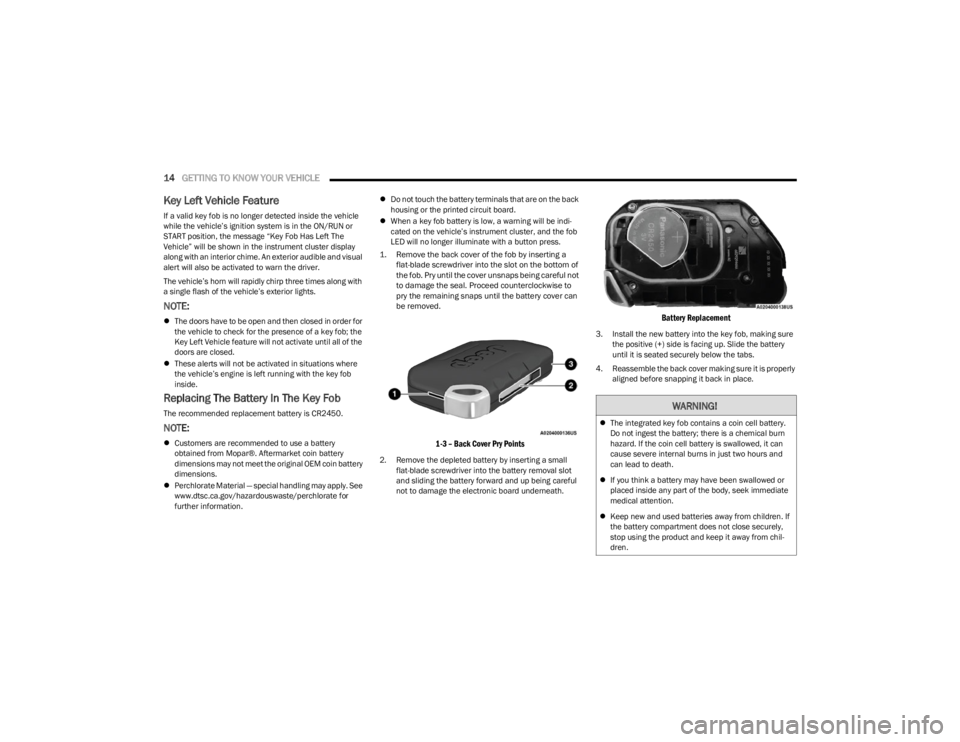
1. Remove the back cover of the fob by inserting a flat-blade screwdriver into the slot on the bottom of
the fob. Pry until the cover unsnaps being careful not
to damage the seal. Proceed counterclockwise to
pry the remaining snaps until the battery cover can
be removed.
1-3 – Back Cover Pry Points
2. Remove the depleted battery by inserting a small flat-blade screwdriver into the battery removal slot
and sliding the battery forward and up being careful
not to damage the electronic board underneath.
Battery Replacement
3. Install the new battery into the key fob, making sure the positive (+) side is facing up. Slide the battery
until it is seated securely below the tabs.
4. Reassemble the back cover making sure it is properly aligned before snapping it back in place.
WARNING!
The integrated key fob contains a coin cell battery.
Do not ingest the battery; there is a chemical burn
hazard. If the coin cell battery is swallowed, it can
cause severe internal burns in just two hours and
can lead to death.
If you think a battery may have been swallowed or
placed inside any part of the body, seek immediate
medical attention.
Keep new and used batteries away from children. If
the battery compartment does not close securely,
stop using the product and keep it away from chil -
dren.
23_JL_OM_EN_USC_t.book Page 14
Page 18 of 396
16GETTING TO KNOW YOUR VEHICLE
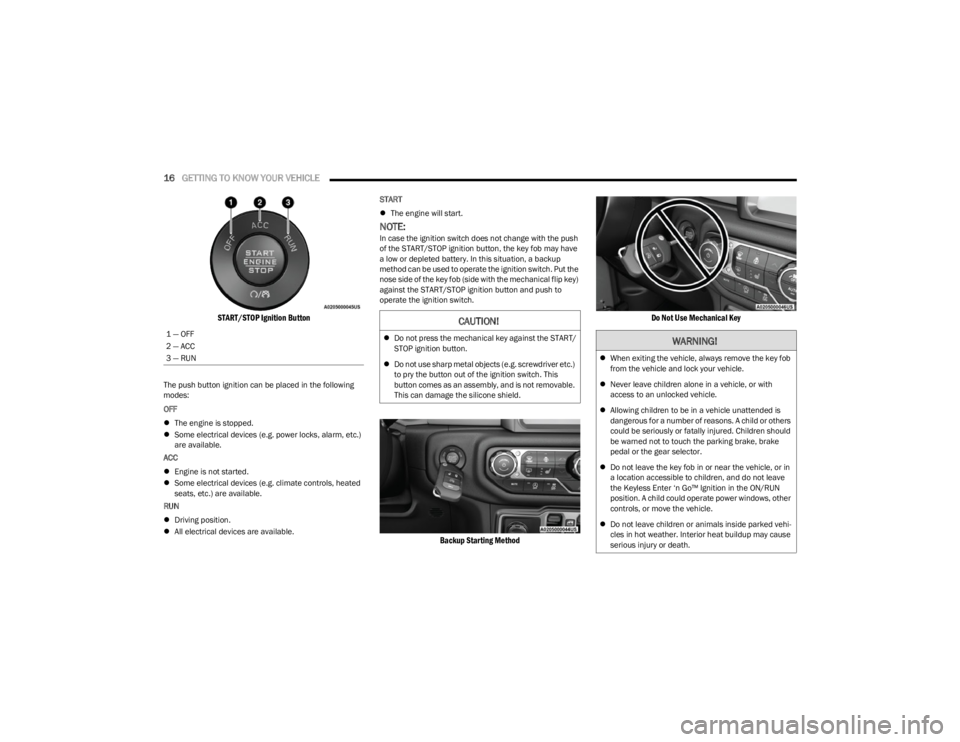
START/STOP Ignition Button
The push button ignition can be placed in the following
modes:
OFF
The engine is stopped.
Some electrical devices (e.g. power locks, alarm, etc.)
are available.
ACC
Engine is not started.
Some electrical devices (e.g. climate controls, heated
seats, etc.) are available.
RUN
Driving position.
All electrical devices are available. START
The engine will start.
NOTE:In case the ignition switch does not change with the push
of the START/STOP ignition button, the key fob may have
a low or depleted battery. In this situation, a backup
method can be used to operate the ignition switch. Put the
nose side of the key fob (side with the mechanical flip key)
against the START/STOP ignition button and push to
operate the ignition switch.
Backup Starting Method Do Not Use Mechanical Key
1 — OFF
2 — ACC
3 — RUNCAUTION!
Do not press the mechanical key against the START/
STOP ignition button.
Do not use sharp metal objects (e.g. screwdriver etc.)
to pry the button out of the ignition switch. This
button comes as an assembly, and is not removable.
This can damage the silicone shield.WARNING!
When exiting the vehicle, always remove the key fob
from the vehicle and lock your vehicle.
Never leave children alone in a vehicle, or with
access to an unlocked vehicle.
Allowing children to be in a vehicle unattended is
dangerous for a number of reasons. A child or others
could be seriously or fatally injured. Children should
be warned not to touch the parking brake, brake
pedal or the gear selector.
Do not leave the key fob in or near the vehicle, or in
a location accessible to children, and do not leave
the Keyless Enter ‘n Go™ Ignition in the ON/RUN
position. A child could operate power windows, other
controls, or move the vehicle.
Do not leave children or animals inside parked vehi -
cles in hot weather. Interior heat buildup may cause
serious injury or death.
23_JL_OM_EN_USC_t.book Page 16
Page 19 of 396

GETTING TO KNOW YOUR VEHICLE17
NOTE:
For more information on normal starting, see Úpage 126.
When opening the driver's door with the ignition in the
ON/RUN position (engine not running), a chime will
sound to remind you to place the ignition in the OFF
position. In addition to the chime, the message will
display “Ignition Or Accessory On” in the cluster.
REMOTE START — IF EQUIPPED
(GASOLINE)
If applicable, refer to the “Hybrid Supplement” for
additional information.
This system uses the key fob to start the engine
conveniently from outside the vehicle while still
maintaining security. The system has a range
of 328 ft (100 m).
Remote Start is used to defrost windows in cold weather,
and to reach a comfortable climate in all ambient
conditions before the driver enters the vehicle.
NOTE:
The vehicle must be equipped with an automatic trans -
mission to be equipped with Remote Start.
Obstructions between the vehicle and key fob may
reduce this range
Úpage 381.
HOW TO USE REMOTE START
Push and release the Remote Start button on the key fob
twice within five seconds. The vehicle doors and swing
gate will lock, the turn signals will flash twice, and the horn
will chirp twice. Pushing the Remote Start button again will
shut the engine off.
NOTE:
With Remote Start, the engine will only run for
15 minutes.
Remote Start can only be used twice.
If an engine fault is present or fuel level is low, the
vehicle will start and then shut down in 10 seconds.
The park lamps will turn on and remain on during
Remote Start mode.
For security, power window operation is disabled when
the vehicle is in the Remote Start mode.
The ignition must be placed in the ON/RUN position
before the Remote Start sequence can be repeated for
a third cycle.
All of the following conditions must be met before the
engine will remote start:
Gear selector in PARK
Doors closed
Hood closed
Swing gate closed
Hazard switch off
Brake switch inactive (brake pedal not pressed)
Battery at an acceptable charge level
Panic button not pushed
System not disabled from previous Remote Start event
Vehicle Security system indicator flashing
Ignition in OFF position
Fuel level meets minimum requirement
All removable doors must not be removed
Malfunction Indicator Light (MIL) not illuminated
CAUTION!
An unlocked vehicle is an invitation for thieves. Always
remove key fob from the vehicle and lock all doors
when leaving the vehicle unattended.
WARNING!
Do not start or run an engine in a closed garage or
confined area. Exhaust gas contains carbon
monoxide (CO) which is odorless and colorless.
Carbon monoxide is poisonous and can cause
serious injury or death when inhaled.
Keep key fobs away from children. Operation of the
Remote Start system, windows, door locks or other
controls could cause serious injury or death.
WARNING!
Do not start or run an engine in a closed garage or
confined area. Exhaust gas contains carbon
monoxide (CO) which is odorless and colorless.
Carbon monoxide is poisonous and can cause
serious injury or death when inhaled.
Keep key fobs away from children. Operation of the
Remote Start system, windows, door locks or other
controls could cause serious injury or death.
2
23_JL_OM_EN_USC_t.book Page 17
Page 21 of 396
GETTING TO KNOW YOUR VEHICLE19
REMOTE START — IF EQUIPPED (DIESEL)
This system uses the key fob to start the engine
conveniently from outside the vehicle while still
maintaining security. The system has a range
of approximately 300 ft (91 m).
Remote Start is used to defrost windows in cold weather,
and to reach a comfortable climate in all ambient
conditions before the driver enters the vehicle.
NOTE:
The vehicle must be equipped with an automatic trans -
mission to be equipped with Remote Start.
Obstructions between the vehicle and the key fob may
reduce this range.
The Remote Start system will wait for the Wait To Start
Indicator Light
Úpage 116 to extinguish before
cranking the engine. This allows time for the engine
preheat cycle to heat the cylinder air, and is normal in
cold weather.
HOW TO USE REMOTE START
Push and release the Remote Start button on the key fob
twice within five seconds. The vehicle doors and swing
gate will lock, the turn signals will flash twice, and the horn
will chirp twice. Pushing the Remote Start button again will
shut the engine off.
NOTE:
With Remote Start, the engine will only run for
15 minutes.
Remote Start can only be used twice.
If an engine fault is present or fuel level is low, the
vehicle will start and then shut down in 10 seconds.
The park lamps will turn on and remain on during
Remote Start mode.
For security, power window operation is disabled when
the vehicle is in the Remote Start mode.
The ignition must be placed in the ON/RUN position
before the Remote Start sequence can be repeated for
a third cycle.
All of the following conditions must be met before the
engine will remote start:
Gear selector in PARK
Doors closed
Hood closed
Swing gate closed
Hazard switch off
Brake switch inactive (brake pedal not pressed)
Battery at an acceptable charge level
Panic button not pushed
Fuel meets minimum requirement
System not disabled from previous Remote Start event
Vehicle Security system not active
Malfunction Indicator Light (MIL) is not illuminated
Water In Fuel Indicator Light is not illuminated
Wait To Start Indicator Light is not illuminated
For additional Remote Start information, see
Úpage 18.
VEHICLE SECURITY SYSTEM — IF EQUIPPED
The Vehicle Security system monitors the vehicle doors for
unauthorized entry and the ignition switch for
unauthorized operation. When the alarm is activated, the
interior switches for door locks are disabled. The Vehicle
Security system provides both audible and visible signals.
If something triggers the alarm, the Vehicle Security
system will provide the following audible and visible
signals: the horn will pulse, the park lamps and/or turn
signals will flash, and the Vehicle Security Light in the
instrument cluster will flash.WARNING!
Do not start or run an engine in a closed garage or
confined area. Exhaust gas contains carbon
monoxide (CO) which is odorless and colorless.
Carbon monoxide is poisonous and can cause
serious injury or death when inhaled.
Keep key fobs away from children. Operation of the
Remote Start system, windows, door locks or other
controls could cause serious injury or death.
WARNING!
Do not start or run an engine in a closed garage or
confined area. Exhaust gas contains carbon
monoxide (CO) which is odorless and colorless.
Carbon monoxide is poisonous and can cause
serious injury or death when inhaled.
Keep key fobs away from children. Operation of the
Remote Start system, windows, door locks or other
controls could cause serious injury or death.2
23_JL_OM_EN_USC_t.book Page 19
Page 23 of 396
GETTING TO KNOW YOUR VEHICLE21
(Continued)
NOTE:The mechanical key can be used to lock or unlock the
doors, swing gate (if equipped with a lock), glove
compartment, and console storage.POWER DOOR LOCKS — IF EQUIPPED
The power door lock switch is located on each front door
panel. Push the switch forward to unlock the doors, and
rearward to lock the doors.
Power Door Lock Switch
KEYLESS ENTER ‘N GO™ — PASSIVE
E
NTRY (IF EQUIPPED)
The Passive Entry system is a feature that allows you to
lock and unlock the vehicle’s door(s) and swing gate
without having to push the key fob lock or unlock buttons.
NOTE:
Passive Entry may be programmed on/off within the
Uconnect Settings Úpage 184.
The key fob may not be detected by the vehicle Passive
Entry system if it is located next to a mobile phone,
laptop, or other electronic device; these devices may
interfere with the key fob’s wireless signal and prevent
the Passive Entry system from locking/unlocking the
vehicle.
Passive Entry Unlock initiates illuminated approach
(low beams, license plate lamp, position lamps) for
whichever duration is set between 0, 30, 60 or
90 seconds. Passive Entry Unlock also initiates two
flashes of the turn signals.
WARNING!
For personal security reasons and safety in a colli -
sion, lock the vehicle doors when you drive, as well as
when you park and exit the vehicle.
When exiting the vehicle, always switch off the igni -
tion and remove the key from the vehicle. Unsuper -
vised use of vehicle equipment may cause severe
personal injuries and death.
Never leave children alone in a vehicle, or with
access to an unlocked vehicle.
Allowing children to be in a vehicle unattended is
dangerous for a number of reasons. A child or others
could be seriously or fatally injured. Children should
be warned not to touch the parking brake, brake
pedal or the gear selector.
Do not leave the key fob in or near the vehicle or in a
location accessible to children. A child could operate
power windows, other controls, or move the vehicle.
WARNING!
For personal security reasons and safety in a colli -
sion, lock the vehicle doors when you drive, as well as
when you park and exit the vehicle.
When exiting the vehicle, always switch off the igni -
tion and remove the key from the vehicle. Unsuper -
vised use of vehicle equipment may cause severe
personal injuries and death.
Never leave children alone in a vehicle, or with
access to an unlocked vehicle.
Allowing children to be in a vehicle unattended is
dangerous for a number of reasons. A child or others
could be seriously or fatally injured. Children should
be warned not to touch the parking brake, brake
pedal or the gear selector.
Do not leave the key fob in or near the vehicle or in a
location accessible to children. A child could operate
power windows, other controls, or move the vehicle.
WARNING!
2
23_JL_OM_EN_USC_t.book Page 21
Page 25 of 396
GETTING TO KNOW YOUR VEHICLE23
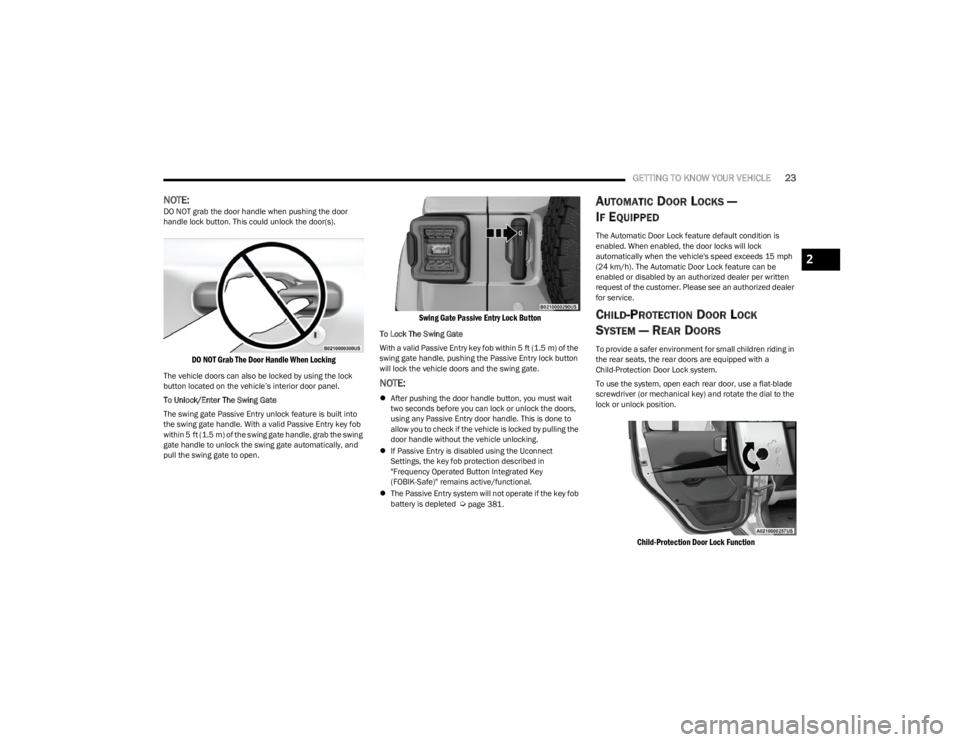
NOTE:DO NOT grab the door handle when pushing the door
handle lock button. This could unlock the door(s).
DO NOT Grab The Door Handle When Locking
The vehicle doors can also be locked by using the lock
button located on the vehicle’s interior door panel.
To Unlock/Enter The Swing Gate
The swing gate Passive Entry unlock feature is built into
the swing gate handle. With a valid Passive Entry key fob
within 5 ft (1.5 m) of the swing gate handle, grab the swing
gate handle to unlock the swing gate automatically, and
pull the swing gate to open.
Swing Gate Passive Entry Lock Button
To Lock The Swing Gate
With a valid Passive Entry key fob within 5 ft (1.5 m) of the
swing gate handle, pushing the Passive Entry lock button
will lock the vehicle doors and the swing gate.
NOTE:
After pushing the door handle button, you must wait
two seconds before you can lock or unlock the doors,
using any Passive Entry door handle. This is done to
allow you to check if the vehicle is locked by pulling the
door handle without the vehicle unlocking.
If Passive Entry is disabled using the Uconnect
Settings, the key fob protection described in
"Frequency Operated Button Integrated Key
(FOBIK-Safe)" remains active/functional.
The Passive Entry system will not operate if the key fob
battery is depleted
Úpage 381.
AUTOMATIC DOOR LOCKS —
I
F EQUIPPED
The Automatic Door Lock feature default condition is
enabled. When enabled, the door locks will lock
automatically when the vehicle's speed exceeds 15 mph
(24 km/h). The Automatic Door Lock feature can be
enabled or disabled by an authorized dealer per written
request of the customer. Please see an authorized dealer
for service.
CHILD-PROTECTION DOOR LOCK
S
YSTEM — REAR DOORS
To provide a safer environment for small children riding in
the rear seats, the rear doors are equipped with a
Child-Protection Door Lock system.
To use the system, open each rear door, use a flat-blade
screwdriver (or mechanical key) and rotate the dial to the
lock or unlock position.
Child-Protection Door Lock Function
2
23_JL_OM_EN_USC_t.book Page 23
Page 26 of 396
24GETTING TO KNOW YOUR VEHICLE
NOTE:
When the Child-Protection Door Lock system is
engaged, the door can be opened only by using the
outside door handle even though the inside door lock
is in the unlocked position.
After disengaging the Child-Protection Door Lock
system, always test the door from the inside to make
certain it is in the unlocked position.
After engaging the Child-Protection Door Lock system,
always test the door from the inside to make certain it
is in the locked position.
For emergency exit with the system engaged, move the
lock lever rearward (located on the door trim panel),
lower the window and open the door with the outside
door handle.
NOTE:Always use this device when carrying children. After
engaging the child lock on both rear doors, check for
effective engagement by trying to open a door with the
internal handle. Once the Child-Protection Door Lock
system is engaged, it is impossible to open the doors from
inside the vehicle. Before getting out of the car, be sure to
check that there is no one left inside.
FRONT DOOR REMOVAL
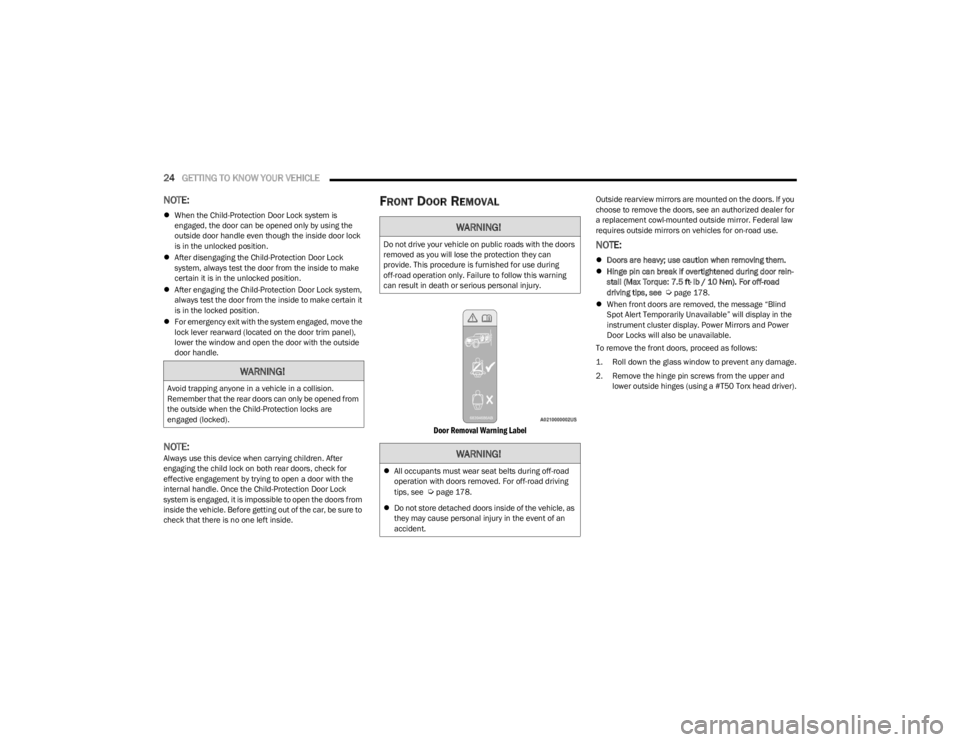
Door Removal Warning Label
Outside rearview mirrors are mounted on the doors. If you
choose to remove the doors, see an authorized dealer for
a replacement cowl-mounted outside mirror. Federal law
requires outside mirrors on vehicles for on-road use.
NOTE:
Doors are heavy; use caution when removing them.
Hinge pin can break if overtightened during door rein -
stall (Max Torque: 7.5 ft· lb / 10 N·m). For off-road
driving tips, see
Úpage 178.
When front doors are removed, the message “Blind
Spot Alert Temporarily Unavailable” will display in the
instrument cluster display. Power Mirrors and Power
Door Locks will also be unavailable.
To remove the front doors, proceed as follows:
1. Roll down the glass window to prevent any damage.
2. Remove the hinge pin screws from the upper and lower outside hinges (using a #T50 Torx head driver).
WARNING!
Avoid trapping anyone in a vehicle in a collision.
Remember that the rear doors can only be opened from
the outside when the Child-Protection locks are
engaged (locked).
WARNING!
Do not drive your vehicle on public roads with the doors
removed as you will lose the protection they can
provide. This procedure is furnished for use during
off-road operation only. Failure to follow this warning
can result in death or serious personal injury.
WARNING!
All occupants must wear seat belts during off-road
operation with doors removed. For off-road driving
tips, see
Úpage 178.
Do not store detached doors inside of the vehicle, as
they may cause personal injury in the event of an
accident.
23_JL_OM_EN_USC_t.book Page 24
Page 41 of 396
GETTING TO KNOW YOUR VEHICLE39
(Continued)
To return the seat to a sitting position, fold the seatback
upright until it locks and push the seat rearward until the
track locks.
NOTE:
The front passenger seats have a track memory, which
returns the seat to its original position.
The recline strap and easy entry lever should not be
used during the automatic returning of the seat to its
sitting position.
60/40 SPLIT FOLDING REAR SEAT —
F
OUR DOOR MODELS
To provide additional storage area, each rear seat can be
folded flat to allow for extended cargo space.
NOTE:
Be sure that the front seats are fully upright and posi -
tioned forward. This will allow the rear seat to fold down
easily.
The center head restraints must be in the lowest posi-
tion to avoid contact with the center console when
folding the seat.
To Fold Down The Rear Seat
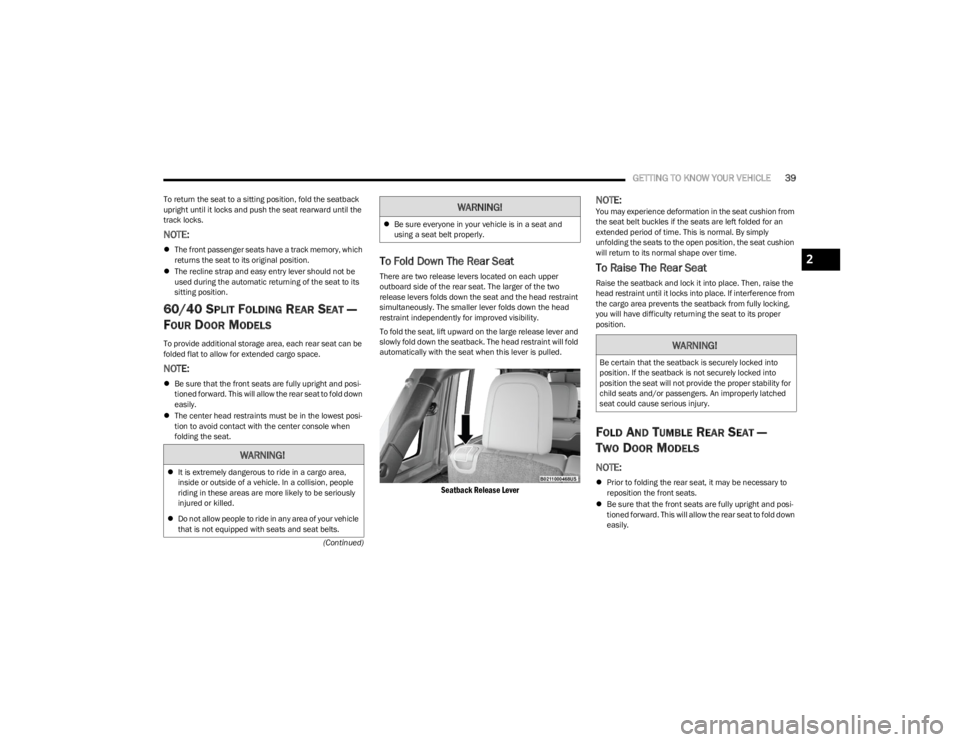
There are two release levers located on each upper
outboard side of the rear seat. The larger of the two
release levers folds down the seat and the head restraint
simultaneously. The smaller lever folds down the head
restraint independently for improved visibility.
To fold the seat, lift upward on the large release lever and
slowly fold down the seatback. The head restraint will fold
automatically with the seat when this lever is pulled.
Seatback Release Lever
NOTE:You may experience deformation in the seat cushion from
the seat belt buckles if the seats are left folded for an
extended period of time. This is normal. By simply
unfolding the seats to the open position, the seat cushion
will return to its normal shape over time.
To Raise The Rear Seat
Raise the seatback and lock it into place. Then, raise the
head restraint until it locks into place. If interference from
the cargo area prevents the seatback from fully locking,
you will have difficulty returning the seat to its proper
position.
FOLD AND TUMBLE REAR SEAT —
T
WO DOOR MODELS
NOTE:
Prior to folding the rear seat, it may be necessary to
reposition the front seats.
Be sure that the front seats are fully upright and posi -
tioned forward. This will allow the rear seat to fold down
easily.
WARNING!
It is extremely dangerous to ride in a cargo area,
inside or outside of a vehicle. In a collision, people
riding in these areas are more likely to be seriously
injured or killed.
Do not allow people to ride in any area of your vehicle
that is not equipped with seats and seat belts.
Be sure everyone in your vehicle is in a seat and
using a seat belt properly.
WARNING!
WARNING!
Be certain that the seatback is securely locked into
position. If the seatback is not securely locked into
position the seat will not provide the proper stability for
child seats and/or passengers. An improperly latched
seat could cause serious injury.
2
23_JL_OM_EN_USC_t.book Page 39