horn JEEP WRANGLER 2023 Owners Manual
[x] Cancel search | Manufacturer: JEEP, Model Year: 2023, Model line: WRANGLER, Model: JEEP WRANGLER 2023Pages: 396, PDF Size: 25.15 MB
Page 7 of 396

5
ANDROID AUTO™ & APPLE CARPLAY® —
IF EQUIPPED ..................................................................... 222Android Auto™
S
.................................................... 222
Apple CarPlay®
S
.................................................. 224
Android Auto™ And Apple CarPlay® Tips And
Tricks.......................................................................... 225
CONNECTED VEHICLE SERVICES — IF EQUIPPED ...... 225 Is My Vehicle Connected? ........................................ 225Introduction To Connected Vehicle Services .......... 226
Getting Started With Connected Vehicle Services ... 227
Using SiriusXM Guardian™ ...................................... 228
Manage My SiriusXM Guardian™ Account ............. 237
CONNECTED SERVICES FAQS ....................................... 237 Connected Services SOS FAQs — If Equipped ........ 237
Connected Services Remote Door Lock/Unlock
FAQs .......................................................................... 237
Connected Services Roadside Assistance FAQs .... 237Connected Services Send & Go FAQs —
If Equipped ............................................................... 238
Connected Services Vehicle Finder FAQs ............... 238
Connected Services Stolen Vehicle Assistance
FAQs — If Equipped .................................................. 238
Connected Services Remote Vehicle Start FAQs ... 238
Connected Services Remote Horn & Lights FAQs .. 239
Connected Services Account FAQs — If Equipped .. 239
Data Collection & Privacy ......................................... 240
RADIO OPERATION AND MOBILE PHONES .................. 240 Regulatory And Safety Information .......................... 241
OFF-ROAD PAGES — IF EQUIPPED ................................ 241 Off-Road Pages Status Bar ...................................... 241
Drivetrain .................................................................. 242
Accessory Gauge ...................................................... 242Pitch & Roll ............................................................... 242
TrailCam — If Equipped ............................................. 243
SAFETY
SAFETY FEATURES .......................................................... 244 Anti-Lock Brake System (ABS) ................................ 244
Rear Seat Reminder Alert (RSRA) — If Equipped .... 244
Electronic Brake Control (EBC) System .................. 245
AUXILIARY DRIVING SYSTEMS ...................................... 252 Blind Spot Monitoring (BSM) — If Equipped ........... 252
Forward Collision Warning (FCW) With
Mitigation — If Equipped........................................... 255Tire Pressure Monitoring System (TPMS) ............... 257
OCCUPANT RESTRAINT SYSTEMS ............................... 261 Occupant Restraint Systems Features ................... 261
Important Safety Precautions .................................. 261
Seat Belt Systems .................................................... 261
Supplemental Restraint Systems (SRS).................. 267
Child Restraints ........................................................ 277
SAFETY TIPS ..................................................................... 288 Transporting Passengers ......................................... 288
Transporting Pets ..................................................... 288
Connected Vehicles .................................................. 288Safety Checks You Should Make Inside The
Vehicle ...................................................................... 288
Periodic Safety Checks You Should Make Outside
The Vehicle ................................................................ 290Exhaust Gas .............................................................. 290
Carbon Monoxide Warnings ..................................... 290
IN CASE OF EMERGENCY
HAZARD WARNING FLASHERS ..................................... 291
ASSIST AND SOS SYSTEM — IF EQUIPPED .................. 291 JACKING AND TIRE CHANGING
S
...............................293
Preparations For Jacking ......................................... 294
Jack Location ............................................................ 294 Spare Tire Removal .................................................. 295
Jacking Instructions .................................................. 295
JUMP STARTING ..............................................................298 Preparations For Jump Start..................................... 298
Jump Starting Procedure .......................................... 299
IF YOUR ENGINE OVERHEATS......................................... 300
MANUAL PARK RELEASE ................................................301
FREEING A STUCK VEHICLE ........................................... 302
TOWING A DISABLED VEHICLE.......................................303 Four–Wheel Drive Models ........................................ 303Without The Key Fob ................................................. 304
Emergency Tow Hooks — If Equipped ..................... 304
ENHANCED ACCIDENT RESPONSE SYSTEM (EARS) ..305
EVENT DATA RECORDER (EDR)......................................305
SERVICING AND MAINTENANCE
SCHEDULED SERVICING — GASOLINE ENGINE ...........306 Maintenance Plan ..................................................... 307
SCHEDULED SERVICING — DIESEL ENGINE .................310 Maintenance Plan — Diesel Fuel Up To B5
Biodiesel .................................................................... 311Additional Maintenance — B6 To B20 Biodiesel ..... 313
ENGINE COMPARTMENT ................................................. 314 2.0L Gasoline Engine ............................................... 3143.6L Gasoline Engine ............................................... 3153.0L Diesel Engine .................................................... 316
Checking Oil Level ..................................................... 317Adding Washer Fluid ................................................. 317
Maintenance-Free Battery ....................................... 317Pressure Washing ..................................................... 318
23_JL_OM_EN_USC_t.book Page 5
Page 15 of 396
13
GETTING TO KNOW YOUR VEHICLE
KEYS
KEY FOB
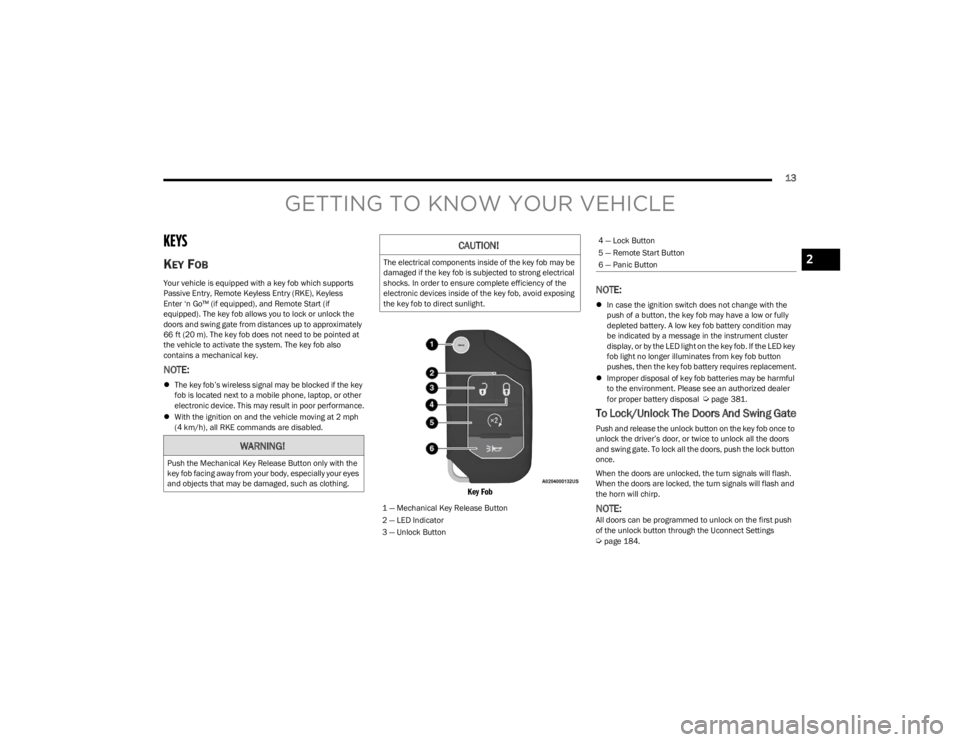
Your vehicle is equipped with a key fob which supports
Passive Entry, Remote Keyless Entry (RKE), Keyless
Enter ‘n Go™ (if equipped), and Remote Start (if
equipped). The key fob allows you to lock or unlock the
doors and swing gate from distances up to approximately
66 ft (20 m). The key fob does not need to be pointed at the vehicle to activate the system. The key fob also
contains a mechanical key.
NOTE:
The key fob’s wireless signal may be blocked if the key
fob is located next to a mobile phone, laptop, or other
electronic device. This may result in poor performance.
With the ignition on and the vehicle moving at 2 mph
(4 km/h), all RKE commands are disabled.
Key Fob
NOTE:
In case the ignition switch does not change with the
push of a button, the key fob may have a low or fully
depleted battery. A low key fob battery condition may
be indicated by a message in the instrument cluster
display, or by the LED light on the key fob. If the LED key
fob light no longer illuminates from key fob button
pushes, then the key fob battery requires replacement.
Improper disposal of key fob batteries may be harmful
to the environment. Please see an authorized dealer
for proper battery disposal
Úpage 381.
To Lock/Unlock The Doors And Swing Gate
Push and release the unlock button on the key fob once to
unlock the driver’s door, or twice to unlock all the doors
and swing gate. To lock all the doors, push the lock button
once.
When the doors are unlocked, the turn signals will flash.
When the doors are locked, the turn signals will flash and
the horn will chirp.
NOTE:All doors can be programmed to unlock on the first push
of the unlock button through the Uconnect Settings
Úpage 184.
WARNING!
Push the Mechanical Key Release Button only with the
key fob facing away from your body, especially your eyes
and objects that may be damaged, such as clothing.
CAUTION!
The electrical components inside of the key fob may be
damaged if the key fob is subjected to strong electrical
shocks. In order to ensure complete efficiency of the
electronic devices inside of the key fob, avoid exposing
the key fob to direct sunlight.
1 — Mechanical Key Release Button
2 — LED Indicator
3 — Unlock Button
4 — Lock Button
5 — Remote Start Button
6 — Panic Button
2
23_JL_OM_EN_USC_t.book Page 13
Page 16 of 396
14GETTING TO KNOW YOUR VEHICLE
Key Left Vehicle Feature
If a valid key fob is no longer detected inside the vehicle
while the vehicle’s ignition system is in the ON/RUN or
START position, the message “Key Fob Has Left The
Vehicle” will be shown in the instrument cluster display
along with an interior chime. An exterior audible and visual
alert will also be activated to warn the driver.
The vehicle’s horn will rapidly chirp three times along with
a single flash of the vehicle’s exterior lights.
NOTE:
The doors have to be open and then closed in order for
the vehicle to check for the presence of a key fob; the
Key Left Vehicle feature will not activate until all of the
doors are closed.
These alerts will not be activated in situations where
the vehicle’s engine is left running with the key fob
inside.
Replacing The Battery In The Key Fob
The recommended replacement battery is CR2450.
NOTE:
Customers are recommended to use a battery
obtained from Mopar®. Aftermarket coin battery
dimensions may not meet the original OEM coin battery
dimensions.
Perchlorate Material — special handling may apply. See
www.dtsc.ca.gov/hazardouswaste/perchlorate for
further information.
Do not touch the battery terminals that are on the back
housing or the printed circuit board.
When a key fob battery is low, a warning will be indi -
cated on the vehicle’s instrument cluster, and the fob
LED will no longer illuminate with a button press.
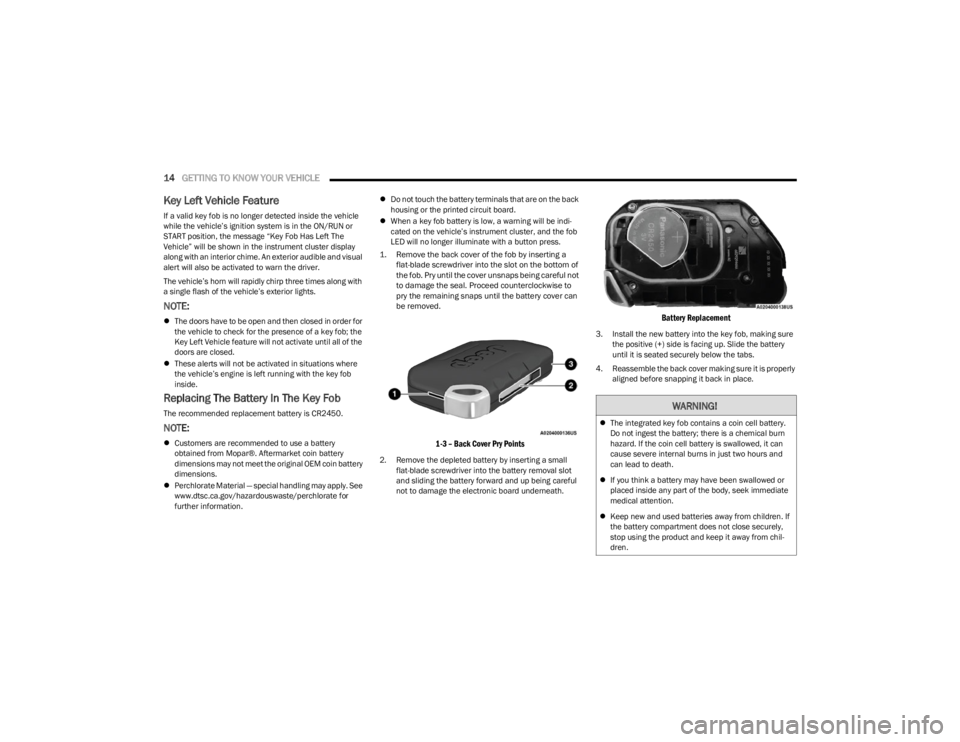
1. Remove the back cover of the fob by inserting a flat-blade screwdriver into the slot on the bottom of
the fob. Pry until the cover unsnaps being careful not
to damage the seal. Proceed counterclockwise to
pry the remaining snaps until the battery cover can
be removed.
1-3 – Back Cover Pry Points
2. Remove the depleted battery by inserting a small flat-blade screwdriver into the battery removal slot
and sliding the battery forward and up being careful
not to damage the electronic board underneath.
Battery Replacement
3. Install the new battery into the key fob, making sure the positive (+) side is facing up. Slide the battery
until it is seated securely below the tabs.
4. Reassemble the back cover making sure it is properly aligned before snapping it back in place.
WARNING!
The integrated key fob contains a coin cell battery.
Do not ingest the battery; there is a chemical burn
hazard. If the coin cell battery is swallowed, it can
cause severe internal burns in just two hours and
can lead to death.
If you think a battery may have been swallowed or
placed inside any part of the body, seek immediate
medical attention.
Keep new and used batteries away from children. If
the battery compartment does not close securely,
stop using the product and keep it away from chil -
dren.
23_JL_OM_EN_USC_t.book Page 14
Page 19 of 396
GETTING TO KNOW YOUR VEHICLE17
NOTE:
For more information on normal starting, see Úpage 126.
When opening the driver's door with the ignition in the
ON/RUN position (engine not running), a chime will
sound to remind you to place the ignition in the OFF
position. In addition to the chime, the message will
display “Ignition Or Accessory On” in the cluster.
REMOTE START — IF EQUIPPED
(GASOLINE)
If applicable, refer to the “Hybrid Supplement” for
additional information.
This system uses the key fob to start the engine
conveniently from outside the vehicle while still
maintaining security. The system has a range
of 328 ft (100 m).
Remote Start is used to defrost windows in cold weather,
and to reach a comfortable climate in all ambient
conditions before the driver enters the vehicle.
NOTE:
The vehicle must be equipped with an automatic trans -
mission to be equipped with Remote Start.
Obstructions between the vehicle and key fob may
reduce this range
Úpage 381.
HOW TO USE REMOTE START
Push and release the Remote Start button on the key fob
twice within five seconds. The vehicle doors and swing
gate will lock, the turn signals will flash twice, and the horn
will chirp twice. Pushing the Remote Start button again will
shut the engine off.
NOTE:
With Remote Start, the engine will only run for
15 minutes.
Remote Start can only be used twice.
If an engine fault is present or fuel level is low, the
vehicle will start and then shut down in 10 seconds.
The park lamps will turn on and remain on during
Remote Start mode.
For security, power window operation is disabled when
the vehicle is in the Remote Start mode.
The ignition must be placed in the ON/RUN position
before the Remote Start sequence can be repeated for
a third cycle.
All of the following conditions must be met before the
engine will remote start:
Gear selector in PARK
Doors closed
Hood closed
Swing gate closed
Hazard switch off
Brake switch inactive (brake pedal not pressed)
Battery at an acceptable charge level
Panic button not pushed
System not disabled from previous Remote Start event
Vehicle Security system indicator flashing
Ignition in OFF position
Fuel level meets minimum requirement
All removable doors must not be removed
Malfunction Indicator Light (MIL) not illuminated
CAUTION!
An unlocked vehicle is an invitation for thieves. Always
remove key fob from the vehicle and lock all doors
when leaving the vehicle unattended.
WARNING!
Do not start or run an engine in a closed garage or
confined area. Exhaust gas contains carbon
monoxide (CO) which is odorless and colorless.
Carbon monoxide is poisonous and can cause
serious injury or death when inhaled.
Keep key fobs away from children. Operation of the
Remote Start system, windows, door locks or other
controls could cause serious injury or death.
WARNING!
Do not start or run an engine in a closed garage or
confined area. Exhaust gas contains carbon
monoxide (CO) which is odorless and colorless.
Carbon monoxide is poisonous and can cause
serious injury or death when inhaled.
Keep key fobs away from children. Operation of the
Remote Start system, windows, door locks or other
controls could cause serious injury or death.
2
23_JL_OM_EN_USC_t.book Page 17
Page 21 of 396
GETTING TO KNOW YOUR VEHICLE19
REMOTE START — IF EQUIPPED (DIESEL)
This system uses the key fob to start the engine
conveniently from outside the vehicle while still
maintaining security. The system has a range
of approximately 300 ft (91 m).
Remote Start is used to defrost windows in cold weather,
and to reach a comfortable climate in all ambient
conditions before the driver enters the vehicle.
NOTE:
The vehicle must be equipped with an automatic trans -
mission to be equipped with Remote Start.
Obstructions between the vehicle and the key fob may
reduce this range.
The Remote Start system will wait for the Wait To Start
Indicator Light
Úpage 116 to extinguish before
cranking the engine. This allows time for the engine
preheat cycle to heat the cylinder air, and is normal in
cold weather.
HOW TO USE REMOTE START
Push and release the Remote Start button on the key fob
twice within five seconds. The vehicle doors and swing
gate will lock, the turn signals will flash twice, and the horn
will chirp twice. Pushing the Remote Start button again will
shut the engine off.
NOTE:
With Remote Start, the engine will only run for
15 minutes.
Remote Start can only be used twice.
If an engine fault is present or fuel level is low, the
vehicle will start and then shut down in 10 seconds.
The park lamps will turn on and remain on during
Remote Start mode.
For security, power window operation is disabled when
the vehicle is in the Remote Start mode.
The ignition must be placed in the ON/RUN position
before the Remote Start sequence can be repeated for
a third cycle.
All of the following conditions must be met before the
engine will remote start:
Gear selector in PARK
Doors closed
Hood closed
Swing gate closed
Hazard switch off
Brake switch inactive (brake pedal not pressed)
Battery at an acceptable charge level
Panic button not pushed
Fuel meets minimum requirement
System not disabled from previous Remote Start event
Vehicle Security system not active
Malfunction Indicator Light (MIL) is not illuminated
Water In Fuel Indicator Light is not illuminated
Wait To Start Indicator Light is not illuminated
For additional Remote Start information, see
Úpage 18.
VEHICLE SECURITY SYSTEM — IF EQUIPPED
The Vehicle Security system monitors the vehicle doors for
unauthorized entry and the ignition switch for
unauthorized operation. When the alarm is activated, the
interior switches for door locks are disabled. The Vehicle
Security system provides both audible and visible signals.
If something triggers the alarm, the Vehicle Security
system will provide the following audible and visible
signals: the horn will pulse, the park lamps and/or turn
signals will flash, and the Vehicle Security Light in the
instrument cluster will flash.WARNING!
Do not start or run an engine in a closed garage or
confined area. Exhaust gas contains carbon
monoxide (CO) which is odorless and colorless.
Carbon monoxide is poisonous and can cause
serious injury or death when inhaled.
Keep key fobs away from children. Operation of the
Remote Start system, windows, door locks or other
controls could cause serious injury or death.
WARNING!
Do not start or run an engine in a closed garage or
confined area. Exhaust gas contains carbon
monoxide (CO) which is odorless and colorless.
Carbon monoxide is poisonous and can cause
serious injury or death when inhaled.
Keep key fobs away from children. Operation of the
Remote Start system, windows, door locks or other
controls could cause serious injury or death.2
23_JL_OM_EN_USC_t.book Page 19
Page 22 of 396
20GETTING TO KNOW YOUR VEHICLE
TO ARM THE SYSTEM
Follow these steps to arm the Vehicle Security system:
1. Make sure the vehicle’s ignition is placed in the OFF
position.
2. Perform one of the following methods to lock the vehicle:
Push lock on the interior power door lock switch
with the driver and/or passenger door open.
Push the lock button on the exterior Passive Entry
door handle with a valid key fob available in the
same exterior zone
Úpage 21.
Push the lock button on the key fob.
3. If any doors are open, close them.
NOTE:The Vehicle Security system will not arm if you lock the
doors using the manual door lock.
TO DISARM THE SYSTEM
The Vehicle Security system can be disarmed using any of
the following methods:
Push the unlock button on the key fob.
Grab the Passive Entry door handle (if equipped)
Úpage 21.
Cycle the vehicle ignition system out of the OFF posi -
tion.
NOTE:
The driver's door key cylinder cannot arm or disarm the
Vehicle Security system.
When the Vehicle Security system is armed, the interior
power door lock switches will not unlock the doors.
The Vehicle Security system is designed to protect your
vehicle. However, you can create conditions where the
system will give you a false alarm. If one of the previously
described arming sequences has occurred, the Vehicle
Security system will arm regardless of whether you are in
the vehicle or not. If you remain in the vehicle and open a
door, the alarm will sound. If this occurs, disarm the
Vehicle Security system.
If the Vehicle Security system is armed and the battery
becomes disconnected, the Vehicle Security system will
remain armed when the battery is reconnected; the
exterior lights will flash, and the horn will sound. If this
occurs, disarm the Vehicle Security system.
REARMING OF THE SYSTEM
If something triggers the alarm and no action is taken to
disarm it, the Vehicle Security system will turn the horn off
after a 29 second cycle (with five seconds between cycles
and up to eight cycles if the trigger remains active) and
then rearm itself.
DOORS
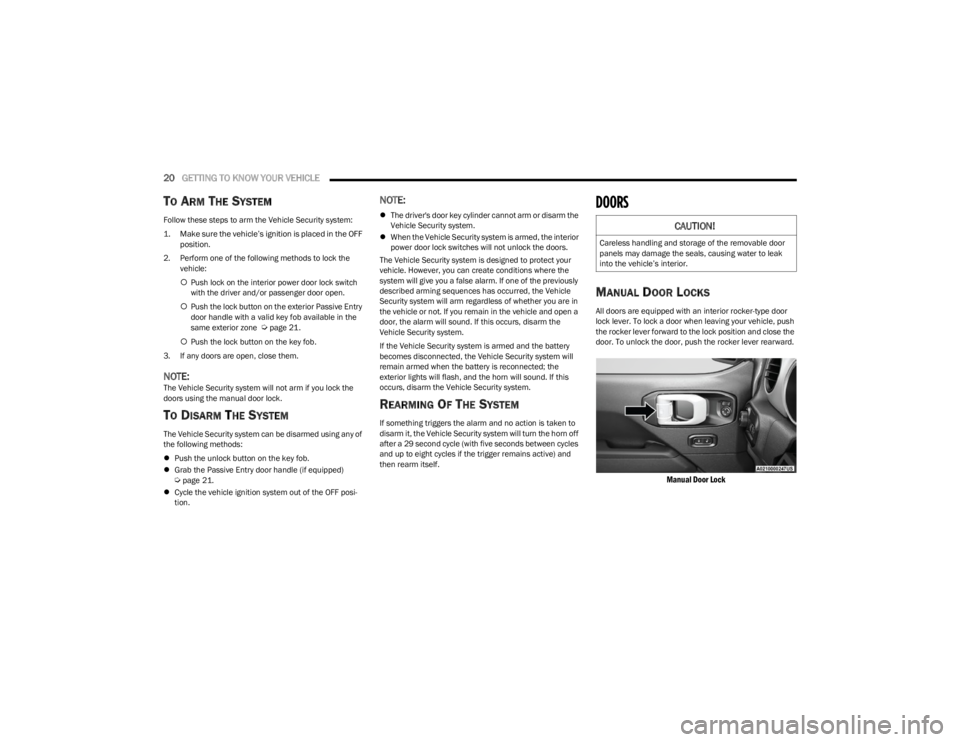
MANUAL DOOR LOCKS
All doors are equipped with an interior rocker-type door
lock lever. To lock a door when leaving your vehicle, push
the rocker lever forward to the lock position and close the
door. To unlock the door, push the rocker lever rearward.
Manual Door Lock
CAUTION!
Careless handling and storage of the removable door
panels may damage the seals, causing water to leak
into the vehicle’s interior.
23_JL_OM_EN_USC_t.book Page 20
Page 194 of 396

192MULTIMEDIA
Seats & Comfort/Auto-On Comfort Systems
Flash Lights With Lock This setting will allow you to turn the flashing of the lights when the Lock button is pushed
on the key fob on or off.
Sound Horn With Lock/Horn With Lock This setting will sound the horn when the Lock button is pushed on the key fob. The “Off”
setting will not sound the horn when the Lock button is pushed. The “1st Press” setting
will sound the horn when the Lock button is pushed once. The “2nd Press” setting will
sound the horn when the Lock button is pushed twice.
Sound Horn With Remote Start/Horn With Remote Start This setting will sound the horn when the remote start is activated from the key fob.
Remote Door Unlock, Door Lock/1st Press Of Key Fob Unlocks This setting will change how many pushes of the Unlock button on the key fob are needed
to unlock all the doors. The “Driver Door” setting will only unlock the driver door on the
first push on the Unlock button. The “All Doors” setting will unlock all doors with only one
push of the Unlock button.
Passive Entry This setting will allow you to turn the Passive Entry feature (Keyless Enter ‘n Go™) on or
off.
When Seats & Comfort/Auto-On Comfort Systems button is pressed on the touchscreen, the system displays the option related to the vehicle’s comfort systems when remote start has
been activated or the vehicle has been started.
NOTE:Depending on the vehicle’s options, feature settings may vary.
Setting Name Description
Auto-On Heated Seat & Steering WheelThis setting will activate the vehicle’s comfort system and heated seats or heated
steering wheel when the vehicle is remote started or ignition is started. The “Off” setting
will not activate the comfort systems. The “Remote Start” setting will only activate the
comfort systems when using Remote Start. The “All Start” setting will activate the comfort
systems whenever the vehicle is started.
Setting Name
Description
23_JL_OM_EN_USC_t.book Page 192
Page 229 of 396
MULTIMEDIA227
Included Trial Period For New Vehicles
Your new vehicle may come with an included trial* period
for use of SiriusXM Guardian™ connected services
starting on the date of vehicle purchase. To get started
with your trial, enrollment in SiriusXM Guardian™ is
required.
* Included trial applies to new vehicles only.
Features And Packages
After the trial period, you must purchase a subscription to
continue your services by calling a SiriusXM Guardian™
Customer Care agent.
GETTING STARTED WITH CONNECTED
V
EHICLE SERVICES
Download The Vehicle Branded App
Once you have activated your services, you’re only a few
steps away from using connected services.
Download the Vehicle Branded App to your mobile
device.
Use your Owner Account login and password to open
the app and then set up a PIN.
For customers in the United States, if your vehicle is not
registered at the dealership, you will have to call the
Customer Care call center from inside your vehicle or
press the in-vehicle registration button. From there,
you will be able to register your vehicle and add your
vehicle’s VIN to your account.
For customers in Canada, register your account via
your vehicle.
a. Press the Apps button in the bottom menu bar.
b. Press the Activate Services button from the apps list.
c. Enter your email and press “OK”. A confirmation email will be sent to the provided email address.
d. Press “Continue Activation” from the confirmation email. It may take a short time before remote
services will be available, but you will be able to
log into the Vehicle Branded App and the Owner’s
Site.
Once on the Remote screen and you have set up your
four-digit PIN, you can begin using Remote Door Lock/
Unlock, Remote Vehicle Start, and activate your horn
and lights remotely, if equipped.
Press the Location button on the bottom menu bar of
the app to bring up a map to locate your vehicle or send
a location to your Mobile Navigation, if equipped.
Press the Settings side menu in the upper left corner of
the app to bring up app settings and access the Assist
Call Centers.
Using Your Owner’s Site
Your Owner’s Site website https://www.mopar.com/
en-us.html (US Residents), or www.mopar.ca (Canadian
Residents) provides you with all the information you need,
all in one place. You can track your service history, find
recommended accessories for your vehicle, watch videos
about your vehicle's features, and easily access your
manuals. It is also where you can manage your SiriusXM
Guardian™ account. This section will familiarize you with
the key elements of the website that will help you get the
most of your SiriusXM Guardian™ connected services.
For customers in the United States, press the Sign In/
Register button and enter your email address and
password.
5
23_JL_OM_EN_USC_t.book Page 227
Page 230 of 396
228MULTIMEDIA
For customers in Canada, press the My Vehicle button.
Select from “Dashboard”, “Vehicle Health Report”, and
“Recalls”. The website will then prompt you to log in using
your email address and password.
Edit/Edit Profile:
To manage the details of your SiriusXM Guardian™
account, such as your contact information, password
and SiriusXM Guardian™ PIN, click on the Edit/Edit
Profile button to access the details of your account.
Connected Services Status:
This statement will indicate your SiriusXM
Guardian™-equipped vehicle.
Remote Commands:
For vehicles with an active SiriusXM Guardian™
subscription, press one of these icons and enter your
four-digit SiriusXM Guardian™ Security PIN to remotely
start (if equipped), lock/unlock doors or sound the horn
and flash the lights.
Editing Your Notifications
Notifications are an important element of your SiriusXM
Guardian™ account. For example, any time you use your
remote services (such as Remote Door Unlock), you can
elect to receive a text message, push notification, and/or
E-mail to notify you of the event. To set up the
notifications, please follow these instructions.
1. Log on to your Owner’s Account at
https://
www.mopar.com/en-us.html (US Residents) and
select “Dashboard”, or www.mopar.ca
(Canadian
Residents), select “My Vehicle” and then
“Dashboard”.
2. Click the Edit/Edit Profile button. 3. Once there, select “SiriusXM Guardian™” where you
can edit Notification Preferences.
4. You can enter a mobile phone and/or email address to notify you, and you can customize the types of
messages.
USING SIRIUSXM GUARDIAN™
SOS Call — If Equipped
Access To Emergency Services At The Push Of A Button
SiriusXM Guardian™ In-Vehicle Assistance Features
With SiriusXM Guardian™, your vehicle has onboard
assistance features located on the rearview mirror or
overhead console designed to enhance your driving
experience if you should ever need assistance or support. Description
SOS Call offers a convenient way to get in contact with a
SiriusXM Guardian™ Customer Care agent in the event of
an emergency. When the connection between the vehicle
and the live agent is made, your vehicle will automatically
transmit location information. In the event of a minor
collision, medical or any other emergency, press the SOS
button to be connected to a call center agent who can
send emergency assistance to your vehicle’s location.
NOTE:Certain SiriusXM Guardian™ connected services are
dependent on an operational Uconnect system, cellular
network availability that is compatible with the device in
your vehicle, and GPS network availability. Not all features
of SiriusXM Guardian™ are available everywhere at all
times, particularly in remote or enclosed areas.
How It Works
1. Push the SOS Call button; the indicator light will turn green indicating a call has been placed.
NOTE:
In case the SOS Call button is accidentally pushed,
there is a 10-second delay before the SOS call is
placed. The system will verbally alert you that a call
is about to be made. To cancel the SOS Call connec -
tion, push the SOS Call button on the rearview
mirror or overhead console or press the Cancel
button on the touchscreen within 10 seconds.
During an SOS Call, the Bluetooth®-paired phone
is disconnected so incoming or outgoing calls will
go through your mobile device versus the
hands-free system which is not available due to
the SOS Call.
WARNING!
Some SiriusXM Guardian™ connected services,
including SOS Call and Roadside Assistance Call, will
NOT work without a network connection compatible
with your device.
Center Light Status Description
Off No call activated
Green Active call in progress
Red System error
23_JL_OM_EN_USC_t.book Page 228
Page 232 of 396
230MULTIMEDIA
Automatic SOS — If Equipped
Automatic SOS is a hands-free safety service that can
immediately connect you with help in the event that your
vehicle’s airbags deploy. After an accident, a live agent will
contact you through the Uconnect system and alert
emergency services.
NOTE:An active SiriusXM Guardian™ subscription is required for
this feature to function.
After a crash where the airbags deploy:
1. Automatic SOS will initiate a call with an agent.
2. An agent will receive the call and confirm the location
of the emergency.
3. If needed, the agent will request the assistance of emergency services.
4. First responders will arrive on scene. The agent will remain on the call until emergency services arrive.
NOTE:
Agents are available 24/7 to assist you in the case of
an emergency.
On your behalf, agents are able to notify family
members about the collision.
Agents can brief first responders of the situation before
they arrive on scene.
In the event vehicle occupants are unable to speak,
emergency services will be dispatched based on the
last known GPS coordinates.
SiriusXM Guardian™ connected services are depen -
dent upon an operative telematics device, a cellular
connection, navigation map data, and GPS satellite
reception, which can limit the ability to reach the
response center or reach emergency support.
Terms of service of the Uconnect and the SiriusXM
Guardian™ subscriber agreement apply. See terms of
services for complete service limitation.
Remote Commands
On the Remote Commands screen, you have access to
several vehicle features that can be controlled remotely
from your mobile device. These features include locking/
unlocking, remote starting, and activating the horn and
lights of the vehicle. Remote Commands lets you send a request to your
vehicle in one of three ways:
Anywhere using your mobile device and Vehicle
Branded App
From your computer on the Owner’s Site (not available
on all functions)
Contacting SiriusXM Guardian™ Customer Care (not
available on all functions)
Using A Remote Command Through Your Mobile Device
And The Vehicle Branded App
1. Press the desired Remote Command icon on your mobile device.
2. A pop-up screen will appear asking for your SiriusXM Guardian™ Security PIN (this is the same four-digit
code established when you activated your SiriusXM
Guardian™ connected services). Enter the SiriusXM
Guardian™ Security PIN on the keypad.
3. It may take 30 seconds or more for the command to go through to your vehicle.
4. A message will let you know if the command was received by your vehicle.
If anyone in the vehicle could be in danger (e.g., fire
or smoke is visible, dangerous road conditions or
location), do not wait for voice contact from a
SiriusXM Guardian™ Customer Care agent. All occu -
pants should exit the vehicle immediately and move
to a safe location.
Failure to perform scheduled maintenance and
regular inspection of your vehicle may result in
vehicle damage, accident or injury.
WARNING!
Lock Press this button to lock
your vehicle.
Vehicle Start Press this button to start
your vehicle.
Horn & Lights Press this button to sound
the horn and activate your
lights.
Unlock
Press this button to unlock
your vehicle.
Cancel Vehicle Start Press this button to cancel
remote start.
23_JL_OM_EN_USC_t.book Page 230