instrument panel JEEP WRANGLER 2023 Owners Manual
[x] Cancel search | Manufacturer: JEEP, Model Year: 2023, Model line: WRANGLER, Model: JEEP WRANGLER 2023Pages: 396, PDF Size: 25.15 MB
Page 3 of 396

TABLE OF CONTENTS
1
2
3
4
5
6
7
8
9
10
11
1 INTRODUCTION .............................................................................................................................. 7
2 GETTING TO KNOW YOUR VEHICLE ..................................................................................13
3 GETTING TO KNOW YOUR INSTRUMENT PANEL ..................................................... 104
4 STARTING AND OPERATING ............................................................................................... 126 5 MULTIMEDIA ............................................................................................................................... 184
6 SAFETY ........................................................................................................................................244 7 IN CASE OF EMERGENCY ..................................................................................................... 291
8 SERVICING AND MAINTENANCE ......................................................................................306
9 TECHNICAL SPECIFICATIONS ............................................................................................ 368
10 CUSTOMER ASSISTANCE ..................................................................................................... 377 11 INDEX ............................................................................................................................................. 382
23_JL_OM_EN_USC_t.book Page 1
Page 5 of 396

3
CLIMATE CONTROLS ..........................................................54Automatic Climate Control Descriptions
And Functions.............................................................. 54
Manual Climate Control Descriptions And
Functions ..................................................................... 57
Automatic Temperature Control (ATC) —
If Equipped .................................................................. 59
Climate Voice Commands ......................................... 59
Operating Tips ............................................................ 59
INTERIOR STORAGE AND EQUIPMENT ............................60 Storage ........................................................................ 60
Lighted Cupholders — If Equipped ............................. 61
USB/AUX Control ......................................................... 61
Power Outlets ............................................................. 62
Power Inverter — If Equipped .................................... 63
Auxiliary Switches — If Equipped ............................... 64
POWER WINDOWS — IF EQUIPPED ................................65 Auto-Down Feature .................................................... 66
Window Lockout Switch.............................................. 66
Wind Buffeting ............................................................ 66
WRANGLER TOPS ..............................................................66 Provided Tools ............................................................. 66
Lowering The Soft Top Into Sunrider®
Position
S
................................................................. 67
Raising The Soft Top
S
............................................ 77
Removing The Soft Top
S
....................................... 80
Installing The Soft Top ................................................ 81
Hard Top Front Panel(s) Removal
S
....................... 83
Hard Top Front Panel(s) Installation .......................... 87
Removing The Hard Top ............................................. 87
Installing The Hard Top............................................... 89
Sunrider® For Hard Top ............................................. 89
Power Sliding Top — If Equipped ................................ 91 DOOR FRAME ..................................................................... 95
Door Frame Removal................................................... 95
Door Frame Installation Four Door Models —
If Equipped ................................................................... 96
Door Frame Installation Two Door Models —
If Equipped ................................................................... 97
FOLDING WINDSHIELD ..................................................... 97 Lowering The Windshield ............................................ 98
Raising The Windshield ............................................... 99
HOOD ................................................................................ 100 Opening The Hood .................................................... 100
Closing The Hood ...................................................... 101
REAR SWING GATE ......................................................... 101 Cargo Area Features................................................. 102
ROOF LUGGAGE RACK — IF EQUIPPED ........................ 102
GETTING TO KNOW YOUR
INSTRUMENT PANEL
INSTRUMENT CLUSTER .................................................. 104 Instrument Cluster Descriptions
S
...................... 108
INSTRUMENT CLUSTER DISPLAY .................................. 108 Instrument Cluster Display Location And
Controls ..................................................................... 109
Oil Change Reset — If Equipped
S
....................... 110
Display And Messages ............................................. 110
Instrument Cluster Display Selectable Items ......... 112
Battery Saver On/Battery Saver Mode Message —
Electrical Load Reduction Actions — If Equipped ... 114
Diesel Displays.......................................................... 115
Diesel Particulate Filter (DPF) Messages ............... 115 Fuel System Messages ............................................ 116 WARNING LIGHTS AND MESSAGES ..............................116
Red Warning Lights ................................................... 117
Yellow Warning Lights ............................................... 119Yellow Indicator Lights .............................................. 122Green Indicator Lights............................................... 123White Indicator Lights ............................................... 123Blue Indicator Lights ................................................. 124
Gray Indicator Lights ................................................. 124
ONBOARD DIAGNOSTIC SYSTEM — OBD II ................... 124 Onboard Diagnostic System (OBD II)
Cybersecurity ............................................................. 125
EMISSIONS INSPECTION AND MAINTENANCE
PROGRAMS ....................................................................... 125
STARTING AND OPERATING
STARTING THE ENGINE — GASOLINE ENGINE
(IF EQUIPPED) ...................................................................126 Manual Transmission — If Equipped ....................... 126
Automatic Transmission — If Equipped ................... 126
Normal Starting ........................................................ 126
AutoPark .................................................................... 127Extended Park Starting ............................................. 128If Engine Fails To Start .............................................. 128Extreme Cold Weather (Below –22°F Or −30°C) .. 128
After Starting.............................................................. 129
STARTING THE ENGINE — DIESEL ENGINE
(IF EQUIPPED) ...................................................................129 Automatic Transmission ........................................... 129
Extreme Cold Weather .............................................. 129Normal Starting ......................................................... 130
Starting Fluids............................................................ 130
23_JL_OM_EN_USC_t.book Page 3
Page 26 of 396
24GETTING TO KNOW YOUR VEHICLE
NOTE:
When the Child-Protection Door Lock system is
engaged, the door can be opened only by using the
outside door handle even though the inside door lock
is in the unlocked position.
After disengaging the Child-Protection Door Lock
system, always test the door from the inside to make
certain it is in the unlocked position.
After engaging the Child-Protection Door Lock system,
always test the door from the inside to make certain it
is in the locked position.
For emergency exit with the system engaged, move the
lock lever rearward (located on the door trim panel),
lower the window and open the door with the outside
door handle.
NOTE:Always use this device when carrying children. After
engaging the child lock on both rear doors, check for
effective engagement by trying to open a door with the
internal handle. Once the Child-Protection Door Lock
system is engaged, it is impossible to open the doors from
inside the vehicle. Before getting out of the car, be sure to
check that there is no one left inside.
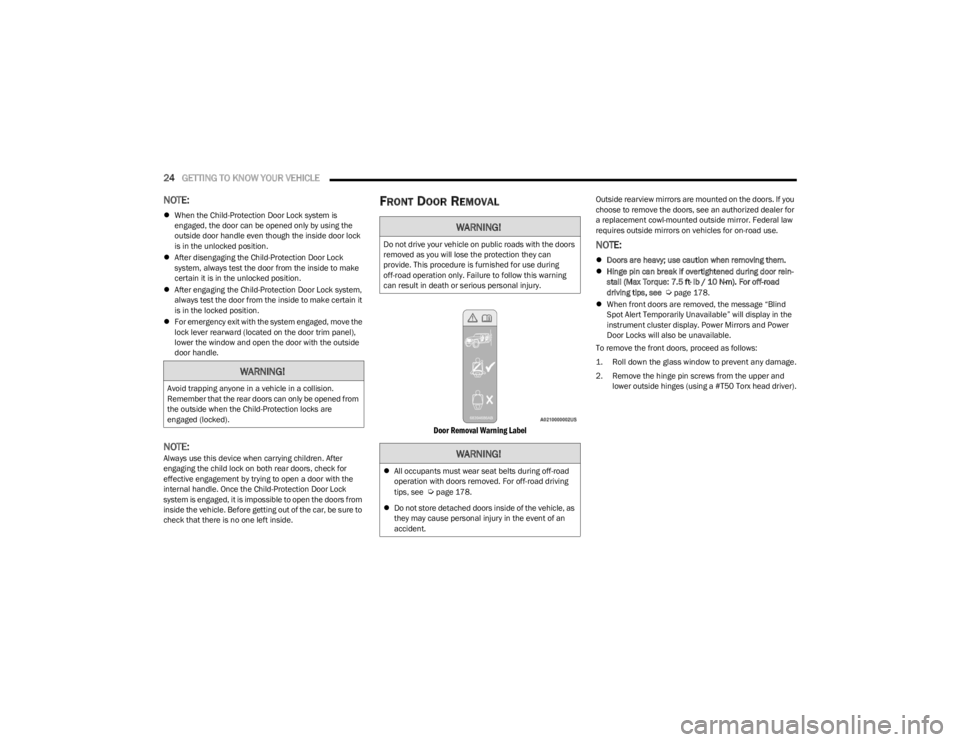
FRONT DOOR REMOVAL
Door Removal Warning Label
Outside rearview mirrors are mounted on the doors. If you
choose to remove the doors, see an authorized dealer for
a replacement cowl-mounted outside mirror. Federal law
requires outside mirrors on vehicles for on-road use.
NOTE:
Doors are heavy; use caution when removing them.
Hinge pin can break if overtightened during door rein -
stall (Max Torque: 7.5 ft· lb / 10 N·m). For off-road
driving tips, see
Úpage 178.
When front doors are removed, the message “Blind
Spot Alert Temporarily Unavailable” will display in the
instrument cluster display. Power Mirrors and Power
Door Locks will also be unavailable.
To remove the front doors, proceed as follows:
1. Roll down the glass window to prevent any damage.
2. Remove the hinge pin screws from the upper and lower outside hinges (using a #T50 Torx head driver).
WARNING!
Avoid trapping anyone in a vehicle in a collision.
Remember that the rear doors can only be opened from
the outside when the Child-Protection locks are
engaged (locked).
WARNING!
Do not drive your vehicle on public roads with the doors
removed as you will lose the protection they can
provide. This procedure is furnished for use during
off-road operation only. Failure to follow this warning
can result in death or serious personal injury.
WARNING!
All occupants must wear seat belts during off-road
operation with doors removed. For off-road driving
tips, see
Úpage 178.
Do not store detached doors inside of the vehicle, as
they may cause personal injury in the event of an
accident.
23_JL_OM_EN_USC_t.book Page 24
Page 27 of 396
GETTING TO KNOW YOUR VEHICLE25
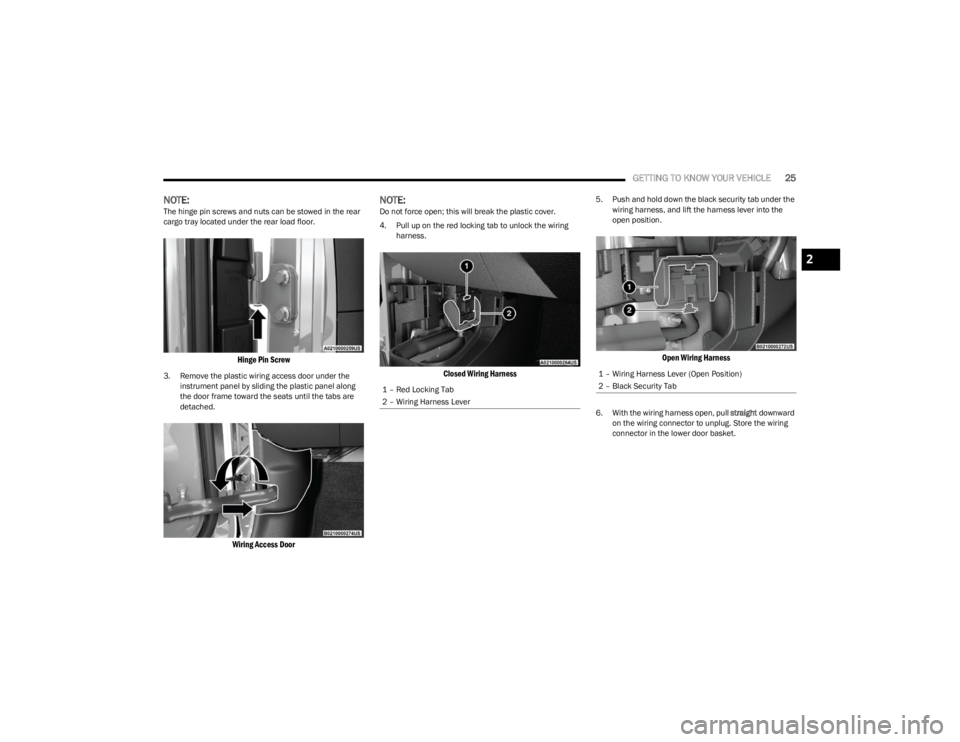
NOTE:The hinge pin screws and nuts can be stowed in the rear
cargo tray located under the rear load floor.
Hinge Pin Screw
3. Remove the plastic wiring access door under the
instrument panel by sliding the plastic panel along
the door frame toward the seats until the tabs are
detached.
Wiring Access Door
NOTE:Do not force open; this will break the plastic cover.
4. Pull up on the red locking tab to unlock the wiring harness.
Closed Wiring Harness
5. Push and hold down the black security tab under the wiring harness, and lift the harness lever into the
open position.
Open Wiring Harness
6. With the wiring harness open, pull straight downward
on the wiring connector to unplug. Store the wiring
connector in the lower door basket.
1 – Red Locking Tab
2 – Wiring Harness Lever
1 – Wiring Harness Lever (Open Position)
2 – Black Security Tab
2
23_JL_OM_EN_USC_t.book Page 25
Page 43 of 396
GETTING TO KNOW YOUR VEHICLE41
(Continued)
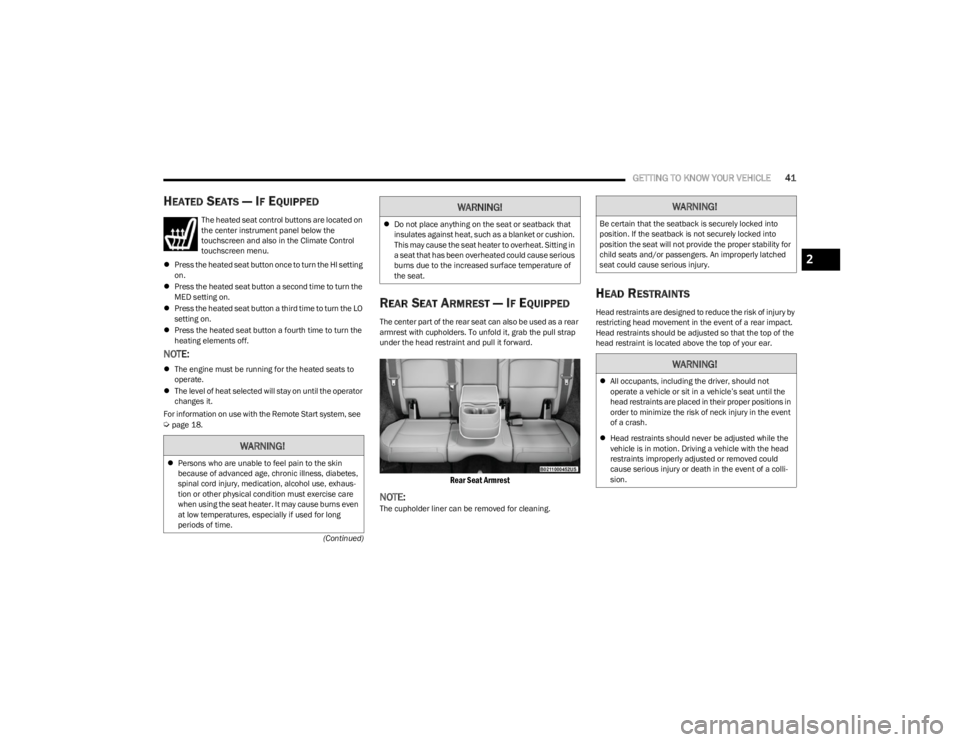
HEATED SEATS — IF EQUIPPED
The heated seat control buttons are located on
the center instrument panel below the
touchscreen and also in the Climate Control
touchscreen menu.
Press the heated seat button once to turn the HI setting
on.
Press the heated seat button a second time to turn the
MED setting on.
Press the heated seat button a third time to turn the LO
setting on.
Press the heated seat button a fourth time to turn the
heating elements off.
NOTE:
The engine must be running for the heated seats to
operate.
The level of heat selected will stay on until the operator
changes it.
For information on use with the Remote Start system, see
Úpage 18.
REAR SEAT ARMREST — IF EQUIPPED
The center part of the rear seat can also be used as a rear
armrest with cupholders. To unfold it, grab the pull strap
under the head restraint and pull it forward.
Rear Seat Armrest
NOTE:The cupholder liner can be removed for cleaning.
HEAD RESTRAINTS
Head restraints are designed to reduce the risk of injury by
restricting head movement in the event of a rear impact.
Head restraints should be adjusted so that the top of the
head restraint is located above the top of your ear.
WARNING!
Persons who are unable to feel pain to the skin
because of advanced age, chronic illness, diabetes,
spinal cord injury, medication, alcohol use, exhaus -
tion or other physical condition must exercise care
when using the seat heater. It may cause burns even
at low temperatures, especially if used for long
periods of time.
Do not place anything on the seat or seatback that
insulates against heat, such as a blanket or cushion.
This may cause the seat heater to overheat. Sitting in
a seat that has been overheated could cause serious
burns due to the increased surface temperature of
the seat.
WARNING!WARNING!
Be certain that the seatback is securely locked into
position. If the seatback is not securely locked into
position the seat will not provide the proper stability for
child seats and/or passengers. An improperly latched
seat could cause serious injury.
WARNING!
All occupants, including the driver, should not
operate a vehicle or sit in a vehicle’s seat until the
head restraints are placed in their proper positions in
order to minimize the risk of neck injury in the event
of a crash.
Head restraints should never be adjusted while the
vehicle is in motion. Driving a vehicle with the head
restraints improperly adjusted or removed could
cause serious injury or death in the event of a colli -
sion.
2
23_JL_OM_EN_USC_t.book Page 41
Page 52 of 396
50GETTING TO KNOW YOUR VEHICLE
TROUBLESHOOTING TIPS
If you are having trouble programming HomeLink®, here
are some of the most common solutions:
Replace the battery in the garage door opener
hand-held transmitter.
Push the LEARN button on the garage door opener to
complete the training for a rolling code.
Did you unplug the device for programming and
remember to plug it back in?
If you have any problems, or require assistance, please
call toll-free 1-800-355-3515 or, on the Internet at
HomeLink.com for information or assistance.
EXTERIOR LIGHTS
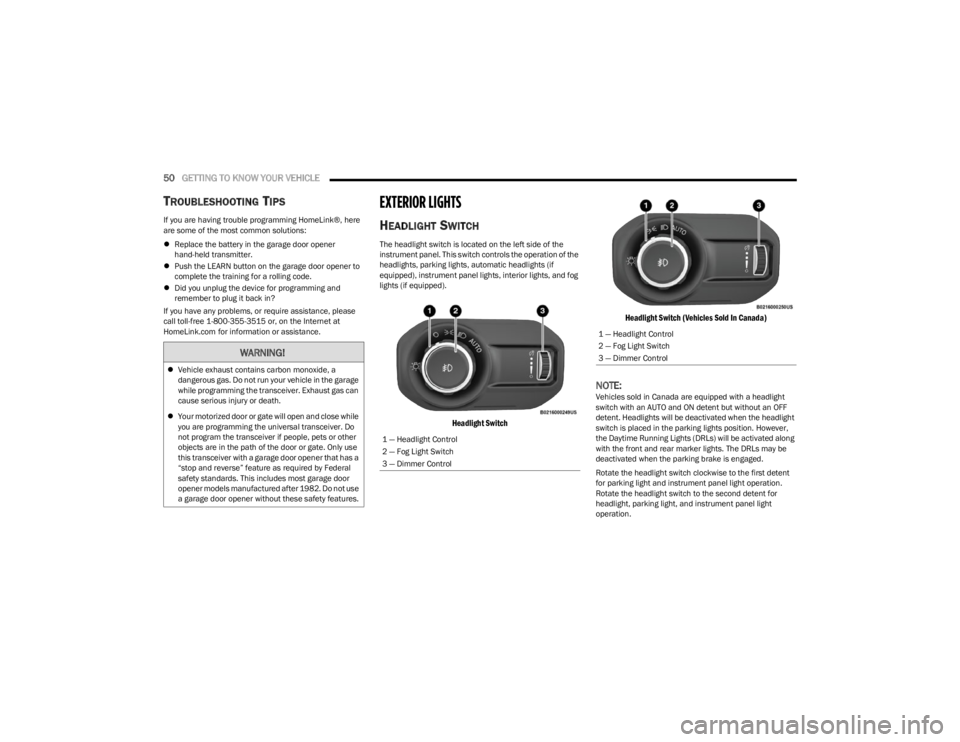
HEADLIGHT SWITCH
The headlight switch is located on the left side of the
instrument panel. This switch controls the operation of the
headlights, parking lights, automatic headlights (if
equipped), instrument panel lights, interior lights, and fog
lights (if equipped).
Headlight Switch Headlight Switch (Vehicles Sold In Canada)
NOTE:Vehicles sold in Canada are equipped with a headlight
switch with an AUTO and ON detent but without an OFF
detent. Headlights will be deactivated when the headlight
switch is placed in the parking lights position. However,
the Daytime Running Lights (DRLs) will be activated along
with the front and rear marker lights. The DRLs may be
deactivated when the parking brake is engaged.
Rotate the headlight switch clockwise to the first detent
for parking light and instrument panel light operation.
Rotate the headlight switch to the second detent for
headlight, parking light, and instrument panel light
operation.
WARNING!
Vehicle exhaust contains carbon monoxide, a
dangerous gas. Do not run your vehicle in the garage
while programming the transceiver. Exhaust gas can
cause serious injury or death.
Your motorized door or gate will open and close while
you are programming the universal transceiver. Do
not program the transceiver if people, pets or other
objects are in the path of the door or gate. Only use
this transceiver with a garage door opener that has a
“stop and reverse” feature as required by Federal
safety standards. This includes most garage door
opener models manufactured after 1982. Do not use
a garage door opener without these safety features.
1 — Headlight Control
2 — Fog Light Switch
3 — Dimmer Control
1 — Headlight Control
2 — Fog Light Switch
3 — Dimmer Control
23_JL_OM_EN_USC_t.book Page 50
Page 53 of 396
GETTING TO KNOW YOUR VEHICLE51
NOTE:For vehicles sold in Canada, rotate the headlight switch
clockwise from the parking lights and instrument panel
lights position to the first detent to turn on headlights,
parking lights, and instrument panel lights. Rotate the
headlight switch to the second detent for the AUTO
position.
DAYTIME RUNNING LIGHTS (DRLS) —
I
F EQUIPPED
The Daytime Running Lights are active when the low
beams are not on, and the engine is running. DRLs may be
deactivated by applying the parking brake.
NOTE:
For vehicles sold in Canada, the Daytime Running
Lights will automatically deactivate when the front fog
lights are turned on.
On some vehicles, the Daytime Running Lights may
deactivate, or reduce intensity, on one side of the
vehicle (when a turn signal is activated on that side), or
on both sides of the vehicle (when the hazard warning
lights are activated).
HIGH/LOW BEAM SWITCH
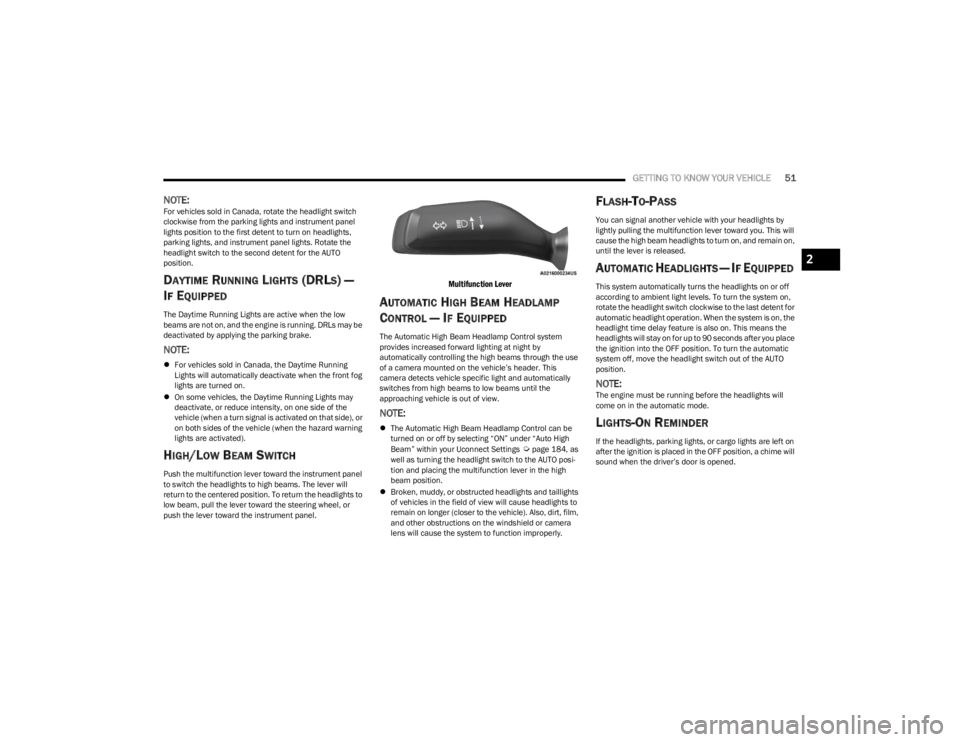
Push the multifunction lever toward the instrument panel
to switch the headlights to high beams. The lever will
return to the centered position. To return the headlights to
low beam, pull the lever toward the steering wheel, or
push the lever toward the instrument panel.
Multifunction Lever
AUTOMATIC HIGH BEAM HEADLAMP
C
ONTROL — IF EQUIPPED
The Automatic High Beam Headlamp Control system
provides increased forward lighting at night by
automatically controlling the high beams through the use
of a camera mounted on the vehicle’s header. This
camera detects vehicle specific light and automatically
switches from high beams to low beams until the
approaching vehicle is out of view.
NOTE:
The Automatic High Beam Headlamp Control can be
turned on or off by selecting “ON” under “Auto High
Beam” within your Uconnect Settings
Úpage 184, as
well as turning the headlight switch to the AUTO posi -
tion and placing the multifunction lever in the high
beam position.
Broken, muddy, or obstructed headlights and taillights
of vehicles in the field of view will cause headlights to
remain on longer (closer to the vehicle). Also, dirt, film,
and other obstructions on the windshield or camera
lens will cause the system to function improperly.
FLASH-TO-PASS
You can signal another vehicle with your headlights by
lightly pulling the multifunction lever toward you. This will
cause the high beam headlights to turn on, and remain on,
until the lever is released.
AUTOMATIC HEADLIGHTS — IF EQUIPPED
This system automatically turns the headlights on or off
according to ambient light levels. To turn the system on,
rotate the headlight switch clockwise to the last detent for
automatic headlight operation. When the system is on, the
headlight time delay feature is also on. This means the
headlights will stay on for up to 90 seconds after you place
the ignition into the OFF position. To turn the automatic
system off, move the headlight switch out of the AUTO
position.
NOTE:The engine must be running before the headlights will
come on in the automatic mode.
LIGHTS-ON REMINDER
If the headlights, parking lights, or cargo lights are left on
after the ignition is placed in the OFF position, a chime will
sound when the driver’s door is opened.
2
23_JL_OM_EN_USC_t.book Page 51
Page 55 of 396
GETTING TO KNOW YOUR VEHICLE53
DIMMER CONTROL
The dimmer control is part of the headlight switch and is
located on the left side of the instrument panel.
Dimmer Control
Dimmer Control (Vehicles Sold In Canada)
With the parking lights or headlights on, rotating the
dimmer control upward will increase the brightness of the
instrument panel lights. Rotating the dimmer control will also adjust the interior and ambient light levels (e.g.
courtesy lights in the footwell, illuminated cupholders, and
front door handles).
WINDSHIELD WIPERS AND WASHERS
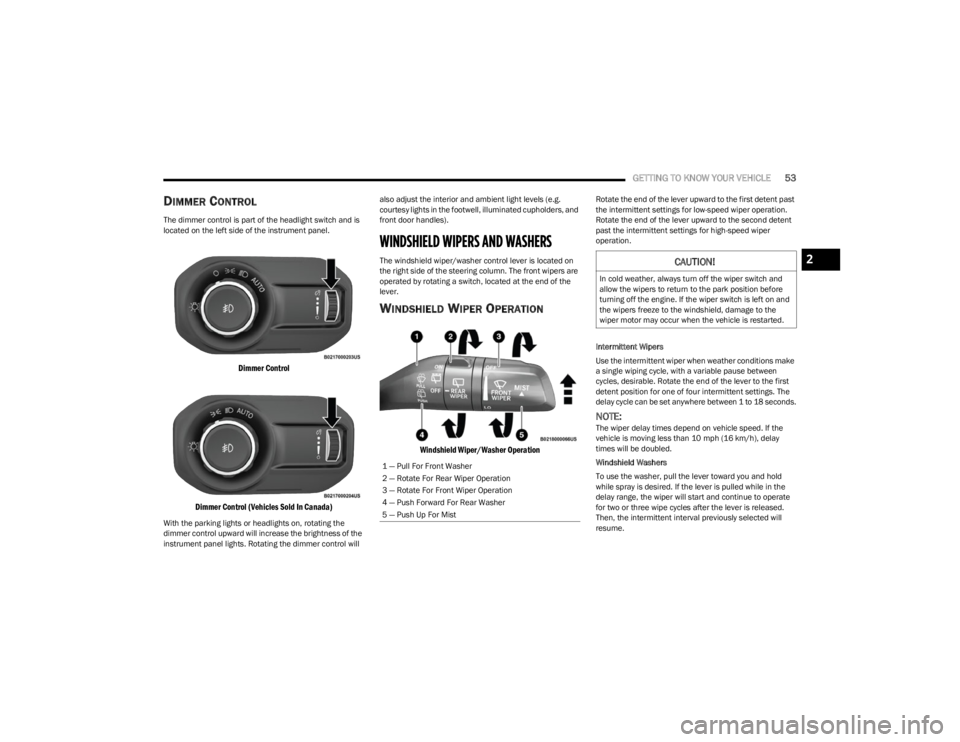
The windshield wiper/washer control lever is located on
the right side of the steering column. The front wipers are
operated by rotating a switch, located at the end of the
lever.
WINDSHIELD WIPER OPERATION
Windshield Wiper/Washer Operation
Rotate the end of the lever upward to the first detent past
the intermittent settings for low-speed wiper operation.
Rotate the end of the lever upward to the second detent
past the intermittent settings for high-speed wiper
operation.
Intermittent Wipers
Use the intermittent wiper when weather conditions make
a single wiping cycle, with a variable pause between
cycles, desirable. Rotate the end of the lever to the first
detent position for one of four intermittent settings. The
delay cycle can be set anywhere between 1 to 18 seconds.
NOTE:The wiper delay times depend on vehicle speed. If the
vehicle is moving less than 10 mph (16 km/h), delay
times will be doubled.
Windshield Washers
To use the washer, pull the lever toward you and hold
while spray is desired. If the lever is pulled while in the
delay range, the wiper will start and continue to operate
for two or three wipe cycles after the lever is released.
Then, the intermittent interval previously selected will
resume.
1 — Pull For Front Washer
2 — Rotate For Rear Wiper Operation
3 — Rotate For Front Wiper Operation
4 — Push Forward For Rear Washer
5 — Push Up For Mist
CAUTION!
In cold weather, always turn off the wiper switch and
allow the wipers to return to the park position before
turning off the engine. If the wiper switch is left on and
the wipers freeze to the windshield, damage to the
wiper motor may occur when the vehicle is restarted.
2
23_JL_OM_EN_USC_t.book Page 53
Page 56 of 396
54GETTING TO KNOW YOUR VEHICLE
If the lever is pulled while in the off position, the wipers will
operate for two or three wipe cycles. Then, the wipers will
turn off.
NOTE:As a protective measure, the washer will stop if the switch
is held for more than 20 seconds. Once the switch is
released the washer will resume normal operation.
Mist
Push upward on the wiper lever to activate a single wipe to
clear off-road mist or spray from a passing vehicle. As long
as the lever is held up, the wipers will continue to operate.
NOTE:The mist feature does not activate the washer pump;
therefore, no washer fluid will be sprayed on the wind -
shield. The washer function must be used in order to spray
the windshield with washer fluid.
For information on wiper care and replacement, see
Úpage 326.
REAR WINDOW WIPER/WASHER —
I
F EQUIPPED
A rotary switch on the center portion of the windshield
wiper/washer lever controls the operation of the rear
wiper/washer function.
Rotate the switch upward to the first detent
position for intermittent operation and to the
second detent for continuous rear wiper
operation.
Push the wiper lever toward the instrument
panel to activate the rear washer. The washer
pump and wiper will continue to operate as
long as the lever is held.
NOTE:As a protective measure, the washer will stop if the switch
is held for more than 20 seconds. Once the switch is
released the washer will resume normal operation.
If the rear wiper is operating when the ignition is placed in
the OFF position, the wiper will automatically return to the
parked position. When the vehicle is restarted, the wiper
will resume function at whichever position the switch is set
at.
CLIMATE CONTROLS
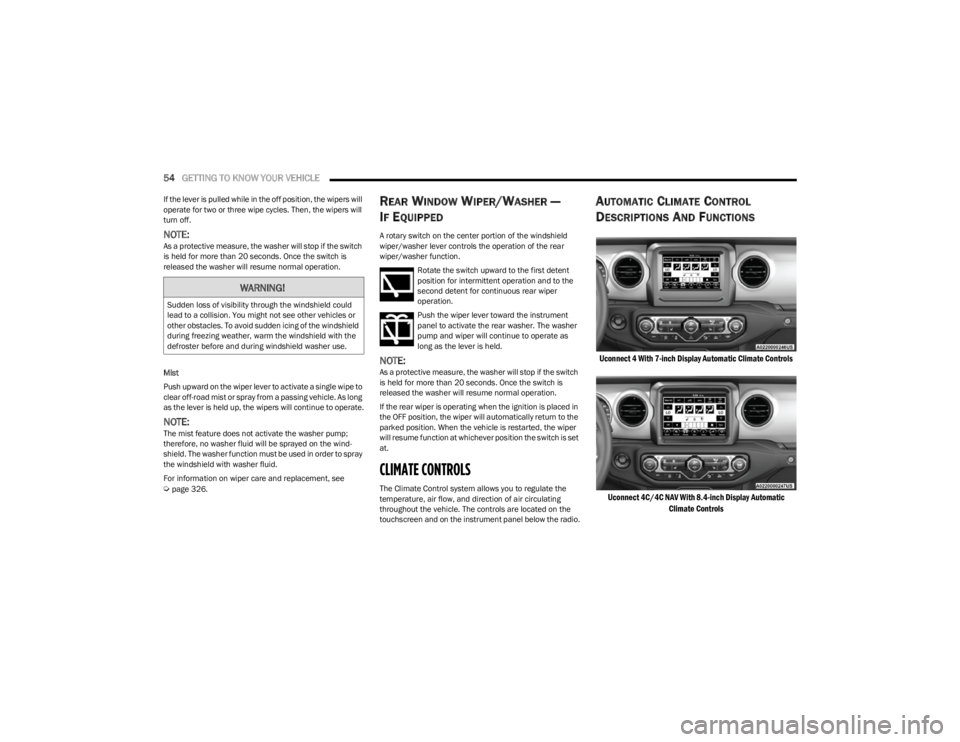
The Climate Control system allows you to regulate the
temperature, air flow, and direction of air circulating
throughout the vehicle. The controls are located on the
touchscreen and on the instrument panel below the radio.
AUTOMATIC CLIMATE CONTROL
D
ESCRIPTIONS AND FUNCTIONS
Uconnect 4 With 7-inch Display Automatic Climate Controls
Uconnect 4C/4C NAV With 8.4-inch Display Automatic Climate Controls
WARNING!
Sudden loss of visibility through the windshield could
lead to a collision. You might not see other vehicles or
other obstacles. To avoid sudden icing of the windshield
during freezing weather, warm the windshield with the
defroster before and during windshield washer use.
23_JL_OM_EN_USC_t.book Page 54
Page 58 of 396
56GETTING TO KNOW YOUR VEHICLE
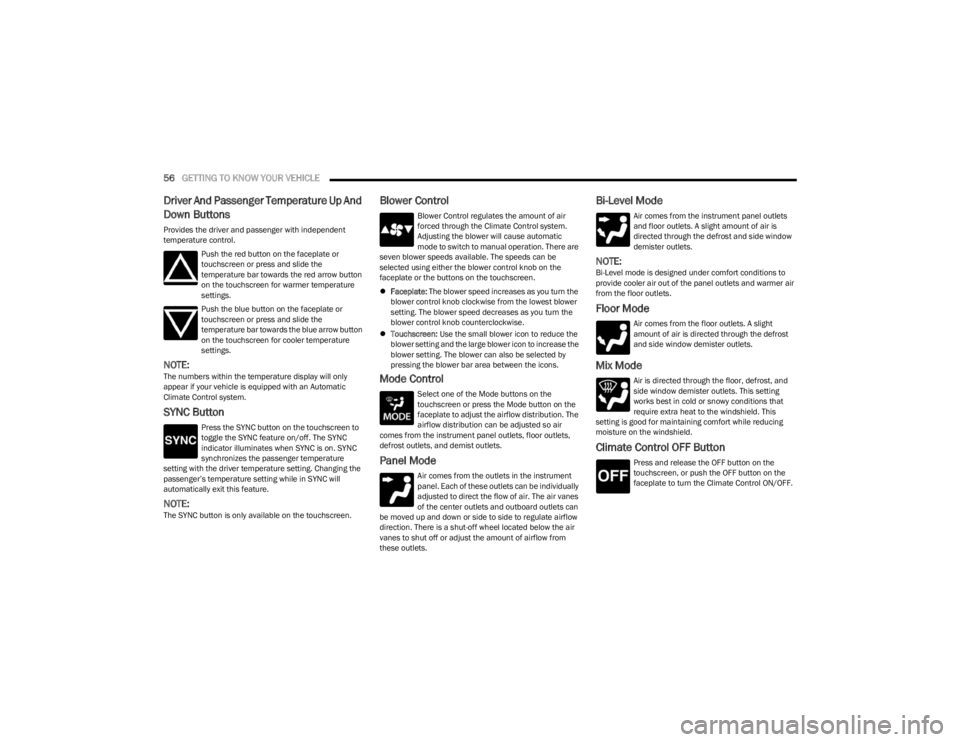
Driver And Passenger Temperature Up And
Down Buttons
Provides the driver and passenger with independent
temperature control.
Push the red button on the faceplate or
touchscreen or press and slide the
temperature bar towards the red arrow button
on the touchscreen for warmer temperature
settings.
Push the blue button on the faceplate or
touchscreen or press and slide the
temperature bar towards the blue arrow button
on the touchscreen for cooler temperature
settings.
NOTE:The numbers within the temperature display will only
appear if your vehicle is equipped with an Automatic
Climate Control system.
SYNC Button
Press the SYNC button on the touchscreen to
toggle the SYNC feature on/off. The SYNC
indicator illuminates when SYNC is on. SYNC
synchronizes the passenger temperature
setting with the driver temperature setting. Changing the
passenger’s temperature setting while in SYNC will
automatically exit this feature.
NOTE:The SYNC button is only available on the touchscreen.
Blower Control
Blower Control regulates the amount of air
forced through the Climate Control system.
Adjusting the blower will cause automatic
mode to switch to manual operation. There are
seven blower speeds available. The speeds can be
selected using either the blower control knob on the
faceplate or the buttons on the touchscreen.
Faceplate: The blower speed increases as you turn the
blower control knob clockwise from the lowest blower
setting. The blower speed decreases as you turn the
blower control knob counterclockwise.
Touchscreen: Use the small blower icon to reduce the
blower setting and the large blower icon to increase the
blower setting. The blower can also be selected by
pressing the blower bar area between the icons.
Mode Control
Select one of the Mode buttons on the
touchscreen or press the Mode button on the
faceplate to adjust the airflow distribution. The
airflow distribution can be adjusted so air
comes from the instrument panel outlets, floor outlets,
defrost outlets, and demist outlets.
Panel Mode
Air comes from the outlets in the instrument
panel. Each of these outlets can be individually
adjusted to direct the flow of air. The air vanes
of the center outlets and outboard outlets can
be moved up and down or side to side to regulate airflow
direction. There is a shut-off wheel located below the air
vanes to shut off or adjust the amount of airflow from
these outlets.
Bi-Level Mode
Air comes from the instrument panel outlets
and floor outlets. A slight amount of air is
directed through the defrost and side window
demister outlets.
NOTE:Bi-Level mode is designed under comfort conditions to
provide cooler air out of the panel outlets and warmer air
from the floor outlets.
Floor Mode
Air comes from the floor outlets. A slight
amount of air is directed through the defrost
and side window demister outlets.
Mix Mode
Air is directed through the floor, defrost, and
side window demister outlets. This setting
works best in cold or snowy conditions that
require extra heat to the windshield. This
setting is good for maintaining comfort while reducing
moisture on the windshield.
Climate Control OFF Button
Press and release the OFF button on the
touchscreen, or push the OFF button on the
faceplate to turn the Climate Control ON/OFF.
23_JL_OM_EN_USC_t.book Page 56