mirror JEEP WRANGLER 2023 Owners Manual
[x] Cancel search | Manufacturer: JEEP, Model Year: 2023, Model line: WRANGLER, Model: JEEP WRANGLER 2023Pages: 396, PDF Size: 25.15 MB
Page 4 of 396
2
INTRODUCTION
SYMBOLS KEY ....................................................................... 8
ROLLOVER WARNING ......................................................... 8
VEHICLE MODIFICATIONS/ALTERATIONS ......................... 8
SYMBOL GLOSSARY ............................................................. 9
GETTING TO KNOW YOUR VEHICLE
KEYS ....................................................................................13
Key Fob ........................................................................ 13
SENTRY KEY ........................................................................15
IGNITION SWITCH ...............................................................15 Keyless Enter ‘n Go™ Ignition .................................... 15
REMOTE START — IF EQUIPPED (GASOLINE)..................17 How To Use Remote Start .......................................... 17
To Exit Remote Start Mode ........................................ 18
Remote Start Front Defrost Activation —
If Equipped .................................................................. 18
Remote Start Comfort Systems — If Equipped ......... 18
Remote Start Windshield Wiper De-Icer
Activation — If Equipped ............................................. 18
Remote Start Cancel Message .................................. 18
REMOTE START — IF EQUIPPED (DIESEL) ......................19 How To Use Remote Start .......................................... 19
VEHICLE SECURITY SYSTEM — IF EQUIPPED .................19 To Arm The System .................................................... 20
To Disarm The System ............................................... 20
Rearming Of The System ............................................ 20 DOORS ................................................................................ 20
Manual Door Locks......................................................20
Power Door Locks — If Equipped ............................... 21
Keyless Enter ‘n Go™ — Passive Entry
(If Equipped) ................................................................ 21
Automatic Door Locks — If Equipped ......................... 23
Child-Protection Door Lock System — Rear Doors.....23
Front Door Removal..................................................... 24
Rear Door Removal (Four-Door Models) ................... 27
Door Off Mirror Kit — If Equipped
S
........................ 29
Half-Door Installation — If Equipped
S
................... 31
STEERING WHEEL............................................................... 36 Tilt/Telescoping Steering Column ..............................36
Heated Steering Wheel — If Equipped........................ 37
SEATS .................................................................................. 37 Manual Adjustment Front Seats ................................. 37
60/40 Split Folding Rear Seat —
Four Door Models ........................................................ 39
Fold And Tumble Rear Seat — Two Door Models....... 39
Heated Seats — If Equipped........................................ 41
Rear Seat Armrest — If Equipped ............................... 41
Head Restraints ........................................................... 41
UCONNECT VOICE RECOGNITION ..................................... 44 Introducing Voice Recognition .................................... 44
Basic Voice Commands............................................... 44
Get Started ................................................................... 44
Additional Information................................................. 45
MIRRORS ............................................................................ 45 Inside Rearview Mirror ................................................ 45
Illuminated Vanity Mirrors .......................................... 46
Outside Mirrors ........................................................... 46
Outside Mirrors With Turn Signal — If Equipped ........ 46
Heated Mirrors — If Equipped ..................................... 46
Power Mirrors — If Equipped ....................................... 46 UNIVERSAL GARAGE DOOR OPENER
(HOMELINK®) — IF EQUIPPED
S
.................................. 47
Before You Begin Programming HomeLink® ............ 47
Erasing All The HomeLink® Channels ....................... 47
Identifying Whether You Have A Rolling Code Or
Non-Rolling Code Device............................................. 47
Programming HomeLink® To A Garage Door
Opener ......................................................................... 48
Programming HomeLink® To A Miscellaneous
Device .......................................................................... 48
Reprogramming A Single HomeLink® Button ........... 49
Canadian/Gate Operator Programming .................... 49
Security ........................................................................ 49
Troubleshooting Tips ................................................... 50
EXTERIOR LIGHTS .............................................................. 50 Headlight Switch.......................................................... 50
Daytime Running Lights (DRLs) — If Equipped ......... 51
High/Low Beam Switch............................................... 51
Automatic High Beam Headlamp Control —
If Equipped .................................................................. 51
Flash-To-Pass............................................................... 51
Automatic Headlights — If Equipped ......................... 51
Lights-On Reminder..................................................... 51
Front Fog Lights — If Equipped ................................... 52
Turn Signals ................................................................. 52
Lane Change Assist — If Equipped ............................. 52
INTERIOR LIGHTS .............................................................. 52 Interior Courtesy Lights ............................................... 52
Dimmer Control ........................................................... 53
WINDSHIELD WIPERS AND WASHERS ........................... 53 Windshield Wiper Operation ...................................... 53
Rear Window Wiper/Washer — If Equipped .............. 54
23_JL_OM_EN_USC_t.book Page 2
Page 26 of 396
24GETTING TO KNOW YOUR VEHICLE
NOTE:
When the Child-Protection Door Lock system is
engaged, the door can be opened only by using the
outside door handle even though the inside door lock
is in the unlocked position.
After disengaging the Child-Protection Door Lock
system, always test the door from the inside to make
certain it is in the unlocked position.
After engaging the Child-Protection Door Lock system,
always test the door from the inside to make certain it
is in the locked position.
For emergency exit with the system engaged, move the
lock lever rearward (located on the door trim panel),
lower the window and open the door with the outside
door handle.
NOTE:Always use this device when carrying children. After
engaging the child lock on both rear doors, check for
effective engagement by trying to open a door with the
internal handle. Once the Child-Protection Door Lock
system is engaged, it is impossible to open the doors from
inside the vehicle. Before getting out of the car, be sure to
check that there is no one left inside.
FRONT DOOR REMOVAL
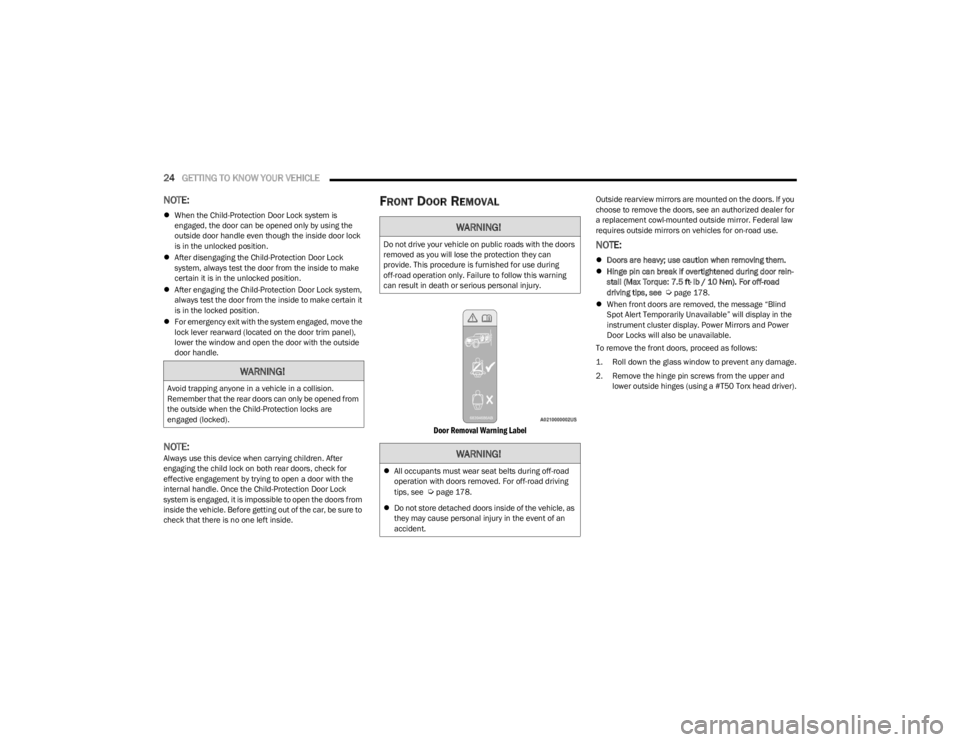
Door Removal Warning Label
Outside rearview mirrors are mounted on the doors. If you
choose to remove the doors, see an authorized dealer for
a replacement cowl-mounted outside mirror. Federal law
requires outside mirrors on vehicles for on-road use.
NOTE:
Doors are heavy; use caution when removing them.
Hinge pin can break if overtightened during door rein -
stall (Max Torque: 7.5 ft· lb / 10 N·m). For off-road
driving tips, see
Úpage 178.
When front doors are removed, the message “Blind
Spot Alert Temporarily Unavailable” will display in the
instrument cluster display. Power Mirrors and Power
Door Locks will also be unavailable.
To remove the front doors, proceed as follows:
1. Roll down the glass window to prevent any damage.
2. Remove the hinge pin screws from the upper and lower outside hinges (using a #T50 Torx head driver).
WARNING!
Avoid trapping anyone in a vehicle in a collision.
Remember that the rear doors can only be opened from
the outside when the Child-Protection locks are
engaged (locked).
WARNING!
Do not drive your vehicle on public roads with the doors
removed as you will lose the protection they can
provide. This procedure is furnished for use during
off-road operation only. Failure to follow this warning
can result in death or serious personal injury.
WARNING!
All occupants must wear seat belts during off-road
operation with doors removed. For off-road driving
tips, see
Úpage 178.
Do not store detached doors inside of the vehicle, as
they may cause personal injury in the event of an
accident.
23_JL_OM_EN_USC_t.book Page 24
Page 31 of 396
GETTING TO KNOW YOUR VEHICLE29
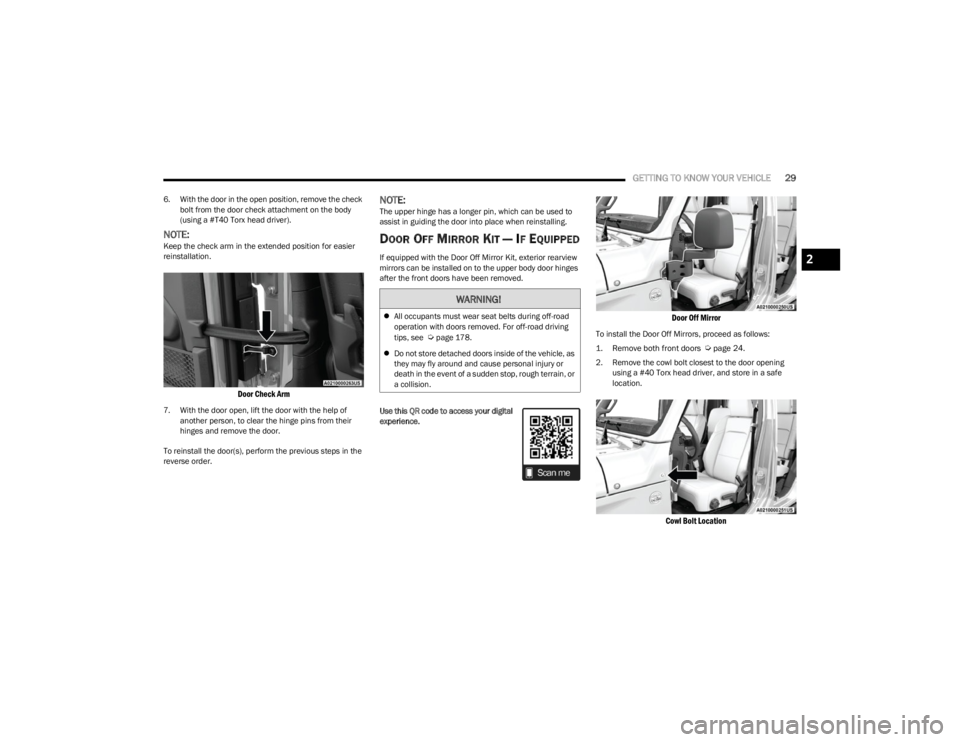
6. With the door in the open position, remove the check
bolt from the door check attachment on the body
(using a #T40 Torx head driver).
NOTE:Keep the check arm in the extended position for easier
reinstallation.
Door Check Arm
7. With the door open, lift the door with the help of another person, to clear the hinge pins from their
hinges and remove the door.
To reinstall the door(s), perform the previous steps in the
reverse order.
NOTE:The upper hinge has a longer pin, which can be used to
assist in guiding the door into place when reinstalling.
DOOR OFF MIRROR KIT — IF EQUIPPED
If equipped with the Door Off Mirror Kit, exterior rearview
mirrors can be installed on to the upper body door hinges
after the front doors have been removed.
Use this QR code to access your digital
experience.
Door Off Mirror
To install the Door Off Mirrors, proceed as follows:
1. Remove both front doors
Ú
page 24.
2. Remove the cowl bolt closest to the door opening using a #40 Torx head driver, and store in a safe
location.
Cowl Bolt Location
WARNING!
All occupants must wear seat belts during off-road
operation with doors removed. For off-road driving
tips, see
Úpage 178.
Do not store detached doors inside of the vehicle, as
they may fly around and cause personal injury or
death in the event of a sudden stop, rough terrain, or
a collision.
2
23_JL_OM_EN_USC_t.book Page 29
Page 32 of 396
30GETTING TO KNOW YOUR VEHICLE
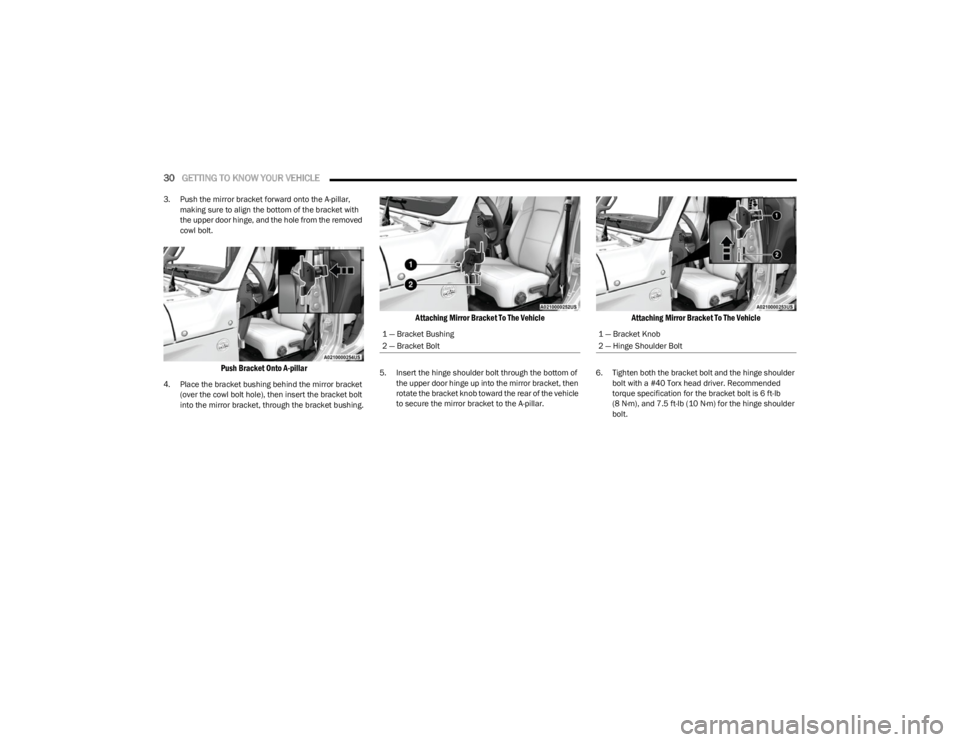
3. Push the mirror bracket forward onto the A-pillar,
making sure to align the bottom of the bracket with
the upper door hinge, and the hole from the removed
cowl bolt.
Push Bracket Onto A-pillar
4. Place the bracket bushing behind the mirror bracket (over the cowl bolt hole), then insert the bracket bolt
into the mirror bracket, through the bracket bushing.
Attaching Mirror Bracket To The Vehicle
5. Insert the hinge shoulder bolt through the bottom of the upper door hinge up into the mirror bracket, then
rotate the bracket knob toward the rear of the vehicle
to secure the mirror bracket to the A-pillar.
Attaching Mirror Bracket To The Vehicle
6. Tighten both the bracket bolt and the hinge shoulder bolt with a #40 Torx head driver. Recommended
torque specification for the bracket bolt is 6 ft-lb
(8 N·m), and 7.5 ft-lb (10 N·m) for the hinge shoulder bolt.
1 — Bracket Bushing
2 — Bracket Bolt1 — Bracket Knob
2 — Hinge Shoulder Bolt
23_JL_OM_EN_USC_t.book Page 30
Page 33 of 396
GETTING TO KNOW YOUR VEHICLE31
7. Lower the mirror assembly onto the mirror bracket.
Lower Mirror Assembly Onto Bracket
8. Insert the three mirror screws into the mirror
assembly, and tighten into the mirror bracket using a
#30 Torx head driver. Recommended torque specifi -
cation for the mirror screws is 4 ft-lb (5.5 N·m).
Mirror Screw Locations
9. Repeat the steps on the other side of the vehicle.
NOTE:If this kit is being installed with the optional lamp bracket,
the bracket bushing from step 4 is not needed. Use the
spacer from the lamp bracket.
HALF-DOOR INSTALLATION —
I
F EQUIPPED
If applicable, refer to the “Hybrid Supplement” for
additional information. Use this QR code to access your digital
experience.
This vehicle may be equipped with
half-doors. To install the half-doors in
the vehicle, follow the instruction sheet
packaged in the box the doors were
received in. Replacement parts may be
purchased through Mopar® Service.
To install the front or rear half-doors, proceed as follows:
1. Remove the full doors from the vehicle. For front
door removal, see
Ú
page 24
. For rear door removal,
see Ú
page 27.
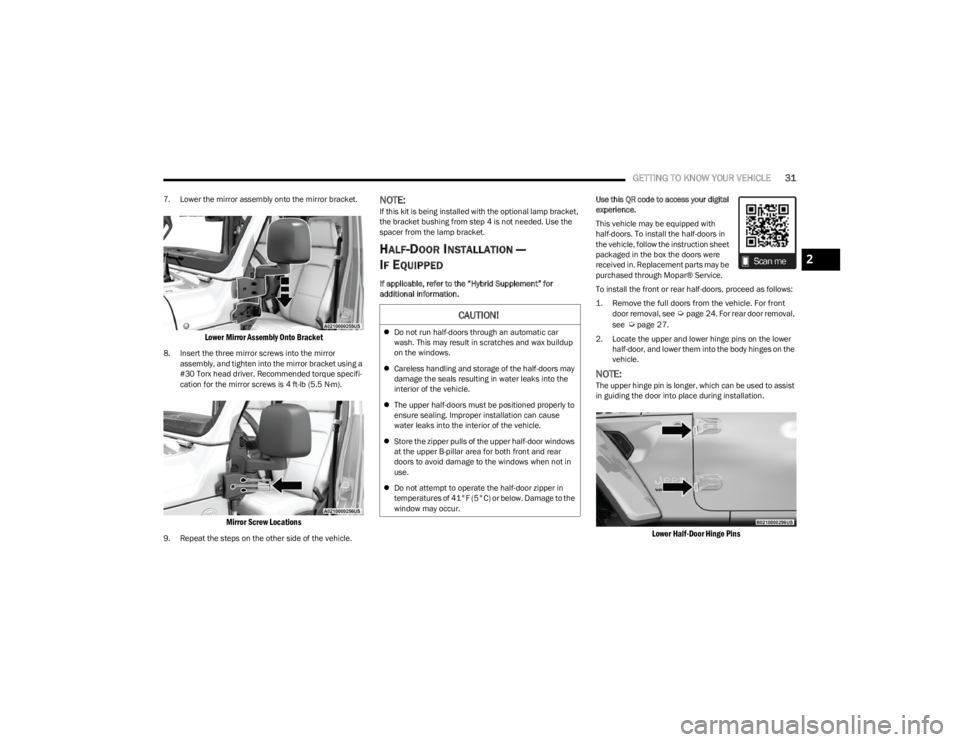
2. Locate the upper and lower hinge pins on the lower half-door, and lower them into the body hinges on the
vehicle.
NOTE:The upper hinge pin is longer, which can be used to assist
in guiding the door into place during installation.
Lower Half-Door Hinge Pins
CAUTION!
Do not run half-doors through an automatic car
wash. This may result in scratches and wax buildup
on the windows.
Careless handling and storage of the half-doors may
damage the seals resulting in water leaks into the
interior of the vehicle.
The upper half-doors must be positioned properly to
ensure sealing. Improper installation can cause
water leaks into the interior of the vehicle.
Store the zipper pulls of the upper half-door windows
at the upper B-pillar area for both front and rear
doors to avoid damage to the windows when not in
use.
Do not attempt to operate the half-door zipper in
temperatures of 41°F (5°C) or below. Damage to the
window may occur.
2
23_JL_OM_EN_USC_t.book Page 31
Page 47 of 396
GETTING TO KNOW YOUR VEHICLE45
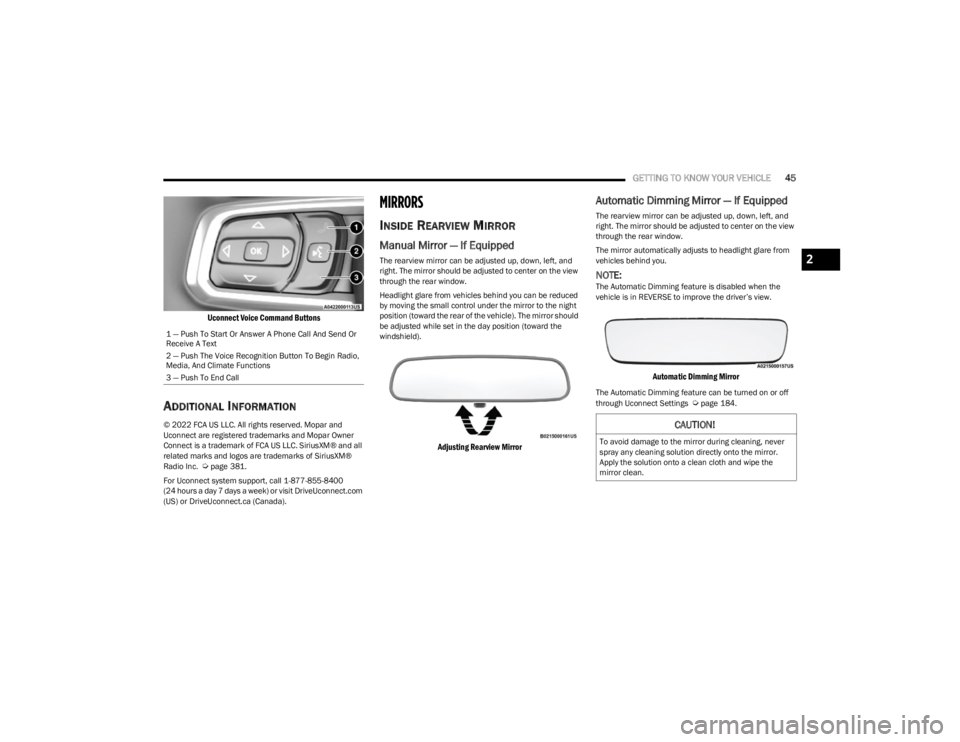
Uconnect Voice Command Buttons
ADDITIONAL INFORMATION
© 2022 FCA US LLC. All rights reserved. Mopar and
Uconnect are registered trademarks and Mopar Owner
Connect is a trademark of FCA US LLC. SiriusXM® and all
related marks and logos are trademarks of SiriusXM®
Radio Inc.
Úpage 381.
For Uconnect system support, call 1-877-855-8400
(24 hours a day 7 days a week) or visit DriveUconnect.com
(US) or DriveUconnect.ca (Canada).
MIRRORS
INSIDE REARVIEW MIRROR
Manual Mirror — If Equipped
The rearview mirror can be adjusted up, down, left, and
right. The mirror should be adjusted to center on the view
through the rear window.
Headlight glare from vehicles behind you can be reduced
by moving the small control under the mirror to the night
position (toward the rear of the vehicle). The mirror should
be adjusted while set in the day position (toward the
windshield).
Adjusting Rearview Mirror
Automatic Dimming Mirror — If Equipped
The rearview mirror can be adjusted up, down, left, and
right. The mirror should be adjusted to center on the view
through the rear window.
The mirror automatically adjusts to headlight glare from
vehicles behind you.
NOTE:The Automatic Dimming feature is disabled when the
vehicle is in REVERSE to improve the driver’s view.
Automatic Dimming Mirror
The Automatic Dimming feature can be turned on or off
through Uconnect Settings Úpage 184.
1 — Push To Start Or Answer A Phone Call And Send Or
Receive A Text
2 — Push The Voice Recognition Button To Begin Radio,
Media, And Climate Functions
3 — Push To End Call
CAUTION!
To avoid damage to the mirror during cleaning, never
spray any cleaning solution directly onto the mirror.
Apply the solution onto a clean cloth and wipe the
mirror clean.
2
23_JL_OM_EN_USC_t.book Page 45
Page 48 of 396
46GETTING TO KNOW YOUR VEHICLE
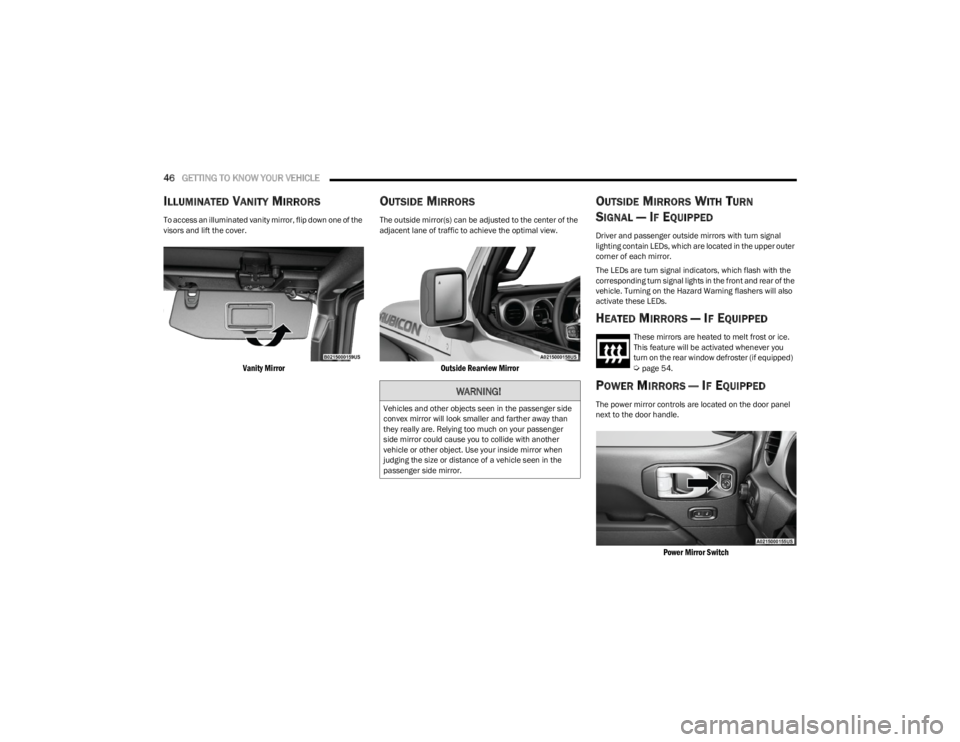
ILLUMINATED VANITY MIRRORS
To access an illuminated vanity mirror, flip down one of the
visors and lift the cover.
Vanity Mirror
OUTSIDE MIRRORS
The outside mirror(s) can be adjusted to the center of the
adjacent lane of traffic to achieve the optimal view.
Outside Rearview Mirror
OUTSIDE MIRRORS WITH TURN
SIGNAL — IF EQUIPPED
Driver and passenger outside mirrors with turn signal
lighting contain LEDs, which are located in the upper outer
corner of each mirror.
The LEDs are turn signal indicators, which flash with the
corresponding turn signal lights in the front and rear of the
vehicle. Turning on the Hazard Warning flashers will also
activate these LEDs.
HEATED MIRRORS — IF EQUIPPED
These mirrors are heated to melt frost or ice.
This feature will be activated whenever you
turn on the rear window defroster (if equipped)
Úpage 54.
POWER MIRRORS — IF EQUIPPED
The power mirror controls are located on the door panel
next to the door handle.
Power Mirror Switch
WARNING!
Vehicles and other objects seen in the passenger side
convex mirror will look smaller and farther away than
they really are. Relying too much on your passenger
side mirror could cause you to collide with another
vehicle or other object. Use your inside mirror when
judging the size or distance of a vehicle seen in the
passenger side mirror.
23_JL_OM_EN_USC_t.book Page 46
Page 49 of 396
GETTING TO KNOW YOUR VEHICLE47
The power mirror controls consist of mirror select buttons
and a four-way mirror control switch. To adjust a mirror,
push either the L (left) or R (right) button to select the
mirror that you want to adjust.
Using the mirror control switch, push any of the four
arrows for the direction that you want the mirror to move.
UNIVERSAL GARAGE DOOR OPENER
(HOMELINK®) — IF EQUIPPED
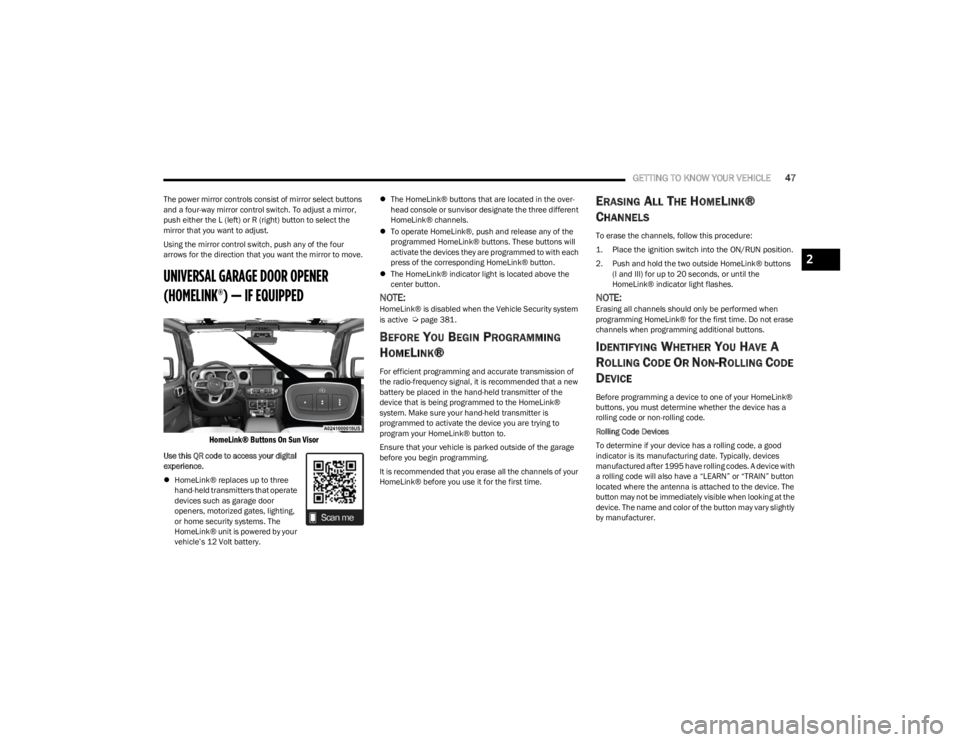
HomeLink® Buttons On Sun Visor
Use this QR code to access your digital
experience.
HomeLink® replaces up to three
hand-held transmitters that operate
devices such as garage door
openers, motorized gates, lighting,
or home security systems. The
HomeLink® unit is powered by your
vehicle’s 12 Volt battery.
The HomeLink® buttons that are located in the over -
head console or sunvisor designate the three different
HomeLink® channels.
To operate HomeLink®, push and release any of the
programmed HomeLink® buttons. These buttons will
activate the devices they are programmed to with each
press of the corresponding HomeLink® button.
The HomeLink® indicator light is located above the
center button.
NOTE:HomeLink® is disabled when the Vehicle Security system
is active Úpage 381.
BEFORE YOU BEGIN PROGRAMMING
H
OMELINK®
For efficient programming and accurate transmission of
the radio-frequency signal, it is recommended that a new
battery be placed in the hand-held transmitter of the
device that is being programmed to the HomeLink®
system. Make sure your hand-held transmitter is
programmed to activate the device you are trying to
program your HomeLink® button to.
Ensure that your vehicle is parked outside of the garage
before you begin programming.
It is recommended that you erase all the channels of your
HomeLink® before you use it for the first time.
ERASING ALL THE HOMELINK®
C
HANNELS
To erase the channels, follow this procedure:
1. Place the ignition switch into the ON/RUN position.
2. Push and hold the two outside HomeLink® buttons
(I and III) for up to 20 seconds, or until the
HomeLink® indicator light flashes.
NOTE:Erasing all channels should only be performed when
programming HomeLink® for the first time. Do not erase
channels when programming additional buttons.
IDENTIFYING WHETHER YOU HAVE A
R
OLLING CODE OR NON-ROLLING CODE
D
EVICE
Before programming a device to one of your HomeLink®
buttons, you must determine whether the device has a
rolling code or non-rolling code.
Rolling Code Devices
To determine if your device has a rolling code, a good
indicator is its manufacturing date. Typically, devices
manufactured after 1995 have rolling codes. A device with
a rolling code will also have a “LEARN” or “TRAIN” button
located where the antenna is attached to the device. The
button may not be immediately visible when looking at the
device. The name and color of the button may vary slightly
by manufacturer.
2
23_JL_OM_EN_USC_t.book Page 47
Page 57 of 396
GETTING TO KNOW YOUR VEHICLE55
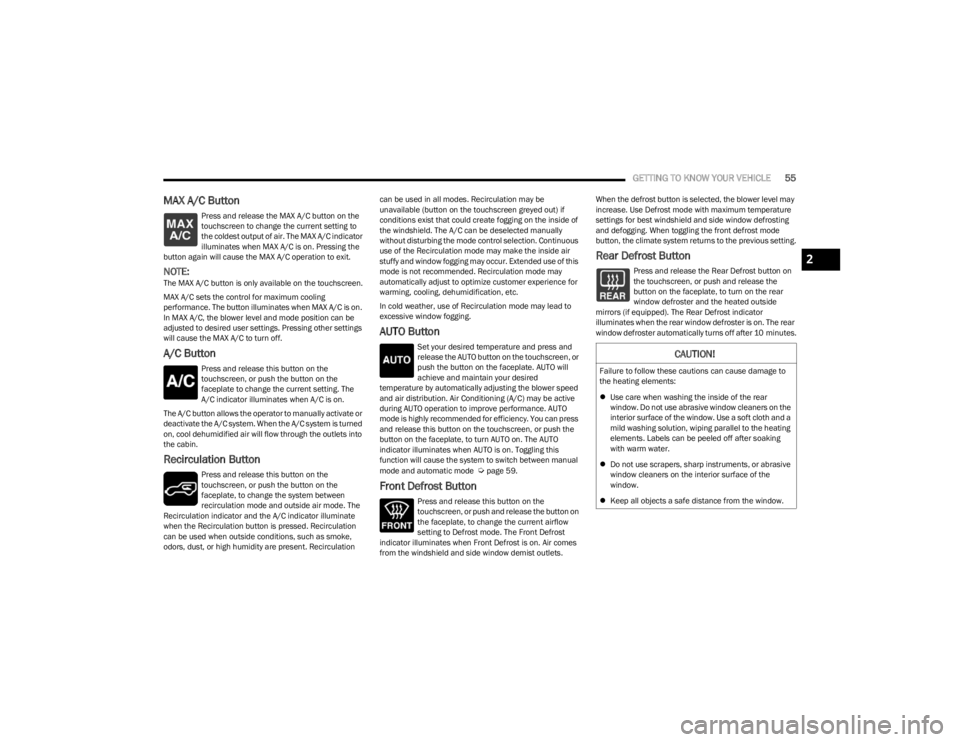
MAX A/C Button
Press and release the MAX A/C button on the
touchscreen to change the current setting to
the coldest output of air. The MAX A/C indicator
illuminates when MAX A/C is on. Pressing the
button again will cause the MAX A/C operation to exit.
NOTE:The MAX A/C button is only available on the touchscreen.
MAX A/C sets the control for maximum cooling
performance. The button illuminates when MAX A/C is on.
In MAX A/C, the blower level and mode position can be
adjusted to desired user settings. Pressing other settings
will cause the MAX A/C to turn off.
A/C Button
Press and release this button on the
touchscreen, or push the button on the
faceplate to change the current setting. The
A/C indicator illuminates when A/C is on.
The A/C button allows the operator to manually activate or
deactivate the A/C system. When the A/C system is turned
on, cool dehumidified air will flow through the outlets into
the cabin.
Recirculation Button
Press and release this button on the
touchscreen, or push the button on the
faceplate, to change the system between
recirculation mode and outside air mode. The
Recirculation indicator and the A/C indicator illuminate
when the Recirculation button is pressed. Recirculation
can be used when outside conditions, such as smoke,
odors, dust, or high humidity are present. Recirculation can be used in all modes. Recirculation may be
unavailable (button on the touchscreen greyed out) if
conditions exist that could create fogging on the inside of
the windshield. The A/C can be deselected manually
without disturbing the mode control selection. Continuous
use of the Recirculation mode may make the inside air
stuffy and window fogging may occur. Extended use of this
mode is not recommended. Recirculation mode may
automatically adjust to optimize customer experience for
warming, cooling, dehumidification, etc.
In cold weather, use of Recirculation mode may lead to
excessive window fogging.
AUTO Button
Set your desired temperature and press and
release the AUTO button on the touchscreen, or
push the button on the faceplate. AUTO will
achieve and maintain your desired
temperature by automatically adjusting the blower speed
and air distribution. Air Conditioning (A/C) may be active
during AUTO operation to improve performance. AUTO
mode is highly recommended for efficiency. You can press
and release this button on the touchscreen, or push the
button on the faceplate, to turn AUTO on. The AUTO
indicator illuminates when AUTO is on. Toggling this
function will cause the system to switch between manual
mode and automatic mode
Úpage 59.
Front Defrost Button
Press and release this button on the
touchscreen, or push and release the button on
the faceplate, to change the current airflow
setting to Defrost mode. The Front Defrost
indicator illuminates when Front Defrost is on. Air comes
from the windshield and side window demist outlets. When the defrost button is selected, the blower level may
increase. Use Defrost mode with maximum temperature
settings for best windshield and side window defrosting
and defogging. When toggling the front defrost mode
button, the climate system returns to the previous setting.
Rear Defrost Button
Press and release the Rear Defrost button on
the touchscreen, or push and release the
button on the faceplate, to turn on the rear
window defroster and the heated outside
mirrors (if equipped). The Rear Defrost indicator
illuminates when the rear window defroster is on. The rear
window defroster automatically turns off after 10 minutes.
CAUTION!
Failure to follow these cautions can cause damage to
the heating elements:
Use care when washing the inside of the rear
window. Do not use abrasive window cleaners on the
interior surface of the window. Use a soft cloth and a
mild washing solution, wiping parallel to the heating
elements. Labels can be peeled off after soaking
with warm water.
Do not use scrapers, sharp instruments, or abrasive
window cleaners on the interior surface of the
window.
Keep all objects a safe distance from the window.
2
23_JL_OM_EN_USC_t.book Page 55
Page 59 of 396
GETTING TO KNOW YOUR VEHICLE57
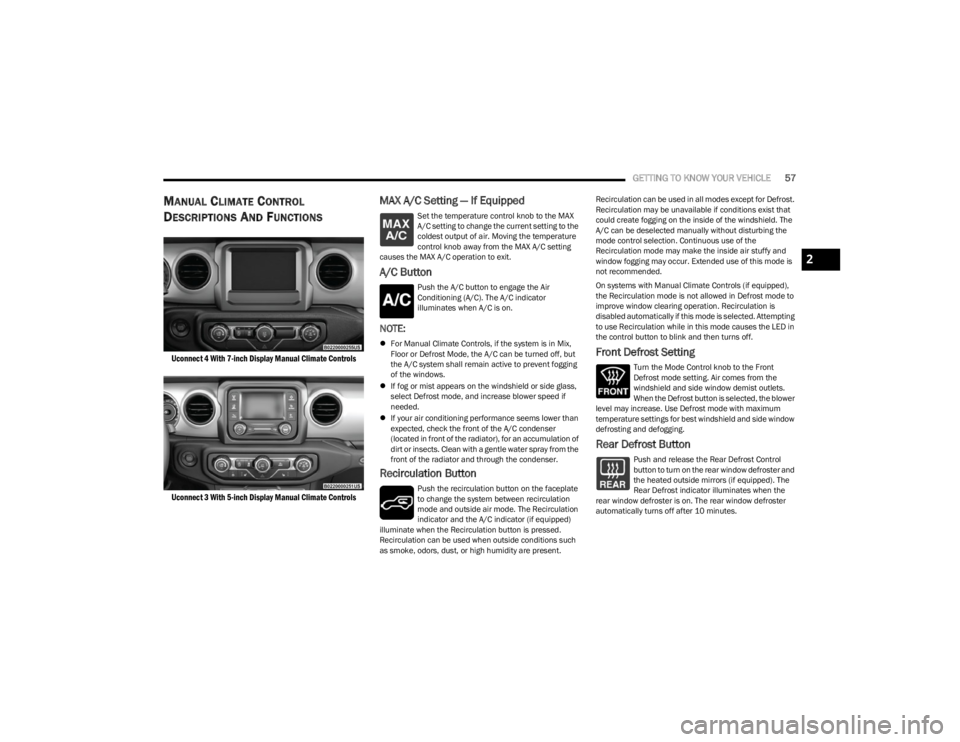
MANUAL CLIMATE CONTROL
D
ESCRIPTIONS AND FUNCTIONS
Uconnect 4 With 7-inch Display Manual Climate Controls
Uconnect 3 With 5-inch Display Manual Climate Controls
MAX A/C Setting — If Equipped
Set the temperature control knob to the MAX
A/C setting to change the current setting to the
coldest output of air. Moving the temperature
control knob away from the MAX A/C setting
causes the MAX A/C operation to exit.
A/C Button
Push the A/C button to engage the Air
Conditioning (A/C). The A/C indicator
illuminates when A/C is on.
NOTE:
For Manual Climate Controls, if the system is in Mix,
Floor or Defrost Mode, the A/C can be turned off, but
the A/C system shall remain active to prevent fogging
of the windows.
If fog or mist appears on the windshield or side glass,
select Defrost mode, and increase blower speed if
needed.
If your air conditioning performance seems lower than
expected, check the front of the A/C condenser
(located in front of the radiator), for an accumulation of
dirt or insects. Clean with a gentle water spray from the
front of the radiator and through the condenser.
Recirculation Button
Push the recirculation button on the faceplate
to change the system between recirculation
mode and outside air mode. The Recirculation
indicator and the A/C indicator (if equipped)
illuminate when the Recirculation button is pressed.
Recirculation can be used when outside conditions such
as smoke, odors, dust, or high humidity are present. Recirculation can be used in all modes except for Defrost.
Recirculation may be unavailable if conditions exist that
could create fogging on the inside of the windshield. The
A/C can be deselected manually without disturbing the
mode control selection. Continuous use of the
Recirculation mode may make the inside air stuffy and
window fogging may occur. Extended use of this mode is
not recommended.
On systems with Manual Climate Controls (if equipped),
the Recirculation mode is not allowed in Defrost mode to
improve window clearing operation. Recirculation is
disabled automatically if this mode is selected. Attempting
to use Recirculation while in this mode causes the LED in
the control button to blink and then turns off.
Front Defrost Setting
Turn the Mode Control knob to the Front
Defrost mode setting. Air comes from the
windshield and side window demist outlets.
When the Defrost button is selected, the blower
level may increase. Use Defrost mode with maximum
temperature settings for best windshield and side window
defrosting and defogging.
Rear Defrost Button
Push and release the Rear Defrost Control
button to turn on the rear window defroster and
the heated outside mirrors (if equipped). The
Rear Defrost indicator illuminates when the
rear window defroster is on. The rear window defroster
automatically turns off after 10 minutes.
2
23_JL_OM_EN_USC_t.book Page 57