mirror JEEP WRANGLER 2023 Owner's Manual
[x] Cancel search | Manufacturer: JEEP, Model Year: 2023, Model line: WRANGLER, Model: JEEP WRANGLER 2023Pages: 396, PDF Size: 25.15 MB
Page 239 of 396
MULTIMEDIA237
MANAGE MY SIRIUSXM GUARDIAN™
A
CCOUNT
To manage your SiriusXM Guardian™ account, press the
ASSIST button in your vehicle, or call SiriusXM Guardian™
Customer Care.
NOTE:It is recommended, when selling your vehicle, or turning in
your lease, to call SiriusXM Guardian™ Care to remove
your personal data.
CONNECTED SERVICES FAQS
For additional information about SiriusXM Guardian™,
active subscribers can push the ASSIST button (if
equipped) and then select SiriusXM Guardian™ Call on
your in-vehicle touchscreen to contact SiriusXM
Guardian™. Your call will be directed to a SiriusXM
Guardian™ agent or held in a queue until an agent is
available. If you do not have an active subscription, push
the ASSIST button and press the Activate button on the
touchscreen to activate services.
CONNECTED SERVICES SOS FAQS —
I
F EQUIPPED
1.
What happens if I accidentally push the SOS Call
button on the mirror or overhead console?
You have
10 seconds after pushing the SOS Call button to
cancel the call. To cancel the call, either push the
SOS Call button again, or press the Cancel button on
the in-vehicle touchscreen.
2.
What type of information is sent when I use the SOS
Call button from my vehicle? Certain vehicle
information, such as make and model, is transmitted
along with the last known GPS location.
3. When could I use the SOS Call button? You can use
the SOS Call button to make a call if you or someone
else needs emergency assistance.
CONNECTED SERVICES REMOTE DOOR
L
OCK/UNLOCK FAQS
1.
How long does it take to unlock or lock the door?
Depending on various conditions, it can take up to
three minutes or more for the request to get to your
vehicle.
2. Which is faster, my key fob or the Vehicle Branded
App? Your key fob will lock/unlock the door more
quickly, however its range is limited and your Vehicle
Branded App comes in handy for these and other
situations.
3. Will my vehicle be safe if I lose my device? People
sometimes lose their mobile devices, which is why
security measures have been engineered into the
Vehicle Branded App. Asking for your username,
password and SiriusXM Guardian™ Security PIN are
required for the activation of Remote services
through your mobile device. It is your responsibility to
protect your passwords and PINs. 4.
Why can’t all mobile devices use the Vehicle Branded
App? The Vehicle Branded App is compatible with
most devices with the Apple® and Android™
operating systems. The capabilities of these devices
allow us to remotely command your vehicle. Other
operating systems may be supported in the future.
5. Why is the Vehicle Branded App running slow? The
Vehicle Branded App relies on a mobile network
connection from your device to send commands to
your vehicle which must have an operable LTE (voice/
data), 4G (data), or 5G (data) network connection. If
either your device or your vehicle is in an area with
below average coverage, it may take longer to log in
and send commands.
CONNECTED SERVICES ROADSIDE
A
SSISTANCE FAQS
1.
What is the phone number for roadside assistance
call? The phone number is:
US: 1-800-521-2779
Canada: 1-800-363-4869
2. If I am subscribed to SiriusXM Guardian™, does it
cover towing or other expenses incurred by using
roadside assistance? No, however your new vehicle
may include Roadside Assistance Call services.
5
23_JL_OM_EN_USC_t.book Page 237
Page 242 of 396
240MULTIMEDIA
selected at the then current subscription rate and on
every renewal date thereafter, unless you cancel your
subscription by calling SiriusXM Guardian™ Care. If
you have not added a credit card to your account,
SiriusXM Guardian™ will send you an email or letter
in advance of your expiration date to remind you that
your subscription is ending soon.
10. How do I manage my SiriusXM Guardian™ notifi -
cation preferences? Contact SiriusXM Guardian™
Customer Care, or go to your Owner’s Site and then
update your preferences on the SiriusXM Guardian™
customer web portal.
11. How do I purchase a subscription? Contact SiriusXM
Guardian™ Customer Care by pushing the ASSIST
button on your rearview mirror or overhead console.
12. How do I update my credit card information? Login to
your Owner’s Site, and select Edit Profile, then select
SiriusXM Guardian™ Payment Account.
13. How do I find out how much longer I have on my
subscription? Contact SiriusXM Guardian™ Customer
Care.
You also can visit your Owner’s Site and choose a sub -
scription to view its expiration date. When your sub -
scription is about to expire, you will receive an email
or letter of notification.
14. Can I get a refund if I have not used the entire
subscription? Prorated refunds are provided from the
date of cancellation for annual plans or longer.
Please see the Uconnect and SiriusXM Guardian™
Terms & Conditions for refunds related to billing
plans of other lengths and other circumstances. 15.
Can I cancel a subscription before it expires? Yes. If
you have an annual subscription, your subscription
will be canceled the day you cancel. If you have a
monthly subscription, your subscription will be
canceled on the last day of the month in which you
choose to cancel.
16. What should I do if I want to sell my vehicle? Before
your vehicle is sold to a new owner, you’ll want to
remove your account information. This process
removes all personal information, returns the
Uconnect system to its original factory settings,
removes all SiriusXM Guardian™ connected services
and account information. To remove your account
information from the Uconnect system, contact
SiriusXM Guardian™ Customer Care.
17. What if I forgot to remove my account information
before I returned my lease vehicle or sold it? Contact
SiriusXM Guardian™ Customer Care.
18. What will happen if an operable LTE (voice/data), 4G
(data), or 5G (data) network connection compatible
with my device is temporarily unavailable? The SOS
Call and ASSIST buttons will NOT function if you are
not connected to an operable LTE (voice/data) or 4G
(data), 5G (data) network. Services that required your
smartphone only direct calls to Roadside Assistance
Call may be functioning if you have an operable
network.
DATA COLLECTION & PRIVACY
The Uconnect system collects and transmits data which
may include information about your vehicle, your vehicle’s
health and performance, your vehicle’s location, your
utilization of the features in your vehicle, and other data. The collection, use and sharing of this information is
required to provide the SiriusXM Guardian™ connected
services and is further described by the Uconnect Privacy
Policy, which can be found at www.driveuconnect.com/
connectedservices/privacy.html (US Residents) or
www.driveuconnect.ca (Canadian Residents). This
information may be collected by SiriusXM® Connected
Vehicle Services Inc. and shared with FCA US LLC for the
purposes stated in the Uconnect Privacy Policy. Vehicle
health and diagnostic information including location data
may be used by Uconnect to provide a Vehicle Health
Report to you.
Even if you cancel your SiriusXM Guardian™ subscription,
this vehicle diagnostic health information, including
location data, may still be transmitted from your vehicle
and you may still have a Vehicle Health Report sent to you.
Use of any of the connected services including SiriusXM
Guardian™ is deemed to be your consent to the collection,
use and disclosure of this information in accordance with
the Uconnect Privacy Policy. If you do not want this
information to be collected, used, or shared, you must
cancel your Uconnect services in their entirety by
contacting us as referenced in the Uconnect Privacy
Policy.
RADIO OPERATION AND MOBILE PHONES
Under certain conditions, the mobile phone being on in
your vehicle can cause erratic or noisy performance from
your radio. This condition may be lessened or eliminated
by repositioning the mobile phone within the vehicle. This
condition is not harmful to the radio. If your radio
performance does not satisfactorily improve from
23_JL_OM_EN_USC_t.book Page 240
Page 254 of 396
252SAFETY
AUXILIARY DRIVING SYSTEMS
BLIND SPOT MONITORING (BSM) —
I
F EQUIPPED
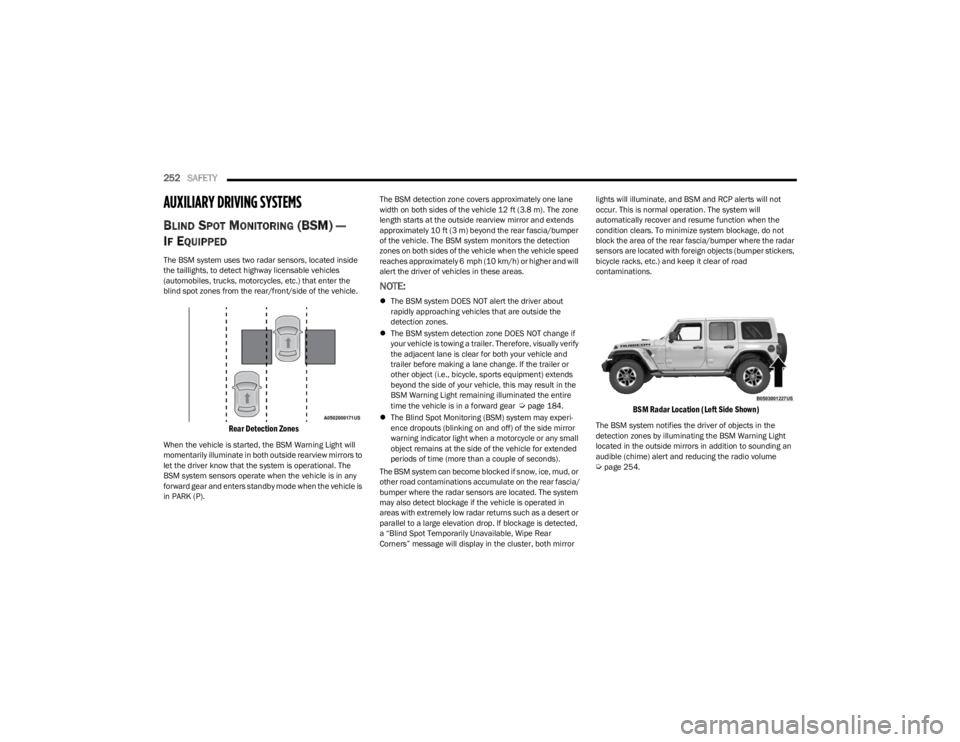
The BSM system uses two radar sensors, located inside
the taillights, to detect highway licensable vehicles
(automobiles, trucks, motorcycles, etc.) that enter the
blind spot zones from the rear/front/side of the vehicle.
Rear Detection Zones
When the vehicle is started, the BSM Warning Light will
momentarily illuminate in both outside rearview mirrors to
let the driver know that the system is operational. The
BSM system sensors operate when the vehicle is in any
forward gear and enters standby mode when the vehicle is
in PARK (P). The BSM detection zone covers approximately one lane
width on both sides of the vehicle 12 ft (3.8 m). The zone
length starts at the outside rearview mirror and extends
approximately 10 ft (3 m) beyond the rear fascia/bumper
of the vehicle. The BSM system monitors the detection
zones on both sides of the vehicle when the vehicle speed
reaches approximately 6 mph (10 km/h) or higher and will
alert the driver of vehicles in these areas.
NOTE:
The BSM system DOES NOT alert the driver about
rapidly approaching vehicles that are outside the
detection zones.
The BSM system detection zone DOES NOT change if
your vehicle is towing a trailer. Therefore, visually verify
the adjacent lane is clear for both your vehicle and
trailer before making a lane change. If the trailer or
other object (i.e., bicycle, sports equipment) extends
beyond the side of your vehicle, this may result in the
BSM Warning Light remaining illuminated the entire
time the vehicle is in a forward gear
Úpage 184.
The Blind Spot Monitoring (BSM) system may experi -
ence dropouts (blinking on and off) of the side mirror
warning indicator light when a motorcycle or any small
object remains at the side of the vehicle for extended
periods of time (more than a couple of seconds).
The BSM system can become blocked if snow, ice, mud, or
other road contaminations accumulate on the rear fascia/
bumper where the radar sensors are located. The system
may also detect blockage if the vehicle is operated in
areas with extremely low radar returns such as a desert or
parallel to a large elevation drop. If blockage is detected,
a “Blind Spot Temporarily Unavailable, Wipe Rear
Corners” message will display in the cluster, both mirror lights will illuminate, and BSM and RCP alerts will not
occur. This is normal operation. The system will
automatically recover and resume function when the
condition clears. To minimize system blockage, do not
block the area of the rear fascia/bumper where the radar
sensors are located with foreign objects (bumper stickers,
bicycle racks, etc.) and keep it clear of road
contaminations.
BSM Radar Location (Left Side Shown)
The BSM system notifies the driver of objects in the
detection zones by illuminating the BSM Warning Light
located in the outside mirrors in addition to sounding an
audible (chime) alert and reducing the radio volume
Úpage 254.
23_JL_OM_EN_USC_t.book Page 252
Page 256 of 396
254SAFETY
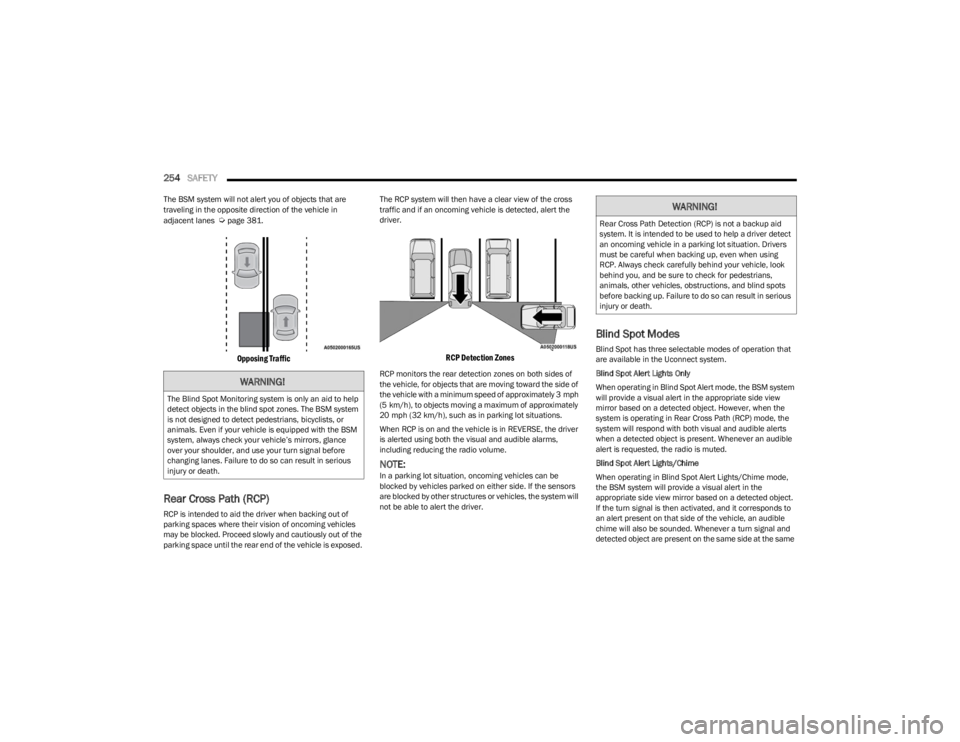
The BSM system will not alert you of objects that are
traveling in the opposite direction of the vehicle in
adjacent lanes
Úpage 381.
Opposing Traffic
Rear Cross Path (RCP)
RCP is intended to aid the driver when backing out of
parking spaces where their vision of oncoming vehicles
may be blocked. Proceed slowly and cautiously out of the
parking space until the rear end of the vehicle is exposed. The RCP system will then have a clear view of the cross
traffic and if an oncoming vehicle is detected, alert the
driver.
RCP Detection Zones
RCP monitors the rear detection zones on both sides of
the vehicle, for objects that are moving toward the side of
the vehicle with a minimum speed of approximately 3 mph
(5 km/h), to objects moving a maximum of approximately
20 mph (32 km/h), such as in parking lot situations.
When RCP is on and the vehicle is in REVERSE, the driver
is alerted using both the visual and audible alarms,
including reducing the radio volume.
NOTE:In a parking lot situation, oncoming vehicles can be
blocked by vehicles parked on either side. If the sensors
are blocked by other structures or vehicles, the system will
not be able to alert the driver.
Blind Spot Modes
Blind Spot has three selectable modes of operation that
are available in the Uconnect system.
Blind Spot Alert Lights Only
When operating in Blind Spot Alert mode, the BSM system
will provide a visual alert in the appropriate side view
mirror based on a detected object. However, when the
system is operating in Rear Cross Path (RCP) mode, the
system will respond with both visual and audible alerts
when a detected object is present. Whenever an audible
alert is requested, the radio is muted.
Blind Spot Alert Lights/Chime
When operating in Blind Spot Alert Lights/Chime mode,
the BSM system will provide a visual alert in the
appropriate side view mirror based on a detected object.
If the turn signal is then activated, and it corresponds to
an alert present on that side of the vehicle, an audible
chime will also be sounded. Whenever a turn signal and
detected object are present on the same side at the same
WARNING!
The Blind Spot Monitoring system is only an aid to help
detect objects in the blind spot zones. The BSM system
is not designed to detect pedestrians, bicyclists, or
animals. Even if your vehicle is equipped with the BSM
system, always check your vehicle’s mirrors, glance
over your shoulder, and use your turn signal before
changing lanes. Failure to do so can result in serious
injury or death.
WARNING!
Rear Cross Path Detection (RCP) is not a backup aid
system. It is intended to be used to help a driver detect
an oncoming vehicle in a parking lot situation. Drivers
must be careful when backing up, even when using
RCP. Always check carefully behind your vehicle, look
behind you, and be sure to check for pedestrians,
animals, other vehicles, obstructions, and blind spots
before backing up. Failure to do so can result in serious
injury or death.
23_JL_OM_EN_USC_t.book Page 254
Page 295 of 396
IN CASE OF EMERGENCY293
SOS Call System Limitations
Vehicles sold in Mexico DO NOT have SOS Call system
capabilities.
SOS or other emergency line operators in Mexico may not
answer or respond to SOS system calls.
If the SOS Call system detects a malfunction, any of the
following may occur at the time the malfunction is
detected, and at the beginning of each ignition cycle:
The light located within the ASSIST and SOS buttons
will continuously illuminate red.
The Device Screen will display the following message
“Vehicle device requires service. Please contact an
authorized dealer.”
An In-Vehicle Audio message will state “Vehicle device
requires service. Please contact an authorized dealer.”
Even if the SOS Call system is fully functional, factors
beyond FCA US LLC’s control may prevent or stop the SOS Call system operation. These include, but are not limited
to, the following factors:
The ignition is in the OFF position
The vehicle’s electrical systems are not intact
The SOS Call system software and/or hardware are
damaged during a crash
The vehicle battery loses power or becomes discon -
nected during a vehicle crash
LTE (voice/data) or 4G (data) network and/or Global
Positioning Satellite signals are unavailable or
obstructed
Equipment malfunction at the SOS operator facility
Operator error by the SOS operator
LTE (voice/data) or 4G (data) network congestion
Weather
Buildings, structures, geographic terrain, or tunnelsNOTE:
Your vehicle may be transmitting data as authorized by
the subscriber.
Never place anything on or near the vehicle’s LTE
(voice/data) or 4G (data) and GPS antennas. You could
prevent LTE (voice/data) or 4G (data) and GPS signal
reception, which can prevent your vehicle from placing
an emergency call. An operable LTE (voice/data) or 4G
(data) network connection and a GPS signal is required
for the SOS Call system to function properly.
NOTE:Changes or modifications not expressly approved by the
party responsible for compliance could void the user's
authority to operate the equipment.
Automatic SOS — If Equipped
Automatic SOS is a hands-free safety service that can
immediately connect you with help in the event that your
vehicle’s airbags deploy. Please refer to your provided
radio supplement for complete information.
JACKING AND TIRE CHANGING
Use this QR code to access your digital
experience.
WARNING!
Ignoring the Rearview Mirror light could mean you
will not have SOS Call services. If the Rearview Mirror
light is illuminated, have an authorized dealer
service the SOS Call system immediately.
The Occupant Restraint Control module turns on the
air bag Warning Light on the instrument panel if a
malfunction in any part of the system is detected. If
the Air Bag Warning Light is illuminated, have an
authorized dealer service the Occupant Restraint
Control system immediately.WARNING!
ALWAYS obey traffic laws and pay attention to the road.
ALWAYS drive safely with your hands on the steering
wheel. You have full responsibility and assume all risks
related to the use of the features and applications in
this vehicle. Only use the features and applications
when it is safe to do so. Failure to do so may result in an
accident involving serious injury or death.
CAUTION!
To avoid damage to the mirror during cleaning, never
spray any cleaning solution directly onto the mirror.
Apply the solution onto a clean cloth and wipe the
mirror clean.
7
23_JL_OM_EN_USC_t.book Page 293
Page 342 of 396
340SERVICING AND MAINTENANCE
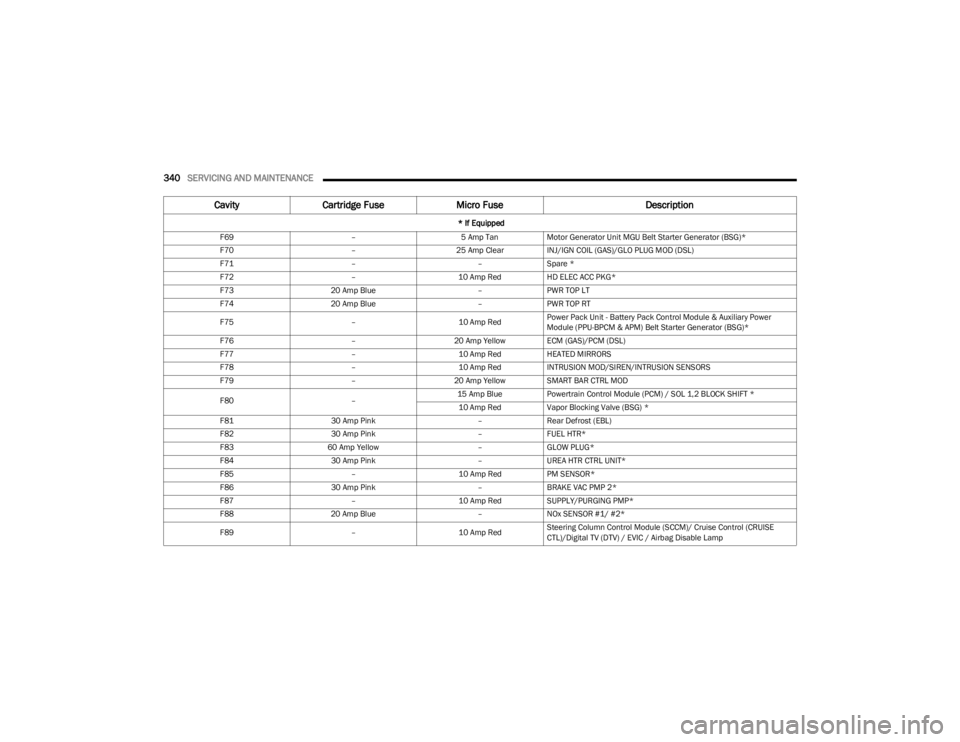
F69 –5 Amp TanMotor Generator Unit MGU Belt Starter Generator (BSG)*
F70 –25 Amp ClearINJ/IGN COIL (GAS)/GLO PLUG MOD (DSL)
F71 ––Spare *
F72 –10 Amp RedHD ELEC ACC PKG*
F73 20 Amp Blue –PWR TOP LT
F74 20 Amp Blue –PWR TOP RT
F75 –10 Amp RedPower Pack Unit - Battery Pack Control Module & Auxiliary Power
Module (PPU-BPCM & APM) Belt Starter Generator (BSG)*
F76 –20 Amp Yellow ECM (GAS)/PCM (DSL)
F77 –10 Amp RedHEATED MIRRORS
F78 –10 Amp RedINTRUSION MOD/SIREN/INTRUSION SENSORS
F79 –20 Amp Yellow SMART BAR CTRL MOD
F80 –15 Amp Blue
Powertrain Control Module (PCM) / SOL 1,2 BLOCK SHIFT *
10 Amp Red Vapor Blocking Valve (BSG) *
F81 30 Amp Pink –Rear Defrost (EBL)
F82 30 Amp Pink –FUEL HTR*
F83 60 Amp Yellow –GLOW PLUG*
F84 30 Amp Pink –UREA HTR CTRL UNIT*
F85 –10 Amp RedPM SENSOR*
F86 30 Amp Pink –BRAKE VAC PMP 2*
F87 –10 Amp RedSUPPLY/PURGING PMP*
F88 20 Amp Blue –NOx SENSOR #1/ #2*
F89 –10 Amp RedSteering Column Control Module (SCCM)/ Cruise Control (CRUISE
CTL)/Digital TV (DTV) / EVIC / Airbag Disable Lamp
Cavity
Cartridge Fuse Micro Fuse Description
* If Equipped
23_JL_OM_EN_USC_t.book Page 340
Page 343 of 396
SERVICING AND MAINTENANCE341
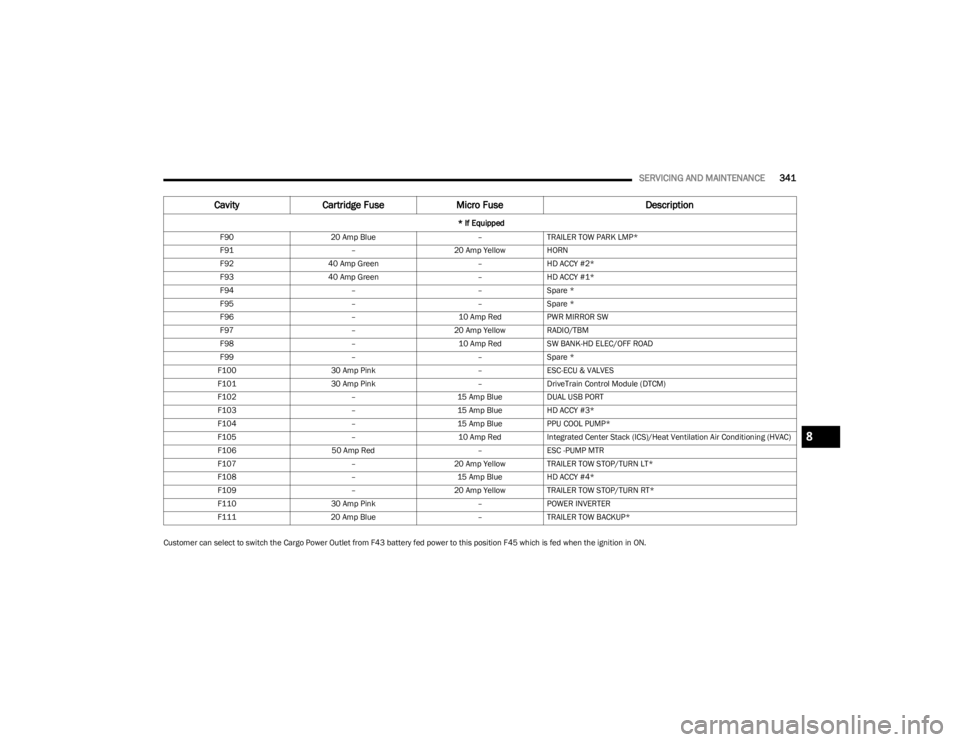
Customer can select to switch the Cargo Power Outlet from F43 battery fed power to this position F45 which is fed when the ignition in ON.F90
20 Amp Blue –TRAILER TOW PARK LMP*
F91 –20 Amp Yellow HORN
F92 40 Amp Green –HD ACCY #2*
F93 40 Amp Green –HD ACCY #1*
F94 ––Spare *
F95 ––Spare *
F96 –10 Amp RedPWR MIRROR SW
F97 –20 Amp Yellow RADIO/TBM
F98 –10 Amp RedSW BANK-HD ELEC/OFF ROAD
F99 ––Spare *
F100 30 Amp Pink –ESC-ECU & VALVES
F101 30 Amp Pink –DriveTrain Control Module (DTCM)
F102 –15 Amp BlueDUAL USB PORT
F103 –15 Amp BlueHD ACCY #3*
F104 –15 Amp BluePPU COOL PUMP*
F105 –10 Amp RedIntegrated Center Stack (ICS)/Heat Ventilation Air Conditioning (HVAC)
F106 50 Amp Red –ESC -PUMP MTR
F107 –20 Amp Yellow TRAILER TOW STOP/TURN LT*
F108 –15 Amp BlueHD ACCY #4*
F109 –20 Amp Yellow TRAILER TOW STOP/TURN RT*
F110 30 Amp Pink –POWER INVERTER
F111 20 Amp Blue –TRAILER TOW BACKUP*
Cavity Cartridge Fuse Micro Fuse Description
* If Equipped
8
23_JL_OM_EN_USC_t.book Page 341
Page 369 of 396
SERVICING AND MAINTENANCE367
SEATS AND FABRIC PARTS
Use Mopar® Total Clean to clean fabric upholstery and
carpeting.
Seat Belt Maintenance
Do not bleach, dye or clean the belts with chemical
solvents or abrasive cleaners. This will weaken the fabric.
Sun damage can also weaken the fabric.
If the belts need cleaning, use a mild soap solution or
lukewarm water. Do not remove the belts from the vehicle
to wash them. Dry with a soft cloth.
Replace the belts if they appear frayed or worn or if the
buckles do not work properly.
PLASTIC AND COATED PARTS
Use Mopar® Total Clean to clean vinyl upholstery.
Cleaning Plastic Instrument Cluster
Lenses
The lenses in front of the instruments in this vehicle are
molded in clear plastic. When cleaning the lenses, care
must be taken to avoid scratching the plastic.
Clean with a wet soft cloth. A mild soap solution may be
used, but do not use high alcohol content or abrasive
cleaners. If soap is used, wipe clean with a clean damp
cloth. Dry with a soft cloth.
LEATHER SURFACES
Mopar® Total Clean is specifically recommended for
leather upholstery.
Your leather upholstery can be best preserved by regular
cleaning with a damp soft cloth. Small particles of dirt can
act as an abrasive and damage the leather upholstery and
should be removed promptly with a damp cloth. Stubborn
soils can be removed easily with a soft cloth and Mopar®
Total Clean. Care should be taken to avoid soaking your leather upholstery with any liquid. Please do not use
polishes, oils, cleaning fluids, solvents, detergents, or
ammonia-based cleaners to clean your leather upholstery.
NOTE:If equipped with light colored leather, it tends to show any
foreign material, dirt, and fabric dye transfer more so than
darker colors. The leather is designed for easy cleaning,
and FCA recommends Mopar® total care leather cleaner
applied on a cloth to clean the leather seats as needed.
GLASS SURFACES
All glass surfaces should be cleaned on a regular basis
with Mopar® Glass Cleaner, or any commercial
household-type glass cleaner. Never use an abrasive type
cleaner. Use caution when cleaning the inside rear
window equipped with electric defrosters or windows
equipped with radio antennas. Do not use scrapers or
other sharp instruments that may scratch the elements.
When cleaning the rearview mirror, spray cleaner on the
towel or cloth that you are using. Do not spray cleaner
directly on the mirror.
WARNING!
Do not use volatile solvents for cleaning purposes.
Many are potentially flammable, and if used in closed
areas they may cause respiratory harm.
WARNING!
A frayed or torn seat belt could rip apart in a collision
and leave you with no protection. Inspect the seat belt
system periodically, checking for cuts, frays, or loose
parts. Damaged parts must be replaced immediately.
Do not disassemble or modify the seat belt system. If
your vehicle is involved in a collision, or if you have
questions regarding seat belt or retractor conditions,
take your vehicle to an authorized FCA dealer or
authorized FCA Certified Collision Care Program facility
for inspection.
CAUTION!
Direct contact of air fresheners, insect repellents,
suntan lotions, or hand sanitizers to the plastic,
painted, or decorated surfaces of the interior may
cause permanent damage. Wipe away immediately.
Damage caused by these type of products may not
be covered by your New Vehicle Limited Warranty.
CAUTION!
Do not use alcohol and alcohol-based and/or ketone
based cleaning products to clean leather upholstery, as
damage to the upholstery may result.
8
23_JL_OM_EN_USC_t.book Page 367
Page 384 of 396
382
INDEX
AAbout Your Brakes ....................................................... 368
Adaptive Cruise Control (ACC)
(Cruise Control) ................................................... 151
, 152
Adding Engine Coolant (Antifreeze) ............................ 329
Adding Fuel.......................................................... 165
, 166
Additives, Fuel .............................................................. 369
Advance Phone Connectivity ....................................... 220
Air Bag Air Bag Operation.................................................... 269
Air Bag Warning Light .................................... 267
, 269
Enhanced Accident Response ...................... 276, 305
Event Data Recorder (EDR).................................... 305 Front Air Bag .................................................. 268
, 269
If Deployment Occurs ............................................. 275
Knee Impact Bolsters ............................................. 274
Maintaining Your Air Bag System .......................... 277
Maintenance ........................................................... 277
Redundant Air Bag Warning Light ......................... 267
Transporting Pets.................................................... 288
Air Bag Light ...............................................117
, 267, 289
Air Cleaner, Engine (Engine Air Cleaner Filter) ........... 319
Air Conditioner Maintenance ...................................... 324
Air Conditioner Refrigerant ................................. 324
, 325
Air Conditioner System ................................................ 324
Air Conditioning Filter ........................................... 59
, 325
Air Conditioning System..................................................59 Air Conditioning, Operating Tips ..................................... 59Air Filter......................................................................... 319
Air Pressure Tires ......................................................................... 352 Alarm
Arm The System......................................................... 20
Disarm The System ................................................... 20
Security Alarm...................................................19
, 119
Alterations/Modifications Vehicle.......................................................................... 8
Android Auto........................................................ 222
, 223
Android Auto™
S
....................................................... 222
Antifreeze (Engine Coolant) ............................... 329, 373
Disposal ...................................................................330
Anti-Lock Brake System (ABS) ..................................... 244
Anti-Lock Warning Light................................................ 119
Apple CarPlay ...................................................... 222
, 225
Apple CarPlay®
S
...................................................... 224
Assist, Hill Start ............................................................. 249
Audio Settings ............................................................... 208
Audio Systems (Radio) ................................................. 184
Auto Down Power Windows............................................ 66
Automatic Dimming Mirror ............................................. 45 Automatic Door Locks .................................................... 23Automatic Headlights ..................................................... 51Automatic High Beams ................................................... 51
Automatic Temperature Control (ATC) .......................... 59
Automatic Transmission ............................................... 138 Adding Fluid ............................................................. 333
Fluid And Filter Change ...........................................333
Fluid Change ............................................................333Fluid Level Check ....................................................333Fluid Type ....................................................... 333
, 376
Gear Ranges ............................................................138 Special Additives ..................................................... 333 Automatic Transmission Limp Home Mode ............... 139
AutoPark ....................................................................... 127
Auxiliary Electrical Outlet (Power Outlet) ...................... 62
Auxiliary Power Outlet .................................................... 62
Auxiliary Switches ........................................................... 64
Axle Fluid....................................................................... 376
Axle Lock ....................................................................... 144
BBattery..................................................................117, 317
Charging System Light ............................................ 117
Keyless Key Fob Replacement................................. 14
Belts, Seat..................................................................... 288
Blind Spot Monitoring .................................................. 252
Bluetooth Connecting To A Particular Mobile Phone OrAudio Device After Pairing ................................. 216
Body Mechanism Lubrication ...................................... 326
B-Pillar Location ........................................................... 349
Brake Assist System..................................................... 245
Brake Control System .................................................. 245
Brake Fluid...........................................................331
, 376
Brake System ......................................................331, 368
Anti-Lock (ABS) ........................................................ 368 Fluid Check .............................................................. 331Master Cylinder ....................................................... 331Parking..................................................................... 133Warning Light .......................................................... 117
Brake/Transmission Interlock ..................................... 138
23_JL_OM_EN_USC_t.book Page 382
Page 386 of 396

384
Door Locks
Automatic ...................................................................23
Door Off Mirror Kit...........................................................29
Door Off Mirror Kit — If Equipped
S
............................ 29
Doors................................................................................ 20 Removal .............................................................. 24
, 27
Removal, Front...........................................................24
Removal, Rear ...........................................................27
Drag & Drop.................................................................. 200
Draining Fuel/Water Separator Filter ......................... 321
Driver Memory Presets ................................................ 207
Driver’s Seat Back Tilt ............................................. 37
, 38
Driving ........................................................................... 178
EElectric Brake Control System..................................... 245 Anti-Lock Brake System ......................................... 244
Electronic Roll Mitigation .............................. 245
, 251
Electric Remote Mirrors ..................................................46 Electrical Outlet, Auxiliary (Power Outlet) ...................... 62Electrical Power Outlets..................................................62Electronic Stability Control (ESC) ................................ 246
Electronic Throttle Control Warning Light................... 118
Emergency In Case Of ................................................................ 291SOS Emergency Call ............................................... 291
Emergency Brake ......................................................... 133
Emergency, In Case Of Jacking..................................................................... 293
Jump Starting .......................................................... 298
Tow Hooks ............................................................... 304
Emission Control System Maintenance...................... 125 Engine............................................................................314
Air Cleaner ............................................................... 319
Block Heater ............................................................129Break-In Recommendations ...................................133
Checking Oil Level ...................................................317
Compartment........................................ 314
, 315, 316
Compartment Identification................. 314, 315, 316
Coolant (Antifreeze)................................................. 374
Cooling .....................................................................328
Exhaust Gas Caution ............................................... 290
Fails To Start ............................................................128 Flooded, Starting ..................................................... 128Fuel Requirements ........................................ 369
, 373
Idling......................................................................... 131
Jump Starting...........................................................298
Oil .......................................................... 318
, 373, 374
Oil Filler Cap ............................................................. 314
Oil Filter ....................................................................319 Oil Reset...................................................................110Oil Selection ................................................... 318
, 373
Oil Synthetic ............................................................. 318
Starting.....................................................................126
Enhanced Accident Response Feature ............. 276
, 305
Ethanol .......................................................................... 370
Exhaust Gas Caution ....................................................290
Exhaust Gas Cautions ..................................................290
Exhaust System .................................................. 290
, 328
Exterior Lights ........................................................50, 290
FFabric Care ....................................................................361
Fabric Top...................................................................... 361
Family Alerts .................................................................. 236
FAQ ................................................................................ 237 Features ........................................................................ 228
Filters
Air Cleaner ............................................................... 319Air Conditioning ................................................ 59
, 325
Engine Fuel .............................................................. 321 Engine Oil................................................................. 319
Engine Oil Disposal ................................................. 319
Flashers Hazard Warning....................................................... 291Turn Signal............................................................... 290Turn Signals.................................................... 123
, 344
Flash-To-Pass.................................................................. 51
Flat Tire Changing ...............................................345
, 355
Flat Tire Stowage .................................................345, 355
Flooded Engine Starting............................................... 128
Fluid Capacities ............................................................ 373
Fluid Leaks.................................................................... 290
Fluid Level Manual Transmission ............................................. 332
Fluid Level Checks ....................................................... 332 Brake........................................................................ 331
Engine Oil................................................................. 317
Fluid, Brake................................................................... 376
Fog Lights...................................................................... 344
Fog Lights, Service ....................................................... 344
Fold And Tumble Rear Seat ........................................... 39
Fold-Flat Seats ................................................................ 37
Folding Rear Seats ......................................................... 39
Folding Windshield ......................................................... 97
Forward Collision Warning ........................................... 255
Four Wheel Drive .......................................................... 140 Operation ........................................................140
, 141
Shifting..................................................................... 140 System ..................................................................... 140
23_JL_OM_EN_USC_t.book Page 384