lights JEEP WRANGLER 2DOORS 2018 Owner handbook (in English)
[x] Cancel search | Manufacturer: JEEP, Model Year: 2018, Model line: WRANGLER 2DOORS, Model: JEEP WRANGLER 2DOORS 2018Pages: 348, PDF Size: 6.5 MB
Page 103 of 348
Initial Indication
If the driver is unbuckled when the ignition
switch is first in the START or ON/RUN posi-
tion, a chime will signal for a few seconds. If
the driver or outboard front seat passenger is
unbuckled when the ignition switch is first in
the START or ON/RUN position, the respec-
tive Seat Belt Reminder Light will turn solid
red and remain red until the seat belt is
buckled. The respective Seat Belt Reminder
Light will turn solid green once the seat belt
is buckled. After the driver and outboard front
seat passenger have buckled their seat belts
all Seat Belt Reminder Lights will turn off.
The outboard front passenger seat BeltAlert
is not active when the outboard front passen-
ger seat is unoccupied.
BeltAlert Warning Sequence
The BeltAlert warning sequence is activated
when the vehicle is moving above a specified
vehicle speed range and the driver or out-
board front seat passenger is unbuckled (the
outboard front passenger seat BeltAlert is not
active when the outboard front passenger
seat is unoccupied). The BeltAlert warning
sequence starts by blinking the respectiveSeat Belt Reminder Light and sounding an
intermittent chime. Once the BeltAlert warn-
ing sequence has completed, the Seat Belt
Reminder Light will remain solid red until the
driver and outboard front seat passenger are
buckled. The BeltAlert warning sequence
may repeat based on vehicle speed until the
driver and occupied outboard front seat pas-
senger seat belts are buckled. The driver
should instruct all occupants to buckle their
seat belts.
Change of Status
If the driver or outboard front seat passenger
unbuckles their seat belt while the vehicle is
traveling, the BeltAlert warning sequence will
begin until the seat belts are buckled again.
The outboard front passenger seat BeltAlert
is not active when the outboard front passen-
ger seat is unoccupied. BeltAlert may be
triggered when an animal or other items are
placed on the outboard front passenger seat
or when the seat is folded flat (if equipped). It
is recommended that pets be restrained in
the rear seat (if equipped) in pet harnesses or
pet carriers that are secured by seat belts,
and cargo is properly stowed.Rear Seat BeltAlert (If Equipped)
Rear Seat BeltAlert shows the driver whether
the seat belts in the rear seat are buckled or
unbuckled (if equipped with Rear Seat
BeltAlert). When the ignition switch is in the
START or ON/RUN position, a Seat Belt Re-
minder Light
located in the upper right
corner of the instrument cluster turns on for
each second row seat position (if equipped
with Rear Seat BeltAlert). The Rear BeltAlert
warning sequence is activated when the ve-
hicle is moving above a specified vehicle
speed range.
If a second row seat belt is buckled, the Rear
BeltAlert Reminder light for that seating po-
sition will illuminate solid green. If a rear seat
passenger is not wearing the seat belt, the
BeltAlert warning sequence will start (if
equipped with Rear Seat BeltAlert). The re-
spective Seat Belt Reminder light will illumi-
nate solid red. If the seat belt is not buckled
when the vehicle exceeds a specified speed,
the Rear Seat Belt Reminder light will flash
red and a continuous chime will sound for
approximately 30 seconds if there is no
change of status of the rear seat belt buckles.
101
Page 104 of 348
If a rear seat passenger unbuckles a seat belt
while the vehicle is travelling, the warning
sequence will start again and the Rear Seat
Belt Reminder Light for that position will
change from green to red. This will alert the
driver to stop the vehicle until the rear seat
passenger buckles the seat belt again. All
rear seat BeltAlert lights will remain illumi-
nated for approximately 60 seconds (if
equipped with Rear Seat BeltAlert).
The Belt Reminder light will indicate if a rear
seat is not occupied and the seat belt is unbuck-
led
. If the rear seat is removed (for vehicles
with a removable rear seat) the Belt Reminder
light will illuminate two dashes
.
Driver and Front Passenger BeltAlert can be
activated or deactivated by an authorized
dealer. Rear Seat BeltAlert cannot be deacti-
vated. FCA US LLC does not recommend
deactivating BeltAlert.
NOTE:
If Front BeltAlert has been deactivated, the
Front Seat Belt Reminder Light will turn on
and remain on until the driver and outboard
front seat passenger seat belts are buckled.
Lap/Shoulder Belts
All seating positions in your vehicle are
equipped with lap/shoulder belts.
The seat belt webbing retractor will lock only
during very sudden stops or collisions. This
feature allows the shoulder part of the seat
belt to move freely with you under normal
conditions. However, in a collision the seat
belt will lock and reduce your risk of striking
the inside of the vehicle or being thrown out
of the vehicle.
WARNING!
• Relying on the air bags alone could lead
to more severe injuries in a collision. The
air bags work with your seat belt to
restrain you properly. In some collisions,
the air bags won’t deploy at all. Always
wear your seat belt even though you have
air bags.
• In a collision, you and your passengers
can suffer much greater injuries if you
are not properly buckled up. You can
strike the interior of your vehicle or other
passengers, or you can be thrown out of
WARNING!
the vehicle. Always be sure you and
others in your vehicle are buckled up
properly.
• It is dangerous to ride in a cargo area,
inside or outside of a vehicle. In a colli-
sion, people riding in these areas are
more likely to be seriously injured or
killed.
• Do not allow people to ride in any area of
your vehicle that is not equipped with
seats and seat belts.
• Be sure everyone in your vehicle is in a
seat and using a seat belt properly. Oc-
cupants, including the driver, should al-
ways wear their seat belts whether or not
an air bag is also provided at their seat-
ing position to minimize the risk of se-
vere injury or death in the event of a
crash.
• Wearing your seat belt incorrectly could
make your injuries in a collision much
worse. You might suffer internal injuries,
or you could even slide out of the seat
belt. Follow these instructions to wear
SAFETY
102
Page 114 of 348
children are safer when properly restrained in
the rear seats rather than in the front. (Refer
to “Child Restraints” in this section for fur-
ther information.)
WARNING!
• A DISABLED (OFF) Passenger Advanced
Front Air Bag is deactivated and will not
deploy in a collision.
• A DISABLED (OFF) Passenger Advanced
Front Air Bag will not provide a front
passenger additional protection by
supplementing the seat belts.
• Do not install a child restraint in the
front seat unless the Passenger Air Bag
DISABLE (OFF) Indicator light
on
the overhead sports bar is illuminated to
show that the Passenger Advanced Front
Air Bag is DISABLED (OFF).
• In a collision, you and your passengers
can suffer much greater injuries if you
are not properly buckled up. You can
strike the interior of your vehicle or other
passengers, or you can be thrown out of
the vehicle. Always be sure you and
WARNING!
others in your vehicle are buckled up
properly.
The Passenger Advanced Front Air Bag can
be ENABLED (ON) or DISABLED (OFF) by
selecting the desired setting in the instru-
ment cluster display menu. For more infor-
mation on how to access the instrument clus-
ter display, refer to “Instrument Cluster
Display” in “Getting To Know Your Instru-
ment Panel”.
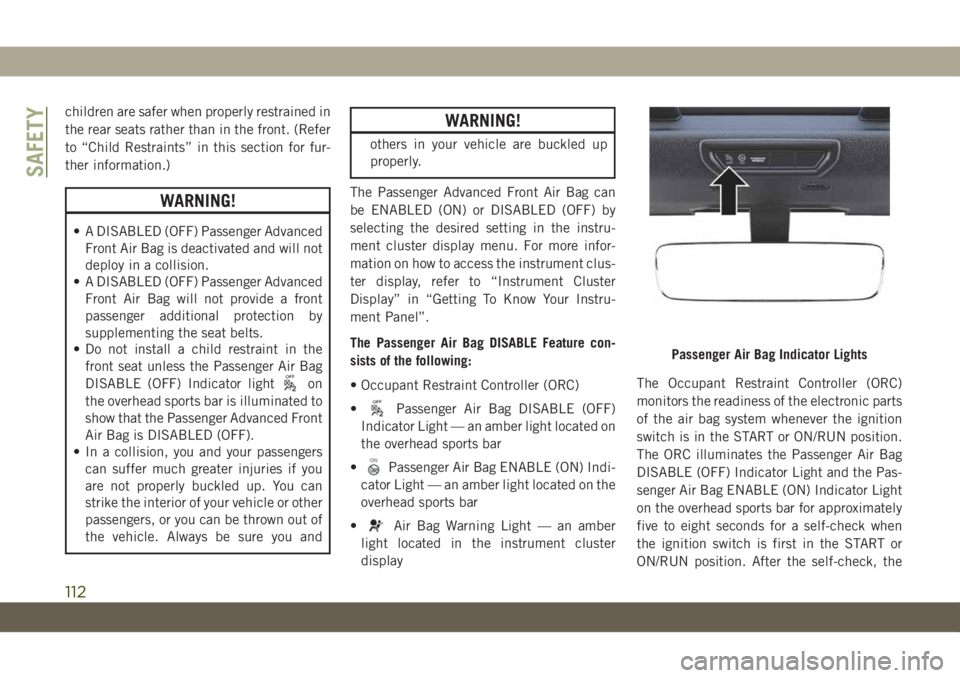
The Passenger Air Bag DISABLE Feature con-
sists of the following:
• Occupant Restraint Controller (ORC)
•
Passenger Air Bag DISABLE (OFF)
Indicator Light — an amber light located on
the overhead sports bar
•
Passenger Air Bag ENABLE (ON) Indi-
cator Light — an amber light located on the
overhead sports bar
•
Air Bag Warning Light — an amber
light located in the instrument cluster
displayThe Occupant Restraint Controller (ORC)
monitors the readiness of the electronic parts
of the air bag system whenever the ignition
switch is in the START or ON/RUN position.
The ORC illuminates the Passenger Air Bag
DISABLE (OFF) Indicator Light and the Pas-
senger Air Bag ENABLE (ON) Indicator Light
on the overhead sports bar for approximately
five to eight seconds for a self-check when
the ignition switch is first in the START or
ON/RUN position. After the self-check, the
Passenger Air Bag Indicator Lights
SAFETY
112
Page 115 of 348
indicator light that is illuminated tells the
driver and passenger the status of the Pas-
senger Advanced Front Air Bag. If any of the
following occurs, have an authorized dealer
service the air bag system immediately:
• Both indicator lights do not come on as a
self-check when the ignition is first in the
START or ON/RUN position.
• Both indicator lights stay on after you start
the vehicle.
• Both indicator lights stay off after you start
the vehicle.
• Both indicator lights come on as you drive.
• Both indicator lights turn off as you drive.
Once the self-check is complete, only one
Passenger Air Bag Indicator Light should be
illuminated at a time.
WARNING!
If any of the above conditions occur, indi-
cating there is an issue with the Passenger
Air Bag Indicator Light, the Passenger Ad-
vanced Front Air Bag will remain in the last
selected state (DISABLED or ENABLED).
Passenger Air Bag DISABLE (OFF) Indicator
Light – Located On The Overhead Sports Bar
The Passenger Air Bag DISABLE (OFF) Indi-
cator Light tells the driver and front passen-
ger when the Passenger Advanced Front Air
Bag is deactivated. The Passenger Air Bag
DISABLE (OFF) Indicator Light will illumi-
nate
to show that the Passenger Ad-
vanced Front Air Bag will not deploy during a
collision.NEVERassume the Passenger Ad-
vanced Front Air Bag is deactivated unless
the Passenger Air Bag DISABLE (OFF) Indi-
cator Light
is illuminated.
Passenger Air Bag ENABLE (ON) Indicator
Light – Located On The Overhead Sports Bar
The Passenger Air Bag ENABLE (ON) Indica-
tor Light tells the driver and front passenger
when the Passenger Advanced Front Air Bag
is activated. The Passenger Air Bag ENABLE
(ON) Indicator Light will illuminate
to
show that the Passenger Advanced Front Air
Bag will deploy during an impact that re-
quires air bag deployment.NEVERassume the
Passenger Advanced Front Air Bag is acti-
vated unless the Passenger Air Bag ENABLE
(ON) Indicator Light
is illuminated.
WARNING!
• NEVER use a rearward facing child re-
straint on a seat protected by an ACTIVE
AIRBAG in front of it, DEATH or SERI-
OUS INJURY to the CHILD can occur.
• It is advisable to always carry children in
a child restraint system on the rear seat,
which is the most protected position in
the event of a collision.
• Should it be necessary to carry a child on
the passenger side front seat in a rear-
facing child restraint system, the pas-
senger side front air bag must be deac-
tivated. Always make sure the airbag
deactivation indicator light is illumi-
nated when using a child restraint sys-
tem. The passenger seat must also be
positioned backward as far as possible to
avoid the child restraint system from
coming into contact with the dashboard.
• A deploying passenger front air bag can
cause death or serious injury to a child
12 years or younger, including a child in
a rear-facing child restraint.
113
Page 118 of 348
Following the actions in the table above will
ENABLE (ON) the Passenger Advanced Front
Air Bag. The Passenger Air Bag ENABLE
(ON) Indicator Light
on the overhead
sports bar will illuminate to show that the
Passenger Advanced Front Air Bag will de-
ploy during an impact that requires air bag
deployment.
WARNING!
• NEVER use a rearward facing child re-
straint on a seat protected by an ACTIVE
AIRBAG in front of it, DEATH or SERI-
OUS INJURY to the CHILD can occur.
• It is advisable to always carry children in
a child restraint system on the rear seat,
which is the most protected position in
the event of a collision.
• Should it be necessary to carry a child on
the passenger side front seat in a rear-
facing child restraint system, the pas-
senger side front air bag must be deac-
tivated. Always make sure the airbag
deactivation indicator light is illumi-
nated when using a child restraint sys-
tem. The passenger seat must also be
WARNING!
positioned backward as far as possible
to avoid the child restraint system from
coming into contact with the dashboard.
• A deploying passenger front air bag can
cause death or serious injury to a child
12 years or younger, including a child in
a rear-facing child restraint.
• Children 12 years or younger should
always ride buckled up in the rear seat of
a vehicle with a rear seat.
Knee Impact Bolsters
The Knee Impact Bolsters help protect the
knees of the driver and front passenger, and
position the front occupants for improved
interaction with the front air bags.
WARNING!
• Do not drill, cut, or tamper with the knee
impact bolsters in any way.
• Do not mount any accessories to the
knee impact bolsters such as alarm
lights, stereos, citizen band radios, etc.
Supplemental Side Air Bags
Supplemental Seat-Mounted Side Air Bags
(SABs) (if equipped)
Your vehicle may be equipped with Supple-
mental Seat-Mounted Side Air Bags (SABs).
If your vehicle is equipped with Supplemen-
tal Seat-Mounted Side Air Bags (SABs),
please refer to the information below.
Supplemental Seat-Mounted Side Air Bags
(SABs) are located in the outboard side of the
front seats. The SABs are marked with “SRS
AIRBAG” or “AIRBAG” on a label or on the
seat trim on the outboard side of the seats.
SAFETY
116
Page 121 of 348
• As the air bags deflate, you may see some
smoke-like particles. The particles are a
normal by-product of the process that gen-
erates the non-toxic gas used for air bag
inflation. These airborne particles may irri-
tate the skin, eyes, nose, or throat. If you
have skin or eye irritation, rinse the area
with cool water. For nose or throat irritation,
move to fresh air. If the irritation continues,
see your doctor. If these particles settle on
your clothing, follow the garment manufac-
turer’s instructions for cleaning.
Do not drive your vehicle after the air bags
have deployed. If you are involved in another
collision, the air bags will not be in place to
protect you.
WARNING!
Deployed air bags and seat belt preten-
sioners cannot protect you in another col-
lision. Have the air bags, seat belt preten-
sioners, and the seat belt retractor
assemblies replaced by an authorized
dealer immediately. Also, have the Occu-
pant Restraint Controller System serviced
as well.NOTE:
• Air bag covers may not be obvious in the
interior trim, but they will open during air
bag deployment.
• After any collision, the vehicle should be
taken to an authorized dealer immediately.
Enhanced Accident Response System
In the event of an impact, if the communica-
tion network remains intact, and the power
remains intact, depending on the nature of
the event, the ORC will determine whether to
have the Enhanced Accident Response Sys-
tem perform the following functions:
• Cut off fuel to the engine (If Equipped)
• Cut off battery power to the electric motor
(If Equipped)
• Flash hazard lights as long as the battery
has power
• Turn on the interior lights, which remain on
as long as the battery has power or for 15
minutes from the intervention of the En-
hanced Accident Response System.
• Unlock the power door locks.Your vehicle may also be designed to perform
any of these other functions in response to
the Enhanced Accident Response System:
• Turn off the Fuel Filter Heater, Turn off the
HVAC Blower Motor, Close the HVAC Circu-
lation Door
• Cut off battery power to the:
– Engine
– Electric Motor (if equipped)
– Electric power steering
– Brake booster
– Electric park brake
– Automatic transmission gear selector
– Horn
– Front wiper
– Headlamp washer pump
NOTE:
After an accident, remember to cycle the
ignition to the STOP (OFF/LOCK) position
and remove the key from the ignition switch
to avoid draining the battery. Carefully check
the vehicle for fuel leaks in the engine com-
partment and on the ground near the engine
compartment and fuel tank before resetting
the system and starting the engine. If there
are no fuel leaks or damage to the vehicle
119
Page 122 of 348
electrical devices (e.g. headlights) after an
accident, reset the system by following the
procedure described below. If you have any
doubt, contact an authorized dealer.
Enhanced Accident Response System Reset
Procedure
In order to reset the Enhanced Accident Re-
sponse System functions after an event, the
ignition switch must be changed from igni-
tion START or ON/RUN to ignition OFF. Care-
fully check the vehicle for fuel leaks in the
engine compartment and on the ground near
the engine compartment and fuel tank before
resetting the system and starting the engine.
Maintaining Your Air Bag System
WARNING!
• Modifications to any part of the air bag
system could cause it to fail when you
need it. You could be injured if the air
bag system is not there to protect you.
Do not modify the components or wiring,
including adding any kind of badges or
stickers to the steering wheel hub trim
WARNING!
cover or the upper passenger side of the
instrument panel. Do not modify the
front bumper, vehicle body structure, or
add aftermarket side steps or running
boards.
• It is dangerous to try to repair any part of
the air bag system yourself. Be sure to
tell anyone who works on your vehicle
that it has an air bag system.
• Do not attempt to modify any part of your
air bag system. The air bag may inflate
accidentally or may not function prop-
erly if modifications are made. Take your
vehicle to an authorized dealer for any
air bag system service. If your seat, in-
cluding your trim cover and cushion,
needs to be serviced in any way (includ-
ing removal or loosening/tightening of
seat attachment bolts), take the vehicle
to an authorized dealer. Only manufac-
turer approved seat accessories may be
used. If it is necessary to modify the air
bag system for persons with disabilities,
contact an authorized dealer.
Event Data Recorder (EDR)
This vehicle is equipped with an event data
recorder (EDR). The main purpose of an EDR
is to record, in certain crash or near crash-
like situations, such as an air bag deployment
or hitting a road obstacle, data that will assist
in understanding how a vehicle’s systems
performed. The EDR is designed to record
data related to vehicle dynamics and safety
systems for a short period of time, typically
30 seconds or less. The EDR in this vehicle is
designed to record such data as:
• How various systems in your vehicle were
operating;
• Whether or not the driver and passenger
safety belts were buckled/fastened;
• How far (if at all) the driver was depressing
the accelerator and/or brake pedal; and,
• How fast the vehicle was traveling.
These data can help provide a better under-
standing of the circumstances in which
crashes and injuries occur.
SAFETY
120
Page 141 of 348
WARNING!
• NEVER place any objects under the floor
mat (e.g., towels, keys, etc.). These ob-
jects could change the position of the
floor mat and may cause interference
with the accelerator, brake, or clutch
pedals.
• If the vehicle carpet has been removed
and re-installed, always properly attach
carpet to the floor and check the floor
mat fasteners are secure to the vehicle
carpet. Fully depress each pedal to
check for interference with the accelera-
tor, brake, or clutch pedals then re-
install the floor mats.
• It is recommended to only use mild soap
and water to clean your floor mats. After
cleaning, always check your floor mat
WARNING!
has been properly installed and is se-
cured to your vehicle using the floor mat
fasteners by lightly pulling mat.
Periodic Safety Checks You Should Make
Outside The Vehicle
Tires
Examine tires for excessive tread wear and
uneven wear patterns. Check for stones,
nails, glass, or other objects lodged in the
tread or sidewall. Inspect the tread for cuts
and cracks. Inspect sidewalls for cuts,
cracks, and bulges. Check the wheel nuts for
tightness. Check the tires (including spare)
for proper cold inflation pressure.
Lights
Have someone observe the operation of brake
lights and exterior lights while you work the
controls. Check turn signal and high beam
indicator lights on the instrument panel.
Door Latches
Check for proper closing, latching, and lock-
ing.
Fluid Leaks
Check area under the vehicle after overnight
parking for fuel, coolant, oil, or other fluid
leaks. Also, if gasoline fumes are detected or
if fuel, or brake fluid leaks are suspected. The
cause should be located and corrected imme-
diately.
139
Page 158 of 348
Axle Lock (Tru-Lok) — Rubicon Models
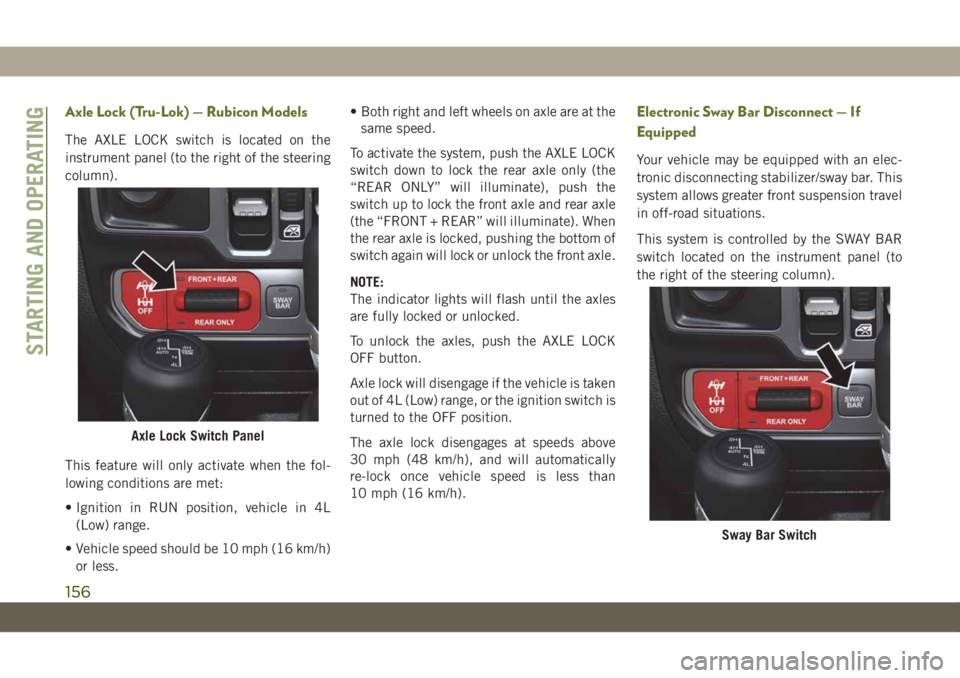
The AXLE LOCK switch is located on the
instrument panel (to the right of the steering
column).
This feature will only activate when the fol-
lowing conditions are met:
• Ignition in RUN position, vehicle in 4L
(Low) range.
• Vehicle speed should be 10 mph (16 km/h)
or less.• Both right and left wheels on axle are at the
same speed.
To activate the system, push the AXLE LOCK
switch down to lock the rear axle only (the
“REAR ONLY” will illuminate), push the
switch up to lock the front axle and rear axle
(the “FRONT + REAR” will illuminate). When
the rear axle is locked, pushing the bottom of
switch again will lock or unlock the front axle.
NOTE:
The indicator lights will flash until the axles
are fully locked or unlocked.
To unlock the axles, push the AXLE LOCK
OFF button.
Axle lock will disengage if the vehicle is taken
out of 4L (Low) range, or the ignition switch is
turned to the OFF position.
The axle lock disengages at speeds above
30 mph (48 km/h), and will automatically
re-lock once vehicle speed is less than
10 mph (16 km/h).
Electronic Sway Bar Disconnect — If
Equipped
Your vehicle may be equipped with an elec-
tronic disconnecting stabilizer/sway bar. This
system allows greater front suspension travel
in off-road situations.
This system is controlled by the SWAY BAR
switch located on the instrument panel (to
the right of the steering column).
Axle Lock Switch Panel
Sway Bar Switch
STARTING AND OPERATING
156
Page 170 of 348
WARNING!
• Never have any smoking materials lit in
or near the vehicle when the fuel door is
open or the tank is being filled.
• Never add fuel when the engine is run-
ning. This is in violation of most coun-
tries regulations and may cause the
“Malfunction Indicator Light” to turn
on.
WARNING!
• Do not apply any object/cap to the end of
the filler which is not provided for the
car. The use of non-compliant objects/
plugs could cause a pressure increase
inside the tank, resulting in dangerous
situations.
• A fire may result if fuel is pumped into a
portable container that is inside of a
vehicle. You could be burned. Always
place fuel containers on the ground
while filling.
CAUTION!
• Damage to the fuel system or emission
control system could result from using
an improper fuel filler cap. A poorly
fitting cap could let impurities into the
fuel system. Also, a poorly fitting after-
market cap can cause the “Malfunction
Indicator Light (MIL)” to illuminate, due
to fuel vapors escaping from the system.
• To avoid fuel spillage and overfilling, do
not “top off” the fuel tank after filling.NOTE:
• When the fuel nozzle “clicks” or shuts off,
the fuel tank is full.
• Tighten the fuel filler cap about 1/4 turn
until you hear one click. This is an indica-
tion that the cap is properly tightened.
• If the fuel filler cap is not tightened prop-
erly, the MIL will come on. Be sure the cap
is tightened every time the vehicle is
refueled.
Adblue (UREA) — If Equipped
The vehicle is equipped with an UREA injec-
tion system and Selective Catalytic Reduc-
tion to meet emission standards. These two
systems ensure compliance with the diesel
emissions requirements; at the same, they
ensure fuel-efficiency, handling, torque and
power. For messages and system warnings,
refer to the "Warning Lights And Messages" in
the "Getting To Know Your Instrument Panel"
section. AdBlue (UREA) is a very stable prod-
uct with a long shelf life. Stored at tempera-
tures LOWER than 90 °F (32 °C), it has a
shelf life of at least one year. For more infor-
mation on the AdBlue liquid type, see the
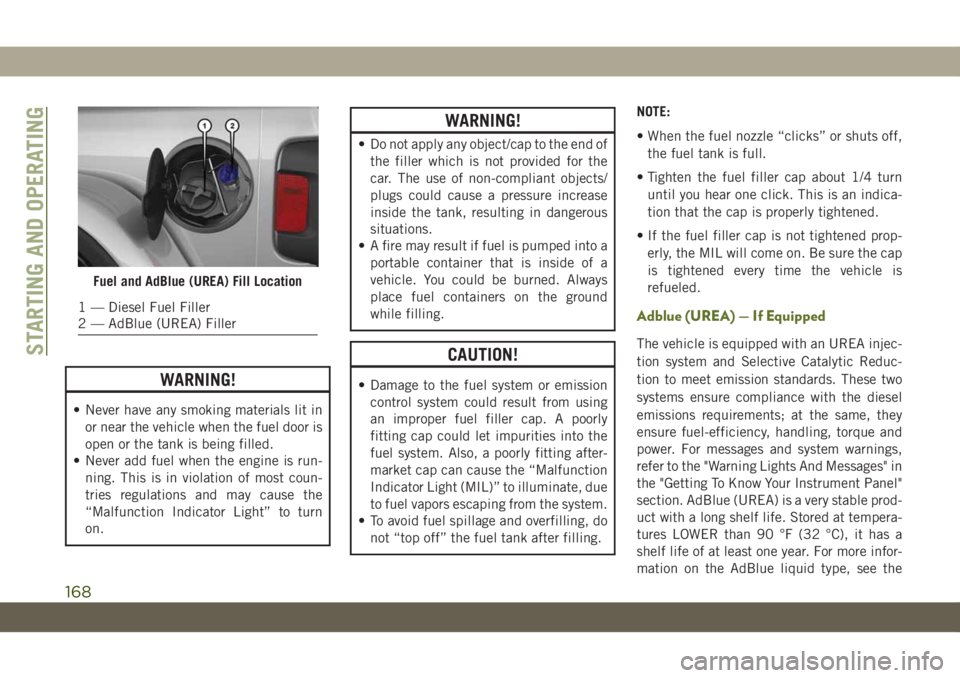
Fuel and AdBlue (UREA) Fill Location
1 — Diesel Fuel Filler
2 — AdBlue (UREA) Filler
STARTING AND OPERATING
168