4WD JEEP WRANGLER UNLIMITED 2013 Owners Manual
[x] Cancel search | Manufacturer: JEEP, Model Year: 2013, Model line: WRANGLER UNLIMITED, Model: JEEP WRANGLER UNLIMITED 2013Pages: 655, PDF Size: 9.04 MB
Page 308 of 655
WARNING! (Continued)look under the hood yourself, see “Maintaining Your
Vehicle”. Follow the warnings under the Cooling
System Pressure Cap paragraph.
19. Cruise Indicator
This indicator shows when the electronic speed
control system is turned on.
20. 4WD Indicator Light — If Equipped
This light alerts the driver that the vehicle is in
the four-wheel drive mode, and the front and
rear driveshafts are mechanically locked to-
gether forcing the front and rear wheels to
rotate at the same speed. 21. Odometer/Trip Odometer/ECO (Fuel Saver Indica-
tor) Button
Press this button to change the display from odometer to
either of the two trip odometer settings or the “ECO”
display. Trip A or Trip B will appear when in the trip
odometer mode. Press and hold the button for two
seconds to reset the trip odometer to 0 miles or kilome-
ters. The odometer must be in trip mode to reset.
22. Shift Lever Indicator
The Shift Lever Indicator is self-contained within the
instrument cluster. It displays the gear position of the
automatic transmission.
23. Tire Pressure Monitoring Telltale Light
Each tire, including the spare (if provided),
should be checked monthly when cold and in-
flated to the inflation pressure recommended by306 UNDERSTANDING YOUR INSTRUMENT PANEL
Page 412 of 655
STARTING PROCEDURES
Before starting your vehicle, adjust your seat, adjust both
inside and outside mirrors, and fasten your seat belts.
WARNING!• When leaving the vehicle, always remove the key
fob from the ignition and lock your vehicle.
• Never leave children alone in a vehicle, or with
access to an unlocked vehicle. Allowing children to
be in a vehicle unattended is dangerous for a
number of reasons. A child or others could be
seriously or fatally injured. Children should be
warned not to touch the parking brake, brake pedal
or the shift lever. Manual Transmission – If Equipped
Apply the parking brake, place the shift lever in NEU-
TRAL, and press the clutch pedal before starting the
vehicle. This vehicle is equipped with a clutch interlock-
ing ignition system. It will not start unless the clutch
pedal is pressed to the floor.
Four-Wheel Drive Models Only
In 4L mode, this vehicle will start regardless of whether
or not the clutch pedal is pressed to the floor. This feature
enhances off-road performance by allowing the vehicle to
start when in 4L without having to press the clutch pedal.
The “4WD Indicator Light” will illuminate when the
transfer case has been shifted into this mode.
Automatic Transmission – If Equipped
Start the vehicle with the shift lever in the PARK position
(vehicle can also be started in NEUTRAL). Apply the
brake before shifting to any driving range.410 STARTING AND OPERATING
Page 431 of 655
In the event that additional traction is required, the
transfer case 4H and 4L positions can be used to lock the
front and rear driveshafts together, forcing the front and
rear wheels to rotate at the same speed. This is accom-
plished by simply moving the shift lever to one of these
positions. The 4H and 4L positions are intended for loose,
slippery road surfaces only and not intended for normal
driving. Driving in the 4H and 4L positions on hard-
surfaced roads will cause increased tire wear and damage
to the driveline components.
The “4WD Indicator Light” (located in the instrument
cluster) alerts the driver that the vehicle is in four-wheel
drive, and the front and rear driveshafts are locked
together. The light will illuminate when the transfer case
is shifted into the 4H position.
NOTE: Do not attempt to shift when only the front or
rear wheels are spinning. The transfer case is not
equipped with a synchronizer, and the front and rear driveshaft speeds must be equal for a shift to take place.
Shifting while only the front or rear wheels are spinning
can cause damage to the transfer case.
When operating your vehicle in 4L, the engine speed will
be approximately three times (four times for Rubicon
models) that of the 2H or 4H positions at a given road
speed. Take care not to overspeed the engine.
Proper operation of four-wheel drive vehicles depends
on tires of equal size, type, and circumference on each
wheel. Any difference will adversely affect shifting and
cause damage to the transfer case.
Because four-wheel drive provides improved traction,
there is a tendency to exceed safe turning and stopping
speeds. Do not go faster than road conditions permit.
5 STARTING AND OPERATING 429
Page 432 of 655
WARNING!You or others could be injured if you leave the vehicle
unattended with the transfer case in the N (Neutral)
position without first fully engaging the parking brake.
The transfer case N (Neutral) position disengages both
the front and rear driveshaft from the powertrain, and
will allow the vehicle to move regardless of the trans-
mission position. The parking brake should always be
applied when the driver is not in the vehicle.
Shift Positions
For additional information on the appropriate use of each
transfer case mode position, see the information below:
2H Position
This range is used for normal street and highway driving
on hard-surfaced roads. 4H Position
This range locks the front and rear driveshafts together,
forcing the front and rear wheels to rotate at the same
speed. This range (4H) provides additional traction for
loose, slippery road surfaces and should not be used on
dry pavement.
The “4WD Indicator Light” (located in the instrument
cluster) will illuminate when the transfer case is shifted
into the 4H position.
N (Neutral) Position
This range disengages the front and rear driveshafts from
the powertrain. It is to be used for flat towing behind
another vehicle. Refer to “Recreational Towing” in “Start-
ing and Operating” for further information.
4L Position
This range locks the front and rear driveshafts together,
forcing the front and rear wheels to rotate at the same430 STARTING AND OPERATING
Page 433 of 655
speed. This range (4L) provides additional traction and
maximum pulling power for loose, slippery road surfaces
only. Do not exceed 25 mph (40 km/h).
The “4WD Indicator Light” (located in the instrument
cluster) will illuminate when the transfer case is shifted
into the 4L position.
NOTE: When in 4WD, the “ESC Off Indicator Light” will
display in the instrument cluster.
Shifting Procedure
2H to 4H or 4H to 2H
Shifting between 2H and 4H can be made with the
vehicle stopped or in motion. With the vehicle in motion,
the transfer case will engage/disengage faster if you
momentarily release the accelerator pedal after complet-
ing the shift. Apply a constant force when shifting the
transfer case lever. 4H to 4L or 4L to 4H
With the vehicle rolling at 2 to 3 mph (3 to 5 km/h), shift an
automatic transmission into NEUTRAL (N), or press the
clutch pedal on a manual transmission. While the vehicle is
coasting at 2 to 3 mph (3 to 5 km/h), shift the transfer case
lever firmly to the desired position. Do not pause with the
transfer case in N (Neutral). Once the shift is completed,
place the automatic transmission into DRIVE or release the
clutch pedal on a manual transmission.
NOTE: Shifting into or out of 4L is possible with the
vehicle completely stopped; however, difficulty may occur
due to the mating teeth not being properly aligned. Several
attempts may be required for clutch teeth alignment and
shift completion to occur. The preferred method is with the
vehicle rolling at 2 to 3 mph (3 to 5 km/h). Avoid
attempting to engage or disengage 4L with the vehicle
moving faster than 2 to 3 mph (3 to 5 km/h).
5 STARTING AND OPERATING 431
Page 466 of 655
WARNING!Electronic Stability Control (ESC) cannot prevent the
natural laws of physics from acting on the vehicle,
nor can it increase the traction afforded by prevailing
road conditions. ESC cannot prevent accidents, in-
cluding those resulting from excessive speed in
turns, driving on very slippery surfaces, or hydro-
planing. ESC also cannot prevent accidents resulting
from loss of vehicle control due to inappropriate
driver input for the conditions. Only a safe, attentive,
and skillful driver can prevent accidents. The capa-
bilities of an ESC equipped vehicle must never be
exploited in a reckless or dangerous manner which
could jeopardize the user ’s safety or the safety of
others. The ESC system has three available operating modes in
4H range. The system has one operating mode in 4L
range. Two-wheel drive vehicles and four-wheel drive
vehicles in 2H range have two operating modes.
4H Range (4WD Models)
On
This is the normal operating mode for ESC in 4H range.
Partial Off
This mode is entered by momentarily pressing the ESC
OFF switch.
ESC Off
This mode is entered by pressing and holding momen-
tarily pressing the ESC OFF switch for 5 seconds.464 STARTING AND OPERATING
Page 468 of 655
ESC OFF switch. This will restore normal “ESC On”
mode of operation.
WARNING!With the ESC switched off, the enhanced vehicle
stability offered by ESC and ERM are unavailable.
In an emergency evasive maneuver, the ESC and
ERM systems will not engage to assist in maintaining
stability. The “Full Off” ESC mode is intended for
off-road use only.
4L Range (4WD Models)
ESC Off
This is the normal operating mode for ESC in 4L range.
Whenever the vehicle is started in 4L range, or the
transfer case (if equipped) is shifted from 4H range or
NEUTRAL to 4L range, the ESC system will be in this
mode. In 4L range, ESC and TCS, except for the “limited slip” feature described in the TCS section, are turned off
until the vehicle reaches a speed of 40 mph (64 km/h). At
40 mph (64 km/h), the normal ESC stability function
returns but TCS remains off. When the vehicle speed
drops below 35 mph (56 km/h), the ESC system shuts off.
The ESC is off at low vehicle speeds in 4L range so that it
will not interfere with off-road driving, but the ESC
function returns to provide the stability feature at speeds
above 40 mph (64 km/h). The “ESC Activation/
Malfunction Indicator Light” will always be illuminated
in 4L range when ESC is off.
NOTE: The “ESC OFF” message will display and the
audible chime will sound when the shift lever is placed in
the PARK position from any position other than PARK,
and then moved out of the PARK position. This will
occur even if the message was previously cleared.466 STARTING AND OPERATING
Page 469 of 655
WARNING!With the ESC switched off, the enhanced vehicle
stability offered by ESC and ERM are unavailable.
In an emergency evasive maneuver, the ESC and
ERM systems will not engage to assist in maintaining
stability. The “Full Off” mode is intended for off-
road use only.
2H Range (4WD Models) Or 2WD Models
On
This is the normal operating mode for ESC in 2H range
and on 2WD vehicles.
Partial Off
When in “Partial Off” mode, the TCS portion of ESC has
been disabled and the “ESC Activation/Malfunction
Indicator Light” will be illuminated. All other stability features of ESC function normally. This
mode is intended to be used if the vehicle is in deep
snow, sand, or gravel conditions and more wheel spin
than ESC would normally allow is required to gain
traction. To turn ESC on again, momentarily press the
ESC OFF switch. This will restore the normal “ESC On”
mode of operation.
NOTE: To improve the vehicle’s traction when driving with
snow chains, or starting off in deep snow, sand, or gravel, it
may be desirable to switch to the “Partial Off” mode by
pressing the ESC OFF switch. Once the situation requiring
ESC to be switched to the “Partial Off” mode is overcome,
turn ESC back on by momentarily pressing the ESC OFF
switch. This may be done while the vehicle is in motion.
5 STARTING AND OPERATING 467
Page 472 of 655
Hill Descent Control (HDC) – If Equipped
HDC is only intended for low speed off-road driving.
HDC maintains vehicle speed while descending hills in
off-road driving conditions by applying the brakes when
necessary.
The symbol indicates the status of the Hill
Descent Control (HDC) feature. The lamp will
be on solid when HDC is armed. HDC can only
be armed when the transfer case is in the “4WD
LOW” position and the vehicle speed is less then 30 mph
(48 km/h). If these conditions are not met while attempt-
ing to use the HDC feature, the HDC indicator light will
flash on/off.
When enabled, HDC senses the terrain and activates
when the vehicle is descending a hill. HDC speed may be
adjusted by the driver to suit the driving conditions. The
speed corresponds to the transmission gear selected. Gear Approximate HDC Set Speed
1st 1 mph (1.5 km/h)
2nd 2.5 mph (4 km/h)
3rd 4 mph (6.5 km/h)
4th 5.5 mph (9 km/h)
DRIVE 7.5 mph (12 km/h)
REVERSE 1 mph (1.5 km/h)
However, the driver can override HDC operation by
applying the brake to slow the vehicle down below the
HDC control speed. If more speed is desired during HDC
control, the accelerator pedal will increase vehicle speed
in the usual manner. When either the brake or the
accelerator is released, HDC will control the vehicle at the
original set speed.470 STARTING AND OPERATING
Page 473 of 655
Enabling HDC
1. Shift the transfer case into 4WD LOW range. Refer to
“Four-Wheel Drive Operation” in “Starting and Oper-
ating” for further information.
2. Press the “Hill Descent” button. The “Hill Descent
Control Indicator Light” in the instrument cluster will
turn on solid.
NOTE: If the transfer case is not in 4WD LOW range, the
“Hill Descent Control Indicator Light” will flash for five
seconds and HDC will not be enabled.
Disabling HDC
Press the “Hill Descent” button or shift the transfer case
out of 4WD LOW range. The “Hill Descent Control
Indicator” light in the instrument cluster will turn off. TIRE SAFETY INFORMATION
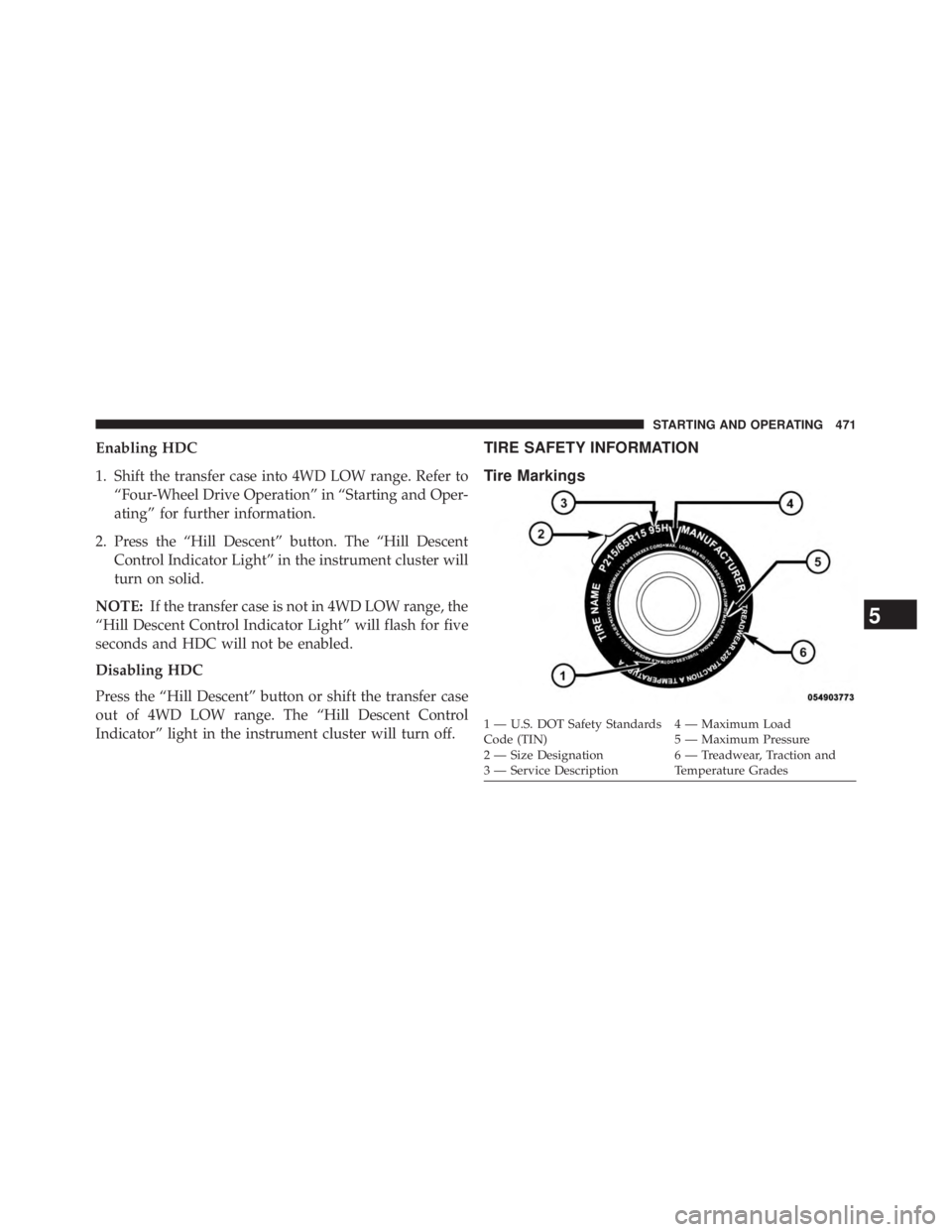
Tire Markings
1 — U.S. DOT Safety Standards
Code (TIN) 4 — Maximum Load
2 — Size Designation 5 — Maximum Pressure
3 — Service Description 6 — Treadwear, Traction and
Temperature Grades
5 STARTING AND OPERATING 471