wheel JEEP WRANGLER UNLIMITED 2014 User Guide
[x] Cancel search | Manufacturer: JEEP, Model Year: 2014, Model line: WRANGLER UNLIMITED, Model: JEEP WRANGLER UNLIMITED 2014Pages: 140, PDF Size: 12.72 MB
Page 83 of 140
Transfer Ongoing Call Between Handset And Vehicle • During a call, press the “Voice Command” button .
• After the BEEP, say “transfer call.”
Changing The Volume • Start a dialogue by pressing the “Phone” button , then adjust the volume
during a normal call.
• Use the radio ON/OFF VOLUME rotary knob to adjust the volume to a comfortable
level while the Uconnect ®
system is speaking. Please note the volume setting for
Uconnect ®
is different than the audio system.
WARNING!• Any voice commanded system should be used only in safe driving conditions
following applicable laws regarding phone use. Your attention should be
focused on safely operating the vehicle. Failure to do so may result in a
collision causing you and others to be severely injured or killed.
• In an emergency, to use Uconnect ®
Phone, your mobile phone must be:
• turned on,
• paired to Uconnect ®
Phone,
• and have network coverage.
Uconnect® VOICE COMMAND Voice Command Operation • The Uconnect ®
Voice Command system allows you to control your AM, FM radio,
satellite radio, disc player, HDD, Uconnect ®
Phone, a memo recorder, and
supported portable media devices.
• When you press the “Voice Command” button located on the radio
faceplate or steering wheel, you will hear a beep. The beep is your signal to give a
command. If you do not say a command within a few seconds, the system will
present you with a list of options. If you ever wish to interrupt the system while it
lists options, press the “Voice Command” button , listen for the BEEP, and
say your command.
NOTE:
Visit http://www.driveuconnect.com/features/voiceCommand/ for more info on which
voice command features apply to your vehicle.ELECTRONICS
81
Page 86 of 140
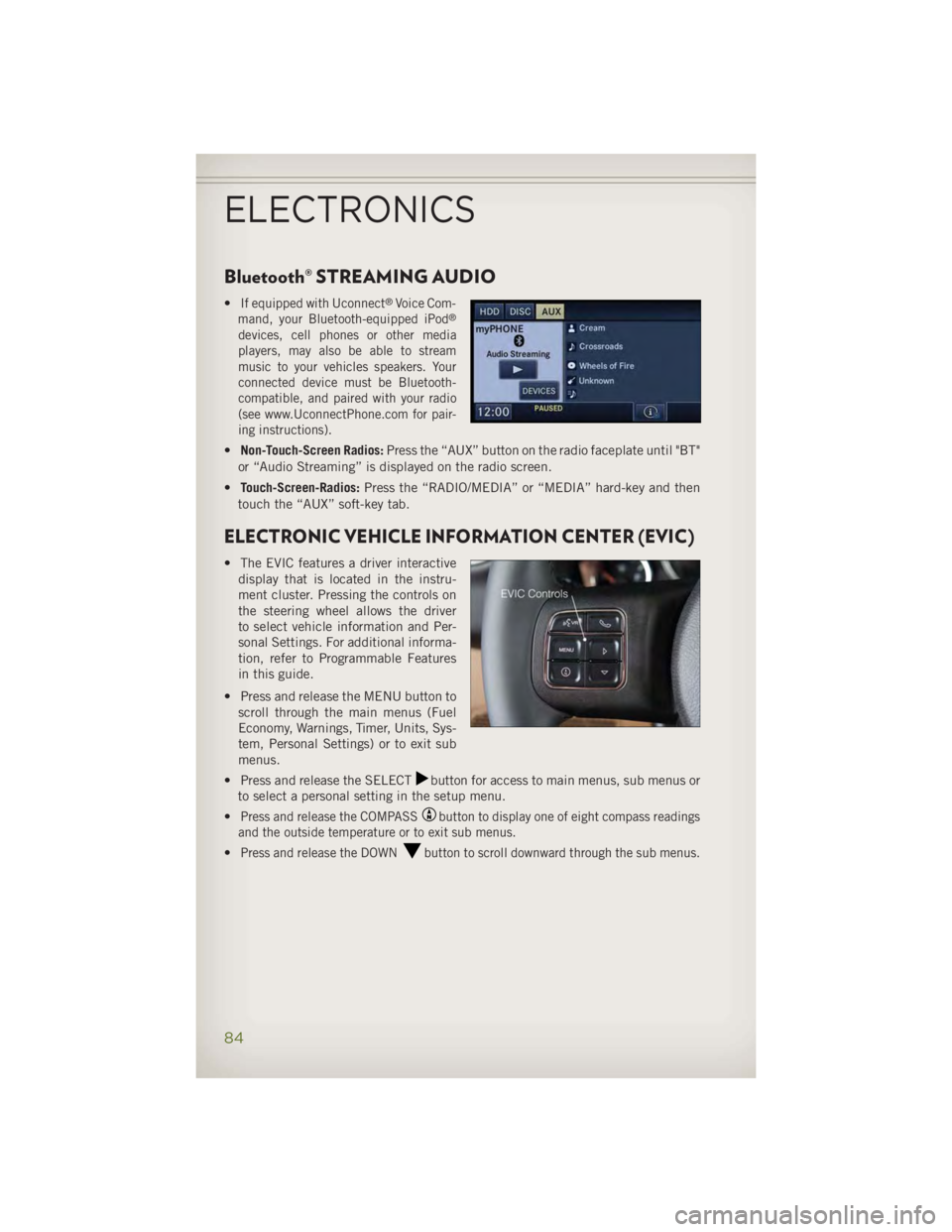
Bluetooth® STREAMING AUDIO • If equipped with Uconnect ®
Voice Com-
mand, your Bluetooth-equipped iPod ®
devices, cell phones or other media
players, may also be able to stream
music to your vehicles speakers. Your
connected device must be Bluetooth-
compatible, and paired with your radio
(see www.UconnectPhone.com for pair-
ing instructions).
• Non-Touch-Screen Radios: Press the “AUX” button on the radio faceplate until "BT"
or “Audio Streaming” is displayed on the radio screen.
• Touch-Screen-Radios: Press the “RADIO/MEDIA” or “MEDIA” hard-key and then
touch the “AUX” soft-key tab.
ELECTRONIC VEHICLE INFORMATION CENTER (EVIC) • The EVIC features a driver interactive
display that is located in the instru-
ment cluster. Pressing the controls on
the steering wheel allows the driver
to select vehicle information and Per-
sonal Settings. For additional informa-
tion, refer to Programmable Features
in this guide.
• Press and release the MENU button to
scroll through the main menus (Fuel
Economy, Warnings, Timer, Units, Sys-
tem, Personal Settings) or to exit sub
menus.
• Press and release the SELECT button for access to main menus, sub menus or
to select a personal setting in the setup menu.
• Press and release the COMPASS button to display one of eight compass readings
and the outside temperature or to exit sub menus.
• Press and release the DOWN button to scroll downward through the sub menus.
ELECTRONICS
84
Page 91 of 140
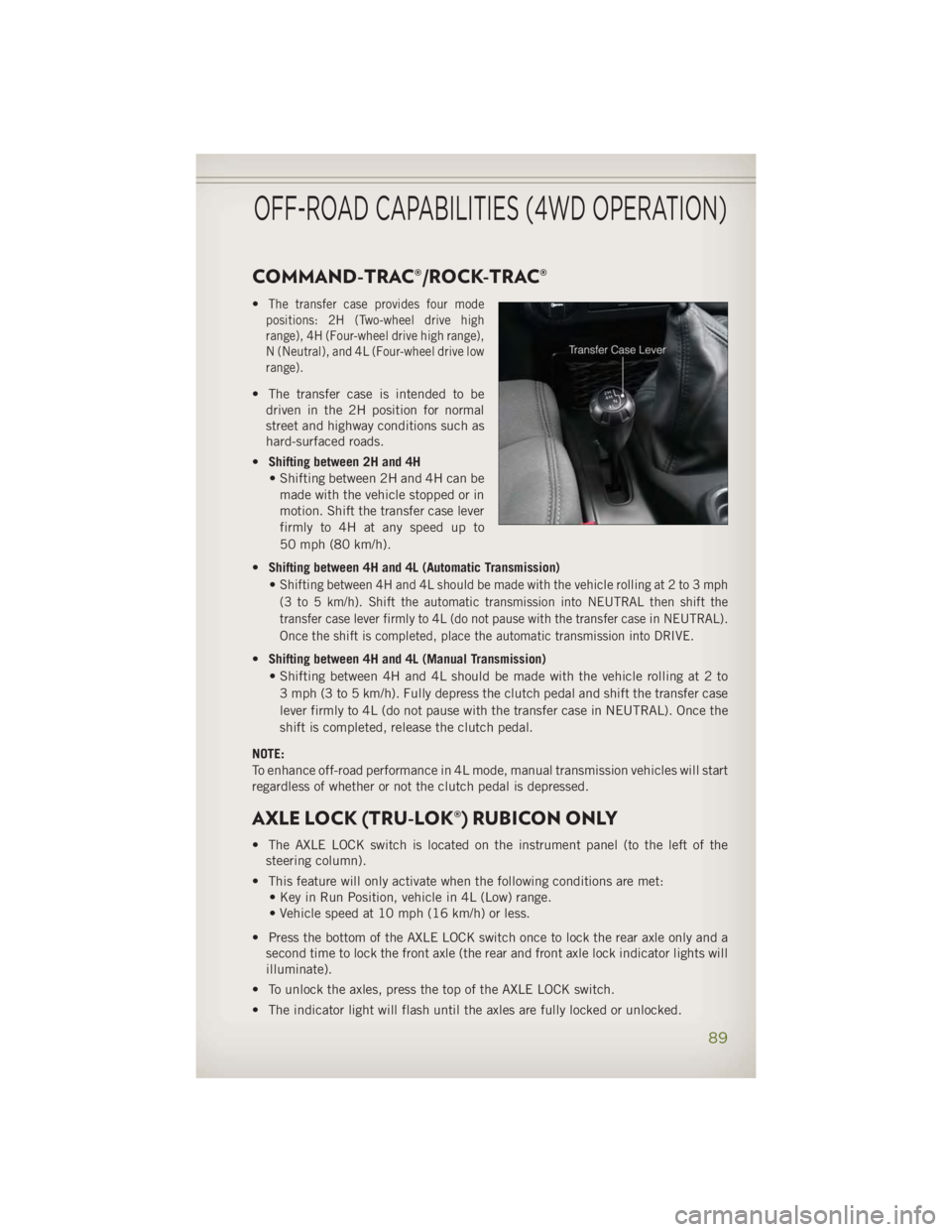
COMMAND-TRAC®/ROCK-TRAC® • The transfer case provides four mode
positions: 2H (Two-wheel drive high
range), 4H (Four-wheel drive high range),
N (Neutral), and 4L (Four-wheel drive low
range).
• The transfer case is intended to be
driven in the 2H position for normal
street and highway conditions such as
hard-surfaced roads.
• Shifting between 2H and 4H
• Shifting between 2H and 4H can be
made with the vehicle stopped or in
motion. Shift the transfer case lever
firmly to 4H at any speed up to
50 mph (80 km/h).
• Shifting between 4H and 4L (Automatic Transmission)
•
Shifting between 4H and 4L should be made with the vehicle rolling at 2 to 3 mph
(3 to 5 km/h). Shift the automatic transmission into NEUTRAL then shift the
transfer case lever firmly to 4L (do not pause with the transfer case in NEUTRAL).
Once the shift is completed, place the automatic transmission into DRIVE.
• Shifting between 4H and 4L (Manual Transmission)
• Shifting between 4H and 4L should be made with the vehicle rolling at 2 to
3 mph (3 to 5 km/h). Fully depress the clutch pedal and shift the transfer case
lever firmly to 4L (do not pause with the transfer case in NEUTRAL). Once the
shift is completed, release the clutch pedal.
NOTE:
To enhance off-road performance in 4L mode, manual transmission vehicles will start
regardless of whether or not the clutch pedal is depressed.
AXLE LOCK (TRU-LOK®) RUBICON ONLY • The AXLE LOCK switch is located on the instrument panel (to the left of the
steering column).
• This feature will only activate when the following conditions are met:
• Key in Run Position, vehicle in 4L (Low) range.
• Vehicle speed at 10 mph (16 km/h) or less.
• Press the bottom of the AXLE LOCK switch once to lock the rear axle only and a
second time to lock the front axle (the rear and front axle lock indicator lights will
illuminate).
• To unlock the axles, press the top of the AXLE LOCK switch.
• The indicator light will flash until the axles are fully locked or unlocked.OFF-ROAD CAPABILITIES (4WD OPERATION)
89
Page 95 of 140
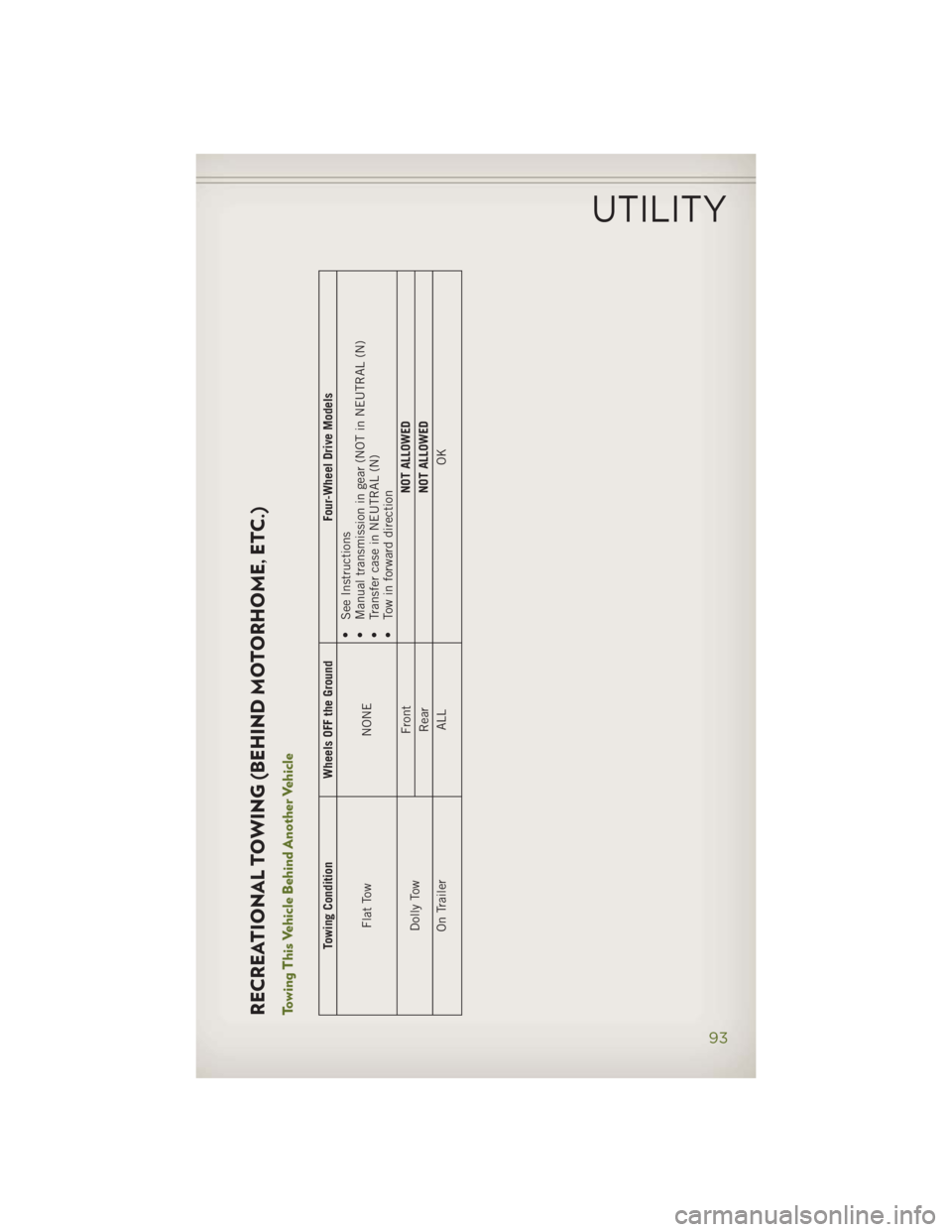
RECREATIONAL TOWING (BEHIND MOTORHOME, ETC.)
Towing This Vehicle Behind Another Vehicle
Towing Condition Wheels OFF the Ground Four-Wheel Drive Models
Flat Tow NONE •
See Instructions
• Manual transmission in gear (NOT in NEUTRAL (N)
• Transfer case in NEUTRAL (N)
• Tow in forward direction
Dolly Tow Front NOT ALLOWED
Rear NOT ALLOWED
On Trailer ALL OKUTILITY
93
Page 96 of 140
Recreational Towing – Four-Wheel Drive Models NOTE:
The transfer case must be shifted into NEUTRAL (N),
automatic transmission must be
shifted into
PARK, and manual transmission must be placed in gear (NOT in NEUTRAL)
for recreational towing. Shifting Into NEUTRAL (N)
Use the following procedure to prepare your vehicle for recreational towing.
1. Bring the vehicle to a complete stop.
2. Press and hold the brake pedal.
3. Shift the automatic transmission into NEUTRAL or depress the clutch pedal on a
manual transmission.
4. Turn OFF the engine.
5. Shift the transfer case lever into NEUTRAL (N).
6. Start the engine.
7. Shift the transmission into REVERSE.
8. Release the brake pedal (and clutch pedal on manual transmissions) for five
seconds and ensure that there is no vehicle movement.
9. Repeat steps 7 and 8 with automatic transmission in DRIVE or manual transmis-
sion in first gear.
10. Turn OFF the engine.
11. Firmly apply the parking brake.
12. Shift the transmission into PARK or place manual transmission in gear (NOT in
Neutral).
13. Attach the vehicle to the tow vehicle using a suitable tow bar.
14. Release the parking brake.
Shifting Out of NEUTRAL (N)
Use the following procedure to prepare your vehicle for normal usage.
1. Bring the vehicle to a complete stop, leaving it connected to the tow vehicle.
2. Firmly apply the parking brake.
3. Turn the ignition switch to the LOCK/OFF position.
4. Turn the ignition switch to the ON/RUN position, but do not start the engine.
5. Press and hold the brake pedal.
6. Shift the transmission into NEUTRAL.
7. Shift the transfer case lever to the desired position.UTILITY
94
Page 97 of 140
NOTE:
When shifting out of transfer case NEUTRAL (N), turning the engine OFF may be
required to avoid gear clash.
8.
Shift the automatic transmission into PARK, or place manual transmission in Neutral.
9. Release the brake pedal.
10. Disconnect vehicle from the tow vehicle.
11. Start the engine.
12. Press and hold the brake pedal.
13. Release the parking brake.
14. Shift the transmission into gear, release the brake pedal (and clutch pedal on
manual transmissions), and check that the vehicle operates normally.
CAUTION!• It is necessary to follow these steps to be certain that the transfer case is fully in
NEUTRAL (N) before recreational towing to prevent damage to internal parts.
• Damage to the transmission may occur if the transmission is shifted into PARK with
the transfer case in NEUTRAL (N) and the engine running. With the transfer case in
NEUTRAL (N) ensure that the engine is OFF prior to shifting the transmission into
PARK.
• Front or rear wheel lifts should not be used. Internal damage to the transmission or
transfer case will occur if a front or rear wheel lift is used when recreational towing.
• Tow only in the forward direction. Towing this vehicle backwards can cause severe
damage to the transfer case.
• Automatic transmissions must be placed in the PARK position for recreational
towing.
• Manual transmissions must be placed in gear (not in Neutral) for recreational
towing.
• Before recreational towing, perform the procedure outlined under “Shifting Into
NEUTRAL (N)” to be certain that the transfer case is fully in NEUTRAL (N).
Otherwise, internal damage will result.
• Towing this vehicle in violation of the above requirements can cause severe
transmission and/or transfer case damage. Damage from improper towing is not
covered under the New Vehicle Limited Warranty.
• Do not use a bumper-mounted clamp-on tow bar on your vehicle. The bumper face
bar will be damaged.
WARNING!You or others could be injured if you leave the vehicle unattended with the transfer
case in the NEUTRAL (N) position without first fully engaging the parking brake.
The transfer case NEUTRAL (N) position disengages both the front and rear
driveshafts from the powertrain and will allow the vehicle to move, even if the
transmission is in PARK. The parking brake should always be applied when the
driver is not in the vehicle.UTILITY
95
Page 99 of 140
• IF THE LIGHT STARTS FLASHING INDICATING A LOW TIRE PRESSURE, ADJUST THE AIR
PRESSURE IN THE LOW TIRE TO THE AIR PRESSURE SHOWN ON THE VEHICLE PLACARD
OR TIRE INFLATION PRESSURE LABEL LOCATED ON THE DRIVER'S DOOR.
NOTE:
AFTER INFLATION, THE VEHICLE MAY NEED TO BE DRIVEN FOR 20 MINUTES
BEFORE THE FLASHING LIGHT WILL TURN OFF.
• Please note that the TPMS is not a substitute for proper tire maintenance, and it
is the driver’s responsibility to maintain correct tire pressure, even if under-
inflation has not reached the level to trigger illumination of the TPMS low tire
pressure telltale.
• Your vehicle has also been equipped with a TPMS malfunction indicator to
indicate when the system is not operating properly. The TPMS malfunction
indicator is combined with the low tire pressure telltale. When the system detects
a malfunction, the telltale will flash for approximately one minute and then remain
continuously illuminated. This sequence will continue each time the vehicle is
restarted as long as the malfunction exists.
• When the malfunction indicator is illuminated, the system may not be able to
detect or signal low tire pressure as intended. TPMS malfunctions may occur for a
variety of reasons, including the installation of replacement or alternate tires or
wheels on the vehicle that prevent the TPMS from functioning properly. Always
check the TPMS malfunction telltale after replacing one or more tires or wheels on
your vehicle, to ensure that the replacement or alternate tires and wheels allow the
TPMS to continue to function properly.
NOTE:
Tire pressures change by approximately 1 psi (7 kPa) per 12° F (7° C) of air temperature
change. Keep this in mind when checking tire pressure inside a garage, especially in the
Winter. Example: If garage temperature is 68°F (20°C) and the outside temperature is
32°F (0°C), then the cold tire inflation pressure should be increased by 3 psi (21 kPa),
which equals 1 psi (7 kPa) for every 12°F (7°C) for this outside temperature condition.
CAUTION!The TPMS has been optimized for the original equipment tires and wheels. TPMS
pressures and warning have been established for the tire size equipped on your
vehicle. Undesirable system operation or sensor damage may result when using
replacement equipment that is not of the same size, type, and/or style. Aftermar-
ket wheels can cause sensor damage. Do not use tire sealant from a can, or
balance beads if your vehicle is equipped with a TPMS, as damage to the sensors
may result.WHAT TO DO IN EMERGENCIES
97
Page 102 of 140
OIL CHANGE EVIC INDICATOR Message
• If an “oil change” message (shown as "Change Oil Soon" and "Oil Change Needed")
appears and a single chime sounds, it is time for your next required oil change.Resetting The Light After Servicing
• Turn the ignition switch to the ON/RUN position (do not start engine).
• Fully depress the accelerator pedal three times within 10 seconds.
• Turn the ignition switch to the OFF/LOCK position.
HOTOIL – Transmission Temperature Warning Message • The HOTOIL cluster message will appear in the odometer accompanied with a
chime to indicate that there is excessive transmission fluid temperature that might
occur with severe usage such as trailer towing.
• It may also occur when operating the vehicle in a high torque converter slip condition,
such as 4-wheel-drive operation (e.g., snow plowing, off-road operation).
• If this HOTOIL message turns on, stop the vehicle and run the engine at idle or
faster, with the transmission in NEUTRAL until the message turns off.
CAUTION!Continuous driving with the Transmission Temperature HOTOIL Warning message
illuminated will eventually cause severe transmission damage and transmission
failure.
WARNING!Continued operation with the Transmission Temperature HOTOIL Warning mes-
sage illuminated could cause the fluid to boil over, come into contact with the hot
engine or exhaust components causing a fire that may result in personal injury.
WHAT TO DO IN EMERGENCIES
100
Page 105 of 140
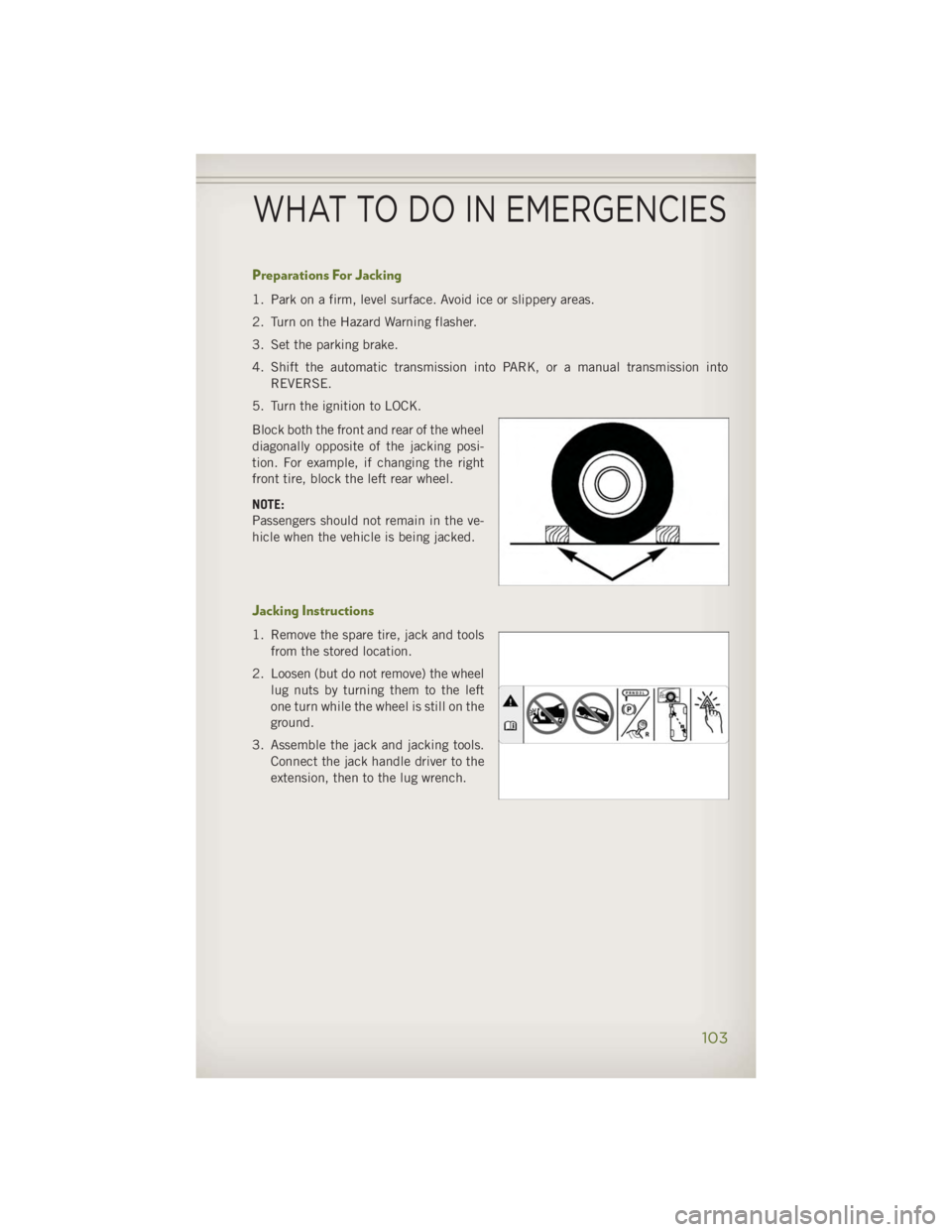
Preparations For Jacking 1. Park on a firm, level surface. Avoid ice or slippery areas.
2. Turn on the Hazard Warning flasher.
3. Set the parking brake.
4. Shift the automatic transmission into PARK, or a manual transmission into
REVERSE.
5. Turn the ignition to LOCK.
Block both the front and rear of the wheel
diagonally opposite of the jacking posi-
tion. For example, if changing the right
front tire, block the left rear wheel.
NOTE:
Passengers should not remain in the ve-
hicle when the vehicle is being jacked.
Jacking Instructions 1. Remove the spare tire, jack and tools
from the stored location.
2. Loosen (but do not remove) the wheel
lug nuts by turning them to the left
one turn while the wheel is still on the
ground.
3. Assemble the jack and jacking tools.
Connect the jack handle driver to the
extension, then to the lug wrench.
WHAT TO DO IN EMERGENCIES
103
Page 106 of 140

4. Operate the jack from the front or the rear of the vehicle. Place the jack under the
axle tube, as shown. Do not raise the vehicle until you are sure the jack is fully
engaged.
5.
Raise the vehicle by turning the jack
screw to the right. Raise the vehicle
only until the tire just clears the surface
and enough clearance is obtained to
install the spare tire. Minimum tire lift
provides maximum stability.
6. Remove the lug nuts and wheel.
7. Position the spare wheel/tire on the
vehicle and install the lug nuts with the
cone-shaped end toward the wheel.
Lightly tighten the lug nuts clockwise.
8. Lower the vehicle by turning the jack
screw to the left, and remove the jack.
9. Finish tightening the lug nuts. Push
down on the wrench while tightening
for increased leverage. Alternate nuts
until each nut has been tightened
twice. The correct wheel nut tightness
is 95 ft lbs (130 N·m). If in doubt
about the correct tightness, have
them checked with a torque wrench
by your authorized dealer or at a ser-
vice station.
10.
Remove the jack assembly and wheel
blocks.
11. Secure the tire, jack, and tools in
their proper locations.
12. Remove blocks from wheels.
WHAT TO DO IN EMERGENCIES
104