AUX JEEP WRANGLER UNLIMITED 2014 Owners Manual
[x] Cancel search | Manufacturer: JEEP, Model Year: 2014, Model line: WRANGLER UNLIMITED, Model: JEEP WRANGLER UNLIMITED 2014Pages: 140, PDF Size: 12.72 MB
Page 47 of 140
Radio Operation Seek Up/Down Buttons
• Press to seek through radio stations in AM or FM bands.
• Hold either button to bypass stations without stopping.
Store Radio Presets
• Press the “SET/RND” or “SET” (depending on the radio) button once and SET 1
will show in the display. Then select button (1–6).
• A second station may be added to each push button. Press the “SET/RND” or
“SET” (depending on the radio) button twice and SET 2 will show in the display.
Then select button (1–6).
CD/DISC Operation Seek Up/Down Buttons
• Press to seek through CD tracks.
• Hold either button to bypass tracks without stopping.
SET/RND or RND (depending on radio) Button (Random Play)
• Press this button while the CD is playing to activate Random Play.
• This feature plays the selections on the CD in random order to provide an
interesting change of pace.
Audio Jack Operation • The AUX/Audio Jack provides a means to connect a portable audio device, such as
an MP3 player or an iPod ®
, to the vehicle’s sound system. This requires the use of
a 3.5 mm stereo audio patch cable.
• Pressing the AUX button will change the mode to auxiliary device if the Audio Jack
is connected, allowing the music from your portable device to play through the
vehicle's speakers.
• The functions of the portable device are controlled using the device buttons, not
the buttons on the radio. However, the volume may be controlled using the radio or
portable device.
ELECTRONICS
45
Page 50 of 140
CD/DISC Operation Seek Up/Down Buttons
• Press to seek through CD tracks.
• Hold either button to bypass tracks without stopping.
SET/RND or RND (depending on radio) Button (Random Play)
• Press this button while the CD is playing to activate Random Play.
• This feature plays the selections on the CD in random order to provide an
interesting change of pace.
LIST Button
• Press the “LIST” button to bring up a list of all folders on the CD. Scroll up or down
the list by turning the “TUNE/SCROLL” control knob.
• To select a folder from the list, press the “TUNE/SCROLL” control knob and the
radio will begin playing the files contained in that folder.
Audio Jack Operation • The AUX/Audio Jack provides a means to connect a portable audio device, such as
an MP3 player or an iPod ®
, to the vehicle’s sound system. This requires the use of
a 3.5 mm stereo audio patch cable.
• Pressing the AUX button will change the mode to auxiliary device if the Audio Jack
is connected, allowing the music from your portable device to play through the
vehicle's speakers.
• The functions of the portable device are controlled using the device buttons, not
the buttons on the radio. However, the volume may be controlled using the radio or
portable device.
ELECTRONICS
48
Page 53 of 140
CD/DISC Operation Seek Up/Down Buttons
• Press to seek through CD tracks.
• Hold either button to bypass tracks without stopping.
LIST Button
• Press the “LIST” button to bring up a list of all folders on the CD. Scroll up or down
the list by turning the “TUNE/SCROLL” control knob.
• To select a folder from the list, press the “TUNE/SCROLL” control knob and the
radio will begin playing the files contained in that folder.
How To Load Multiple CDs/DVDs
• Press the “LOAD” button and then press the button with the corresponding
number (1–6) where the CD is being loaded. The radio will display “PLEASE
WAIT” and prompt when to “INSERT DISC”.
• After the radio displays “INSERT DISC”, insert the CD into the player. The radio
display will show “LOADING DISC” when the disc is loading and “READING
DISC” when the radio is reading the disc.
• Press the eject button and then the corresponding number (1–6) to eject the
desired disc.
Audio Jack Operation • The AUX/Audio Jack provides a means to connect a portable audio device, such as
an MP3 player or an iPod ®
, to the vehicle’s sound system. This requires the use of
a 3.5 mm stereo audio patch cable.
• Pressing the AUX button will change the mode to auxiliary device if the Audio Jack
is connected, allowing the music from your portable device to play through the
vehicle's speakers.
• The functions of the portable device are controlled using the device buttons, not
the buttons on the radio. However, the volume may be controlled using the radio or
portable device.
ELECTRONICS
51
Page 55 of 140
Menu • Press the “MENU” hard-key to access the System Setup menu and the My Files
menu.
• Press the “MENU” hard-key in an active mode (SAT, CD, AUX, etc.) to change
mode specific settings.
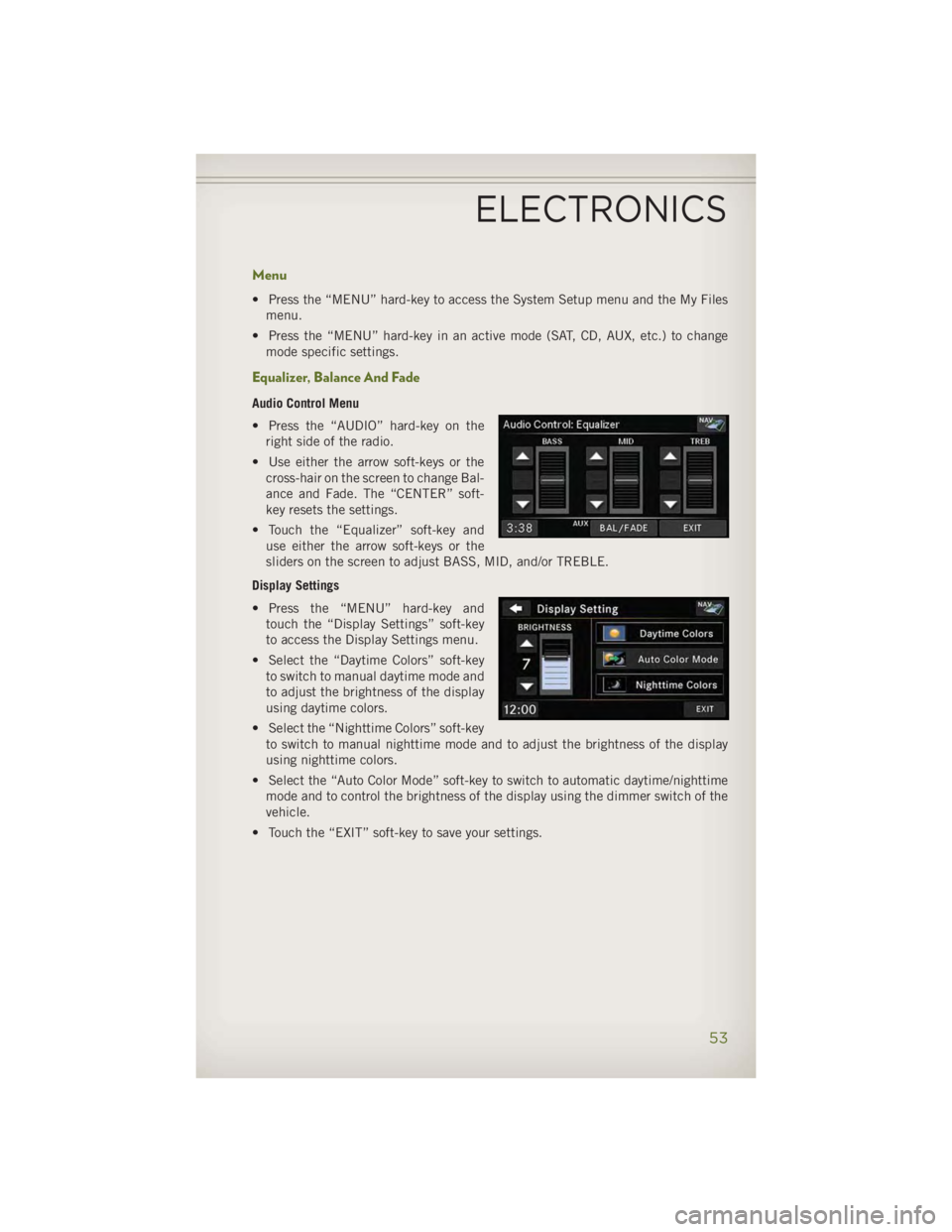
Equalizer, Balance And Fade Audio Control Menu
• Press the “AUDIO” hard-key on the
right side of the radio.
• Use either the arrow soft-keys or the
cross-hair on the screen to change Bal-
ance and Fade. The “CENTER” soft-
key resets the settings.
• Touch the “Equalizer” soft-key and
use either the arrow soft-keys or the
sliders on the screen to adjust BASS, MID, and/or TREBLE.
Display Settings
• Press the “MENU” hard-key and
touch the “Display Settings” soft-key
to access the Display Settings menu.
• Select the “Daytime Colors” soft-key
to switch to manual daytime mode and
to adjust the brightness of the display
using daytime colors.
• Select the “Nighttime Colors” soft-key
to switch to manual nighttime mode and to adjust the brightness of the display
using nighttime colors.
• Select the “Auto Color Mode” soft-key to switch to automatic daytime/nighttime
mode and to control the brightness of the display using the dimmer switch of the
vehicle.
• Touch the “EXIT” soft-key to save your settings.
ELECTRONICS
53
Page 57 of 140
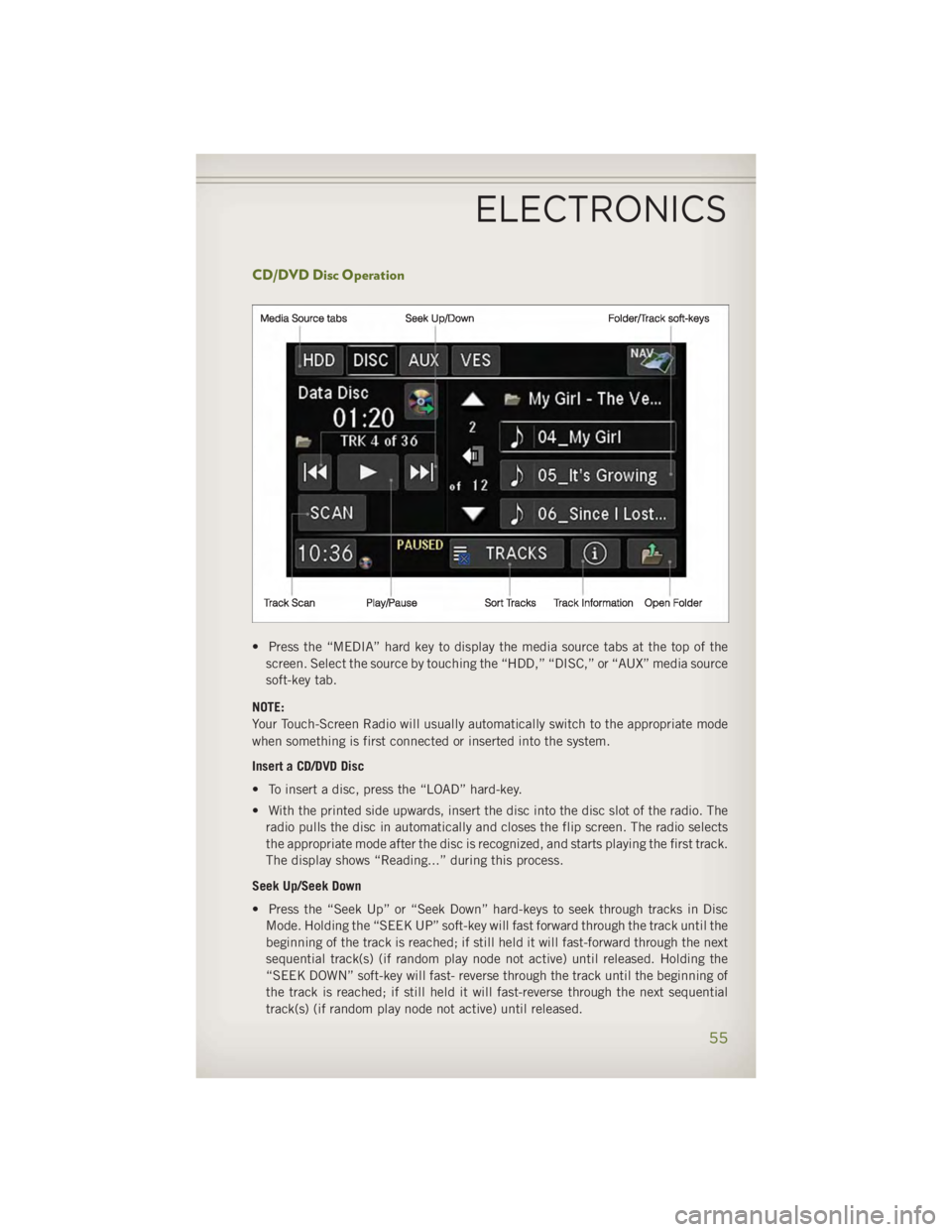
CD/DVD Disc Operation
• Press the “MEDIA” hard key to display the media source tabs at the top of the
screen. Select the source by touching the “HDD,” “DISC,” or “AUX” media source
soft-key tab.
NOTE:
Your Touch-Screen Radio will usually automatically switch to the appropriate mode
when something is first connected or inserted into the system.
Insert a CD/DVD Disc
• To insert a disc, press the “LOAD” hard-key.
• With the printed side upwards, insert the disc into the disc slot of the radio. The
radio pulls the disc in automatically and closes the flip screen. The radio selects
the appropriate mode after the disc is recognized, and starts playing the first track.
The display shows “Reading...” during this process.
Seek Up/Seek Down
• Press the “Seek Up” or “Seek Down” hard-keys to seek through tracks in Disc
Mode. Holding the “SEEK UP” soft-key will fast forward through the track until the
beginning of the track is reached; if still held it will fast-forward through the next
sequential track(s) (if random play node not active) until released. Holding the
“SEEK DOWN” soft-key will fast- reverse through the track until the beginning of
the track is reached; if still held it will fast-reverse through the next sequential
track(s) (if random play node not active) until released.ELECTRONICS
55
Page 58 of 140
Audio Jack Operation • The AUX/Audio Jack provides a means to connect a portable audio device, such as
an MP3 player or an iPod ®
, to the vehicle’s sound system. This requires the use of
a 3.5 mm stereo audio patch cable.
• Press the “MEDIA” hard-key then the “AUX” soft-key to change the mode to
auxiliary device if the Audio Jack is connected, allowing the music from your
portable device to play through the vehicle's speakers.
• The functions of the portable device are controlled using the device itself, not the
buttons on the radio. However, the volume may be controlled using the radio or
portable device.
Hard Disk Drive (HDD) Operation • The Hard Disk Drive (HDD) mode gives you access to the audio files on the internal
hard disk drive. It functions similar to a CD player, with the exception that the
internal HDD can hold more tracks.
• It is also possible to import display pictures to the internal hard disk drive. The
pictures can be displayed on the right half of the radio screen.
• Before using the HDD mode, you will need to copy songs and pictures to the
internal hard drive. Songs and pictures can be added to the hard drive by using a
CD or USB device (e.g. thumb drive or memory stick).
NOTE:
• HDD supports only .jpg/JPEG formats for photos.
• WMA/MP3 Files and Selective Songs from a CD can also be added to the HDD. See
the Uconnect ®
430/430N User's Manual for more information.
Copying Music From CD
• Press the “LOAD” hard-key.
• Insert a disc, then press the “MY FILES” hard-key and then select the “MY
MUSIC” soft-key.
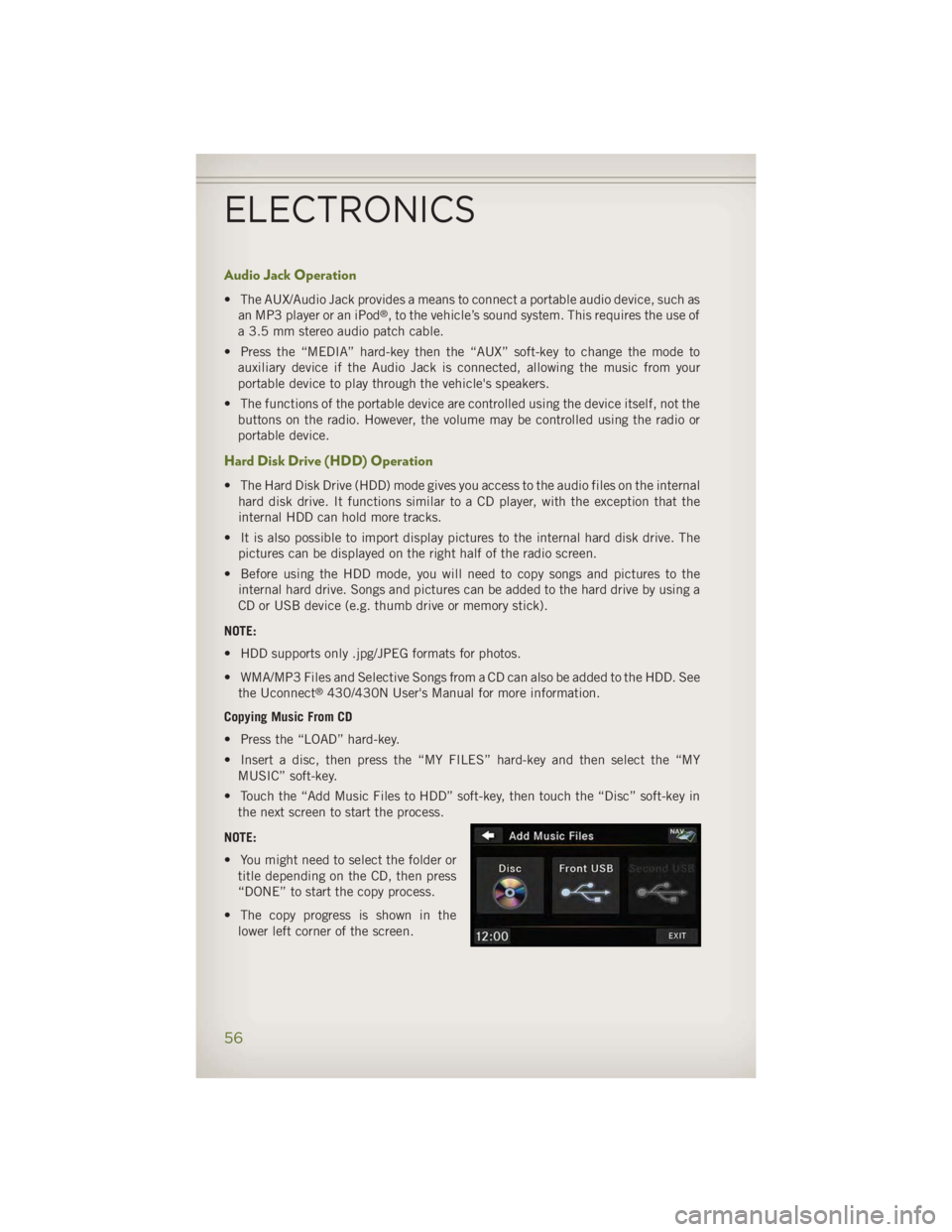
• Touch the “Add Music Files to HDD” soft-key, then touch the “Disc” soft-key in
the next screen to start the process.
NOTE:
• You might need to select the folder or
title depending on the CD, then press
“DONE” to start the copy process.
• The copy progress is shown in the
lower left corner of the screen.ELECTRONICS
56
Page 65 of 140
Menu • Press the “MENU” hard-key to access the System Setup menu and the My Files
menu.
• Press the “MENU” hard-key in an active mode (SAT, CD, AUX, etc.) to change
mode specific settings.
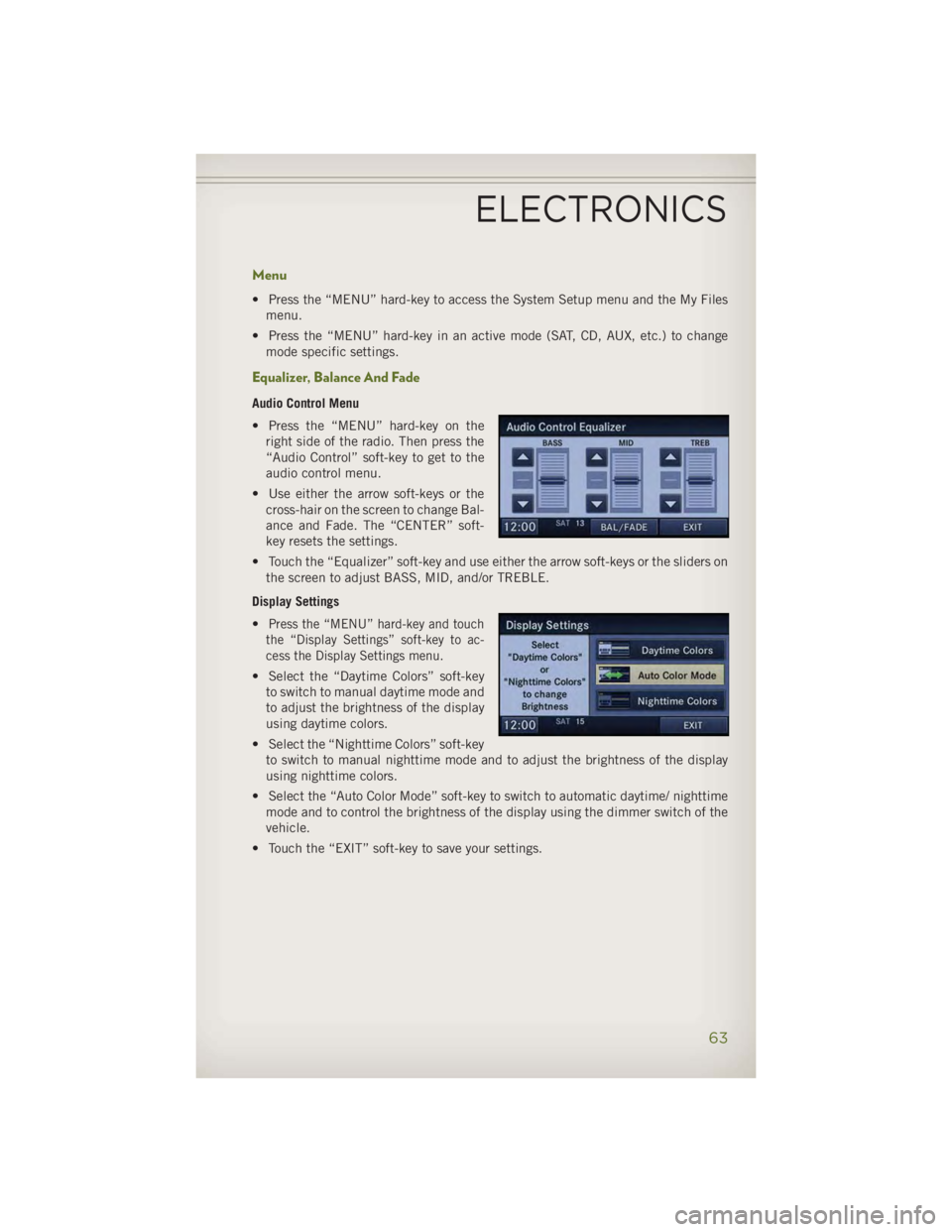
Equalizer, Balance And Fade Audio Control Menu
• Press the “MENU” hard-key on the
right side of the radio. Then press the
“Audio Control” soft-key to get to the
audio control menu.
• Use either the arrow soft-keys or the
cross-hair on the screen to change Bal-
ance and Fade. The “CENTER” soft-
key resets the settings.
• Touch the “Equalizer” soft-key and use either the arrow soft-keys or the sliders on
the screen to adjust BASS, MID, and/or TREBLE.
Display Settings
• Press the “MENU” hard-key and touch
the “Display Settings” soft-key to ac-
cess the Display Settings menu.
• Select the “Daytime Colors” soft-key
to switch to manual daytime mode and
to adjust the brightness of the display
using daytime colors.
• Select the “Nighttime Colors” soft-key
to switch to manual nighttime mode and to adjust the brightness of the display
using nighttime colors.
• Select the “Auto Color Mode” soft-key to switch to automatic daytime/ nighttime
mode and to control the brightness of the display using the dimmer switch of the
vehicle.
• Touch the “EXIT” soft-key to save your settings.
ELECTRONICS
63
Page 67 of 140
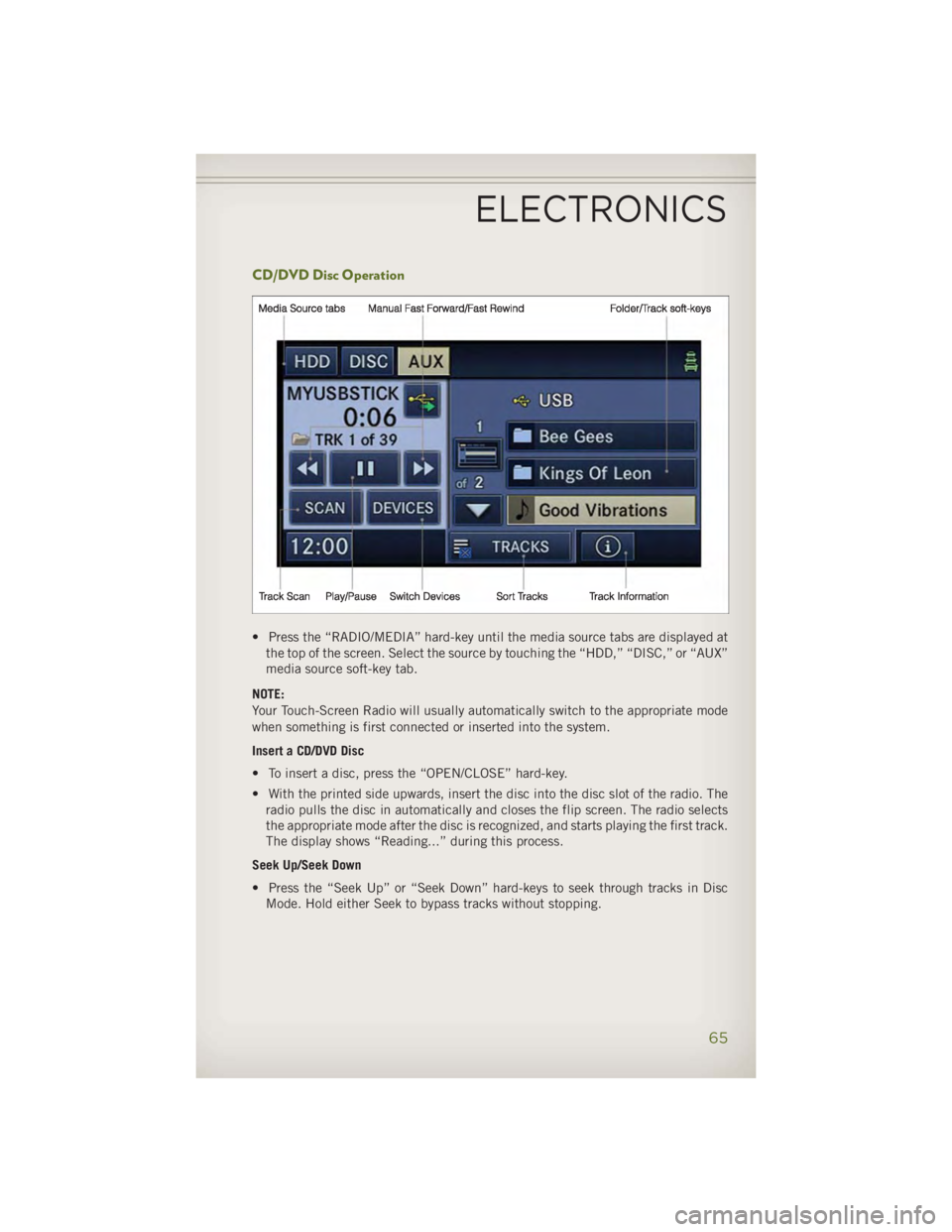
CD/DVD Disc Operation
• Press the “RADIO/MEDIA” hard-key until the media source tabs are displayed at
the top of the screen. Select the source by touching the “HDD,” “DISC,” or “AUX”
media source soft-key tab.
NOTE:
Your Touch-Screen Radio will usually automatically switch to the appropriate mode
when something is first connected or inserted into the system.
Insert a CD/DVD Disc
• To insert a disc, press the “OPEN/CLOSE” hard-key.
• With the printed side upwards, insert the disc into the disc slot of the radio. The
radio pulls the disc in automatically and closes the flip screen. The radio selects
the appropriate mode after the disc is recognized, and starts playing the first track.
The display shows “Reading...” during this process.
Seek Up/Seek Down
• Press the “Seek Up” or “Seek Down” hard-keys to seek through tracks in Disc
Mode. Hold either Seek to bypass tracks without stopping.ELECTRONICS
65
Page 68 of 140
Audio Jack Operation • The AUX/Audio Jack provides a means to connect a portable audio device, such as
an MP3 player or an iPod ®
, to the vehicle’s sound system. This requires the use of
a 3.5 mm stereo audio patch cable.
• Press the “RADIO/MEDIA” hard-key, then the “AUX” soft-key to change the mode
to auxiliary device if the Audio Jack is connected, allowing the music from your
portable device to play through the vehicle's speakers.
• The functions of the portable device are controlled using the device itself, not the
buttons on the radio. The volume may be controlled using the radio or portable
device.
Hard Disk Drive (HDD) Operation • The Hard Disk Drive (HDD) mode gives you access to the audio files on the internal
hard disk drive. It functions similar to a CD player, with the exception that the
internal HDD can hold more tracks.
• It is also possible to import display pictures to the internal hard disk drive. The
pictures can be displayed on the right half of the radio screen.
• Before using the HDD mode, you will need to copy songs and pictures to the
internal hard drive. Songs and pictures can be added to the hard drive by using a
CD or USB device (e.g. thumb drive or memory stick).
NOTE:
• HDD supports only .jpg/JPEG formats for photos.
• WMA/MP3 Files and Selective Songs from a CD can also be added to the HDD.
See the Uconnect ®
730N Supplement Manual for more information.
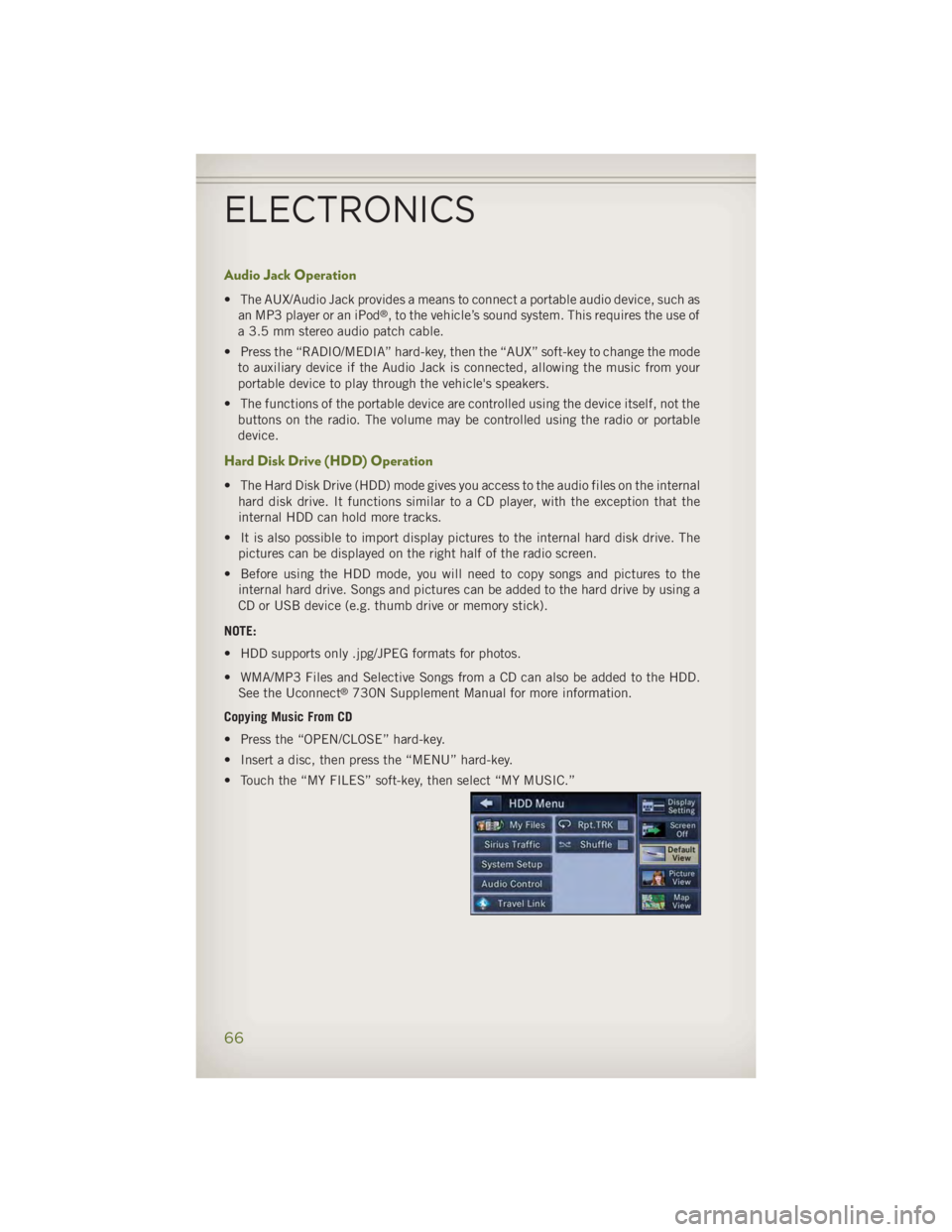
Copying Music From CD
• Press the “OPEN/CLOSE” hard-key.
• Insert a disc, then press the “MENU” hard-key.
• Touch the “MY FILES” soft-key, then select “MY MUSIC.”
ELECTRONICS
66
Page 79 of 140
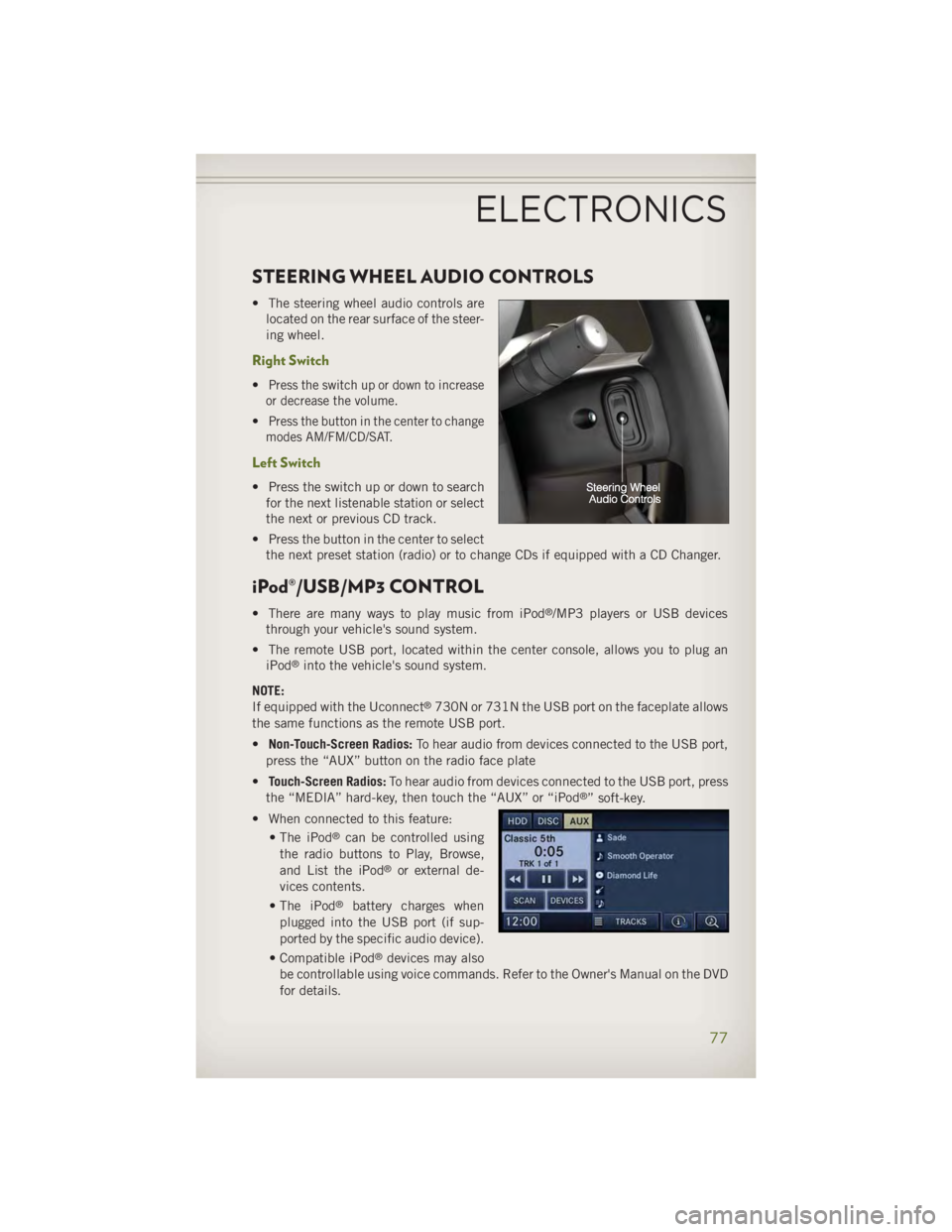
STEERING WHEEL AUDIO CONTROLS • The steering wheel audio controls are
located on the rear surface of the steer-
ing wheel.
Right Switch • Press the switch up or down to increase
or decrease the volume.
• Press the button in the center to change
modes AM/FM/CD/SAT.
Left Switch • Press the switch up or down to search
for the next listenable station or select
the next or previous CD track.
• Press the button in the center to select
the next preset station (radio) or to change CDs if equipped with a CD Changer.
iPod®/USB/MP3 CONTROL • There are many ways to play music from iPod ®
/MP3 players or USB devices
through your vehicle's sound system.
• The remote USB port, located within the center console, allows you to plug an
iPod ®
into the vehicle's sound system.
NOTE:
If equipped with the Uconnect ®
730N or 731N the USB port on the faceplate allows
the same functions as the remote USB port.
• Non-Touch-Screen Radios: To hear audio from devices connected to the USB port,
press the “AUX” button on the radio face plate
• Touch-Screen Radios: To hear audio from devices connected to the USB port, press
the “MEDIA” hard-key, then touch the “AUX” or “iPod ®
” soft-key.
• When connected to this feature:
• The iPod ®
can be controlled using
the radio buttons to Play, Browse,
and List the iPod ®
or external de-
vices contents.
• The iPod ®
battery charges when
plugged into the USB port (if sup-
ported by the specific audio device).
• Compatible iPod ®
devices may also
be controllable using voice commands. Refer to the Owner's Manual on the DVD
for details.ELECTRONICS
77