power steering JEEP WRANGLER UNLIMITED 2019 Owner handbook (in English)
[x] Cancel search | Manufacturer: JEEP, Model Year: 2019, Model line: WRANGLER UNLIMITED, Model: JEEP WRANGLER UNLIMITED 2019Pages: 348, PDF Size: 6.5 MB
Page 206 of 348
WARNING!
• Do not use a tow strap with a tow eye.
Tow straps may break or become disen-
gaged, causing serious injury or death.
• Failure to follow proper tow eye usage
may cause components to break result-
ing in serious injury or death.
• The brake and steering power assist sys-
tems will not function while the vehicle
is being towed. You will, therefore, need
to apply more force on the brake pedal
and steering wheel. Do not use flexible
ropes when towing, and avoid jerky
movements. Do not start the engine
while towing the car. Before tightening
the ring, clean the threaded housing
thoroughly. Make sure that the ring is
fully screwed into the housing before
towing the car.
CAUTION!
• The tow eye must only be used for road-
side emergencies. Use with an appropri-
ate device in accordance with highway
code (a rigid bar) to maneuver the ve-
hicle in preparation for transport via a
tow truck.
• The tow eye must not be used to move
the vehicle off the road or where there
are obstacles.
• Do not use the tow eyes for tow truck
hookup or highway towing.
• Do not use the tow eye to free a stuck
vehicle. Refer to the “Freeing A Stuck
Vehicle” section for further information.
• Please refer to the “Towing A Disabled
Vehicle” section for detailed instruc-
tions. Damage to your vehicle may occur
if these guidelines are not followed.NOTE:
• Ensure that the tow eye is properly
mounted.
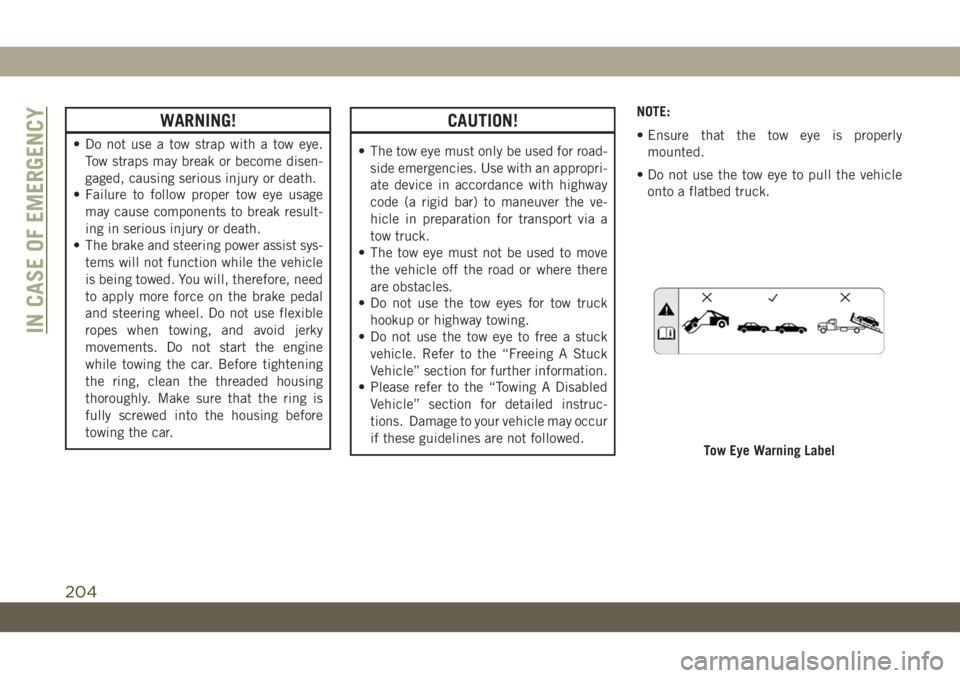
• Do not use the tow eye to pull the vehicle
onto a flatbed truck.
Tow Eye Warning Label
IN CASE OF EMERGENCY
204
Page 211 of 348
Your authorized dealer will reset the oil
change indicator message after completing
the scheduled oil change.
Once A Month Or Before A Long Trip
• Check the engine oil level about five min-
utes after a fully warmed engine is shut off.
Checking the oil level while the vehicle is
on level ground will improve the accuracy of
the oil level reading. Add oil only when the
level is at or below the ADD or MIN mark.
• Check the windshield washer solvent and
add if required.
• Check tire pressure and look for unusual
wear or damage. Rotate tires at the first
sign of irregular wear, even if it occurs
before the oil indicator system turns on.• Inspect the battery and clean and tighten
the terminals as required.
• Check the fluid levels of coolant reservoir,
brake master cylinder and power steering
and fill as needed.
• Check all lights and other electrical items
for correct operation.
At Each Oil Change
• Change the engine oil filter.
• Inspect the brake hoses and lines.
CAUTION!
Failure to perform the required mainte-
nance items may result in damage to the
vehicle.Required Maintenance Intervals
Refer to the Maintenance Plan on the follow-
ing pages for the required maintenance inter-
vals.
Maintenance Plan
NOTE:
Once you have carried out the last interven-
tion in the table, continue with the scheduled
servicing, maintaining the frequency indi-
cated in the plan by marking each operation
with a dot or dedicated note. Simply restart-
ing the maintenance from the start of the
plan may cause the allowed interval to be
exceeded for some operations.
209
Page 219 of 348
ENGINE COMPARTMENT
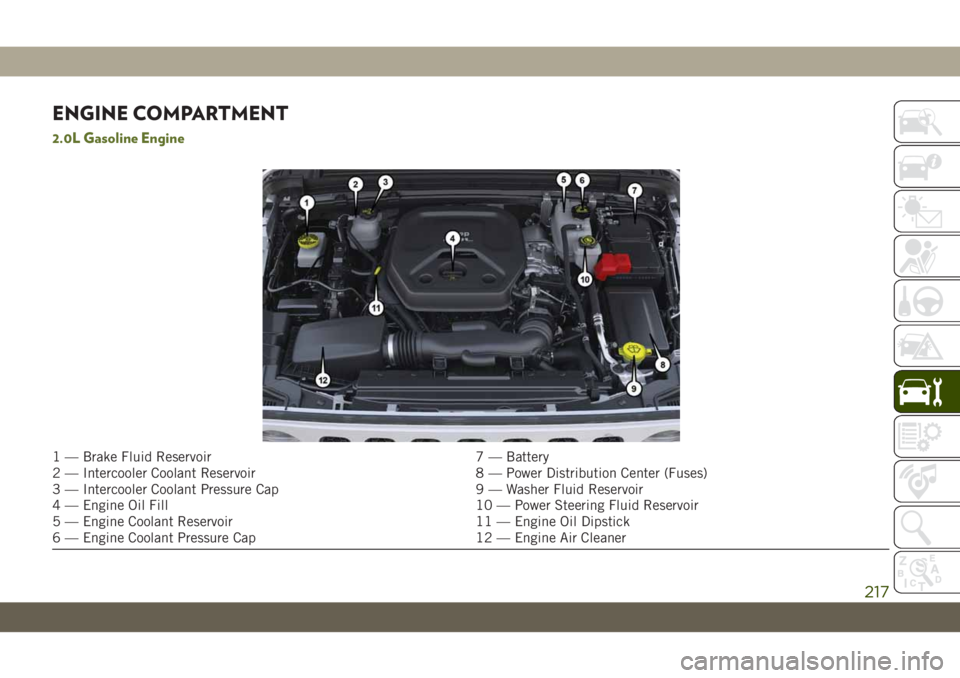
2.0L Gasoline Engine
1 — Brake Fluid Reservoir 7 — Battery
2 — Intercooler Coolant Reservoir 8 — Power Distribution Center (Fuses)
3 — Intercooler Coolant Pressure Cap 9 — Washer Fluid Reservoir
4 — Engine Oil Fill 10 — Power Steering Fluid Reservoir
5 — Engine Coolant Reservoir 11 — Engine Oil Dipstick
6 — Engine Coolant Pressure Cap 12 — Engine Air Cleaner
217
Page 220 of 348
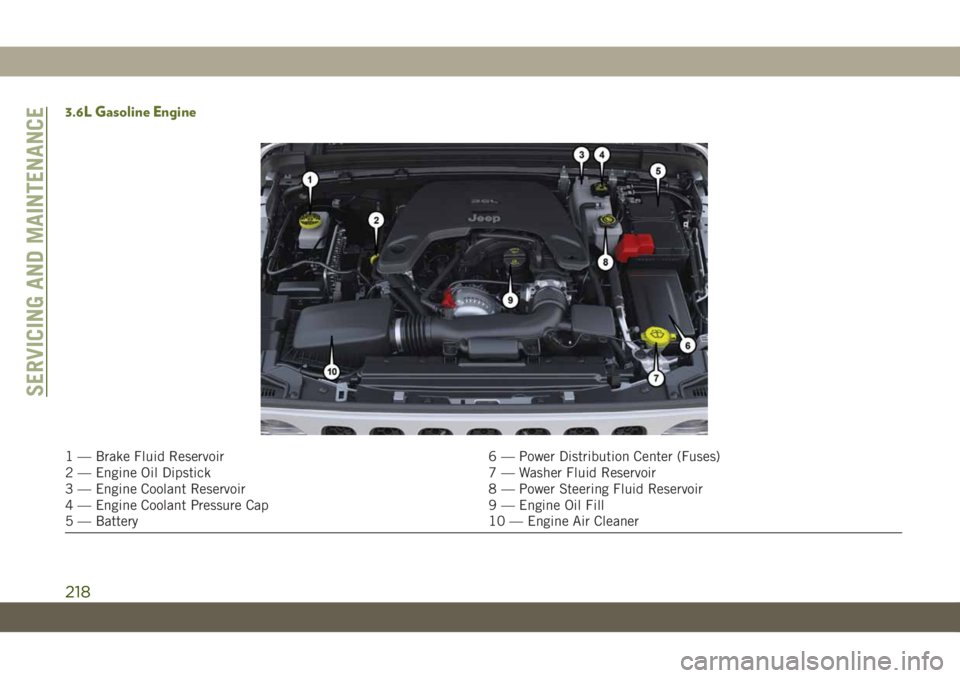
3.6L Gasoline Engine
1 — Brake Fluid Reservoir 6 — Power Distribution Center (Fuses)
2 — Engine Oil Dipstick 7 — Washer Fluid Reservoir
3 — Engine Coolant Reservoir 8 — Power Steering Fluid Reservoir
4 — Engine Coolant Pressure Cap 9 — Engine Oil Fill
5 — Battery 10 — Engine Air Cleaner
SERVICING AND MAINTENANCE
218
Page 221 of 348
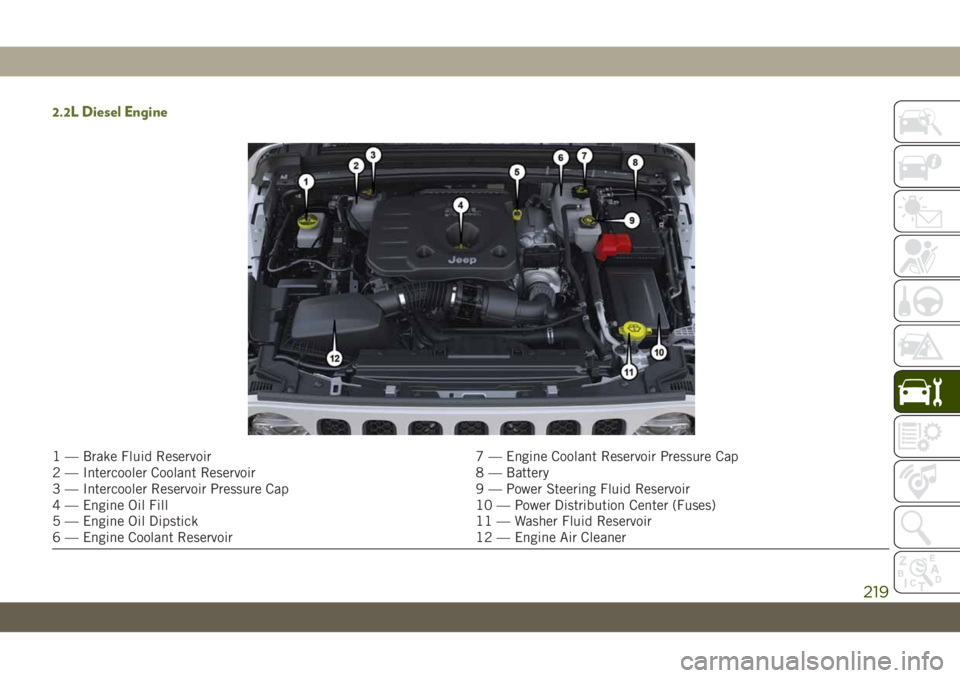
2.2L Diesel Engine
1 — Brake Fluid Reservoir 7 — Engine Coolant Reservoir Pressure Cap
2 — Intercooler Coolant Reservoir 8 — Battery
3 — Intercooler Reservoir Pressure Cap 9 — Power Steering Fluid Reservoir
4 — Engine Oil Fill 10 — Power Distribution Center (Fuses)
5 — Engine Oil Dipstick 11 — Washer Fluid Reservoir
6 — Engine Coolant Reservoir 12 — Engine Air Cleaner
219
Page 264 of 348
Component Fluid, Lubricant, or Genuine Part
Brake Master Cylinder We recommend you use DOT 3, SAE J1703 brake fluid. If DOT 3 brake fluid is not available
then TUTELA TOP4/S, FMVSS no. 116 DOT 4, ISO 4925 SAE J1704, or equivalent, is
acceptable.
If using DOT 4 brake fluid, the fluid must be changed every 24 months regardless of mileage.
Power Steering Reservoir We recommend you use TUTELA TRANSMISSION FORCE 4 fluid, or equivalent, meeting
requirement of FCA Material Standard 9.55550-AV4 or MS.9602.
FUEL CONSUMPTION AND
CO
2EMISSIONS
The fuel consumption and CO2emission
figures declared by the manufacturer are de-
termined on the basis of the type-approval
tests laid down by the applicable standards
in the country where the vehicle is registered.
The type of route, traffic conditions, weather
conditions, driving style, general condition of
the vehicle, trim level/equipment/ accesso-
ries, use of the climate control system, ve-
hicle load, presence of roof racks and othersituations that adversely affect the aerody-
namics or wind resistance lead to different
fuel consumption values than those mea-
sured.
The fuel consumption will only become more
regular after driving the first 1,864 miles
(3000 km).
To find the specific fuel consumption and
CO
2emission figures for this vehicle, please
refer to the data in the Certificate of Confor-
mity, and the related documentation that
accompanies the vehicle.
MOPAR ACCESSORIES
Authentic Accessories And Jeep
Performance Parts By Mopar
• Mopar Accessories and Jeep performance
parts are developed with the same engi-
neering that went into your Wrangler.
Choose these products with confidence
knowing that they have passed the same
rigid standards for function, fit, durability
and performance as your Wrangler.
• For the full line of Authentic Jeep Accesso-
ries by Mopar, visit your local dealership or
online at jeep.mopar.eu
NOTE:
All parts are subject to availability.TECHNICAL SPECIFICATIONS
262
Page 277 of 348
WARNING!
ALWAYS drive safely with your hands on
the wheel. You have full responsibility and
assume all risks related to the use of the
Uconnect features and applications in this
vehicle. Only use Uconnect when it is safe
to do so. Failure to do so may result in an
accident involving serious injury or death.
• To access the Radio mode, press the “Ra-
dio” button on the touchscreen.
Selecting Radio Stations
• Press the desired radio band (AM, FM or
DAB) button on the touchscreen.
Seek Up/Seek Down
• Press the Seek up or down arrow buttons on
the touchscreen for less than two seconds
to seek through radio stations.
• Press and hold either arrow button on the
touchscreen for more than two seconds to
bypass stations without stopping. The radio
will stop at the next listenable station once
the arrow button on the touchscreen is
released.Direct Tune
• Tune directly to a radio station by pressing
the “Tune” button on the screen, and en-
tering the desired station number.
Store Radio Presets Manually
Your radio can store 36 total preset stations,
12 presets per band (AM, FM and DAB). They
are shown at the top of your radio screen. To
see the 12 preset stations per band, press the
arrow button on the touchscreen at the top
right of the screen to toggle between the two
sets of six presets.
To store a radio preset manually, follow the
steps below:
1. Tune to the desired station.
2. Press and hold the desired numbered but-
ton on the touchscreen for more than two
seconds or until you hear a confirmation
beep.
Android Auto — If Equipped
NOTE:
Feature availability depends on your carrier
and mobile phone manufacturer. Some
Android Auto features may or may not be
available in every region and/or language.
Android Auto is a feature of your Uconnect
system, and your Android 5.0 Lollipop, or
higher, powered smartphone with a data plan,
that allows you to project your smartphone
and a number of its apps onto the touch-
screen radio display. Android Auto automati-
cally brings you useful information, and orga-
nizes it into simple cards that appear just
when they are needed. Android Auto can be
used with Google's best-in-class speech tech-
nology, the steering wheel controls, the knobs
and buttons on your radio faceplate, and the
radio display’s touchscreen to control many
of your apps. To use Android Auto follow the
following steps:
1. Download the Android Auto app from the
Google Play store on your Android-
powered smartphone.
275
Page 283 of 348
WARNING!
ALWAYS drive safely with your hands on
the wheel. You have full responsibility and
assume all risks related to the use of the
Uconnect features and applications in this
vehicle. Only use Uconnect when it is safe
to do so. Failure to do so may result in an
accident involving serious injury or death.
• To access the Radio mode, press the “Ra-
dio” button on the touchscreen.
Selecting Radio Stations
• Press the desired radio band (AM, FM or
DAB) button on the touchscreen.
Seek Up/Seek Down
• Press the Seek up or down arrow buttons on
the touchscreen for less than two seconds
to seek through radio stations.
• Press and hold either arrow button on the
touchscreen for more than two seconds to
bypass stations without stopping. The radio
will stop at the next listenable station once
the arrow button on the touchscreen is
released.Direct Tune
• Tune directly to a radio station by pressing
the “Tune” button on the screen, and en-
tering the desired station number.
Store Radio Presets Manually
Your radio can store 36 total preset stations,
12 presets per band (AM, FM and DAB). They
are shown at the top of your radio screen. To
see the 12 preset stations per band, press the
arrow button on the touchscreen at the top
right of the screen to toggle between the two
sets of six presets.
To store a radio preset manually, follow the
steps below:
1. Tune to the desired station.
2. Press and hold the desired numbered but-
ton on the touchscreen for more than two
seconds or until you hear a confirmation
beep.
Android Auto — If Equipped
NOTE:
Feature availability depends on your carrier
and mobile phone manufacturer. Some
Android Auto features may or may not be
available in every region and/or language.
Android Auto is a feature of your Uconnect
system, and your Android 5.0 Lollipop, or
higher, powered smartphone with a data plan,
that allows you to project your smartphone
and a number of its apps onto the touch-
screen radio display. Android Auto automati-
cally brings you useful information, and orga-
nizes it into simple cards that appear just
when they are needed. Android Auto can be
used with Google's best-in-class speech tech-
nology, the steering wheel controls, the knobs
and buttons on your radio faceplate, and the
radio display’s touchscreen to control many
of your apps. To use Android Auto follow
these steps:
1. Download the Android Auto app from the
Google Play store on your Android-
powered smartphone.
281
Page 316 of 348
• Reply with text message is not compatible
with iPhones.
• Auto reply with text message is only avail-
able on phones that supporting Bluetooth
MAP.
Android Auto — If Equipped
NOTE:
Feature availability depends on your carrier
and mobile phone manufacturer. Some
Android Auto features may or may not be
available in every region and/or language.
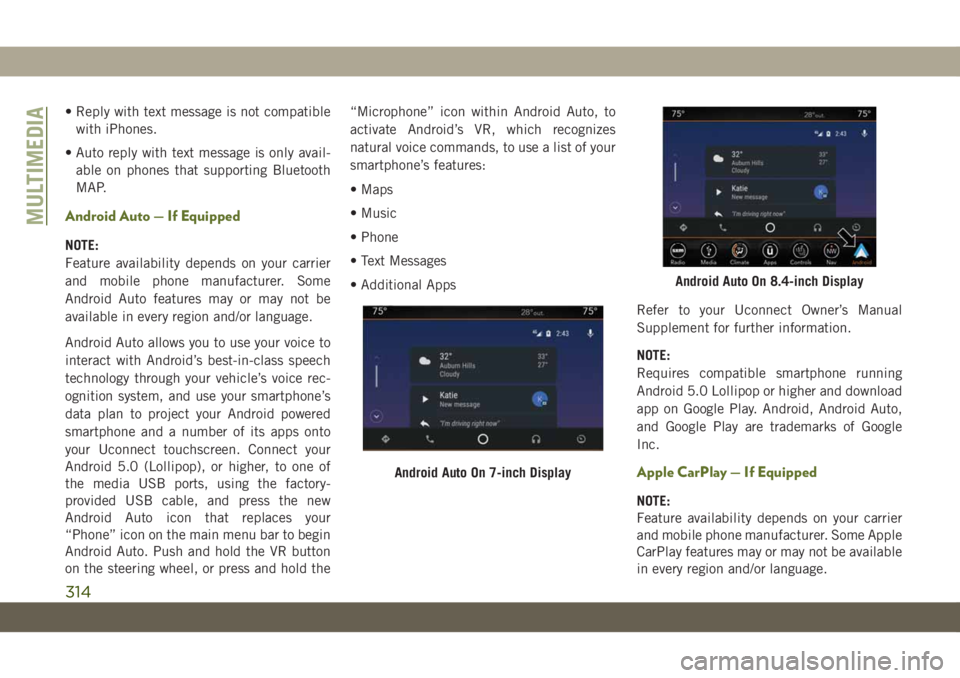
Android Auto allows you to use your voice to
interact with Android’s best-in-class speech
technology through your vehicle’s voice rec-
ognition system, and use your smartphone’s
data plan to project your Android powered
smartphone and a number of its apps onto
your Uconnect touchscreen. Connect your
Android 5.0 (Lollipop), or higher, to one of
the media USB ports, using the factory-
provided USB cable, and press the new
Android Auto icon that replaces your
“Phone” icon on the main menu bar to begin
Android Auto. Push and hold the VR button
on the steering wheel, or press and hold the“Microphone” icon within Android Auto, to
activate Android’s VR, which recognizes
natural voice commands, to use a list of your
smartphone’s features:
• Maps
• Music
• Phone
• Text Messages
• Additional Apps
Refer to your Uconnect Owner’s Manual
Supplement for further information.
NOTE:
Requires compatible smartphone running
Android 5.0 Lollipop or higher and download
app on Google Play. Android, Android Auto,
and Google Play are trademarks of Google
Inc.
Apple CarPlay — If Equipped
NOTE:
Feature availability depends on your carrier
and mobile phone manufacturer. Some Apple
CarPlay features may or may not be available
in every region and/or language.
Android Auto On 7-inch Display
Android Auto On 8.4-inch Display
MULTIMEDIA
314
Page 341 of 348
Low Tire Pressure System..........94
Lug Nuts...................246
Maintenance..................54
Maintenance Free Battery.........221
Maintenance Schedule.......208, 213
Malfunction Indicator Light (Check
Engine)...................71
Manual Park Release............200
Memory Feature (Memory Seats)......26
Memory Seat..................26
Memory Seats And Radio..........26
Mirrors.....................35
Heated...................35
Modifications/Alterations
Vehicle....................3
Monitor, Tire Pressure System.......94
Mopar Accessories.............262
Navigation..................292
New Vehicle Break-In Period.......146
Occupant Restraints.............99
Octane Rating, Gasoline (Fuel) . .252, 259
Oil, Engine..................259
Capacity.................257
Dipstick..................220Filter....................259
Pressure Warning Light.........69
Recommendation............257
Viscosity.................257
Oil Pressure Light...............69
Onboard Diagnostic System.........78
Operating Precautions............78
Operator Manual
Owner's Manual...............2
Overheating, Engine............199
Paddle Shifters...............149
ParkSense System, Rear..........163
Passenger Airbag Disable.........111
Passive Entry..................18
Personalized Main Menu......273, 279
Pets......................136
Phonebook..................304
Phone (Uconnect)..............297
Pairing
..................300
Placard, Tire And Loading Information .226
Power
Inverter...................59
Windows..................46
Power Sliding Top...............54
Operation..................54
Pinch Protect...............54Power Steering Fluid............261
Pregnant Women And Seat Belts.....106
Preparation For Jacking..........191
Pretensioners
Seat Belts................106
Radial Ply Tires...............232
Radio
Presets...........270, 274, 280
Radio Operation........268, 272, 278
Radio Screens.............272, 278
Raising.....................47
Raising The Soft Top.............47
Rear Camera.................165
Rear Cross Path................93
Rear ParkSense System..........163
Rear Swing Gate...............57
Rear Wiper/Washer..............38
Recreational Towing.............171
Shifting Into Transfer Case Neutral
(N) .....................172
Shifting Out Of Transfer Case Neutral
(N) .....................173
Release, Hood.................56
Reminder, Seat Belt............100
Remote Control
Starting System..............16
339