instrument panel JEEP WRANGLER UNLIMITED 2019 Owner handbook (in English)
[x] Cancel search | Manufacturer: JEEP, Model Year: 2019, Model line: WRANGLER UNLIMITED, Model: JEEP WRANGLER UNLIMITED 2019Pages: 348, PDF Size: 6.5 MB
Page 113 of 348
passenger seat belt is buckled. The seat belt
buckle switch may adjust the inflation rate of
the passenger multistage Front Air Bag.
WARNING!
• No objects should be placed over or near
the air bag on the instrument panel or
steering wheel because any such objects
could cause harm if the vehicle is in a
collision severe enough to cause the air
bag to inflate.
• Do not put anything on or around the air
bag covers or attempt to open them
manually. You may damage the air bags
and you could be injured because the air
bags may no longer be functional. The
protective covers for the air bag cushions
are designed to open only when the air
bags are inflating.
• Relying on the air bags alone could lead
to more severe injuries in a collision. The
air bags work with your seat belt to
restrain you properly. In some collisions,
air bags won’t deploy at all. Always wear
your seat belts even though you have air
bags.
Front Air Bag Operation
Front Air Bags are designed to provide addi-
tional protection by supplementing the seat
belts. Front air bags are not expected to
reduce the risk of injury in rear, side, or
rollover collisions. The front air bags will not
deploy in all frontal collisions, including
some that may produce substantial vehicle
damage — for example, some pole collisions,
truck underrides, and angle offset collisions.
On the other hand, depending on the type
and location of impact, front air bags may
deploy in crashes with little vehicle front-end
damage but that produce a severe initial
deceleration.
Because air bag sensors measure vehicle de-
celeration over time, vehicle speed and dam-
age by themselves are not good indicators of
whether or not an air bag should have de-
ployed.
Seat belts are necessary for your protection in
all collisions, and also are needed to help
keep you in position, away from an inflating
air bag.When the ORC detects a collision requiring
the front air bags, it signals the inflator units.
A large quantity of non-toxic gas is generated
to inflate the front air bags.
The steering wheel hub trim cover and the
upper passenger side of the instrument panel
separate and fold out of the way as the air
bags inflate to their full size. The front air
bags fully inflate in less time than it takes to
blink your eyes. The front air bags then
quickly deflate while helping to restrain the
driver and front passenger.
Passenger Air Bag Disable Feature — If
Equipped
This system allows the driver to DISABLE
(OFF) the Passenger Advanced Front Air Bag
if a child restraintmustbe installed in the
front seat. Only DISABLE (OFF) the Passen-
ger Advanced Front Air Bag if it is absolutely
necessary to install a child restraint in the
front seat. Children 12 years or younger
should ride properly buckled up in a rear seat,
if available. According to crash statistics,
111
Page 114 of 348
children are safer when properly restrained in
the rear seats rather than in the front. (Refer
to “Child Restraints” in this section for fur-
ther information.)
WARNING!
• A DISABLED (OFF) Passenger Advanced
Front Air Bag is deactivated and will not
deploy in a collision.
• A DISABLED (OFF) Passenger Advanced
Front Air Bag will not provide a front
passenger additional protection by
supplementing the seat belts.
• Do not install a child restraint in the
front seat unless the Passenger Air Bag
DISABLE (OFF) Indicator light
on
the overhead sports bar is illuminated to
show that the Passenger Advanced Front
Air Bag is DISABLED (OFF).
• In a collision, you and your passengers
can suffer much greater injuries if you
are not properly buckled up. You can
strike the interior of your vehicle or other
passengers, or you can be thrown out of
the vehicle. Always be sure you and
WARNING!
others in your vehicle are buckled up
properly.
The Passenger Advanced Front Air Bag can
be ENABLED (ON) or DISABLED (OFF) by
selecting the desired setting in the instru-
ment cluster display menu. For more infor-
mation on how to access the instrument clus-
ter display, refer to “Instrument Cluster
Display” in “Getting To Know Your Instru-
ment Panel”.
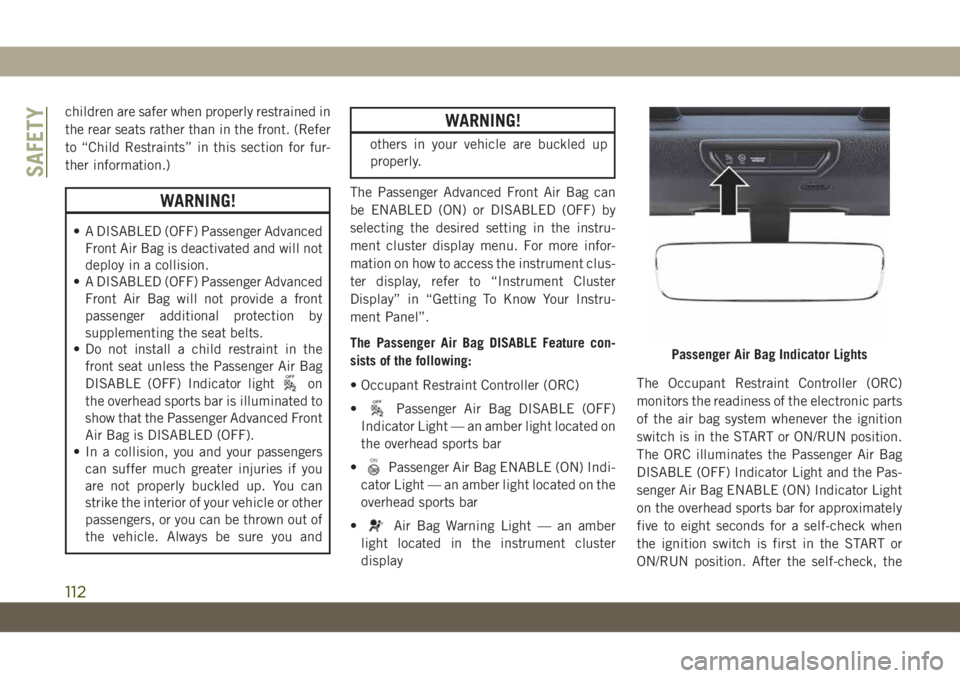
The Passenger Air Bag DISABLE Feature con-
sists of the following:
• Occupant Restraint Controller (ORC)
•
Passenger Air Bag DISABLE (OFF)
Indicator Light — an amber light located on
the overhead sports bar
•
Passenger Air Bag ENABLE (ON) Indi-
cator Light — an amber light located on the
overhead sports bar
•
Air Bag Warning Light — an amber
light located in the instrument cluster
displayThe Occupant Restraint Controller (ORC)
monitors the readiness of the electronic parts
of the air bag system whenever the ignition
switch is in the START or ON/RUN position.
The ORC illuminates the Passenger Air Bag
DISABLE (OFF) Indicator Light and the Pas-
senger Air Bag ENABLE (ON) Indicator Light
on the overhead sports bar for approximately
five to eight seconds for a self-check when
the ignition switch is first in the START or
ON/RUN position. After the self-check, the
Passenger Air Bag Indicator Lights
SAFETY
112
Page 120 of 348
WARNING!
inflate, even if they are in an infant or
child restraint.
• Seat belts (and child restraints where
appropriate) are necessary for your pro-
tection in all collisions. They also help
keep you in position, away from an in-
flating Side Air Bag. To get the best
protection from the Side Air Bags, occu-
pants must wear their seat belts properly
and sit upright with their backs against
the seats. Children must be properly
restrained in a child restraint or booster
seat that is appropriate for the size of the
child.
WARNING!
• Side Air Bags need room to inflate. Do
not lean against the door or window. Sit
upright in the center of the seat.
• Being too close to the Side Air Bags
during deployment could cause you to
be severely injured or killed.
• Relying on the Side Air Bags alone could
lead to more severe injuries in a colli-
WARNING!
sion. The Side Air Bags work with your
seat belt to restrain you properly. In
some collisions, Side Air Bags won’t
deploy at all. Always wear your seat belt
even though you have Side Air Bags.
NOTE:
Air bag covers may not be obvious in the
interior trim, but they will open during air bag
deployment.
Air Bag System Components
NOTE:
The Occupant Restraint Controller (ORC)
monitors the internal circuits and intercon-
necting wiring associated with electrical Air
Bag System Components listed below:
• Occupant Restraint Controller (ORC)
• Air Bag Warning Light
• Steering Wheel and Column
• Instrument Panel
• Knee Impact Bolsters
• Driver and Front Passenger Air Bags• Seat Belt Buckle Switch
• Supplemental Side Air Bags
• Front and Side Impact Sensors
• Seat Belt Pretensioners
If A Deployment Occurs
The front air bags are designed to deflate
immediately after deployment.
NOTE:
Front and/or side air bags will not deploy in
all collisions. This does not mean something
is wrong with the air bag system.
If you do have a collision which deploys the
air bags, any or all of the following may occur:
• The air bag material may sometimes cause
abrasions and/or skin reddening to the oc-
cupants as the air bags deploy and unfold.
The abrasions are similar to friction rope
burns or those you might get sliding along a
carpet or gymnasium floor. They are not
caused by contact with chemicals. They are
not permanent and normally heal quickly.
However, if you haven’t healed significantly
within a few days, or if you have any blis-
tering, see your doctor immediately.
SAFETY
118
Page 122 of 348
electrical devices (e.g. headlights) after an
accident, reset the system by following the
procedure described below. If you have any
doubt, contact an authorized dealer.
Enhanced Accident Response System Reset
Procedure
In order to reset the Enhanced Accident Re-
sponse System functions after an event, the
ignition switch must be changed from igni-
tion START or ON/RUN to ignition OFF. Care-
fully check the vehicle for fuel leaks in the
engine compartment and on the ground near
the engine compartment and fuel tank before
resetting the system and starting the engine.
Maintaining Your Air Bag System
WARNING!
• Modifications to any part of the air bag
system could cause it to fail when you
need it. You could be injured if the air
bag system is not there to protect you.
Do not modify the components or wiring,
including adding any kind of badges or
stickers to the steering wheel hub trim
WARNING!
cover or the upper passenger side of the
instrument panel. Do not modify the
front bumper, vehicle body structure, or
add aftermarket side steps or running
boards.
• It is dangerous to try to repair any part of
the air bag system yourself. Be sure to
tell anyone who works on your vehicle
that it has an air bag system.
• Do not attempt to modify any part of your
air bag system. The air bag may inflate
accidentally or may not function prop-
erly if modifications are made. Take your
vehicle to an authorized dealer for any
air bag system service. If your seat, in-
cluding your trim cover and cushion,
needs to be serviced in any way (includ-
ing removal or loosening/tightening of
seat attachment bolts), take the vehicle
to an authorized dealer. Only manufac-
turer approved seat accessories may be
used. If it is necessary to modify the air
bag system for persons with disabilities,
contact an authorized dealer.
Event Data Recorder (EDR)
This vehicle is equipped with an event data
recorder (EDR). The main purpose of an EDR
is to record, in certain crash or near crash-
like situations, such as an air bag deployment
or hitting a road obstacle, data that will assist
in understanding how a vehicle’s systems
performed. The EDR is designed to record
data related to vehicle dynamics and safety
systems for a short period of time, typically
30 seconds or less. The EDR in this vehicle is
designed to record such data as:
• How various systems in your vehicle were
operating;
• Whether or not the driver and passenger
safety belts were buckled/fastened;
• How far (if at all) the driver was depressing
the accelerator and/or brake pedal; and,
• How fast the vehicle was traveling.
These data can help provide a better under-
standing of the circumstances in which
crashes and injuries occur.
SAFETY
120
Page 124 of 348
WARNING!
12 years or younger, including a child in
a rear-facing child restraint.
• In a collision, an unrestrained child can
become a projectile inside the vehicle.
The force required to hold even an infant
on your lap could become so great that
you could not hold the child, no matter
how strong you are. The child and others
could be badly injured or killed. Any
child riding in your vehicle should be in
a proper restraint for the child’s size.
There are different sizes and types of re-
straints for children from newborn size to the
child almost large enough for an adult safety
belt. Children should ride rearward facing as
long as possible; this is the most protected
position for a child in the event of a crash.
Always check the child seat Owner’s Manual
to make sure you have the correct seat for
your child. Carefully read and follow all the
instructions and warnings in the child re-
straint Owner’s Manual and on all the labels
attached to the child restraint.In Europe, children restraint systems are de-
fined by regulation ECE-R44, which divides
them into five weight groups:
Restraint Group Weight Group
Group 0 up to 10 kg
Group 0+ up to 13 kg
Group 1 9-18 kg
Group 2 15-25 kg
Group 3 22-36 kg
Check the label of your child restraint. All
approved child restraints must include type-
approval data and the control mark on its
label. The label must be permanently se-
cured to the child restraint system. You
should not remove this label from the child
restraint.
WARNING!
Extreme Hazard! Do not place a rear-
facing child restraint in front of an active
air bag. Refer to visor mounted labels for
information. Deployment of the air bag in
an accident could cause fatal injuries to
the baby regardless of the severity of the
WARNING!
collision. It is advisable to always carry
children in a child restraint system on the
rear seat, which is the most protected
position in the event of a collision.
WARNING!
Should it be necessary to carry a child on
the passenger side front seat in a rear-
facing child restraint system, the passen-
ger side front airbag and side bag (for
versions/markets, where provided) must
be deactivated through the Setup menu.
Deactivation should be verified by check-
ing whether the warning light is switched
on in the instrument panel. The passenger
seat must also be positioned backward as
far as possible to avoid the child restraint
system from coming into contact with the
dashboard.
“Universal” Child Restraint Systems
• The figures in the following sections are
examples of each type of universal child
restraint system. Typical installations are
SAFETY
122
Page 141 of 348
WARNING!
• NEVER place any objects under the floor
mat (e.g., towels, keys, etc.). These ob-
jects could change the position of the
floor mat and may cause interference
with the accelerator, brake, or clutch
pedals.
• If the vehicle carpet has been removed
and re-installed, always properly attach
carpet to the floor and check the floor
mat fasteners are secure to the vehicle
carpet. Fully depress each pedal to
check for interference with the accelera-
tor, brake, or clutch pedals then re-
install the floor mats.
• It is recommended to only use mild soap
and water to clean your floor mats. After
cleaning, always check your floor mat
WARNING!
has been properly installed and is se-
cured to your vehicle using the floor mat
fasteners by lightly pulling mat.
Periodic Safety Checks You Should Make
Outside The Vehicle
Tires
Examine tires for excessive tread wear and
uneven wear patterns. Check for stones,
nails, glass, or other objects lodged in the
tread or sidewall. Inspect the tread for cuts
and cracks. Inspect sidewalls for cuts,
cracks, and bulges. Check the wheel nuts for
tightness. Check the tires (including spare)
for proper cold inflation pressure.
Lights
Have someone observe the operation of brake
lights and exterior lights while you work the
controls. Check turn signal and high beam
indicator lights on the instrument panel.
Door Latches
Check for proper closing, latching, and lock-
ing.
Fluid Leaks
Check area under the vehicle after overnight
parking for fuel, coolant, oil, or other fluid
leaks. Also, if gasoline fumes are detected or
if fuel, or brake fluid leaks are suspected. The
cause should be located and corrected imme-
diately.
139
Page 147 of 348
ALWAYS DO A VISUAL CHECKthat your vehicle
is in PARK by looking for the "P" in the
instrument cluster display and on the shifter.
As an added precaution, always apply the
parking brake when exiting the vehicle.
Normal Starting — Diesel Engine
1. The gear selector must be in the NEU-
TRAL or PARK position before you can
start the engine.
2. Place the ignition in the ON position.
3. Watch for the “Wait To Start Light” in the
instrument cluster. Refer to “Instrument
Cluster” in “Getting To Know Your Instru-
ment Panel” for further review. It will glow
for two to ten seconds or more, depending
on engine temperature. When the “Wait
To Start Light” goes out, the engine is
ready to start.
4. Tip Start Feature
Do notpress the accelerator. Cycle the
ignition to the START position and then
release it. The starter motor will continue
to run, and it will automatically disengage
when the engine is running. If the engine
fails to start, the starter will disengageautomatically in 25 seconds. If this oc-
curs, cycle the ignition to the LOCK posi-
tion, wait 25 to 30 seconds, then repeat
the “Normal Starting” procedure.
NOTE:
The starter motor may run up to 30 sec-
onds in very cold conditions until the
engine is started. The starter can be dis-
engaged by cycling the ignition to the
OFF position, if required.
5. After the engine starts, allow it to idle for
approximately 30 seconds before driving.
This allows oil to circulate and lubricate
the turbocharger.
Diesel Engine Warm-Up
Avoid full throttle operation when the engine
is cold. When starting a cold engine, bring the
engine up to operating speed slowly to allow
the oil pressure to stabilize as the engine
warms up.NOTE:
High-speed, no-load running of a cold engine
can result in excessive white smoke and poor
engine performance. No-load engine speeds
should be kept under 1,200 rpm during the
warm-up period, especially in cold, ambient
temperature conditions.
If temperatures are below 32°F (0°C), oper-
ate the engine at moderate speeds for five
minutes before full loads are applied.
Diesel Engine Idling — In Cold Weather
Avoid prolonged idling in ambient tempera-
tures below 0°F (-18°C). Long periods of
idling may be harmful to your engine because
combustion chamber temperatures can drop
so low that the fuel may not burn completely.
Incomplete combustion allows carbon and
varnish to form on piston rings and injector
nozzles. Also, the unburned fuel can enter
the crankcase, diluting the oil and causing
rapid wear to the engine.
145
Page 158 of 348
Axle Lock (Tru-Lok) — Rubicon Models
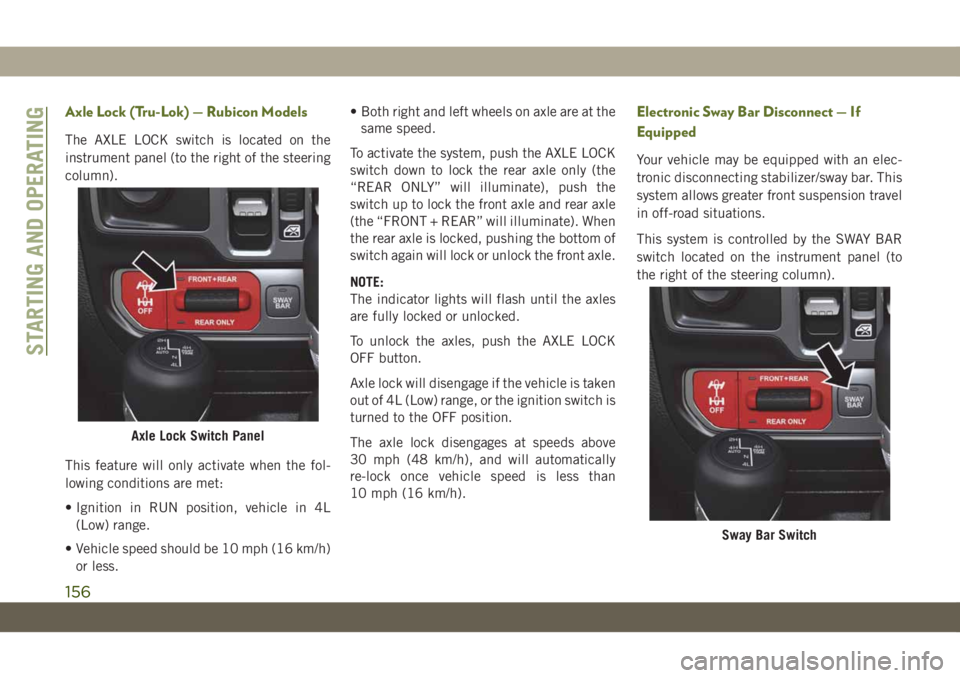
The AXLE LOCK switch is located on the
instrument panel (to the right of the steering
column).
This feature will only activate when the fol-
lowing conditions are met:
• Ignition in RUN position, vehicle in 4L
(Low) range.
• Vehicle speed should be 10 mph (16 km/h)
or less.• Both right and left wheels on axle are at the
same speed.
To activate the system, push the AXLE LOCK
switch down to lock the rear axle only (the
“REAR ONLY” will illuminate), push the
switch up to lock the front axle and rear axle
(the “FRONT + REAR” will illuminate). When
the rear axle is locked, pushing the bottom of
switch again will lock or unlock the front axle.
NOTE:
The indicator lights will flash until the axles
are fully locked or unlocked.
To unlock the axles, push the AXLE LOCK
OFF button.
Axle lock will disengage if the vehicle is taken
out of 4L (Low) range, or the ignition switch is
turned to the OFF position.
The axle lock disengages at speeds above
30 mph (48 km/h), and will automatically
re-lock once vehicle speed is less than
10 mph (16 km/h).
Electronic Sway Bar Disconnect — If
Equipped
Your vehicle may be equipped with an elec-
tronic disconnecting stabilizer/sway bar. This
system allows greater front suspension travel
in off-road situations.
This system is controlled by the SWAY BAR
switch located on the instrument panel (to
the right of the steering column).
Axle Lock Switch Panel
Sway Bar Switch
STARTING AND OPERATING
156
Page 160 of 348
ESS vehicles have been upgraded with a
heavy duty starter, enhanced battery, and
other upgraded engine parts, to handle the
additional engine starts.
NOTE:
It is recommended that the Start/Stop Sys-
tem be disabled during off-road use.
Automatic Mode
The Stop/Start feature is enabled
after every normal customer en-
gine start. At that time, the sys-
tem will go into STOP/START
READY and if all other conditions are met,
can go into a STOP/START AUTOSTOP AC-
TIVE “Autostop” mode.
To Activate The Autostop Mode, The Following
Must Occur:
• The system must be in STOP/START
READY state. A STOP/START READY mes-
sage will be displayed in the instrument
cluster display within the Stop/Start sec-tion. Refer to “Instrument Cluster” in “Get-
ting To Know Your Instrument Panel” in
your Owner’s Manual for further informa-
tion.
• The vehicle must be completely stopped.
• The shifter must be in a forward gear and
the brake pedal depressed.
The engine will shut down, the tachometer
will move to the zero position and the Stop/
Start telltale will illuminate indicating you
are in Autostop. Customer settings will be
maintained upon return to an engine running
condition.
Refer to the “Stop/Start System” in the
“Starting And Operating” section located in
your Owner’s Manual for further information.
Possible Reasons The Engine Does Not
Autostop
Prior to engine shut down, the system will
check many safety and comfort conditions to
see if they are fulfilled. Detailed information
about the operation of the Stop/Start system
may be viewed in the instrument clusterdisplay Stop/Start Screen. In the following
situations, the engine will not stop:
• Driver’s seat belt is not buckled.
• Driver’s door is not closed.
• Battery temperature is too warm or cold.
• Battery charge is low.
• The vehicle is on a steep grade.
• Cabin heating or cooling is in process and
an acceptable cabin temperature has not
been achieved.
• HVAC is set to full defrost mode at a high
blower speed.
• HVAC set to MAX A/C.
• Engine has not reached normal operating
temperature.
• Engine temperature too high.
• The transmission is not in a forward gear.
• Hood is open.
• Transfer case is in 4LO or Neutral.
• Brake pedal is not pressed with sufficient
pressure.
STARTING AND OPERATING
158
Page 161 of 348
Other Factors Which Can Inhibit Autostop In-
clude:
• Accelerator pedal input.
• Vehicle speed threshold not achieved from
previous auto-stop.
• Steering angle beyond threshold. (ESS
Models Only)
• ACC is on and speed is set.
• Vehicle is at high altitude.
• System fault present.
It may be possible for the vehicle to be driven
several times without the STOP/START sys-
tem going into a STOP/START READY state
under more extreme conditions of the items
listed above.
To Start The Engine While In Autostop
Mode
While in a forward gear, the engine will start
when the brake pedal is released or the
throttle pedal is depressed. The transmission
will automatically re-engage upon engine re-
start.Conditions That Will Cause The Engine To Start
Automatically While In Autostop Mode:
• The transmission selector is moved out of
DRIVE.
• To maintain cabin temperature comfort.
• Actual cabin temperature is significantly
different than temperature set on Auto
HVAC.
• HVAC is set to full defrost mode.
• HVAC system temperature or fan speed is
manually adjusted.
• Battery voltage drops too low.
• Low brake vacuum (e.g. after several brake
pedal applications).
• STOP/START OFF switch is pushed.
• A STOP/START system error occurs.
• STOP/START AUTO STOP ACTIVE time ex-
ceeds 5 minutes.
• 4WD system is put into 4LO or Neutral
mode.
• Steering wheel is turned beyond threshold.
(ESS Models Only)
To Manually Turn Off The Stop/Start
System
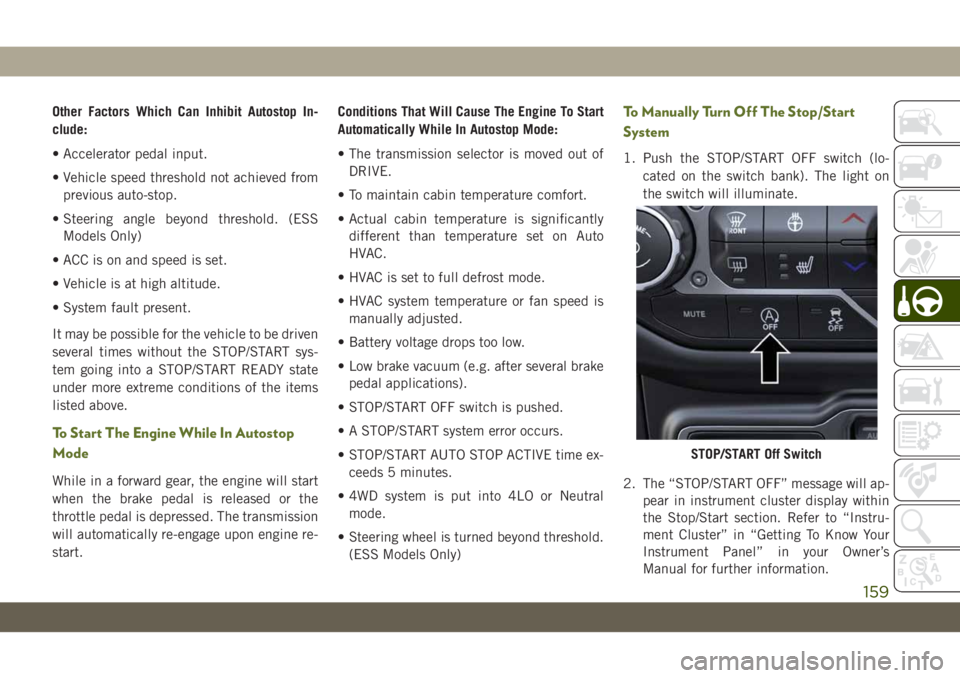
1. Push the STOP/START OFF switch (lo-
cated on the switch bank). The light on
the switch will illuminate.
2. The “STOP/START OFF” message will ap-
pear in instrument cluster display within
the Stop/Start section. Refer to “Instru-
ment Cluster” in “Getting To Know Your
Instrument Panel” in your Owner’s
Manual for further information.
STOP/START Off Switch
159