radio KIA AMANTI 2009 User Guide
[x] Cancel search | Manufacturer: KIA, Model Year: 2009, Model line: AMANTI, Model: KIA AMANTI 2009Pages: 321, PDF Size: 23.77 MB
Page 134 of 321
![KIA AMANTI 2009 User Guide Knowing your vehicle122
37. CAT/FOLDER Button Press [CAT ] or [FLDR ] button to
enter the Category list Mode, it dis-
plays cateogry items and highlights the
category that currently tuned channel
belo](/img/2/57931/w960_57931-133.png "KIA AMANTI 2009 User Guide Knowing your vehicle122
37. CAT/FOLDER Button Press [CAT ] or [FLDR ] button to
enter the Category list Mode, it dis-
plays cateogry items and highlights the
category that currently tuned channel
belo")
Knowing your vehicle122
37. CAT/FOLDER Button Press [CAT ] or [FLDR ] button to
enter the Category list Mode, it dis-
plays cateogry items and highlights the
category that currently tuned channel
belongs to.
On Category List Mode, press these buttons to navigate category list.
Press [ENTER] Button to select the lowest channel in highlighted category.
If channel is selected by selecting cat- egory CATEGORY Icon is displayed at
the top of the screen.8. Tune Knob and Enter Button Rotate clockwise to increase the chan-nel number or to down the category in
the category list.
Rotate counterclockwise to decrease the channel number or to up the cate-
gory in the category list.
Press this button to make selection of channels or items.
❈ ❈ Troubleshooting1. Antenna Error
If this message is displayed, the antenna
or antenna cable is broken or unplugged.
Please consult with your Kia dealership.
2. Acquiring Signal
If this message is displayed, it means that
the antenna is covered and that the SIR-
IUS Satellite Radio signal is not available.
Ensure the antenna is uncovered and has
a clear view of the sky.
Page 220 of 321
Driving tips28
5ProgrammingYour vehicle may require the ignition
switch to be turned to the ACC position
for programming and/or operation of
HomeLink. It is also recommended that a
new battery be replaced in the hand-held
transmitter of the device being pro-
grammed to HomeLink for quicker train-
ing and accurate transmission of the
radio-frequency.
Follow these steps to train your
HomeLink mirror:
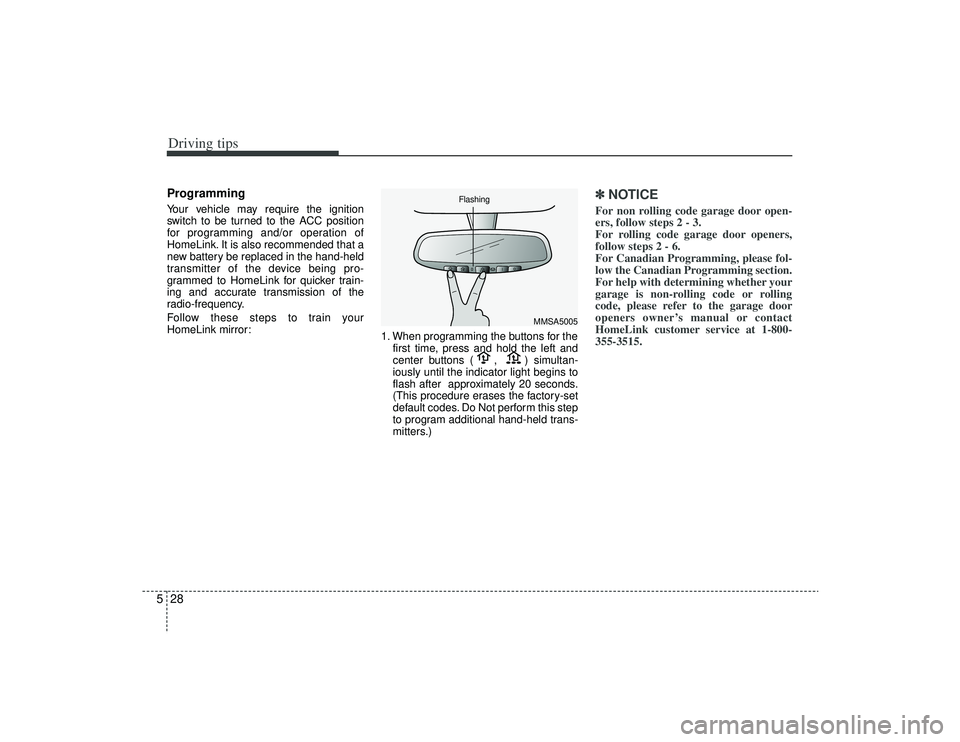
1. When programming the buttons for the
first time, press and hold the left and
center buttons ( , ) simultan-
iously until the indicator light begins to
flash after approximately 20 seconds.
(This procedure erases the factory-set
default codes. Do Not perform this step
to program additional hand-held trans-
mitters.)
✽ ✽NOTICEFor non rolling code garage door open-
ers, follow steps 2 - 3.
For rolling code garage door openers,
follow steps 2 - 6.
For Canadian Programming, please fol-
low the Canadian Programming section.
For help with determining whether your
garage is non-rolling code or rolling
code, please refer to the garage door
openers owner’s manual or contact
HomeLink customer service at 1-800-
355-3515.
MMSA5005
Flashing
Page 231 of 321
In case of an emergency86If you do not have a spare, use a fuse ofthe same rating from a circuit you maynot need for operating the vehicle, suchas the radio or room lamp fuse.If the headlights or other electrical com-
ponents do not work and the fuses are
OK, check the fuse block in the engine
compartment. If a fuse is blown, it must
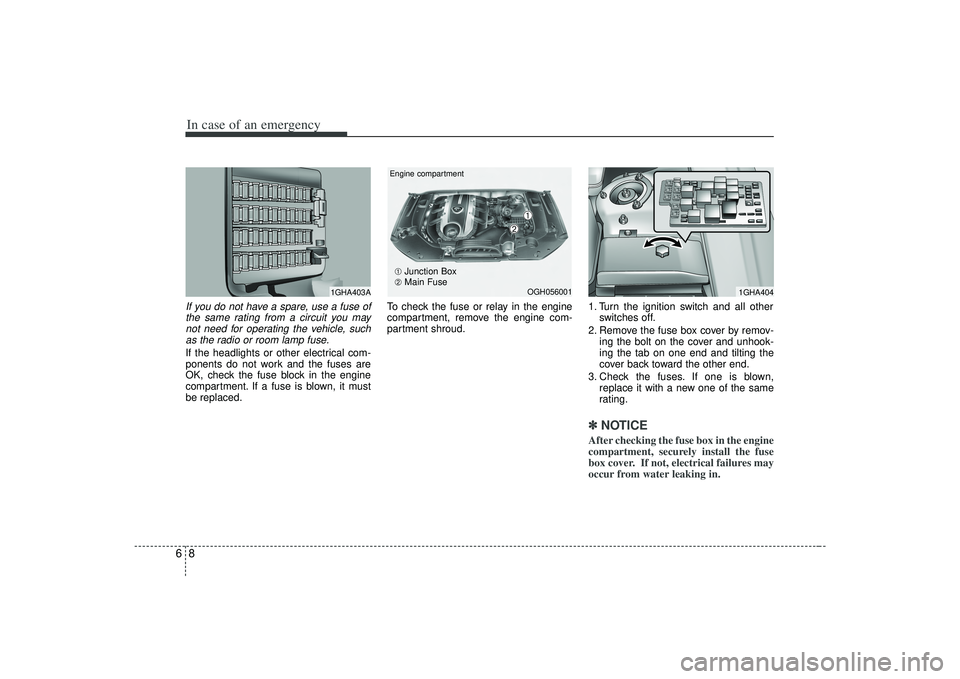
be replaced. To check the fuse or relay in the engine
compartment, remove the engine com-
partment shroud.
1. Turn the ignition switch and all other
switches off.
2. Remove the fuse box cover by remov- ing the bolt on the cover and unhook-
ing the tab on one end and tilting the
cover back toward the other end.
3. Check the fuses. If one is blown, replace it with a new one of the same
rating.
✽ ✽NOTICEAfter checking the fuse box in the engine
compartment, securely install the fuse
box cover. If not, electrical failures may
occur from water leaking in.
1GHA403A
1GHA404
OGH056001
Engine compartment➀
➁
➀
Junction Box
➁ Main Fuse
Page 233 of 321
In case of an emergency10
6
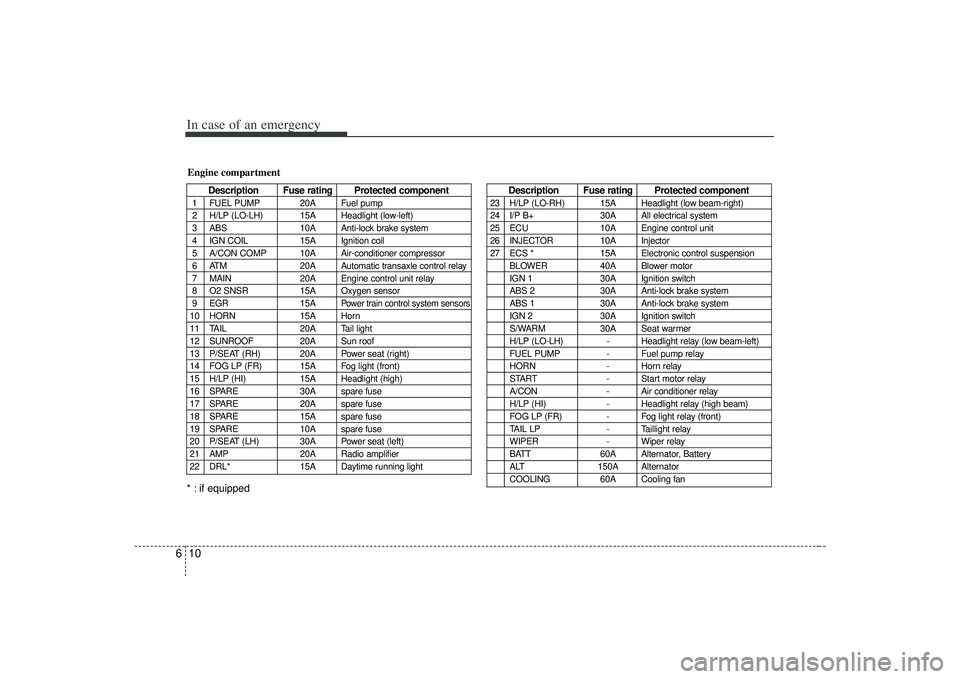
Description Fuse rating Protected component
1 FUEL PUMP 20A Fuel pump
2 H/LP (LO-LH) 15A Headlight (low-left)
3 ABS 10A Anti-lock brake system
4 IGN COIL 15A Ignition coil
5 A/CON COMP 10A Air-conditioner compressor
6 ATM 20A Automatic transaxle control relay
7 MAIN 20A Engine control unit relay
8 O2 SNSR 15A Oxygen sensor
9 EGR 15A
Power train control system sensors
10 HORN 15A Horn
11 TAIL 20A Tail light
12 SUNROOF 20A Sun roof
13 P/SEAT (RH) 20A Power seat (right)
14 FOG LP (FR) 15A Fog light (front)
15 H/LP (HI) 15A Headlight (high)
16 SPARE 30A spare fuse
17 SPARE 20A spare fuse
18 SPARE 15A spare fuse
19 SPARE 10A spare fuse
20 P/SEAT (LH) 30A Power seat (left)
21 AMP 20A Radio amplifier
22 DRL* 15A Daytime running lightEngine compartment
Description Fuse rating Protected component
23 H/LP (LO-RH) 15A Headlight (low beam-right)
24 I/P B+ 30A All electrical system
25 ECU 10A Engine control unit
26 INJECTOR 10A Injector
27 ECS * 15A Electronic control suspension
BLOWER 40A Blower motor
IGN 1 30A Ignition switch
ABS 2 30A Anti-lock brake system
ABS 1 30A Anti-lock brake system
IGN 2 30A Ignition switch
S/WARM 30A Seat warmer
H/LP (LO-LH) - Headlight relay (low beam-left)
FUEL PUMP - Fuel pump relay
HORN - Horn relay
START - Start motor relay
A/CON - Air conditioner relay
H/LP (HI) - Headlight relay (high beam)
FOG LP (FR) - Fog light relay (front)
TAIL LP - Taillight relay
WIPER - Wiper relay
BATT 60A Alternator, Battery
ALT 150A Alternator
COOLING 60A Cooling fan
* : if equipped
Page 242 of 321

619
In case of an emergency
TPMS (Tire Pressure
Monitoring System)
malfunction indicator
The TPMS malfunction indicator
turns on and stays on when there is
a problem with the Tire Pressure
Monitoring System. If the system is
able to correctly detect an under-
inflation warning at the same time as
system failure then it will illuminate
both the TPMS malfunction and the
low tire pressure telltale e.g. if Front
Left sensor fails, the TPMS malfunc-
tion indicator turns, but if Front Right,
Rear Left, or Rear Right tire is under-
inflated, the low tire pressure telltale
may turn on at the same time as the
TPMS malfunction indicator.
Have the system checked by an
authorized KIA dealer as soon as
possible to determine the cause of
the problem.
✽ ✽NOTICE• The TPMS malfunction indicator
may be illuminated if the vehicle is
moving around electric power sup-
ply cable or radio transmitter such
as police stations, government and
public offices, broadcasting sta-
tions, military installations, air-
ports, or transmitting tower, etc.
this can interfere with normal
operation of the Tire Pressure
Monitoring System (TPMS).
• The TPMS malfunction indicator may be illuminated if snow chains
or some electronic devices, such as
notebook computers, are used in
the vehicle. This can interfere with
normal operation of the Tire
Pressure Monitoring System
(TPMS). (Continued)(Continued)
• If there is a failed tire sensor, it is
possible for the TPMS to tem-
porarily learn a replacement sen-
sor if closely driven to another
vehicle that is also equipped with
TPMS. In rare cases, this may
temporarily delay the TPMS mal-
function indicator from turning
on.
TPMS
Page 309 of 321
Consumer assistance, Reporting safety defects49ELECTRICAL EQUIPMENT (U.S. ONLY)The electrical system of your vehicle is designed to perform
under all reasonably expected operating conditions. However,
before any additional electrical equipment is installed in your
vehicle, consult an Authorized Kia Dealer, in order to ensure
that you do not void your warranty.
Certain electrical equipment, or the way in which it is installed,
may adversely affect the operation of your vehicle, including
such systems as the engine control system, the audio system
and the electrical charging system and thus potentially void all
or part of your warranty.
We assume no responsibility for any expense you may incur or
for any malfunction of your vehicle or any of its components or
systems that may result from the installation of additional elec-
trical equipment that is not supplied, or recommended for instal-
lation by, Kia.
Installation of a Mobile Two-Way Radio SystemIf a mobile two-way radio system is installed improperly, or if an
excessively powerful type of system is used, other electronic
systems may be adversely affected. To avoid damage to your
vehicle, consult an Authorized Kia Dealer concerning the prop-
er equipment and installation.
Page 320 of 321

10
9
Index
Towing ··················\
··················\
··················\
··················\
·5-18
Weight of the ··················\
··················\
··················\
·········5-19
Transaxle, Automatic··················\
··················\
··········4-5, 7-18
Trip Interruption ··················\
··················\
··················\
··············9-3
Meter··················\
··················\
··················\
··················\
····4-26
Trunk ··················\
··················\
··················\
··················\
······3-76
Turn Signals ··················\
··················\
··················\
·············4-40
Two-Way Radio System, Installation of a Mobile ··········9-4
Underbody Maintenance··················\
··················\
············7-50
Uniform Tire Quality Grading ··················\
··················\
···7-36
Upholstery and Interior Trim, Cleaning the ··················\
7-51
Vehicle at a Glance, Your ··················\
··················\
··················\
·····2-1
Break-In Process··················\
··················\
··················\
······1-3
Data Collection and Event Data Recorders··················\
·1-4
Driving Your ··················\
··················\
··················\
············4-1
Identification Number ··················\
··················\
·············5-25
Knowing Your ··················\
··················\
··················\
·········3-1
Load Limit ··················\
··················\
··················\
·············5-13
Modifications ··················\
··················\
··················\
···········5-3
Rocking the··················\
··················\
··················\
··············5-7 Ventilating the Front Seats··················\
··················\
·········3-23
Warming the Front Seats ··················\
··················\
···········3-23
Warning
and Indicators ··················\
··················\
··················\
········4-31
Road··················\
··················\
··················\
··················\
·······6-2
Washer Fluid Level, Checking the ··················\
··················\
·······7-20
Wipers and ··················\
··················\
··················\
·············4-42
Washing·················\
··················\
··················\
··················\
···7-48
Waxing ··················\
··················\
··················\
··················\
···7-49
Weight of the Vehicle ··················\
··················\
··················\
·········5-17
of the Trailer Tongue ··················\
··················\
···············5-20
Wheel Alignment and Tire Balance··················\
··················\
····7-32
Aluminum, Maintenance ··················\
··················\
·········7-50
Replacement ··················\
··················\
··················\
··········7-33
Size Designation ··················\
··················\
··················\
····7-35
Steering ··················\
··················\
··················\
··················\
4-17
Wheels, Tires and ··················\
··················\
··················\
····7-29
Window ··················\
··················\
··················\
··················\
··3-13 Glass, Cleaning the Interior··················\
··················\
·····7-51
Windows, Power ··················\
··················\
··················\
······3-14
Windshield Defrosting and Defogging ··················\
··················\
·······4-56UV
W