steering wheel KIA AMANTI 2009 User Guide
[x] Cancel search | Manufacturer: KIA, Model Year: 2009, Model line: AMANTI, Model: KIA AMANTI 2009Pages: 321, PDF Size: 23.77 MB
Page 138 of 321
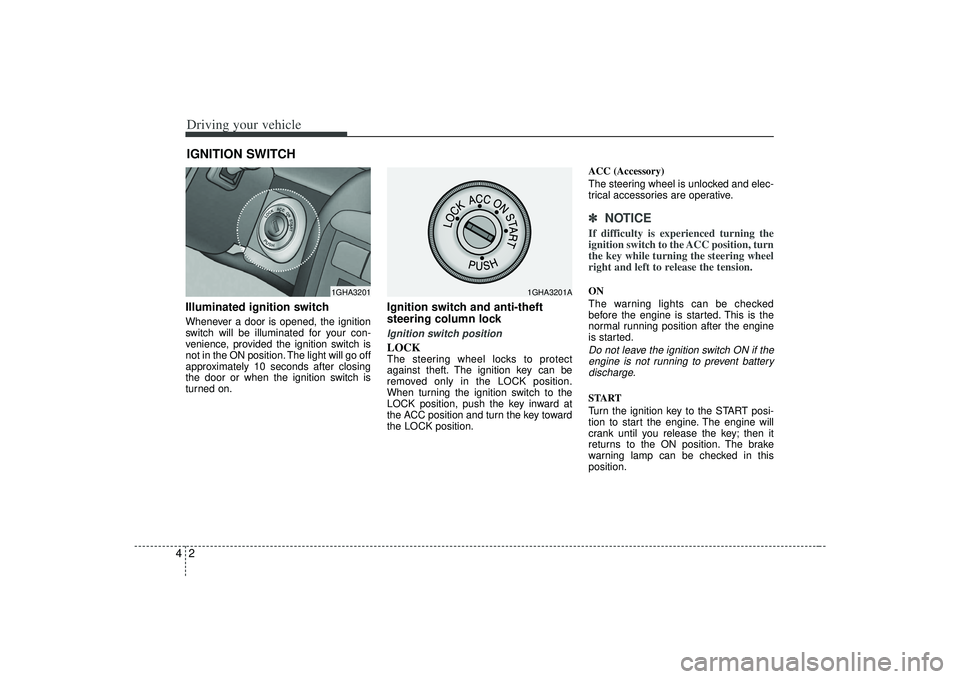
Driving your vehicle24Illuminated ignition switchWhenever a door is opened, the ignition
switch will be illuminated for your con-
venience, provided the ignition switch is
not in the ON position. The light will go off
approximately 10 seconds after closing
the door or when the ignition switch is
turned on.
Ignition switch and anti-theft
steering column lock Ignition switch positionLOCKThe steering wheel locks to protect
against theft. The ignition key can be
removed only in the LOCK position.
When turning the ignition switch to the
LOCK position, push the key inward at
the ACC position and turn the key toward
the LOCK position.ACC (Accessory)
The steering wheel is unlocked and elec-
trical accessories are operative.
✽ ✽
NOTICEIf difficulty is experienced turning the
ignition switch to the ACC position, turn
the key while turning the steering wheel
right and left to release the tension.ON
The warning lights can be checked
before the engine is started. This is the
normal running position after the engine
is started.Do not leave the ignition switch ON if the
engine is not running to prevent batterydischarge.START
Turn the ignition key to the START posi-
tion to start the engine. The engine will
crank until you release the key; then it
returns to the ON position. The brake
warning lamp can be checked in this
position.
IGNITION SWITCH
1GHA3201
1GHA3201A
Page 139 of 321
43
Driving your vehicle
Automatic transaxleWhen turning the ignition switch to the
LOCK position, the shift lever must be in
the P (Park) position.
WARNING
- Ignition switch
• Never turn the ignition switch toLOCK or ACC while the vehicle is
moving. This would result in loss
of directional control and braking
function, which could cause an
immediate accident.
The anti-theft steering column lock is not a substitute for the
parking brake. Before leaving the
driver’s seat, always make sure
the shift lever is engaged in P
(Park), set the parking brake fully
and shut the engine off.
Unexpected and sudden vehicle
movement may occur if these pre-
cautions are not taken.
Never reach for the ignition switch, or any other controls
through the steering wheel while
the vehicle is in motion. The pres-
ence of your hand or arm in this
area could cause a loss of vehicle
control, an accident and serious
bodily injury or death.
Do not put any movable things around the driver’s seat as they
can disturb your driving and may
cause accidents.
WARNING
When you intend to park or stop the
vehicle with the engine on, be care-
ful not to depress the accelerator
pedal for a long period of time. It
may overheat the engine or exhaust
system and cause fire.
Page 153 of 321
417
Driving your vehicle
Power steeringPower Steering uses energy from the
engine to assist you in steering the vehi-
cle. If the engine is off or if the power
steering system becomes inoperative,
the vehicle may still be steered, but it will
require increased steering effort.
Should you notice any change in the
effort required to steer during normal
vehicle operation, have the power steer-
ing checked by an Authorized Kia Dealer.
✽ ✽NOTICE• Never hold the steering wheel against
a stop (extreme right or left turn) for
more than 5 seconds with the engine
running. Holding the steering wheel
for more than 5 seconds in either posi-
tion may cause damage to the power
steering pump.
• If the power steering drive belt breaks or if the power steering pump mal-
functions, the steering effort will
greatly increase.
✽ ✽ NOTICEIf the vehicle is parked for extended
periods outside in cold weather (below -
10 °C/14 °F), the power steering may
require increased effort when the engine
is first started. This is caused by
increased fluid viscosity due to the cold
weather and does not indicate a mal-
function.
When this happens, increase the engine
RPM by depressing the accelerator until
the RPM reaches 1,500 rpm then release
or let the engine idle for two or three
minutes to warm up the fluid.
STEERING WHEEL
Page 154 of 321
Driving your vehicle18
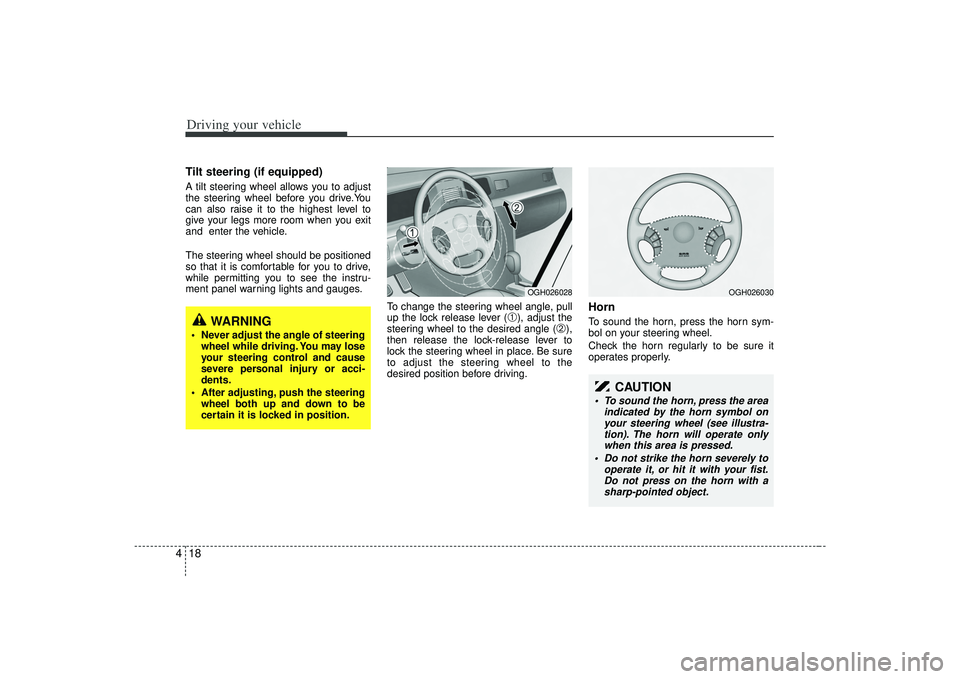
4Tilt steering (if equipped)A tilt steering wheel allows you to adjust
the steering wheel before you drive.You
can also raise it to the highest level to
give your legs more room when you exit
and enter the vehicle.
The steering wheel should be positioned
so that it is comfortable for you to drive,
while permitting you to see the instru-
ment panel warning lights and gauges.
To change the steering wheel angle, pull
up the lock release lever (
➀), adjust the
steering wheel to the desired angle (
➁),
then release the lock-release lever to
lock the steering wheel in place. Be sure
to adjust the steering wheel to the
desired position before driving.
HornTo sound the horn, press the horn sym-
bol on your steering wheel.
Check the horn regularly to be sure it
operates properly.
WARNING
Never adjust the angle of steering wheel while driving. You may lose
your steering control and cause
severe personal injury or acci-
dents.
After adjusting, push the steering wheel both up and down to be
certain it is locked in position.
OGH026028
OGH026030
CAUTION
To sound the horn, press the area indicated by the horn symbol onyour steering wheel (see illustra-tion). The horn will operate onlywhen this area is pressed.
Do not strike the horn severely to operate it, or hit it with your fist.Do not press on the horn with asharp-pointed object.
Page 155 of 321
419
Driving your vehicle
The cruise control system allows you to
program the vehicle to maintain a con-
stant speed without resting your foot on
the accelerator pedal.
With cruise control, you can set and
automatically maintain any speed of
between 24 mph (40 km/h) and
125 mph (200 km/h).
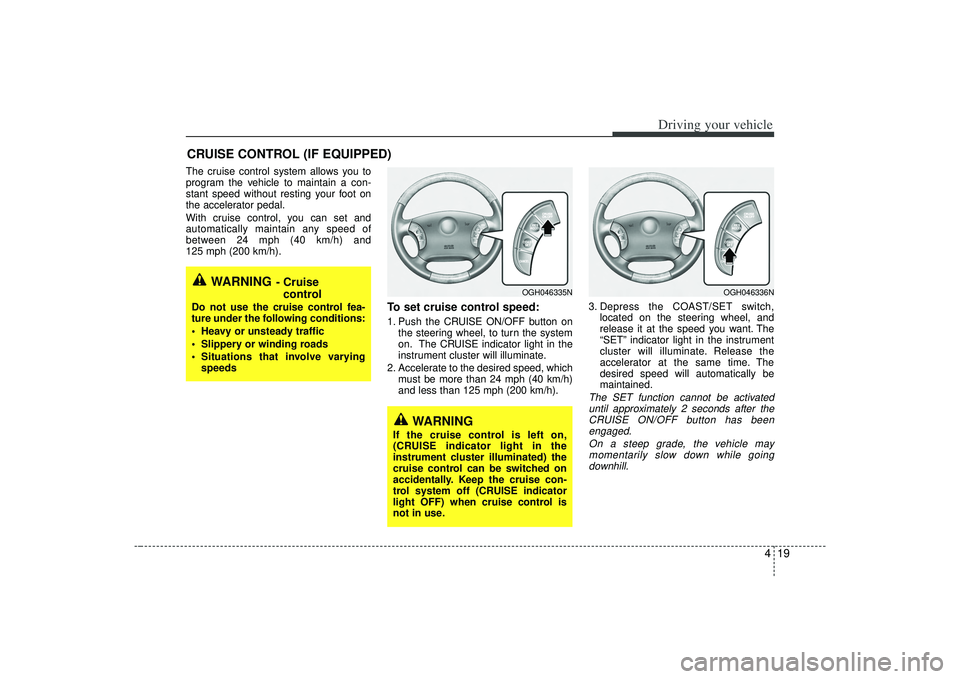
To set cruise control speed:1. Push the CRUISE ON/OFF button onthe steering wheel, to turn the system
on. The CRUISE indicator light in the
instrument cluster will illuminate.
2. Accelerate to the desired speed, which must be more than 24 mph (40 km/h)
and less than 125 mph (200 km/h). 3. Depress the COAST/SET switch,
located on the steering wheel, and
release it at the speed you want. The
“SET” indicator light in the instrument
cluster will illuminate. Release the
accelerator at the same time. The
desired speed will automatically be
maintained.
The SET function cannot be activateduntil approximately 2 seconds after theCRUISE ON/OFF button has been engaged.
On a steep grade, the vehicle maymomentarily slow down while goingdownhill.
CRUISE CONTROL (IF EQUIPPED)
WARNING
- Cruise control
Do not use the cruise control fea-
ture under the following conditions:
Heavy or unsteady traffic
Slippery or winding roads
Situations that involve varying
speeds
WARNING
If the cruise control is left on,
(CRUISE indicator light in the
instrument cluster illuminated) the
cruise control can be switched on
accidentally. Keep the cruise con-
trol system off (CRUISE indicator
light OFF) when cruise control is
not in use.
OGH046335N
OGH046336N
Page 156 of 321
Driving your vehicle20
4To cancel cruise control, do one
of the following: Depress the brake pedal.
Shift into N (Neutral).
Depress the CANCEL switch located
on the steering wheel.
Depress the COAST/SET and RES/ACCEL switches at the same
time.Each of these actions will cancel cruisecontrol operation (the “SET” indicator light in the instrument cluster will goOFF), but it will not turn the system off. Ifyou wish to resume cruise control opera-tion, depress the RES/ACCEL switch located on your steering wheel. You willreturn to your previously preset speed.
To turn cruise control off, do one
of the following: Push the CRUISE ON/OFF button on the steering wheel (the CRUISE indi-
cator light in the instrument cluster will
go OFF).
Turn the ignition off.Both of these actions cancel cruise con- trol operation. If you want to resumecruise control operation, repeat the stepsprovided in “To Set Cruise ControlSpeed” on the previous page.
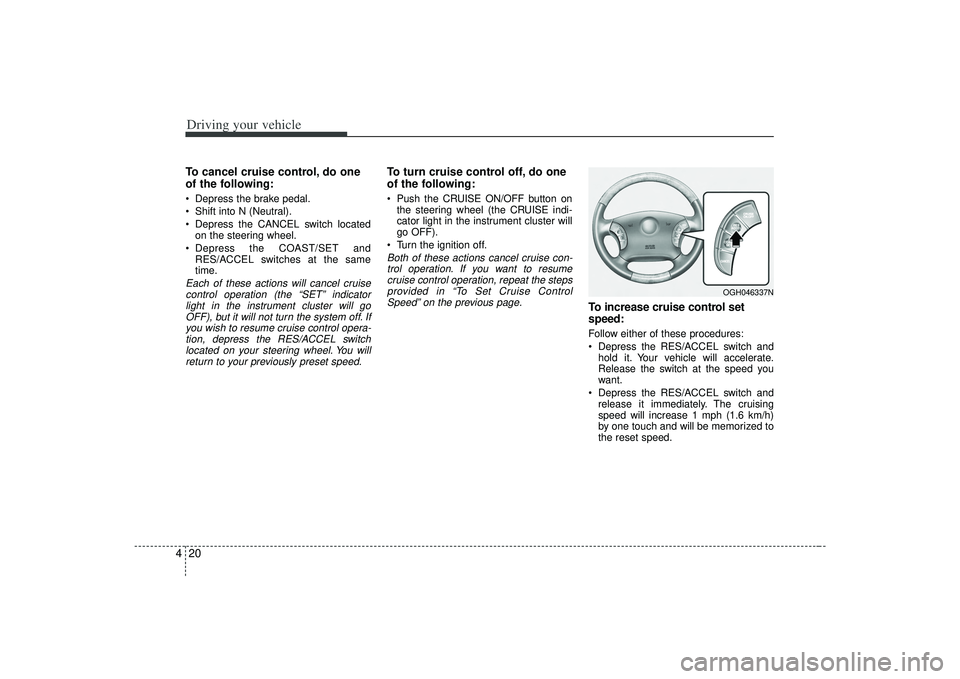
To increase cruise control set
speed:Follow either of these procedures:
Depress the RES/ACCEL switch and hold it. Your vehicle will accelerate.
Release the switch at the speed you
want.
Depress the RES/ACCEL switch and release it immediately. The cruising
speed will increase 1 mph (1.6 km/h)
by one touch and will be memorized to
the reset speed.
OGH046337N
Page 173 of 321

437
Driving your vehicle
Low tire pressure tell-
taleThe low tire pressure telltale comes on
for 3 seconds after the ignition key is
turned to the "ON" position.
If the warning light does not come on, the
Tire Pressure Monitoring System is not
working properly. If this occurs, have your
vehicle checked by an authorized Kia
dealer as soon as possible.
This warning light will also illuminate if
one or more of your tires are significantly
under-inflated.
You should stop and check your tires as
soon as possible. If the warning lights
illuminate while driving, reduce vehicle
speed immediately and stop the vehicle.
Avoid hard braking and overcorrecting at
the steering wheel. Inflate the tires to the
proper pressure as indicated on the vehi-
cle’s tire information placard.
TPMS (Tire pressure
monitoring system)
malfunction indicatorTPMS malfunction indicator illuminates
for 3 seconds after the ignition key is
turned to the "ON" position. If the warn-
ing light does not come on, or continu-
ously remains on after the 3-second bulb
check when you turned the ignition key to
the "ON" position, the Tire Pressure
Monitoring System is not working proper-
ly. If this occurs, have your vehicle
checked by an authorized Kia dealer as
soon as possible.
The warning light also comes on and
stays on when there is a problem with the
Tire Pressure Monitoring System.
If this happens, the system may not mon-
itor the tire pressure. Have the system
checked by an authorized Kia dealer as
soon as possible.
TPMS
WARNING
Significantly low tire pressure
makes the vehicle unstable and can
contribute to loss of vehicle control
and increased braking distances.
Continued driving on low pressure
tires will cause the tires to overheat
and fail.
WARNING
The TPMS cannot alert you tosevere and sudden tire damage
caused by external factors.
If you feel any vehicle instability, immediately take your foot off the
accelerator and slowly move to a
safe position off the road.
Page 198 of 321
Driving tips65SUGGESTIONS FOR ECONOMICAL OPERATIONYour vehicle's fuel economy depends
mainly on your style of driving, where you
drive and when you drive.
Each of these factors affects how many
kilometers (miles) you can get from a liter
(gallon) of fuel. To operate your vehicle
as economically as possible, use the fol-
lowing driving suggestions to help save
money in both fuel and repairs:
Avoid lengthy warm-up idling. Once theengine is running smoothly, begin driv-
ing. Remember, engine warm-up may
take a little longer on cold days.
Save fuel by accelerating slowly after stopping.
Keep the engine in tune and follow the recommended periodic maintenance
schedule. This will increase the life of
all parts and lower your operating
costs. Do not use the air conditioner unnec-
essarily.
Slow down when driving on rough roads.
For longer tire life and better fuel econ- omy, always keep the tires inflated to
the recommended pressures.
Maintain a safe distance from other vehicles to avoid sudden stops. This
will reduce wear on brake linings and
pads. Driving in such a way will also
save fuel because extra fuel is required
to accelerate back to driving speed.
Do not carry unnecessary weight in the vehicle.
Do not rest your foot on the brake pedal while driving. This can cause
needless wear, possible damage to the
brakes, and poor fuel economy.
Improper wheel alignment results in faster tire wear and lower fuel econo-
my. Open windows at high speeds can
reduce fuel economy.
Fuel economy is less in crosswinds and headwinds. To help offset some of
this loss, slow down when driving in
these conditions.
Keeping a vehicle in good operating con-
dition is important both for economy and
safety. Therefore, have an authorized Kia
dealer perform scheduled inspections
and maintenance.
WARNING
- Engine off dur-
ing motion
Never turn the engine off to coast
down hills or anytime the vehicle is
in motion. The power steering and
power brakes will not function with-
out the engine running. Instead,
downshift to an appropriate gear for
engine braking effect.
Page 199 of 321
57
Driving tips
SPECIAL DRIVING CONDITIONS Hazardous driving conditions When hazardous driving conditions are
encountered such as water, snow, ice,
mud, sand, or similar hazards, follow
these suggestions:
Drive cautiously and allow extra dis-tance for braking.
Avoid sudden movements in braking or steering.
When braking, pump the brake pedal with a light up-and-down motion until
the vehicle is stopped.✽ ✽ NOTICEDo not pump the brake pedal on a vehi-
cle equipped with ABS.
If stalled in snow, mud, or sand, use
second gear. Accelerate slowly to
avoid spinning the drive wheels.
Use sand, rock salt, tire chains, or other non-slip material under the drive
wheels to provide traction when stalled
in ice, snow, or mud.
Rocking the vehicle If it is necessary to rock the vehicle to
free it from snow, sand, or mud, first turn
the steering wheel right and left to clear
the area around your front wheels. Then,
shift back and forth between R (Reverse)
and any forward gear in vehicles
equipped with an automatic transaxle. Do
not race the engine, and spin the wheels
as little as possible. If you are still stuck
after a few tries, have the vehicle pulled
out by a tow vehicle to avoid engine
overheating and possible damage to the
transaxle.
WARNING
- Downshifting
Downshifting with an automatic
transaxle, while driving on slippery
surfaces can cause an accident.
The sudden change in tire speed
could cause the tires to skid. Be
careful when downshifting on slip-
pery surfaces.
Page 202 of 321
Driving tips10
5Snow tires If you mount snow tires on your Kia,
make sure they are radial tires of the
same size and load range as the original
tires. Mount snow tires on all four wheels
to balance your vehicle’s handling in all
weather conditions. Keep in mind that the
traction provided by snow tires on dry
roads may not be as high as your vehi-
cle's original equipment tires. You should
drive cautiously even when the roads are
clear. Check with the tire dealer for max-
imum speed recommendations.Do not install studded tires without first
checking local, state and municipal regu- lations for possible restrictions againsttheir use. Tire chains
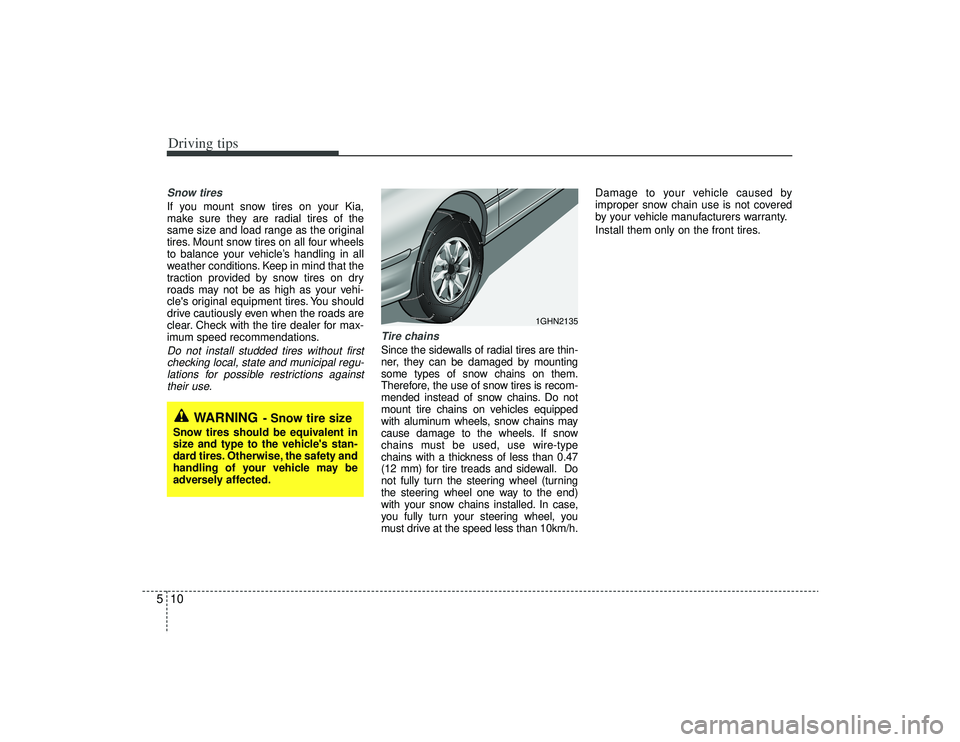
Since the sidewalls of radial tires are thin-
ner, they can be damaged by mounting
some types of snow chains on them.
Therefore, the use of snow tires is recom-
mended instead of snow chains. Do not
mount tire chains on vehicles equipped
with aluminum wheels, snow chains may
cause damage to the wheels. If snow
chains must be used, use wire-type
chains with a thickness of less than 0.47
(12 mm) for tire treads and sidewall. Do
not fully turn the steering wheel (turning
the steering wheel one way to the end)
with your snow chains installed. In case,
you fully turn your steering wheel, you
must drive at the speed less than 10km/h. Damage to your vehicle caused by
improper snow chain use is not covered
by your vehicle manufacturers warranty.
Install them only on the front tires.
WARNING
- Snow tire size
Snow tires should be equivalent in
size and type to the vehicle's stan-
dard tires. Otherwise, the safety and
handling of your vehicle may be
adversely affected.
1GHN2135