key KIA AMANTI 2009 Owner's Manual
[x] Cancel search | Manufacturer: KIA, Model Year: 2009, Model line: AMANTI, Model: KIA AMANTI 2009Pages: 321, PDF Size: 23.77 MB
Page 88 of 321
Knowing your vehicle76
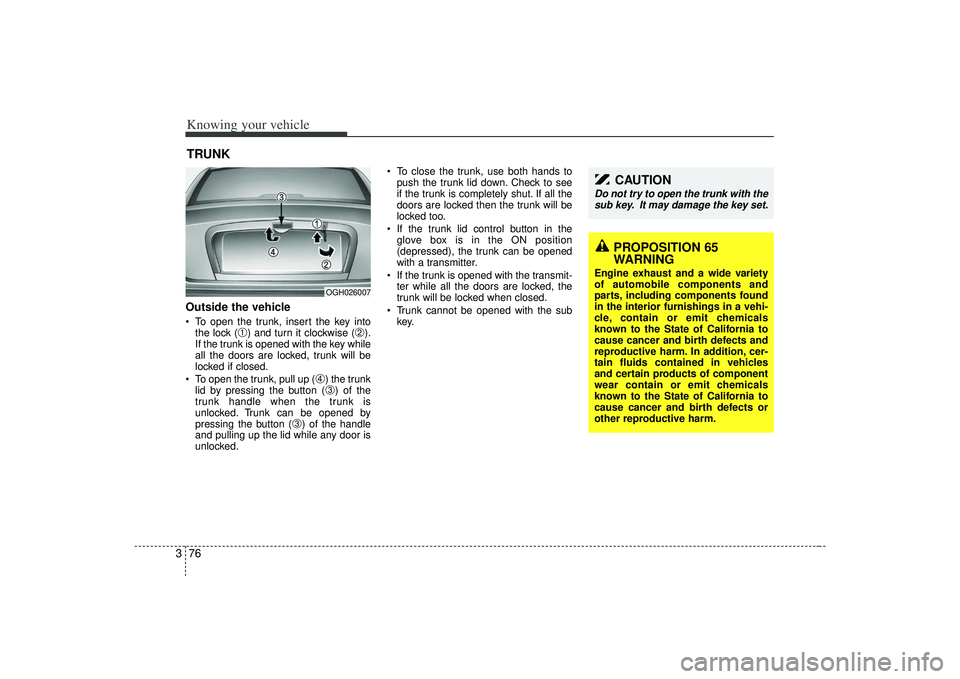
3Outside the vehicle To open the trunk, insert the key into
the lock (
➀) and turn it clockwise (
➁).
If the trunk is opened with the key while
all the doors are locked, trunk will be
locked if closed.
To open the trunk, pull up (
➃) the trunk
lid by pressing the button (➂) of the
trunk handle when the trunk is
unlocked. Trunk can be opened by
pressing the button (
➂) of the handle
and pulling up the lid while any door is
unlocked. To close the trunk, use both hands to
push the trunk lid down. Check to see
if the trunk is completely shut. If all the
doors are locked then the trunk will be
locked too.
If the trunk lid control button in the glove box is in the ON position
(depressed), the trunk can be opened
with a transmitter.
If the trunk is opened with the transmit- ter while all the doors are locked, the
trunk will be locked when closed.
Trunk cannot be opened with the sub key.
TRUNK
OGH026007
PROPOSITION 65
WARNING
Engine exhaust and a wide variety
of automobile components and
parts, including components found
in the interior furnishings in a vehi-
cle, contain or emit chemicals
known to the State of California to
cause cancer and birth defects and
reproductive harm. In addition, cer-
tain fluids contained in vehicles
and certain products of component
wear contain or emit chemicals
known to the State of California to
cause cancer and birth defects or
other reproductive harm.
CAUTION
Do not try to open the trunk with thesub key. It may damage the key set.
Page 89 of 321
377
Knowing your vehicle
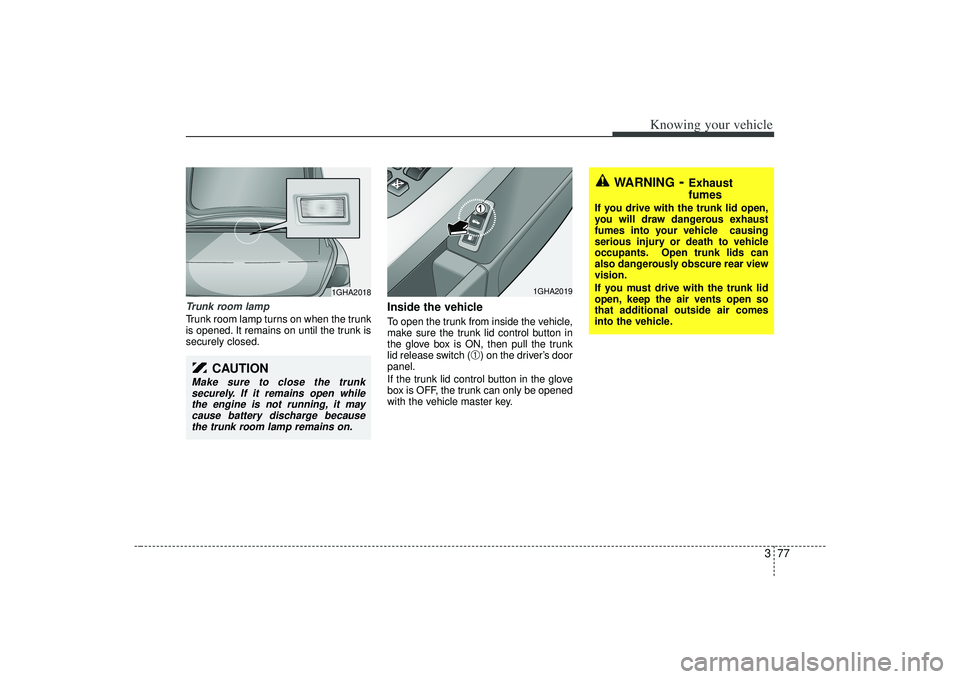
Trunk room lampTrunk room lamp turns on when the trunk
is opened. It remains on until the trunk is
securely closed.
Inside the vehicleTo open the trunk from inside the vehicle,
make sure the trunk lid control button in
the glove box is ON, then pull the trunk
lid release switch (
➀) on the driver’s door
panel.
If the trunk lid control button in the glove
box is OFF, the trunk can only be opened
with the vehicle master key.
WARNING
- Exhaust
fumes
If you drive with the trunk lid open,
you will draw dangerous exhaust
fumes into your vehicle causing
serious injury or death to vehicle
occupants. Open trunk lids can
also dangerously obscure rear view
vision.
If you must drive with the trunk lid
open, keep the air vents open so
that additional outside air comes
into the vehicle.
1GHA2018
CAUTION
Make sure to close the trunk securely. If it remains open while the engine is not running, it maycause battery discharge becausethe trunk room lamp remains on.
1GHA2019
Page 90 of 321
Knowing your vehicle78
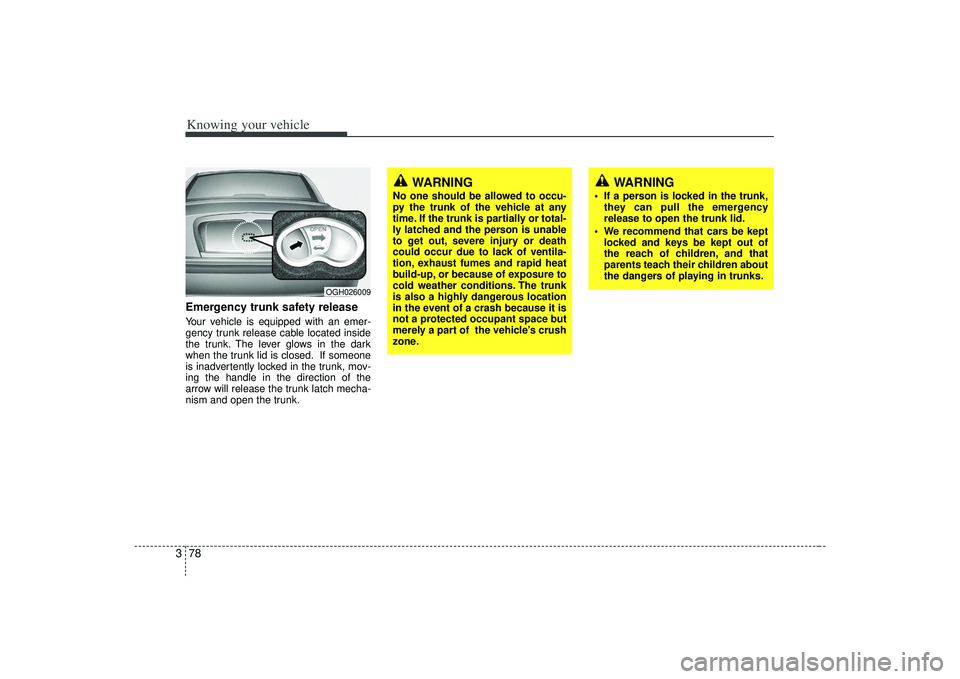
3Emergency trunk safety releaseYour vehicle is equipped with an emer-
gency trunk release cable located inside
the trunk. The lever glows in the dark
when the trunk lid is closed. If someone
is inadvertently locked in the trunk, mov-
ing the handle in the direction of the
arrow will release the trunk latch mecha-
nism and open the trunk.
OGH026009
WARNING
No one should be allowed to occu-
py the trunk of the vehicle at any
time. If the trunk is partially or total-
ly latched and the person is unable
to get out, severe injury or death
could occur due to lack of ventila-
tion, exhaust fumes and rapid heat
build-up, or because of exposure to
cold weather conditions. The trunk
is also a highly dangerous location
in the event of a crash because it is
not a protected occupant space but
merely a part of the vehicle’s crush
zone.
WARNING
If a person is locked in the trunk,
they can pull the emergency
release to open the trunk lid.
We recommend that cars be kept locked and keys be kept out of
the reach of children, and that
parents teach their children about
the dangers of playing in trunks.
Page 91 of 321
379
Knowing your vehicle
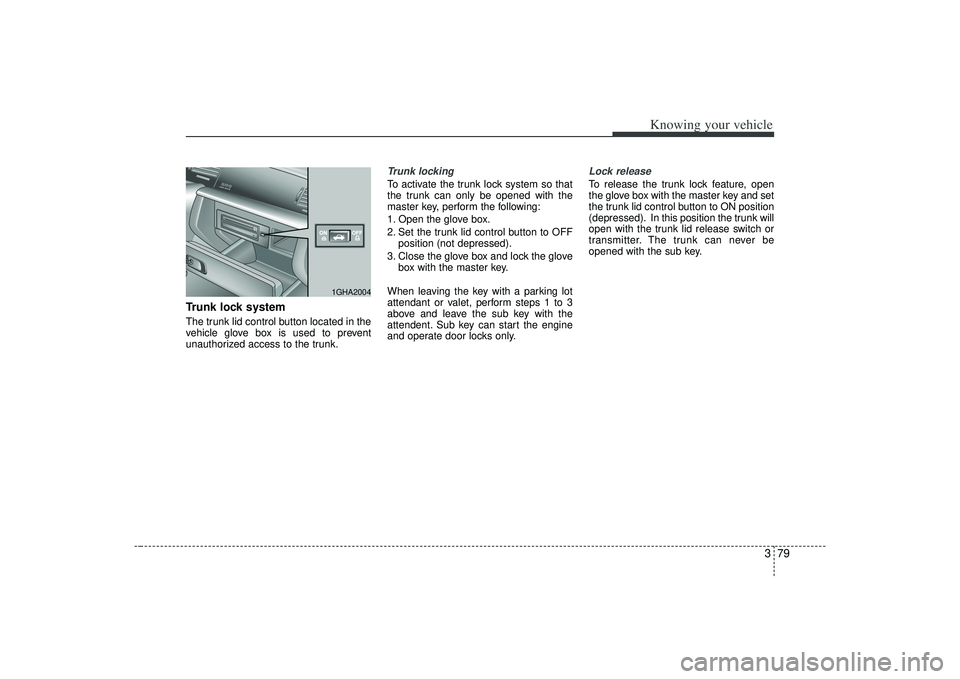
Trunk lock systemThe trunk lid control button located in the
vehicle glove box is used to prevent
unauthorized access to the trunk.
Trunk lockingTo activate the trunk lock system so that
the trunk can only be opened with the
master key, perform the following:
1. Open the glove box.
2. Set the trunk lid control button to OFFposition (not depressed).
3. Close the glove box and lock the glove box with the master key.
When leaving the key with a parking lot
attendant or valet, perform steps 1 to 3
above and leave the sub key with the
attendent. Sub key can start the engine
and operate door locks only.
Lock releaseTo release the trunk lock feature, open
the glove box with the master key and set
the trunk lid control button to ON position
(depressed). In this position the trunk will
open with the trunk lid release switch or
transmitter. The trunk can never be
opened with the sub key.
1GHA2004
Page 102 of 321
Knowing your vehicle90
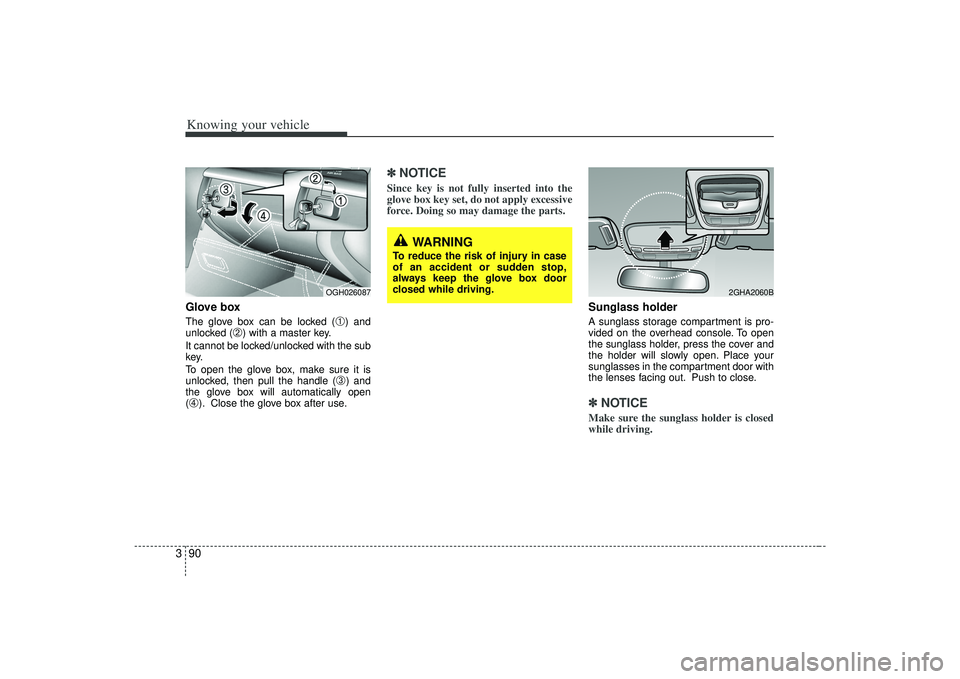
3Glove boxThe glove box can be locked (
➀) and
unlocked (
➁) with a master key.
It cannot be locked/unlocked with the sub
key.
To open the glove box, make sure it is
unlocked, then pull the handle (
➂) and
the glove box will automatically open
(
➃). Close the glove box after use.
✽ ✽ NOTICESince key is not fully inserted into the
glove box key set, do not apply excessive
force. Doing so may damage the parts.
Sunglass holder A sunglass storage compartment is pro-
vided on the overhead console. To open
the sunglass holder, press the cover and
the holder will slowly open. Place your
sunglasses in the compartment door with
the lenses facing out. Push to close.✽ ✽NOTICEMake sure the sunglass holder is closed
while driving.
WARNING
To reduce the risk of injury in case
of an accident or sudden stop,
always keep the glove box door
closed while driving.
2GHA2060B
OGH026087
Page 110 of 321
Knowing your vehicle98
3Resetting the sunroofWhenever the vehicle battery is discon-
nected or discharged, or you use the
emergency handle to operate the sun-
roof, you have to reset your sunroof sys-
tem as follows:
1. Turn the ignition key to the ON posi-
tion.
2. According to the position of the sun- roof, do as follows.
1) in case that the sunroof has closedcompletely or been tilted
: Press the TILT UP button for 1 second.
2) in case that the sunroof has slide- opened
: Press and hold the CLOSE button for more than 5 seconds until the
sunroof has closed completely.
And then press the TILT UP but-
ton for 1 second
3. Then, release it.
4. Press and hold the TILT UP button once again until the sunroof has
returned to the original position of
TILT UP after it is raised a little higher
than the maximum TILT UP position.
When this is complete, the sunroof sys-
tem is reset.
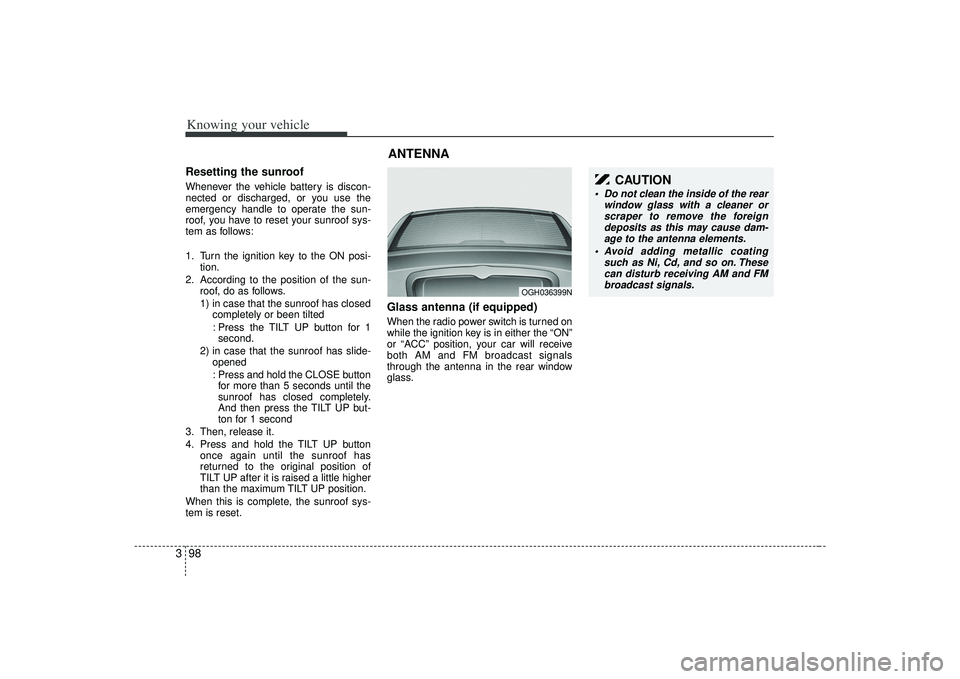
Glass antenna (if equipped)When the radio power switch is turned on
while the ignition key is in either the “ON”
or “ACC” position, your car will receive
both AM and FM broadcast signals
through the antenna in the rear window
glass.ANTENNA
OGH036399N
CAUTION
Do not clean the inside of the rear window glass with a cleaner orscraper to remove the foreigndeposits as this may cause dam- age to the antenna elements.
Avoid adding metallic coating such as Ni, Cd, and so on. Thesecan disturb receiving AM and FMbroadcast signals.
Page 121 of 321
3109
Knowing your vehicle
1. CD Loading SlotPlease face printed side upward and gen-
tly push in. When the ignition switch is on
ACC or ON and power is off, power is
automatically turned on if the CD is
loaded. This CDP supports only 12cm
CD. If VCD, Data CD are loaded, Reading
"Error message" will appear and CD will
be ejected.2. CD Indicator When car ignition switch is ACC or ONand if the CD is loaded, this indicator is
lighted. If the CD is ejected the light is
turned off(CDP Only).
If the LOAD button is pressed, this indi- cator will begin to blink(CDC Only).3. Automatic Track Selection Button Push [TRACK ] button for less than
0.8 seconds to play from the beginning
of current song.
Push [TRACK ] button for less than 0.8 seconds and press again within 1
seconds to play the previous song.
Push [TRACK ] button for 0.8 or longer to initiate reverse direction high
speed sound search of current song. Push [SEEK ] button for less than
0.8 seconds to play the next song.
Push [SEEK ] button for 0.8 or longer to initiate high speed sound
search of current song.
4. SCAN Play ButtonPlays first 10 seconds of each song in
the CD. To cancel the mode, press the
key once again.5. MUTE ButtonPress this button to temporarily cut off
the Sound. "Mute" is displayed on the
LCD. Press the button once again to can-
cel MUTE mode.6. RANDOM Play ButtonPress this button for less than 0.8 sec-
onds to activate 'RDM' mode and more
than 0.8 seconds to activate 'ALL RDM'
mode.
RDM : Only files/tracks in a folder/discare played back in a random
sequence.
ALL RDM(MP3/WMA Only) : All files in a disc are played back in the random
sequence.
7. REPEAT Play ButtonPress this button for less than 0.8 sec-
onds to activate 'RPT' mode and more
than 0.8 seconds to activate 'FLD RPT'
mode.
RPT : Only a track(file) is repeatedly
played back.
FLD RPT(MP3/WMA Only) : Only files in a folder are repeatedly played back.8. INFORMATION Selection ButtonDisplays the information of the current
CD TRACK(FILE) as below when the
button is pressed each time.
CDDA : DISC TITLE
➟DISC ARTIST
➟
TRACK TITLE
➟TRACK ARTIST
➟
TOTAL TRACK
➟...
MP3/WMA : FILE NAME
➟TITLE
➟
ARTIST
➟ALBUM
➟FOLDER NAME
➟
TOTAL FILE
➟...
9. Folder Search Button Folder name/File name(the first song in the folder) is moved up or down from
currently playing folder.
To select to the displayed folder, press ENTER(NO.11) button.
Page 135 of 321
3123
Knowing your vehicle
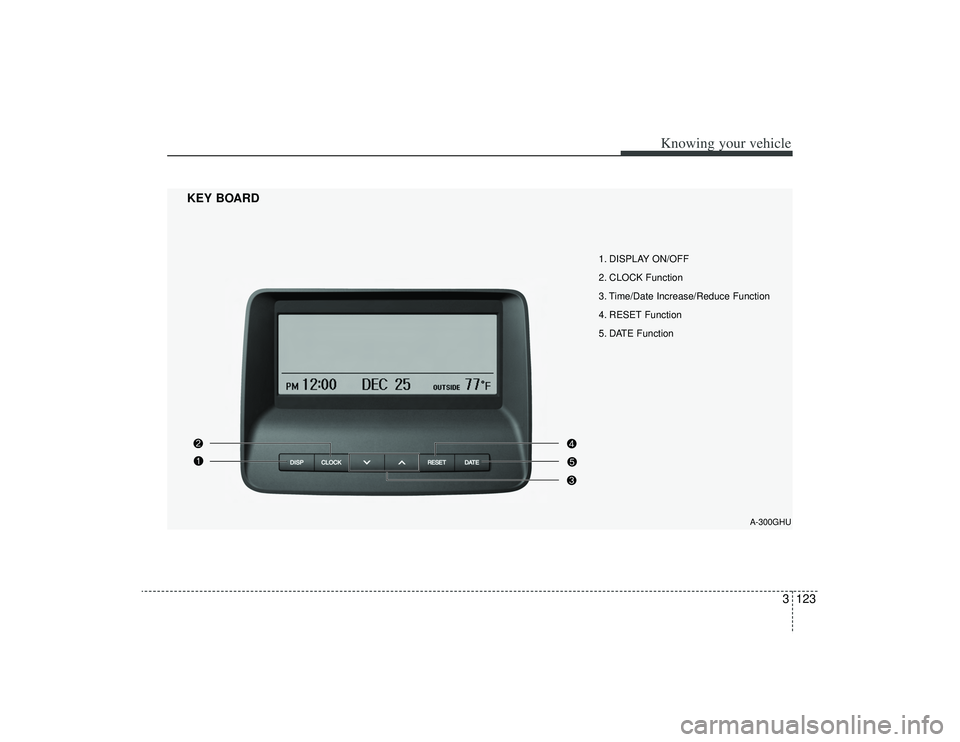
1. DISPLAY ON/OFF
2. CLOCK Function
3. Time/Date Increase/Reduce Function
4. RESET Function
5. DATE Function
KEY BOARD
A-300GHU
Page 138 of 321
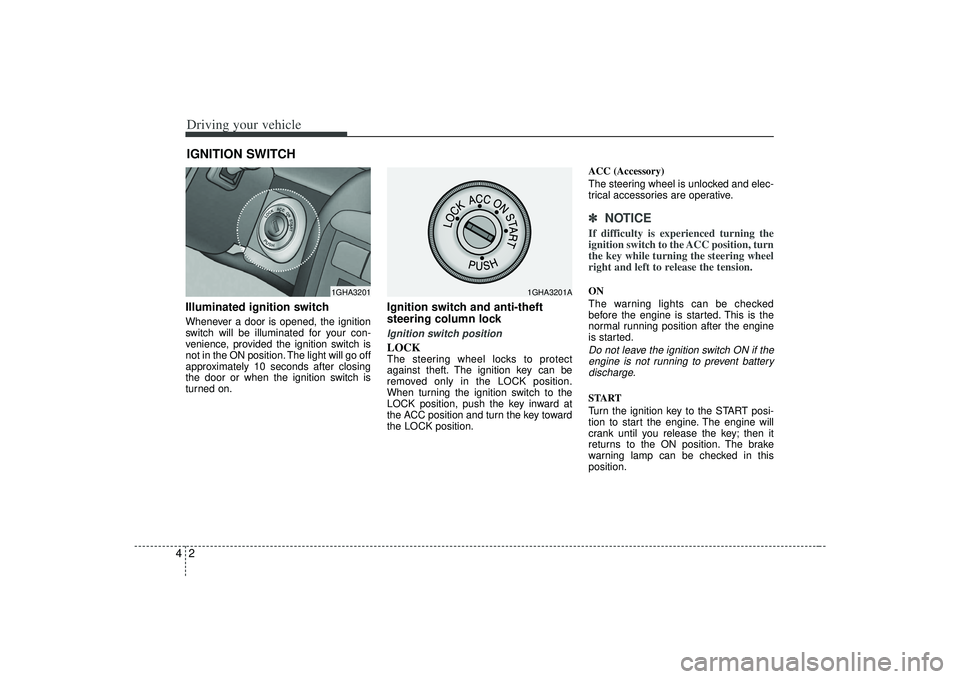
Driving your vehicle24Illuminated ignition switchWhenever a door is opened, the ignition
switch will be illuminated for your con-
venience, provided the ignition switch is
not in the ON position. The light will go off
approximately 10 seconds after closing
the door or when the ignition switch is
turned on.
Ignition switch and anti-theft
steering column lock Ignition switch positionLOCKThe steering wheel locks to protect
against theft. The ignition key can be
removed only in the LOCK position.
When turning the ignition switch to the
LOCK position, push the key inward at
the ACC position and turn the key toward
the LOCK position.ACC (Accessory)
The steering wheel is unlocked and elec-
trical accessories are operative.
✽ ✽
NOTICEIf difficulty is experienced turning the
ignition switch to the ACC position, turn
the key while turning the steering wheel
right and left to release the tension.ON
The warning lights can be checked
before the engine is started. This is the
normal running position after the engine
is started.Do not leave the ignition switch ON if the
engine is not running to prevent batterydischarge.START
Turn the ignition key to the START posi-
tion to start the engine. The engine will
crank until you release the key; then it
returns to the ON position. The brake
warning lamp can be checked in this
position.
IGNITION SWITCH
1GHA3201
1GHA3201A
Page 140 of 321
Driving your vehicle441. Make sure the parking brake isapplied.
2. Place the transaxle shift lever in P (Park). Depress the brake pedal fully.
You can also start the engine when the shift lever is in the N (Neutral)
position.
3. Turn the ignition switch to START and hold it there until the engine starts (a
maximum of 10 seconds), then
release the key.
4. In extremely cold weather (below -18°C / 0°F) or after the vehicle has
not been operated for several days, let
the engine warm up without depress-
ing the accelerator.Whether the engine is cold or warm, itshould be started without depressingthe accelerator.STARTING THE ENGINE
CAUTION
If the engine stalls while you are inmotion, do not attempt to move the shift lever to the P (Park) position. Iftraffic and road conditions permit,you may put the shift lever in the N(Neutral) position while the vehicleis still moving and turn the ignition switch to the START position in anattempt to restart the engine.
WARNING
Always wear appropriate shoes
when operating your vehicle.
Unsuitable shoes (high heels, ski
boots,etc.) may interfere with your
ability to use the brake and acceler-
ator pedal.