ECO mode KIA Borrego 2009 1.G Owner's Guide
[x] Cancel search | Manufacturer: KIA, Model Year: 2009, Model line: Borrego, Model: KIA Borrego 2009 1.GPages: 425, PDF Size: 8.46 MB
Page 220 of 425
4143
Features of your vehicle
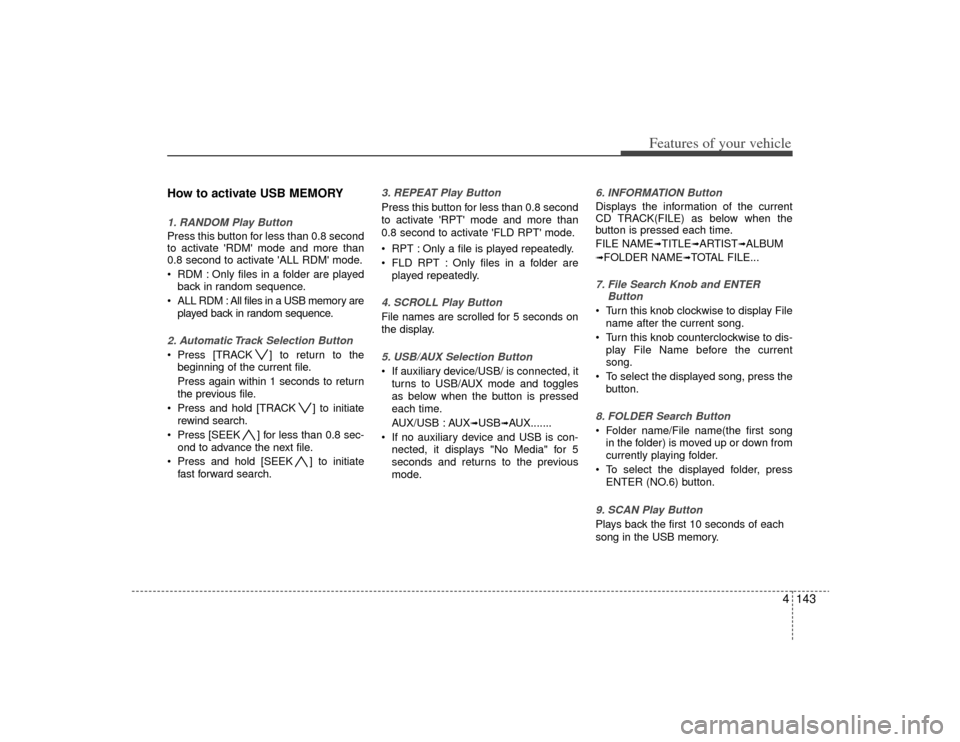
How to activate USB MEMORY1. RANDOM Play ButtonPress this button for less than 0.8 second
to activate 'RDM' mode and more than
0.8 second to activate 'ALL RDM' mode.
RDM : Only files in a folder are playedback in random sequence.
ALL RDM : All files in a USB memory are played back in random sequence.2. Automatic Track Selection Button Press [TRACK ] to return to thebeginning of the current file.
Press again within 1 seconds to return
the previous file.
Press and hold [TRACK ] to initiate rewind search.
Press [SEEK ] for less than 0.8 sec- ond to advance the next file.
Press and hold [SEEK ] to initiate fast forward search.
3. REPEAT Play ButtonPress this button for less than 0.8 second
to activate 'RPT' mode and more than
0.8 second to activate 'FLD RPT' mode.
RPT : Only a file is played repeatedly.
FLD RPT : Only files in a folder areplayed repeatedly.4. SCROLL Play ButtonFile names are scrolled for 5 seconds on
the display.5. USB/AUX Selection Button If auxiliary device/USB/ is connected, itturns to USB/AUX mode and toggles
as below when the button is pressed
each time.
AUX/USB : AUX
➟USB
➟AUX.......
If no auxiliary device and USB is con- nected, it displays "No Media" for 5
seconds and returns to the previous
mode.
6. INFORMATION ButtonDisplays the information of the current
CD TRACK(FILE) as below when the
button is pressed each time.
FILE NAME
➟TITLE
➟ARTIST
➟ALBUM
➟FOLDER NAME
➟TOTAL FILE...
7. File Search Knob and ENTER Button Turn this knob clockwise to display File
name after the current song.
Turn this knob counterclockwise to dis- play File Name before the current
song.
To select the displayed song, press the button.8. FOLDER Search Button Folder name/File name(the first songin the folder) is moved up or down from
currently playing folder.
To select the displayed folder, press ENTER (NO.6) button.9. SCAN Play Button Plays back the first 10 seconds of each
song in the USB memory.
Page 221 of 425
Features of your vehicle144
4
Hierarchy 1 Hierarchy 2 Hierarchy 3 Hierarchy 4 Hierarchy 5Playlist Playlists Songs --
Artist Artists Albums Songs -
Album Albums Songs --
Song Songs -- -
Genre Genres Artists Albums Songs
Composer Composers Albums Songs -
How to Activate iPod Device1. RANDOM Play ButtonPress this button for less than 0.8 second
to activate ' ' mode and more than 0.8
second to activate
''mode.
'' : All songs in the current catego-
ry are played in random.
'' : An album in the iPod is selected
in random and is played in the order of
the songs in the album.2. Automatic Track Selection Button Press [TRACK ] to return to the beginning of the current file.
Press again within 1 second to return
the previous file.
Press and hold [TRACK ] to initiate rewind search.
Press [SEEK ] for less than 0.8 sec- ond to advance to the next file.
Press and hold [SEEK ] to initiate fast forward search.3. REPEAT Play ButtonA single song is played repeatedly.
4. SCROLL Play ButtonFile names are scrolled for 5 second on
the display.5. iPod Selection Button If iPod is connected, it turns to iPod mode.6. INFORMATION ButtonDisplays the information of the file cur-
rently played as below when the button is
pressed each time.
TITLE
➟ARTIST
➟ALBUM...
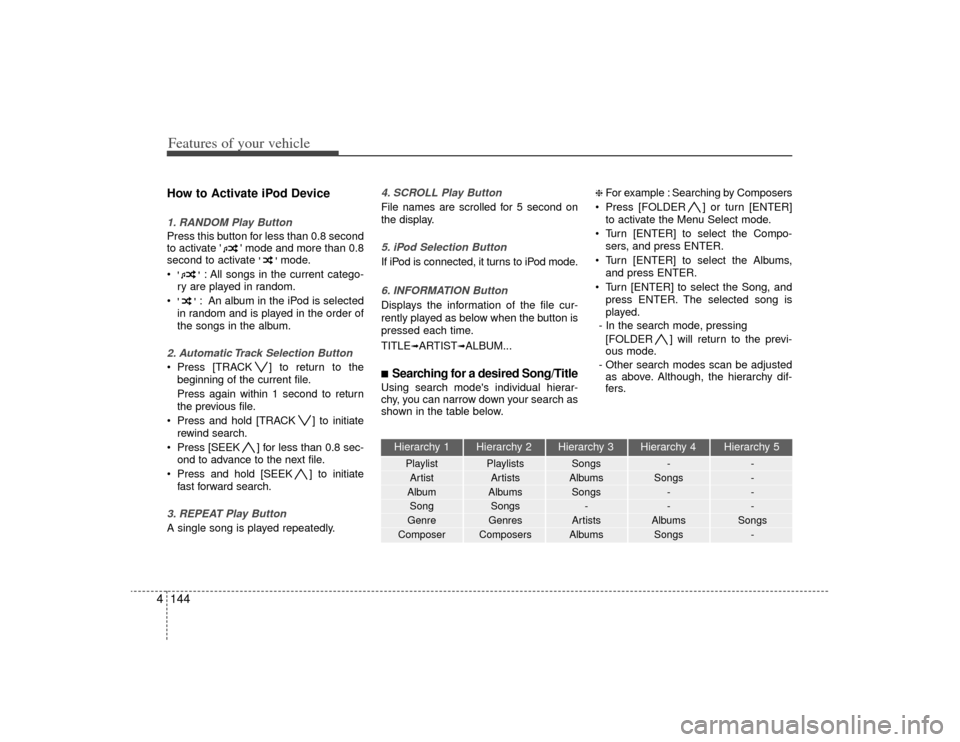
■Searching for a desired Song/TitleUsing search mode's individual hierar-
chy, you can narrow down your search as
shown in the table below.
❈ For example : Searching by Composers
Press [FOLDER ] or turn [ENTER] to activate the Menu Select mode.
Turn [ENTER] to select the Compo- sers, and press ENTER.
Turn [ENTER] to select the Albums, and press ENTER.
Turn [ENTER] to select the Song, and press ENTER. The selected song is
played.
- In the search mode, pressing [FOLDER ] will return to the previ-
ous mode.
- Other search modes scan be adjusted as above. Although, the hierarchy dif-
fers.
Page 224 of 425
![KIA Borrego 2009 1.G Owners Guide 4147
Features of your vehicle
Using the Rear Seat
Entertainment (RSE)1. DVD Chapter Selection Button Press [TRACK ] button to play fromthe beginning of current track.
Press [TRACK ] button again with](/img/2/2906/w960_2906-223.png "KIA Borrego 2009 1.G Owners Guide 4147
Features of your vehicle
Using the Rear Seat
Entertainment (RSE)1. DVD Chapter Selection Button Press [TRACK ] button to play fromthe beginning of current track.
Press [TRACK ] button again with")
4147
Features of your vehicle
Using the Rear Seat
Entertainment (RSE)1. DVD Chapter Selection Button Press [TRACK ] button to play fromthe beginning of current track.
Press [TRACK ] button again within 3 seconds to play the previous track.
Press [SEEK ] button for less than 0.8 second to play the next track.2.DVD Title Selection Button Press [FOLDER ] b utton to play the
previous track.
Press [CAT ] button to play the next
track.3. RSE ON/OFF, LOCK/UNLOCK ButtonWhen the RSE ON/OFF, LOCK/UNLOCK
button is pushed for less than 0.8 sec-
ond, the red color LED of the button will
light and RSE unit will be locked. If you
push button for more than 0.8 second,
the green color LED of the button will
light and RSE unit will turn on and [RSE]
will appear on the LCD.
4. DVD/AUX2 Selection ButtonIn the event there is a DVD inserted and
an auxiliary device is connected to the
RSE system, pressing the DVD/AUX2
button will switch between DVD and
AUX2 modes.
Page 228 of 425
4151
Features of your vehicle
How to Use SIRIUS Satellite
RadioYour Kia vehicle is equipped with a 3
month complimentary period of SIRIUS
Satellite Radio so you have access to
over 130 channels of music, information,
and entertainment programming.ActivationIn order to extend or reactivate your sub-
scription to SIRIUS Satellite Radio, you
will need to contact SIRIUS Customer
Care at 888-539-7474. Have your 12 digit
SID (Sirius Identification Number)/ESN
(Electronic Serial Number) ready. To
retrieve the SID/ESN, turn on the radio,
press the [SAT] button, and tune to chan-
nel zero. Please note that the vehicle will
need to be turned on, in Sirius mode, and
have an unobstructed view of the sky in
order for the radio to receive the activa-
tion signal.
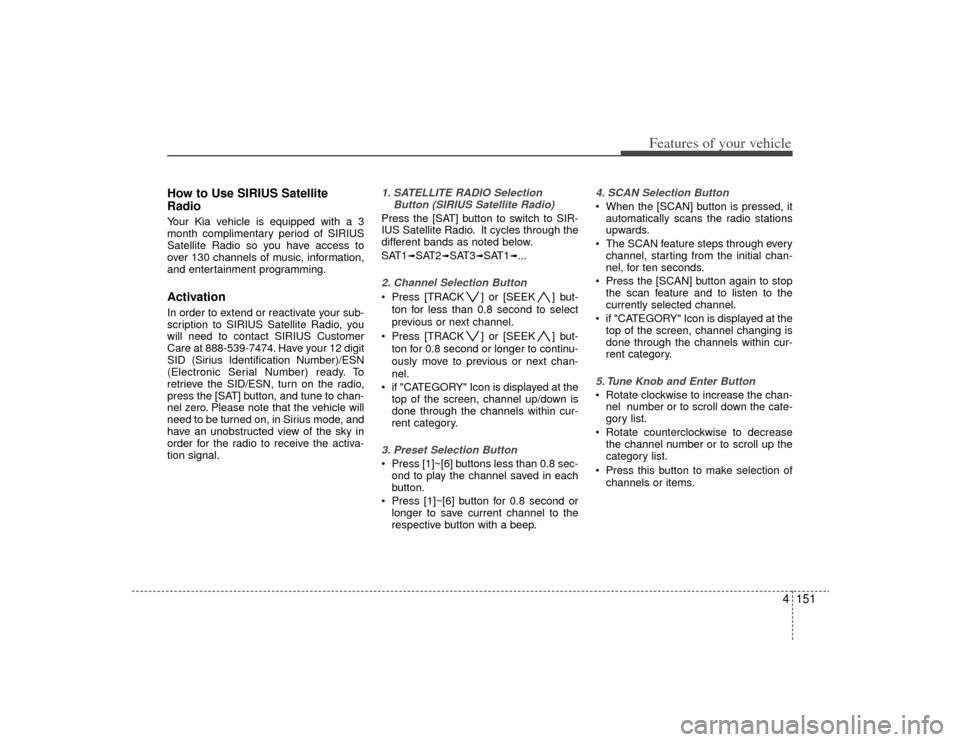
1. SATELLITE RADIO SelectionButton (SIRIUS Satellite Radio)Press the [SAT] button to switch to SIR-
IUS Satellite Radio. It cycles through the
different bands as noted below.
SAT1
➟SAT2
➟SAT3
➟SAT1
➟...
2. Channel Selection Button Press [TRACK ] or [SEEK ] but-
ton for less than 0.8 second to select
previous or next channel.
Press [TRACK ] or [SEEK ] but- ton for 0.8 second or longer to continu-
ously move to previous or next chan-
nel.
if "CATEGORY" Icon is displayed at the top of the screen, channel up/down is
done through the channels within cur-
rent category.3. Preset Selection Button Press [1]~[6] buttons less than 0.8 sec-ond to play the channel saved in each
button.
Press [1]~[6] button for 0.8 second or longer to save current channel to the
respective button with a beep.
4. SCAN Selection Button When the [SCAN] button is pressed, itautomatically scans the radio stations
upwards.
The SCAN feature steps through every channel, starting from the initial chan-
nel, for ten seconds.
Press the [SCAN] button again to stop the scan feature and to listen to the
currently selected channel.
if "CATEGORY" Icon is displayed at the top of the screen, channel changing is
done through the channels within cur-
rent category.5. Tune Knob and Enter Button Rotate clockwise to increase the chan-nel number or to scroll down the cate-
gory list.
Rotate counterclockwise to decrease the channel number or to scroll up the
category list.
Press this button to make selection of channels or items.
Page 234 of 425
![KIA Borrego 2009 1.G Owners Guide 4157
Features of your vehicle
Rear Wireless Headset1. This is used to turn the power on/off.
2. This is used to make volume adjust-ments.
Rear Panel1. The [MODE] operating on the REARsystem is displa](/img/2/2906/w960_2906-233.png "KIA Borrego 2009 1.G Owners Guide 4157
Features of your vehicle
Rear Wireless Headset1. This is used to turn the power on/off.
2. This is used to make volume adjust-ments.
Rear Panel1. The [MODE] operating on the REARsystem is displa")
4157
Features of your vehicle
Rear Wireless Headset1. This is used to turn the power on/off.
2. This is used to make volume adjust-ments.
Rear Panel1. The [MODE] operating on the REARsystem is displayed.
2. Used to turn the power on/off or adjust the volume for the speaker.
3. Used to display the menu for the mode currently operating on the REAR sys-
tem.
4. Used to make screen adjustments for the mode currently operating on the
REAR system. 5. Used to change to a different mode on
the REAR system.
Pressing this button will display a screen in which the 6 supported
modes of FM, AM, SIRIUS, CDC,
DVDP, AUX can be selected.
Re-pressing the button will return to the currently playing mode.
If there are no operations for 10 sec- onds while in mode selection screen,
the previously operated mode will be
restored.
If the REAR system power is off, the monitor will turn on and the mode
screen will become displayed.
6. This is used to play/pause when the device is operating a VCD, Audio CD,
MP3 CD or DVD.
7. The 4-direction JOYSTICK is used to move the select area on the screen of
the REAR System. The JOYSTICK key
is used to select the button within the
select area.
CAUTION
The power button and volume arepositioned at the left side of theheadset. Wearing the headset with the left and right-side reversed mayreduce sound quality and recep-tion. Check to see that the headsetsare properly worn.
Page 238 of 425
![KIA Borrego 2009 1.G Owners Guide 4161
Features of your vehicle
FM/AM modeStarting FM/AM mode by use of Rearpanel 1. Press the [MODE] button on the REAR panel to display a screen allowing the 6
modes of FM, AM, SIRIUS, CDC, AUX,
DVDP](/img/2/2906/w960_2906-237.png "KIA Borrego 2009 1.G Owners Guide 4161
Features of your vehicle
FM/AM modeStarting FM/AM mode by use of Rearpanel 1. Press the [MODE] button on the REAR panel to display a screen allowing the 6
modes of FM, AM, SIRIUS, CDC, AUX,
DVDP")
4161
Features of your vehicle
FM/AM modeStarting FM/AM mode by use of Rearpanel 1. Press the [MODE] button on the REAR panel to display a screen allowing the 6
modes of FM, AM, SIRIUS, CDC, AUX,
DVDP to be selected.
2. While in mode selection screen, use the 4-direction keys on the REAR panel
to move the select area and press the
key to select FM mode.
3. The FM1/FM2/AM mode screen will become displayed. Select the desired
broadcast station to begin listening.
Starting FM/AM mode by use of Rearremote control 1. When operating a different mode, pressing the [RADIO] key on the Rear
Remote Control will display the most
recently operated RADIO mode. In
addition, pressing the RADIO key will
change the mode in FM1
➟FM2
➟AM
➟
FM1
➟... order.
FM/AM mode menu screen configura-tion
1. Mode display
This will display the current mode.
FM1/FM2/AM
2. PRESET button
The station can be easily selected by
storing the desired frequency in advance.
3. TUNE button
The frequency/station is increased or
reduced incrementally.
4. SEEK button
The channel is automatically searched
through the SEEK function.
5. BAND button
The mode is changed in FM1
➟FM2
➟AM
➟FM1
➟... order.
6. SCAN/SEEK display
This becomes displayed when the
SCAN/SEEK functions are operating.
(The RSE supports only the AUDIO
SCAN function.)
7. Station display
The station of the currently playing
broadcast is displayed.
Page 241 of 425

Features of your vehicle164
49. Channel name, Channel name display
The NUMBER and Channel name of the
current channel are displayed.
10. CATEGORY display
The name of the current category is dis-
played.
11. SONG TITLE display
The title and broadcast title of the current
song are displayed.Methods of Frequency selectionSelecting a station through Preset
This function allows station previously
saved to be selected for broadcast.
1. After selecting one of the SIRIUS1/
SIRIUS2/SIRIUS3 modes, move the
select area to the preset button stored
with the broadcast station desired for
listening and press ENTER.
✽ ✽NOTICEThe stations possible for preset are 6
channels each for SIRIUS1, SIRIUS2
and SIRIUS3.Selecting a station through Channel
search
1. After selecting one of the SIRIUS1/
SIRIUS2/SIRIUS3 modes, press the
Channel Search button on the Remote
Control to increase or decrease the
station in 1-step increments. Use the
Channel Search button to select the
station desired for broadcast.
2. Press the [SEEK UP/DOWN] button on the Remote Control to automatical-
ly increase or decrease the station.Storing a broadcast channel to aPreset button Storing Manually
1. To store the current station, use the 4- direction key on the REAR panel or the
Remote Control to display the cursor
and move it to the PRESET button
desired for storing. 2. After positioning the cursor to the
PRESET button desired for storing,
press the JOYSTICK select key on the
REAR panel or the select key on the
Remote Control for over 0.8 seconds
to store the current frequency.
Page 244 of 425
![KIA Borrego 2009 1.G Owners Guide 4167
Features of your vehicle
CD modeStarting CD mode by use of Rearpanel 1. Press the [MODE] button on the REAR panel to display the MODE selection
screen.
2. If the 4-direction joystick located at t](/img/2/2906/w960_2906-243.png "KIA Borrego 2009 1.G Owners Guide 4167
Features of your vehicle
CD modeStarting CD mode by use of Rearpanel 1. Press the [MODE] button on the REAR panel to display the MODE selection
screen.
2. If the 4-direction joystick located at t")
4167
Features of your vehicle
CD modeStarting CD mode by use of Rearpanel 1. Press the [MODE] button on the REAR panel to display the MODE selection
screen.
2. If the 4-direction joystick located at the far right-side of the REAR panel is
moved in any direction, the select area
will become displayed on the button of
the most recently operated mode
3. While in mode selection screen, use the 4-direction keys on the REAR
panel to move the cursor to CDC
/DVDP mode and press the joystick
key to enter.
4. If the CDC mode is selected, the DISC selection screen displaying the No. 1 ~
6 DISC becomes displayed. If the
DVDP mode is selected, the CD
already inserted in the DVD PLAYER
will begin playing. 5. When in CDC mode, use the 4-direc-
tion joystick to move to the select area
of the DISC where the CD has been
inserted and press the joystick key to
begin playing.
Starting CD mode by use of Rearremote control 1. When operating a different mode, pressing the [DISC] key on the Rear
Remote Control will display the most
recently operated mode between CDC
mode and DVDP mode. In addition,
pressing the DISC key will change the
mode in CDC
➟DVDP
➟CDC order.
2. When in CDC mode, use the 4-direc- tion joystick on the REAR panel to
move to the select area of the DISC
where the CD has been inserted and
press the select button on the remote
control to begin playing.
✽ ✽NOTICEIf there are no discs already inserted in
the CD Changer or the DVD player,
pressing the [DISC] key on the remote
control will not begin mode operation.Selecting a track with the Remote
Control & Searching a playing track 1. Press the [SEEK/TRACK UP/DOWN] key on the Remote Control to move to
the previous or next track.
2. Pressing the [TUNE UP/DOWN] key on the Remote Control will quick
search the current track.✽ ✽NOTICEIn the case of CD Changer : The RAN-
DOM, REPEAT and SCAN functions
are supported only by the FRONT sys-
tem. There are no buttons for these
functions in the REAR system and the
method of operating the FRONT sys-
tem is the same as the REAR system.
In the case of DVD Player : The RAN-
DOM, REPEAT and SCAN functions
are not supported in both FRONT and
REAR systems.
Page 245 of 425

Features of your vehicle168
4CD mode menu screen configuration1. Mode display
This displays that the current mode is CD
Changer mode.
2. FAST FORWARD button
The track can be fast forwarded.
3. FAST REWIND button
The track can be rewinded.
4. TRACK DOWN button
The start of the current or previous track
will begin playing. The start of the current
track will begin playing if the track has
played for over 3 seconds. The start of
the previous track will begin playing if the
track has played for under 3 seconds. 5. TRACK UP button
The start of the next track will begin play-
ing.
6. Play time
The play time of the currently playing
song is displayed.
7. DISC number display
The DISC number of the currently play-
ing disc is displayed.
8. TRACK display
The current TRACK of the currently play-
ing DISC is displayed.
9. RDM/RPT/SCAN display
This is displayed when the RANDOM/
REPEAT/SCAN functions are operating.
10. DISC button
The 6-disc CD changer select screen is
displayed.
✽ ✽
NOTICEThere is a PLAY/PAUSE function with-
in DVDP CD mode.Selecting a DISC track 1. Select the Track button on the CD
operation screen.
(The track will change each time the
[TRACK] buttons are pressed.)Fast-forwarding a track 1. Press the [FAST FORWARD] button to fast forward the current song.✽ ✽NOTICEThe tracks will continue to be searched
if the button is continuously pressed. If
released, the video will return to normal
speed.
Page 246 of 425
![KIA Borrego 2009 1.G Owners Guide 4169
Features of your vehicle
MP3 modeStarting MP3 mode by use of Rearpanel 1. Press the [MODE] button on the REAR panel to display the MODE selection
screen.
2. If the key on the joystick located at](/img/2/2906/w960_2906-245.png "KIA Borrego 2009 1.G Owners Guide 4169
Features of your vehicle
MP3 modeStarting MP3 mode by use of Rearpanel 1. Press the [MODE] button on the REAR panel to display the MODE selection
screen.
2. If the key on the joystick located at")
4169
Features of your vehicle
MP3 modeStarting MP3 mode by use of Rearpanel 1. Press the [MODE] button on the REAR panel to display the MODE selection
screen.
2. If the key on the joystick located at the far right-side of the REAR panel is
moved in any direction, the select area
will become displayed on the button of
the most recently operated mode.
3. While in mode selection screen, use the 4-direction keys on the REAR
panel to move the select area to CDC
/DVDP mode and press the joystick
key to enter.
4. If the CDC mode is selected, the DISC selection screen displaying the No. 1 ~
6 DISC becomes displayed. If the
DVDP mode is selected, the MP3
already inserted in the DVD PLAYER
will begin playing. 5. When in CDC mode, use the 4-direc-
tion joystick on the REAR panel to
move to the select area of the DISC
where the MP3 has been inserted and
press the joystick key to begin playing.
Starting MP3 mode by use of Rearremote control 1. When operating a different mode, pressing the [DISC] button on the
REAR Remote Control will display the
most recently operated mode between
CDC mode and DVDP mode. In addi-
tion, pressing the DISC key will
change the mode in
CDC
➟DVDP
➟CDC order.
2. When in CDC mode, use the 4-direc- tion joystick on the REAR panel to
move to the select area of the DISC
where the MP3 has been inserted and
press the select button on the remote
control to begin playing.
✽ ✽NOTICEIf there are no discs already inserted in
the CD Changer or the DVD player,
pressing the [DISC] key on the remote
control will not begin mode operation.Selecting a file or searching current
file with the Rear Remote Control 1. Press the [SEEK/TRACK UP/DOWN] button on the Remote Control to move
to the previous or next file.
2. Pressing the [TUNE UP/DOWN] button on the Remote Control will quickly
search the previous or next files.✽ ✽NOTICEIn the case of CD Changer : The RAN-
DOM, REPEAT, and SCAN functions
are supported only by the FRONT sys-
tem. There are no buttons for these
functions in the REAR system and the
method of operating the FRONT system
are the same as the REAR system.
In the case of DVD Player : The RAN-
DOM, REPEAT and SCAN functions
are not supported in the FRONT and
REAR systems.