ESP KIA Borrego 2011 1.G Owner's Guide
[x] Cancel search | Manufacturer: KIA, Model Year: 2011, Model line: Borrego, Model: KIA Borrego 2011 1.GPages: 464, PDF Size: 12.57 MB
Page 219 of 464
4139
Features of your vehicle
How to Activate
CDP/CD CHANGER
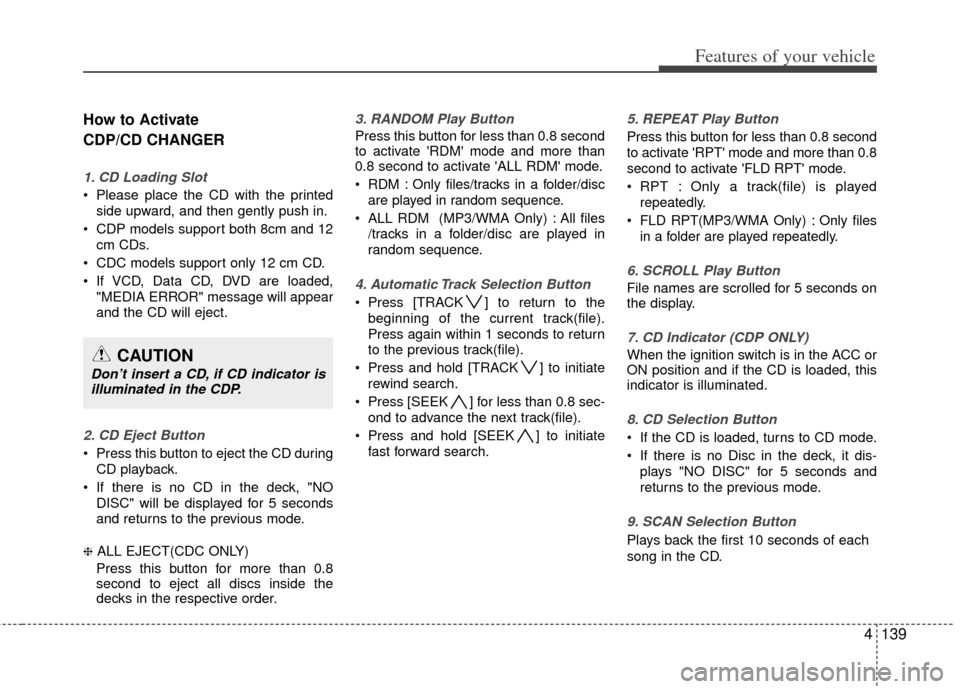
1. CD Loading Slot
Please place the CD with the printedside upward, and then gently push in.
CDP models support both 8cm and 12 cm CDs.
CDC models support only 12 cm CD.
If VCD, Data CD, DVD are loaded, "MEDIA ERROR" message will appear
and the CD will eject.
2. CD Eject Button
Press this button to eject the CD duringCD playback.
If there is no CD in the deck, "NO DISC" will be displayed for 5 seconds
and returns to the previous mode.
❈ ALL EJECT(CDC ONLY)
Press this button for more than 0.8
second to eject all discs inside the
decks in the respective order.
3. RANDOM Play Button
Press this button for less than 0.8 second
to activate 'RDM' mode and more than
0.8 second to activate 'ALL RDM' mode.
RDM : Only files/tracks in a folder/disc are played in random sequence.
ALL RDM (MP3/WMA Only) : All files /tracks in a folder/disc are played in
random sequence.
4. Automatic Track Selection Button
Press [TRACK ] to return to thebeginning of the current track(file).
Press again within 1 seconds to return
to the previous track(file).
Press and hold [TRACK ] to initiate rewind search.
Press [SEEK ] for less than 0.8 sec- ond to advance the next track(file).
Press and hold [SEEK ] to initiate fast forward search.
5. REPEAT Play Button
Press this button for less than 0.8 second
to activate 'RPT' mode and more than 0.8
second to activate 'FLD RPT' mode.
RPT : Only a track(file) is playedrepeatedly.
FLD RPT(MP3/WMA Only) : Only files in a folder are played repeatedly.
6. SCROLL Play Button
File names are scrolled for 5 seconds on
the display.
7. CD Indicator (CDP ONLY)
When the ignition switch is in the ACC or
ON position and if the CD is loaded, this
indicator is illuminated.
8. CD Selection Button
If the CD is loaded, turns to CD mode.
If there is no Disc in the deck, it dis-plays "NO DISC" for 5 seconds and
returns to the previous mode.
9. SCAN Selection Button
Plays back the first 10 seconds of each
song in the CD.
CAUTION
Don’t insert a CD, if CD indicator isilluminated in the CDP.
Page 231 of 464
4151
Features of your vehicle
Satellite radio channels:
SIRIUS Satellite Radio has over 130 chan-
nels, including 69 channels of 100% com-
mercial-free music, plus sports, news, talk
and entertainment available nationwide in
your vehicle. For more information and a
complete list of SIRIUS Satellite Radio
channels, visit sirius.com in the United
States, sirius-canada.ca in Canada, or call
SIRIUS at 1-888-539-7474.
Satellite radio reception factors:
To receive the satellite signal, your vehi-
cle has been equipped with a satellite
radio antenna located on the roof of your
vehicle. The vehicle roof provides the
best location for an unobstructed, open
view of the sky, a requirement of a satel-
lite radio system. Like AM/FM, there are
several factors that can affect satellite
radio reception performance:
Antenna obstructions: For optimalreception performance, keep the anten-
na clear of snow and ice build-up and
keep luggage and other material as far
away from the antenna as possible.
Terrain: Hills, mountains, tall buildings, bridges, tunnels, freeway overpasses,
parking garages, dense tree foliage
and thunderstorms can interfere with
your reception.
SIRIUS Satellite Radio service:
SIRIUS Satellite Radio is a subscription-
based satellite radio service that broad-
casts music, sports, news and entertain-
ment programming to radio receivers,
which are available for installation in
motor vehicles or factory installed, as
well as for the home, portable and wire-
less devices, and through an Internet
connection on personal computer.
Vehicles that are equipped with a factory
installed SIRIUS Satellite Radio system
include:
Hardware and an introductory trial sub-scription term, which begins on the
date of sale or lease of the vehicle.
For a small upgrade fee, access to SIRIUS music channels, and other
select channels over the Internet using
any computer connected to the
Internet (U.S. customers only).
For information on extended subscrip-
tion terms, contact SIRIUS at 1-888-
539-7474.
✽ ✽ NOTICE
Satellite Radio requires SIRIUS®com-
patible receiver and a subscription serv-
ice fee after trial period.
Vehicles without a factory-installed
radio receiver require hardware pur-
chase and installation. Please see your
dealer for further details. All fees and
programming subject to change.
Subscriptions governed by the SIRIUS
Terms & Conditions available at
www
.sirius.com/ serviceterms.
Available only in the 48 contiguous
United States and the District of
Columbia. Service available in Canada;
see www
.siriuscanada.caChrysler LLC shall not be responsible
for any such programming changes.
Satellite Radio Electronic Serial
Number (ESN): This 12-digit Satellite
Serial Number is needed to re-activate,
modify or track your satellite radio
account. You will need this number when
communicating with SIRIUS.
SIRIUS SATELLITE RADIO INFORMATION (IF EQUIPPED)
Page 235 of 464
4155
Features of your vehicle
How to Use SIRIUS Satellite
Radio
Your Kia vehicle is equipped with a 3
month complimentary period of SIRIUS
Satellite Radio so you have access to
over 130 channels of music, information,
and entertainment programming.
Activation
In order to extend or reactivate your sub-
scription to SIRIUS Satellite Radio, you
will need to contact SIRIUS Customer
Care at 888-539-7474. Have your 12 digit
SID (Sirius Identification Number)/ESN
(Electronic Serial Number) ready. To
retrieve the SID/ESN, turn on the radio,
press the [SAT] button, and tune to chan-
nel zero. Please note that the vehicle will
need to be turned on, in Sirius mode, and
have an unobstructed view of the sky in
order for the radio to receive the activa-
tion signal.
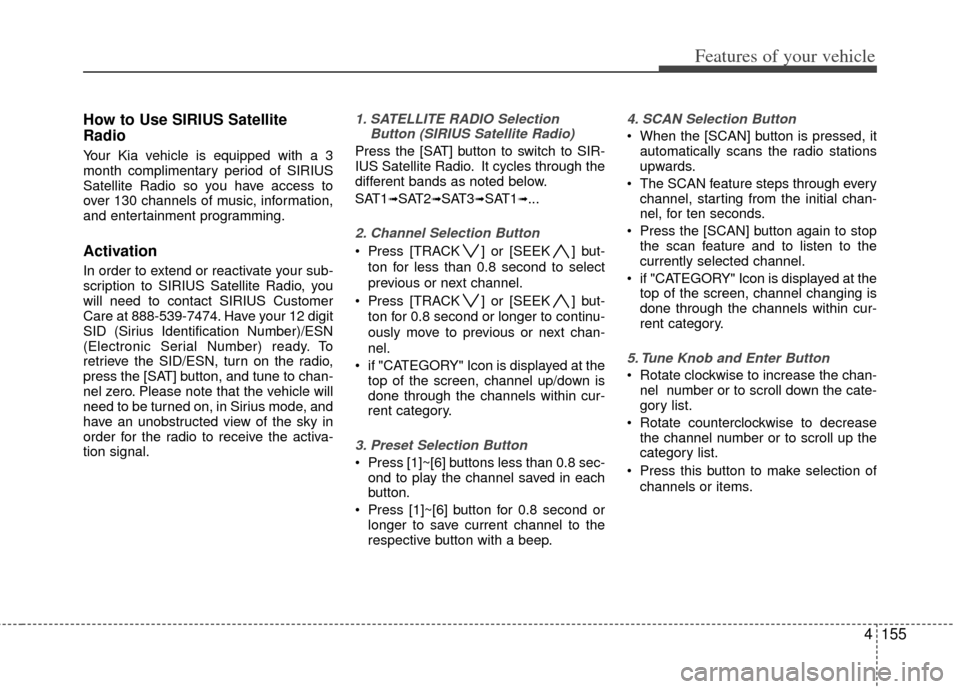
1. SATELLITE RADIO SelectionButton (SIRIUS Satellite Radio)
Press the [SAT] button to switch to SIR-
IUS Satellite Radio. It cycles through the
different bands as noted below.
SAT1
➟SAT2➟SAT3➟SAT1➟...
2. Channel Selection Button
Press [TRACK ] or [SEEK ] but-
ton for less than 0.8 second to select
previous or next channel.
Press [TRACK ] or [SEEK ] but- ton for 0.8 second or longer to continu-
ously move to previous or next chan-
nel.
if "CATEGORY" Icon is displayed at the top of the screen, channel up/down is
done through the channels within cur-
rent category.
3. Preset Selection Button
Press [1]~[6] buttons less than 0.8 sec-ond to play the channel saved in each
button.
Press [1]~[6] button for 0.8 second or longer to save current channel to the
respective button with a beep.
4. SCAN Selection Button
When the [SCAN] button is pressed, itautomatically scans the radio stations
upwards.
The SCAN feature steps through every channel, starting from the initial chan-
nel, for ten seconds.
Press the [SCAN] button again to stop the scan feature and to listen to the
currently selected channel.
if "CATEGORY" Icon is displayed at the top of the screen, channel changing is
done through the channels within cur-
rent category.
5. Tune Knob and Enter Button
Rotate clockwise to increase the chan-nel number or to scroll down the cate-
gory list.
Rotate counterclockwise to decrease the channel number or to scroll up the
category list.
Press this button to make selection of channels or items.
Page 240 of 464
Features of your vehicle
160
4
How to Activate RADIO,
SET UP, VOLUME Control
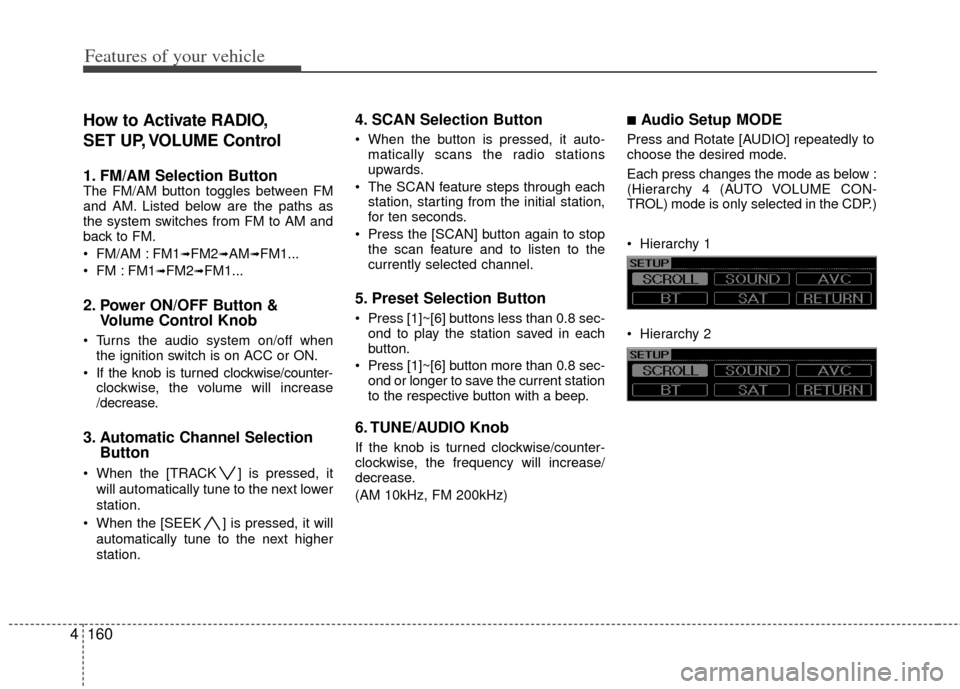
1. FM/AM Selection Button The FM/AM button toggles between FM
and AM. Listed below are the paths as
the system switches from FM to AM and
back to FM.
FM/AM : FM1
➟FM2➟AM➟FM1...
FM : FM1
➟FM2➟FM1...
2. Power ON/OFF Button & Volume Control Knob
Turns the audio system on/off when
the ignition switch is on ACC or ON.
If the knob is turned clockwise/counter- clockwise, the volume will increase
/decrease.
3. Automatic Channel Selection Button
When the [TRACK ] is pressed, it
will automatically tune to the next lower
station.
When the [SEEK ] is pressed, it will automatically tune to the next higher
station.
4. SCAN Selection Button
When the button is pressed, it auto-matically scans the radio stations
upwards.
The SCAN feature steps through each station, starting from the initial station,
for ten seconds.
Press the [SCAN] button again to stop the scan feature and to listen to the
currently selected channel.
5. Preset Selection Button
Press [1]~[6] buttons less than 0.8 sec-ond to play the station saved in each
button.
Press [1]~[6] b utton more than 0.8 sec-
ond or longer to save the current station
to the respective button with a beep.
6. TUNE/AUDIO Knob
If the knob is turned clockwise/counter-
clockwise, the frequency will increase/
decrease.
(AM 10kHz, FM 200kHz)
■Audio Setup MODE
Press and Rotate [AUDIO] repeatedly to
choose the desired mode.
Each press changes the mode as below :
(Hierarchy 4 (AUTO VOLUME CON-
TROL) mode is only selected in the CDP.)
Hierarchy 1
Hierarchy 2
Page 245 of 464
4165
Features of your vehicle
How to Activate
CDP/CD CHANGER
1. CD Loading Slot
Please place the CD with the printedside upward, and then gently push in.
CDP models support both 8cm and 12 cm CDs.
CDC models support only 12 cm CD.
If VCD, Data CD, DVD are loaded, "MEDIA ERROR" message will appear
and the CD will eject.
2. CD Eject Button
Press this button to eject the CD duringCD playback.
If there is no CD in the deck, "NO DISC" will be displayed for 5 seconds
and returns to the previous mode.
❈ ALL EJECT(CDC ONLY)
Press this button for more than 0.8
second to eject all discs inside the
decks in the respective order.
3. RANDOM Play Button
Press this button for less than 0.8 second
to activate 'RDM' mode and more than
0.8 second to activate 'ALL RDM' mode.
RDM : Only files/tracks in a folder/disc are played in random sequence.
ALL RDM (MP3/WMA Only) : All files /tracks in a folder/disc are played in
random sequence.
4. Automatic Track Selection Button
Press [TRACK ] to return to thebeginning of the current track(file).
Press again within 1 seconds to return
to the previous track(file).
Press and hold [TRACK ] to initiate rewind search.
Press [SEEK ] for less than 0.8 sec- ond to advance the next track(file).
Press and hold [SEEK ] to initiate fast forward search.
5. REPEAT Play Button
Press this button for less than 0.8 second
to activate 'RPT' mode and more than 0.8
second to activate 'FLD RPT' mode.
RPT : Only a track(file) is playedrepeatedly.
FLD RPT(MP3/WMA Only) : Only files in a folder are played repeatedly.
6. CD Indicator(CDP ONLY)
When the ignition switch is in the ACC or
ON position and if the CD is loaded, this
indicator is illuminated.
7. CD Selection Button
If the CD is loaded, turns to CD mode.
If there is no Disc in the deck, it dis-plays "NO DISC" for 5 seconds and
returns to the previous mode.
8. SCAN Selection Button
Plays back the first 10 seconds of each
song in the CD.
CAUTION
Don’t insert a CD, if CD indicator isilluminated in the CDP.
Page 257 of 464
4177
Features of your vehicle
Satellite radio channels:
SIRIUS Satellite Radio has over 130 chan-
nels, including 69 channels of 100% com-
mercial-free music, plus sports, news, talk
and entertainment available nationwide in
your vehicle. For more information and a
complete list of SIRIUS Satellite Radio
channels, visit sirius.com in the United
States, sirius-canada.ca in Canada, or call
SIRIUS at 1-888-539-7474.
Satellite radio reception factors:
To receive the satellite signal, your vehi-
cle has been equipped with a satellite
radio antenna located on the roof of your
vehicle. The vehicle roof provides the
best location for an unobstructed, open
view of the sky, a requirement of a satel-
lite radio system. Like AM/FM, there are
several factors that can affect satellite
radio reception performance:
Antenna obstructions: For optimalreception performance, keep the anten-
na clear of snow and ice build-up and
keep luggage and other material as far
away from the antenna as possible.
Terrain: Hills, mountains, tall buildings, bridges, tunnels, freeway overpasses,
parking garages, dense tree foliage
and thunderstorms can interfere with
your reception.
SIRIUS Satellite Radio service:
SIRIUS Satellite Radio is a subscription-
based satellite radio service that broad-
casts music, sports, news and entertain-
ment programming to radio receivers,
which are available for installation in
motor vehicles or factory installed, as
well as for the home, portable and wire-
less devices, and through an Internet
connection on personal computer.
Vehicles that are equipped with a factory
installed SIRIUS Satellite Radio system
include:
Hardware and an introductory trial sub-scription term, which begins on the
date of sale or lease of the vehicle.
For a small upgrade fee, access to SIRIUS music channels, and other
select channels over the Internet using
any computer connected to the
Internet (U.S. customers only).
For information on extended subscrip-
tion terms, contact SIRIUS at 1-888-
539-7474.
✽ ✽ NOTICE
Satellite Radio requires SIRIUS®com-
patible receiver and a subscription serv-
ice fee after trial period.
Vehicles without a factory-installed
radio receiver require hardware pur-
chase and installation. Please see your
dealer for further details. All fees and
programming subject to change.
Subscriptions governed by the SIRIUS
Terms & Conditions available at
www
.sirius.com/ serviceterms.
Available only in the 48 contiguous
United States and the District of
Columbia. Service available in Canada;
see www
.siriuscanada.caChrysler LLC shall not be responsible
for any such programming changes.
Satellite Radio Electronic Serial
Number (ESN): This 12-digit Satellite
Serial Number is needed to re-activate,
modify or track your satellite radio
account. You will need this number when
communicating with SIRIUS.
SIRIUS SATELLITE RADIO INFORMATION (IF EQUIPPED)
Page 261 of 464
4181
Features of your vehicle
How to Use SIRIUS Satellite
Radio
Your Kia vehicle is equipped with a 3
month complimentary period of SIRIUS
Satellite Radio so you have access to
over 130 channels of music, information,
and entertainment programming.
Activation
In order to extend or reactivate your sub-
scription to SIRIUS Satellite Radio, you
will need to contact SIRIUS Customer
Care at 888-539-7474. Have your 12 digit
SID (Sirius Identification Number)/ESN
(Electronic Serial Number) ready. To
retrieve the SID/ESN, turn on the radio,
press the [SAT] button, and tune to chan-
nel zero. Please note that the vehicle will
need to be turned on, in Sirius mode, and
have an unobstructed view of the sky in
order for the radio to receive the activa-
tion signal.
1. SATELLITE RADIO SelectionButton(SIRIUS Satellite Radio)
Press the [SAT] button to switch to SIR-
IUS Satellite Radio. It cycles through the
different bands as noted below.
SAT1
➟SAT2➟SAT3➟SAT1➟...
2. Channel Selection Button
Press [TRACK ] or [SEEK ] but-
ton for less than 0.8 second to select
previous or next channel.
Press [TRACK ] or [SEEK ] but- ton for 0.8 second or longer to continu-
ously move to previous or next chan-
nel.
if "CATEGORY" Icon is displayed at the top of the screen, channel up/down is
done through the channels within cur-
rent category.
3. Preset Selection Button
Press [1]~[6] buttons less than 0.8 sec-ond to play the channel saved in each
button.
Press [1]~[6] button for 0.8 second or longer to save current channel to the
respective button with a beep.
4. SCAN Selection Button
When the [SCAN] button is pressed, itautomatically scans the radio stations
upwards.
The SCAN feature steps through every channel, starting from the initial chan-
nel, for ten seconds.
Press the [SCAN] button again to stop the scan feature and to listen to the
currently selected channel.
if "CATEGORY" Icon is displayed at the top of the screen, channel changing is
done through the channels within cur-
rent category.
5. Tune Knob and Enter Button
Rotate clockwise to increase the chan-nel number or to scroll down the cate-
gory list.
Rotate counterclockwise to decrease the channel number or to scroll up the
category list.
Press this button to make selection of channels or items.
Page 263 of 464
4183
Features of your vehicle
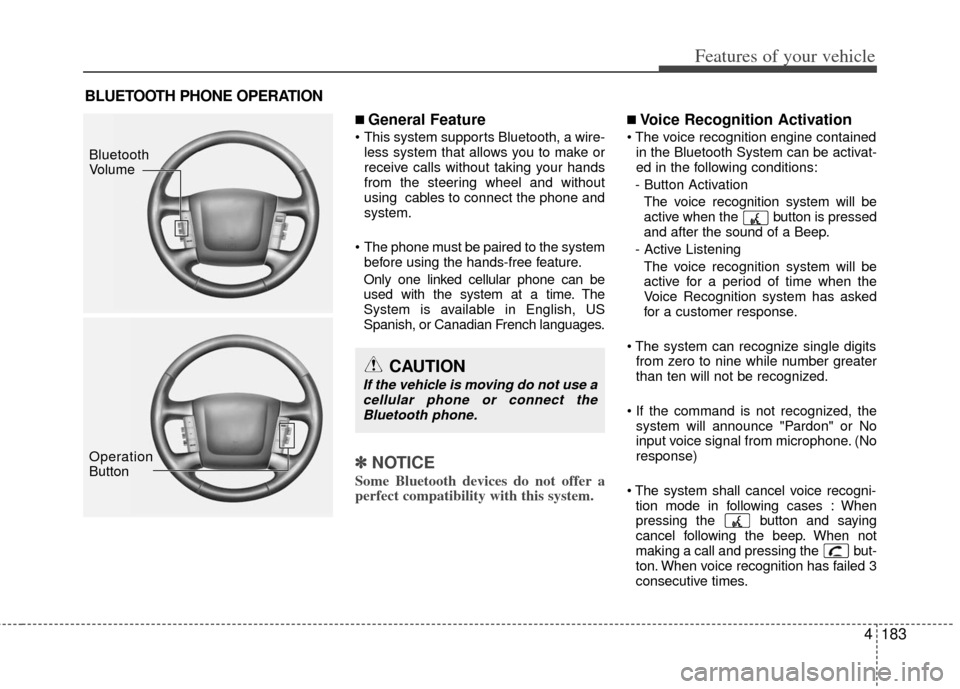
■ General Feature
This system supports Bluetooth, a wire-less system that allows you to make or
receive calls without taking your hands
from the steering wheel and without
using cables to connect the phone and
system.
The phone must be paired to the system before using the hands-free feature.
Only one linked cellular phone can be
used with the system at a time. The
System is available in English, US
Spanish, or Canadian French languages.
✽ ✽ NOTICE
Some Bluetooth devices do not offer a
perfect compatibility with this system.
■Voice Recognition Activation
in the Bluetooth System can be activat-
ed in the following conditions:
- Button Activation The voice recognition system will be
active when the button is pressed
and after the sound of a Beep.
- Active Listening The voice recognition system will be
active for a period of time when the
Voice Recognition system has asked
for a customer response.
from zero to nine while number greater
than ten will not be recognized.
system will announce "Pardon" or No
input voice signal from microphone. (No
response)
tion mode in following cases : When
pressing the button and saying
cancel following the beep. When not
making a call and pressing the but-
ton. When voice recognition has failed 3
consecutive times.
BLUETOOTH PHONE OPERATION
CAUTION
If the vehicle is moving do not use acellular phone or connect theBluetooth phone.
Bluetooth
Volume
Operation
Button
Page 265 of 464
4185
Features of your vehicle
Changing Priority
The connection priority for registered
phones can be changed.
1. Press the button.
2. Say "Set Up".
3. Say "Change Priority".
4. Say the name of the contact or the number of the contact.
5. Say "Yes".
Turning Bluetooth on / off
Bluetooth function can be switched ON/
OFF. initial status : Bluetooth ON
1. Press the button.
2. Say "Set Up".
3. Say "Bluetooth off".
4. Say "Yes".
Turning Bluetooth on
1. Press the send or button.
2. Say "yes".
3. The Bluetooth will be turned on.■ Phone Book
Adding Entry
Phone numbers and voice tags can be
registered. Entries registered in the phone
can also be transferred.
Adding Entry by Voice
1. Press the button.
2. Say "phonebook".
3. Say "add entry".
4. Say "by voice".
5. Say the name of the contact.
6. Say "yes".
7. Say the phone number.
8. Say "store".
9. Say "Home", "Office", "Mobile", "Other" or "default".
10. Say "Yes" to store an additional loca- tion for this contact.
Adding Entry by phone
1. Press the button.
2. Say "phonebook".
3. Say "add entry".
4. Say "by phone".
5. Say "yes".
6. Transfer procedures may vary depend- ing on the cellular phone.
✽ ✽NOTICE
The system can recognize single digits
from zero to nine. Numbers that are ten
or greater are not recognized.
To speed up input, it is a good idea to
group all digits into a continuous string.
However, you can enter each digit indi-
vidually or group digits together in pre-
ferred string lengths.
The display corresponding to each oper-
ation appears on the screen as follows:
Input operation
1. say: "Nine, nine, five"
Display: "995"
2. say: "Seven, three, four" Display: "995734"
Changing Name
The registered names can be changed.
1. Press the button.
2. Say "phonebook".
3. Say "Change name".
4. Say the name of the phonebook [voice tag].
5. Say "yes".
6. Say the name of the phonebook to be changed.
Page 269 of 464
4189
Features of your vehicle
REAR SEAT ENTERTAINMENT SYSTEM (RSE) (IF EQUIPPED)
Important Safety Information
Please read the following for safety pre-
cautions.
✽ ✽NOTICE
Information which the user must
observe in order to prevent vehicle dam-
age or malfunction.
Warnings which must be observed in
the case of vehicle malfunction.
Information which the user must have
prior knowledge.
Information which allows for more con-
venient operation.
Closely observe and comply with the fol-
lowing cautions before using the product.
All problems which occur in violation of
the following will not be the responsibility
of the manufacturer.
For user and passenger safety, please
read the user manual carefully before
using the product.
1. Do not disassemble, assemble, or
modify the AVN system.
2. Set the volume to a level which allows the driver to be aware of external con-
ditions.
3. Do not operate the AVN system for prolonged periods of time with the
vehicle ignition turned off. Such opera-
tions may lead to battery discharge.
4. Be cautious not to spill water or intro- duce foreign objects into the device.
5. Opening the Roof Monitor with exces- sive force may lead to damage.
6. In case of product malfunction, please contact your place of purchase or After
Service center. This device complies with Industry
Canada Standard RSS-210.
Operation is subject to the following two
conditions:
1. This device may not cause harmful
interference, and
2. This device must accept any interfer- ence received, including interference
that may cause undesired operation.
CAUTION
Ignoring the cautions listed withinthis user manual may lead to acci-dents or injury. Cautions indicate matters which may lead to vehicledamage or malfunction.
WARNING
Ignoring the warnings listed within
this user manual may cause fatal or
serious injuries. Warnings indicate
matters which may directly lead to
accidents.
CAUTION
When cleaning this product, makesure to turn off the device and use adry and soft cloth. Never use harsh materials, chemical cloths, or sol-vents (alcohol, benzene, thinners,etc.) as such materials may damage the device panel or cause color andquality deterioration.
WARNING
Changes or modifications not
expressly approved by the party
responsible for compliance could
void the user's authority to operate
the equipment.