light KIA BORREGO 2015 Workshop Manual
[x] Cancel search | Manufacturer: KIA, Model Year: 2015, Model line: BORREGO, Model: KIA BORREGO 2015Pages: 420, PDF Size: 41.56 MB
Page 156 of 420

Features of your vehicle
82
4
D200100CHM-EE
Windshield wipers
Operates as follows when the ignition
switch is turned ON.
(MIST) : For a single wiping cycle,
push the lever upward and
release it with the lever in
the OFF position. The
wipers will operate continu-
ously if the lever is pushed
upward and held.
OFF (0) : Wiper is not in operation
INT (---) : Wiper operates intermittently at the same wiping intervals.
Use this mode in light rain or
mist. To vary the speed setting,
turn the speed control ring.
LO (1) : Normal wiper speed
HI (2) : Fast wiper speed
✽✽ NOTICE
If there is heavy accumulation of snow
or ice on the windshield, defrost the
windshield for about 10 minutes, or
until the snow and/or ice is removed
before using the windshield wipers to
ensure proper operation.
If you do not remove the snow and/or ice
before using the wiper and washer, it may
damage the wiper and washer system. ✽
✽
NOTICE
When you operate the wipers, if your vehicle has a problem in any part of
the wiper operation system, the wiper
may operate in the LO (1) mode
regardless of the wiper switch posi-
tion. In this case, have your vehicle
checked by an authorized Kia dealer
as soon as possible.
When the ignition key is removed, the wiper blade may sometimes slightly
move to reduce the deterioration of
the windshield wipers.Auto control (if equipped)
The rain sensor located on the upper end of the windshield glass senses the
amount of rainfall and controls the wiping
cycle for the proper interval. The more it
rains, the faster the wiper operates.
When the rain stops, the wiper stops.
OHM043202L
OHM043205K
■
Type A
■ Type B
■ Type C
■ Type D
Rain sensor
Rain sensor
Page 159 of 420

485
Features of your vehicle
D210000BEND210100AHM Map lamp
Push the lens to turn the map lamp on or
off. This light produces a spot beam for
convenient use as a map lamp at night or
as a personal lamp for the driver and the
front passenger.D210200AHM-EE Room lamp
DOOR: The light comes on when any
door (or tailgate) is opened
regardless of the ignition switch
position. When doors are
unlocked by the transmitter (or
smart key), the light comes on
for approximately 30 seconds
as long as any door is not
opened. The light goes out
gradually after approximately30 seconds if the door is
closed. However, if the ignition
switch is ON or all doors are
locked, the light will turn off
immediately.
INTERIOR LIGHT
CAUTION
Do not use the interior lights for
extended periods when the engineis not running.
It may cause battery discharge.
OHM048077OHM048079
WARNING
Do not use the interior lights when
driving in the dark. Accidents could
happen because the view may be
obscured by interior lights.
Page 160 of 420

Features of your vehicle
86
4
If a door is opened with the
ignition switch in the ACC or
LOCK position, the light stays
on for about 20 minutes.
However, if a door is opened
with the ignition switch in the
ON position, the light stays on
continuously.
: The light stays off at all times.
: The light stays on at all times.
D210300AHM
Luggage lamp (if equipped)
: The light comes on when the tail-gate is opened.
OFF: The light stays off at all times. D210400AEN
Door courtesy lamp (if equipped)
The door courtesy lamp comes ON when
the door is opened to assist entering or
exiting the vehicle. It also serves as a
warning to passing vehicles that the vehi-cle door is open.
OHM048080OHM048081
Page 161 of 420

487
Features of your vehicle
D210500AUN
Glove box lamp (if equipped)
The glove box lamp comes on when the
glove box is opened.
The parking lights or headlights must be
ON for the glove box lamp to function.D210600AUN
Vanity mirror lamp (if equipped)
Opening the lid of the vanity mirror will
automatically turn on the mirror light.
OHM049082OHM048083
Page 162 of 420
Features of your vehicle
88
4
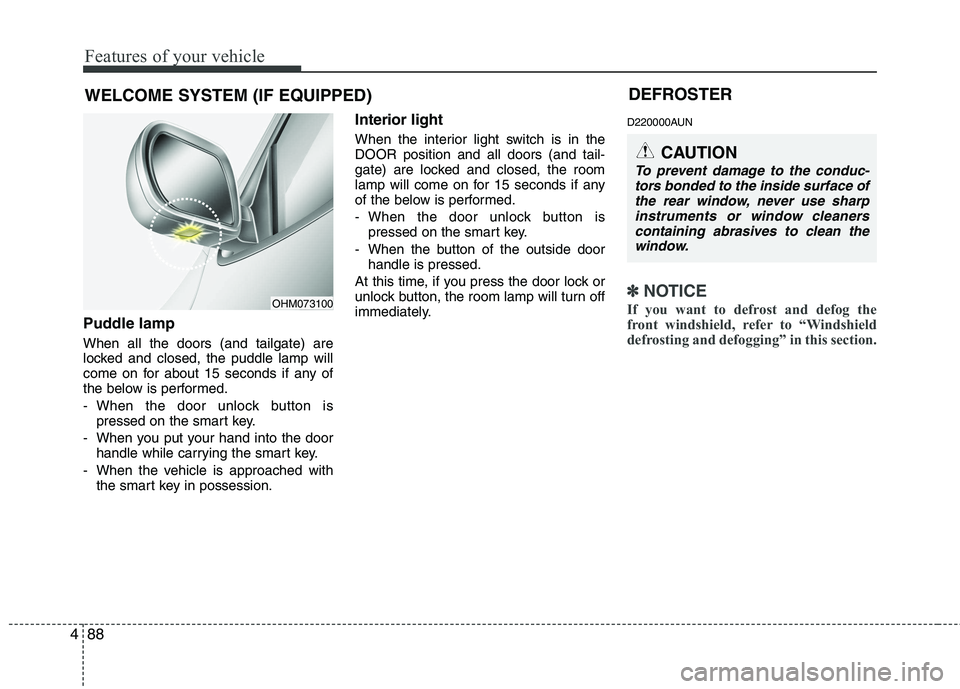
Puddle lamp When all the doors (and tailgate) are
locked and closed, the puddle lamp will
come on for about 15 seconds if any of
the below is performed.
- When the door unlock button is
pressed on the smart key.
- When you put your hand into the door handle while carrying the smart key.
- When the vehicle is approached with the smart key in possession. Interior light
When the interior light switch is in the DOOR position and all doors (and tail-
gate) are locked and closed, the room
lamp will come on for 15 seconds if any
of the below is performed.
- When the door unlock button is
pressed on the smart key.
- When the button of the outside door handle is pressed.
At this time, if you press the door lock or
unlock button, the room lamp will turn off
immediately. D220000AUN
✽✽
NOTICE
If you want to defrost and defog the
front windshield, refer to “Windshield
defrosting and defogging” in this section.
WELCOME SYSTEM (IF EQUIPPED)
OHM073100 DEFROSTER
CAUTION
To prevent damage to the conduc-
tors bonded to the inside surface ofthe rear window, never use sharp
instruments or window cleanerscontaining abrasives to clean the window.
Page 170 of 420

Features of your vehicle
96
4
D230104AHM
Fan speed control
The ignition switch must be in the ON
position for fan operation.
The fan speed switch allows you to con-
trol the fan speed of the air flow from the
ventilation system. To change the fanspeed, pull up ( ▲) the switch for higher
speed (+), or push down ( ▼) the switch
for lower speed (-). To turn the fan speed
control off, press the front blower
ON/OFF button (the indicator light is notilluminated). D230105AHM
Air conditioning (if equipped)
Press the A/C button to turn the air con- ditioning system on (indicator light will
illuminate). Press the button again to turn
the air conditioning system off.
D230200AHM-EE Rear heating and air conditioning (if equipped)
OHM048095OHM048096N
OHM040112L
OHM048159
■
Front
■ Rear
Page 171 of 420

497
Features of your vehicle
To turn on the rear climate control sys- tem
1. Press the rear blower ON/OFF buttonlocated on the front and rear climate control panel (indicator light will illumi-nate).
Operating the fan speed switch will
also turn on the rear climate controlsystem.
2. Set the fan speed to the desired speed with the front or rear fan speed switch.
3. The rear temperature and mode is controlled automatically by the frontclimate control system.
same as the front temperature
- Front mode control is MAX A/C, : Rear mode control is
- Front mode control is : Rear mode control is
- Front mode control is , , : Rear mode control is
4. To turn off the rear climate control sys- tem, press the rear blower ON/OFF
button once more located on the frontand rear climate control panel (indica-tor light is not illuminated). If you operate the rear temperature or
mode on the rear climate control panel,
the corresponding rear temperature or
mode will operate independentlyregardless of the front climate control
system operation.
If the ignition switch is turned OFF and ON again, the rear temperature andmode will be controlled automatically
by the front climate control system.
To activate the rear air conditioning, press the A/C button on the front cli-mate control system.
D230201AHM
Rear mode selection
The rear mode is selected by pressing
the rear mode selection button on the
rear control panel as follows:
OHM048113
Page 173 of 420

499
Features of your vehicle
D230202AHM
Rear temperature control
To change the air temperature in the rear
passenger compartment, pull up ( ▲)
the switch for warm and hot air (H) or
push down ( ▼) the switch for cooler air
(C). D230203AHM
Rear fan speed control
To change the fan speed, pull up (
▲) the
switch for higher speed (+), or push down ( ▼ ) the switch for lower speed (-).
To turn the fan speed control off, press
the rear blower ON/OFF button. (indica-tor light is not illuminated) System operation
D230501AUN
Ventilation
1. Set the mode to the position.
2. Set the air intake control to the outside
(fresh) air position.
3. Set the temperature control to the desired position.
4. Set the fan speed control to the desired speed.
OHM048117OHM048118
■Front
■Rear
Page 175 of 420

4101
Features of your vehicle
✽✽NOTICE
When using the air conditioning sys- tem, monitor the temperature gauge
closely while driving up hills or in
heavy traffic when outside tempera-
tures are high. Air conditioning sys-
tem operation may cause engine over-
heating. Continue to use the blower
fan but turn the air conditioning sys-
tem off if the temperature gauge indi-
cates engine overheating.
When opening the windows in humid weather air conditioning may create
water droplets inside the vehicle.
Since excessive water droplets may
cause damage to electrical equipment,
air conditioning should only be used
with the windows closed.Air conditioning system operation tips
If the vehicle has been parked in direct
sunlight during hot weather, open the
windows for a short time to let the hot
air inside the vehicle escape.
To help reduce moisture inside of the windows on rainy or humid days,
decrease the humidity inside the vehi-
cle by operating the air conditioningsystem.
During air conditioning system opera- tion, you may occasionally notice aslight change in engine speed as the
air conditioning compressor cycles.
This is a normal system operation
characteristic.
Use the air conditioning system every month only for a few minutes to ensure
maximum system performance. When using the air conditioning sys-
tem, you may notice clear water drip-
ping (or even puddling) on the ground
under the passenger side of the vehi-
cle. This is a normal system operation
characteristic.
Operating the air conditioning system in the recirculated air position provides
maximum cooling, however, continual
operation in this mode may cause the
air inside the vehicle to become stale.
During cooling operation, you may occasionally notice a misty air flow
because of rapid cooling and humid air
intake. This is a normal system opera-
tion characteristics.
Page 184 of 420
Features of your vehicle
110
4
D240205AHM
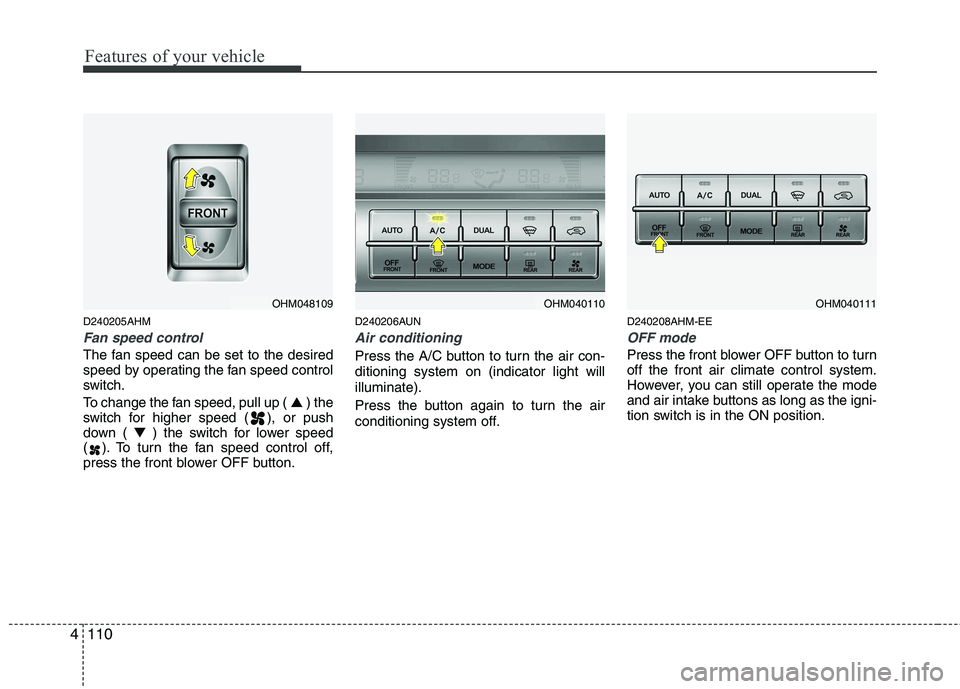
Fan speed control
The fan speed can be set to the desired
speed by operating the fan speed control
switch.
To change the fan speed, pull up ( ▲) the
switch for higher speed ( ), or push
down ( ▼) the switch for lower speed
( ). To turn the fan speed control off,
press the front blower OFF button. D240206AUN
Air conditioning
Press the A/C button to turn the air con- ditioning system on (indicator light willilluminate).
Press the button again to turn the air
conditioning system off.
D240208AHM-EE
OFF mode
Press the front blower OFF button to turn off the front air climate control system.
However, you can still operate the mode
and air intake buttons as long as the igni-
tion switch is in the ON position.
OHM048109OHM040110OHM040111