ECO mode KIA BORREGO 2017 User Guide
[x] Cancel search | Manufacturer: KIA, Model Year: 2017, Model line: BORREGO, Model: KIA BORREGO 2017Pages: 548, PDF Size: 36.78 MB
Page 217 of 548
Features of your vehicle
128
4
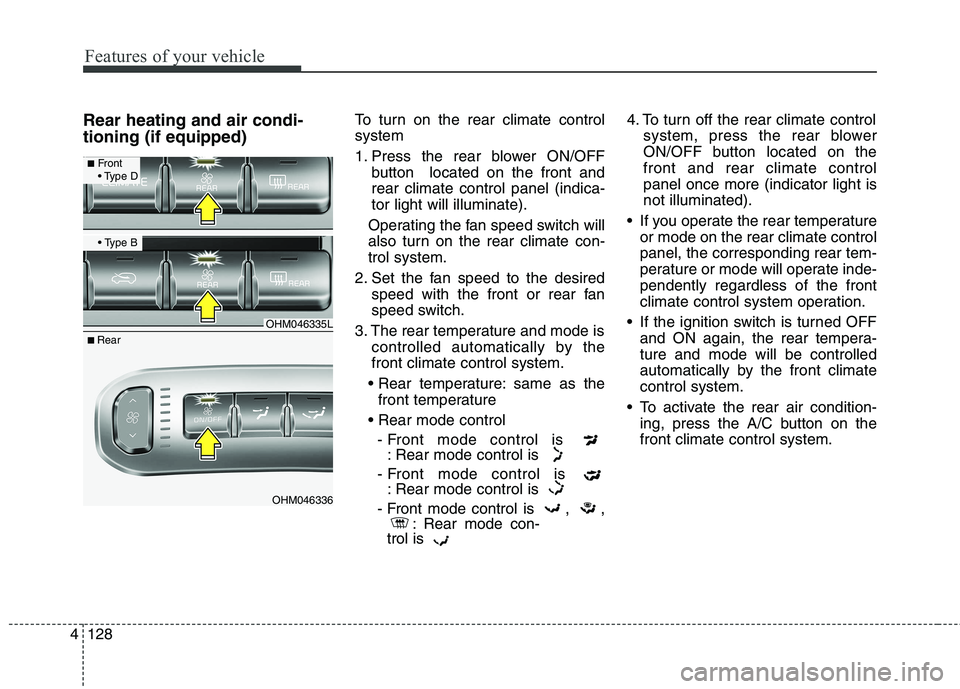
Rear heating and air condi- tioning (if equipped) To turn on the rear climate control system
1. Press the rear blower ON/OFF
button located on the front and rear climate control panel (indica-tor light will illuminate).
Operating the fan speed switch will
also turn on the rear climate con-trol system.
2. Set the fan speed to the desired speed with the front or rear fan
speed switch.
3. The rear temperature and mode is controlled automatically by thefront climate control system.
same as the front temperature
- Front mode control is : Rear mode control is
- Front mode control is : Rear mode control is
- Front mode control is , , : Rear mode con-
trol is 4. To turn off the rear climate control
system, press the rear blower
ON/OFF button located on thefront and rear climate controlpanel once more (indicator light isnot illuminated).
If you operate the rear temperature or mode on the rear climate controlpanel, the corresponding rear tem-
perature or mode will operate inde-pendently regardless of the front
climate control system operation.
If the ignition switch is turned OFF and ON again, the rear tempera-ture and mode will be controlled
automatically by the front climatecontrol system.
To activate the rear air condition- ing, press the A/C button on thefront climate control system.
OHM046335L
OHM046336
■Front
■ Rear
Page 222 of 548
4133
Features of your vehicle
Air conditioning system operation tips
If the vehicle has been parked indirect sunlight during hot weather,
open the windows for a short time
to let the hot air inside the vehicle
escape.
Use air conditioning to reduce humidity and moisture inside the
vehicle on rainy or humid days.
During air conditioning system operation, you may occasionallynotice a slight change in enginespeed as the air conditioning com-
pressor cycles. This is a normal
system operation characteristic.
Use the air conditioning system every month only for a few minutes
to ensure maximum system per-
formance. When using the air conditioning
system, you may notice clear water
dripping (or even puddling) on the
ground under the passenger side
of the vehicle. This is a normal sys-
tem operation characteristic.
Operating the air conditioning sys- tem in the recirculated air position
provides maximum cooling, how-
ever, continual operation in this
mode may cause the air inside the
vehicle to become stale.
During cooling operation, you may occasionally notice a misty air flow
because of rapid cooling and
humid air intake. This is a normal
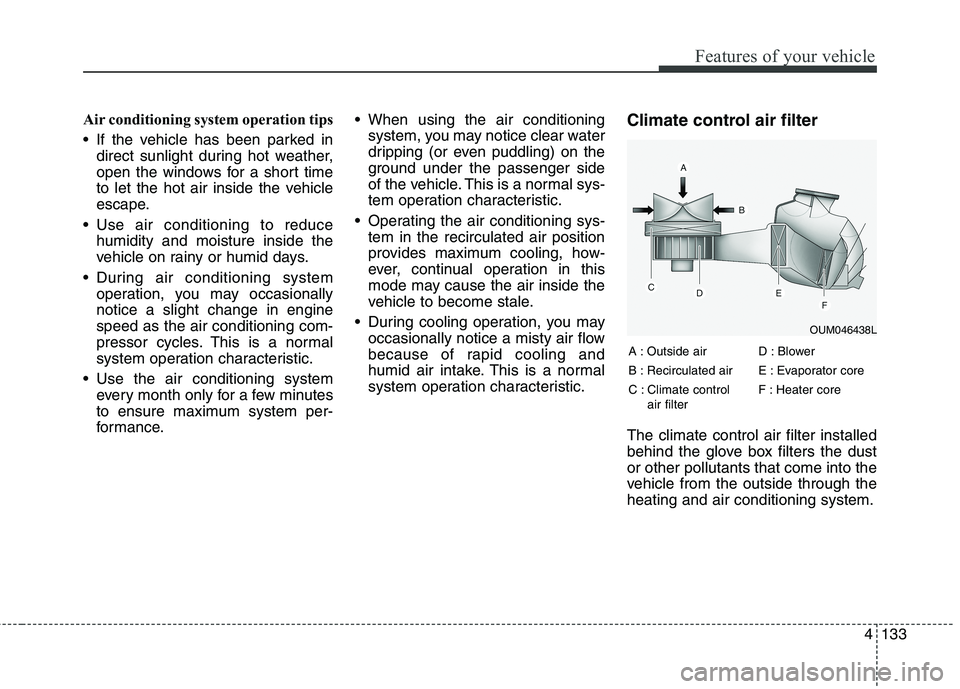
system operation characteristic. Climate control air filter The climate control air filter installed
behind the glove box filters the dustor other pollutants that come into the
vehicle from the outside through theheating and air conditioning system.
OUM046438L
A : Outside air
B : Recirculated air
C : Climate control air filter D : Blower
E : Evaporator core
F : Heater core
Page 227 of 548
Features of your vehicle
138
4
These compartments can be used to
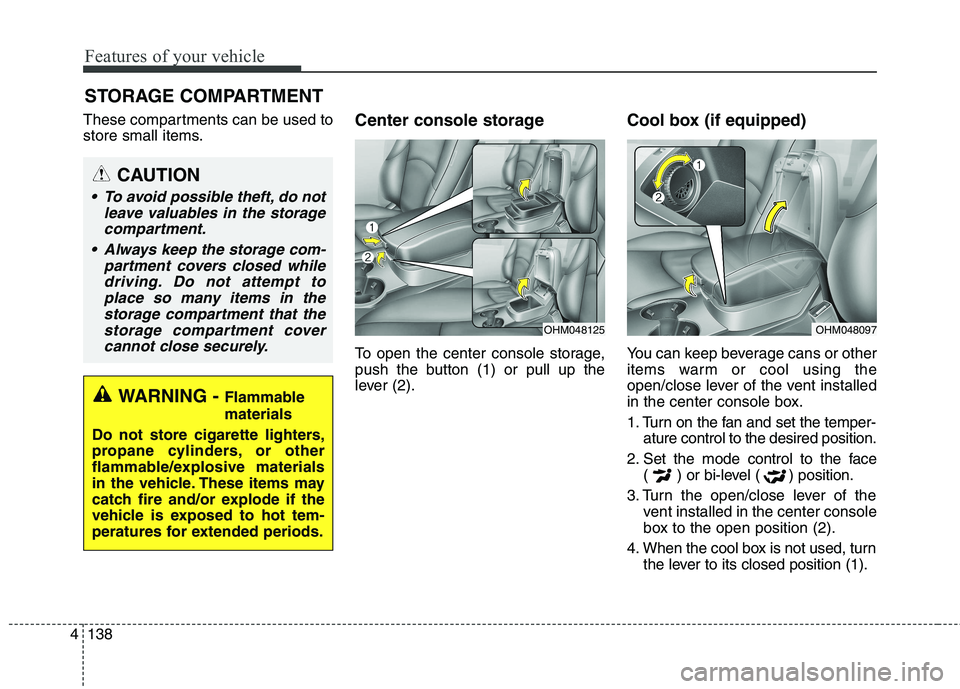
store small items. Center console storage
To open the center console storage,
push the button (1) or pull up the
lever (2).Cool box (if equipped)
You can keep beverage cans or other
items warm or cool using the
open/close lever of the vent installed
in the center console box.
1. Turn on the fan and set the temper-
ature control to the desired position.
2. Set the mode control to the face ( ) or bi-level ( ) position.
3. Turn the open/close lever of the vent installed in the center console
box to the open position (2).
4. When the cool box is not used, turn the lever to its closed position (1).
STORAGE COMPARTMENT
WARNING - Flammable materials
Do not store cigarette lighters,
propane cylinders, or other
flammable/explosive materials
in the vehicle. These items may
catch fire and/or explode if the
vehicle is exposed to hot tem-
peratures for extended periods.
CAUTION
To avoid possible theft, do not leave valuables in the storagecompartment.
Always keep the storage com- partment covers closed whiledriving. Do not attempt toplace so many items in the storage compartment that thestorage compartment covercannot close securely.
OHM048125OHM048097
Page 243 of 548
Audio system
AUDIO SYSTEM . . . . . . . . . . . . . . . . . . . . . . . . . . . 5-2 Antenna . . . . . . . . . . . . . . . . . . . . . . . . . . . . . . . . . . . . . 5-2
Steering wheel audio controls. . . . . . . . . . . . . . . . . . . . 5-3
Aux, USB port . . . . . . . . . . . . . . . . . . . . . . . . . . . . . . . . 5-4
How vehicle radio works . . . . . . . . . . . . . . . . . . . . . . . 5-4
AUDIO (With Touch Screen) . . . . . . . . . . . . . . . . . 5-7 Features of Your Audio . . . . . . . . . . . . . . . . . . . . . . . . . 5-8
Radio Mode (Type-1) . . . . . . . . . . . . . . . . . . . . . . . . . 5-20
Radio Mode (Type-2) . . . . . . . . . . . . . . . . . . . . . . . . . 5-23
Media Mode . . . . . . . . . . . . . . . . . . . . . . . . . . . . . . . . . 5-25
Phone Mode . . . . . . . . . . . . . . . . . . . . . . . . . . . . . . . . . 5-40
Bluetooth ®
Wireless Technology (Type-1) . . . . . . . . . 5-41
Bluetooth ®
Wireless Technology (Type-2) . . . . . . . . . 5-48
Voice Recognition Mode . . . . . . . . . . . . . . . . . . . . . . . 5-55
Setup Mode (Type-1) . . . . . . . . . . . . . . . . . . . . . . . . . . 5-63
Setup Mode (Type-2) . . . . . . . . . . . . . . . . . . . . . . . . . . 5-72
Declaration of Conformity . . . . . . . . . . . . . . . . . . 5-80 FCC . . . . . . . . . . . . . . . . . . . . . . . . . . . . . . . . . . . . . . . . 5-80
CE for EU. . . . . . . . . . . . . . . . . . . . . . . . . . . . . . . . . . . 5-82
5
Page 245 of 548
Audio system
35
Steering wheel audio controls (if equipped)
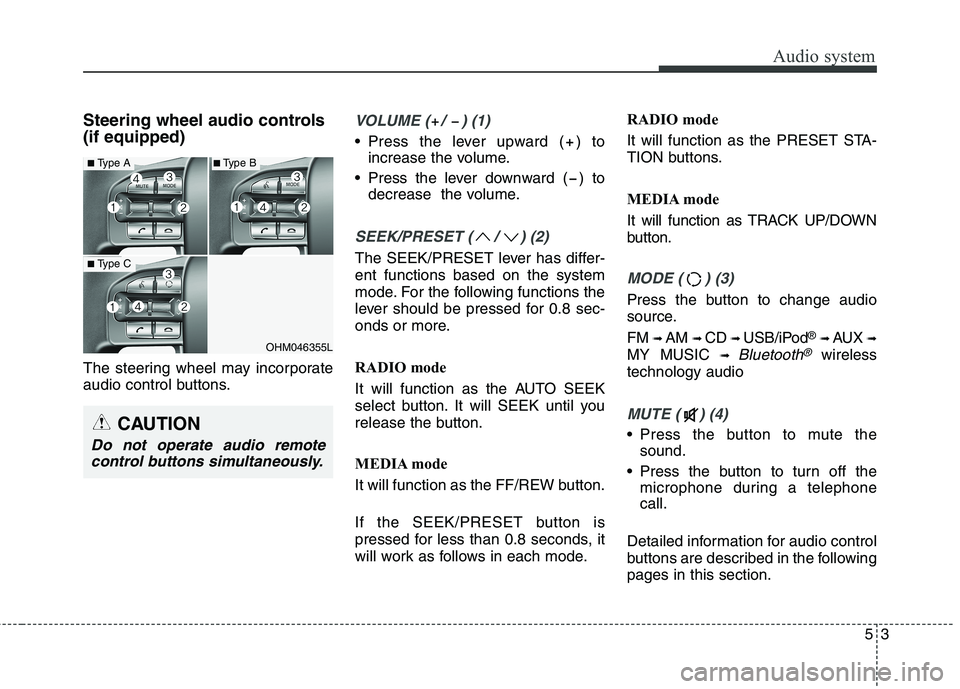
The steering wheel may incorporate
audio control buttons.VOLUME ( / ) (1)
• Press the lever upward ( ) toincrease the volume.
Press the lever downward ( ) to decrease the volume.
SEEK/PRESET ( / ) (2)
The SEEK/PRESET lever has differ- ent functions based on the system
mode. For the following functions the
lever should be pressed for 0.8 sec-
onds or more.
RADIO mode
It will function as the AUTO SEEK
select button. It will SEEK until you
release the button.
MEDIA mode
It will function as the FF/REW button.
If the SEEK/PRESET button is
pressed for less than 0.8 seconds, it
will work as follows in each mode. RADIO mode
It will function as the PRESET STA-
TION buttons.
MEDIA mode
It will function as TRACK UP/DOWN
button.
MODE ( ) (3)
Press the button to change audio
source. FM
➟ AM ➟ CD ➟ USB/iPod ®
➟ AUX ➟
MY MUSIC ➟
Bluetooth®wireless
technology audio
MUTE ( ) (4)
Press the button to mute the sound.
Press the button to turn off the microphone during a telephone call.
Detailed information for audio control
buttons are described in the followingpages in this section.
OHM046355L
■ Type A
■Type C
■Type B
CAUTION
Do not operate audio remote
control buttons simultaneously.
Page 251 of 548
Audio system
95
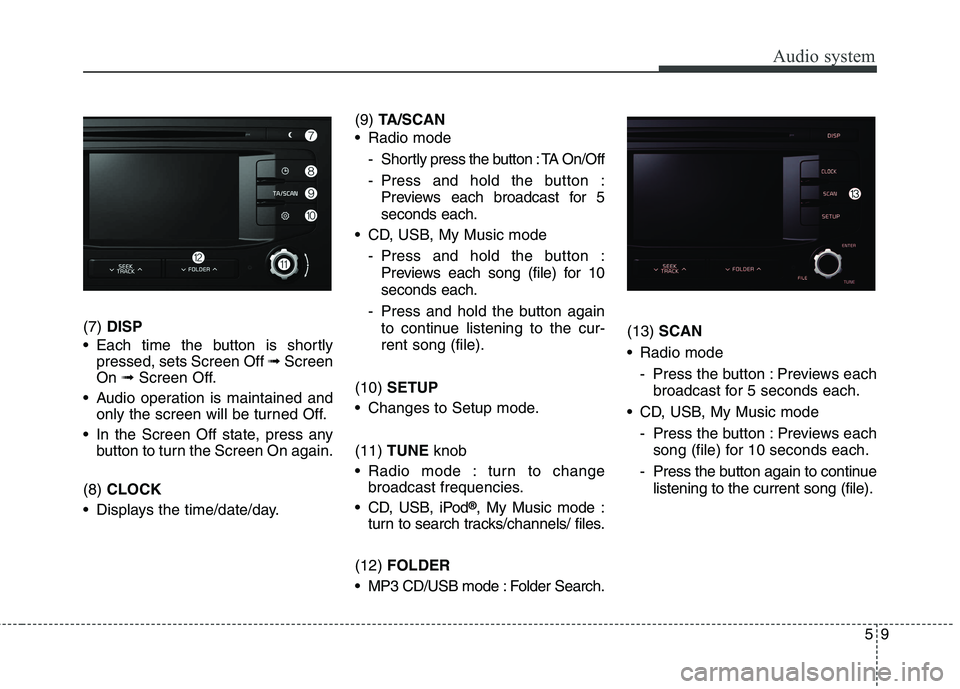
(7) DISP
Each time the button is shortly pressed, sets Screen Off ➟Screen
On ➟Screen Off.
Audio operation is maintained and only the screen will be turned Off.
In the Screen Off state, press any button to turn the Screen On again.
(8) CLOCK
Displays the time/date/day. (9)
TA/SCAN
Radio mode
- Shortly press the button : TA On/Off
- Press and hold the button :Previews each broadcast for 5 seconds each.
CD, USB, My Music mode
- Press and hold the button :Previews each song (file) for 10seconds each.
- Press and hold the button again to continue listening to the cur-rent song (file).
(10) SETUP
Changes to Setup mode. (11) TUNE knob
Radio mode : turn to change broadcast frequencies.
CD, USB, iPod ®
, My Music mode :
turn to search tracks/channels/ files.
(12) FOLDER
MP3 CD/USB mode : Folder Search. (13)
SCAN
Radio mode
- Press the button : Previews eachbroadcast for 5 seconds each.
CD, USB, My Music mode - Press the button : Previews eachsong (file) for 10 seconds each.
- Press the button again to continue listening to the current song (file).
Page 256 of 548
Audio system
514
(Continued)
Charging through the USB maynot work for some mobile devices.
The device may not support nor- mal operation when using an atyp-
ical USB memory device (minia-
ture, keychain, etc.). For best
results, use a typical USB device
that has a metal case.
The device may not support nor- mal operation when using formats
such as HDD Type, CF, or SD
Memory.
The device will not support files locked by DRM (Digital Rights
Management.)
USB memory sticks used by con- necting an Adaptor (SD Type or
CF Type) may not be properly rec-
ognized.
The device may not operate prop- erly when using USB HDDs or
USBs subject to connection fail-
ures caused by vehicle vibrations.
(e.g. i-stick type) (Continued)(Continued)
Avoid use of USB
memory products that
can also be used as key
chains or mobile phone
accessories. Use of such products
may cause damage to the USB
jack.
Connecting an MP3 device or phone through various channels,
such as AUX/BT or Audio/USB
mode may result in pop noises or
abnormal operation. ✽✽
NOTICE - Using an iPod ®
iPod ®
is a registered trademark of
Apple Inc.
In order to use the iPod ®
with
your vehicle’s audio system, you
must use a dedicated iPod ®
cable.
(the cable that is supplied when
purchasing iPod ®
/iPhone ®
prod-
ucts)
If the iPod ®
is connected to the
vehicle while it is playing, a high
pitch sound could occur for
approximately 1-2 seconds imme-
diately after connecting. If possi-
ble, connect the iPod ®
to the vehi-
cle with the iPod ®
stopped/paused.
When the vehicle ignition is set to ACC or ON, connecting the iPod ®
through the iPod ®
cable will
charge the iPod ®
through the car
audio system.
When connecting with the iPod ®
cable, make sure to fully insert the
jack to prevent communication
interference. (Continued)
Page 257 of 548
Audio system
15
5
(Continued)
When the EQ features of an exter-
nal device, such as the iPod ®
, and
the audio system are both active,
EQ effects could overlap and
cause sound deterioration and dis-
tortion. Whenever possible, turn
off the EQ feature within the
external device when it is connect-
ed to the audio system.
Noise may occur when an iPod ®
or
AUX device is connected. When
such devices are not being used,
disconnect the device for storage.
When the iPod ®
or AUX device
power is connected to the power
jack, playing the external device
may result in noise. In such cases,
disconnect the power connection
before use.
Skipping or improper operation may occur depending on the char-
acteristics of your iPod ®
/iPhone ®
device. (Continued)(Continued)
If your iPhone is connected to both
the Bluetooth ®
Wireless Technology
and USB, the sound may not be
properly played. In your iPhone,
select the Dock connector or
Bluetooth ®
Wireless Technology to
change the sound output (source).
iPod ®
mode cannot be operated
when the iPod ®
cannot be recog-
nized due to the playing of ver-
sions that do not support commu-
nication protocols, cases of iPod ®
abnormalities and defects.
For fifth generation iPod ®
Nano
devices, the iPod ®
may not be recog-
nized when the battery level is low.
Please charge the iPod ®
for use.
The search/play orders shown with- in the iPod ®
device may differ from
the orders shown within the audio
system.
If the iPod ®
malfunctions due to
an iPod ®
device defect, reset the
iPod ®
and try again. (To learn
more, refer to your iPod ®
manual)
(Continued) (Continued)
Some iPod
®
s may not sync with
the System depending on the ver-
sion. If the Media is removed
before the Media is recognized,
then the system may not properly
restore the previously operated
mode. (iPad charging is not sup-
ported.)
Use an iPod ®
cable shorter than 1
meter in length such as the one
originally supplied with a new
iPod ®
, longer cables may lead to
the audio system not recognizing
the iPod ®
.
Page 260 of 548
Audio system
518
(Continued)
While a phone is connectedthrough Bluetooth®
Wireless
Technology your phone may dis-
charge quicker than usual for
additional Bluetooth®
Wireless
Technology-related operations.
If Priority is set upon vehicle igni- tion (IGN/ACC ON), the
Bluetooth ®
Wireless Technology
phone will be automatically con-
nected. Even if you are outside, the
Bluetooth ®
Wireless Technology
phone will be automatically con-
nected once you are in the vicinity
of the vehicle. If you do not want
to automatically connect your
Bluetooth ®
Wireless Technology
phone, try the following.
1) Turn off the Bluetooth®
Wireless
Technology feature in your
mobile phone.
2) Turn off the Bluetooth®
Wireless
Technology feature in your car
audio system. (Continued)(Continued)
- To turn off the Bluetooth®
Wireless Technology feature in
your car audio system, go to
[SETUP]> [Phone] and [turn
off] the Bluetooth®
Wireless
Technology feature.
Bluetooth ®
Wireless Technology
connection may become intermit-
tently disconnected in some
mobile phones. Follow these steps
to try again.
1) Turn the Bluetooth®
Wireless
Technology function within the
mobile phone off/on and try
again.
2) Turn the mobile phone power Off/On and try again.
3) Completely remove the mobile phone battery, reboot, and then
try again.
4) Reboot the audio system and try again.
5) Delete all paired devices, pair and try again.
It is possible to pair up to five Bluetooth ®
Wireless Technology
devices to the car system. (Continued)(Continued)
Phone contact names should be
saved in English or they may not
be displayed correctly.
The Handsfree call volume and quality may differ depending on
the mobile phone.
Only one Bluetooth®
Wireless
Technology device can be connect-
ed at a time.
In some mobile phones, starting the ignition while talking through
Bluetooth ®
Wireless Technology
enabled handsfree call will result
in the call becoming disconnected.
(Switch the call back to your
mobile phone when starting the
ignition.)
If the mobile phone is not paired or connected, it is not possible to
enter Phone mode. Once a phone
is paired or connected, the guid-
ance screen will be displayed.
Page 261 of 548
Audio system
19
5
✽✽
NOTICE - Usingthe Voice
Recognition (if equipped)
When using the voice recognition feature, only commands listed with-
in the user's manual are supported.
Be aware that during the opera- tion of the voice recognition sys-
tem, pressing any button other
than the button or touching the
screen will terminate voice recog-
nition mode.
For superior voice recognition performance, position the micro-
phone used for voice recognition
above the head of the driver’s seat
and maintain a proper position
when saying commands.
Within the following situations, voice recognition may not function
properly due to external sound.
- When the windows and sunroof
are open
- When the wind of the cooling/heat- ing device is strong
- When entering and passing through tunnels
- When driving on rugged and uneven roads. (Continued)(Continued)
- During severe rain (heavy rains,windstorms)
Phone related voice commands can be used only when a Bluetooth®
Wireless Technology device is con-
nected.
When making calls by stating a name, the corresponding contact
must be downloaded and stored
within the audio system.
After downloading the Bluetooth®
Wireless Technology phone book,
it takes some time to convert the
phone book data into voice infor-
mation. During this time, voice
recognition may not properly
operate.
Pronounce the voice commands naturally and clearly as if in a nor-
mal conversation.CAUTION
Bluetooth®Wireless Technology
Handsfree is a feature that enables drivers to practicesafe driving. Connecting the car audio system with aBluetooth
®Wireless Technology
phone allows the user to con- veniently make calls, receivecalls, and manage the phone book. Before using theBluetooth
®Wireless Technology,
carefully read the contents of this user’s manual.
Excessive use or operations while driving may lead to neg-ligent driving practices and bethe cause of accidents.
Do not operate the device excessively while driving.
Viewing the screen for pro- longed periods of time whiledriving is dangerous and may lead to accidents.
When driving, view the screen only for short periods of time.