display KIA BORREGO 2017 User Guide
[x] Cancel search | Manufacturer: KIA, Model Year: 2017, Model line: BORREGO, Model: KIA BORREGO 2017Pages: 548, PDF Size: 36.78 MB
Page 148 of 548
459
Features of your vehicle
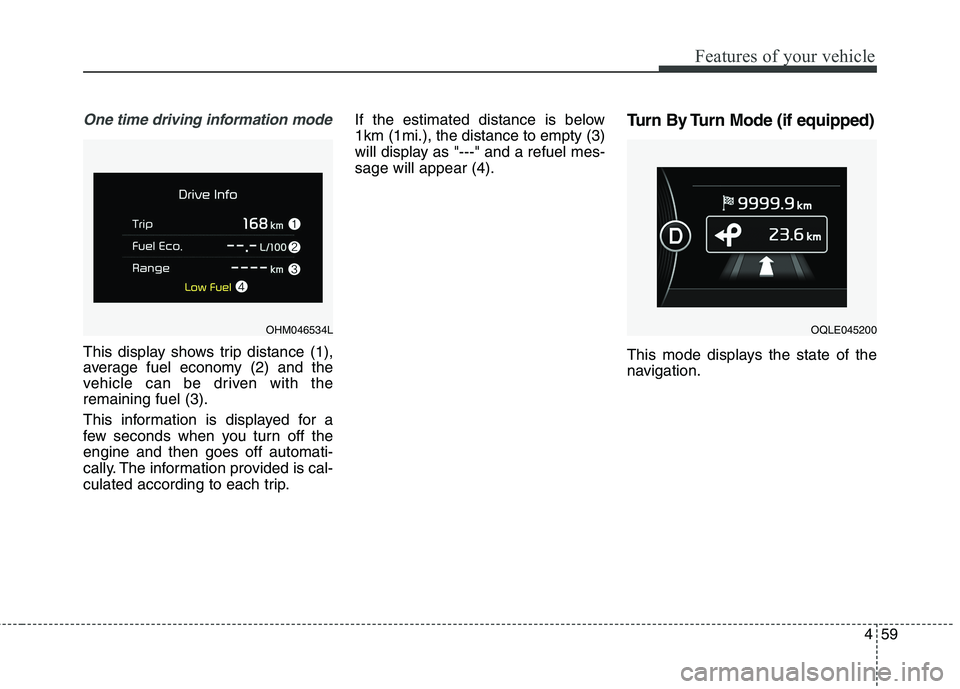
One time driving information mode
This display shows trip distance (1),
average fuel economy (2) and the
vehicle can be driven with theremaining fuel (3).
This information is displayed for a
few seconds when you turn off theengine and then goes off automati-
cally. The information provided is cal-
culated according to each trip.If the estimated distance is below1km (1mi.), the distance to empty (3)
will display as "---" and a refuel mes-sage will appear (4).
Turn By Turn Mode (if equipped)
This mode displays the state of the
navigation.
OQLE045200OHM046534L
Page 149 of 548
Features of your vehicle
60
4
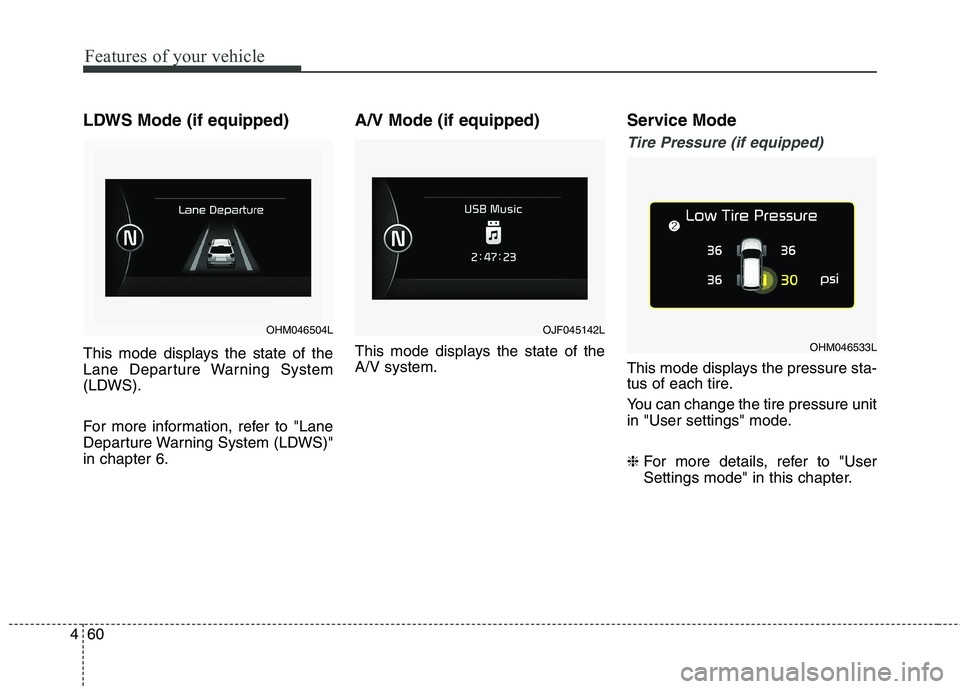
LDWS Mode (if equipped)
This mode displays the state of the
Lane Departure Warning System
(LDWS).
For more information, refer to "Lane
Departure Warning System (LDWS)"in chapter 6. A/V Mode (if equipped)
This mode displays the state of the A/V system.
Service Mode
Tire Pressure (if equipped)
This mode displays the pressure sta-
tus of each tire.
You can change the tire pressure unit
in "User settings" mode. ❈
For more details, refer to "User
Settings mode" in this chapter.
OHM046504LOJF045142L
OHM046533L
Page 150 of 548
461
Features of your vehicle
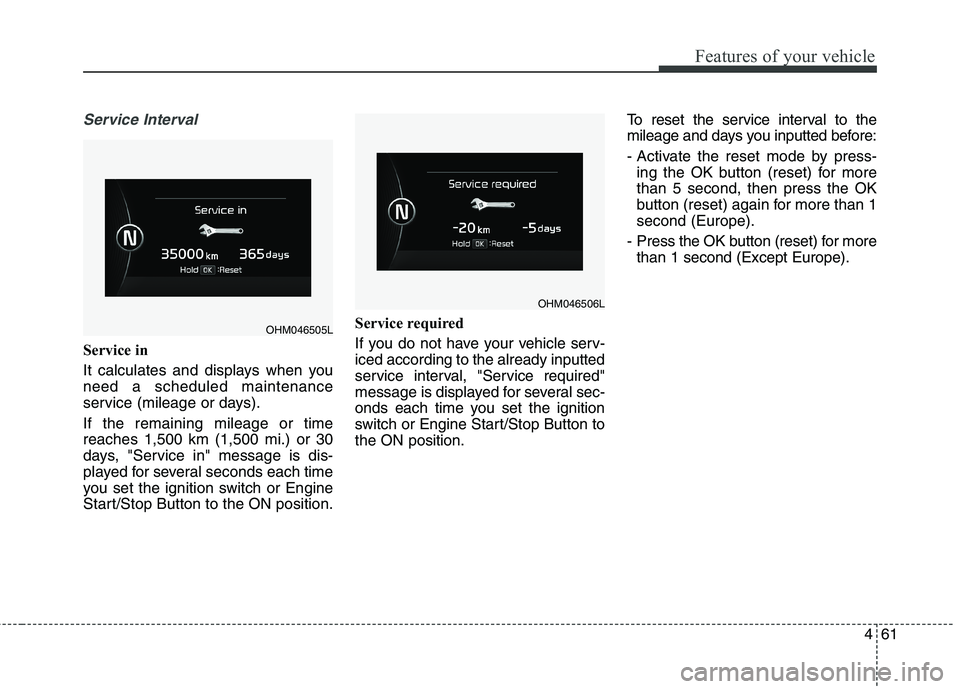
Service Interval
Service in
It calculates and displays when you need a scheduled maintenance
service (mileage or days). If the remaining mileage or time reaches 1,500 km (1,500 mi.) or 30
days, "Service in" message is dis-
played for several seconds each time
you set the ignition switch or Engine
Start/Stop Button to the ON position.Service required
If you do not have your vehicle serv- iced according to the already inputted
service interval, "Service required"
message is displayed for several sec-
onds each time you set the ignition
switch or Engine Start/Stop Button tothe ON position.To reset the service interval to the
mileage and days you inputted before:
- Activate the reset mode by press-
ing the OK button (reset) for more than 5 second, then press the OK
button (reset) again for more than 1second (Europe).
- Press the OK button (reset) for more than 1 second (Except Europe).
OHM046505L
OHM046506L
Page 151 of 548
Features of your vehicle
62
4
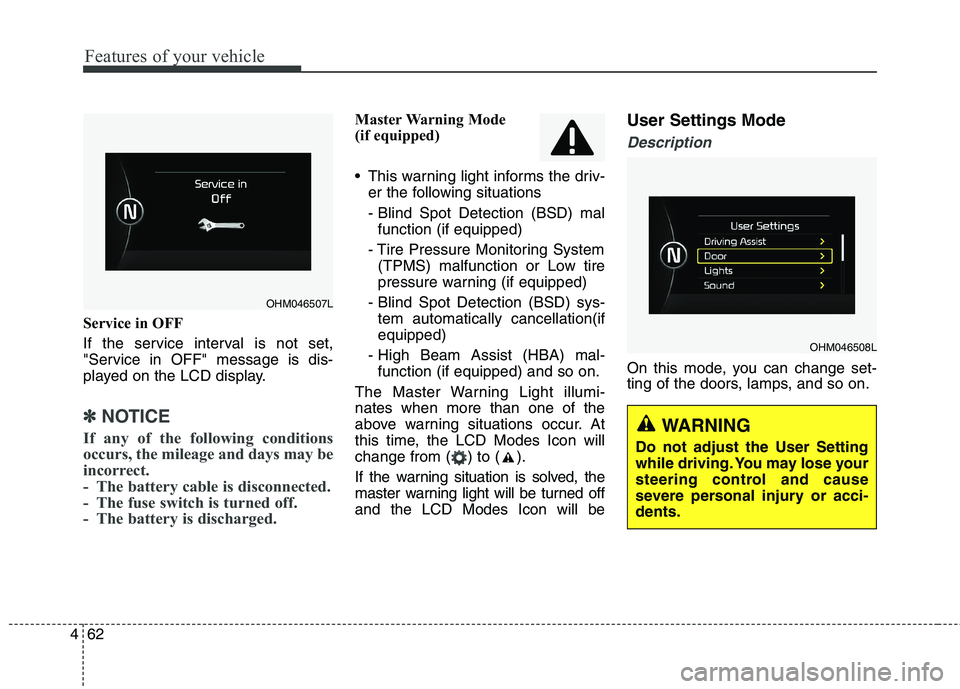
Service in OFF
If the service interval is not set,
"Service in OFF" message is dis-
played on the LCD display.
✽✽
NOTICE
If any of the following conditions
occurs, the mileage and days may be
incorrect.
- The battery cable is disconnected.
- The fuse switch is turned off.
- The battery is discharged.
Master Warning Mode
(if equipped)
This warning light informs the driv- er the following situations
- Blind Spot Detection (BSD) malfunction (if equipped)
- Tire Pressure Monitoring System (TPMS) malfunction or Low tire
pressure warning (if equipped)
- Blind Spot Detection (BSD) sys- tem automatically cancellation(ifequipped)
- High Beam Assist (HBA) mal- function (if equipped) and so on.
The Master Warning Light illumi-nates when more than one of the
above warning situations occur. At
this time, the LCD Modes Icon will
change from ( ) to ( ).
If the warning situation is solved, the
master warning light will be turned offand the LCD Modes Icon will be User Settings Mode
Description
On this mode, you can change set-
ting of the doors, lamps, and so on.
OHM046508L
OHM046507L
WARNING
Do not adjust the User Setting
while driving. You may lose your
steering control and cause
severe personal injury or acci-dents.
Page 167 of 548
Features of your vehicle
78
4
Low Fuel Level Warning
Light
This warning light illuminates:
When the fuel tank is nearly empty.
If the fuel tank is nearly empty:
Add fuel as soon as possible.
Low Tire PressureWarning Light (if equipped)
This warning light illuminates:
Once you set the ignition switch or Engine Start/Stop Button to the ON position.
- It illuminates for approximately 3seconds and then goes off.
When one or more of your tires are significantly underinflated (The
location of the underinflated tires
are displayed on the LCD display).
For more details, refer to “Tire
Pressure Monitoring System
(TPMS)” in chapter 7.
CAUTION - Engine Oil
Pressure Warning Light
If the engine does not stop immediately after the EngineOil Pressure Warning Light is illuminated, severe damagecould result.
If the warning light stays onwhile the engine is running, itindicates that there may be serious engine damage ormalfunction. In this case,
1. Stop the vehicle as soon as it is safe to do so.
2. Turn off the engine and check the oil level. If the oillevel is low, fill the engineoil to the proper level.
3. Start the engine again. If the warning light stays on afterthe engine is started, turnthe engine off immediately.In this case, we recommend that you have the vehicleinspected by an authorizedKia dealer.
CAUTION - Low Fuel
Level
Driving with the Low Fuel Level
warning light on or with the fuellevel below “0 or E” can cause the engine to misfire and dam-age the catalytic converter (ifequipped).
Page 169 of 548

Features of your vehicle
80
4
Fuel Filter Warning Light
(Diesel Engine)
This warning light illuminates:
Once you set the ignition switch or Engine Start/Stop Button to the ON position.
- It illuminates for approximately 3seconds and then goes off.
When water has accumulated inside the fuel filter.
In this case, remove the water from
the fuel filter.
For more details, refer to “Fuel
Filter” in chapter 8.
Exhaust system (DPF)
warning light (Diesel Engine)
This warning light illuminates:
When there is a malfunction with Diesel Particulate Filter (DPF) system.
When this warning light illumi- nates, it may turn off after driving
the vehicle: - at more than 60km/h (37 mph), or
- at more than 2nd gear with 1500~ 2000 engine rpm for a certain
time (for about 25 minutes).
If the this warning light blink in spiteof the procedure (at this time LCD
warning message will be displayed),
we recommend that you have the
DPF system checked by an author-
ized Kia dealer.
CAUTION - Fuel Filter
Warning Light
When the Fuel Filter Warning
Light illuminates, enginepower (vehicle speed & idle speed) may decrease.
If you keep driving with the warning light on, engine parts(injector, common rail, highpressure fuel pump) may be damaged. If this occurs, werecommend that you have thevehicle inspected by an authorized Kia dealer as soonas possible.
CAUTION - Diesel Engine
with DPF (if equipped)
If you continue to drive with the DPF warning light blinking for along time, the DPF system can be damaged and fuel consump-tion can worsen.
Page 175 of 548
Features of your vehicle
86
4
ALS (Air Leveling
System) indicator (if equipped)
The rear height of the vehicle is con-
trolled by pressing the top or bottom
part of the switch. The corresponding
indicator will illuminate in LCD display. ❈ For more details, refer to “Air level-
ing system” in chapter 6.
Cruise
Indicator Light (if equipped)
This indicator light illuminates:
When the cruise control system is enabled.
For more details, refer to “Cruise
Control System” in chapter 6.
Cruise SET Indicator Light (if equipped)
This indicator light illuminates:
When the cruise control speed is set.
For more details, refer to “Cruise
Control System” in chapter 6.
+,CRUISESET
Page 184 of 548
495
Features of your vehicle
Self-diagnosis
When you shift the gear to the R
(Reverse) position and if one or more
of the below occurs you may have a
malfunction in the rear parking assistsystem.
You don't hear an audible warningsound or if the buzzer sounds inter-
mittently.
If this occurs, we recommend that the
system be checked by an authorized
Kia dealer.WARNING
Pay close attention when the
vehicle is driven close to
objects on the road, particularly
pedestrians, and especially
children. Be aware that some
objects may not be detected by
the sensors, due to the objects
distance, size or material, all of
which can limit the effective-
ness of the sensor. Always per-
form a visual inspection to
make sure the vehicle is clear of
all obstructions before moving
the vehicle in any direction.WARNING
Your new vehicle warranty does
not cover any accidents or dam-
age to the vehicle or injuries toits occupants related to a park-
ing assist system. Always drive
safely and cautiously.
is displayed. (if equipped)
(blinks)
Page 185 of 548
Features of your vehicle
96
4
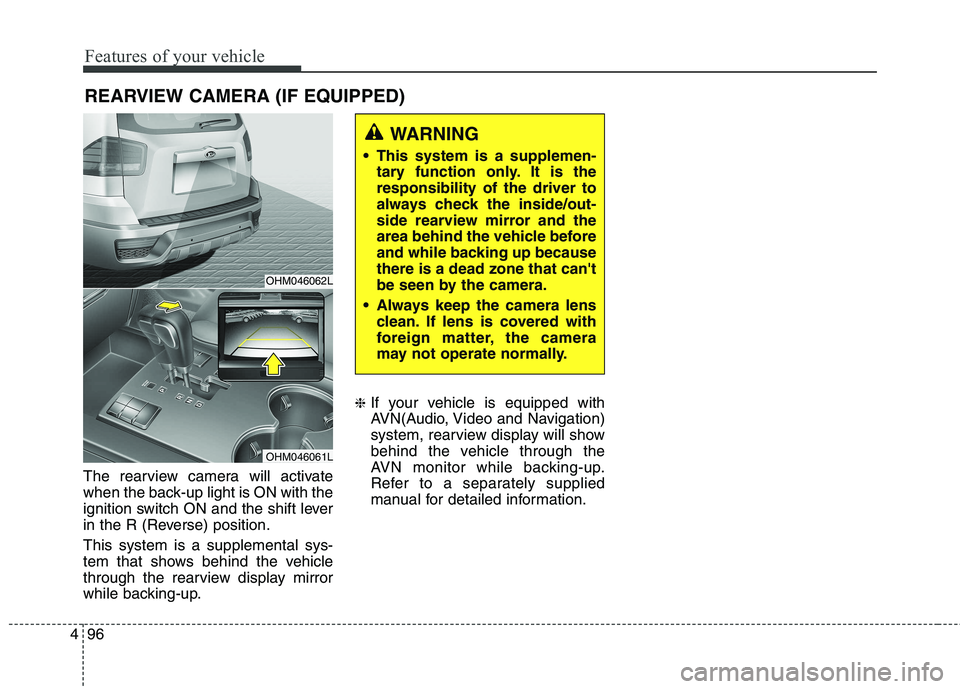
The rearview camera will activate
when the back-up light is ON with the
ignition switch ON and the shift lever
in the R (Reverse) position. This system is a supplemental sys-
tem that shows behind the vehicle
through the rearview display mirror
while backing-up. ❈
If your vehicle is equipped with
AVN(Audio, Video and Navigation)
system, rearview display will show
behind the vehicle through the
AVN monitor while backing-up.
Refer to a separately supplied
manual for detailed information.
WARNING
This system is a supplemen- tary function only. It is the responsibility of the driver to
always check the inside/out-
side rearview mirror and the
area behind the vehicle before
and while backing up becausethere is a dead zone that can't
be seen by the camera.
Always keep the camera lens clean. If lens is covered with
foreign matter, the camera
may not operate normally.
OHM046062L
OHM046061L
REARVIEW CAMERA (IF EQUIPPED)
Page 206 of 548
4117
Features of your vehicle
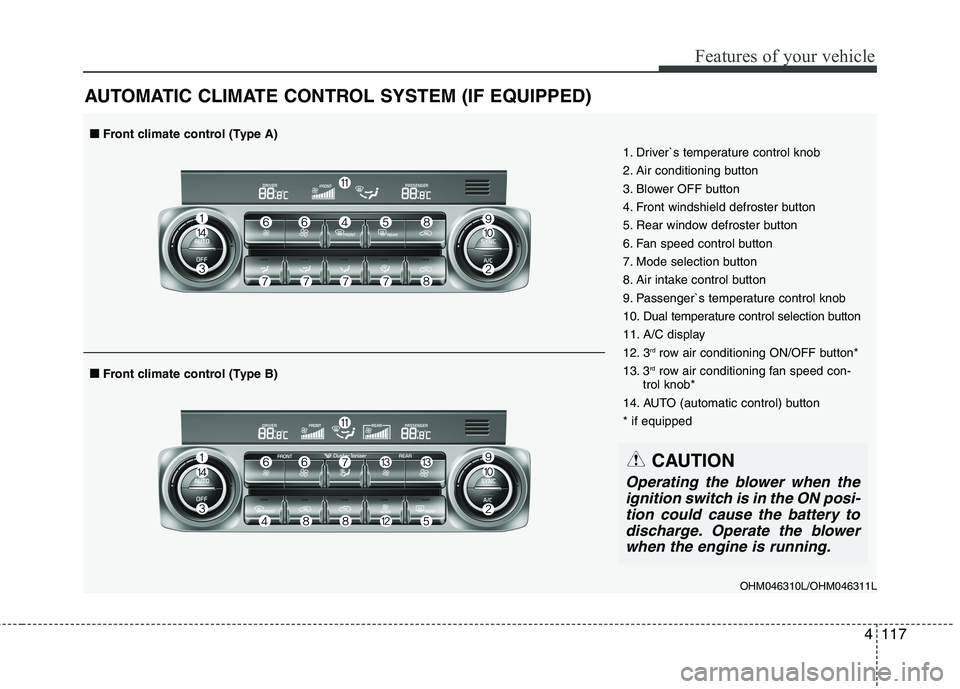
AUTOMATIC CLIMATE CONTROL SYSTEM (IF EQUIPPED)
OHM046310L/OHM046311L
1. Driver`s temperature control knob
2. Air conditioning button
3. Blower OFF button
4. Front windshield defroster button
5. Rear window defroster button
6. Fan speed control button
7. Mode selection button
8. Air intake control button
9. Passenger`s temperature control knob
10. Dual temperature control selection button
11. A/C display
12. 3
rd
row air conditioning ON/OFF button*
13. 3 rd
row air conditioning fan speed con-
trol knob*
14. AUTO (automatic control) button* if equipped
■■ Front climate control (Type B)
■■Front climate control (Type A)
CAUTION
Operating the blower when the
ignition switch is in the ON posi- tion could cause the battery todischarge. Operate the blowerwhen the engine is running.