display KIA BORREGO 2017 Service Manual
[x] Cancel search | Manufacturer: KIA, Model Year: 2017, Model line: BORREGO, Model: KIA BORREGO 2017Pages: 548, PDF Size: 36.78 MB
Page 274 of 548
Audio system
532(8) Random(Shuffle)
Turns the Random(Shuffle) feature
on/off.
Each time the button is pressed, the
feature changes in the order of
Random(Shuffle) Folder
➟Random
(Shuffle) All ➟Off.
Random(Shuffle) Folder : Plays the files in the current folder in ran-
dom(Shuffle) order.
Random(Shuffle) All : Plays all files in random(Shuffle) order.
(9) Repeat
Turns the Repeat feature on/off.
Each time the button is pressed, the
feature changes in the order ofRepeat ➟Repeat Folder ➟Off.
Repeat : Repeats the current file.
Repeat Folder : Repeats all files within the current folder. (10) Copy Copies the current file into My Music.
Selecting another feature during
copying will display a pop-up asking
whether you wish to cancel copying.
To cancel, select “Yes”.
(11) List
Moves to the list screen.
Turn the
TUNEknob left/right to
search for files. Once the desired file
is displayed, press the knob to select
and play.
With the USB Mode
Playing/Pausing USB Files Once a USB is connected, the mode
will automatically start and begin
playing a USB file.
While playing, press the [ II] button to
pause and press [ ] button to play.
Loading may require additional time
if there are many files and folders
within the USB and may result in
faulty list display or file search.
Normal operations will resume once
loading is complete.
The device may not support normal
operation when using a USB memo-
ry type besides (Metal Cover Type)
USB Memory.
Page 275 of 548
![KIA BORREGO 2017 Service Manual Audio system
33
5
Changing Files Press the [SEEK TRACK] button to
move to the previous or next file.Pressing the [
SEEK TRACK
] but-
tonafter the file has been playing for
2 seconds will start t](/img/2/57934/w960_57934-274.png "KIA BORREGO 2017 Service Manual Audio system
33
5
Changing Files Press the [SEEK TRACK] button to
move to the previous or next file.Pressing the [
SEEK TRACK
] but-
tonafter the file has been playing for
2 seconds will start t")
Audio system
33
5
Changing Files Press the [SEEK TRACK] button to
move to the previous or next file.Pressing the [
SEEK TRACK
] but-
tonafter the file has been playing for
2 seconds will start the current filefrom the beginning. Pressing the [
SEEK TRACK
] but-
ton before the file has been playing
for 1 second will start the previous
file. Selecting from the List
Turn the
TUNEknob left/right to
search for the desired file.
Once you find the desired file, press the TUNE knob to start playing.
Rewinding / Fast-forwarding Files
While playing, press and hold the
[SEEK TRACK] button to rewind or
fast-forward the current file.
Scan (With RDS) Press and hold the [TA/SCAN]but-
ton to play the file 10 seconds of
each file. Press and hold the [TA/SCAN]but-
ton again to turn off. Scan (Without RDS)Press the
[SCAN]button to play the
first 10 seconds of each file.Press the [SCAN]button again to
turn off.
Searching Folders Press the [FOLDER] button to select
and search folders.
Once the desired folder is displayed, press the TUNEknob to select.
The first file within the selected fold-
er will begin playing.
Page 276 of 548
Audio system
534MENU : iPod
®
iPod®Mode Display Controls
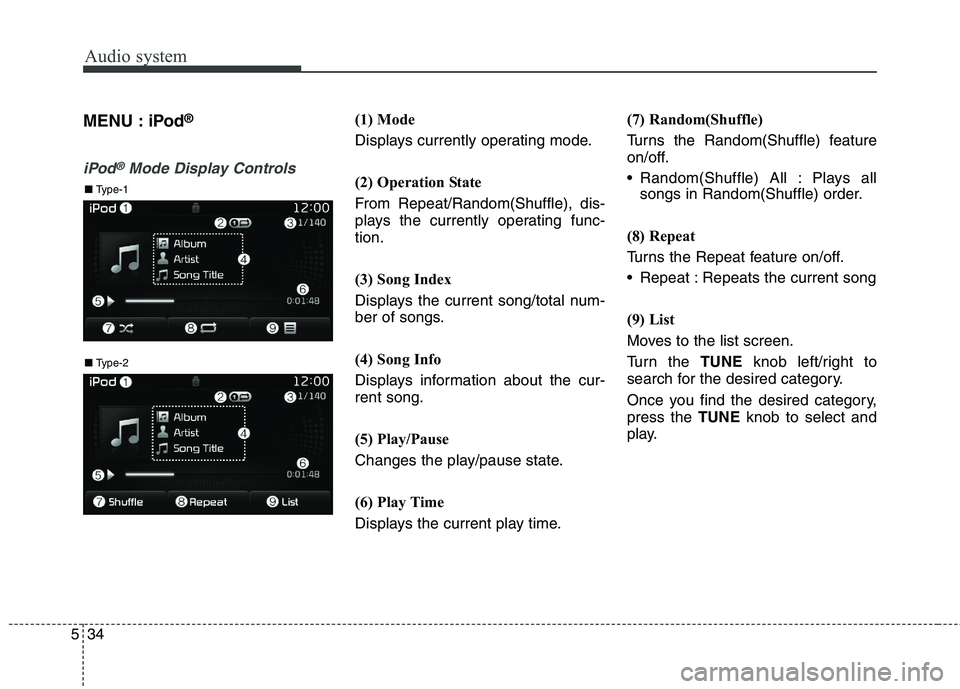
(1) Mode
Displays currently operating mode.
(2) Operation State
From Repeat/Random(Shuffle), dis-
plays the currently operating func-tion.
(3) Song Index
Displays the current song/total num-
ber of songs.
(4) Song Info
Displays information about the cur- rent song.
(5) Play/Pause
Changes the play/pause state.
(6) Play Time
Displays the current play time. (7) Random(Shuffle)
Turns the Random(Shuffle) feature
on/off.
Random(Shuffle) All : Plays all
songs in Random(Shuffle) order.
(8) Repeat
Turns the Repeat feature on/off.
Repeat : Repeats the current song
(9) List
Moves to the list screen.
Turn the TUNEknob left/right to
search for the desired category.
Once you find the desired category, press the TUNEknob to select and
play.
■ Type-2
■ Type-1
Page 277 of 548
![KIA BORREGO 2017 Service Manual Audio system
35
5
With the iPod®Mode
Playing/Pausing iPod ®
Songs
Once an iPod ®
is connected, the
mode will automatically start and
begin playing an iPod ®
song.
While playing, press the [ II] b](/img/2/57934/w960_57934-276.png "KIA BORREGO 2017 Service Manual Audio system
35
5
With the iPod®Mode
Playing/Pausing iPod ®
Songs
Once an iPod ®
is connected, the
mode will automatically start and
begin playing an iPod ®
song.
While playing, press the [ II] b")
Audio system
35
5
With the iPod®Mode
Playing/Pausing iPod ®
Songs
Once an iPod ®
is connected, the
mode will automatically start and
begin playing an iPod ®
song.
While playing, press the [ II] button to
pause and press [ ] button to play.
iPod ®
s with unsupported communi-
cation protocols may not properly
operate in the audio system.
Changing Songs Press the [SEEK TRACK] button to
move to the previous or next song. Pressing the [
SEEK TRACK
] but-
ton after the song has been playing
for 2 seconds will start the currentsong from the beginning. Pressing the [
SEEK TRACK
] but-
ton before the song has been playing
for 1 second will start the previoussong.
Slight time differences may exist
depending your iPod ®
product. Rewinding/Fast-forwarding Songs
While playing, press and hold the
[SEEK TRACK]
button to rewind or
fast-forward the current song. Searching Categories
Turn the
TUNEknob left/right to
search for the desired category.
Once you find the desired category, press the TUNEknob to select and
play.
There are eight categories that can be
searched, including Playlists, Artists,
Albums, Genres, Songs, Composers,
Audiobooks and Podcasts.
Category Menu
(1) Displays the play screen.
(2) Moves to the iPod ®
root category
screen.
(3) Moves to the previous category. If the search mode is accessed while
playing a song, the most recently
searched category is displayed. Search steps upon initial connection
may differ depending on the type of
iPod ®
device.
■ Type-2
■ Type-1
Page 278 of 548
![KIA BORREGO 2017 Service Manual Audio system
536MENU : AUX
AUX Mode Display Controls
Press the
[MEDIA]button Select
[AUX]
An external device can be connected
to play music.
Connecting an External Device
External audio players (C](/img/2/57934/w960_57934-277.png "KIA BORREGO 2017 Service Manual Audio system
536MENU : AUX
AUX Mode Display Controls
Press the
[MEDIA]button Select
[AUX]
An external device can be connected
to play music.
Connecting an External Device
External audio players (C")
Audio system
536MENU : AUX
AUX Mode Display Controls
Press the
[MEDIA]button Select
[AUX]
An external device can be connected
to play music.
Connecting an External Device
External audio players (Camcorders,
car VCR, etc.) can be played through
a dedicated cable.
If an external device connector is
connected with the AUX terminal,
then AUX mode will automatically
operate. Once the connector is dis-
connected, the previous mode will be restored.
AUX mode can be used only when
an external audio player (camcorder,
car VCR, etc.) has been connected.
The AUX volume can be controlled
separately from other audio modes.
Connecting a connector jack to the
AUX terminal without an external
device will convert the system to
AUX mode, but only output noise.
When an external device is not being
used, also remove the connector
jack.
When the external device power is
connected to the power jack, playing
the external device may output
noise. In such cases, disconnect the
power connection before use. Fully insert the AUX cable to the AUX
jack upon use.
■
Type-2
■ Type-1
Page 279 of 548
Audio system
37
5
MENU : My Music Mode
My Music Mode Display Controls
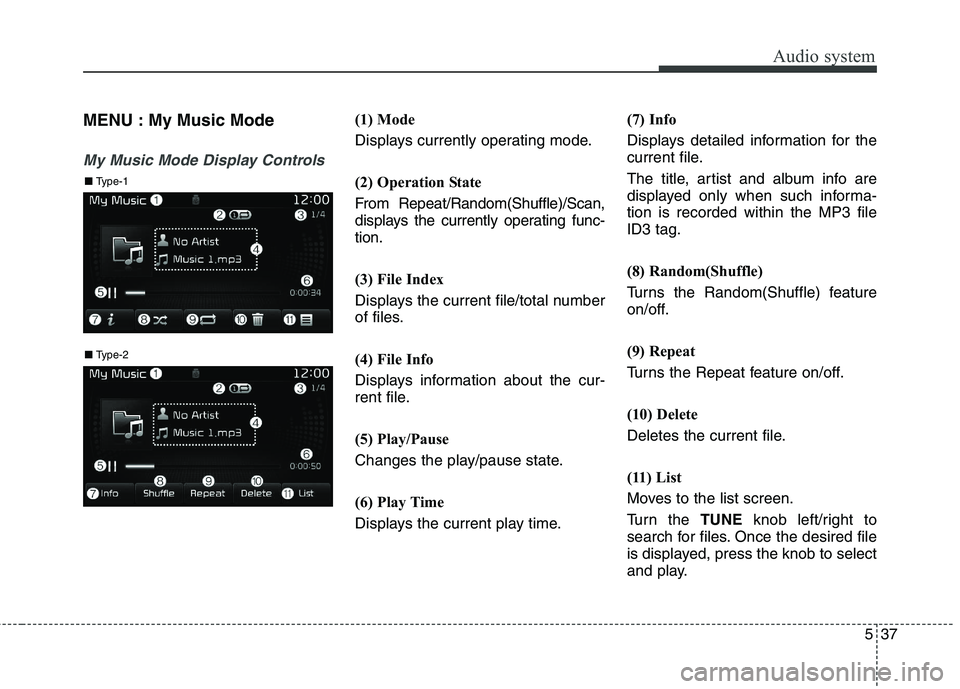
(1) Mode
Displays currently operating mode.
(2) Operation State
From Repeat/Random(Shuffle)/Scan,
displays the currently operating func-
tion.
(3) File Index
Displays the current file/total number
of files.
(4) File Info
Displays information about the cur-
rent file.
(5) Play/Pause
Changes the play/pause state.
(6) Play Time
Displays the current play time. (7) Info
Displays detailed information for the
current file.
The title, artist and album info are
displayed only when such informa-tion is recorded within the MP3 fileID3 tag.
(8) Random(Shuffle)
Turns the Random(Shuffle) feature
on/off.
(9) Repeat
Turns the Repeat feature on/off.
(10) Delete
Deletes the current file.
(11) List
Moves to the list screen.
Turn the
TUNEknob left/right to
search for files. Once the desired file
is displayed, press the knob to select
and play.
■ Type-2
■ Type-1
Page 281 of 548
![KIA BORREGO 2017 Service Manual Audio system
39
5
Scan (With RDS) Press and hold the [TA/SCAN]but-
ton to play the file 10 seconds of
each file. Press and hold the [TA/SCAN]but-
ton again to turn off.
Scan (Without RDS) Press th](/img/2/57934/w960_57934-280.png "KIA BORREGO 2017 Service Manual Audio system
39
5
Scan (With RDS) Press and hold the [TA/SCAN]but-
ton to play the file 10 seconds of
each file. Press and hold the [TA/SCAN]but-
ton again to turn off.
Scan (Without RDS) Press th")
Audio system
39
5
Scan (With RDS) Press and hold the [TA/SCAN]but-
ton to play the file 10 seconds of
each file. Press and hold the [TA/SCAN]but-
ton again to turn off.
Scan (Without RDS) Press the [SCAN]button to play the
first 10 seconds of each file.Press the [SCAN]button again to
turn off. MENU :Bluetooth®Wireless
Technology Audio
Using Bluetooth®Wireless Technology
Audio Mode
Playing/Pausing Bluetooth®
Wireless
Technology Audio Once a
Bluetooth®Wireless
Technology device is connected, the
mode will automatically start.
While playing, press the [ II] button
to pause and press [ II] button to
play.
The play/pause feature may operate
differently depending on the mobile
phone. Changing Files Press the
[SEEK TRACK] button to
move to the previous or next file.
Setting Connection If a
Bluetooth®Wireless Technology
device has not been connected, press the [SETUP]button
[Phone]
button to display the
Bluetooth®
Wireless Technology connectionscreen.
It is possible to use the pair phone,
connect/disconnect and delete fea-
tures from your
Bluetooth®Wireless
Technology phone.
If music is not yet playing from your
mobile device after converting to
Bluetooth®Wireless Technology
Audio mode, pressing the play button
once may start playing the mode.
Check to see that music is playingfrom the
Bluetooth®Wireless
Technology device after convertingto
Bluetooth®Wireless Technology
Audio Mode.
Page 282 of 548
Audio system
540Phone Mode
Making a call using the Steering
wheel controls
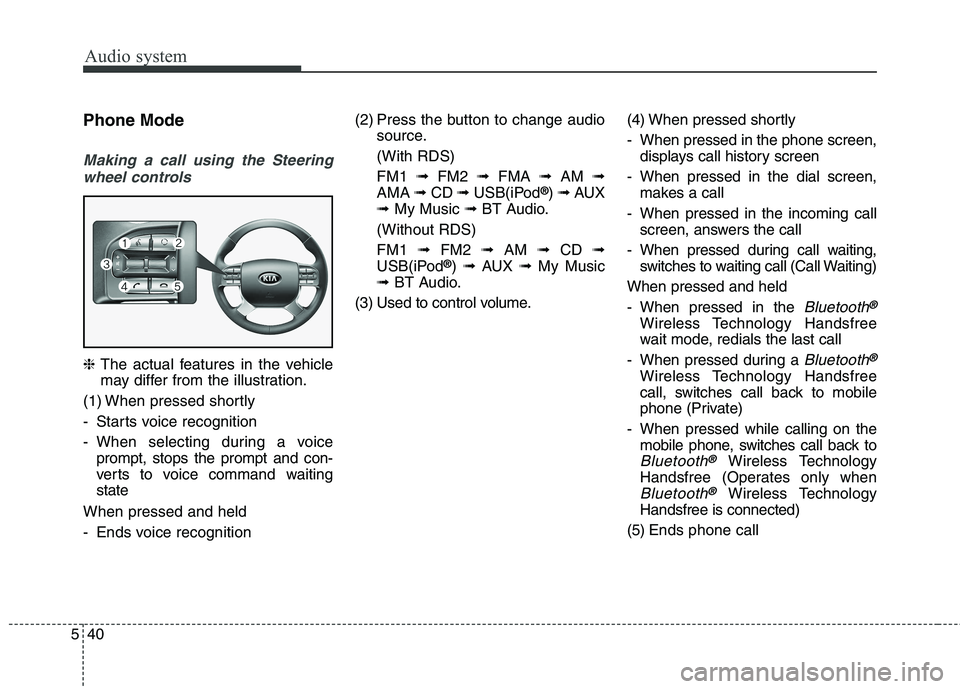
❈ The actual features in the vehicle
may differ from the illustration.
(1) When pressed shortly
- Starts voice recognition
- When selecting during a voice prompt, stops the prompt and con-
verts to voice command waitingstate
When pressed and held
- Ends voice recognition (2) Press the button to change audio
source.
(With RDS)FM1 ➟FM2 ➟FMA ➟AM ➟
AMA ➟CD ➟USB(iPod ®
) ➟ AUX
➟ My Music ➟BT Audio.
(Without RDS)FM1 ➟FM2 ➟AM ➟CD ➟
USB(iPod ®
) ➟ AUX ➟My Music
➟ BT Audio.
(3) Used to control volume. (4) When pressed shortly
- When pressed in the phone screen,
displays call history screen
- When pressed in the dial screen, makes a call
- When pressed in the incoming call screen, answers the call
- When pressed during call waiting, switches to waiting call (Call Waiting)
When pressed and held
- When pressed in the
Bluetooth®
Wireless Technology Handsfree
wait mode, redials the last call
- When pressed during a
Bluetooth®
Wireless Technology Handsfree
call, switches call back to mobile
phone (Private)
- When pressed while calling on the mobile phone, switches call back to
Bluetooth®Wireless Technology
Handsfree (Operates only when
Bluetooth®Wireless Technology
Handsfree is connected)
(5) Ends phone call
Page 283 of 548
![KIA BORREGO 2017 Service Manual Audio system
41
5
Bluetooth®Wireless Technology
(Type-1)
When No Devices have been Paired
➀ Press the [PHONE]button or the
[CALL] button on the steering
wheel controls. The following
screen is](/img/2/57934/w960_57934-282.png "KIA BORREGO 2017 Service Manual Audio system
41
5
Bluetooth®Wireless Technology
(Type-1)
When No Devices have been Paired
➀ Press the [PHONE]button or the
[CALL] button on the steering
wheel controls. The following
screen is")
Audio system
41
5
Bluetooth®Wireless Technology
(Type-1)
When No Devices have been Paired
➀ Press the [PHONE]button or the
[CALL] button on the steering
wheel controls. The following
screen is displayed.
➁ Press the [OK] button to enter the
Pair Phone screen. Device : Name of device as shown
when searching from your
Bluetooth®Wireless Technology
device
Passkey : Passkey used to pair the device
➂ From your
Bluetooth®Wireless
Technology device (i.e. Mobile
Phone), search and select yourcar audio system.
❈ SSP : Secure Simple Pairing
Non SSP supported device : ➃ After a few moments, a screen is
displayed where the passkey is entered.
Enter the passkey “0000” to pair
your
Bluetooth®Wireless Technology
device with the car audio system. SSP supported device : ➃
After a few moments, a screen is dis-
played 6 digits passkey.
Check the passkey on your
Bluetooth®Wireless Technology
device and confirm.
➄ Once pairing is complete, the fol-
lowing screen is displayed.
Some phones (i.e., iPhone ®
, Android
and Blackberry phones) may offer an
option to allow acceptance of all futureBluetooth ®
connection requests by
default. Visit http://www.kia.com/#/blue-
tooth for additional information on pair-
ing your Bluetooth ®
-enabled mobile
phone, and to view a phone compatibil-ity list.
Page 284 of 548
![KIA BORREGO 2017 Service Manual Audio system
542
✽✽NOTICE
If Bluetooth ®
Wireless Technology
devices are paired but none are cur-
rently connected, pressing the
[PHONE]button or the [CALL]but-
ton on the steering wheel contr](/img/2/57934/w960_57934-283.png "KIA BORREGO 2017 Service Manual Audio system
542
✽✽NOTICE
If Bluetooth ®
Wireless Technology
devices are paired but none are cur-
rently connected, pressing the
[PHONE]button or the [CALL]but-
ton on the steering wheel contr")
Audio system
542
✽✽NOTICE
If Bluetooth ®
Wireless Technology
devices are paired but none are cur-
rently connected, pressing the
[PHONE]button or the [CALL]but-
ton on the steering wheel controls
displays the following screen. Press
the [Pair] button to pair a new
device or press the [Connect] to con-
nect a previously paired device.
Pairing through [PHONE] Setup
Press the [SETUP]button Select
[Phone]
Pair Phone
The following steps are the same as
those described in the section “When
No Devices have been Paired” on the
previous page.
✽✽ NOTICE
The waiting period during phone pairing will last for one minute.
The pairing process will fail if the
device is not paired within the
given time. If the pairing process
fails, you must start the process
from the beginning.
Generally, most Bluetooth®
Wireless Technology devices will
automatically connect once pair-
ing is complete. However, some
devices may require a separate
verification process to connect.
Check to see whether Bluetooth®
Wireless Technology has been
properly connected within your
mobile phone.
List of paired Bluetooth®
Wireless
Technology devices can be viewedat
[SETUP] [Phone][Paired
Phone List].