instrument panel KIA BORREGO 2017 User Guide
[x] Cancel search | Manufacturer: KIA, Model Year: 2017, Model line: BORREGO, Model: KIA BORREGO 2017Pages: 548, PDF Size: 36.78 MB
Page 87 of 548
Safety features of your vehicle
70
3
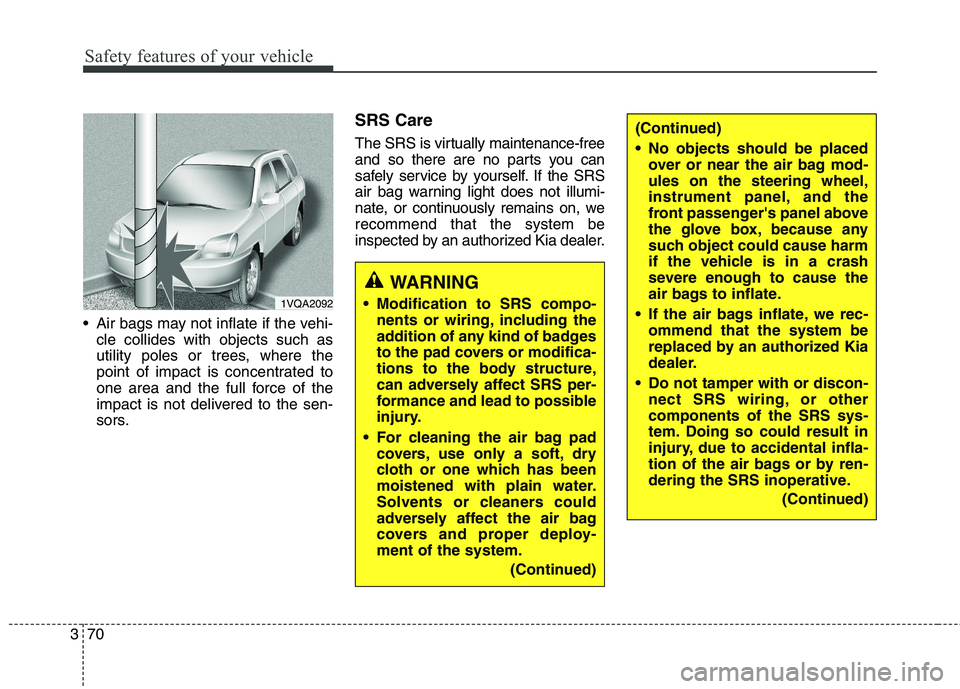
Air bags may not inflate if the vehi-
cle collides with objects such as
utility poles or trees, where the
point of impact is concentrated to
one area and the full force of the
impact is not delivered to the sen-
sors. SRS Care
The SRS is virtually maintenance-free
and so there are no parts you can
safely service by yourself. If the SRS
air bag warning light does not illumi-
nate, or continuously remains on, werecommend that the system be
inspected by an authorized Kia dealer.
WARNING
Modification to SRS compo- nents or wiring, including the
addition of any kind of badges
to the pad covers or modifica-
tions to the body structure,
can adversely affect SRS per-
formance and lead to possible
injury.
For cleaning the air bag pad covers, use only a soft, dry
cloth or one which has been
moistened with plain water.
Solvents or cleaners could
adversely affect the air bag
covers and proper deploy-ment of the system.
(Continued)
(Continued)
No objects should be placedover or near the air bag mod- ules on the steering wheel,
instrument panel, and the
front passenger's panel above
the glove box, because any
such object could cause harm
if the vehicle is in a crash
severe enough to cause the
air bags to inflate.
If the air bags inflate, we rec- ommend that the system be
replaced by an authorized Kia
dealer.
Do not tamper with or discon- nect SRS wiring, or othercomponents of the SRS sys-
tem. Doing so could result in
injury, due to accidental infla-
tion of the air bags or by ren-
dering the SRS inoperative.
(Continued)
1VQA2092
Page 128 of 548

439
Features of your vehicle
Power steering
Power steering uses energy from the
engine to assist you in steering the
vehicle. If the engine is off or if the
power steering system becomes
inoperative, the vehicle may still be
steered, but it will require increased
steering effort.
Should you notice any change in the
effort required to steer during normal
vehicle operation, we recommend
that the system be checked by an
authorized Kia dealer.✽✽NOTICE
If the power steering drive belt
breaks or if the power steering
pump malfunctions, the steering
effort will greatly increase.
✽
✽ NOTICE
If the vehicle is parked for extended
periods o utside in cold weather (below
-10°C(14°F)), the power steering may
require increased effort when the
engine is first started. This is caused by
increased fluid viscosity due to the cold
weather and does not indicate a mal-
function.
When this happens, increase the
engine RPM by depressing the accel-
erator until the RPM reaches 1,500
rpm then release or let the engine idle
for two or three minutes to warm up
the fluid.
Tilt steering
Tilt steering allows you to adjust the
steering wheel before you drive. You
can also raise it to give your legs
more room when you exit and enter
the vehicle.
The steering wheel should be posi-
tioned so that it is comfortable for
you to drive, while permitting you to
see the instrument panel warning
lights and gauges.
STEERING WHEEL
CAUTION
Never hold the steering wheel to
the extreme right or left for morethan 5 seconds with the engine running. Holding the steeringwheel for more than 5 secondsin either position may cause damage to the power steeringpump.
WARNING
Never adjust the angle of the steering wheel while driving.
You may lose steering control
and cause severe personal
injury, death or accidents.
After adjusting, push the steering wheel both up and
down to be certain it is lockedin position.
Page 138 of 548
449
Features of your vehicle
Instrument Cluster Control
Adjusting Instrument ClusterIllumination (if equipped)
The brightness of the instrument
panel illumination is changed byrotating the control knob when the
ignition switch or Engine Start/Stop
button is ON, or the tail lights are
turned on. LCD Display Control
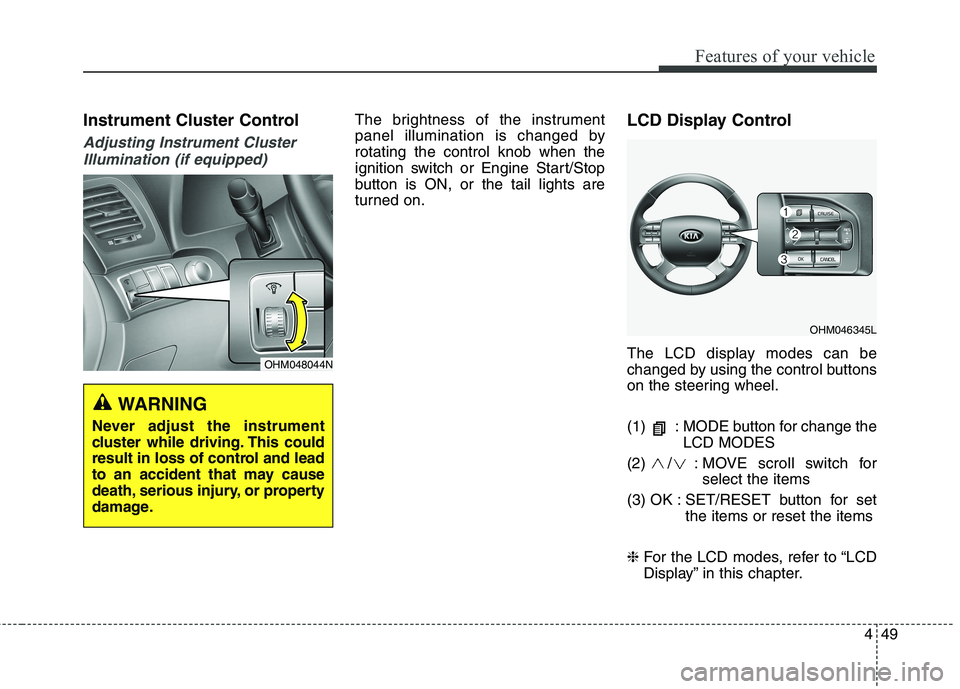
The LCD display modes can be
changed by using the control buttons
on the steering wheel.
(1) : MODE button for change the
LCD MODES
(2) / : MOVE scroll switch for select the items
(3) OK : SET/RESET button for set the items or reset the items
❈ For the LCD modes, refer to “LCD
Display” in this chapter.
OHM048044N
WARNING
Never adjust the instrument
cluster while driving. This could
result in loss of control and lead
to an accident that may cause
death, serious injury, or property
damage.
OHM046345L
Page 188 of 548
499
Features of your vehicle
❈❈Traffic Change (For Europe)
The low beam light distribution is
asymmetric. If you go abroad to a
country with opposite traffic direc-
tion, this asymmetric part will dazzle
oncoming car driver. To prevent daz-
zle, ECE regulation demand several
technical solutions (ex. automatic
change system, adhesive sheet,
down aiming). This headlamps aredesigned to adjust in user setting
mode in cluster. Lighting control
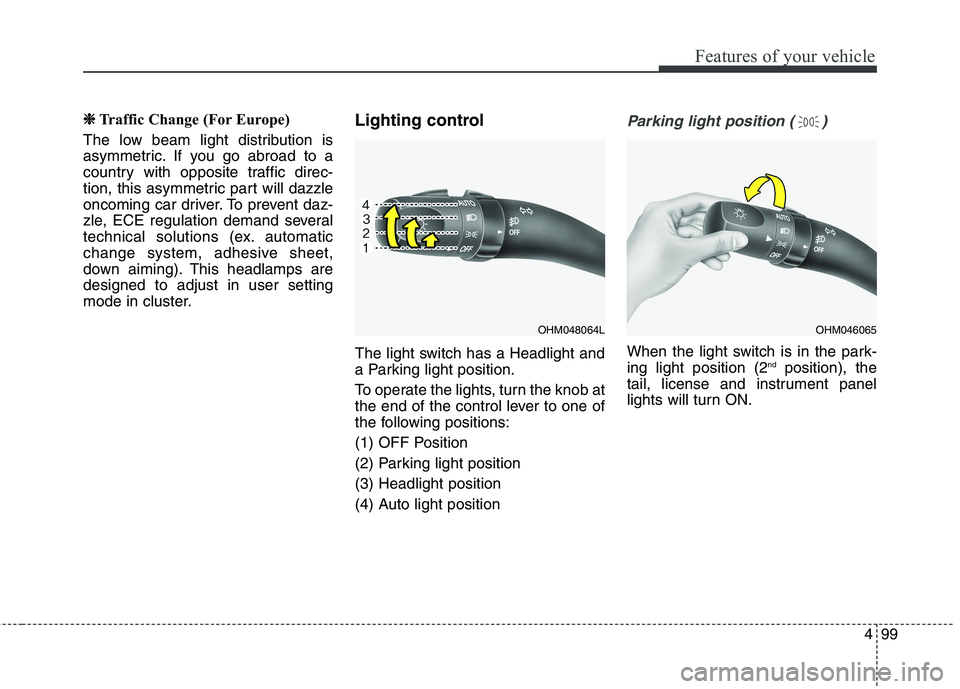
The light switch has a Headlight and
a Parking light position.
To operate the lights, turn the knob at
the end of the control lever to one of
the following positions:
(1) OFF Position
(2) Parking light position(3) Headlight position
(4) Auto light positionParking light position ( )
When the light switch is in the park- ing light position (2
nd
position), the
tail, license and instrument panel
lights will turn ON.
OHM048064LOHM046065
Page 189 of 548
Features of your vehicle
100
4
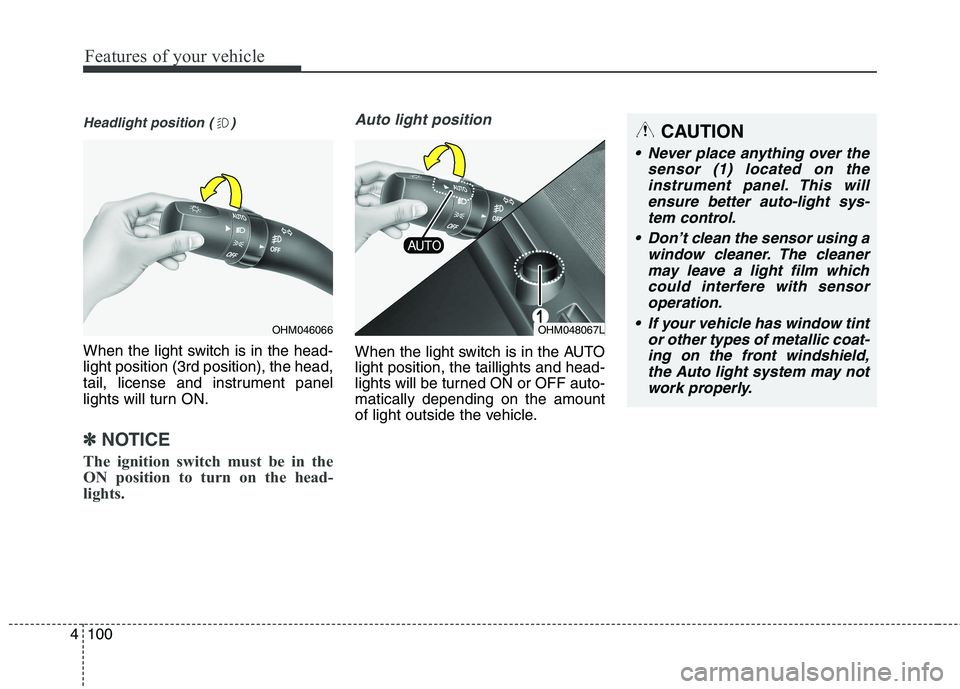
Headlight position ( )
When the light switch is in the head- light position (3rd position), the head,
tail, license and instrument panel
lights will turn ON.
✽✽
NOTICE
The ignition switch must be in the
ON position to turn on the head-
lights.
Auto light position
When the light switch is in the AUTO light position, the taillights and head-
lights will be turned ON or OFF auto-matically depending on the amount
of light outside the vehicle.
OHM046066OHM048067L
CAUTION
Never place anything over the sensor (1) located on theinstrument panel. This will ensure better auto-light sys-tem control.
Don’t clean the sensor using a window cleaner. The cleanermay leave a light film which could interfere with sensoroperation.
If your vehicle has window tint or other types of metallic coat-ing on the front windshield, the Auto light system may notwork properly.
Page 193 of 548
Features of your vehicle
104
4
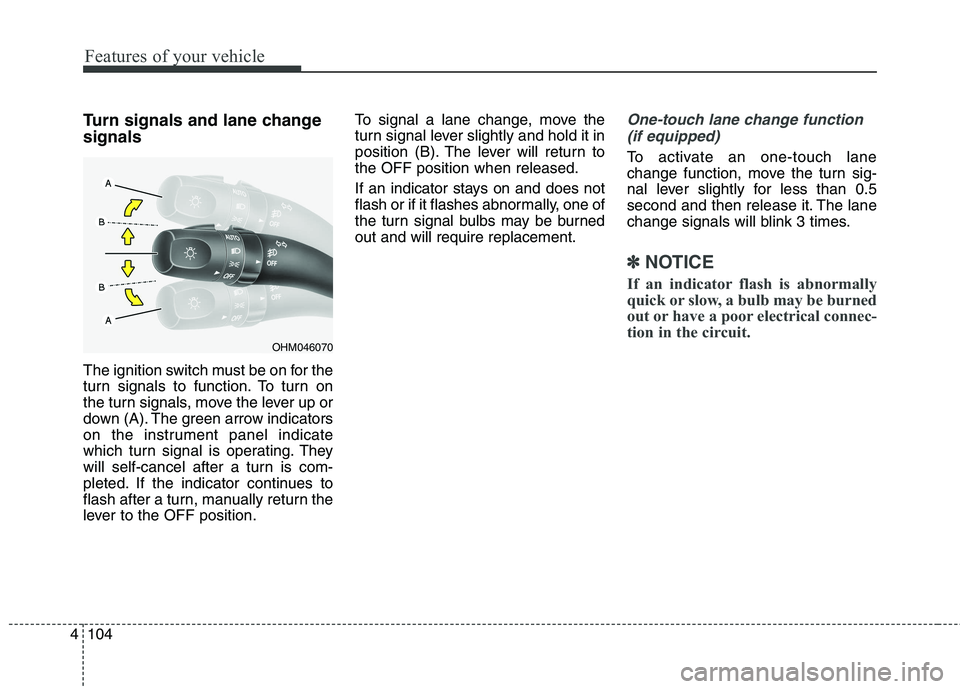
Turn signals and lane change signals
The ignition switch must be on for the
turn signals to function. To turn on
the turn signals, move the lever up or
down (A). The green arrow indicators
on the instrument panel indicate
which turn signal is operating. They
will self-cancel after a turn is com-
pleted. If the indicator continues to
flash after a turn, manually return the
lever to the OFF position. To signal a lane change, move the
turn signal lever slightly and hold it in
position (B). The lever will return tothe OFF position when released.
If an indicator stays on and does not
flash or if it flashes abnormally, one of
the turn signal bulbs may be burnedout and will require replacement.One-touch lane change function
(if equipped)
To activate an one-touch lane
change function, move the turn sig-
nal lever slightly for less than 0.5
second and then release it. The lane
change signals will blink 3 times.
✽✽ NOTICE
If an indicator flash is abnormally
quick or slow, a bulb may be burned
out or have a poor electrical connec-
tion in the circuit.
OHM046070
Page 205 of 548
Features of your vehicle
116
4
DEFROSTER
✽✽
NOTICE
If you want to defrost and defog the
front windshield, refer to
“Windshield defrosting and defog-
ging” in this section.
Rear window defroster
The defroster heats the window to
remove frost, fog and thin ice from
the rear window, while the engine is
running. To activate the rear window
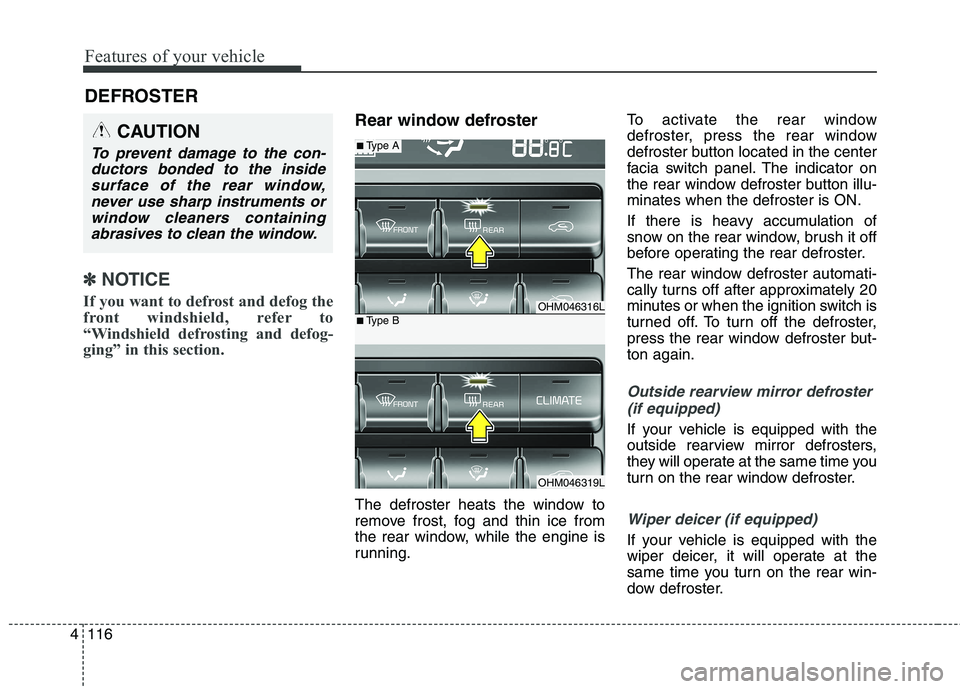
defroster, press the rear window
defroster button located in the center
facia switch panel. The indicator on
the rear window defroster button illu-minates when the defroster is ON.
If there is heavy accumulation of
snow on the rear window, brush it off
before operating the rear defroster.
The rear window defroster automati-
cally turns off after approximately 20
minutes or when the ignition switch is
turned off. To turn off the defroster,
press the rear window defroster but-ton again.
Outside rearview mirror defroster
(if equipped)
If your vehicle is equipped with the
outside rearview mirror defrosters,
they will operate at the same time you
turn on the rear window defroster.
Wiper deicer (if equipped)
If your vehicle is equipped with the
wiper deicer, it will operate at the
same time you turn on the rear win-
dow defroster.
CAUTION
To prevent damage to the con-ductors bonded to the insidesurface of the rear window, never use sharp instruments orwindow cleaners containingabrasives to clean the window.
OHM046316L
OHM046319L
■ Type A
■Type B
Page 209 of 548
Features of your vehicle
120
4
✽✽
NOTICE
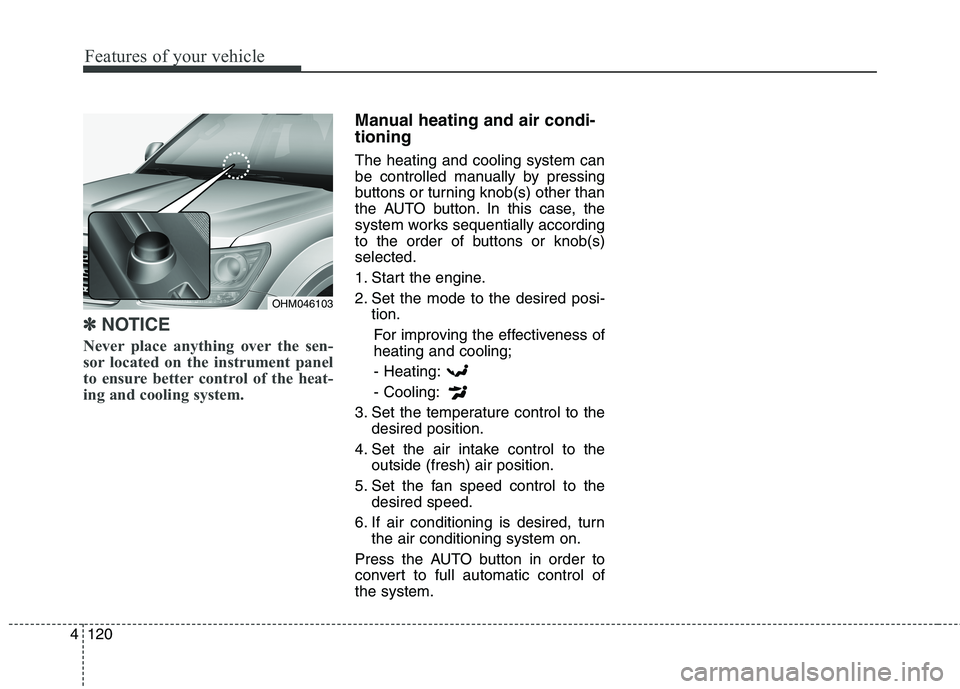
Never place anything over the sen-
sor located on the instrument panel
to ensure better control of the heat-
ing and cooling system.
Manual heating and air condi- tioning The heating and cooling system can
be controlled manually by pressing
buttons or turning knob(s) other than
the AUTO button. In this case, the
system works sequentially according
to the order of buttons or knob(s)selected.
1. Start the engine.
2. Set the mode to the desired posi- tion.
For improving the effectiveness of heating and cooling;
- Heating: - Cooling:
3. Set the temperature control to the desired position.
4. Set the air intake control to the outside (fresh) air position.
5. Set the fan speed control to the desired speed.
6. If air conditioning is desired, turn the air conditioning system on.
Press the AUTO button in order to
convert to full automatic control ofthe system.
OHM046103
Page 210 of 548
4121
Features of your vehicle
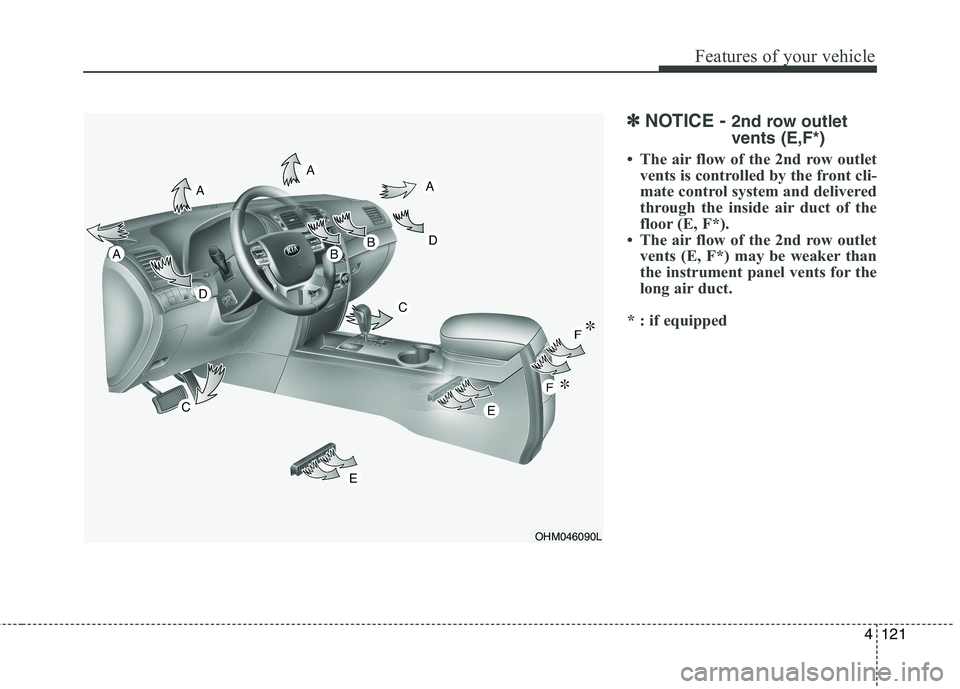
✽✽NOTICE - 2nd row outlet vents (E,F*)
The air flow of the 2nd row outlet vents is controlled by the front cli-
mate control system and delivered
through the inside air duct of the
floor (E, F*).
The air flow of the 2nd row outlet vents (E, F*) may be weaker than
the instrument panel vents for the
long air duct.
* : if equipped
OHM046090L
Page 213 of 548
Features of your vehicle
124
4
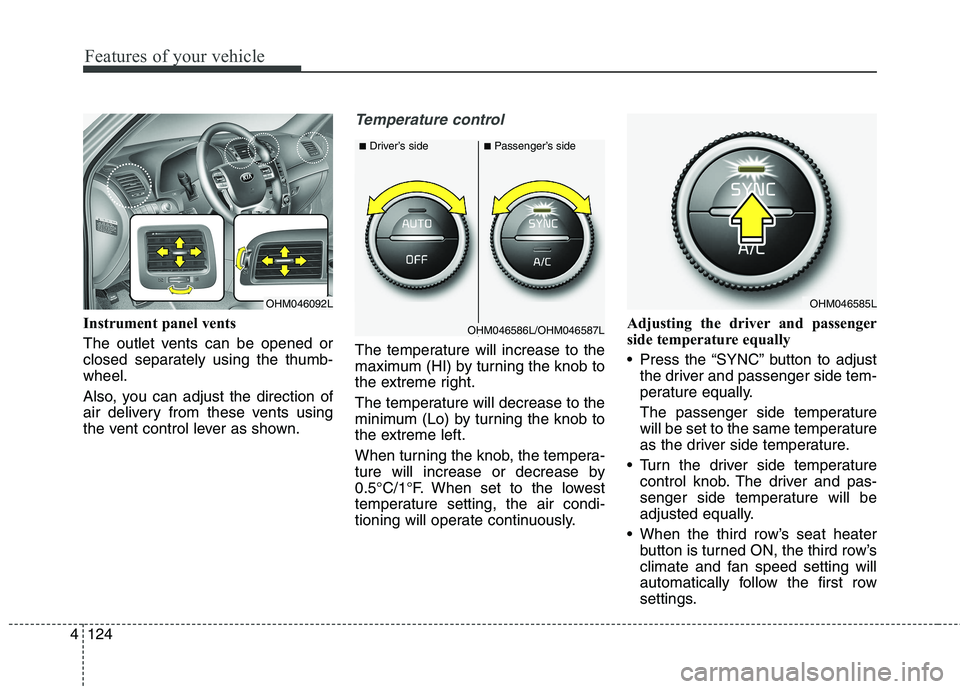
Instrument panel vents
The outlet vents can be opened or
closed separately using the thumb-wheel.
Also, you can adjust the direction of
air delivery from these vents using
the vent control lever as shown.
Temperature control
The temperature will increase to the
maximum (HI) by turning the knob to
the extreme right.
The temperature will decrease to the
minimum (Lo) by turning the knob to
the extreme left.
When turning the knob, the tempera-
ture will increase or decrease by
0.5°C/1°F. When set to the lowest
temperature setting, the air condi-
tioning will operate continuously. Adjusting the driver and passenger
side temperature equally
Press the “SYNC” button to adjust
the driver and passenger side tem-
perature equally.
The passenger side temperature
will be set to the same temperature
as the driver side temperature.
Turn the driver side temperature control knob. The driver and pas-
senger side temperature will be
adjusted equally.
When the third row’s seat heater button is turned ON, the third row’s
climate and fan speed setting will
automatically follow the first row
settings.
OHM046092L
■Driver’s side■Passenger’s side
OHM046585L
OHM046586L/OHM046587L