radio KIA BORREGO 2017 User Guide
[x] Cancel search | Manufacturer: KIA, Model Year: 2017, Model line: BORREGO, Model: KIA BORREGO 2017Pages: 548, PDF Size: 36.78 MB
Page 265 of 548
Audio system
23
5
Radio Mode
(Type-2)
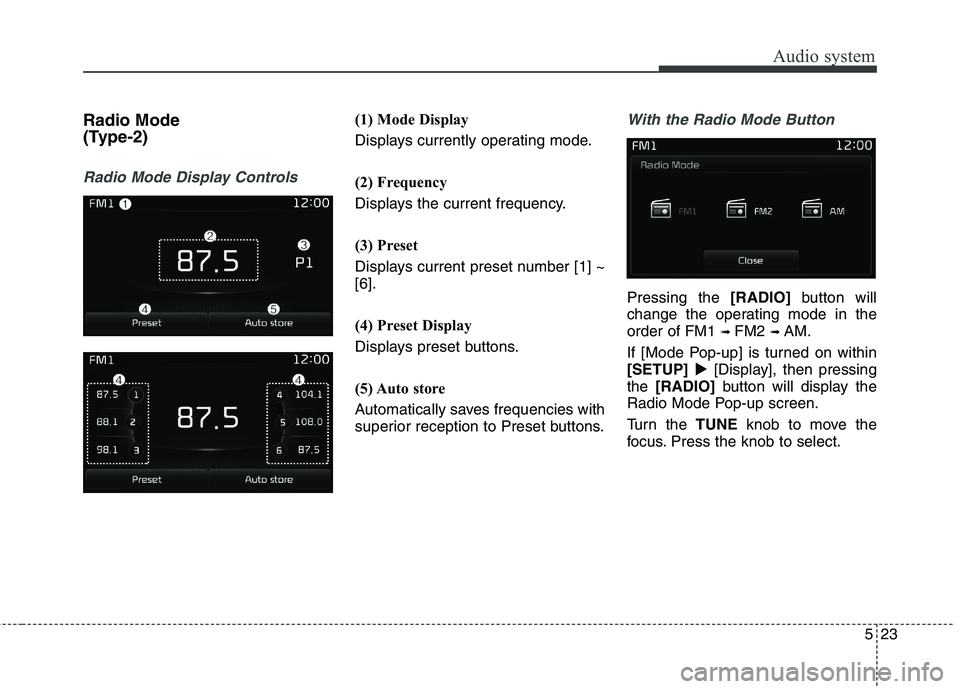
Radio Mode Display Controls
(1) Mode Display
Displays currently operating mode.
(2) Frequency
Displays the current frequency.
(3) Preset
Displays current preset number [1] ~ [6].
(4) Preset Display
Displays preset buttons.
(5) Auto store
Automatically saves frequencies with
superior reception to Preset buttons.With the Radio Mode Button
Pressing the [RADIO]button will
change the operating mode in the order of FM1 ➟ FM2 ➟ AM.
If [Mode Pop-up] is turned on within[SETUP] [Display], then pressing
the [RADIO] button will display the
Radio Mode Pop-up screen.
Turn the TUNEknob to move the
focus. Press the knob to select.
Page 299 of 548
Audio system
57
5
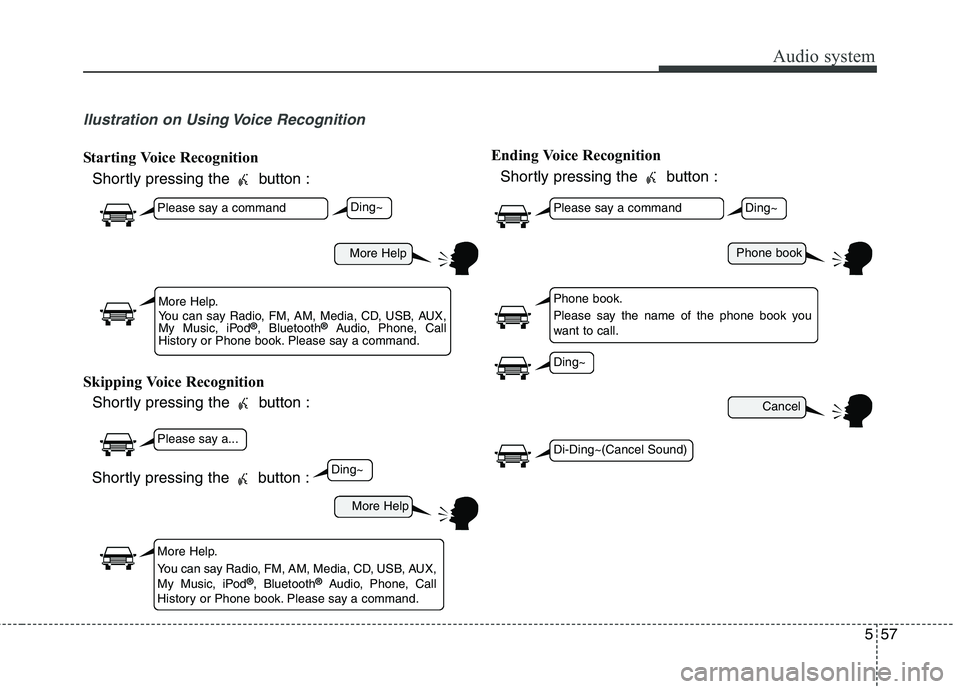
llustration on Using Voice Recognition
Starting Voice Recognition
Shortly pressing the button :
Skipping Voice Recognition Shortly pressing the button : Ending Voice Recognition
Shortly pressing the button :
More Help
More Help
Please say a command
Please say a...
More Help.
You can say Radio, FM, AM, Media, CD, USB, AUX,
My Music, iPod ®
, Bluetooth ®
Audio, Phone, Call
History or Phone book. Please say a command.
More Help.
You can say Radio, FM, AM, Media, CD, USB, AUX,
My Music, iPod ®
, Bluetooth ®
Audio, Phone, Call
History or Phone book. Please say a command.
Ding~
Ding~
Shortly pressing the button :
Phone book
Cancel
Please say a command
Phone book.
Please say the name of the phone book you
want to call.
Ding~
Di-Ding~(Cancel Sound)
Ding~
Page 300 of 548
Audio system
558
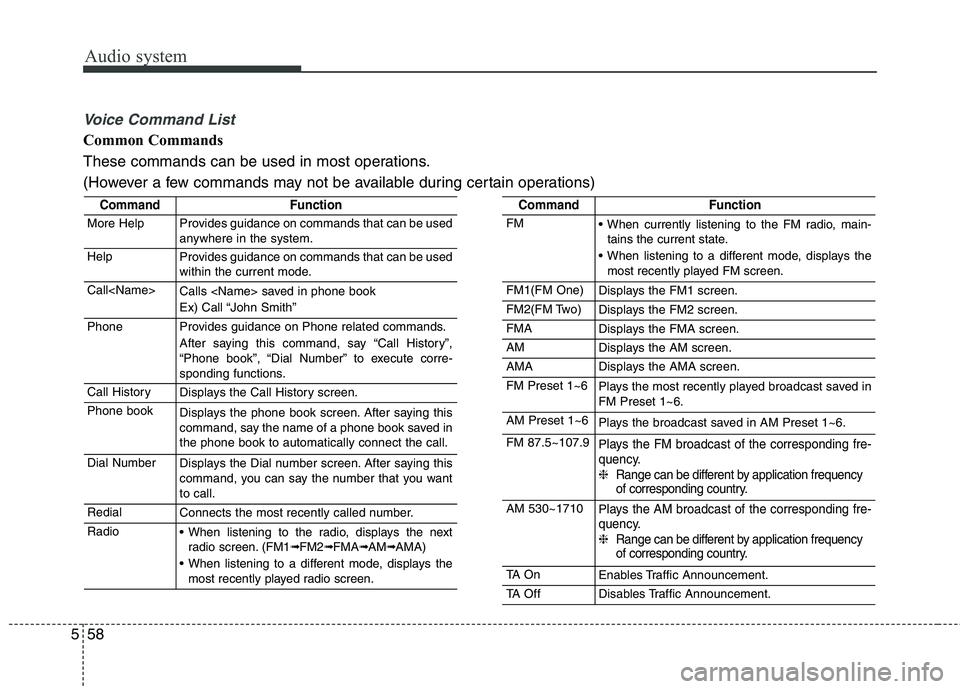
Voice Command List
Common Commands
These commands can be used in most operations.
(However a few commands may not be available during certain operations)
CommandFunction
More HelpProvides guidance on commands that can be used
anywhere in the system.
HelpProvides guidance on commands that can be used
within the current mode.
Call
Ex) Call “John Smith”
PhoneProvides guidance on Phone related commands.
After saying this command, say “Call History”,
“Phone book”, “Dial Number” to execute corre-
sponding functions.
Call HistoryDisplays the Call History screen.
Phone bookDisplays the phone book screen. After saying this
command, say the name of a phone book saved inthe phone book to automatically connect the call.
Dial NumberDisplays the Dial number screen. After saying this
command, you can say the number that you wantto call.
RedialConnects the most recently called number.
Radio When listening to the radio, displays the nextradio screen. (FM1➟FM2➟FMA➟AM➟AMA)
When listening to a different mode, displays the most recently played radio screen.
CommandFunction
FM When currently listening to the FM radio, main-tains the current state.
When listening to a different mode, displays the most recently played FM screen.
FM1(FM One)Displays the FM1 screen.
FM2(FM Two)Displays the FM2 screen.
FMADisplays the FMA screen.
AMDisplays the AM screen.
AMADisplays the AMA screen.
FM Preset 1~6Plays the most recently played broadcast saved in FM Preset 1~6.
AM Preset 1~6Plays the broadcast saved in AM Preset 1~6.
FM 87.5~107.9Plays the FM broadcast of the corresponding fre-
quency. ❈ Range can be different by application frequency
of corresponding country.
AM 530~1710Plays the AM broadcast of the corresponding fre-
quency. ❈ Range can be different by application frequency
of corresponding country.
TA O nEnables Traffic Announcement.
TA OffDisables Traffic Announcement.
Page 301 of 548

Audio system
59
5
CommandFunction
News OnEnables RDS News feature.
News OffDisables RDS News feature.
MediaMoves to the most recently played media screen.
Play Track 1~30If a music CD has been inserted, plays the corre-
sponding track.
CDPlays music on the CD.
Search CDMoves to the CD track or file selection screen.
For audio CDs, move to the screen and say the
track number to play the corresponding track.
Moves to MP3 CD file selection screen. After manually operate the device to select and play
music.
USBPlays music on the USB device.
Search USBMoves to USB file selection screen. After manual-
ly operate the device to select and play music.
iPod ®Plays music on the iPod ®
.
Search iPod ®Moves to the iPod
®
file selection screen. After,
manually operate the device to select and play
music.
My MusicPlays music saved in My Music.
Search My MusicMoves to the My Music file selection screen. After,
manually operate the device to select and play
music.
CommandFunction
AUX (Auxiliary)Plays the connected external device.
Bluetooth ®
AudioPlays the music saved in connected Bluetooth®
Wireless Technology device.
MuteMutes the radio or music volume.
Pardon?Repeats the most recent comment.
Cancel (Exit)Ends voice command.
Page 302 of 548
Audio system
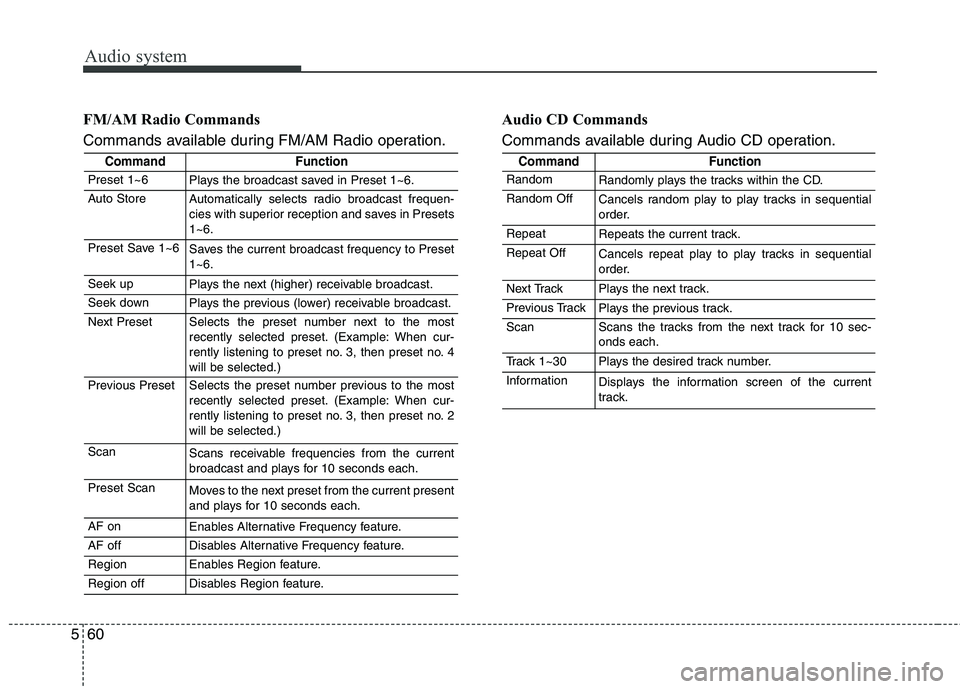
560FM/AM Radio Commands
Commands available during FM/AM Radio operation.
Audio CD Commands
Commands available during Audio CD operation.
CommandFunction
Preset 1~6Plays the broadcast saved in Preset 1~6.
Auto StoreAutomatically selects radio broadcast frequen-
cies with superior reception and saves in Presets1~6.
Preset Save 1~6Saves the current broadcast frequency to Preset 1~6.
Seek upPlays the next (higher) receivable broadcast.
Seek downPlays the previous (lower) receivable broadcast.
Next PresetSelects the preset number next to the most
recently selected preset. (Example: When cur-
rently listening to preset no. 3, then preset no. 4will be selected.)
Previous PresetSelects the preset number previous to the most
recently selected preset. (Example: When cur-
rently listening to preset no. 3, then preset no. 2will be selected.)
ScanScans receivable frequencies from the current
broadcast and plays for 10 seconds each.
Preset ScanMoves to the next preset from the current present
and plays for 10 seconds each.
AF onEnables Alternative Frequency feature.
AF offDisables Alternative Frequency feature.
RegionEnables Region feature.
Region offDisables Region feature.
CommandFunction
RandomRandomly plays the tracks within the CD.
Random OffCancels random play to play tracks in sequential
order.
RepeatRepeats the current track.
Repeat OffCancels repeat play to play tracks in sequential
order.
Next TrackPlays the next track.
Previous TrackPlays the previous track.
ScanScans the tracks from the next track for 10 sec- onds each.
Track 1~30Plays the desired track number.
InformationDisplays the information screen of the current
track.
Page 306 of 548
![KIA BORREGO 2017 User Guide Audio system
564Pop-up Mode
This feature is used to display the
Pop-up Mode screen when entering
radio and media modes.
When this feature is turned on, pressing the
[RADIO]or [MEDIA]
button will d](/img/2/57934/w960_57934-305.png "KIA BORREGO 2017 User Guide Audio system
564Pop-up Mode
This feature is used to display the
Pop-up Mode screen when entering
radio and media modes.
When this feature is turned on, pressing the
[RADIO]or [MEDIA]
button will d")
Audio system
564Pop-up Mode
This feature is used to display the
Pop-up Mode screen when entering
radio and media modes.
When this feature is turned on, pressing the
[RADIO]or [MEDIA]
button will display the Pop-up Modescreen.
✽✽ NOTICE
The media Pop-up Mode screen can
be displayed only when two or more
media modes have been connected.
Scroll Text
This feature is used to scroll text dis-
played on the screen when it is too
long to be displayed at once.
When turned on, the text is repeat-
edly scrolled. When turned off, the
text is scrolled just once. Song Info
This feature is used to change the
information displayed within USB
and MP3 CD modes.
Folder File : Displays file name and
folder name.
Album Artist Song : Displays album name/artist name/song.
Page 315 of 548
![KIA BORREGO 2017 User Guide Audio system
73
5
Mode Pop up
This feature is used to display the
Mode Pop up screen when entering
radio and media modes.
When this feature is turned on, pressing the [RADIO]or [MEDIA]
button wil](/img/2/57934/w960_57934-314.png "KIA BORREGO 2017 User Guide Audio system
73
5
Mode Pop up
This feature is used to display the
Mode Pop up screen when entering
radio and media modes.
When this feature is turned on, pressing the [RADIO]or [MEDIA]
button wil")
Audio system
73
5
Mode Pop up
This feature is used to display the
Mode Pop up screen when entering
radio and media modes.
When this feature is turned on, pressing the [RADIO]or [MEDIA]
button will display the Mode Pop upscreen.
✽✽ NOTICE
The media Mode Pop up screen can
be displayed only when two or more
media modes have been connected.
Text Scroll
This feature is used to scroll text dis-
played on the screen when it is too
long to be displayed at once.
When turned on, the text is repeat-
edly scrolled. When turned off, the
text is scrolled just once. Media Display
This feature is used to change the
information displayed within USB
and MP3 CD modes.
Folder File : Displays file name and
folder name.
Album Artist Song : Displays album name/artist name/song.
Page 322 of 548
Audio system
580FCC
This equipment has been tested and found to comply with the limits for a Class B digital device, pursuant to part 15
of the FCC Rules. These limits are designed to provide reasonable protection against harmful interference in a resi-dential installation.
This equipment generates, uses and can radiate radio frequency energy and, if not installed and used in accordance
with the instructions,may cause harmful interference to radio communications. However, there is no guarantee that
interference will not occur in a particular installation. If this equipment does cause harmful interference to radio or tel-
evision reception, which can be determined by turning the equipment off and on, the user is encouraged to try to cor-
rect the interference by one or more of the following measures :
Reorient or relocate the receiving antenna.
Increase the separation between the equipment and receiver.
Connect the equipment into an outlet on a circuit different from that to which the receiver is connected.
Consult the dealer or an experienced radio/TV technician for help.
Caution : Any changes or modifications to this device not explicitly approved by manufacturer could void
your authority to operate this equipment.
Declaration of Conformity
Page 417 of 548
713
What to do in an emergency
Changing a tire with TPMS
If you have a flat tire, the low Tire
Pressure and Position telltales will
come on. We recommend that the
system be checked by an authorized
Kia dealer. Each wheel is equipped with a tire pressure sensor mounted inside the
tire behind the valve stem. You must
use TPMS specific wheels. It is rec-
ommended that you have your tires
serviced by an authorized Kia dealer.CAUTION
The TPMS malfunction indica-tor may blink for approximate-ly 1 minute and then remaincontinuously illuminated if thevehicle is moving around elec- tric power supply cables orradios transmitter such as atpolice stations, government and public offices, broadcast-ing stations, military installa-tions, airports, or transmitting towers, etc. This can interferewith normal operation of theTire Pressure MonitoringSystem (TPMS).
The TPMS malfunction indica- tor may blink for approximate-ly 1 minute and then remaincontinuously illuminated ifsnow chains are used or some separate electronic devicessuch as notebook computer,mobile charger, remote starter or navigation etc., are used inthe vehicle.
(Continued)
(Continued)This can interfere with normaloperation of the Tire PressureMonitoring System (TPMS).
CAUTION
We recommend that you use the sealant approved by Kia.
The sealant on the tire pressuresensor and wheel shall be elim-inated when you replace the tire with a new one.
Page 535 of 548
911
Specifications & Consumer information
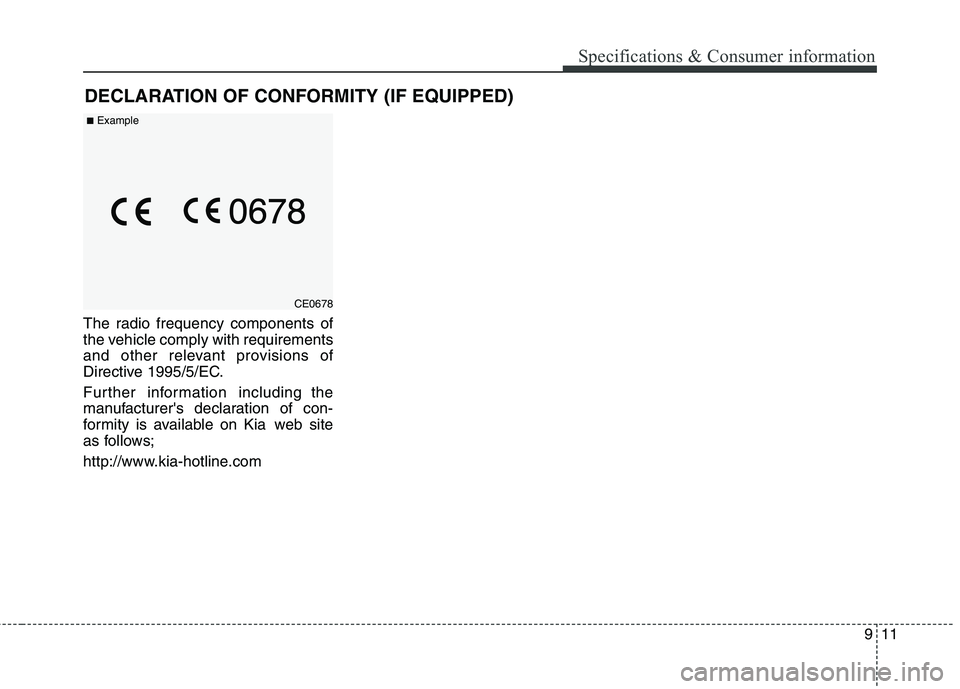
DECLARATION OF CONFORMITY (IF EQUIPPED)
The radio frequency components of
the vehicle comply with requirements
and other relevant provisions of
Directive 1995/5/EC.
Further information including the
manufacturer's declaration of con-
formity is available on Kia web site
as follows;
http://www.kia-hotline.com
CE0678
■Example