roof KIA BORREGO 2017 User Guide
[x] Cancel search | Manufacturer: KIA, Model Year: 2017, Model line: BORREGO, Model: KIA BORREGO 2017Pages: 548, PDF Size: 36.78 MB
Page 241 of 548

Features of your vehicle
152
4
Roof rack (if equipped)
If the vehicle has a roof rack, you can
load cargo on top of your vehicle. Crossbars and fixing components
needed to install the roof rack on
your vehicle may be obtained from
an authorized Kia dealer or other
qualified shop.✽✽
NOTICE
The crossbars (if equipped) should be placed in the proper load carry-
ing positions prior to placing items
onto the roof rack.
If the vehicle is equipped with a sunroof, be sure not to position
cargo onto the roof rack in such a
way that it could interfere with
sunroof operation.
When the roof rack is not being used to carry cargo, the crossbars
may need to be repositioned if
wind noise is detected.
EXTERIOR FEATURES
CAUTION
When carrying cargo on the
roof rack, take the necessaryprecautions to make sure thecargo does not damage theroof of the vehicle.
When carrying large objects on the roof rack, make surethey do not exceed the overallroof length or width.
When you are carrying cargo on the roof rack, do not operatethe sunroof (if equipped).
OHM046140
WARNING
The following specification is the maximum weight that can
be loaded onto the roof rack.
Distribute the load as evenly as
possible across the crossbars
(if equipped) and roof rack and
secure the load firmly.
Loading cargo or luggage in
excess of the specified weight
limit on the roof rack may
damage your vehicle.
The vehicle center of gravity will be higher when items are
loaded onto the roof rack.
Avoid sudden starts, braking,
sharp turns, abrupt maneu-
vers or high speeds that may
result in loss of vehicle con-
trol or rollover resulting in anaccident.
(Continued)
ROOF 100 kg (220 lbs.)
RACK EVENLY DISTRIBUTED
Page 242 of 548
4153
Features of your vehicle
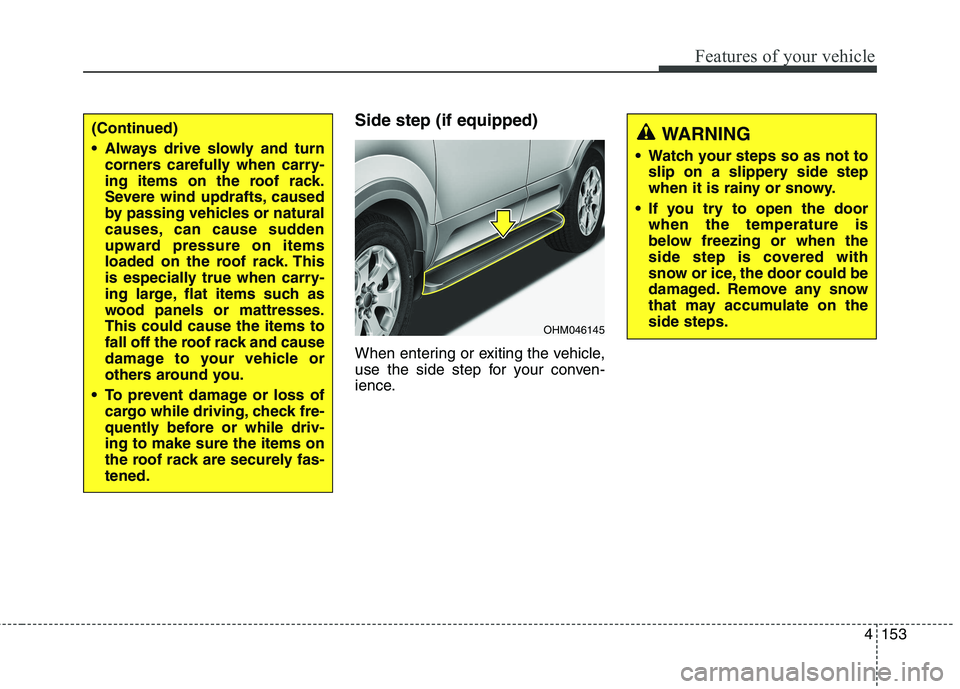
Side step (if equipped)
When entering or exiting the vehicle,
use the side step for your conven-
ience.(Continued)
Always drive slowly and turncorners carefully when carry-
ing items on the roof rack.
Severe wind updrafts, caused
by passing vehicles or natural
causes, can cause sudden
upward pressure on items
loaded on the roof rack. This
is especially true when carry-
ing large, flat items such as
wood panels or mattresses.This could cause the items to
fall off the roof rack and cause
damage to your vehicle or
others around you.
To prevent damage or loss of cargo while driving, check fre-
quently before or while driv-ing to make sure the items on
the roof rack are securely fas-tened.
OHM046145
WARNING
Watch your steps so as not to slip on a slippery side step
when it is rainy or snowy.
If you try to open the door when the temperature is
below freezing or when the
side step is covered with
snow or ice, the door could be
damaged. Remove any snow
that may accumulate on theside steps.
Page 244 of 548
Audio system
52
✽✽NOTICE
If you install an after market HID
head lamp, your vehicle’s audio and
electronic device may malfunction.
❈ If your vehicle is equipped with
AVN(Audio, Video and Navigation)
system, refer to a separately sup-
plied manual for detailed informa-tion. Antenna
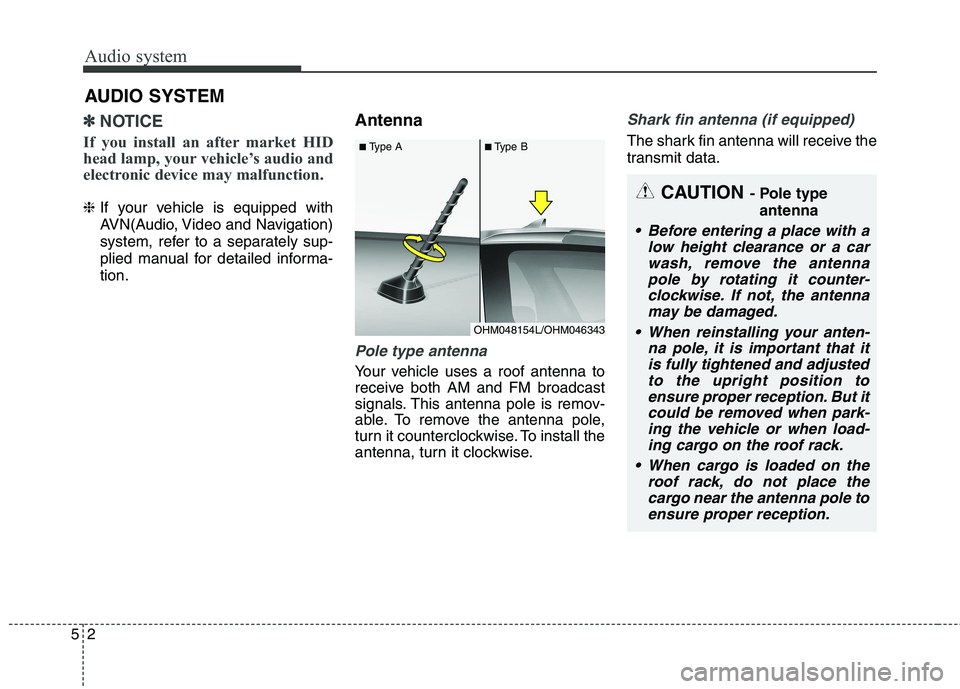
Pole type antenna
Your vehicle uses a roof antenna to
receive both AM and FM broadcast
signals. This antenna pole is remov-
able. To remove the antenna pole,
turn it counterclockwise. To install the
antenna, turn it clockwise.
Shark fin antenna (if equipped)
The shark fin antenna will receive the
transmit data.
AUDIO SYSTEM
CAUTION
- Pole type
antenna
• Before entering a place with a low height clearance or a carwash, remove the antenna pole by rotating it counter-clockwise. If not, the antennamay be damaged.
When reinstalling your anten- na pole, it is important that itis fully tightened and adjustedto the upright position toensure proper reception. But it could be removed when park-ing the vehicle or when load-ing cargo on the roof rack.
When cargo is loaded on the roof rack, do not place thecargo near the antenna pole toensure proper reception.
OHM048154L/OHM046343
■
Type A ■Type B
Page 261 of 548
Audio system
19
5
✽✽
NOTICE - Usingthe Voice
Recognition (if equipped)
When using the voice recognition feature, only commands listed with-
in the user's manual are supported.
Be aware that during the opera- tion of the voice recognition sys-
tem, pressing any button other
than the button or touching the
screen will terminate voice recog-
nition mode.
For superior voice recognition performance, position the micro-
phone used for voice recognition
above the head of the driver’s seat
and maintain a proper position
when saying commands.
Within the following situations, voice recognition may not function
properly due to external sound.
- When the windows and sunroof
are open
- When the wind of the cooling/heat- ing device is strong
- When entering and passing through tunnels
- When driving on rugged and uneven roads. (Continued)(Continued)
- During severe rain (heavy rains,windstorms)
Phone related voice commands can be used only when a Bluetooth®
Wireless Technology device is con-
nected.
When making calls by stating a name, the corresponding contact
must be downloaded and stored
within the audio system.
After downloading the Bluetooth®
Wireless Technology phone book,
it takes some time to convert the
phone book data into voice infor-
mation. During this time, voice
recognition may not properly
operate.
Pronounce the voice commands naturally and clearly as if in a nor-
mal conversation.CAUTION
Bluetooth®Wireless Technology
Handsfree is a feature that enables drivers to practicesafe driving. Connecting the car audio system with aBluetooth
®Wireless Technology
phone allows the user to con- veniently make calls, receivecalls, and manage the phone book. Before using theBluetooth
®Wireless Technology,
carefully read the contents of this user’s manual.
Excessive use or operations while driving may lead to neg-ligent driving practices and bethe cause of accidents.
Do not operate the device excessively while driving.
Viewing the screen for pro- longed periods of time whiledriving is dangerous and may lead to accidents.
When driving, view the screen only for short periods of time.
Page 355 of 548
631
Driving your vehicle
✽✽NOTICE
Do not drive in water if the level is higher than the bottom of the vehi-
cle.
Check your brake condition once you are out of mud or water. Press
the brake pedal several times as
you move slowly until you feel nor-
mal braking forces return.
Shorten your scheduled mainte- nance interval if you drive in off-
road conditions such as sand, mud
or water (see “Maintenance under
severe usage conditions” in chapter
8). Always wash your vehicle thor-
oughly after off road use, especially
cleaning the bottom of the vehicle.
Since the driving torque is always applied to the 4 wheels the per-
formance of the 4WD vehicle is
greatly affected by the condition of
the tires. Be sure to equip the vehi-
cle with four tires of the same size
and type.
A full time four wheel drive vehi- cle cannot be towed by an ordi-
nary tow truck. Make sure that
the vehicle is placed on a flat bed
truck for moving.Reducing the risk of a rollover
This multi-purpose passenger vehicle
is defined as a Sports Utility Vehicle
(SUV). SUV’s have higher ground
clearance and a narrower track to
make them capable of performing in a
wide variety of off-road applications.
Specific design characteristics give
them a higher center of gravity than
ordinary vehicles. An advantage of the
higher ground clearance is a better
view of the road, which allows you to
anticipate problems. They are not
designed for cornering at the same
speeds as conventional passenger
vehicles, any more than low-slung
sports vehicles are designed to per-
form satisfactorily in off-road condi-
tions. Due to this risk, driver and pas-sengers are strongly recommended to
buckle their seat belts. In a rollover
crash, an unbelted person is more
likely to die than a person wearing a
seat belt. There are steps that a driver
can make to reduce the risk of a
rollover. If at all possible, avoid sharp
turns or abrupt maneuvers, do not
load your roof rack with heavy cargo,
and never modify your vehicle in any
way.CAUTION - Mud or snow
If one of the front or rear wheels
begins to spin in mud, snow,etc. the vehicle can sometimes be driven out by depressing theaccelerator pedal further; how-ever avoid running the engine continuously at high rpmbecause doing so could dam-age the 4WD system.
Page 446 of 548
Maintenance
10
8
SCHEDULED MAINTENANCE SERVICE
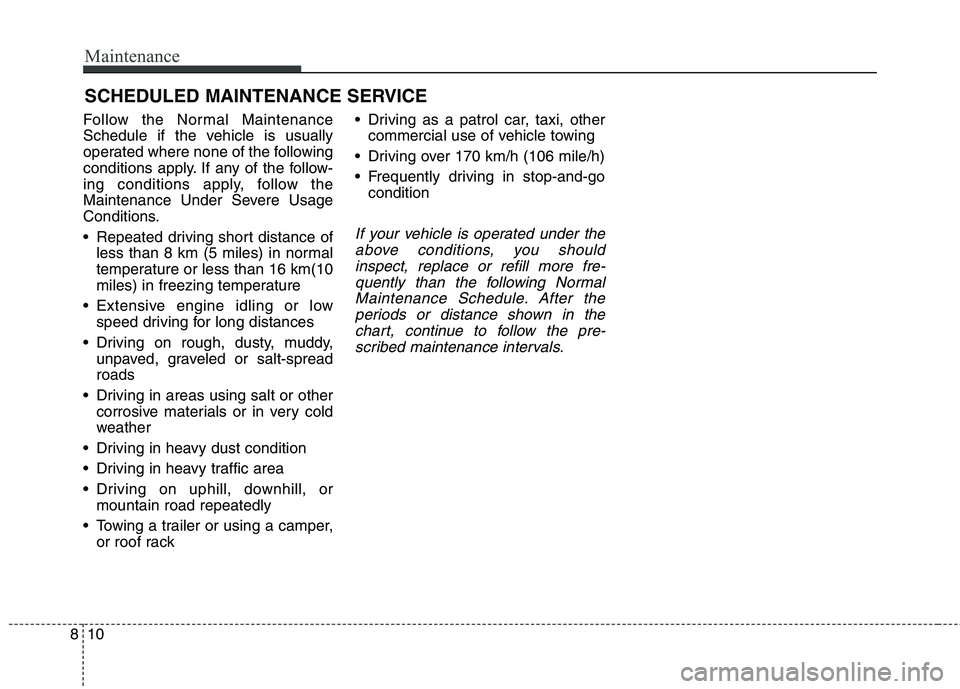
Follow the Normal Maintenance
Schedule if the vehicle is usually
operated where none of the following
conditions apply. If any of the follow-
ing conditions apply, follow the
Maintenance Under Severe Usage
Conditions.
Repeated driving short distance of less than 8 km (5 miles) in normal
temperature or less than 16 km(10
miles) in freezing temperature
Extensive engine idling or low speed driving for long distances
Driving on rough, dusty, muddy, unpaved, graveled or salt-spreadroads
Driving in areas using salt or other corrosive materials or in very cold
weather
Driving in heavy dust condition
Driving in heavy traffic area
Driving on uphill, downhill, or mountain road repeatedly
Towing a trailer or using a camper, or roof rack Driving as a patrol car, taxi, other
commercial use of vehicle towing
Driving over 170 km/h (106 mile/h)
Frequently driving in stop-and-go condition
If your vehicle is operated under the
above conditions, you shouldinspect, replace or refill more fre- quently than the following NormalMaintenance Schedule. After theperiods or distance shown in the chart, continue to follow the pre-scribed maintenance intervals.
Page 453 of 548
817
Maintenance
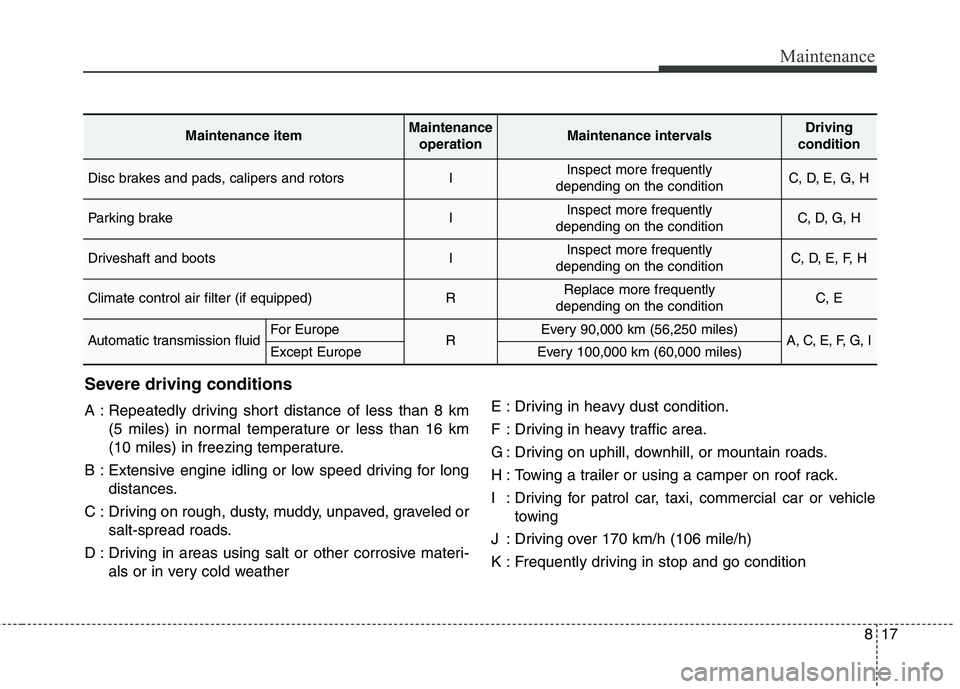
Severe driving conditions
A : Repeatedly driving short distance of less than 8 km(5 miles) in normal temperature or less than 16 km
(10 miles) in freezing temperature.
B : Extensive engine idling or low speed driving for long distances.
C : Driving on rough, dusty, muddy, unpaved, graveled or salt-spread roads.
D : Driving in areas using salt or other corrosive materi- als or in very cold weather E : Driving in heavy dust condition.
F : Driving in heavy traffic area.
G : Driving on uphill, downhill, or mountain roads.
H : Towing a trailer or using a camper on roof rack.I:
Driving for patrol car, taxi, commercial car or vehicle
towing
J : Driving over 170 km/h (106 mile/h)
K : Frequently driving in stop and go condition
Maintenance itemMaintenance
operationMaintenance intervalsDriving
condition
Disc brakes and pads, calipers and rotorsIInspect more frequently
depending on the conditionC, D, E, G, H
Parking brakeIInspect more frequently
depending on the conditionC, D, G, H
Driveshaft and bootsIInspect more frequently
depending on the conditionC, D, E, F, H
Climate control air filter (if equipped)RReplace more frequently
depending on the conditionC, E
Automatic transmission fluidFor EuropeREvery 90,000 km (56,250 miles)A, C, E, F, G, IExcept EuropeEvery 100,000 km (60,000 miles)
Page 477 of 548
841
Maintenance
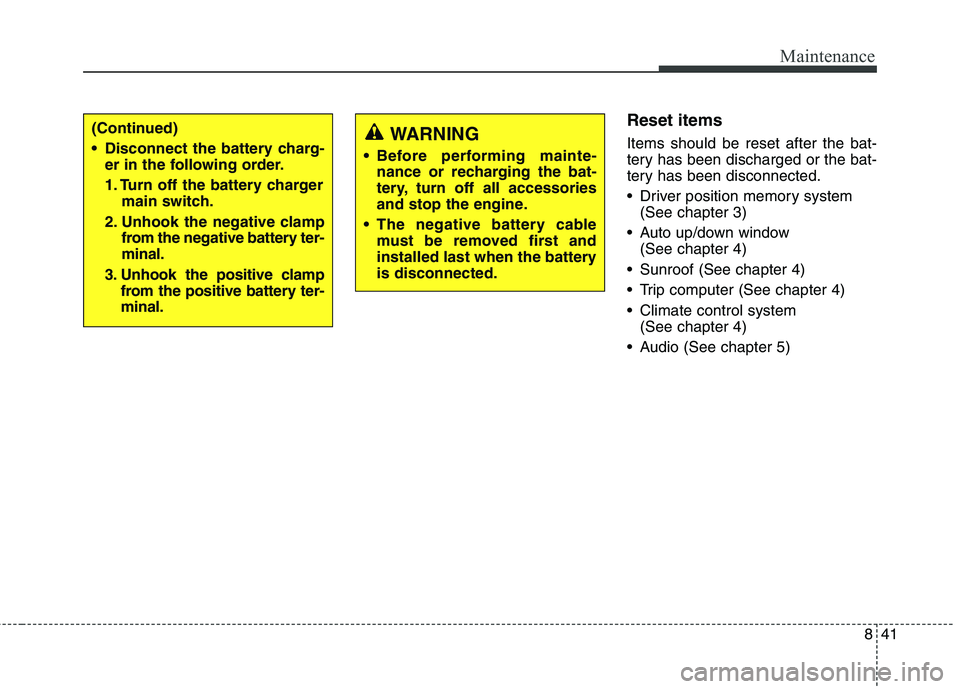
Reset items Items should be reset after the bat-
tery has been discharged or the bat-
tery has been disconnected.
Driver position memory system(See chapter 3)
Auto up/down window (See chapter 4)
Sunroof (See chapter 4)
Trip computer (See chapter 4)
Climate control system (See chapter 4)
Audio (See chapter 5)WARNING
Before performing mainte- nance or recharging the bat-
tery, turn off all accessories
and stop the engine.
The negative battery cable must be removed first and
installed last when the batteryis disconnected.(Continued)
Disconnect the battery charg-er in the following order.
1. Turn off the battery charger main switch.
2. Unhook the negative clamp from the negative battery ter- minal.
3. Unhook the positive clamp from the positive battery ter-minal.
Page 495 of 548
859
Maintenance
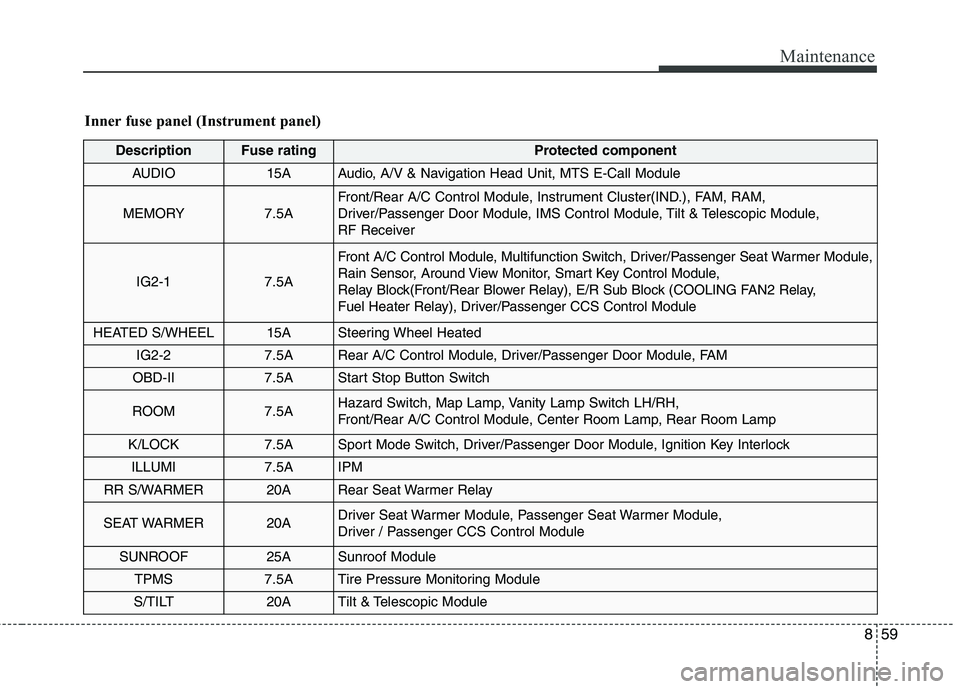
Inner fuse panel (Instrument panel)
DescriptionFuse ratingProtected component
AUDIO15AAudio, A/V & Navigation Head Unit, MTS E-Call Module
MEMORY7.5A
Front/Rear A/C Control Module, Instrument Cluster(IND.), FAM, RAM,
Driver/Passenger Door Module, IMS Control Module, Tilt & Telescopic Module,
RF Receiver
IG2-17.5A
Front A/C Control Module, Multifunction Switch, Driver/Passenger Seat Warmer Module,
Rain Sensor, Around View Monitor, Smart Key Control Module,
Relay Block(Front/Rear Blower Relay), E/R Sub Block (COOLING FAN2 Relay,
Fuel Heater Relay), Driver/Passenger CCS Control Module
HEATED S/WHEEL15ASteering Wheel Heated
IG2-27.5ARear A/C Control Module, Driver/Passenger Door Module, FAM
OBD-II7.5AStart Stop Button Switch
ROOM7.5AHazard Switch, Map Lamp, Vanity Lamp Switch LH/RH,
Front/Rear A/C Control Module, Center Room Lamp, Rear Room Lamp
K/LOCK7.5ASport Mode Switch, Driver/Passenger Door Module, Ignition Key Interlock
ILLUMI7.5AIPM
RR S/WARMER20ARear Seat Warmer Relay
SEAT WARMER20ADriver Seat Warmer Module, Passenger Seat Warmer Module,
Driver / Passenger CCS Control Module
SUNROOF25ASunroof Module
TPMS7.5ATire Pressure Monitoring Module
S/TILT20ATilt & Telescopic Module
Page 501 of 548
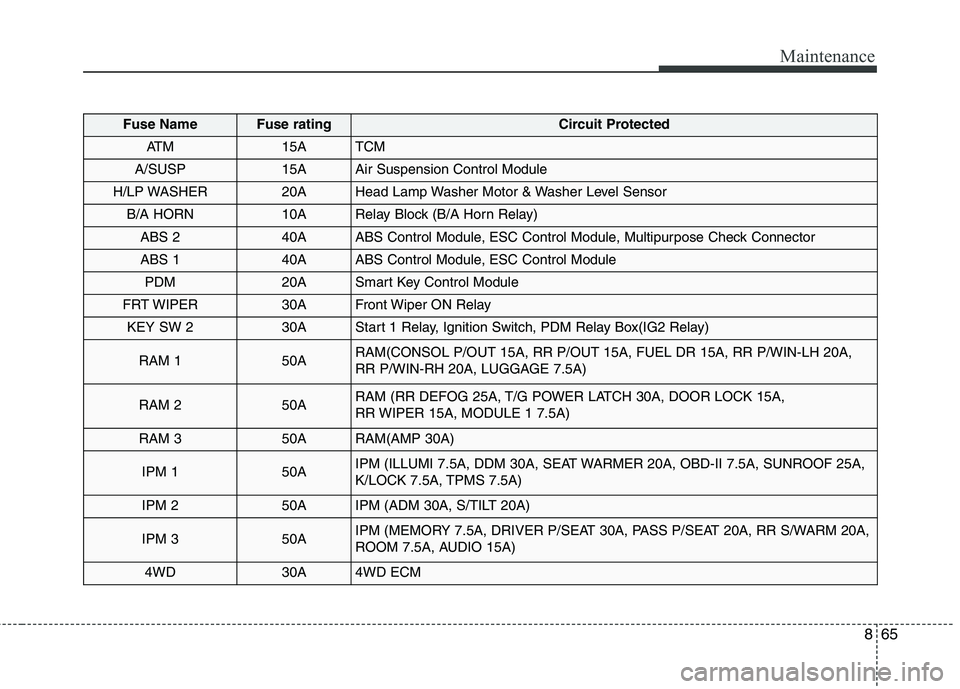
865
Maintenance
Fuse NameFuse ratingCircuit Protected
AT M15ATCM
A/SUSP15AAir Suspension Control Module
H/LP WASHER20AHead Lamp Washer Motor & Washer Level Sensor
B/A HORN10ARelay Block (B/A Horn Relay)
ABS 240AABS Control Module, ESC Control Module, Multipurpose Check Connector
ABS 140AABS Control Module, ESC Control Module
PDM20ASmart Key Control Module
FRT WIPER30AFront Wiper ON Relay
KEY SW 230AStart 1 Relay, Ignition Switch, PDM Relay Box(IG2 Relay)
RAM 150ARAM(CONSOL P/OUT 15A, RR P/OUT 15A, FUEL DR 15A, RR P/WIN-LH 20A,
RR P/WIN-RH 20A, LUGGAGE 7.5A)
RAM 250ARAM (RR DEFOG 25A, T/G POWER LATCH 30A, DOOR LOCK 15A,
RR WIPER 15A, MODULE 1 7.5A)
RAM 350ARAM(AMP 30A)
IPM 150AIPM (ILLUMI 7.5A, DDM 30A, SEAT WARMER 20A, OBD-II 7.5A, SUNROOF 25A,
K/LOCK 7.5A, TPMS 7.5A)
IPM 250AIPM (ADM 30A, S/TILT 20A)
IPM 350AIPM (MEMORY 7.5A, DRIVER P/SEAT 30A, PASS P/SEAT 20A, RR S/WARM 20A,
ROOM 7.5A, AUDIO 15A)
4WD30A4WD ECM