warning light KIA BORREGO 2017 User Guide
[x] Cancel search | Manufacturer: KIA, Model Year: 2017, Model line: BORREGO, Model: KIA BORREGO 2017Pages: 548, PDF Size: 36.78 MB
Page 77 of 548
Safety features of your vehicle
60
3
(Continued)
Front and side air bags can
injure occupants improperly
positioned in the front seats.
Move your seat as far back as practical from the front air
bags, while still maintaining
control of the vehicle.
You and your passengers should never sit or lean unnec-
essarily close to the air bags.
Improperly positioned drivers
and passengers can be severe-
ly injured by inflating air bags.
Never lean agai nst the door or
center console – always sit in an upright position.
No objects should be placed over or near the air bag mod- ules on the steering wheel,
instrument panel or the front
passenger's panel above the
glove box, because any suchobject could cause harm if the
vehicle is in a crash severe
enough to cause the air bags
to deploy.
(Continued)(Continued)
Do not tamper with or discon-nect SRS wiring or other com- ponents of the SRS system.
Doing so could result in injury,
due to accidental deployment
of the air bags or by rendering
the SRS inoperative.
If the SRS air bag warning light remains illuminated while the
vehicle is being driven, we rec-ommend that the system be
inspected by an authorized Kia
dealer.
Air bags can only be used once – we recommend that
the system be replaced by an
authorized Kia dealer.
The SRS is designed to deploy the front air bags only when an
impact is sufficiently severeand when the impact angle is
less than 30° from the forwardlongitudinal axis of the vehi-
cle. Additionally, the air bags
will only deploy once. Seat
belts must be worn at all times.
(Continued)(Continued)
Front air bags are not intend-ed to deploy in side-impact,
rear-impact or rollover crash-
es. In addition, front air bags
will not deploy in frontal
crashes below the deploy-ment threshold.
A child restraint system must never be placed in the front
seat. The infant or child could
be severely injured or killed
by an air bag deployment incase of an accident.
Children age 12 and under must always be properlyrestrained in the rear seat.
Never allow children to ride in
the front passenger seat. If a
child over 12 must be seated
in the front seat, he or she
must be properly belted and
the seat should be moved as
far back as possible.
(Continued)
Page 87 of 548
Safety features of your vehicle
70
3
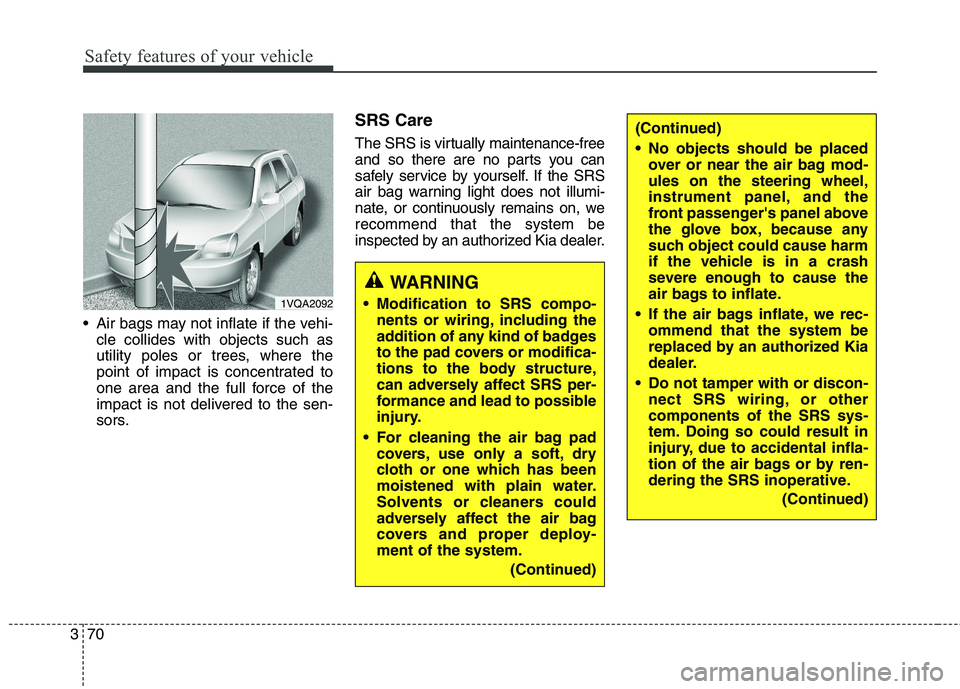
Air bags may not inflate if the vehi-
cle collides with objects such as
utility poles or trees, where the
point of impact is concentrated to
one area and the full force of the
impact is not delivered to the sen-
sors. SRS Care
The SRS is virtually maintenance-free
and so there are no parts you can
safely service by yourself. If the SRS
air bag warning light does not illumi-
nate, or continuously remains on, werecommend that the system be
inspected by an authorized Kia dealer.
WARNING
Modification to SRS compo- nents or wiring, including the
addition of any kind of badges
to the pad covers or modifica-
tions to the body structure,
can adversely affect SRS per-
formance and lead to possible
injury.
For cleaning the air bag pad covers, use only a soft, dry
cloth or one which has been
moistened with plain water.
Solvents or cleaners could
adversely affect the air bag
covers and proper deploy-ment of the system.
(Continued)
(Continued)
No objects should be placedover or near the air bag mod- ules on the steering wheel,
instrument panel, and the
front passenger's panel above
the glove box, because any
such object could cause harm
if the vehicle is in a crash
severe enough to cause the
air bags to inflate.
If the air bags inflate, we rec- ommend that the system be
replaced by an authorized Kia
dealer.
Do not tamper with or discon- nect SRS wiring, or othercomponents of the SRS sys-
tem. Doing so could result in
injury, due to accidental infla-
tion of the air bags or by ren-
dering the SRS inoperative.
(Continued)
1VQA2092
Page 91 of 548
. . . . . . . . . . . . . . . . . . . . . . . . . . . . . . . . . . . . . 4-50
. . . . . . . . . . . . . . . . . . . . . . 4-53
LCD display . . . . . . . . . . . . . . . . . . . . . . . . . . . . . . 4-54 . . . . . . . . . . . . . . . . . . . . . . . . . . . . . . . . . 4-54
. . . . . . . . . . . . . . . . . . . . . . . . . . 4-59
. . . . . . . . . . . . . . . . . . . . . . . . . . . . . . . . 4-60
. . . . . . . . . . . . . . . . . . . . . . . . . . . . . . . . . . . 4-60
. . . . . . . . . . . . . . . . . . . . . . . . . . . . . . . . 4-60
. . . . . . . . . . . . . . . . . . . . . . . . . . . 4-62
. . . . . . . . . . . . . . . . . . . . . . . . . . . . 4-67
Warning and indicator lights . . . . . . . . . . . . . . . . 4-73 . . . . . . . . . . . . . . . . . . . . . . . . . . . . . . . 4-73
. . . . . . . . . . . . . . . . . . . . . . . . . . . . . . 4-81
Rear parking assist system . . . . . . . . . . . . . . . . . . 4-87 rear parking assist system . . . . . . . . . . . . . . . . . . . . 4-88
. . . . . . . . . . 4-89
. . . . . . . . . . . . . . . . . . . . . . . . . . . . . . . . 4-90
Parking assist system . . . . . . . . . . . . . . . . . . . . . . . 4-91 . . . . . . . . . . . 4-91 parking assist system . . . . . . . . . . . . . . . . . . . . . . . . 4-93
. . . . . . . . . . . . . . . . . . . . . . . . . . . . . . . . 4-95 Rearview camera . . . . . . . . . . . . . . . . . . . . . . . . . . 4-96
Surround View Monitoring system. . . . . . . . . . . . 4-97
Lighting . . . . . . . . . . . . . . . . . . . . . . . . . . . . . . . . . . 4-98
. . . . . . . . . . . . . . . . . . . . . . . 4-98
. . . . . . . . . . . . . . . . . . . . . . . . . 4-98
. . . . . . . . . . . . . . . . . . . . . . . . . . . . . . 4-99
. . . . . . . . . . . . . . . . . . . . . . . . 4-101
. . . . . . . . . . . . . . . . . . . . . . . . . . . . 4-102
. . . . . . . . . . . 4-104
. . . . . . . . . . . . . . . . . . . . . . . . . . . . . . 4-105
. . . . . . . . . . . . . . . . . . . . . . . . . . . . . . . 4-105
. . . . . . . . . . . . . . . . . . . . . 4-106
Wipers and washers . . . . . . . . . . . . . . . . . . . . . . . 4-107 . . . . . . . . . . . . 4-107
. . . . . . . . . . . . . . . . . . . . . . . . . . 4-107
. . . . . . . . . . . . . . . . . . . . . . . . . . . . 4-110
. . . . . . . . . 4-111
Interior light . . . . . . . . . . . . . . . . . . . . . . . . . . . . . 4-112 . . . . . . . . . . . . . . . . . . . . . . . . . . . . . . . . . . 4-112
. . . . . . . . . . . . . . . . . . . . . . . . . . . . . . . . 4-112
. . . . . . . . . . . . . . . . . . . . . . . . . 4-113
. . . . . . . . . . . . . . . . . . . . . . . . . . . . . 4-114
. . . . . . . . . . . . . . . . . . . . . . . . . . 4-114
4
Page 96 of 548

47
Features of your vehicle
With a smart key, you can lock or
unlock a door (and tailgate) and even
start the engine without inserting the
key.
The functions of the buttons on a
smart key are similar to the remote
keyless entry. (Refer to the “Remote
keyless entry” in this chapter.)Smart key operation
To remove the mechanical key, press
and hold the release button (1) and
remove the mechanical key (2).
To reinstall the mechanical key, put
the key into the hole and push it until
a click sound is heard.
Smart key functions
Carrying the smart key, you may lock
and unlock the vehicle doors (and
tailgate). Also, you may start the
engine. Refer to the following, for
more details.
Locking
Pressing the button of the front out- side door handles with all doors (and
tailgate) closed and any door
unlocked, locks all the doors (and tail-
gate). The hazard warning lights will
blink once to indicate that all doors
(and tailgate) are locked. The button
will only operate when the smart keyis within 0.7 ~ 1m (28 ~ 39.3 in) from
the outside door handle. If you want
to make sure that a door has locked
or not, you should check the door
lock button inside the vehicle or pull
the outside door handle.
SMART KEY (IF EQUIPPED)
OHM046588L
OHM048002OHM046589L
Page 97 of 548
Features of your vehicle
8
4
Even though you press the button,
the doors will not lock and the chime
sounds if any of the following occurs:
The smart key is in the vehicle.
The ENGINE START/STOP button
is in the ACC or ON position.
Any door except the tailgate is opened.Unlocking
Pressing the button of the front out- side door handles with all doors (and
tailgate) closed and locked, unlocks
all the doors (and tailgate). The haz-
ard warning lights will blink twice toindicate that all doors (and tailgate)
are unlocked. The button will only
operate when the smart key is within0.7 ~ 1m (28 ~ 39.3 in) from the out-
side door handle.
When the smart key is recognized in the area of 0.7 ~ 1m (28 ~ 39.3 in)
from the front outside door handle,other people can also open a door
without possession of the smart key.
Tailgate unlocking
If you are within 0.7 ~ 1m (28 ~ 39.3
in) from the outside tailgate handle,
with your smart key in possession, the
tailgate will unlock and open when
you press the tailgate handle switch.
The hazard warning lights will blink twice to indicate that the tailgate is
unlocked.
Also, once the tailgate is opened and
then closed, the tailgate will lock
automatically.
Start-up
You can start the engine without
inserting the key. For detailed infor-
mation refer to “Starting the engine
with a smart key” in chapter 6.
Page 99 of 548
Features of your vehicle
10
4
Restrictions in handling keys
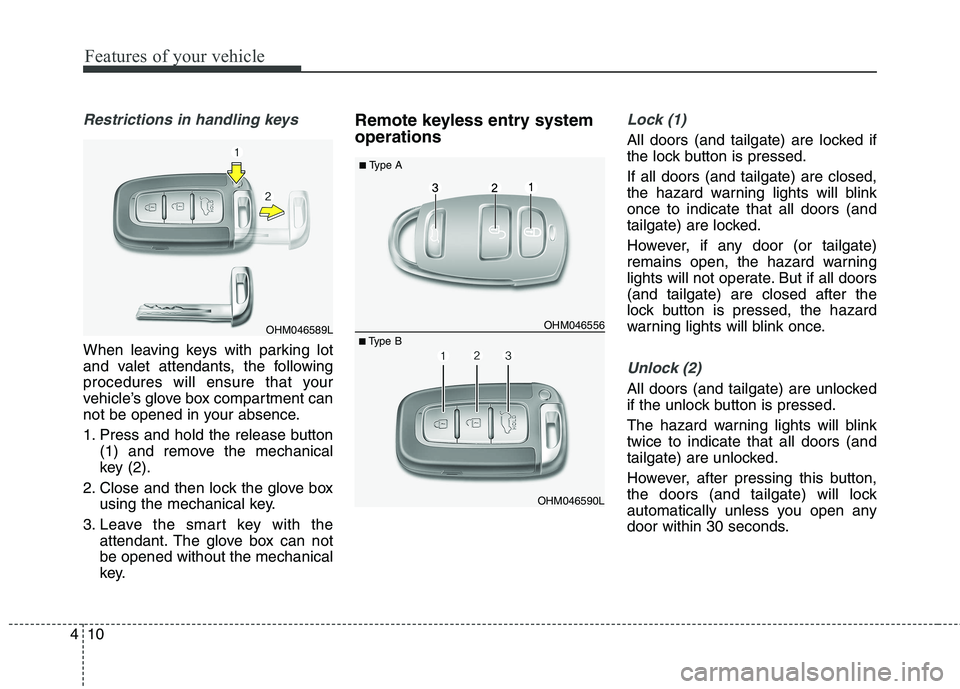
When leaving keys with parking lot
and valet attendants, the following
procedures will ensure that your
vehicle’s glove box compartment can
not be opened in your absence.
1. Press and hold the release button
(1) and remove the mechanical
key (2).
2. Close and then lock the glove box using the mechanical key.
3. Leave the smart key with the attendant. The glove box can notbe opened without the mechanical
key. Remote keyless entry system operations
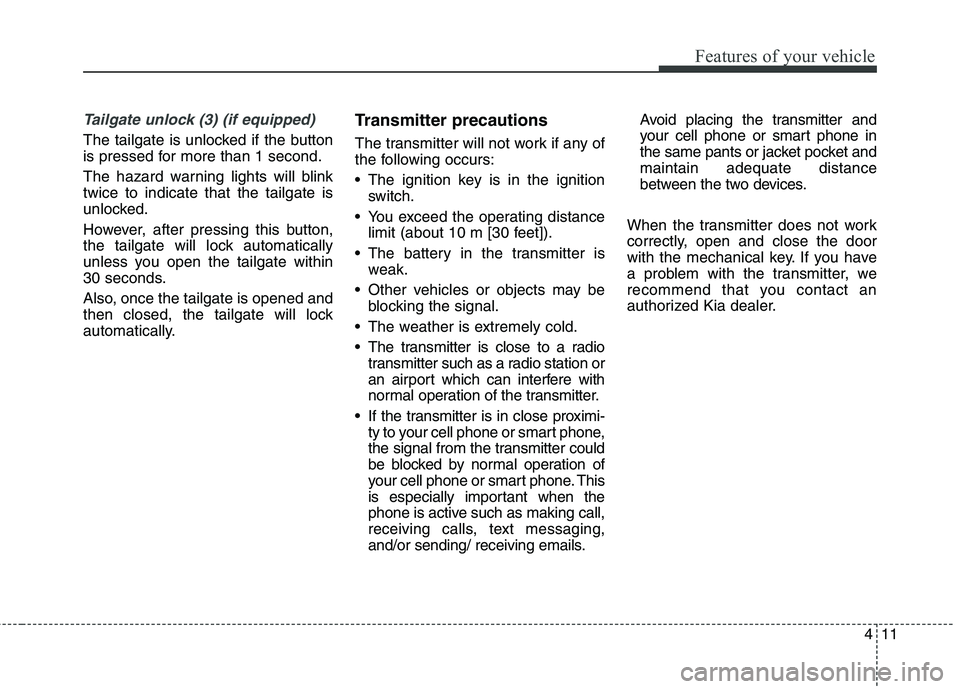
Lock (1)
All doors (and tailgate) are locked if
the lock button is pressed. If all doors (and tailgate) are closed,
the hazard warning lights will blinkonce to indicate that all doors (and
tailgate) are locked.
However, if any door (or tailgate)
remains open, the hazard warning
lights will not operate. But if all doors(and tailgate) are closed after the
lock button is pressed, the hazard
warning lights will blink once.
Unlock (2)
All doors (and tailgate) are unlocked
if the unlock button is pressed.
The hazard warning lights will blink twice to indicate that all doors (and
tailgate) are unlocked.
However, after pressing this button,
the doors (and tailgate) will lock
automatically unless you open any
door within 30 seconds.
OHM046589LOHM046556
OHM046590L
■
Type A
■ Type B
Page 100 of 548
411
Features of your vehicle
Tailgate unlock (3) (if equipped)
The tailgate is unlocked if the button
is pressed for more than 1 second.
The hazard warning lights will blink twice to indicate that the tailgate is
unlocked.
However, after pressing this button,
the tailgate will lock automatically
unless you open the tailgate within
30 seconds.
Also, once the tailgate is opened and
then closed, the tailgate will lock
automatically.Transmitter precautions
The transmitter will not work if any of
the following occurs:
The ignition key is in the ignition
switch.
You exceed the operating distance limit (about 10 m [30 feet]).
The battery in the transmitter is weak.
Other vehicles or objects may be blocking the signal.
The weather is extremely cold.
The transmitter is close to a radio transmitter such as a radio station or
an airport which can interfere with
normal operation of the transmitter.
If the transmitter is in close proximi- ty to your cell phone or smart phone,
the signal from the transmitter could
be blocked by normal operation of
your cell phone or smart phone. This
is especially important when the
phone is active such as making call,
receiving calls, text messaging,
and/or sending/ receiving emails. Avoid placing the transmitter and
your cell phone or smart phone in
the same pants or jacket pocket andmaintain adequate distance
between the two devices.
When the transmitter does not work
correctly, open and close the door
with the mechanical key. If you have
a problem with the transmitter, we
recommend that you contact an
authorized Kia dealer.
Page 103 of 548
Features of your vehicle
14
4
THEFT-ALARM SYSTEM (IF EQUIPPED)
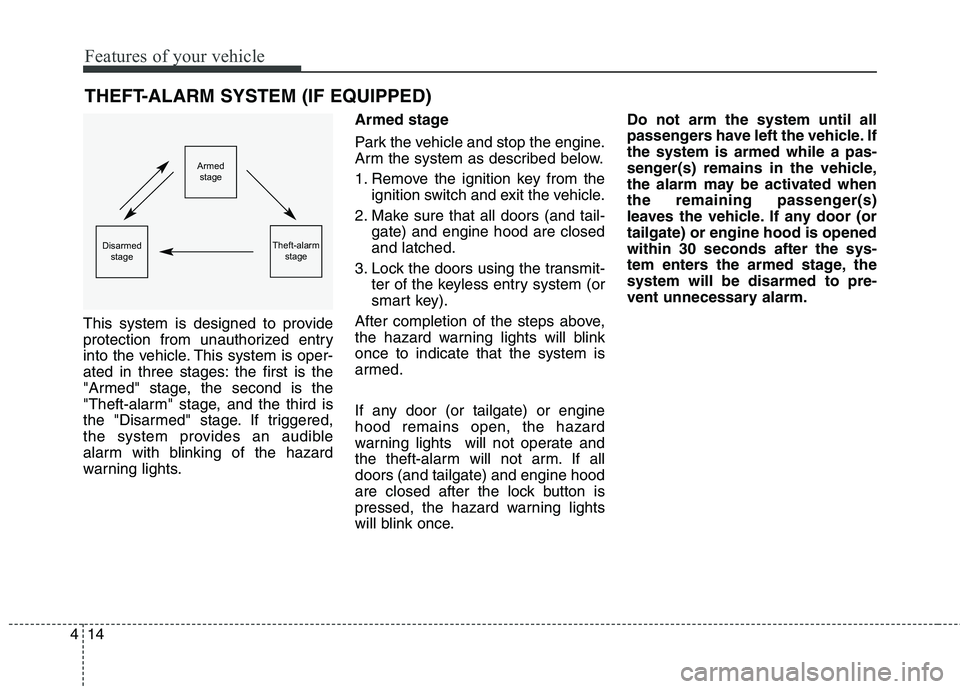
This system is designed to provide
protection from unauthorized entry
into the vehicle. This system is oper-
ated in three stages: the first is the
"Armed" stage, the second is the
"Theft-alarm" stage, and the third is
the "Disarmed" stage. If triggered,
the system provides an audible
alarm with blinking of the hazard
warning lights. Armed stage
Park the vehicle and stop the engine.
Arm the system as described below.
1. Remove the ignition key from the
ignition switch and exit the vehicle.
2. Make sure that all doors (and tail- gate) and engine hood are closed and latched.
3. Lock the doors using the transmit- ter of the keyless entry system (or
smart key).
After completion of the steps above,
the hazard warning lights will blinkonce to indicate that the system is
armed.
If any door (or tailgate) or engine hood remains open, the hazard
warning lights will not operate and
the theft-alarm will not arm. If alldoors (and tailgate) and engine hood
are closed after the lock button is
pressed, the hazard warning lights
will blink once. Do not arm the system until all
passengers have left the vehicle. Ifthe system is armed while a pas-
senger(s) remains in the vehicle,
the alarm may be activated when
the remaining passenger(s)
leaves the vehicle. If any door (ortailgate) or engine hood is openedwithin 30 seconds after the sys-
tem enters the armed stage, thesystem will be disarmed to pre-
vent unnecessary alarm.
Armed
stage
Theft-alarm stageDisarmedstage
Page 104 of 548
415
Features of your vehicle
Theft-alarm stage
The alarm will be activated if any of
the following occurs while the system
is armed.
A front or rear door is opened withoutusing the transmitter (or smart key).
The tailgate is opened without using the transmitter (or smart key).
The engine hood is opened.
The horn will sound and the hazard
warning lights will blink continuously
for approximately 30 seconds. To
turn off the system, unlock the doors
with the transmitter (or smart key). Disarmed stage
The system will be disarmed when:
Transmitter
- The door unlock button is pressed.
Smart key
- The door unlock button is pressed.
- The button of the front outside door
is pressed while carrying the smart
key.
- The tailgate unlock button is pressed.
- The tailgate is opened while carry- ing the smart key. After the doors are unlocked, the
hazard warning lights will blink twiceto indicate that the system is dis-
armed.
After pressing the unlock button, if
any door (or tailgate) is not opened
within 30 seconds, the system will be
rearmed.
✽✽
NOTICE
Avoid trying to start the engine while the alarm is activated. The
vehicle starting motor is disabled
during the theft-alarm stage.
If the system is not disarmed with
the transmitter, insert the key into
the ignition switch, turn the igni-
tion switch to the ON position and
wait for 30 seconds. Then the sys-
tem will be disarmed. (except
China)
If you lose your keys, we recom- mend that you consult an author-
ized Kia dealer.
Page 114 of 548
425
Features of your vehicle
Power windows
The ignition switch must be in the ON
position for power windows to oper-
ate.
Each door has a power window
switch that controls the door's win-
dow. The driver has a power window
lock button which can block the oper-
ation of passenger windows. The
power windows can be operated for
approximately 30 seconds after the
ignition key is removed or turned to
the ACC or LOCK position. However,if the front doors are opened, the
power windows cannot be operated
even within the 30 second period.
The driver’s door has a master power
window switch that controls all the
windows in the vehicle.✽✽NOTICE
While driving with the rear windows
down or with the sunroof (if
equipped) in an open (or partially
open position), your vehicle may
demonstrate a wind buffeting or
pulsation noise. This noise is a nor-
mal occurrence and can be reduced
or eliminated by taking the follow-
ing actions. If the noise occurs with
one or both of the rear windows
down, partially lower both front
windows approximately one inch.
If you experience the noise with the
sunroof open, slightly reduce the
size of the sunroof opening. Window opening and closing
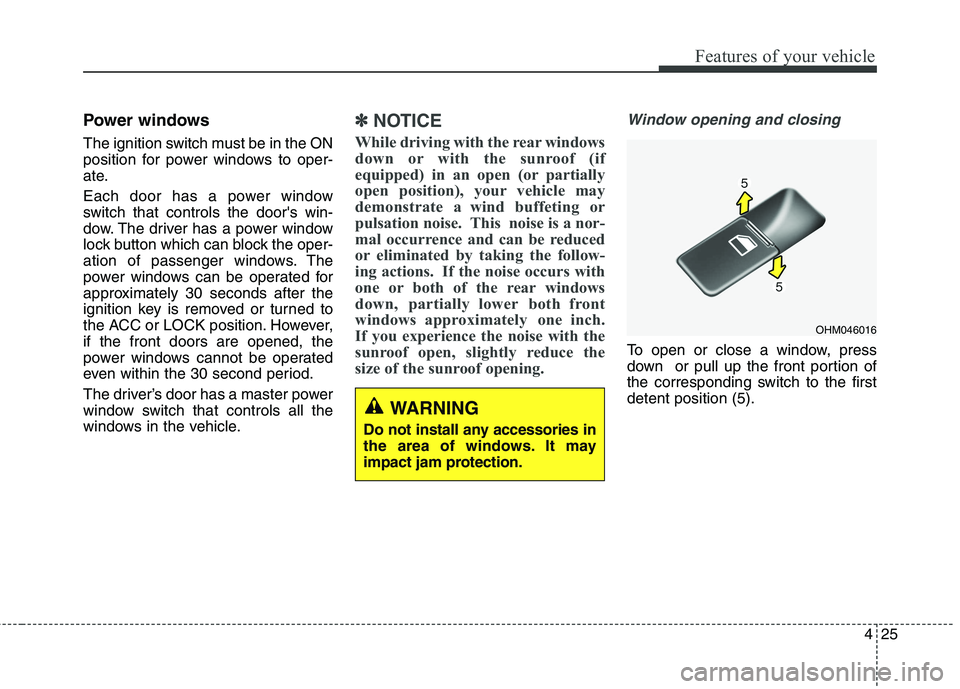
To open or close a window, press
down or pull up the front portion of
the corresponding switch to the firstdetent position (5).
OHM046016
WARNING
Do not install any accessories in
the area of windows. It may
impact jam protection.