ad blue KIA BORREGO 2017 Owner's Manual
[x] Cancel search | Manufacturer: KIA, Model Year: 2017, Model line: BORREGO, Model: KIA BORREGO 2017Pages: 548, PDF Size: 36.78 MB
Page 290 of 548
![KIA BORREGO 2017 Owners Manual Audio system
548
Bluetooth®Wireless Technology
(Type-2)
When No Devices have been Paired
➀ Press the [PHONE]button or the
[CALL] button on the steering
wheel controls. The following
screen is d](/img/2/57934/w960_57934-289.png "KIA BORREGO 2017 Owners Manual Audio system
548
Bluetooth®Wireless Technology
(Type-2)
When No Devices have been Paired
➀ Press the [PHONE]button or the
[CALL] button on the steering
wheel controls. The following
screen is d")
Audio system
548
Bluetooth®Wireless Technology
(Type-2)
When No Devices have been Paired
➀ Press the [PHONE]button or the
[CALL] button on the steering
wheel controls. The following
screen is displayed.
➁ Press the [OK] button to enter the
Pair Phone screen. Vehicle Name : Name of device as
shown when searching from your
Bluetooth®Wireless Technology
device
Passkey : Passkey used to pair the device
➂ From your
Bluetooth®Wireless
Technology device (i.e. Mobile
Phone), search and select yourcar audio system.
❈ SSP : Secure Simple Pairing
Non SSP supported device : ➃ After a few moments, a screen is
displayed where the passkey is entered.
Enter the passkey “0000” to pair
your
Bluetooth®Wireless Technology
device with the car audio system. SSP supported device : ➃
After a few moments, a screen is dis-
played 6 digits passkey.
Check the passkey on your
Bluetooth®Wireless Technology
device and confirm.
➄ Once pairing is complete, the fol-
lowing screen is displayed.
Some phones (i.e., iPhone ®
, Android
and Blackberry phones) may offer an
option to allow acceptance of all futureBluetooth ®
connection requests by
default. Visit http://www.kia.com/#/blue-
tooth for additional information on pair-
ing your Bluetooth ®
-enabled mobile
phone, and to view a phone compatibil-ity list.
Page 291 of 548
![KIA BORREGO 2017 Owners Manual Audio system
49
5
✽✽
NOTICE
If Bluetooth ®
Wireless Technology
devices are paired but none are cur-
rently connected, pressing the
[PHONE]button or the [CALL]but-
ton on the steering wheel con](/img/2/57934/w960_57934-290.png "KIA BORREGO 2017 Owners Manual Audio system
49
5
✽✽
NOTICE
If Bluetooth ®
Wireless Technology
devices are paired but none are cur-
rently connected, pressing the
[PHONE]button or the [CALL]but-
ton on the steering wheel con")
Audio system
49
5
✽✽
NOTICE
If Bluetooth ®
Wireless Technology
devices are paired but none are cur-
rently connected, pressing the
[PHONE]button or the [CALL]but-
ton on the steering wheel controls
displays the following screen. Press
the [Pair] button to pair a new
device or press the [Connect] to con-
nect a previously paired device.
Pairing through [PHONE] Setup
Press the [SETUP]button
Select
[Phone]
Pair Phone
The following steps are the same as
those described in the section “When
No Devices have been Paired” on the
previous page.
✽✽ NOTICE
The waiting period during phone pairing will last for one minute.
The pairing process will fail if the
device is not paired within the
given time. If the pairing process
fails, you must start the process
from the beginning.
Generally, most Bluetooth®
Wireless Technology devices will
automatically connect once pair-
ing is complete. However, some
devices may require a separate
verification process to connect.
Check to see whether Bluetooth®
Wireless Technology has been
properly connected within your
mobile phone.
List of paired Bluetooth®
Wireless
Technology devices can be viewedat
[SETUP] [Phone][Paired
Phone List].
Page 292 of 548
![KIA BORREGO 2017 Owners Manual Audio system
550
Paired Phone List
Press the [SETUP]button
Select
[Phone] Select [Paired Phone List]
Connected Phone : Device that is currently connected.
Paired Phone : Device that is paired bu](/img/2/57934/w960_57934-291.png "KIA BORREGO 2017 Owners Manual Audio system
550
Paired Phone List
Press the [SETUP]button
Select
[Phone] Select [Paired Phone List]
Connected Phone : Device that is currently connected.
Paired Phone : Device that is paired bu")
Audio system
550
Paired Phone List
Press the [SETUP]button
Select
[Phone] Select [Paired Phone List]
Connected Phone : Device that is currently connected.
Paired Phone : Device that is paired but not connected.
Connecting a Device
From the paired phone list, select the
device you want to connect and
press the [Connect](1) button. Disconnecting a Device
From the paired phone list, select the
currently connected device and
press the [Disconnect](2) button.
Deleting a Device
From the paired phone list, select the
device you want to delete and press
the [Delete](3) button.
✽✽
NOTICE
When deleting the currently con- nected device, the device will auto-
matically be disconnected to pro-
ceed with the deleting process.
If a paired Bluetooth®
Wireless
Technology device is deleted, the
device’s call history and contacts
data will also be deleted.
To re-use a deleted device, you must pair the device again.
Page 293 of 548
Audio system
51
5
Changing Priority
It is possible to pair up to five
Bluetooth®Wireless Technology
devices with the car audio system.
The “Change Priority” feature is used
to set the connection priority of
paired phones. However, the most
recently connected phone will always
be set as the highest priority.
From the paired phone list, select
the phone you want to switch to the
highest priority, then press the
[Change priority](4) button. The
selected device will be changed to
the highest priority.
When a device is currently connect-
ed, even if you change the priority to
a different device, the currently con-
nected phone will always be set as
the highest priority.
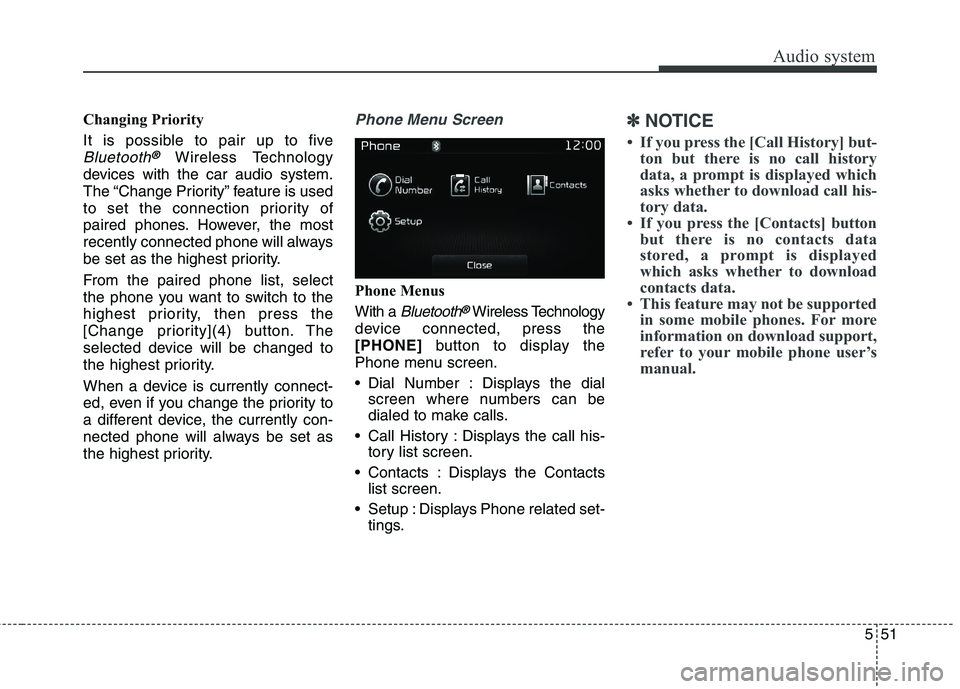
Phone Menu Screen
Phone Menus With a
Bluetooth®Wireless Technology
device connected, press the [PHONE] button to display the
Phone menu screen.
Dial Number : Displays the dial screen where numbers can be
dialed to make calls.
Call History : Displays the call his- tory list screen.
Contacts : Displays the Contacts list screen.
Setup : Displays Phone related set- tings.
✽✽ NOTICE
If you press the [Call History] but- ton but there is no call history
data, a prompt is displayed which
asks whether to download call his-
tory data.
If you press the [Contacts] button but there is no contacts data
stored, a prompt is displayed
which asks whether to download
contacts data.
This feature may not be supported in some mobile phones. For more
information on download support,
refer to your mobile phone user’s
manual.
Page 294 of 548
Audio system
552Calling by Dialing a Number
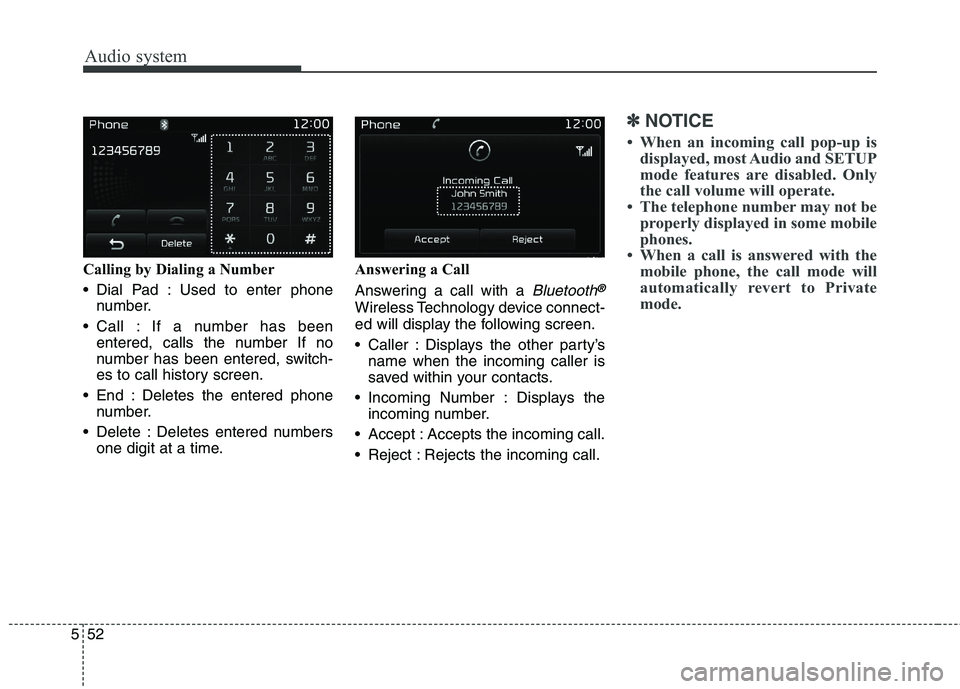
Dial Pad : Used to enter phone
number.
Call : If a number has been entered, calls the number If no
number has been entered, switch-
es to call history screen.
End : Deletes the entered phone number.
Delete : Deletes entered numbers one digit at a time. Answering a Call
Answering a call with a
Bluetooth®
Wireless Technology device connect-
ed will display the following screen.
Caller : Displays the other party’s
name when the incoming caller is
saved within your contacts.
Incoming Number : Displays the incoming number.
Accept : Accepts the incoming call.
Reject : Rejects the incoming call.
✽✽ NOTICE
When an incoming call pop-up is displayed, most Audio and SETUP
mode features are disabled. Only
the call volume will operate.
The telephone number may not be properly displayed in some mobile
phones.
When a call is answered with the mobile phone, the call mode will
automatically revert to Private
mode.
Page 296 of 548

Audio system
554
✽✽NOTICE
Up to 1,000 contacts entries can be copied into car contacts.
Upon downloading contacts data, previously saved contacts data will
be deleted.
Downloading is not possible if the contacts download feature is
turned off within the Bluetooth®
Wireless Technology device. Also,
some devices may require device
authorization upon attempting to
download. If downloading cannot
be normally conducted, check the
Bluetooth ®
Wireless Technology
device setting or the screen state.
Caller ID information will not be displayed for unsaved callers.
The download feature may not be supported in some mobile phones.
Check to see that the Bluetooth®
Wireless Technology device sup-
ports the download feature.
Page 299 of 548
Audio system
57
5
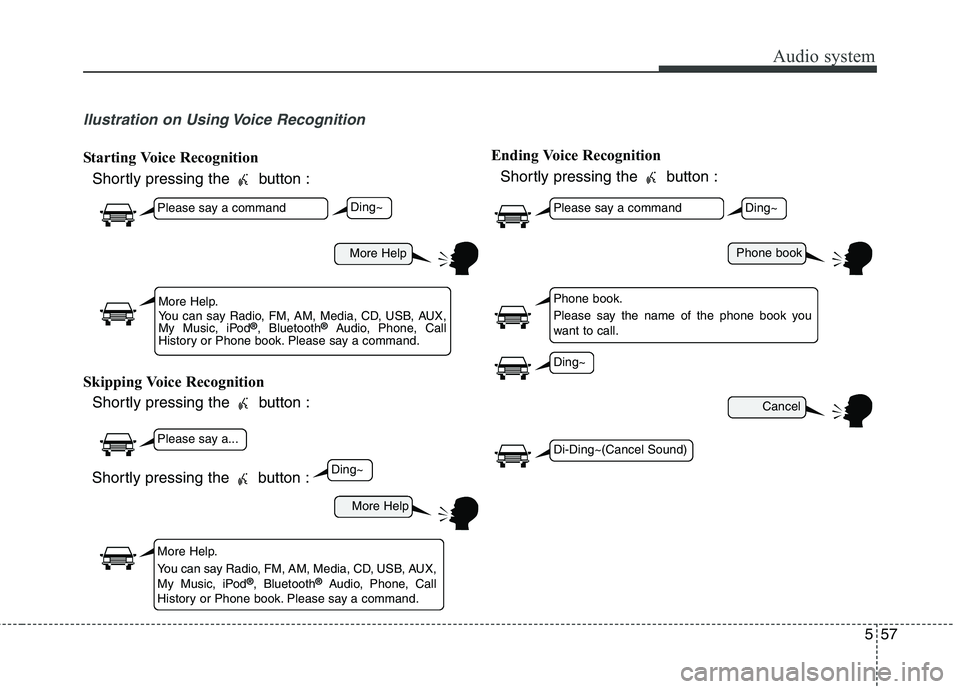
llustration on Using Voice Recognition
Starting Voice Recognition
Shortly pressing the button :
Skipping Voice Recognition Shortly pressing the button : Ending Voice Recognition
Shortly pressing the button :
More Help
More Help
Please say a command
Please say a...
More Help.
You can say Radio, FM, AM, Media, CD, USB, AUX,
My Music, iPod ®
, Bluetooth ®
Audio, Phone, Call
History or Phone book. Please say a command.
More Help.
You can say Radio, FM, AM, Media, CD, USB, AUX,
My Music, iPod ®
, Bluetooth ®
Audio, Phone, Call
History or Phone book. Please say a command.
Ding~
Ding~
Shortly pressing the button :
Phone book
Cancel
Please say a command
Phone book.
Please say the name of the phone book you
want to call.
Ding~
Di-Ding~(Cancel Sound)
Ding~
Page 301 of 548

Audio system
59
5
CommandFunction
News OnEnables RDS News feature.
News OffDisables RDS News feature.
MediaMoves to the most recently played media screen.
Play Track 1~30If a music CD has been inserted, plays the corre-
sponding track.
CDPlays music on the CD.
Search CDMoves to the CD track or file selection screen.
For audio CDs, move to the screen and say the
track number to play the corresponding track.
Moves to MP3 CD file selection screen. After manually operate the device to select and play
music.
USBPlays music on the USB device.
Search USBMoves to USB file selection screen. After manual-
ly operate the device to select and play music.
iPod ®Plays music on the iPod ®
.
Search iPod ®Moves to the iPod
®
file selection screen. After,
manually operate the device to select and play
music.
My MusicPlays music saved in My Music.
Search My MusicMoves to the My Music file selection screen. After,
manually operate the device to select and play
music.
CommandFunction
AUX (Auxiliary)Plays the connected external device.
Bluetooth ®
AudioPlays the music saved in connected Bluetooth®
Wireless Technology device.
MuteMutes the radio or music volume.
Pardon?Repeats the most recent comment.
Cancel (Exit)Ends voice command.
Page 304 of 548
Audio system
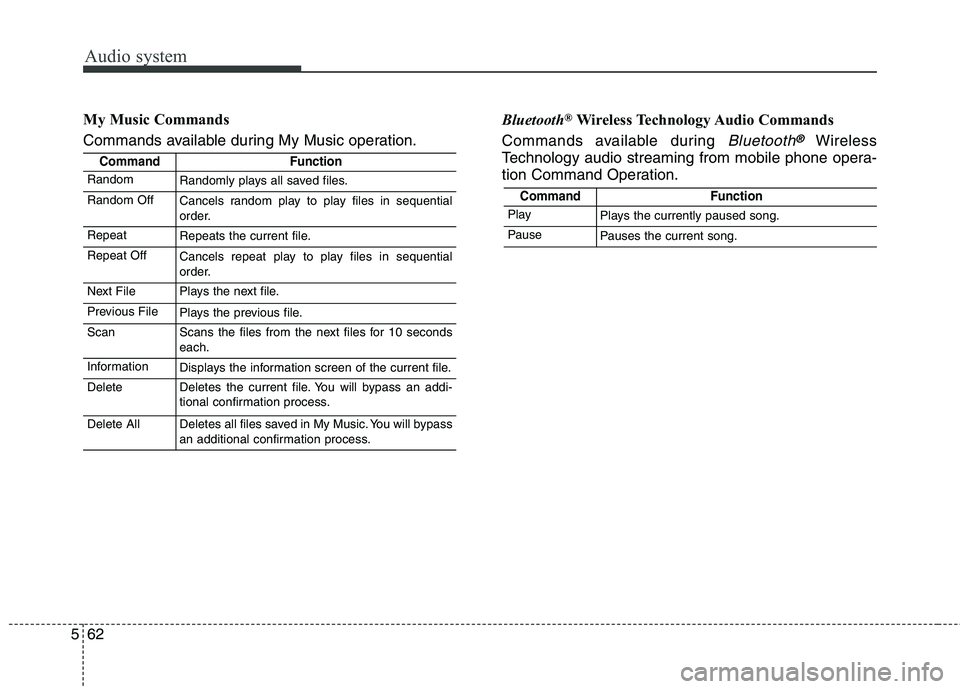
562My Music Commands
Commands available during My Music operation.
Bluetooth
®
Wireless Technology Audio Commands
Commands available during
Bluetooth®Wireless
Technology audio streaming from mobile phone opera-
tion Command Operation.
CommandFunction
RandomRandomly plays all saved files.
Random OffCancels random play to play files in sequential
order.
RepeatRepeats the current file.
Repeat OffCancels repeat play to play files in sequential
order.
Next FilePlays the next file.
Previous FilePlays the previous file.
ScanScans the files from the next files for 10 seconds each.
InformationDisplays the information screen of the current file.
DeleteDeletes the current file. You will bypass an addi-
tional confirmation process.
Delete AllDeletes all files saved in My Music. You will bypass
an additional confirmation process.
CommandFunction
PlayPlays the currently paused song.
PausePauses the current song.
Page 310 of 548
![KIA BORREGO 2017 Owners Manual Audio system
568
With the Phone Button
Press the [SETUP]button
Select
[Phone]
You can select and control options
related to [Pair Phone], [PairedPhone List], [Phone book
Download], [Auto Download]](/img/2/57934/w960_57934-309.png "KIA BORREGO 2017 Owners Manual Audio system
568
With the Phone Button
Press the [SETUP]button
Select
[Phone]
You can select and control options
related to [Pair Phone], [PairedPhone List], [Phone book
Download], [Auto Download]")
Audio system
568
With the Phone Button
Press the [SETUP]button
Select
[Phone]
You can select and control options
related to [Pair Phone], [PairedPhone List], [Phone book
Download], [Auto Download],
[Outgoing Volume] and [BluetoothSystem Off]. Pairing a New Device
Bluetooth®Wireless Technology
devices can be paired with the audiosystem.
For more information, refer to the
“Pairing through Phone Setup” sec-tion within
Bluetooth®Wireless
Technology. Viewing Paired Phone List
This feature is used to view mobile
phones that have been paired with
the audio system. Upon selecting a
paired phone, the setup menu is dis-
played.
For more information, refer to the “Setting
Bluetooth®Wireless Technology
Connection” section within
Bluetooth®
Wireless Technology.
(1) Moves to the previous screen.
(2) Connect/Disconnects currently select- ed phone.
(3) Deeletes the currently selected phone.
(4) Sets currently selected phone to highest connection priority.