mirror KIA BORREGO 2017 Owner's Manual
[x] Cancel search | Manufacturer: KIA, Model Year: 2017, Model line: BORREGO, Model: KIA BORREGO 2017Pages: 548, PDF Size: 36.78 MB
Page 387 of 548
663
Driving your vehicle
BSD (Blind Spot Detection) /
LCA (Lane Change Assist)
Operating conditions
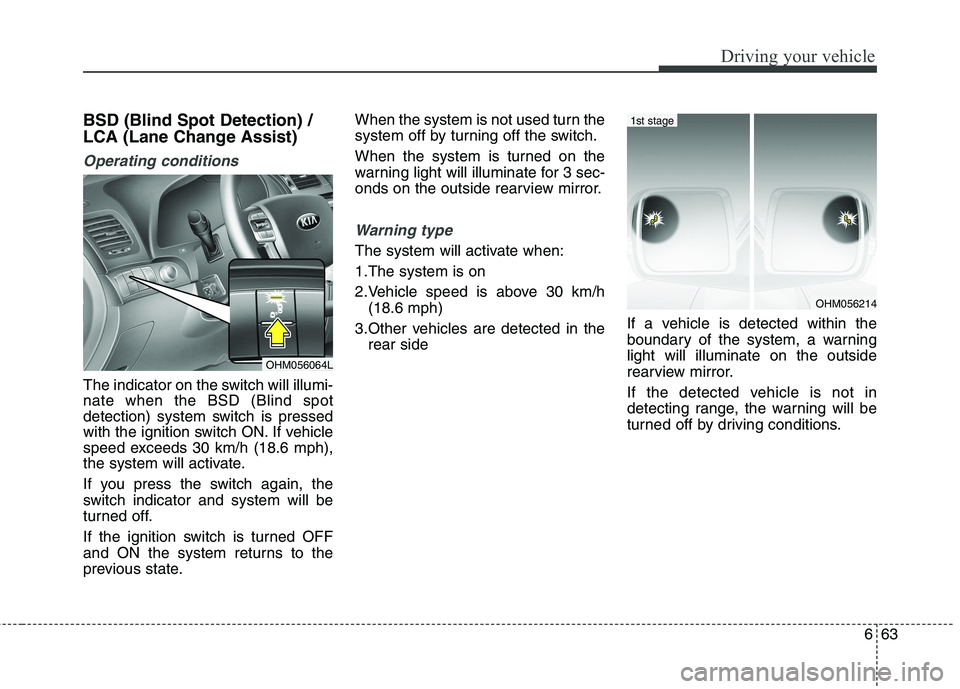
The indicator on the switch will illumi- nate when the BSD (Blind spot
detection) system switch is pressed
with the ignition switch ON. If vehicle
speed exceeds 30 km/h (18.6 mph),
the system will activate.
If you press the switch again, the
switch indicator and system will be
turned off.
If the ignition switch is turned OFF
and ON the system returns to the
previous state.When the system is not used turn the
system off by turning off the switch.
When the system is turned on the
warning light will illuminate for 3 sec-
onds on the outside rearview mirror.
Warning type
The system will activate when:
1.The system is on
2.Vehicle speed is above 30 km/h
(18.6 mph)
3.Other vehicles are detected in the rear side If a vehicle is detected within the
boundary of the system, a warninglight will illuminate on the outside
rearview mirror.
If the detected vehicle is not in
detecting range, the warning will be
turned off by driving conditions.
OHM056064L
OHM056214
1st stage
Page 388 of 548
Driving your vehicle
64
6
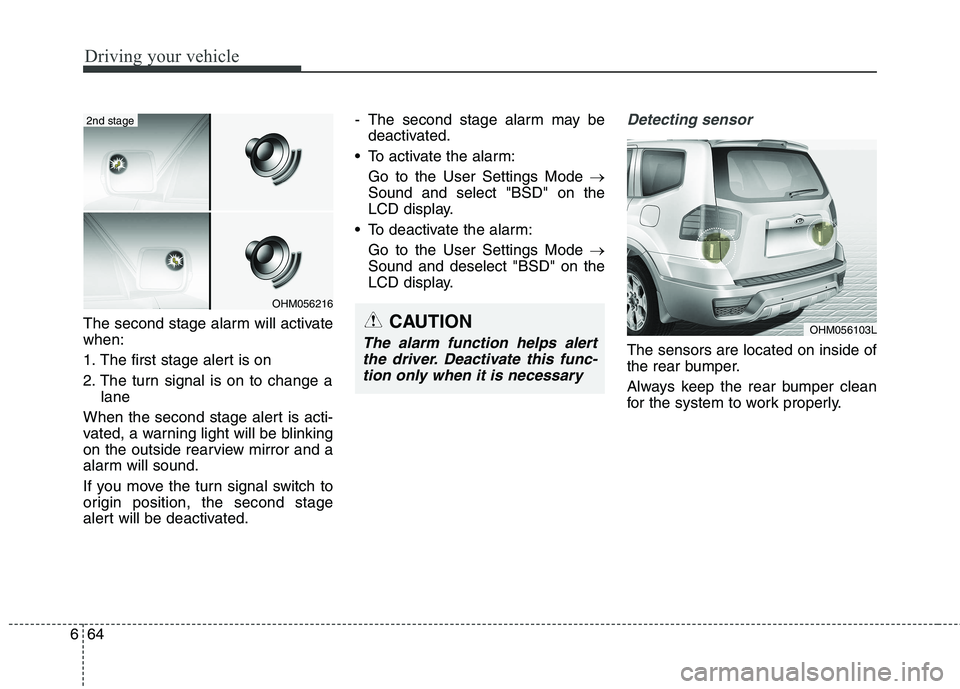
The second stage alarm will activate when:
1. The first stage alert is on
2. The turn signal is on to change a
lane
When the second stage alert is acti-
vated, a warning light will be blinking
on the outside rearview mirror and a
alarm will sound.
If you move the turn signal switch to
origin position, the second stage
alert will be deactivated. - The second stage alarm may be
deactivated.
To activate the alarm:
Go to the User Settings Mode
Sound and select "BSD" on the
LCD display.
To deactivate the alarm: Go to the User Settings Mode
Sound and deselect "BSD" on the
LCD display.
Detecting sensor
The sensors are located on inside of
the rear bumper.
Always keep the rear bumper clean
for the system to work properly.
OHM056216
2nd stage
OHM056103LCAUTION
The alarm function helps alert
the driver. Deactivate this func-tion only when it is necessary
Page 390 of 548
Driving your vehicle
66
6
RCTA (Rear cross traffic alert)
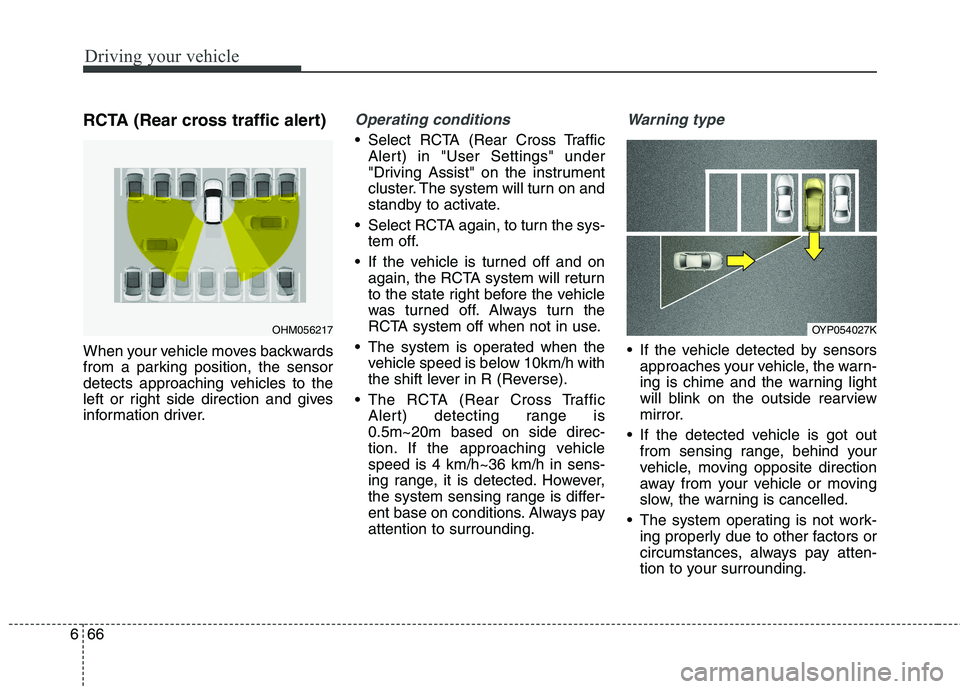
When your vehicle moves backwards
from a parking position, the sensor
detects approaching vehicles to the
left or right side direction and gives
information driver.Operating conditions
Select RCTA (Rear Cross Traffic
Alert) in "User Settings" under
"Driving Assist" on the instrument
cluster. The system will turn on and
standby to activate.
Select RCTA again, to turn the sys- tem off.
If the vehicle is turned off and on again, the RCTA system will return
to the state right before the vehicle
was turned off. Always turn the
RCTA system off when not in use.
The system is operated when the vehicle speed is below 10km/h with
the shift lever in R (Reverse).
The RCTA (Rear Cross Traffic Alert) detecting range is0.5m~20m based on side direc-
tion. If the approaching vehiclespeed is 4 km/h~36 km/h in sens-
ing range, it is detected. However,
the system sensing range is differ-
ent base on conditions. Always payattention to surrounding.
Warning type
If the vehicle detected by sensorsapproaches your vehicle, the warn-
ing is chime and the warning light
will blink on the outside rearview
mirror.
If the detected vehicle is got out from sensing range, behind your
vehicle, moving opposite direction
away from your vehicle or moving
slow, the warning is cancelled.
The system operating is not work- ing properly due to other factors or
circumstances, always pay atten-
tion to your surrounding.
OHM056217OYP054027K
Page 391 of 548
667
Driving your vehicle
❈If your vehicle's left or right side
bumper is blinded by barrier or
vehicles, the system sensing abili-
ty may be deteriorated.
WARNING
The warning light on the out- side rearview mirror will illu-
minate whenever a vehicle is
detected at the rear side bythe system.
To avoid accidents, do not
focus only on the warninglight and neglect to see the
surrounding of the vehicle.
Drive safely even though the vehicle is equipped with aBSD (Blind spot detection)
system. Do not solely rely on
the system but check for your-
self before changing lanes.
The system may not alert the driver in some conditions so
always check the surround-ings while driving.CAUTION
The system may not work
properly if the bumper hasbeen replaced or if a repair work has been done near thesensor.
The detection area differs according to the roads width.If the road is narrow the sys- tem may detect other vehiclesin the next lane.
On the contrary, if the road is very wide the system may notdetect other vehicles.
The system may turn off due to strong electromagneticwaves.
Page 392 of 548
Driving your vehicle
68
6
Non-operating condition
Driver's Attention
The driver must be cautious in the
below situations for the system may
not assist the driver and may not
work properly.
- Curved roads, tollgates, etc.
- The surrounding of the sensor is
polluted with rain, snow, mud, etc
- The rear bumper near the sensor is covered or hidden with a foreign
matter such as a sticker, bumperguard, bicycle stand etc.
- The rear bumper is damaged or the sensor is out of place.
- The height of the vehicle shows much change such as when the
trunk is loaded with heavy objects,
abnormal tire pressure etc.
- Due to bad weather such as heavy rain or snow.
- A fixed object is near such as a guardrail, etc.
- A lot of amount of metal sub- stances are near the vehicles such
as a construction area. - A big vehicle is near such as a bus
or truck.
- A motorcycle or bicycle is near.
- A flat trailer like vehicle is near.
- If the vehicle has started at the same time as the vehicle next to it
and has accelerated.
- When the other vehicle passes by very fast.
- When changing lanes.
- When going down or up a steep, uneven road.
- When the other vehicle drives at the rear very nearby or drives very
close.
- When a trailer or carrier is installed.
- When the temperature of the rear bumper is very high or low.
- When the sensors are covered by the vehicle, wall and pillar of park- ing lot.
- When exiting rearward from a parking space with pillars or metal
structures. - When your vehicle moves back, if
the detected vehicle also moves
back.
- If there is small things like shopping cart and baby carriage.
- If there is low height vehicle like sport vehicle.
- When the vehicle is closing to your vehicle.
- When driving through a narrow road with many plants.
- When driving on wet surface.
Outside rearview mirror may not alert the driver when:
- The outside rearview mirror hous- ing is severely polluted.
- The window is severely polluted.
- The windows are severely tinted.
- When driving through a narrow road with many trees or bushes.
Page 396 of 548
Driving your vehicle
72
6
✽✽
NOTICE
The ESC system should be turned
OFF prior to rocking the vehicle.
Smooth cornering
Avoid braking or gear changing in
corners, especially when roads are
wet. Ideally, corners should always
be taken under gentle acceleration. If
you follow these suggestions, tire
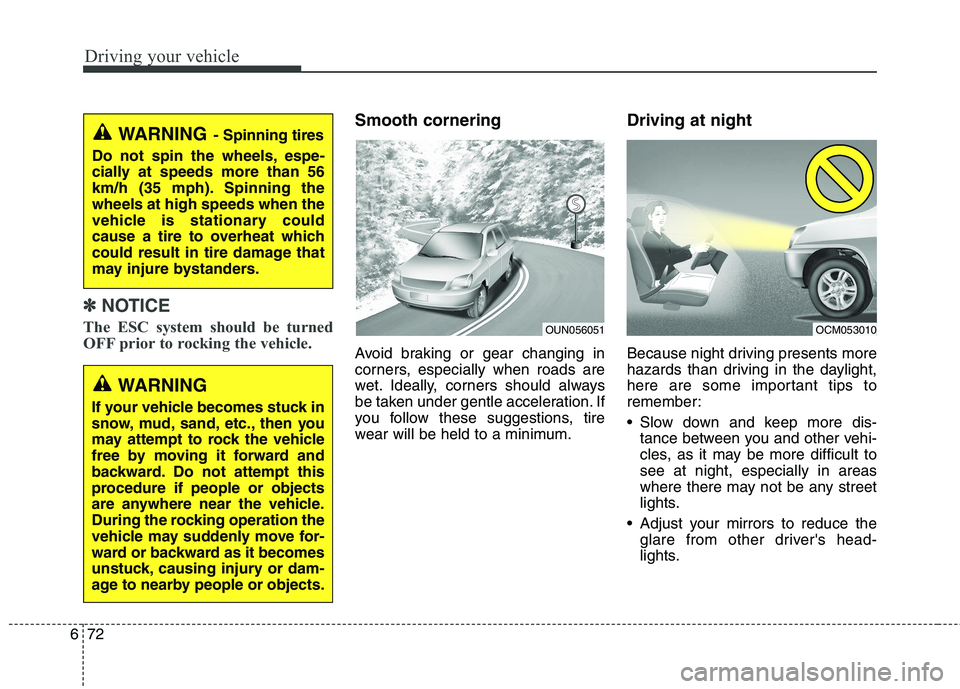
wear will be held to a minimum. Driving at night
Because night driving presents more
hazards than driving in the daylight,
here are some important tips to
remember:
Slow down and keep more dis-
tance between you and other vehi-
cles, as it may be more difficult tosee at night, especially in areas
where there may not be any street
lights.
Adjust your mirrors to reduce the glare from other driver's head-
lights.WARNING - Spinning tires
Do not spin the wheels, espe-
cially at speeds more than 56
km/h (35 mph). Spinning thewheels at high speeds when the
vehicle is stationary could
cause a tire to overheat which
could result in tire damage that
may injure bystanders.
WARNING
If your vehicle becomes stuck in
snow, mud, sand, etc., then you
may attempt to rock the vehicle
free by moving it forward and
backward. Do not attempt this
procedure if people or objects
are anywhere near the vehicle.
During the rocking operation the
vehicle may suddenly move for-
ward or backward as it becomes
unstuck, causing injury or dam-
age to nearby people or objects.
OUN056051OCM053010
Page 496 of 548
Maintenance
60
8
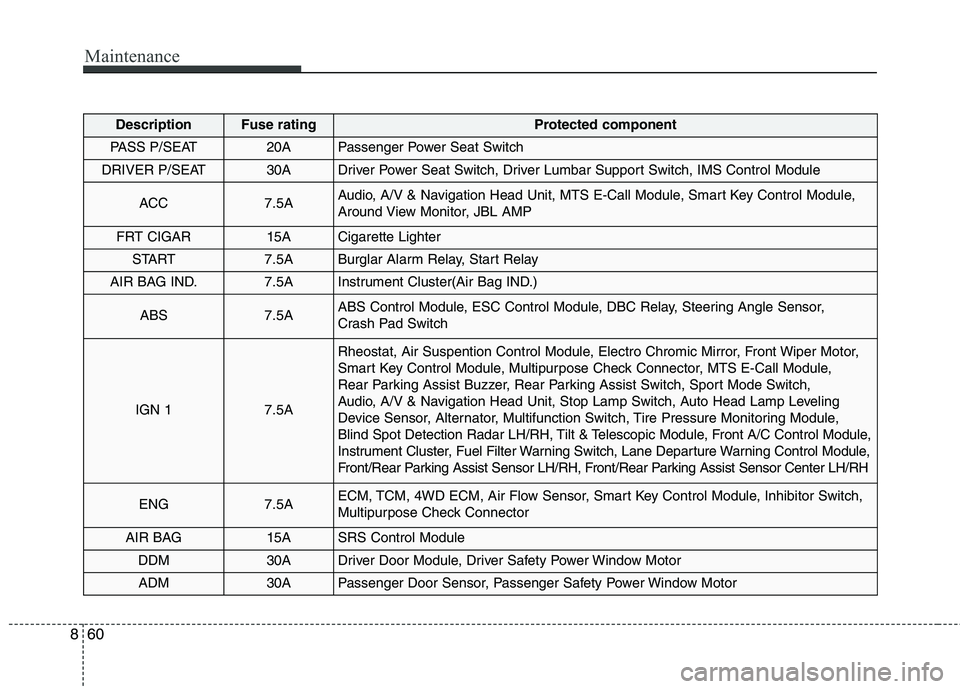
DescriptionFuse ratingProtected component
PASS P/SEAT20APassenger Power Seat Switch
DRIVER P/SEAT30ADriver Power Seat Switch, Driver Lumbar Support Switch, IMS Control Module
ACC7.5AAudio, A/V & Navigation Head Unit, MTS E-Call Module, Smart Key Control Module,
Around View Monitor, JBL AMP
FRT CIGAR15ACigarette Lighter
START7.5ABurglar Alarm Relay, Start Relay
AIR BAG IND.7.5AInstrument Cluster(Air Bag IND.)
ABS7.5AABS Control Module, ESC Control Module, DBC Relay, Steering Angle Sensor,
Crash Pad Switch
IGN 17.5A
Rheostat, Air Suspention Control Module, Electro Chromic Mirror, Front Wiper Motor,
Smart Key Control Module, Multipurpose Check Connector, MTS E-Call Module,
Rear Parking Assist Buzzer, Rear Parking Assist Switch, Sport Mode Switch,
Audio, A/V & Navigation Head Unit, Stop Lamp Switch, Auto Head Lamp Leveling
Device Sensor, Alternator, Multifunction Switch, Tire Pressure Monitoring Module,
Blind Spot Detection Radar LH/RH, Tilt & Telescopic Module, Front A/C Control Module,
Instrument Cluster, Fuel Filter Warning Switch, Lane Departure Warning Control Module,
Front/Rear Parking Assist Sensor LH/RH, Front/Rear Parking Assist Sensor Center LH/RH
ENG7.5AECM, TCM, 4WD ECM, Air Flow Sensor, Smart Key Control Module, Inhibitor Switch,
Multipurpose Check Connector
AIR BAG15ASRS Control Module
DDM30ADriver Door Module, Driver Safety Power Window Motor
ADM30APassenger Door Sensor, Passenger Safety Power Window Motor
Page 512 of 548
Maintenance
76
8
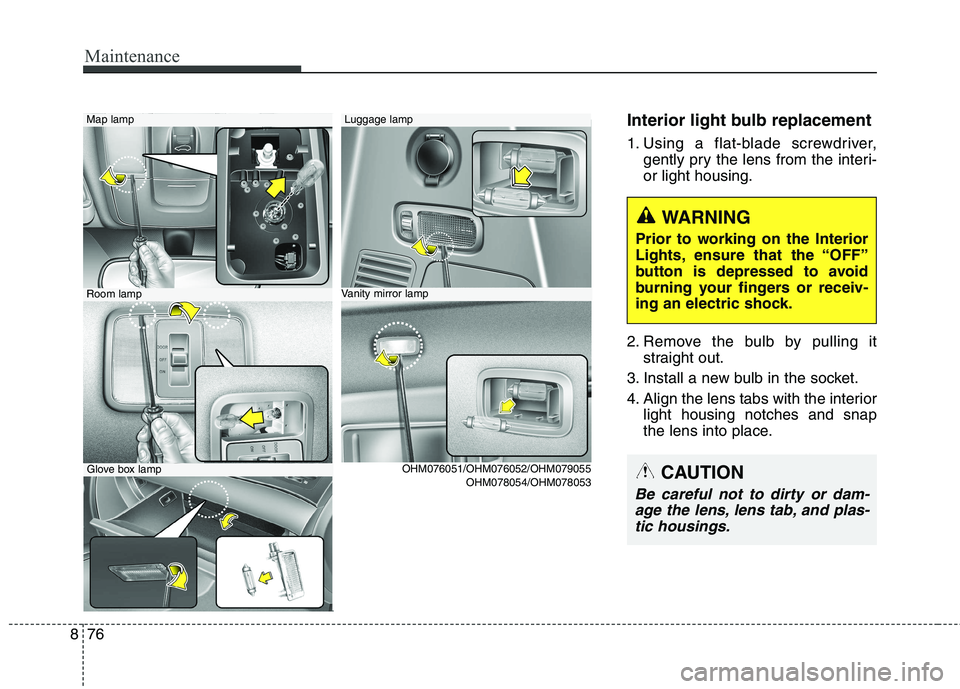
Interior light bulb replacement
1. Using a flat-blade screwdriver,
gently pry the lens from the interi- or light housing.
2. Remove the bulb by pulling it straight out.
3. Install a new bulb in the socket.
4. Align the lens tabs with the interior light housing notches and snap
the lens into place.Luggage lamp Map lamp
OHM078054/OHM078053
Vanity mirror lampRoom lamp
Glove box lamp OHM076051/OHM076052/OHM079055
WARNING
Prior to working on the Interior
Lights, ensure that the “OFF”
button is depressed to avoid
burning your fingers or receiv-
ing an electric shock.
CAUTION
Be careful not to dirty or dam- age the lens, lens tab, and plas-tic housings.
Page 528 of 548
Specifications & Consumer information
4
9
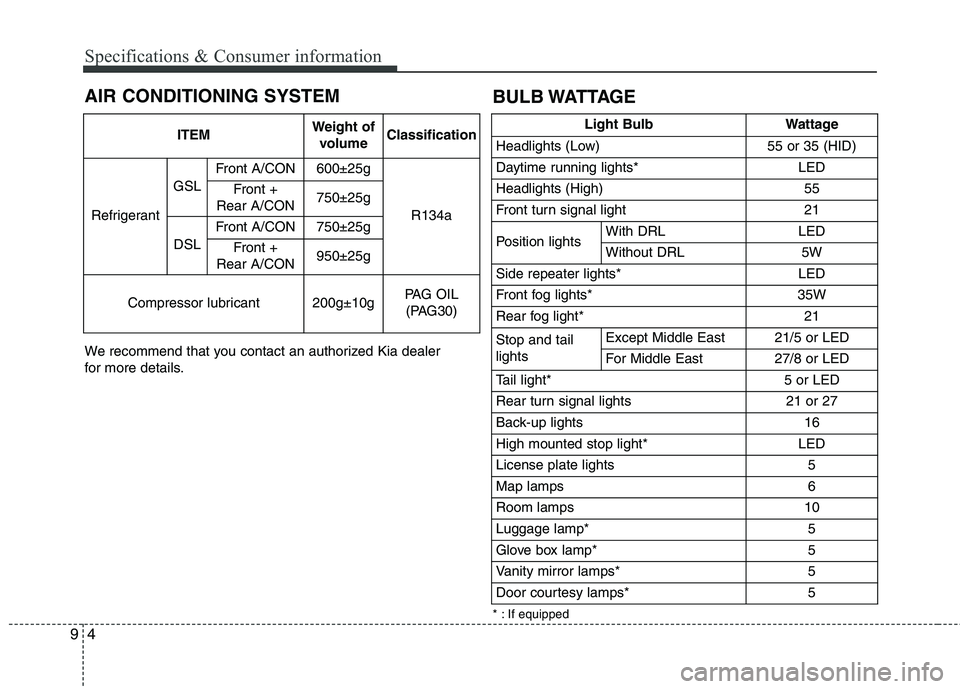
AIR CONDITIONING SYSTEM
We recommend that you contact an authorized Kia dealer
for more details.
ITEMWeight of
volumeClassification
Refrigerant
GSL
Front A/CON600±25g
R134a
Front +
Rear A/CON750±25g
DSL
Front A/CON750±25g
Front +
Rear A/CON950±25g
Compressor lubricant200g±10gPAG OIL (PAG30)
* : If equipped
BULB WATTAGE
Light BulbWattage
Headlights (Low)55 or 35 (HID)
Daytime running lights* LED
Headlights (High)55
Front turn signal light21
Position lightsWith DRLLED
Without DRL5W
Side repeater lights* LED
Front fog lights* 35W
Rear fog light*21
Stop and tail lightsExcept Middle East21/5 or LED
For Middle East 27/8 or LED
Tail light*5 or LED
Rear turn signal lights 21 or 27
Back-up lights16
High mounted stop light*LED
License plate lights5
Map lamps6
Room lamps10
Luggage lamp*5
Glove box lamp*5
Vanity mirror lamps*5
Door courtesy lamps*5
Page 539 of 548
Index
4
I
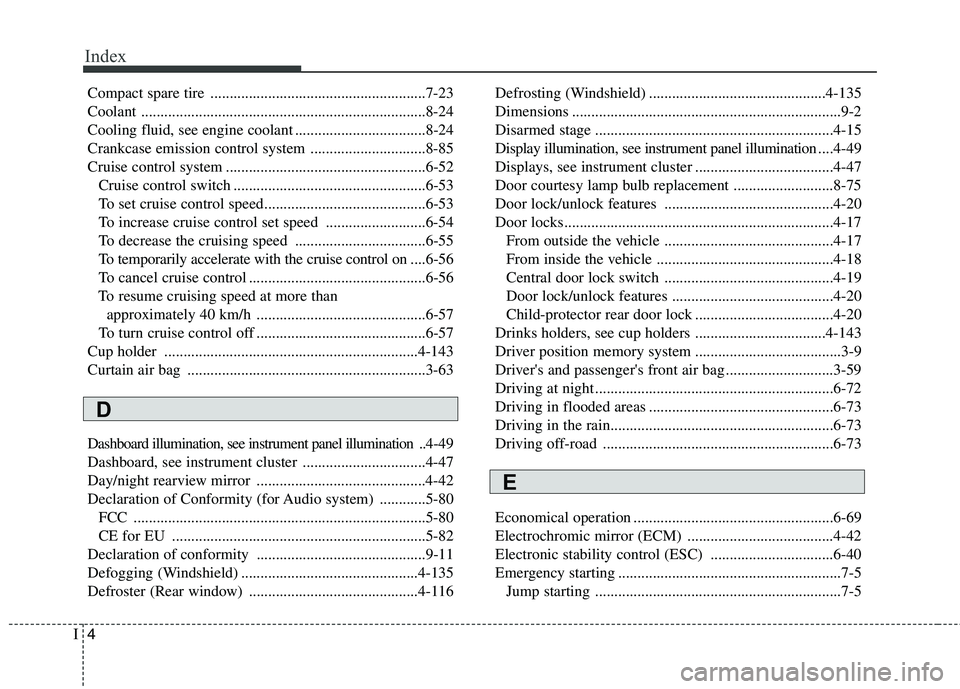
Compact spare tire ........................................................7-23
Coolant ..........................................................................8-24
Cooling fluid, see engine coolant ..................................8-24
Crankcase emission control system ..............................8-85
Cruise control system ....................................................6-52
Cruise control switch ..................................................6-53
To set cruise control speed..........................................6-53
To increase cruise control set speed ..........................6-54
To decrease the cruising speed ..................................6-55
To temporarily accelerate with the cruise control on ....6-56
To cancel cruise control ..............................................6-56
To resume cruising speed at more than approximately 40 km/h ............................................6-57
To turn cruise control off ............................................6-57
Cup holder ..................................................................4-143
Curtain air bag ..............................................................3-63
Dashboard illumination, see instrument panel illumination .. 4-49
Dashboard, see instrument cluster ................................4-47
Day/night rearview mirror ............................................4-42
Declaration of Conformity (for Audio system) ............5-80 FCC ............................................................................5-80
CE for EU ..................................................................5-82
Declaration of conformity ............................................9-11
Defogging (Windshield) ..............................................4-135
Defroster (Rear window) ............................................4-116 Defrosting (Windshield) ..............................................4-135
Dimensions ......................................................................9-2
Disarmed stage ..............................................................4-15
Display illumination, see instrument panel illumination
....4-49
Displays, see instrument cluster ....................................4-47
Door courtesy lamp bulb replacement ..........................8-75
Door lock/unlock features ............................................4-20
Door locks......................................................................4-17 From outside the vehicle ............................................4-17
From inside the vehicle ..............................................4-18
Central door lock switch ............................................4-19
Door lock/unlock features ..........................................4-20
Child-protector rear door lock ....................................4-20
Drinks holders, see cup holders ..................................4-143
Driver position memory system ......................................3-9
Driver's and passenger's front air bag ............................3-59
Driving at night ..............................................................6-72
Driving in flooded areas ................................................6-73
Driving in the rain..........................................................6-73
Driving off-road ............................................................6-73
Economical operation ....................................................6-69
Electrochromic mirror (ECM) ......................................4-42
Electronic stability control (ESC) ................................6-40
Emergency starting ..........................................................7-5 Jump starting ................................................................7-5
D
E