lock KIA BORREGO 2017 Repair Manual
[x] Cancel search | Manufacturer: KIA, Model Year: 2017, Model line: BORREGO, Model: KIA BORREGO 2017Pages: 548, PDF Size: 36.78 MB
Page 220 of 548
4131
Features of your vehicle
System operation
Ventilation
1. Set the mode to the position.
2. Set the air intake control to theoutside (fresh) air position.
3. Set the temperature control to the desired position.
4. Set the fan speed control to the desired speed.
Heating
1. Set the mode to the position.
2. Set the air intake control to theoutside (fresh) air position.
3. Set the temperature control to the desired position.
4. Set the fan speed control to the desired speed.
5. If dehumidified heating is desired, turn the air conditioning system (if equipped) on.
Operation Tips
To keep dust or unpleasant fumesfrom entering the vehicle through
the ventilation system, temporarily
set the air intake control to the
recirculated air position. Be sure to
return the control to the fresh air
position when the irritation has
passed to keep fresh air in the
vehicle. This will help keep the driv-
er alert and comfortable.
Air for the heating/cooling system is drawn in through the grilles just
ahead of the windshield. Care
should be taken that these are not
blocked by leaves, snow, ice or
other obstructions.
To prevent interior fog on the wind- shield, set the air intake control to
the fresh air position and fan speed
to the desired position, turn on theair conditioning system, and adjust
the temperature control to desired
temperature.
If the windshield fogs up, set the mode to the or position.CAUTION
Operating the blower when the
ignition switch is in the ON posi-tion could cause the battery to discharge. Operate the blowerwhen the engine is running.
Page 228 of 548
4139
Features of your vehicle
For improving the effectiveness of
the cool box, do as follows;
1. Set the temperature to the hot(extreme right) position for warm
air or to the cold (extreme left)
position for cool air.
Turn on the air conditioning sys-tem for cooler air.
2. Set the fan speed to the highest (extreme right) position.
3. Set the mode to the face ( ) position.
✽✽ NOTICE
If some items in the cool box block
the vent, the warming or cooling
effectiveness of the cool box is
reduce
Glove box
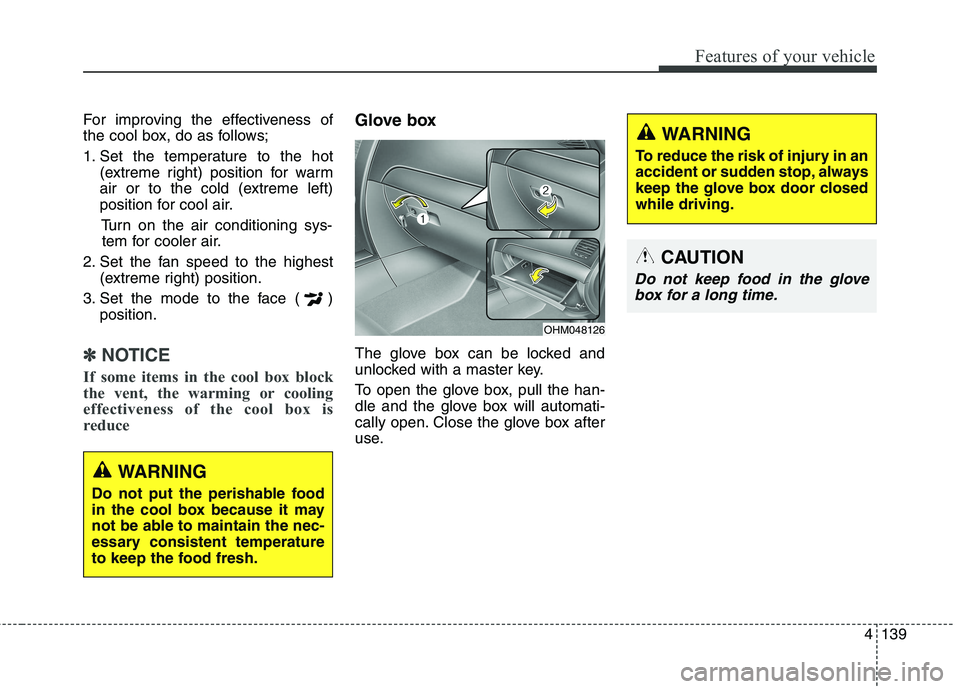
The glove box can be locked and
unlocked with a master key.
To open the glove box, pull the han-
dle and the glove box will automati-
cally open. Close the glove box after
use.
WARNING
Do not put the perishable food
in the cool box because it may
not be able to maintain the nec-
essary consistent temperature
to keep the food fresh.
OHM048126
WARNING
To reduce the risk of injury in an
accident or sudden stop, always
keep the glove box door closedwhile driving.
CAUTION
Do not keep food in the glove box for a long time.
Page 229 of 548
Features of your vehicle
140
4
Sunglass holder
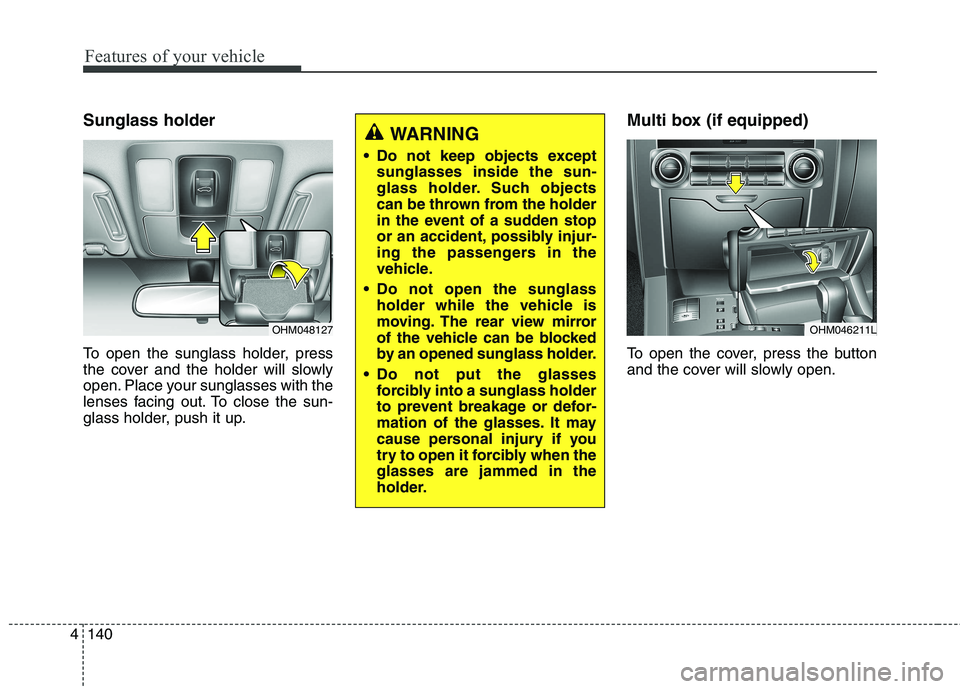
To open the sunglass holder, press
the cover and the holder will slowly
open. Place your sunglasses with the
lenses facing out. To close the sun-
glass holder, push it up. Multi box (if equipped)
To open the cover, press the button
and the cover will slowly open.
OHM048127
WARNING
Do not keep objects except sunglasses inside the sun-
glass holder. Such objects
can be thrown from the holder
in the event of a sudden stop
or an accident, possibly injur-
ing the passengers in the
vehicle.
Do not open the sunglass holder while the vehicle is
moving. The rear view mirror
of the vehicle can be blocked
by an opened sunglass holder.
Do not put the glasses forcibly into a sunglass holder
to prevent breakage or defor-
mation of the glasses. It may
cause personal injury if you
try to open it forcibly when theglasses are jammed in the
holder.
OHM046211L
Page 244 of 548
Audio system
52
✽✽NOTICE
If you install an after market HID
head lamp, your vehicle’s audio and
electronic device may malfunction.
❈ If your vehicle is equipped with
AVN(Audio, Video and Navigation)
system, refer to a separately sup-
plied manual for detailed informa-tion. Antenna
Pole type antenna
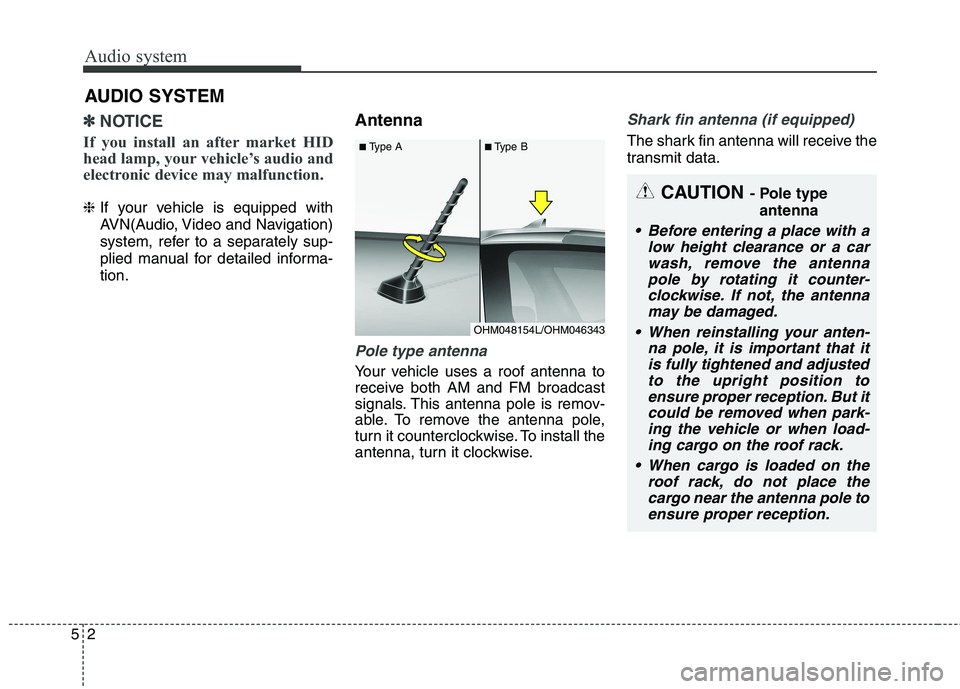
Your vehicle uses a roof antenna to
receive both AM and FM broadcast
signals. This antenna pole is remov-
able. To remove the antenna pole,
turn it counterclockwise. To install the
antenna, turn it clockwise.
Shark fin antenna (if equipped)
The shark fin antenna will receive the
transmit data.
AUDIO SYSTEM
CAUTION
- Pole type
antenna
• Before entering a place with a low height clearance or a carwash, remove the antenna pole by rotating it counter-clockwise. If not, the antennamay be damaged.
When reinstalling your anten- na pole, it is important that itis fully tightened and adjustedto the upright position toensure proper reception. But it could be removed when park-ing the vehicle or when load-ing cargo on the roof rack.
When cargo is loaded on the roof rack, do not place thecargo near the antenna pole toensure proper reception.
OHM048154L/OHM046343
■
Type A ■Type B
Page 248 of 548
Audio system
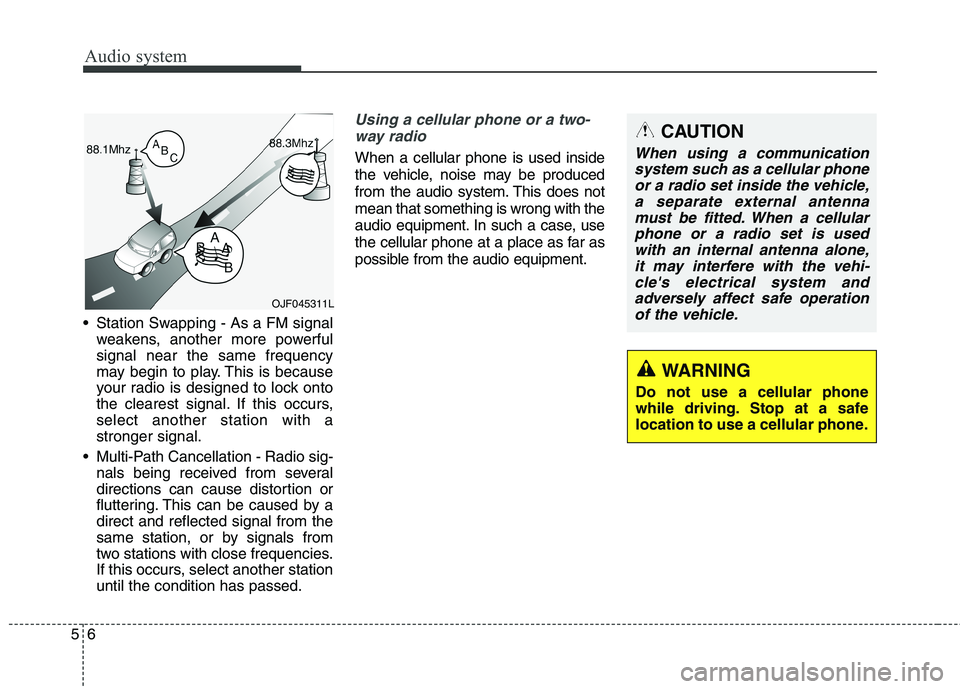
56 Station Swapping - As a FM signal
weakens, another more powerful signal near the same frequency
may begin to play. This is because
your radio is designed to lock onto
the clearest signal. If this occurs,select another station with astronger signal.
Multi-Path Cancellation - Radio sig- nals being received from several
directions can cause distortion or
fluttering. This can be caused by adirect and reflected signal from the
same station, or by signals from
two stations with close frequencies.
If this occurs, select another stationuntil the condition has passed.
Using a cellular phone or a two-
way radio
When a cellular phone is used inside
the vehicle, noise may be produced
from the audio system. This does notmean that something is wrong with the
audio equipment. In such a case, use
the cellular phone at a place as far as
possible from the audio equipment.
CAUTION
When using a communicationsystem such as a cellular phoneor a radio set inside the vehicle, a separate external antennamust be fitted. When a cellularphone or a radio set is usedwith an internal antenna alone, it may interfere with the vehi-cle's electrical system andadversely affect safe operation of the vehicle.
WARNING
Do not use a cellular phone
while driving. Stop at a safe
location to use a cellular phone.
OJF045311L
Page 251 of 548
Audio system
95
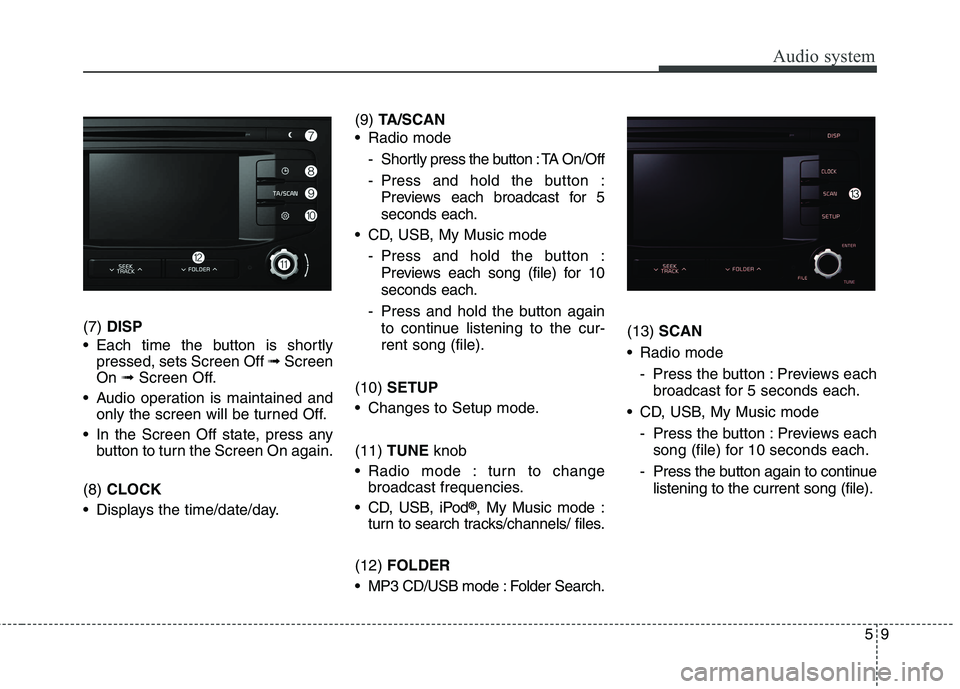
(7) DISP
Each time the button is shortly pressed, sets Screen Off ➟Screen
On ➟Screen Off.
Audio operation is maintained and only the screen will be turned Off.
In the Screen Off state, press any button to turn the Screen On again.
(8) CLOCK
Displays the time/date/day. (9)
TA/SCAN
Radio mode
- Shortly press the button : TA On/Off
- Press and hold the button :Previews each broadcast for 5 seconds each.
CD, USB, My Music mode
- Press and hold the button :Previews each song (file) for 10seconds each.
- Press and hold the button again to continue listening to the cur-rent song (file).
(10) SETUP
Changes to Setup mode. (11) TUNE knob
Radio mode : turn to change broadcast frequencies.
CD, USB, iPod ®
, My Music mode :
turn to search tracks/channels/ files.
(12) FOLDER
MP3 CD/USB mode : Folder Search. (13)
SCAN
Radio mode
- Press the button : Previews eachbroadcast for 5 seconds each.
CD, USB, My Music mode - Press the button : Previews eachsong (file) for 10 seconds each.
- Press the button again to continue listening to the current song (file).
Page 256 of 548
Audio system
514
(Continued)
Charging through the USB maynot work for some mobile devices.
The device may not support nor- mal operation when using an atyp-
ical USB memory device (minia-
ture, keychain, etc.). For best
results, use a typical USB device
that has a metal case.
The device may not support nor- mal operation when using formats
such as HDD Type, CF, or SD
Memory.
The device will not support files locked by DRM (Digital Rights
Management.)
USB memory sticks used by con- necting an Adaptor (SD Type or
CF Type) may not be properly rec-
ognized.
The device may not operate prop- erly when using USB HDDs or
USBs subject to connection fail-
ures caused by vehicle vibrations.
(e.g. i-stick type) (Continued)(Continued)
Avoid use of USB
memory products that
can also be used as key
chains or mobile phone
accessories. Use of such products
may cause damage to the USB
jack.
Connecting an MP3 device or phone through various channels,
such as AUX/BT or Audio/USB
mode may result in pop noises or
abnormal operation. ✽✽
NOTICE - Using an iPod ®
iPod ®
is a registered trademark of
Apple Inc.
In order to use the iPod ®
with
your vehicle’s audio system, you
must use a dedicated iPod ®
cable.
(the cable that is supplied when
purchasing iPod ®
/iPhone ®
prod-
ucts)
If the iPod ®
is connected to the
vehicle while it is playing, a high
pitch sound could occur for
approximately 1-2 seconds imme-
diately after connecting. If possi-
ble, connect the iPod ®
to the vehi-
cle with the iPod ®
stopped/paused.
When the vehicle ignition is set to ACC or ON, connecting the iPod ®
through the iPod ®
cable will
charge the iPod ®
through the car
audio system.
When connecting with the iPod ®
cable, make sure to fully insert the
jack to prevent communication
interference. (Continued)
Page 305 of 548
![KIA BORREGO 2017 Repair Manual Audio system
63
5
Setup Mode
(Type-1) Press the [SETUP]button to display
the Setup screen.
You can select and control options
related to [Display], [Sound], [Clock/
Day], [Phone] and [System].With](/img/2/57934/w960_57934-304.png "KIA BORREGO 2017 Repair Manual Audio system
63
5
Setup Mode
(Type-1) Press the [SETUP]button to display
the Setup screen.
You can select and control options
related to [Display], [Sound], [Clock/
Day], [Phone] and [System].With")
Audio system
63
5
Setup Mode
(Type-1) Press the [SETUP]button to display
the Setup screen.
You can select and control options
related to [Display], [Sound], [Clock/
Day], [Phone] and [System].With the Display Button
Press the [SETUP]button
Select
[Display]
You can select and control options
related to [Brightness], [Pop-up
Mode], [Scroll text] and [Song Info].
Adjusting the Brightness
Use the [Left/Right] buttons to adjust
the screen brightness or set the
Brightness on Automatic, Day or
Night mode.
Press the [Default] button to reset.
Automatic : Adjusts the brightnessautomatically.
Day : Always maintains the bright- ness on high.
Night : Always maintains the bright- ness on low.
Page 308 of 548
![KIA BORREGO 2017 Repair Manual Audio system
566Volume Dialogue (if equipped)
Use the [-], [+] buttons to adjust the
Volume Dialog.
Touch Screen Beep
This feature is used to turn the touch
screen beep on/off.
With the Clock/Day](/img/2/57934/w960_57934-307.png "KIA BORREGO 2017 Repair Manual Audio system
566Volume Dialogue (if equipped)
Use the [-], [+] buttons to adjust the
Volume Dialog.
Touch Screen Beep
This feature is used to turn the touch
screen beep on/off.
With the Clock/Day")
Audio system
566Volume Dialogue (if equipped)
Use the [-], [+] buttons to adjust the
Volume Dialog.
Touch Screen Beep
This feature is used to turn the touch
screen beep on/off.
With the Clock/Day Button
Press the
[SETUP]button
Select
[Clock/Day]
You can select and control options
related to [Clock Settings], [Day
Settings], [Time Format], [Clock
Display(Power off)] and [AutomaticRDS Time].
Clock Settings
Use the [Up/Down] buttons to set the
Hour, Minutes and AM/PM setting. Press and hold the [CLOCK]button
to display the Clock/Day screen.
Page 309 of 548
![KIA BORREGO 2017 Repair Manual Audio system
67
5
Day Settings
Use the [Up/Down] buttons to set the
Day, Month and Year setting. Time Format
This feature is used to change the
clock format between 12hr or 24hr.
Clock Display (P](/img/2/57934/w960_57934-308.png "KIA BORREGO 2017 Repair Manual Audio system
67
5
Day Settings
Use the [Up/Down] buttons to set the
Day, Month and Year setting. Time Format
This feature is used to change the
clock format between 12hr or 24hr.
Clock Display (P")
Audio system
67
5
Day Settings
Use the [Up/Down] buttons to set the
Day, Month and Year setting. Time Format
This feature is used to change the
clock format between 12hr or 24hr.
Clock Display (Power Off)
This feature is used to display a clock on the screen when the audio sys-
tem is turned off.Automatic RDS Time
This feature is used to set time auto-
matically by synchronizing with RDS.