tire pressure KIA BORREGO 2017 Owners Manual
[x] Cancel search | Manufacturer: KIA, Model Year: 2017, Model line: BORREGO, Model: KIA BORREGO 2017Pages: 548, PDF Size: 36.78 MB
Page 143 of 548
Features of your vehicle
54
4
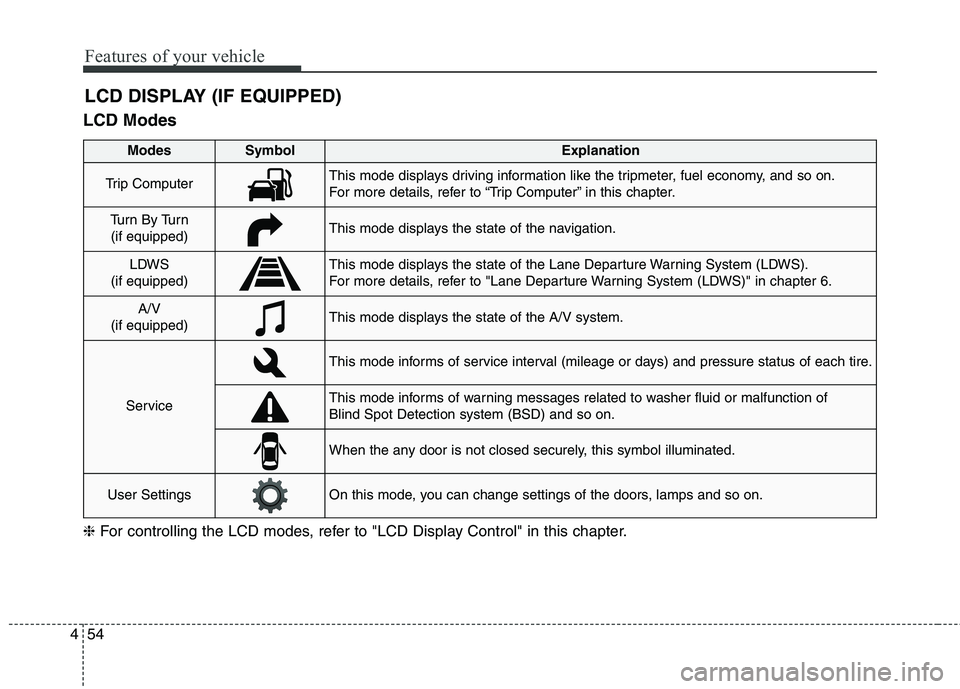
LCD Modes LCD DISPLAY (IF EQUIPPED)
Modes SymbolExplanation
Trip ComputerThis mode displays driving information like the tripmeter, fuel economy, and so on.
For more details, refer to “Trip Computer” in this chapter.
Tu r n B y Tu r n
(if equipped)This mode displays the state of the navigation.
LDWS
(if equipped)This mode displays the state of the Lane Departure Warning System (LDWS).
For more details, refer to "Lane Departure Warning System (LDWS)" in chapter 6.
A/V
(if equipped)This mode displays the state of the A/V system.
Service
This mode informs of service interval (mileage or days) and pressure status of each tire.
This mode informs of warning messages related to washer fluid or malfunction of Blind Spot Detection system (BSD) and so on.
When the any door is not closed securely, this symbol illuminated.
User SettingsOn this mode, you can change settings of the doors, lamps and so on.
❈ For controlling the LCD modes, refer to "LCD Display Control" in this chapter.
Page 149 of 548
Features of your vehicle
60
4
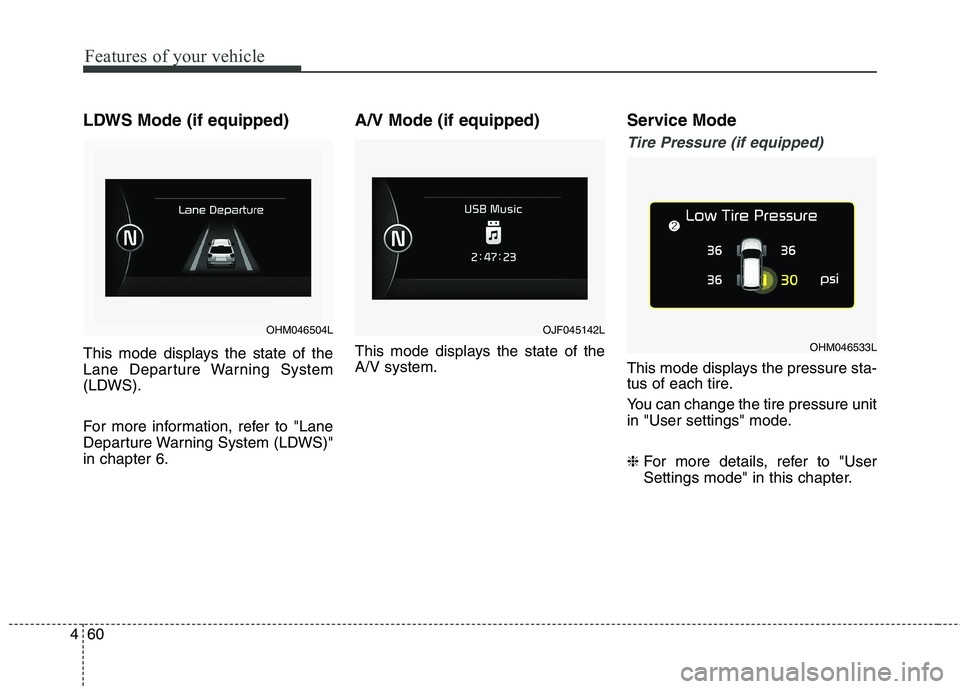
LDWS Mode (if equipped)
This mode displays the state of the
Lane Departure Warning System
(LDWS).
For more information, refer to "Lane
Departure Warning System (LDWS)"in chapter 6. A/V Mode (if equipped)
This mode displays the state of the A/V system.
Service Mode
Tire Pressure (if equipped)
This mode displays the pressure sta-
tus of each tire.
You can change the tire pressure unit
in "User settings" mode. ❈
For more details, refer to "User
Settings mode" in this chapter.
OHM046504LOJF045142L
OHM046533L
Page 151 of 548
Features of your vehicle
62
4
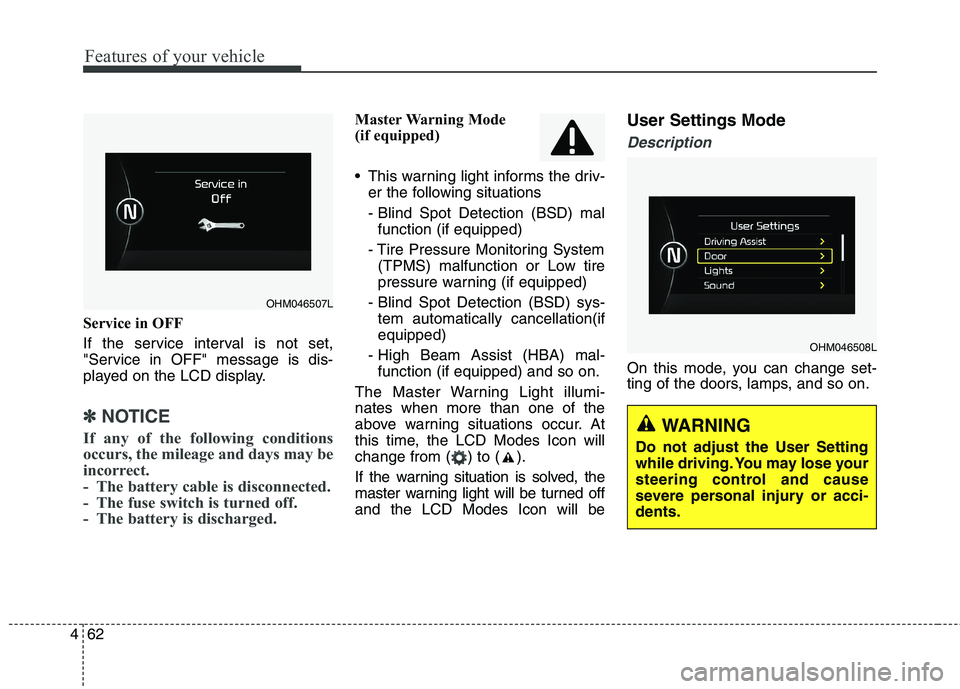
Service in OFF
If the service interval is not set,
"Service in OFF" message is dis-
played on the LCD display.
✽✽
NOTICE
If any of the following conditions
occurs, the mileage and days may be
incorrect.
- The battery cable is disconnected.
- The fuse switch is turned off.
- The battery is discharged.
Master Warning Mode
(if equipped)
This warning light informs the driv- er the following situations
- Blind Spot Detection (BSD) malfunction (if equipped)
- Tire Pressure Monitoring System (TPMS) malfunction or Low tire
pressure warning (if equipped)
- Blind Spot Detection (BSD) sys- tem automatically cancellation(ifequipped)
- High Beam Assist (HBA) mal- function (if equipped) and so on.
The Master Warning Light illumi-nates when more than one of the
above warning situations occur. At
this time, the LCD Modes Icon will
change from ( ) to ( ).
If the warning situation is solved, the
master warning light will be turned offand the LCD Modes Icon will be User Settings Mode
Description
On this mode, you can change set-
ting of the doors, lamps, and so on.
OHM046508L
OHM046507L
WARNING
Do not adjust the User Setting
while driving. You may lose your
steering control and cause
severe personal injury or acci-dents.
Page 155 of 548
Features of your vehicle
66
4
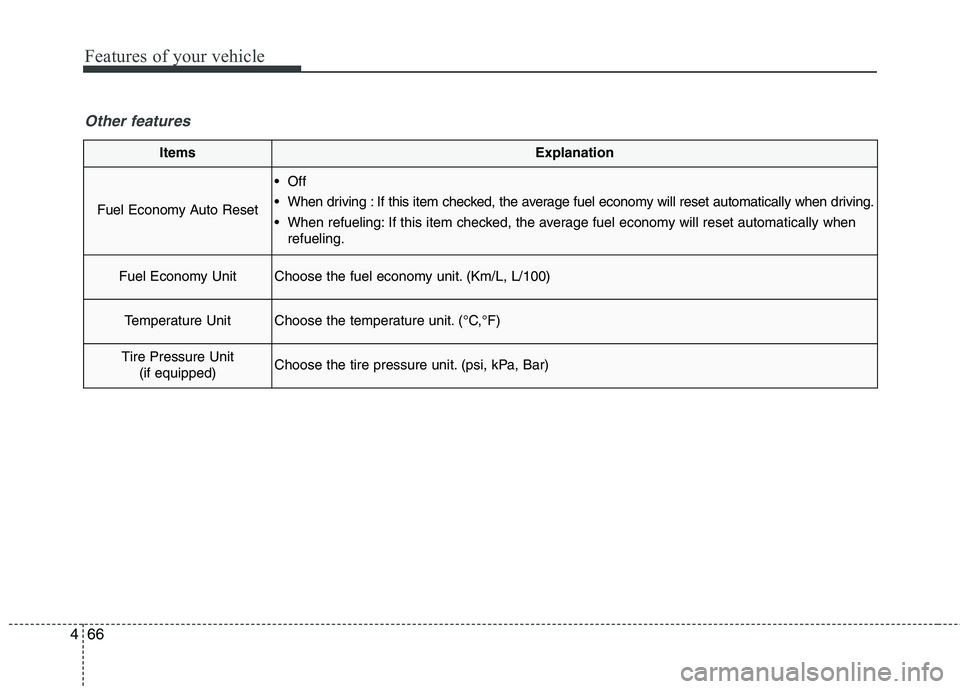
ItemsExplanation
Fuel Economy Auto Reset
Off
When driving : If this item checked, the average fuel economy will reset automatically when driving.
When refueling: If this item checked, the average fuel economy will reset automatically when
refueling.
Fuel Economy UnitChoose the fuel economy unit. (Km/L, L/100)
Temperature UnitChoose the temperature unit. (°C,°F)
Tire Pressure Unit
(if equipped)Choose the tire pressure unit. (psi, kPa, Bar)
Other features
Page 167 of 548
Features of your vehicle
78
4
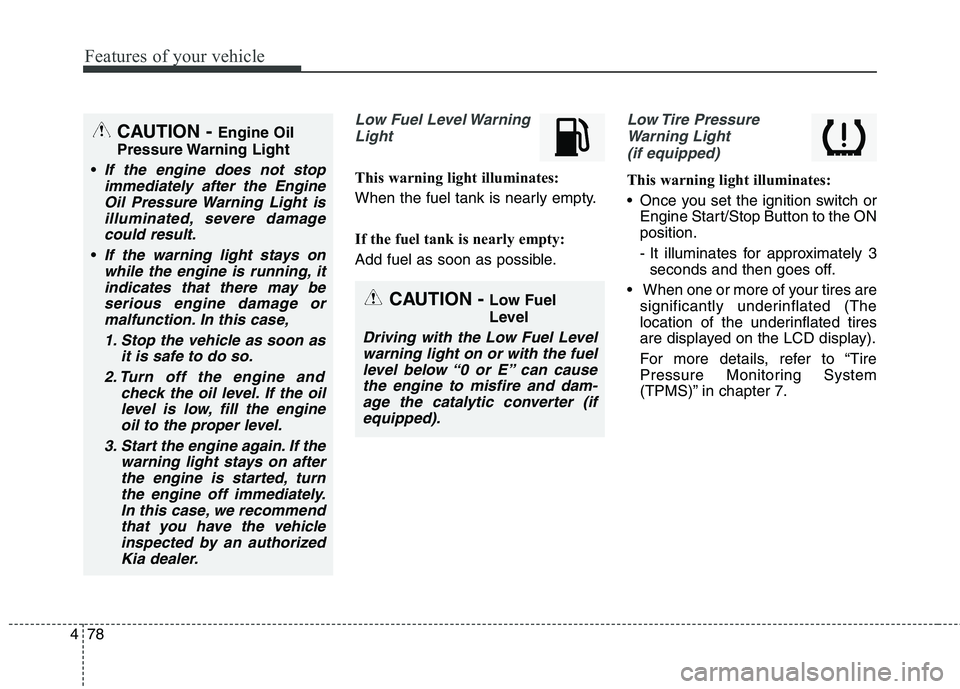
Low Fuel Level Warning
Light
This warning light illuminates:
When the fuel tank is nearly empty.
If the fuel tank is nearly empty:
Add fuel as soon as possible.
Low Tire PressureWarning Light (if equipped)
This warning light illuminates:
Once you set the ignition switch or Engine Start/Stop Button to the ON position.
- It illuminates for approximately 3seconds and then goes off.
When one or more of your tires are significantly underinflated (The
location of the underinflated tires
are displayed on the LCD display).
For more details, refer to “Tire
Pressure Monitoring System
(TPMS)” in chapter 7.
CAUTION - Engine Oil
Pressure Warning Light
If the engine does not stop immediately after the EngineOil Pressure Warning Light is illuminated, severe damagecould result.
If the warning light stays onwhile the engine is running, itindicates that there may be serious engine damage ormalfunction. In this case,
1. Stop the vehicle as soon as it is safe to do so.
2. Turn off the engine and check the oil level. If the oillevel is low, fill the engineoil to the proper level.
3. Start the engine again. If the warning light stays on afterthe engine is started, turnthe engine off immediately.In this case, we recommend that you have the vehicleinspected by an authorizedKia dealer.
CAUTION - Low Fuel
Level
Driving with the Low Fuel Level
warning light on or with the fuellevel below “0 or E” can cause the engine to misfire and dam-age the catalytic converter (ifequipped).
Page 168 of 548
479
Features of your vehicle
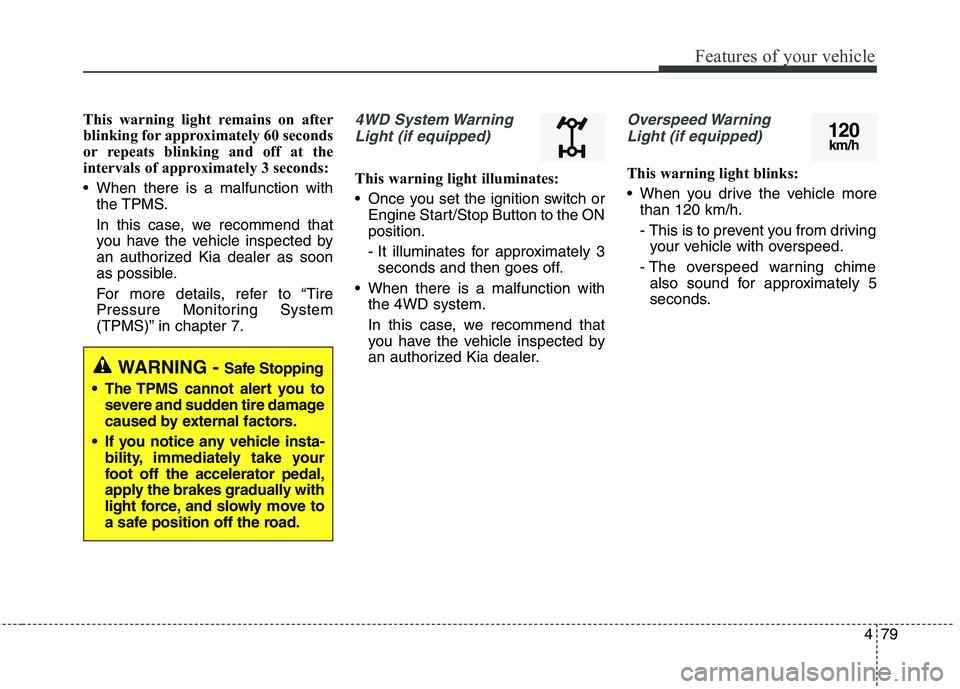
This warning light remains on after
blinking for approximately 60 seconds
or repeats blinking and off at the
intervals of approximately 3 seconds:
When there is a malfunction withthe TPMS.
In this case, we recommend that
you have the vehicle inspected by
an authorized Kia dealer as soon
as possible.
For more details, refer to “Tire
Pressure Monitoring System
(TPMS)” in chapter 7.4WD System Warning
Light (if equipped)
This warning light illuminates:
Once you set the ignition switch or Engine Start/Stop Button to the ON position.
- It illuminates for approximately 3seconds and then goes off.
When there is a malfunction with the 4WD system.
In this case, we recommend that
you have the vehicle inspected by
an authorized Kia dealer.
Overspeed Warning
Light (if equipped)
This warning light blinks:
When you drive the vehicle more than 120 km/h.
- This is to prevent you from drivingyour vehicle with overspeed.
- The overspeed warning chime also sound for approximately 5
seconds.
WARNING - Safe Stopping
The TPMS cannot alert you to severe and sudden tire damage
caused by external factors.
If you notice any vehicle insta- bility, immediately take your
foot off the accelerator pedal,
apply the brakes gradually with
light force, and slowly move to
a safe position off the road.
120km/h
Page 357 of 548
633
Driving your vehicle
Full-time 4WD vehicles must betested on a special four wheel
chassis dynamometer.
Part-time 4WD vehicles must be tested on a 2WD roll tester with the
transfer shift knob in the 2H posi-tion.
✽✽ NOTICE
Never engage the parking brake
while performing these tests.
A full-time 4WD vehicle should not be tested on a 2WD roll tester. If a
2WD roll tester must be used, per-
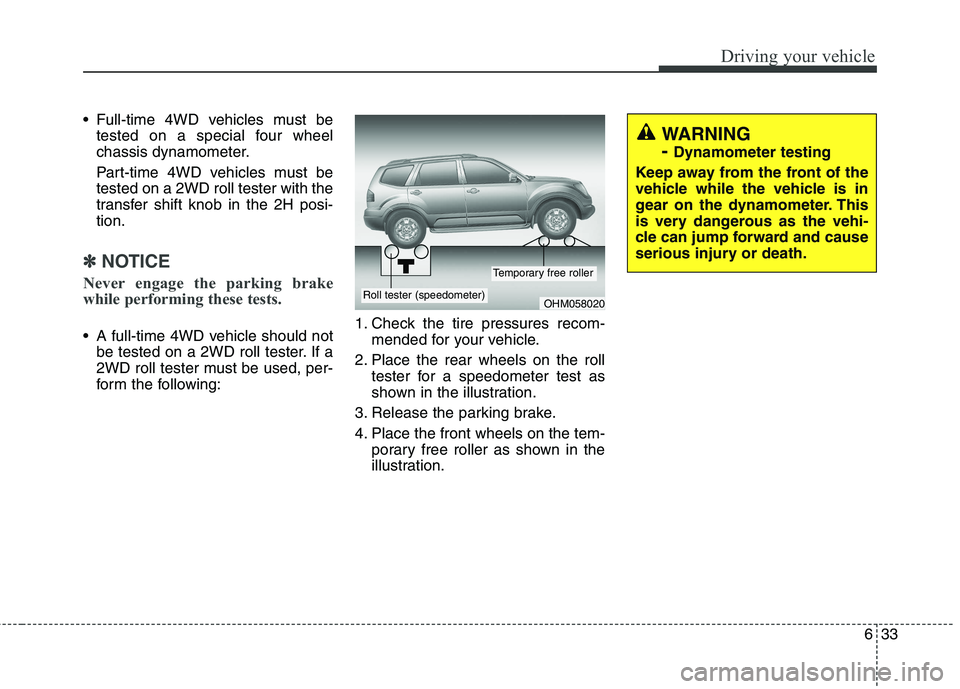
form the following: 1. Check the tire pressures recom-
mended for your vehicle.
2. Place the rear wheels on the roll tester for a speedometer test as
shown in the illustration.
3. Release the parking brake.
4. Place the front wheels on the tem- porary free roller as shown in the
illustration.
OHM058020Roll tester (speedometer)
Temporary free roller
WARNING - Dynamometer testing
Keep away from the front of the
vehicle while the vehicle is in
gear on the dynamometer. This
is very dangerous as the vehi-
cle can jump forward and cause
serious injury or death.
Page 362 of 548
Driving your vehicle
38
6
Anti-lock brake system (ABS) The ABS continuously senses the
speed of the wheels. If the wheels
are going to lock, the ABS system
repeatedly modulates the hydraulic
brake pressure to the wheels.
When you apply your brakes under
conditions which may lock the wheels,
you may hear a “tik-tik’’ sound from the
brakes, or feel a corresponding sensa-
tion in the brake pedal. This is normal
and it means your ABS is active.
In order to obtain the maximum ben-
efit from your ABS in an emergencysituation, do not attempt to modulate
your brake pressure and do not try to
pump your brakes. Press your brake
pedal as hard as possible or as hard
as the situation warrants and allow
the ABS to control the force being
delivered to the brakes.
✽✽
NOTICE
A click sound may be heard in the
engine compartment when the vehi-
cle begins to move after the engine is
started. These conditions are normal
and indicate that the anti-lock brake
system is functioning properly.
(Continued)
On roads where the road sur- face is pitted or has different surface height.
The safety features of an ABS
(or ESC) equipped vehicle
should not be tested by high
speed driving or cornering. This
could endanger the safety of
yourself or others.
WARNING
ABS (or ESC) will not prevent
accidents due to improper or
dangerous driving maneuvers.
Even though vehicle control is
improved during emergency
braking, always maintain a safe
distance between you and
objects ahead. Vehicle speeds
should always be reduced dur-
ing extreme road conditions.
The braking distance for vehicle
equipped with an anti-lock brak-
ing system (or Electronic
Stability Control) may be longer
than for those without it in the
following road conditions. During these conditions the
vehicle should be driven atreduced speeds:
Rough, gravel or snow-cov- ered roads.
With tire chains installed. (Continued)
Page 392 of 548
Driving your vehicle
68
6
Non-operating condition
Driver's Attention
The driver must be cautious in the
below situations for the system may
not assist the driver and may not
work properly.
- Curved roads, tollgates, etc.
- The surrounding of the sensor is
polluted with rain, snow, mud, etc
- The rear bumper near the sensor is covered or hidden with a foreign
matter such as a sticker, bumperguard, bicycle stand etc.
- The rear bumper is damaged or the sensor is out of place.
- The height of the vehicle shows much change such as when the
trunk is loaded with heavy objects,
abnormal tire pressure etc.
- Due to bad weather such as heavy rain or snow.
- A fixed object is near such as a guardrail, etc.
- A lot of amount of metal sub- stances are near the vehicles such
as a construction area. - A big vehicle is near such as a bus
or truck.
- A motorcycle or bicycle is near.
- A flat trailer like vehicle is near.
- If the vehicle has started at the same time as the vehicle next to it
and has accelerated.
- When the other vehicle passes by very fast.
- When changing lanes.
- When going down or up a steep, uneven road.
- When the other vehicle drives at the rear very nearby or drives very
close.
- When a trailer or carrier is installed.
- When the temperature of the rear bumper is very high or low.
- When the sensors are covered by the vehicle, wall and pillar of park- ing lot.
- When exiting rearward from a parking space with pillars or metal
structures. - When your vehicle moves back, if
the detected vehicle also moves
back.
- If there is small things like shopping cart and baby carriage.
- If there is low height vehicle like sport vehicle.
- When the vehicle is closing to your vehicle.
- When driving through a narrow road with many plants.
- When driving on wet surface.
Outside rearview mirror may not alert the driver when:
- The outside rearview mirror hous- ing is severely polluted.
- The window is severely polluted.
- The windows are severely tinted.
- When driving through a narrow road with many trees or bushes.
Page 393 of 548
669
Driving your vehicle
Your vehicle's fuel economy depends
mainly on your style of driving, where
you drive and when you drive.
Each of these factors affects how
many kilometers (miles) you can get
from a liter (gallon) of fuel. To operate
your vehicle as economically as pos-
sible, use the following driving sug-
gestions to help save money in bothfuel and repairs:
Drive smoothly. Accelerate at amoderate rate. Do not make "jack-
rabbit" starts or full-throttle shifts
and maintain a steady cruising
speed. Do not race between stop-
lights. Try to adjust your speed to
the traffic so you do not have to
change speeds unnecessarily.
Avoid heavy traffic whenever pos-
sible. Always maintain a safe dis-
tance from other vehicles so you
can avoid unnecessary braking.
This also reduces brake wear.
Drive at a moderate speed. The faster you drive, the more fuel your
vehicle uses. Driving at a moderate
speed, especially on the highway,
is one of the most effective ways toreduce fuel consumption. Do not "ride" the brake pedal. This
can increase fuel consumption and
also increase wear on these com-
ponents. In addition, driving with
your foot resting on the brake pedal
may cause the brakes to overheat,
which reduces their effectiveness
and may lead to more serious con-
sequences.
Take care of your tires. Keep them inflated to the recommended pres-
sure. Incorrect inflation, either too
much or too little, results in unnec-
essary tire wear. Check the tirepressures at least once a month.
Be sure that the wheels are aligned correctly. Improper align-ment can result from hitting curbs
or driving too fast over irregular
surfaces. Poor alignment causes
faster tire wear and may also result
in other problems as well as
greater fuel consumption. Keep your vehicle in good condi-
tion. For better fuel economy and
reduced maintenance costs, main-
tain your vehicle in accordancewith the maintenance schedule in
chapter 8. If you drive your vehicle
in severe conditions, more frequentmaintenance is required (see
chapter 8 for details).
Keep your vehicle clean. For maxi- mum service, your vehicle should
be kept clean and free of corrosive
materials. It is especially important
that mud, dirt, ice, etc. not be
allowed to accumulate on the
underside of the vehicle. This extra
weight can result in increased fuel
consumption and also contribute tocorrosion.
Travel lightly. Do not carry unnec- essary weight in your vehicle.
Weight reduces fuel economy.
Do not let the engine idle longer than necessary. If you are waiting
(and not in traffic), turn off your
engine and restart only when
you're ready to go.
ECONOMICAL OPERATION