display KIA CADENZA 2011 Owner's Guide
[x] Cancel search | Manufacturer: KIA, Model Year: 2011, Model line: CADENZA, Model: KIA CADENZA 2011Pages: 352, PDF Size: 28.17 MB
Page 202 of 352
4141
Knowing your vehicle
■Making a Phone Call
A Call Back can be made by pressing button on the steering wheel.
- This is the same function as using the button solely on the cellular phone.
NOTE: Some phone models require pressing button twice to make a call.
✽✽NOTICE
In the following situations, you or the
other party may have difficulty hearing
each other:
1. Speaking at the same time, your voice
may not reach each other parties. (This
is not a malfunction.) Speak alternate-
ly with the other party on the phone.
2. Keep the Bluetooth(R) volume to a
low level. High-level volume may
result in distortion and echo.
3. When driving on a rough road.
4. When driving at high speeds.
5. When the window is open.
6. When the air conditioning vents are facing the microphone.
7. When the sound of the air condition- ing fan is loud.
■Using the head unit as Bluetooth
music
This audio system supports A2DP (Audio
Advanced Distribution Profile) and
AVRCP(Audio Video Remote ControlProfile).
Both profiles are available for listening to
the MP3 music via Bluetooth cellular phone
supporting above Bluetooth profiles.
To play MP3 music from the Bluetooth
cellular phone, press the [AUX] button
until “MP3 Play” is displayed on the LCD.
Then try playing music by phone.
When playing music from the Bluetooth
cellular phone, the head unit displays MP3 MODE. NOTE:
all the sounds that the phone supports can be
heard by the audio system.
feature A2DP and AVRCP functions.
cellular phones may not play music
through the head unit on first try.
Please try the below;
i.e : Menu ➟
Filemanager ➟Music ➟
Option ➟Play via Bluetooth
phone for more.
To stop music, try stop playing
music from the phone then change
the audio mode to other than “MP3
Play” mode (e.g. FM, AM, CD, etc.)
Page 213 of 352
Driving your vehicle
10
5
Starting the engine
1. Carry the smart key or leave it inside
the vehicle.
2. Make sure the parking brake is firmly applied.
3. Place the shift lever in the P (Park) position.
4. Depress the brake pedal.
5. Press the ENGINE START/STOP but- ton.
6. In extremely cold weather (below -18°C / 0°F) or after the vehicle has not been
operated for several days, let the
engine warm up without depressing
the accelerator.
Whether the engine is cold or warm, itshould be started without depressing
the accelerator. Even if the smart key is in the vehicle,
if it is far away from you, the engine
may not start.
When the ENGINE START/STOP but- ton is in the ACC position or above, if
any door is opened, the system checks
for the smart key. If the smart key is not
in the vehicle, the warning "Key is not
in vehicle" will illuminate on the LCD
display. And if all doors are closed, the
chime will sound for 5 seconds. The
warning will turn off while the vehicle is
moving. Always have the smart key
with you.
WARNING
Always wear appropriate shoes
when operating your vehicle.
Unsuitable shoes (high heels, ski
boots, etc.) may interfere with yourability to use the brake and acceler-ator pedal.
WARNING
The engine will start by pressing the
ENGINE START/STOP button, only
when the smart key is in the vehicle.
Never allow children or any person
who is unfamiliar with the vehicle to
touch the ENGINE START/STOP but-
ton or related parts.CAUTION
If the engine stalls while you are in motion, do not attempt to move the
shift lever to the P (Park) position. Iftraffic and road conditions permit,you may put the shift lever in the N (Neutral) position while the vehicle
is still moving and press theENGINE START/STOP button in anattempt to restart the engine.
Page 216 of 352
513
Driving your vehicle
For smooth operation, depress the brakepedal when shifting from N (Neutral) to aforward or reverse gear.Transaxle ranges
The indicator in the instrument cluster
displays the shift lever position when the
ignition switch is in the ON position.
P (Park)
Always come to a complete stop before
shifting into P (Park). This position locks
the transaxle and prevents the drivewheels from rotating.
WARNING - Automatic
transaxle
Always check the surrounding areas near your vehicle for peo-
ple, especially children, beforeshifting a car into D (Drive) or R
(Reverse).
Before leaving the driver’s seat, always make sure the shift lever
is in the P (Park) position; then
set the parking brake fully and
shut the engine off. Unexpected
and sudden vehicle movementcan occur if these precautions
are not followed in the order iden-tified.
CAUTION
To avoid damage to your
transaxle, do not accelerate the
engine in R (Reverse) or any for-ward gear position with thebrakes on.
When stopped on an incline, do not hold the vehicle stationarywith engine power. Use the serv-ice brake or the parking brake.
Do not shift from N (Neutral) or P (Park) into D (Drive), or R
(Reverse) when the engine isabove idle speed.
WARNING
Shifting into P (Park) while the vehicle is in motion will cause the
drive wheels to lock which will
cause you to lose control of the
vehicle.
Do not use the P (Park) position in place of the parking brake.
Always make sure the shift lever
is latched in the P (Park) position
and set the parking brake fully.
Never leave a child unattended in a vehicle.
CAUTION
The transaxle may be damaged if
you shift into P (Park) while the vehicle is in motion.
Page 305 of 352
Maintenance
40
7
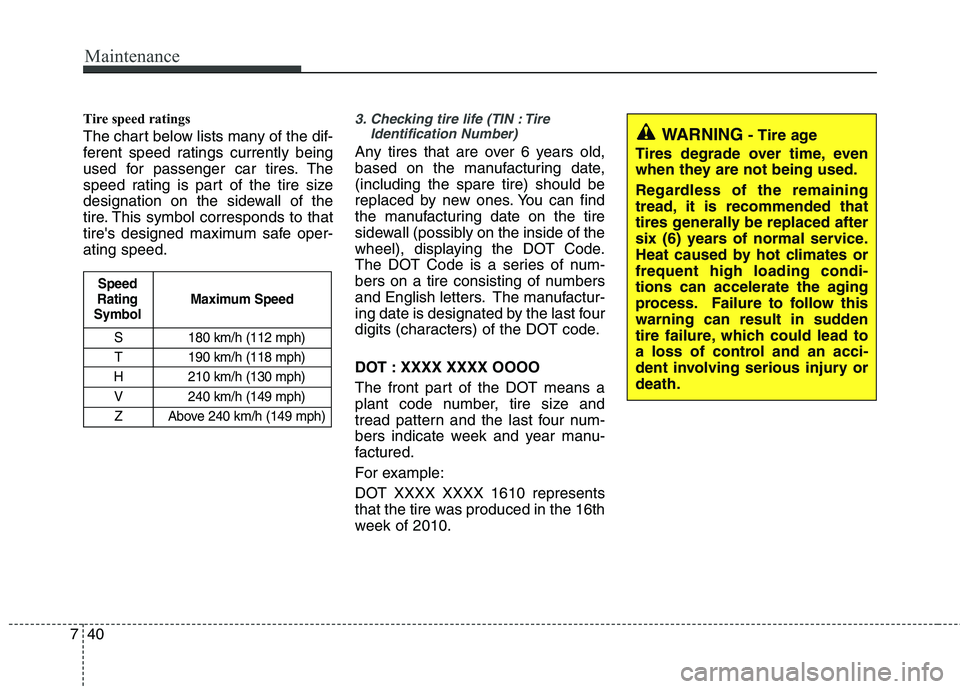
Tire speed ratings
The chart below lists many of the dif-
ferent speed ratings currently being
used for passenger car tires. The
speed rating is part of the tire size
designation on the sidewall of the
tire. This symbol corresponds to that
tire's designed maximum safe oper-ating speed.3. Checking tire life (TIN : Tire
Identification Number)
Any tires that are over 6 years old,
based on the manufacturing date,(including the spare tire) should be
replaced by new ones. You can find
the manufacturing date on the tire
sidewall (possibly on the inside of the
wheel), displaying the DOT Code.
The DOT Code is a series of num-
bers on a tire consisting of numbers
and English letters. The manufactur-
ing date is designated by the last four
digits (characters) of the DOT code.
DOT : XXXX XXXX OOOO
The front part of the DOT means a
plant code number, tire size and
tread pattern and the last four num-
bers indicate week and year manu-
factured.
For example:
DOT XXXX XXXX 1610 represents
that the tire was produced in the 16th
week of 2010.
S 180 km/h (112 mph)
T 190 km/h (118 mph)
H 210 km/h (130 mph) V 240 km/h (149 mph)
Z Above 240 km/h (149 mph)
Maximum Speed
Speed
Rating
Symbol
WARNING - Tire age
Tires degrade over time, even
when they are not being used.
Regardless of the remaining
tread, it is recommended that
tires generally be replaced after
six (6) years of normal service.
Heat caused by hot climates orfrequent high loading condi-
tions can accelerate the aging
process. Failure to follow this
warning can result in sudden
tire failure, which could lead to
a loss of control and an acci-
dent involving serious injury ordeath.
Page 346 of 352
I3
Index
Center console storage ·················································4-111
Central door lock switch················································4-16
Changing tires ··································································6-9Chains
Tire chains ·································································5-39
Checking tire inflation pressure·····································7-34
Child restraint system ····················································3-25
Child-protector rear door lock ·······································4-18
Climate control system (Automatic) ···························4-100 Air conditioning ······················································4-106
Automatic heating and air conditioning··················4-101
Manual heating and air conditioning ······················4-102
Climate control system (Manual) ··································4-91
Air conditioning ························································4-96
Climate control air filter············································4-98
Heating and air conditioning ·····································4-92
Cigarette lighter ···························································4-113
Climate control air filter ······································4-98, 7-26
Clock (Digital) ·····························································4-116
Clothes hanger ·····························································4-118
Combined instrument, see instrument cluster ···············4-43
Compact spare tire ·························································6-14
Compact spare tire replacement ····································7-38
Control switch (Outside rearview mirror) ·····················4-41
Coolant ···········································································7-18
Cooling fluid, see engine coolant ··································7-18
Crankcase emission control system ·······························7-69
Cruise control system ····················································5-28 Cup holder ···································································4-114
Cushion extension ····························································3-6
Curtain air bag ·······························································3-40
Dashboard, see instrument cluster ·································4-43
Dashboard illumination, see instrument panel
illumination ·······························································4-44
Defogging logic (Windshield) ·····································4-109 Auto defogging system ···········································4-110
Defroster (Rear window) ···············································4-90
Digital clock·································································4-106
Dimensions ······································································8-2
Displays, see instrument cluster ····································4-43
Display illumination, see instrument panel illumination··4-44
Door locks······································································4-15 Central door lock switch ···········································4-16
Child-protector rear door lock ··································4-18
Drink holders, see cup holders ····································4-114
Driver position memory system·····································4-34 Easy access function ·················································4-35
Driver's air bag·······························································3-37
Driving at night ······························································5-35
Driving in flooded areas ················································5-36
Driving in the rain··························································5-36
D