high beam KIA CADENZA 2011 Owners Manual
[x] Cancel search | Manufacturer: KIA, Model Year: 2011, Model line: CADENZA, Model: KIA CADENZA 2011Pages: 352, PDF Size: 28.17 MB
Page 8 of 352
15
Introduction
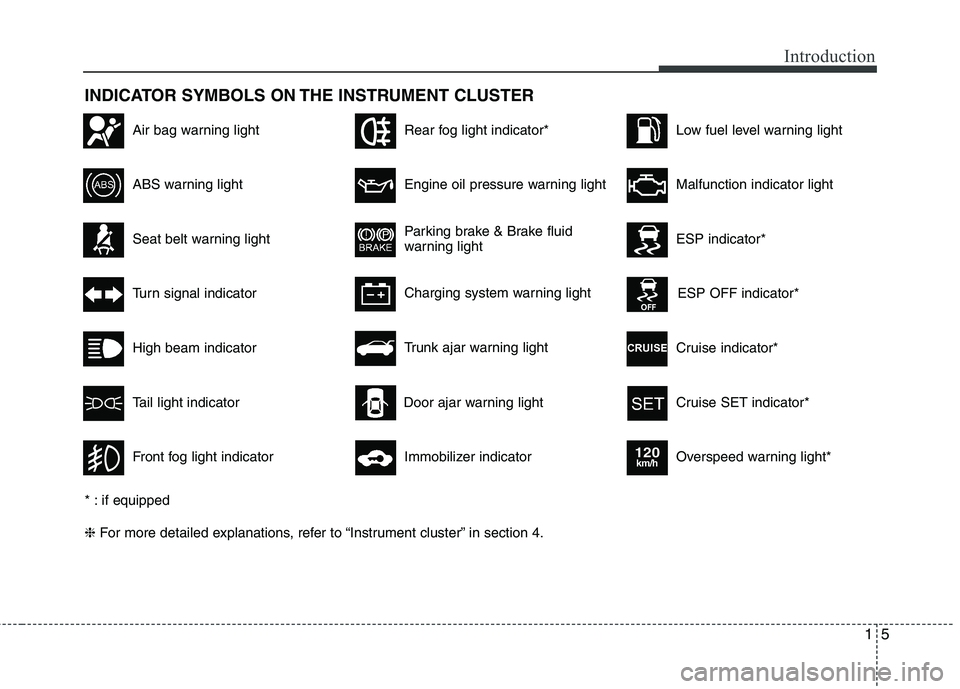
INDICATOR SYMBOLS ON THE INSTRUMENT CLUSTER
Seat belt warning light
High beam indicator
Turn signal indicator
ABS warning light
Parking brake & Brake fluid
warning light
Engine oil pressure warning light
ESP indicator*
ESP OFF indicator*
Malfunction indicator light
Air bag warning light
Cruise indicator*
Cruise SET indicator*
Immobilizer indicator
Low fuel level warning light
* : if equipped ❈ For more detailed explanations, refer to “Instrument cluster” in section 4.
Charging system warning light
Overspeed warning light*
120km/h
Tail light indicator
Trunk ajar warning light
Front fog light indicator
Rear fog light indicator*
Door ajar warning light
Page 118 of 352
457
Features of your vehicle
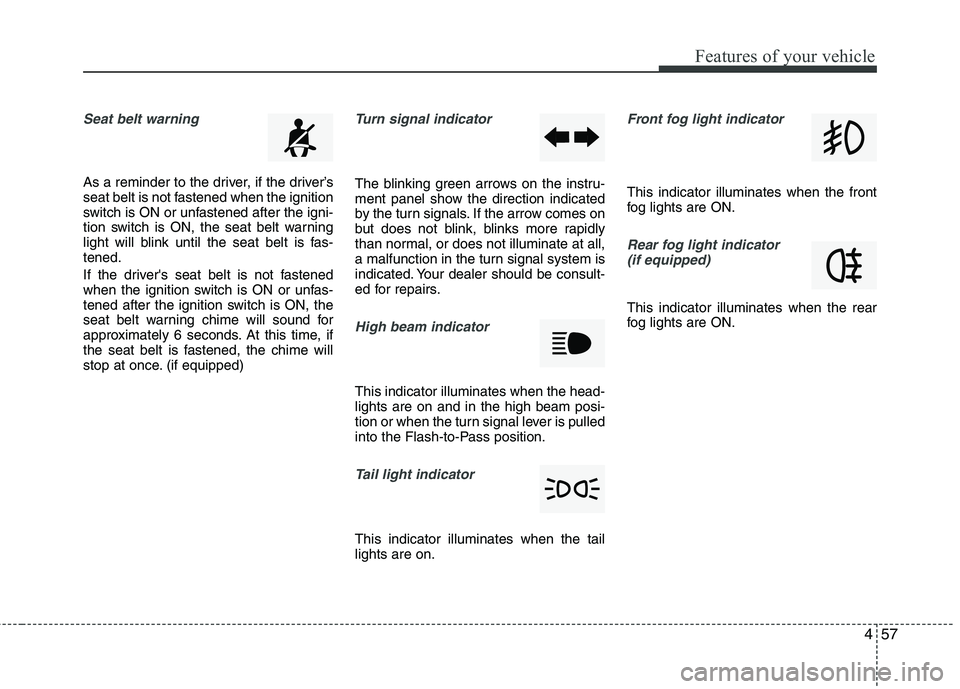
Seat belt warning
As a reminder to the driver, if the driver’s
seat belt is not fastened when the ignition
switch is ON or unfastened after the igni-
tion switch is ON, the seat belt warning
light will blink until the seat belt is fas-tened.
If the driver's seat belt is not fastened
when the ignition switch is ON or unfas-
tened after the ignition switch is ON, the
seat belt warning chime will sound for
approximately 6 seconds. At this time, if
the seat belt is fastened, the chime will
stop at once. (if equipped)
Turn signal indicator
The blinking green arrows on the instru-
ment panel show the direction indicated
by the turn signals. If the arrow comes on
but does not blink, blinks more rapidly
than normal, or does not illuminate at all,
a malfunction in the turn signal system is
indicated. Your dealer should be consult-
ed for repairs.
High beam indicator
This indicator illuminates when the head- lights are on and in the high beam posi-
tion or when the turn signal lever is pulled
into the Flash-to-Pass position.
Tail light indicator
This indicator illuminates when the tail lights are on.
Front fog light indicator
This indicator illuminates when the front
fog lights are ON.
Rear fog light indicator (if equipped)
This indicator illuminates when the rear
fog lights are ON.
Page 139 of 352
Features of your vehicle
78
4
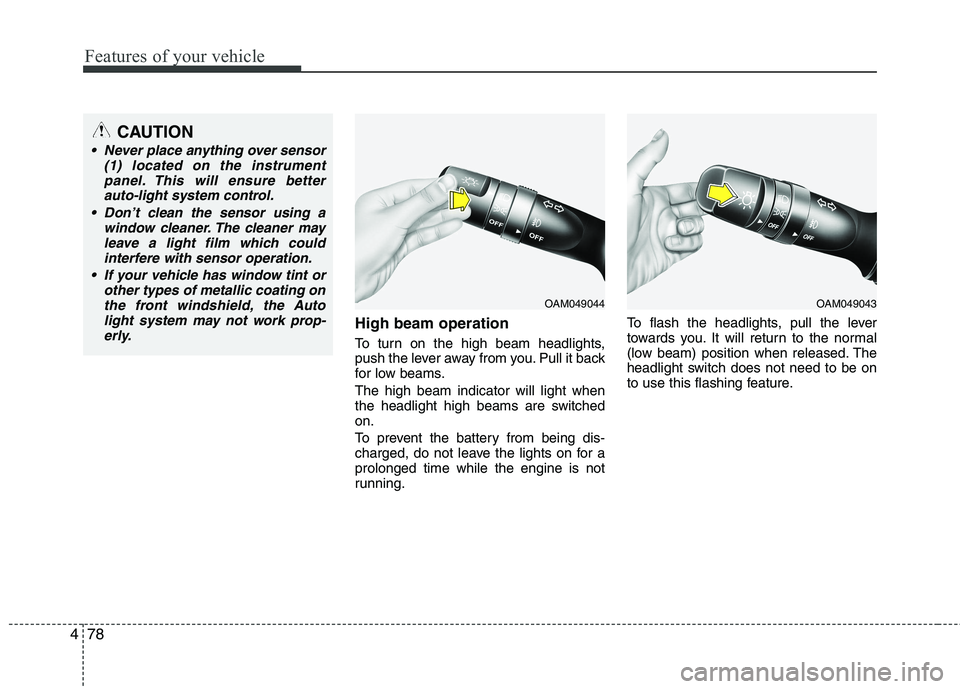
High beam operation
To turn on the high beam headlights,
push the lever away from you. Pull it back
for low beams. The high beam indicator will light when
the headlight high beams are switchedon.
To prevent the battery from being dis-
charged, do not leave the lights on for aprolonged time while the engine is not
running. To flash the headlights, pull the lever
towards you. It will return to the normal
(low beam) position when released. The
headlight switch does not need to be on
to use this flashing feature.
OAM049044
CAUTION
Never place anything over sensor
(1) located on the instrument
panel. This will ensure betterauto-light system control.
Don’t clean the sensor using a window cleaner. The cleaner may
leave a light film which could interfere with sensor operation.
If your vehicle has window tint or other types of metallic coating onthe front windshield, the Auto
light system may not work prop-erly.
OAM049043
Page 141 of 352
Features of your vehicle
80
4
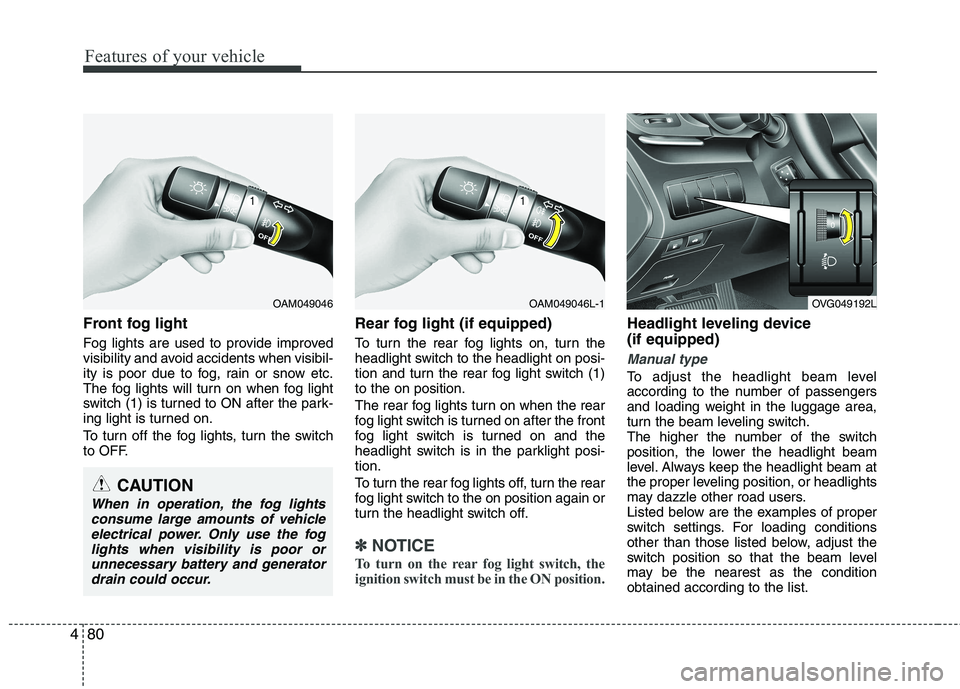
Front fog light
Fog lights are used to provide improved
visibility and avoid accidents when visibil-
ity is poor due to fog, rain or snow etc.
The fog lights will turn on when fog light
switch (1) is turned to ON after the park-
ing light is turned on.
To turn off the fog lights, turn the switch
to OFF. Rear fog light (if equipped)
To turn the rear fog lights on, turn the
headlight switch to the headlight on posi-
tion and turn the rear fog light switch (1)to the on position.
The rear fog lights turn on when the rear
fog light switch is turned on after the front
fog light switch is turned on and the
headlight switch is in the parklight posi-tion.
To turn the rear fog lights off, turn the rear
fog light switch to the on position again or
turn the headlight switch off.
✽✽
NOTICE
To turn on the rear fog light switch, the
ignition switch must be in the ON position.
Headlight leveling device (if equipped)
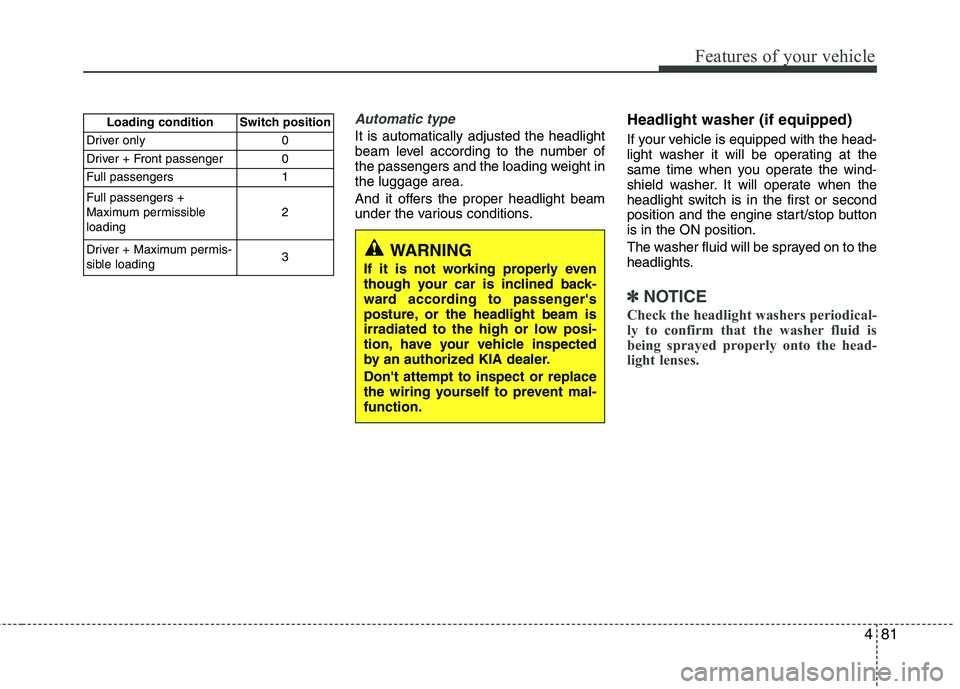
Manual type
To adjust the headlight beam level
according to the number of passengers
and loading weight in the luggage area,
turn the beam leveling switch.
The higher the number of the switch
position, the lower the headlight beam
level. Always keep the headlight beam at
the proper leveling position, or headlights
may dazzle other road users.
Listed below are the examples of proper
switch settings. For loading conditions
other than those listed below, adjust the
switch position so that the beam level
may be the nearest as the conditionobtained according to the list.
OAM049046OAM049046L-1
CAUTION
When in operation, the fog lights consume large amounts of vehicleelectrical power. Only use the foglights when visibility is poor orunnecessary battery and generator
drain could occur.
OVG049192L
Page 142 of 352
481
Features of your vehicle
Automatic type
It is automatically adjusted the headlight
beam level according to the number of
the passengers and the loading weight inthe luggage area.
And it offers the proper headlight beam
under the various conditions.Headlight washer (if equipped)
If your vehicle is equipped with the head-
light washer it will be operating at the
same time when you operate the wind-
shield washer. It will operate when the
headlight switch is in the first or second
position and the engine start/stop buttonis in the ON position.
The washer fluid will be sprayed on to the
headlights.
✽✽
NOTICE
Check the headlight washers periodical-
ly to confirm that the washer fluid is
being sprayed properly onto the head-
light lenses.
WARNING
If it is not working properly even
though your car is inclined back-
ward according to passenger's
posture, or the headlight beam is
irradiated to the high or low posi-
tion, have your vehicle inspected
by an authorized KIA dealer. Don't attempt to inspect or replace
the wiring yourself to prevent mal-function.
Loading condition Switch position
Driver only 0
Driver + Front passenger 0
Full passengers 1 Full passengers +
Maximum permissibleloading 2
Driver + Maximum permis-
sible loading 3