stop start KIA CADENZA 2011 Owners Manual
[x] Cancel search | Manufacturer: KIA, Model Year: 2011, Model line: CADENZA, Model: KIA CADENZA 2011Pages: 352, PDF Size: 28.17 MB
Page 7 of 352
Introduction
4
1
Use of MTBE
KIA recommends avoiding fuels contain-
ing MTBE (Methyl Tertiary Butyl Ether)
over 15.0% vol. (Oxygen Content 2.7%
weight) in your vehicle.
Fuel containing MTBE over 15.0% vol.
(Oxygen Content 2.7% weight) may
reduce vehicle performance and produce
vapor lock or hard starting.
Do not use methanol
Fuels containing methanol (wood alco-
hol) should not be used in your vehicle.
This type of fuel can reduce vehicle per-
formance and damage components ofthe fuel system.
Gasolines for cleaner air
To help contribute to cleaner air, KIA rec-
ommends that you use gasolines treated
with detergent additives, which help pre-
vent deposit formation in the engine.
These gasolines will help the engine run
cleaner and enhance performance of theEmission Control System.
Operation in foreign countries
If you are going to drive your vehicle in
another country, be sure to:
Observe all regulations regarding reg-
istration and insurance.
Determine that acceptable fuel is avail- able. No special break-in period is needed. By
following a few simple precautions for the
first 1,000 km (600 miles) you may add to
the performance, economy and life of
your vehicle.
Do not race the engine.
While driving, keep your engine speed
(rpm, or revolutions per minute)
between 2,000 rpm and 4,000 rpm.
Do not maintain a single speed for long periods of time, either fast or slow.
Varying engine speed is needed to
properly break-in the engine.
Avoid hard stops, except in emergen- cies, to allow the brakes to seat prop-
erly.
Don't let the engine idle longer than 3 minutes at one time.
Don't tow a trailer during the first 2,000
km (1,200 miles) of operation.
VEHICLE BREAK-IN PROCESS
CAUTION
Your New Vehicle Limited Warranty
may not cover damage to the fuelsystem and any performance prob-lems that are caused by the use offuels containing methanol or fuels
containing MTBE (Methyl TertiaryButyl Ether) over 15.0% vol. (Oxygen Content 2.7% weight.)
Page 11 of 352
23
Your vehicle at a glance
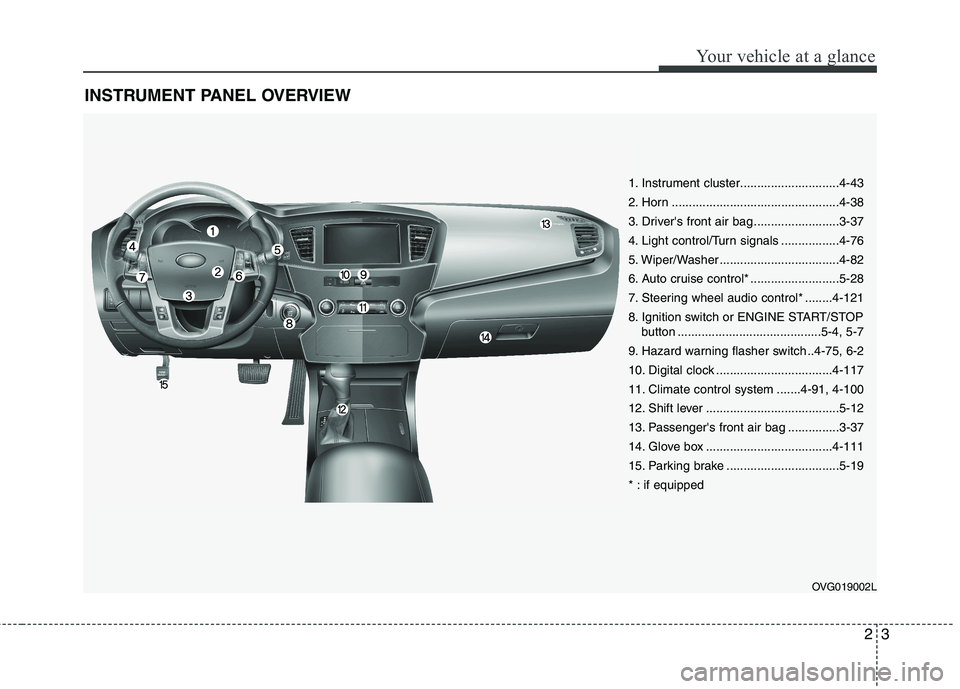
INSTRUMENT PANEL OVERVIEW
OVG019002L
1. Instrument cluster.............................4-43
2. Horn .................................................4-38
3. Driver's front air bag .........................3-37
4. Light control/Turn signals .................4-76
5. Wiper/Washer ...................................4-82
6. Auto cruise control* ..........................5-28
7. Steering wheel audio control* ........4-121
8. Ignition switch or ENGINE START/STOPbutton ..........................................5-4, 5-7
9. Hazard warning flasher switch ..4-75, 6-2
10. Digital clock ..................................4-117
11. Climate control system .......4-91, 4-100
12. Shift lever .......................................5-12
13. Passenger's front air bag ...............3-37
14. Glove box .....................................4-111
15. Parking brake .................................5-19
* : if equipped
Page 67 of 352
Features of your vehicle
6
4
To activate the immobilizer system:
Turn the ignition key to the OFF position.
The immobilizer system activates auto-
matically. Without a valid ignition key for
your vehicle, the engine will not start.
To deactivate the immobilizer sys-
tem:
Insert the ignition key into the key cylin-
der and turn it to the ON position.
✽✽ NOTICE
When starting the engine, do not use the
key with other immobilizer keys around.
Otherwise the engine may not start or
may stop soon after it starts. Keep each
key separate in order to avoid a starting
malfunction. ✽
✽
NOTICE
If you need additional keys or lose your
keys, consult an authorized KIA dealer.
CAUTION
Do not change, alter or adjust the immobilizer system because it
could cause the immobilizer sys- tem to malfunction and should onlybe serviced by an authorized KIAdealer.
Malfunctions caused by improperalterations, adjustments or modifi-cations to the immobilizer system are not covered by your vehicle
manufacturer warranty.
WARNING
In order to prevent theft of your
vehicle, do not leave spare keys
anywhere in your vehicle. Your
immobilizer password is a cus-
tomer unique password and should
be kept confidential. Do not leave
this number anywhere in your vehi-
cle.
CAUTION
The transponder in your ignition key is an important part of theimmobilizer system. It is designedto give years of trouble-free service,
however you should avoid expo-sure to moisture, static electricity and rough handling. Immobilizersystem malfunction could occur.
CAUTION
Do not put metal accessories near the ignition switch. Metal acces-
sories may interrupt the transpon-der signal and may prevent theengine from being started.
Page 71 of 352
Features of your vehicle
10
4
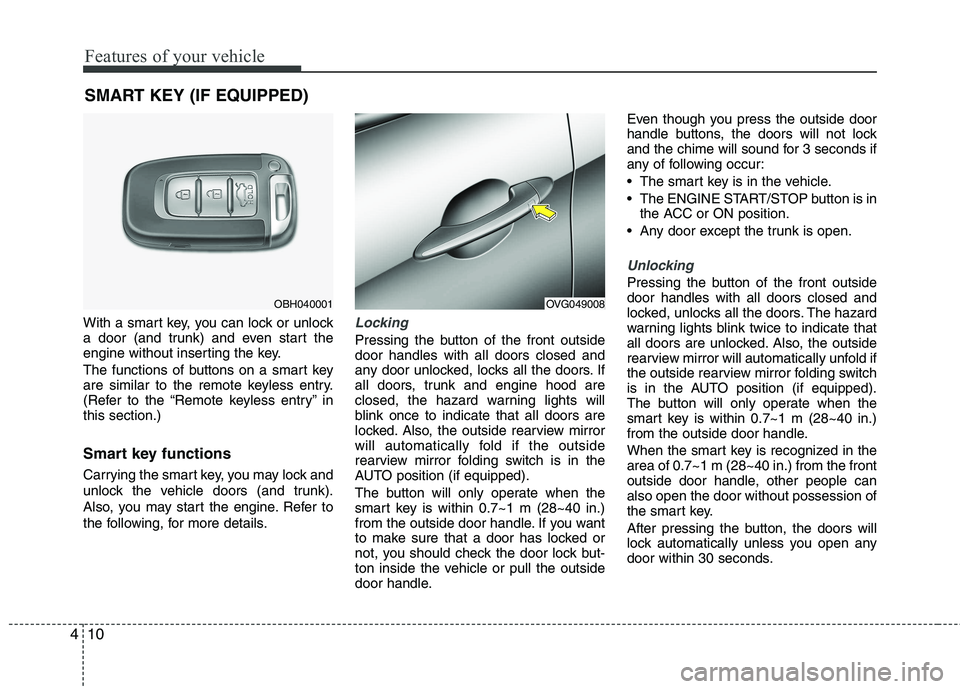
With a smart key, you can lock or unlock
a door (and trunk) and even start the
engine without inserting the key.
The functions of buttons on a smart key
are similar to the remote keyless entry.
(Refer to the “Remote keyless entry” inthis section.)
Smart key functions
Carrying the smart key, you may lock and
unlock the vehicle doors (and trunk).
Also, you may start the engine. Refer to
the following, for more details.Locking
Pressing the button of the front outside door handles with all doors closed and
any door unlocked, locks all the doors. If
all doors, trunk and engine hood are
closed, the hazard warning lights will
blink once to indicate that all doors are
locked. Also, the outside rearview mirror
will automatically fold if the outside
rearview mirror folding switch is in the
AUTO position (if equipped).
The button will only operate when the
smart key is within 0.7~1 m (28~40 in.)
from the outside door handle. If you want
to make sure that a door has locked or
not, you should check the door lock but-
ton inside the vehicle or pull the outside
door handle. Even though you press the outside door
handle buttons, the doors will not lock
and the chime will sound for 3 seconds if
any of following occur:
The smart key is in the vehicle.
The ENGINE START/STOP button is in
the ACC or ON position.
Any door except the trunk is open.
Unlocking
Pressing the button of the front outside door handles with all doors closed and
locked, unlocks all the doors. The hazard
warning lights blink twice to indicate that
all doors are unlocked. Also, the outside
rearview mirror will automatically unfold if
the outside rearview mirror folding switch
is in the AUTO position (if equipped).
The button will only operate when the
smart key is within 0.7~1 m (28~40 in.)
from the outside door handle.
When the smart key is recognized in the area of 0.7~1 m (28~40 in.) from the front
outside door handle, other people canalso open the door without possession of
the smart key.
After pressing the button, the doors will
lock automatically unless you open any
door within 30 seconds.
SMART KEY (IF EQUIPPED)
OBH040001OVG049008
Page 72 of 352
411
Features of your vehicle
Trunk unlocking
If you are within 0.7~1 m (28~40 in.) from
the outside trunk handle with your smart
key in your possession, the trunk will
unlock and open when you press the
trunk handle switch.
Also, once the trunk is opened and then
closed, the trunk will lock automatically.
Start-up
You can start the engine without inserting
the key. For detailed information refer to
“ENGINE START/STOP button” in sec-tion 5.Smart key precautions
✽✽
NOTICE
If, for some reason, you happen to lose your smart key, you will not be able to
start the engine. Tow the vehicle, if
necessary, and contact an authorized
KIA dealer.
A maximum of 2 smart keys can be
registered to a single vehicle. If you
lose a smart key, you should immedi-
ately take the vehicle and key to your
authorized KIA dealer to protect it
from potential theft.
The smart key will not work if any of
following occur:
- The smart key is close to a radiotransmitter such as a radio station or
an airport which can interfere with
normal operation of the smart key.
- You keep the smart key near a
mobile two-way radio system or a
cellular phone.
- Another vehicle’s smart key is being operated close to your vehicle.
When the smart key does not work
correctly, open and close the door with
the mechanical key. If you have a
problem with the smart key, contact
an authorized KIA dealer.CAUTION
Keep the smart key away from
water or any liquid. If the keyless
entry system is inoperative due to exposure to water or liquids, it willnot be covered by your manufactur- er’s vehicle warranty.
Page 96 of 352
435
Features of your vehicle
Recalling positions from memory
1. Shift the shift lever into P (Park) whilethe ignition switch is ON.
2. To recall the position in memory, press the desired memory button (1 or 2).
The system will beep once, then the
driver’s seat, outside rearview mirror,
steering wheel and the instrumentpanel illumination will automatically
adjust to the stored positions.
3. "Driver 1 (or 2) set is changed" will appear on the instrument cluster LCD
display.
Adjusting the control switch for the dri-
ver’s seat, outside rearview mirror, steer-
ing wheel and the instrument panel illu-mination while the system is recalling the
stored position will cause the movement
to stop and move in the direction that the
control switch is moved. Easy access function (if equipped)
With the shift lever in the P (Park) posi-
tion, the system will move the driver's
seat and steering wheel automatically so
you can comfortably enter and exit the
vehicle.
Without smart key system
- The steering wheel will move awayfrom the driver and the seat will move
rearward, when the ignition key is
removed.
- The steering wheel will move toward the driver and the seat will move for-
ward, when the ignition key is insert-ed.
With smart key system - The steering wheel will move awayfrom the driver and the seat will move
rearward, when the ENGINE START/
STOP button is in the OFF position.
- The steering wheel will move toward the driver and the seat will move for-
ward, when the ENGINE START/
STOP button is in the ACC position.
You can activate or deactivate this fea-
ture. Refer to “Vehicle Option" in this
chapter.
WARNING
Use caution when recalling adjust-
ment memory while sitting in the
vehicle. Push the seat position con-
trol knob to the desired position
immediately if the seat moves too
far in any direction.
Page 98 of 352
437
Features of your vehicle
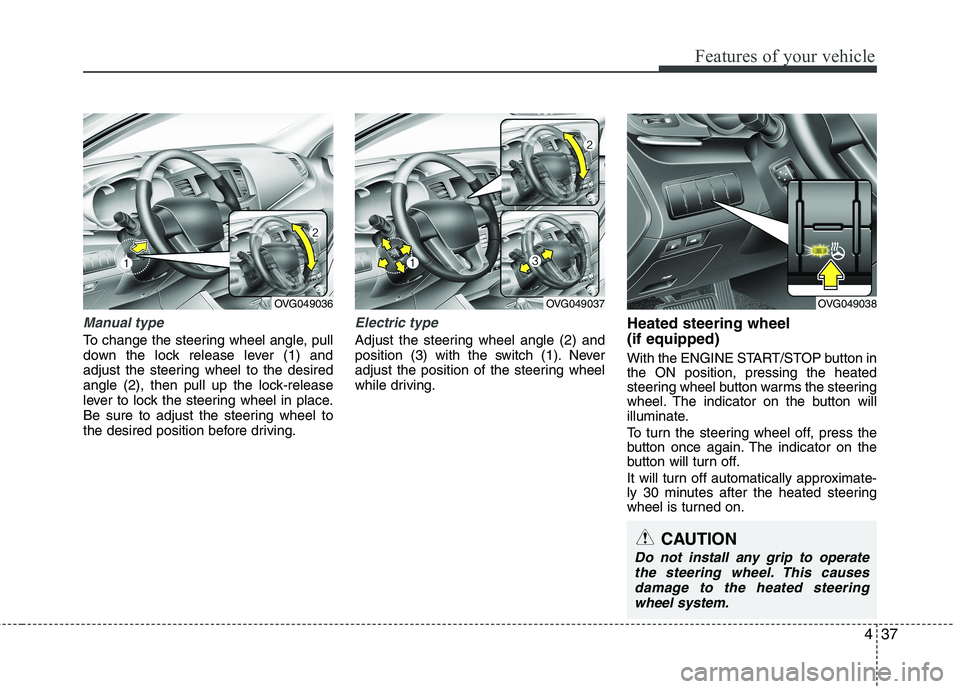
Manual type
To change the steering wheel angle, pull
down the lock release lever (1) and
adjust the steering wheel to the desired
angle (2), then pull up the lock-release
lever to lock the steering wheel in place.
Be sure to adjust the steering wheel to
the desired position before driving.
Electric type
Adjust the steering wheel angle (2) and
position (3) with the switch (1). Never
adjust the position of the steering wheel
while driving.Heated steering wheel (if equipped)
With the ENGINE START/STOP button in the ON position, pressing the heated
steering wheel button warms the steering
wheel. The indicator on the button will
illuminate.
To turn the steering wheel off, press the
button once again. The indicator on the
button will turn off.
It will turn off automatically approximate-
ly 30 minutes after the heated steering
wheel is turned on.
OVG049036OVG049037
CAUTION
Do not install any grip to operate
the steering wheel. This causes
damage to the heated steeringwheel system.
OVG049038
Page 103 of 352
Features of your vehicle
42
4
Neutral : When the remote control out-
side rearview mirror switch is in the middle position, the outside
rearview mirrors will not oper-
ate.
✽✽ NOTICE
The outside rearview mirrors will auto-
matically revert to their original posi-
tions under the following conditions:
1. ENGINE START/STOP button is changed to the ACC or OFF position.
2. Shift lever is moved to any position
except R.
3. Remote control outside rearview mir-
ror switch is placed in the middle
position.
Folding/Unfolding the outside
rearview mirror (if equipped)
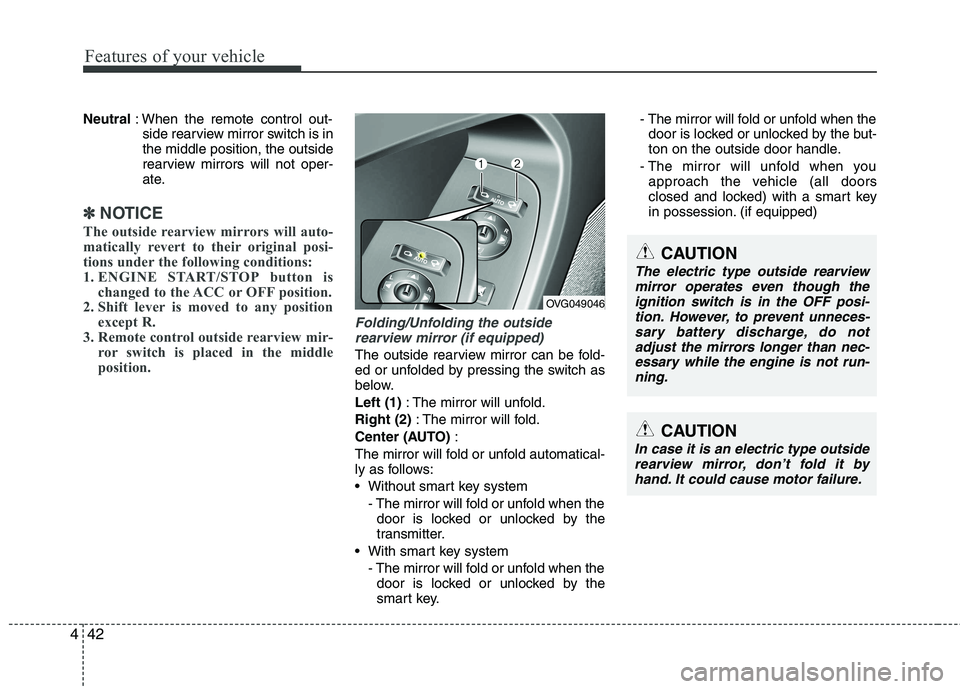
The outside rearview mirror can be fold-
ed or unfolded by pressing the switch as
below. Left (1) : The mirror will unfold.
Right (2) : The mirror will fold.
Center (AUTO) :
The mirror will fold or unfold automatical-
ly as follows:
Without smart key system - The mirror will fold or unfold when thedoor is locked or unlocked by the
transmitter.
With smart key system - The mirror will fold or unfold when thedoor is locked or unlocked by the
smart key. - The mirror will fold or unfold when the
door is locked or unlocked by the but-
ton on the outside door handle.
- The mirror will unfold when you approach the vehicle (all doors
closed and locked) with a smart key
in possession. (if equipped)
CAUTION
In case it is an electric type outside
rearview mirror, don’t fold it byhand. It could cause motor failure.
OVG049046
CAUTION
The electric type outside rearview
mirror operates even though the ignition switch is in the OFF posi-tion. However, to prevent unneces-sary battery discharge, do not
adjust the mirrors longer than nec- essary while the engine is not run-ning.
Page 113 of 352
Features of your vehicle
52
4
Maintenance
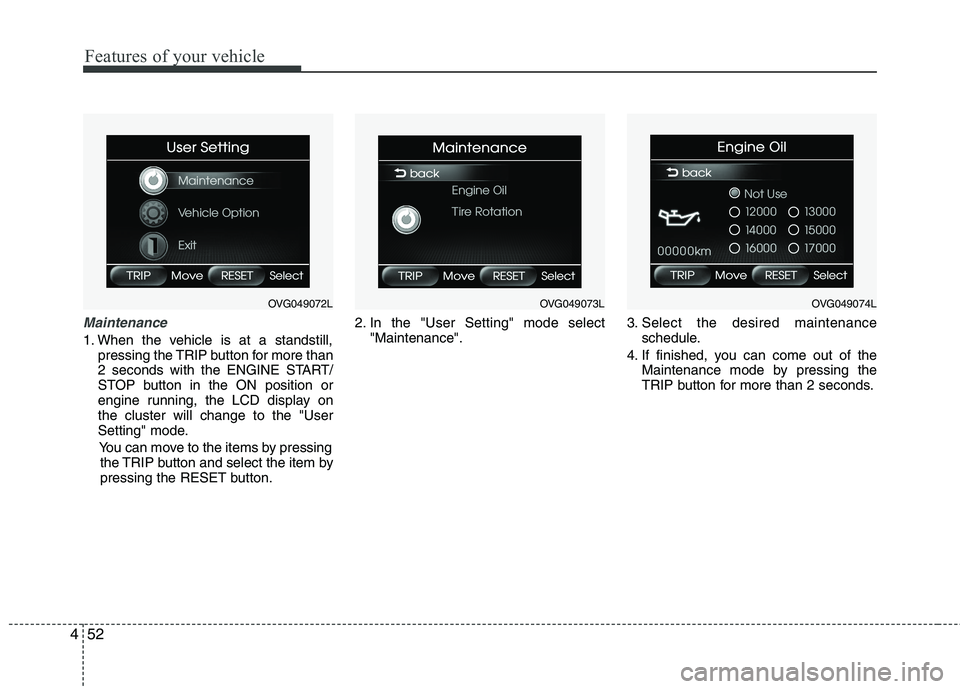
1. When the vehicle is at a standstill,
pressing the TRIP button for more than
2 seconds with the ENGINE START/
STOP button in the ON position or
engine running, the LCD display onthe cluster will change to the "User
Setting" mode.
You can move to the items by pressing the TRIP button and select the item by
pressing the RESET button. 2. In the "User Setting" mode select
"Maintenance". 3. Select the desired maintenance
schedule.
4. If finished, you can come out of the Maintenance mode by pressing the
TRIP button for more than 2 seconds.
OVG049072LOVG049073LOVG049074L
Page 114 of 352
453
Features of your vehicle
Vehicle option (if equipped)
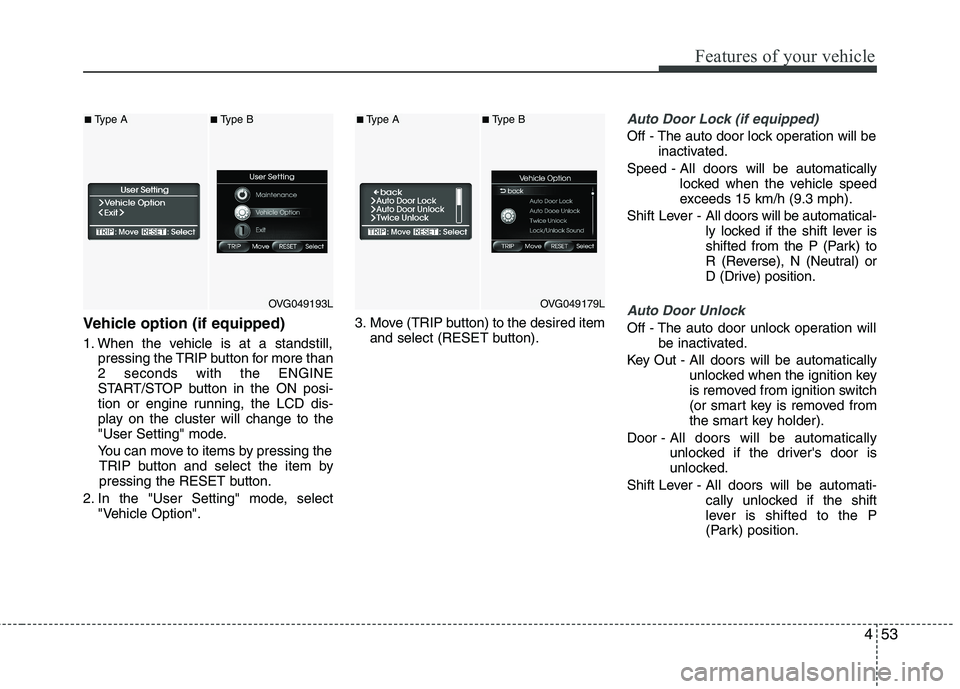
1. When the vehicle is at a standstill,pressing the TRIP button for more than 2 seconds with the ENGINE
START/STOP button in the ON posi-
tion or engine running, the LCD dis-
play on the cluster will change to the
"User Setting" mode.
You can move to items by pressing the TRIP button and select the item by
pressing the RESET button.
2. In the "User Setting" mode, select "Vehicle Option". 3. Move (TRIP button) to the desired item
and select (RESET button).
Auto Door Lock (if equipped)
Off - The auto door lock operation will be inactivated.
Speed - All doors will be automatically locked when the vehicle speed
exceeds 15 km/h (9.3 mph).
Shift Lever - All doors will be automatical-
ly locked if the shift lever is
shifted from the P (Park) to
R (Reverse), N (Neutral) or
D (Drive) position.
Auto Door Unlock
Off - The auto door unlock operation will
be inactivated.
Key Out - All doors will be automatically unlocked when the ignition key
is removed from ignition switch
(or smart key is removed from
the smart key holder).
Door - All doors will be automatically
unlocked if the driver's door is
unlocked.
Shift Lever - All doors will be automati- cally unlocked if the shift
lever is shifted to the P
(Park) position.
OVG049193L
■Type A■Type B
OVG049179L
■Type A■Type B