Sound KIA Cadenza 2015 1.G User Guide
[x] Cancel search | Manufacturer: KIA, Model Year: 2015, Model line: Cadenza, Model: KIA Cadenza 2015 1.GPages: 429, PDF Size: 5.47 MB
Page 113 of 429
429
Features of your vehicle
FUEL FILLER LID
Opening the fuel filler lid
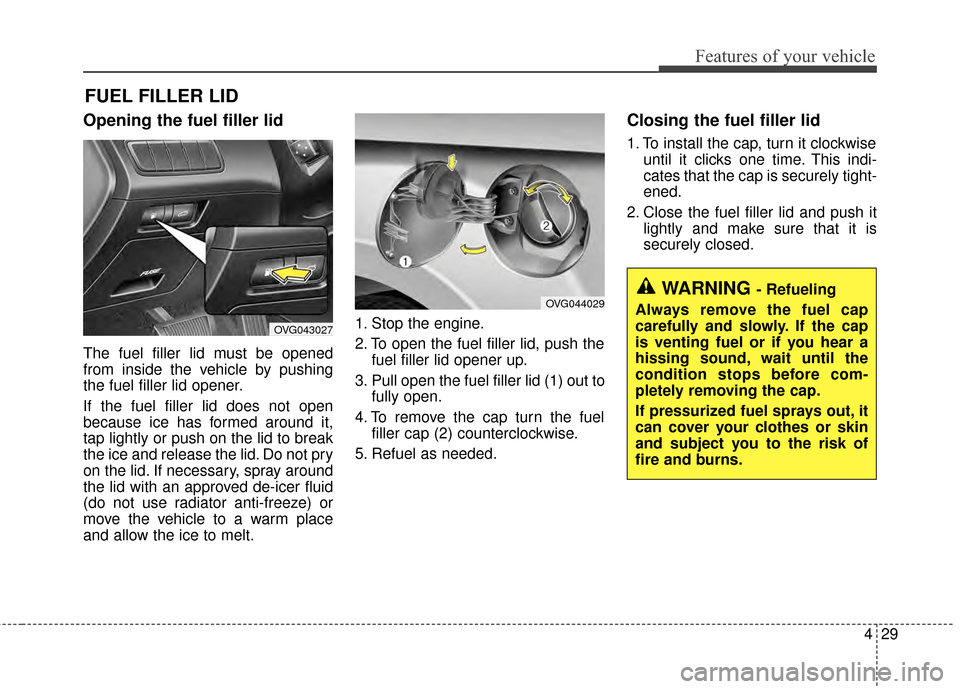
The fuel filler lid must be opened
from inside the vehicle by pushing
the fuel filler lid opener.
If the fuel filler lid does not open
because ice has formed around it,
tap lightly or push on the lid to break
the ice and release the lid. Do not pry
on the lid. If necessary, spray around
the lid with an approved de-icer fluid
(do not use radiator anti-freeze) or
move the vehicle to a warm place
and allow the ice to melt.1. Stop the engine.
2. To open the fuel filler lid, push the
fuel filler lid opener up.
3. Pull open the fuel filler lid (1) out to fully open.
4. To remove the cap turn the fuel filler cap (2) counterclockwise.
5. Refuel as needed.
Closing the fuel filler lid
1. To install the cap, turn it clockwise until it clicks one time. This indi-
cates that the cap is securely tight-
ened.
2. Close the fuel filler lid and push it lightly and make sure that it is
securely closed.
WARNING - Refueling
Always remove the fuel cap
carefully and slowly. If the cap
is venting fuel or if you hear a
hissing sound, wait until the
condition stops before com-
pletely removing the cap.
If pressurized fuel sprays out, it
can cover your clothes or skin
and subject you to the risk of
fire and burns.
OVG043027
OVG044029
Page 116 of 429
Features of your vehicle
32
4
PANORAMIC SUNROOF (IF EQUIPPED)
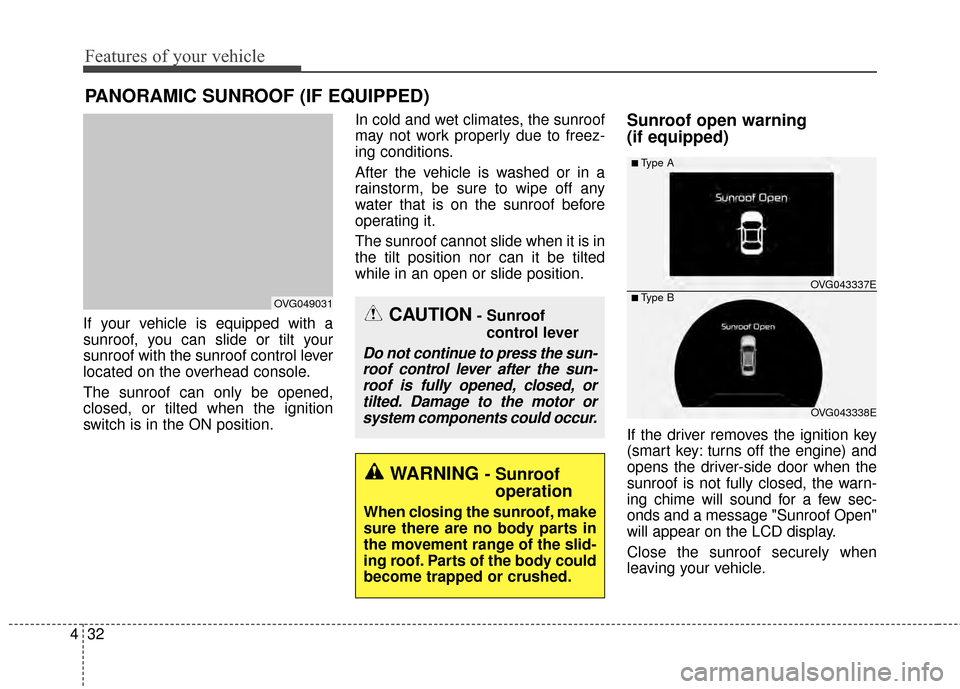
If your vehicle is equipped with a
sunroof, you can slide or tilt your
sunroof with the sunroof control lever
located on the overhead console.
The sunroof can only be opened,
closed, or tilted when the ignition
switch is in the ON position. In cold and wet climates, the sunroof
may not work properly due to freez-
ing conditions.
After the vehicle is washed or in a
rainstorm, be sure to wipe off any
water that is on the sunroof before
operating it.
The sunroof cannot slide when it is in
the tilt position nor can it be tilted
while in an open or slide position.
Sunroof open warning
(if equipped)
If the driver removes the ignition key
(smart key: turns off the engine) and
opens the driver-side door when the
sunroof is not fully closed, the warn-
ing chime will sound for a few sec-
onds and a message "Sunroof Open"
will appear on the LCD display.
Close the sunroof securely when
leaving your vehicle.
CAUTION- Sunroof
control lever
Do not continue to press the sun-roof control lever after the sun-roof is fully opened, closed, ortilted. Damage to the motor orsystem components could occur.
OVG049031
OVG043338E
■Type A
■ Type B OVG043337E
WARNING - Sunroof
operation
When closing the sunroof, make
sure there are no body parts in
the movement range of the slid-
ing roof. Parts of the body could
become trapped or crushed.
Page 123 of 429
439
Features of your vehicle
Heated steering wheel
(if equipped)
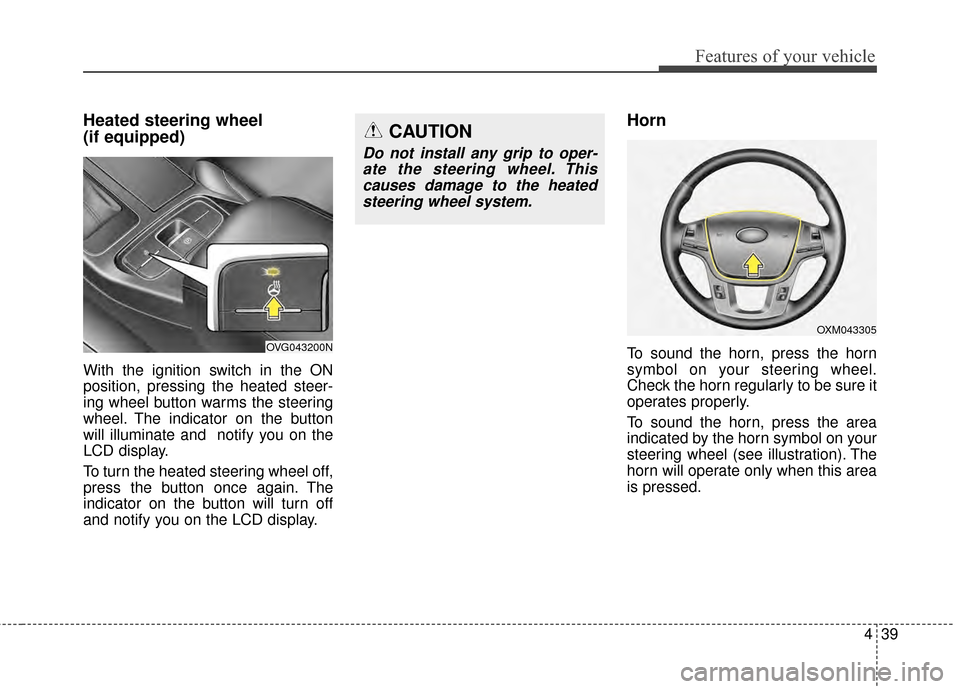
With the ignition switch in the ON
position, pressing the heated steer-
ing wheel button warms the steering
wheel. The indicator on the button
will illuminate and notify you on the
LCD display.
To turn the heated steering wheel off,
press the button once again. The
indicator on the button will turn off
and notify you on the LCD display.
Horn
To sound the horn, press the horn
symbol on your steering wheel.
Check the horn regularly to be sure it
operates properly.
To sound the horn, press the area
indicated by the horn symbol on your
steering wheel (see illustration). The
horn will operate only when this area
is pressed.
CAUTION
Do not install any grip to oper-ate the steering wheel. Thiscauses damage to the heatedsteering wheel system.
OVG043200N
OXM043305
Page 137 of 429
453
Features of your vehicle
Instrument Cluster Control
Adjusting Instrument ClusterIllumination
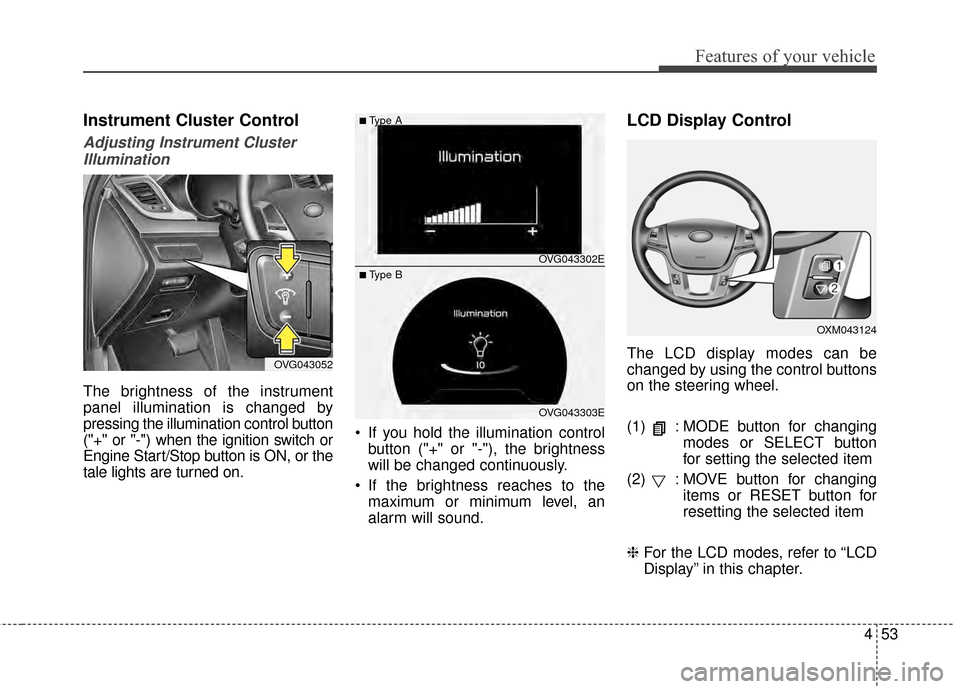
The brightness of the instrument
panel illumination is changed by
pressing the illumination control button
("+" or "-") when the ignition switch or
Engine Start/Stop button is ON, or the
tale lights are turned on. If you hold the illumination control
button ("+" or "-"), the brightness
will be changed continuously.
If the brightness reaches to the maximum or minimum level, an
alarm will sound.
LCD Display Control
The LCD display modes can be
changed by using the control buttons
on the steering wheel.
(1) : MODE button for changing modes or SELECT button
for setting the selected item
(2) : MOVE button for changing items or RESET button for
resetting the selected item
❈ For the LCD modes, refer to “LCD
Display” in this chapter.OVG043052
OXM043124
OVG043302E
OVG043303E
■Type A
■ Type B
Page 147 of 429
463
Features of your vehicle
Auto Door Unlock
Off:The auto door unlock operation will
be canceled.
Key Out or Power Off: All doors will be automatically
unlocked when the ignition key is
removed from ignition switch or
Engine Start/Stop Button is set to
the OFF position.
Shift Lever: All doors will be automatically
unlocked if the automatic transaxle
shift lever is shifted to the P (Park)
position. Two Press Unlock
Off:
The two press unlock function will
be deactivated. Therefore, all doors
will unlock if the door is unlocked.
On: The driver’s door will unlock if the
door is unlocked. When the door is
unlocked again within 4 seconds,
all doors will unlock.
Lock/Unlock sound
Off: The Lock/Unlock sound operation
will be deactivated.
On: When you locking (or unlocking)
the door by pressing the lock (or
unlock) button on the transmitter or
door out handle, the confirm sound
will operate. Horn Feedback
Off:
The Horn feedback operation will
be deactivated.
On: After locking the door by pressing
the lock button on the transmitter, if
you press the lock button again
within 4 seconds, the warning
sound will operate once to indicate
that all doors are locked.
Page 148 of 429
Features of your vehicle
64
4
Lamp
One touch turn lamp
If this item is checked, the lane
change signals will blink 3, 5 or 7
times when the turn signal lever is
moved slightly.
Head Lamp Delay
If this item is checked, the headlamp
delay and headlamp welcome func-
tion will be activated.
Welcome Light (if equipped)
If this item is checked, the welcome
light function of the pocket lamp will
be activated.
Settings
Temperature Unit
Convert the temperature unit from °C
to °F or from °F to °C.
Speed Unit (for type B cluster)
Convert the speedometer unit km/h
to MPH or MPH to km/h
At this time MPH or km/h unit dis-
played in the upper-right corner.
Speedometer Size (for type B cluster)
Adjust the size of the numbers on the
cluster you prefer (normal or large)
AVG Fuel Eco Reset
Auto Reset:
The average fuel economy will
reset automatically when refueling.
Manual Reset: The average fuel economy will not
reset automatically whenever refu-
eling.
For more details, refer to “Trip
Computer” in this chapter. Seat Easy Access (if equipped)
If this item is checked, the driver’s
seat will automatically move forward
or rearward for the driver to enter or
exit the vehicle comfortably.
Steering Easy Access (if equipped)
If this item is checked, the steering
wheel will automatically move upward
or downward for driver to enter or exit
the vehicle comfortably.
Welcome Sound
If this item is checked, the welcome
sound function will be activated.
Steering Position
If this item is checked, the warning
function regarding the steering wheel
alignment will be activated.
For more details, refer to "Warning
Messages" in this chapter.
Page 175 of 429
491
Features of your vehicle
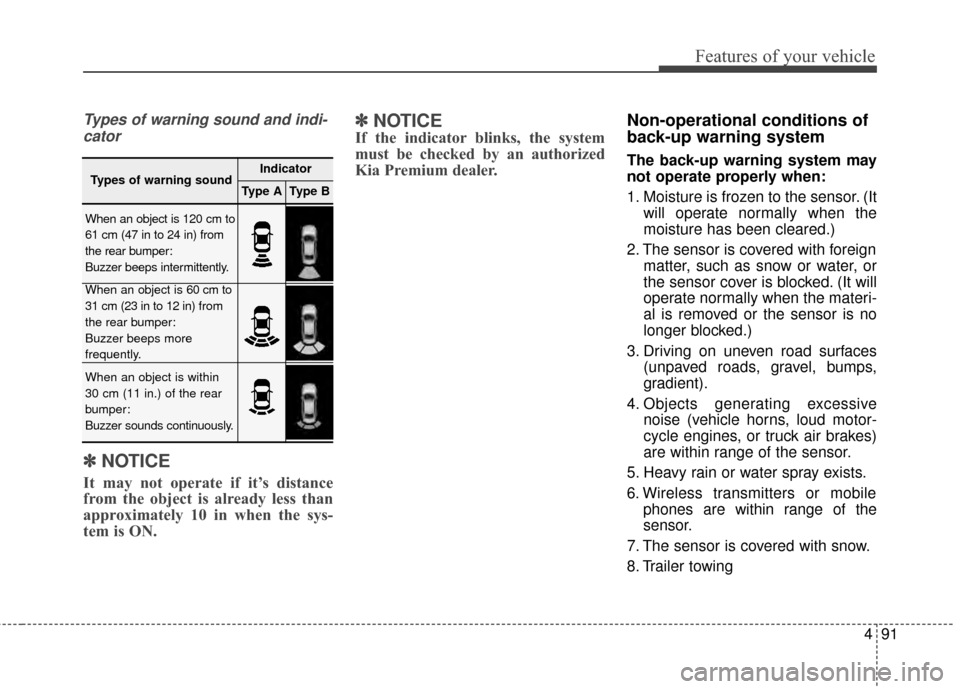
Types of warning sound and indi-cator
✽
✽ NOTICE
It may not operate if it’s distance
from the object is already less than
approximately 10 in when the sys-
tem is ON.
✽ ✽NOTICE
If the indicator blinks, the system
must be checked by an authorized
Kia Premium dealer.
Non-operational conditions of
back-up warning system
The back-up warning system may
not operate properly when:
1. Moisture is frozen to the sensor. (It
will operate normally when the
moisture has been cleared.)
2. The sensor is covered with foreign matter, such as snow or water, or
the sensor cover is blocked. (It will
operate normally when the materi-
al is removed or the sensor is no
longer blocked.)
3. Driving on uneven road surfaces (unpaved roads, gravel, bumps,
gradient).
4. Objects generating excessive noise (vehicle horns, loud motor-
cycle engines, or truck air brakes)
are within range of the sensor.
5. Heavy rain or water spray exists.
6. Wireless transmitters or mobile phones are within range of the
sensor.
7. The sensor is covered with snow.
8. Trailer towing
Types of warning soundIndicator
Type AType B
When an object is 120 cm to
61 cm (47 in to 24 in) from
the rear bumper:
Buzzer beeps intermittently.
When an object is 60 cm to
31 cm (23 in to 12 in) from
the rear bumper:
Buzzer beeps more
frequently.
When an object is within
30 cm (11 in.) of the rear
bumper:
Buzzer sounds continuously.
Page 176 of 429
Features of your vehicle
92
4
The detecting range may decrease
when:
1. The sensor is stained with foreign
matter such as snow or water.
(The sensing range will return to
normal when removed.)
2. Outside air temperature is extremely hot or cold.
The following objects may not be
recognized by the sensor:
1. Sharp or slim objects such as ropes, chains or small poles.
2. Objects which tend to absorb the sensor frequency such as clothes,
spongy material or snow.
3. Undetectable objects smaller than 1 m (40 in.) in height and narrower
than 14 cm (6 in.) in diameter.Back-up warning system pre-
cautions
The back-up warning system maynot sound sequentially depending
on the speed and shapes of the
objects detected.
The back-up warning system may malfunction if the vehicle bumper
height or sensor installation has
been modified or damaged. Any
non-factory installed equipment or
accessories may also interfere with
the sensor performance.
The sensor may not recognize objects less than 30 cm (11 in.)
from the sensor, or it may sense an
incorrect distance. Use caution.
When the sensor is frozen or stained with snow, dirt, or water,
the sensor may be inoperative until
the stains are removed using a soft
cloth.
Do not push, scratch or strike the sensor. Sensor damage could
occur.
✽ ✽ NOTICE
This system can only sense objects
within the range and location of the
sensors; It can not detect objects in
other areas where sensors are not
installed. Also, small or slim objects,
such as poles or objects located
between sensors may not be detected
by the sensors.
Always visually check behind the
vehicle when backing up.
Be sure to inform any drivers of the
vehicle that may be unfamiliar with
the system regarding the systems
capabilities and limitations.
Page 177 of 429
493
Features of your vehicle
Self-diagnosis
If you don’t hear an audible warning
sound or if the buzzer sounds inter-
mittently when shifting the shift lever
into the R (Reverse) position, this
may indicate a malfunction in the
parking assist system. If this occurs,
the system be checked by an author-
ized Kia Premium dealer.
Your new vehicle warranty does not
cover any accidents or damage to
the vehicle or injuries to its occu-
pants due to a back-up warning sys-
tem malfunction. Always drive safely
and cautiously.WARNING- Back-up
Warning System
Never rely solely on the back-up
warning system when backing
up. Always perform a visual
inspection to make sure the
vehicle is clear of all obstruc-
tions before moving the vehicle
in any direction. Stop immedi-
ately if you are aware of a child
anywhere near your vehicle.
Some objects may not be
detected by the sensors, due to
the object's size or material.
Page 205 of 429
4121
Features of your vehicle
✽
✽NOTICE
For better sound quality, fan speed
may automatically slow down, when
you activate Voice recognition or
Hands free.
- This function will be deactivated in
a few minutes.
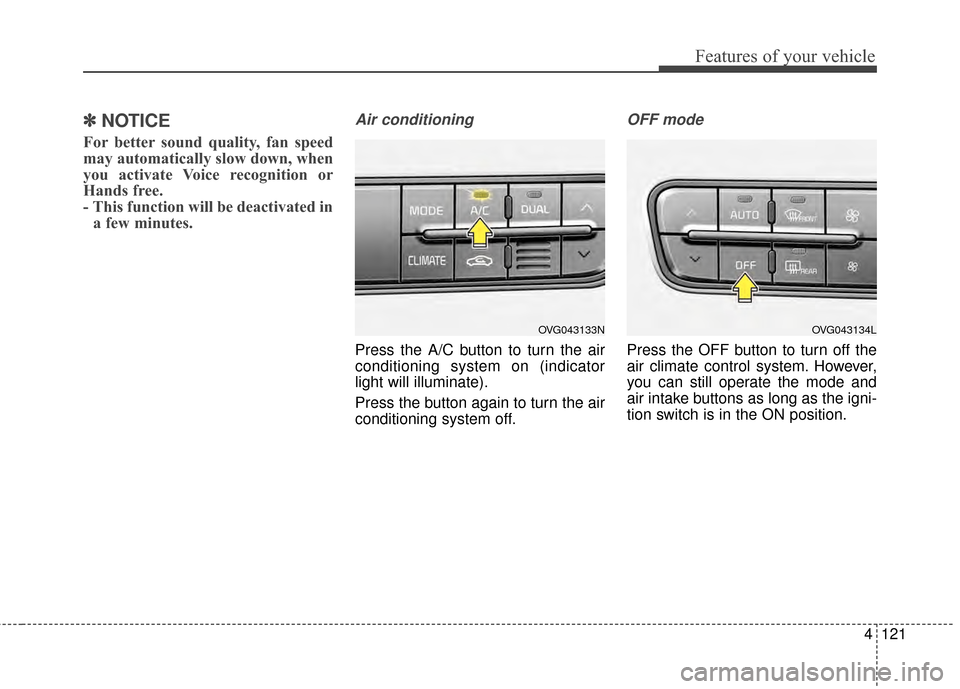
Air conditioning
Press the A/C button to turn the air
conditioning system on (indicator
light will illuminate).
Press the button again to turn the air
conditioning system off.
OFF mode
Press the OFF button to turn off the
air climate control system. However,
you can still operate the mode and
air intake buttons as long as the igni-
tion switch is in the ON position.
OVG043134LOVG043133N