light KIA CADENZA 2017 Owners Manual
[x] Cancel search | Manufacturer: KIA, Model Year: 2017, Model line: CADENZA, Model: KIA CADENZA 2017Pages: 500, PDF Size: 10.37 MB
Page 291 of 500
Driving your vehicle
54
5
Speed setting (ASCC)
To set cruise control speed:
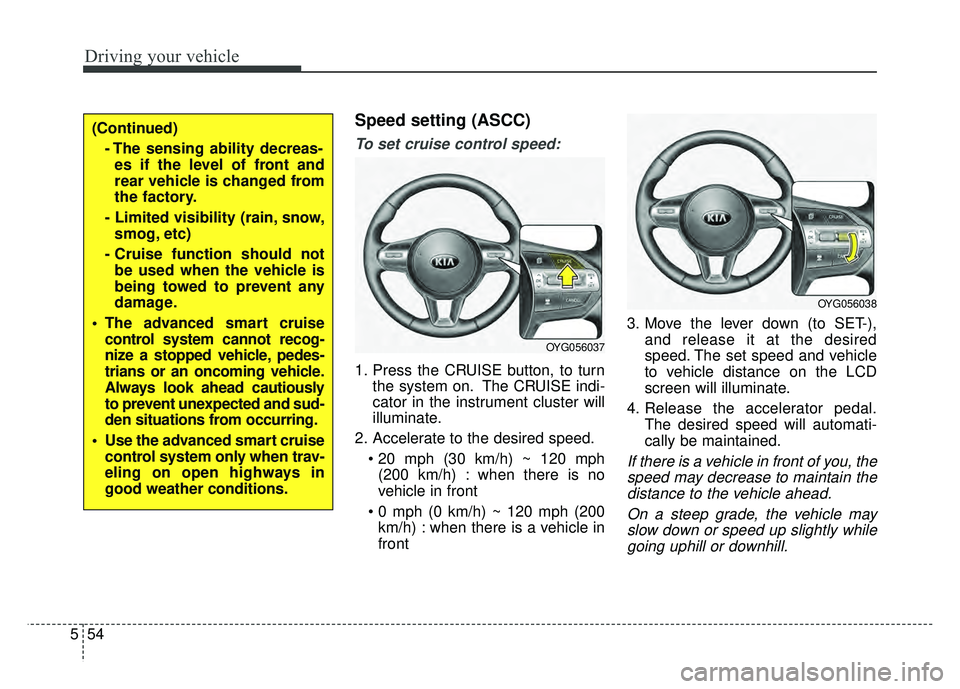
1. Press the CRUISE button, to turn
the system on. The CRUISE indi-
cator in the instrument cluster will
illuminate.
2. Accelerate to the desired speed. (200 km/h) : when there is no
vehicle in front
km/h) : when there is a vehicle in
front 3. Move the lever down (to SET-),
and release it at the desired
speed. The set speed and vehicle
to vehicle distance on the LCD
screen will illuminate.
4. Release the accelerator pedal. The desired speed will automati-
cally be maintained.
If there is a vehicle in front of you, thespeed may decrease to maintain thedistance to the vehicle ahead.
On a steep grade, the vehicle mayslow down or speed up slightly whilegoing uphill or downhill.
OYG056037
OYG056038
(Continued)
- The sensing ability decreas-es if the level of front and
rear vehicle is changed from
the factory.
- Limited visibility (rain, snow, smog, etc)
- Cruise function should not be used when the vehicle is
being towed to prevent any
damage.
The advanced smart cruise control system cannot recog-
nize a stopped vehicle, pedes-
trians or an oncoming vehicle.
Always look ahead cautiously
to prevent unexpected and sud-
den situations from occurring.
Use the advanced smart cruise control system only when trav-
eling on open highways in
good weather conditions.
Page 298 of 500
561
Driving your vehicle
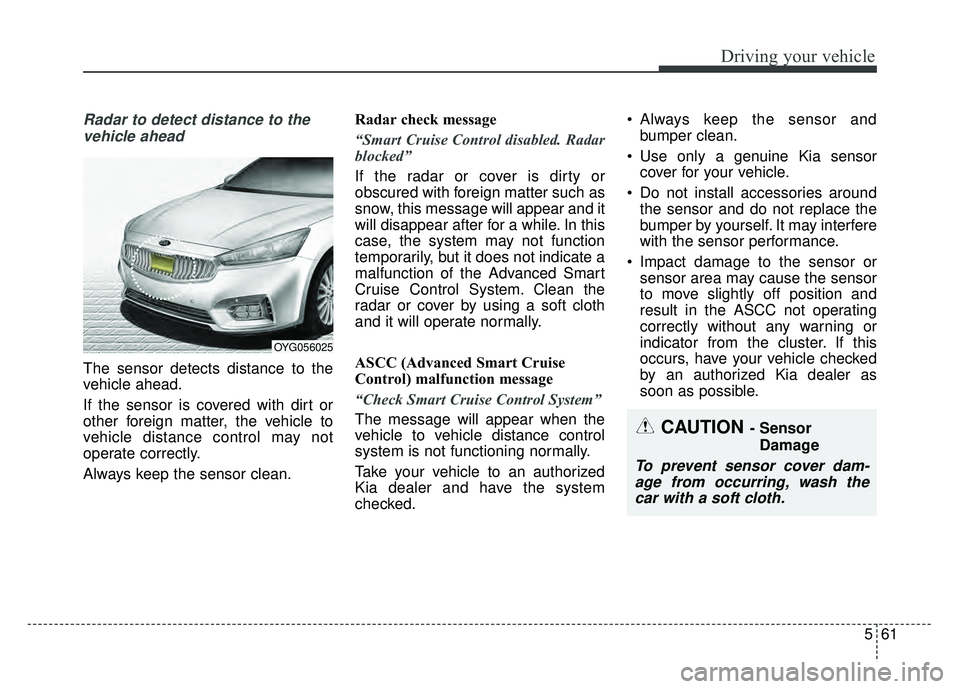
Radar to detect distance to thevehicle ahead
The sensor detects distance to the
vehicle ahead.
If the sensor is covered with dirt or
other foreign matter, the vehicle to
vehicle distance control may not
operate correctly.
Always keep the sensor clean. Radar check message
“Smart Cruise Control disabled. Radar
blocked”
If the radar or cover is dirty or
obscured with foreign matter such as
snow, this message will appear and it
will disappear after for a while. In this
case, the system may not function
temporarily, but it does not indicate a
malfunction of the Advanced Smart
Cruise Control System. Clean the
radar or cover by using a soft cloth
and it will operate normally.
ASCC (Advanced Smart Cruise
Control) malfunction message
“Check Smart Cruise Control System”
The message will appear when the
vehicle to vehicle distance control
system is not functioning normally.
Take your vehicle to an authorized
Kia dealer and have the system
checked. Always keep the sensor and
bumper clean.
Use only a genuine Kia sensor cover for your vehicle.
Do not install accessories around the sensor and do not replace the
bumper by yourself. It may interfere
with the sensor performance.
Impact damage to the sensor or sensor area may cause the sensor
to move slightly off position and
result in the ASCC not operating
correctly without any warning or
indicator from the cluster. If this
occurs, have your vehicle checked
by an authorized Kia dealer as
soon as possible.
OYG056025
CAUTION - Sensor
Damage
To prevent sensor cover dam-age from occurring, wash thecar with a soft cloth.
Page 299 of 500
Driving your vehicle
62
5
To adjust the sensitivity of
Advanced Smart Cruise Control
The sensitivity of vehicle speed when
following the front vehicle to maintain
the set distance can be adjusted. Go
to the User Settings Mode (Driving
Assist) and select SCC (Smart
Cruise Control). You may select one
of the three stages you prefer.
Slow:
Vehicle speed following the front
vehicle to maintain the set distance
is slower than normal speed.
Normal: Vehicle speed following the front
vehicle to maintain the set distance
is normal
Fast: Vehicle speed following the front
vehicle to maintain the set distance
is faster than normal speed.
✽ ✽ NOTICE
The system remembers the last
selected mode.
To convert to cruise control
mode:
The driver may choose to only use
the cruise control mode (speed con-
trol function) by doing as follows:
1.Turn the ASCC on (the cruise indi-
cator light will be on but the system
will not be activated).
2.Push the distance to distance switch for more than 2 seconds.
3.Choose between "Smart cruise control (SCC) mode" and "Cruise
control (CC) mode".
When using the cruise control mode,
you must manually assess the dis-
tance to other vehicles as the system
will not automatically brake to slow
down for other vehicles.
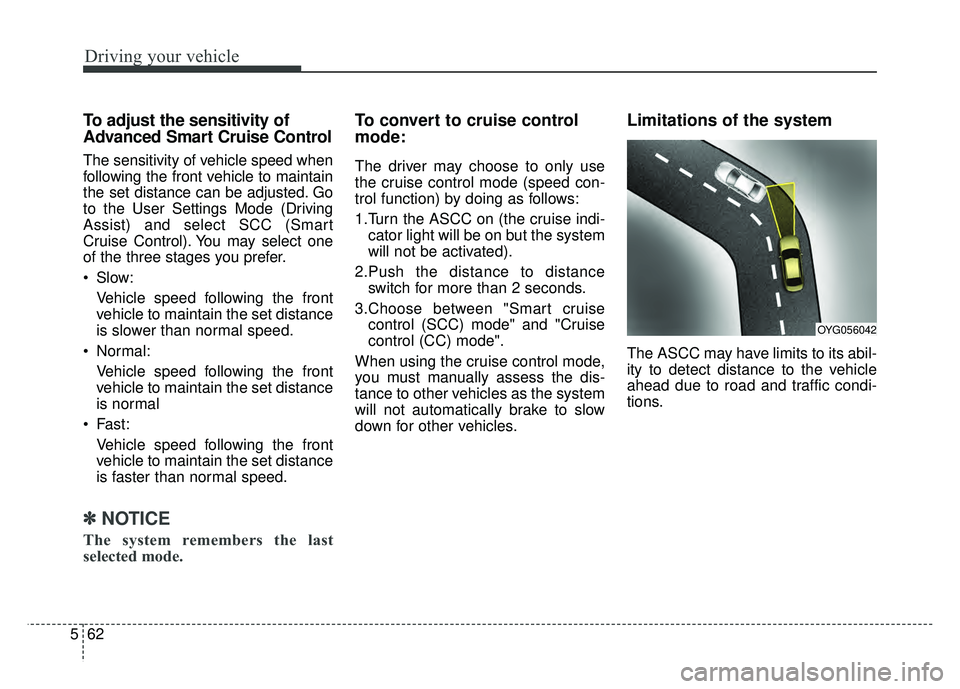
Limitations of the system
The ASCC may have limits to its abil-
ity to detect distance to the vehicle
ahead due to road and traffic condi-
tions.
OYG056042
Page 306 of 500
569
Driving your vehicle
ECO (ACTIVE ECO) MODE
enhances fuel efficiency
through eco control of
the engine and trans-
mission. The actual fuel
efficiency will depend on
personal driving style
and habits.
MODE button and
selecting ECO MODE,
green ECO indicator
light will illuminate.
ECO MODE Driving:
The vehicle engine and transmission
will operate in fuel economy oriented
mode.
ACTIVE ECO MODE system will
restrain fuel economy worsening
driving habits, such as suddenly
starts and accelerations, compare to
the COMFORT MODE.
Conditions that limit Active
ECO MODE:
Below are a list of conditions in which
when in ACTIVE ECO MODE, the
indicator light will not change, but the
internal system may operate differ-
ently.
When engine coolant temperature is low:
When temperature of the transaxle
oil is below the comfort range, the
ACTIVE ECO MODE may become
temporarily unavailable until the
transaxle oil heats up after vehicle
ignition.
When in an uphill gradient: Since the ACTIVE ECO MODE
partially limits the engine torque,
ACTIVE ECO MODE may become
temporarily unavailable when more
torque is essential for going uphill.
When using the manual transmis- sion operation mode:
If transmission operation is
changed from automatic to manual,
vehicle will reflect it and automati-
cally stop the ACTIVE ECO MODE.
Page 307 of 500
Driving your vehicle
70
5
SPORT MODE
button is pressed and
the SPORT MODE is
selected, the SPORT
indicator (red) will illumi-
nate on the dashboard.
is activated, and the
Engine Start/Stop button
is turned off and on again,
drive mode will reset to
COMFORT MODE.
To turn on SPORT MODE, press DRIVE
MODE button again.
- After increasing speed and turning your foot
off the accelerator
pedal, it maintains the
current gear and RPM
for some time even
though the accelerator
pedal is not depressed.
- Up-shift during accel- eration is delayed.
✽ ✽ NOTICE
In SPORT DRIVE MODE, the fuel
efficiency may decrease.
SMART MODE
SMART MODE is an intel-
ligent driving mode which
automatically selects the
most appropriate drive
mode (Economic \b
Aggressive) by measuring
usage of steering wheel,
and accelerator pedal.
ton is pressed and the
SMART MODE is select-
ed, SMART indicator will
illuminate on the dash-
board.
MODE indicator light will
depend on the driving
style. If the driving style is
economic, average, and
speedy, the indicator light
will be green, white, and
red in respective order.
is activated, and the
Engine Start/Stop button
is turned off and on again,
your car will still maintain
the SMART MODE.
Page 309 of 500
Driving your vehicle
72
5
DRIVE MODE Indicator Screen
The DRIVE MODE indicator screen
can be displayed by using the trip com-
puter button on the steering wheel.
DRIVE MODE indicator screen dis-
plays status of current drive mode.
DRIVE MODE button is located on
the lower part of the transmission
lever for selecting drive mode.
If drive mode is selected manually
by the user, the drive mode indica-
tor screen will show user-selected
drive mode. (COMFORT, ECO, or
SPORT)
If SMART MODE is selected by
DRIVE MODE button, the drive
mode indicator screen will show
current drive mode automatically
selected by SMART MODE sys-
tem. (SMART COMFORT, SMART
ECO, or SMART SPORT) When the trip computer mode is
selected to show DRIVE MODE
and the SMART MODE is in oper-
ation, an automatically selected
driving mode SMART ECO,
SMART COMFORT, or SMART
SPORT, will be selected on the
cluster's center.
And right below is the horizontal
driving style gauge which reflects
the driving style in real time.
If you drive carefully and slowly in SMART MODE, the left side of the
driving style gauge will illuminate,
and be automatically shifted to the
SMART ECO MODE.
When the driver accelerates more
frequently, the right side of the driv-
ing style gauge will fill up, and shift
to SMART COMFORT MODE.
In addition, if the rate of accelera-
tion and speed is high, drive mode
will change to SMART SPORT
MODE. If the auto cruise control function is
operated or the transmission is
shifted to manual mode while
SMART MODE is on, the SMART
MODE will stop temporarily, and
the DRIVE MODE will be displayed
as OFF. The driving style gauge
light will be turned off accordingly.
If the trip computer is not set to show DRIVE MODE indicator
screen, and you want to know the
on/off status of the SMART MODE,
simply check whether the letters
'SMART' is lighten up on the
screen or not (green - ECO MODE,
white - COMFORT MODE, red -
SPORT MODE).
Page 310 of 500
573
Driving your vehicle
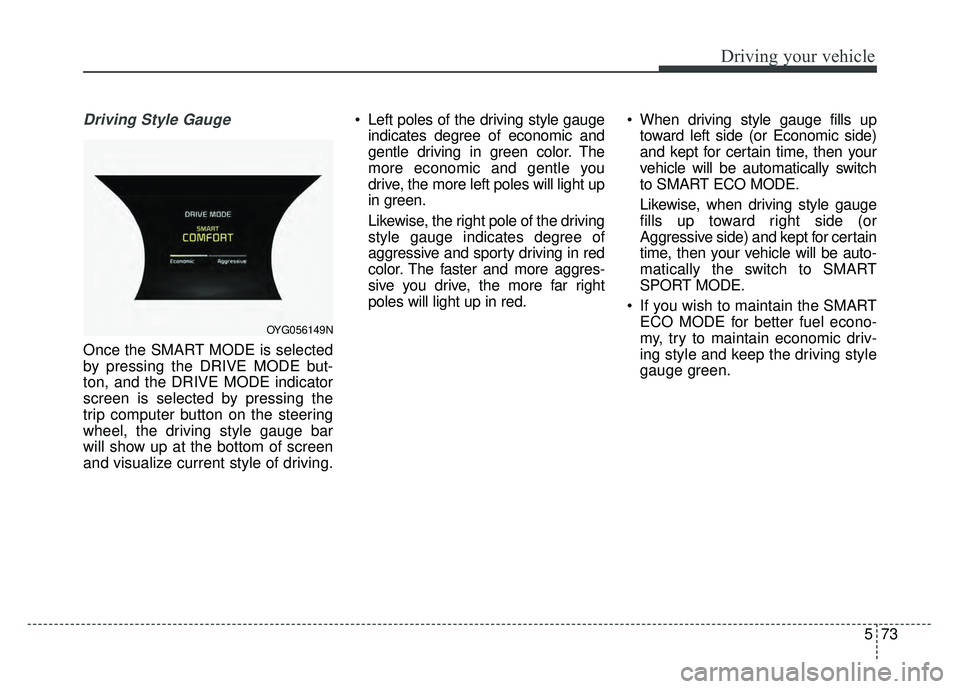
Driving Style Gauge
Once the SMART MODE is selected
by pressing the DRIVE MODE but-
ton, and the DRIVE MODE indicator
screen is selected by pressing the
trip computer button on the steering
wheel, the driving style gauge bar
will show up at the bottom of screen
and visualize current style of driving. Left poles of the driving style gauge
indicates degree of economic and
gentle driving in green color. The
more economic and gentle you
drive, the more left poles will light up
in green.
Likewise, the right pole of the driving
style gauge indicates degree of
aggressive and sporty driving in red
color. The faster and more aggres-
sive you drive, the more far right
poles will light up in red. When driving style gauge fills up
toward left side (or Economic side)
and kept for certain time, then your
vehicle will be automatically switch
to SMART ECO MODE.
Likewise, when driving style gauge
fills up toward right side (or
Aggressive side) and kept for certain
time, then your vehicle will be auto-
matically the switch to SMART
SPORT MODE.
If you wish to maintain the SMART ECO MODE for better fuel econo-
my, try to maintain economic driv-
ing style and keep the driving style
gauge green.
OYG056149N
Page 312 of 500
575
Driving your vehicle
Conditions which Limit SMARTMODE
In following conditions your vehicle will
temporarily stop the SMART Mode
and the indicator light will turn off.
When using the manual transmis- sion operation mode: If the
transaxle system is changed from
automatic to manual, your vehicle
will automatically stop the SMART
MODE.
If transmission operation is
changed from automatic to manu-
al, vehicle will reflect it and auto-
matically stop the SMART MODE.
When the Cruise Control system is turned on:
When the driver sets a target
cruise control speed, your vehicle
will automatically stop the SMART
MODE. (The SMART MODE will
stop not immediately after you
press the cruise control button, but
when the cruise control system
takes control of the vehicle speed.) If the temperature of the transaxle
oil is very high or low:
The SMART MODE control system
will operate in nearly all driving
conditions. But when the tempera-
ture of the transaxle oil is out of the
comfort range, the SMART MODE
system may become temporarily
unavailable.
Page 314 of 500
577
Driving your vehicle
BSD (Blind Spot Detection) /
LCA (Lane Change Assist)
Operating conditions
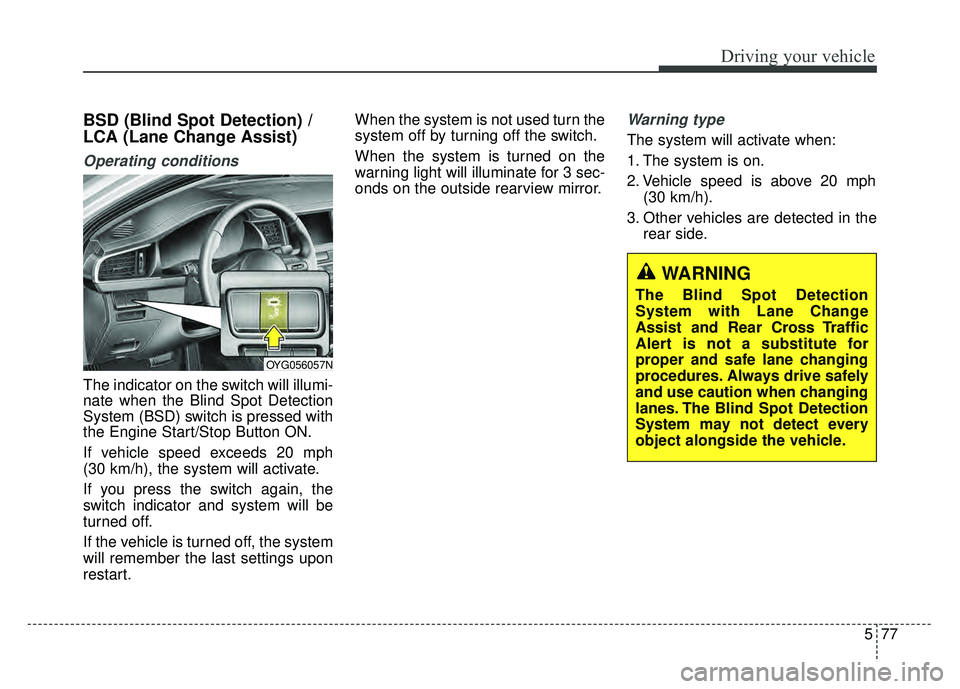
The indicator on the switch will illumi-
nate when the Blind Spot Detection
System (BSD) switch is pressed with
the Engine Start/Stop Button ON.
If vehicle speed exceeds 20 mph
(30 km/h), the system will activate.
If you press the switch again, the
switch indicator and system will be
turned off.
If the vehicle is turned off, the system
will remember the last settings upon
restart.When the system is not used turn the
system off by turning off the switch.
When the system is turned on the
warning light will illuminate for 3 sec-
onds on the outside rearview mirror.
Warning type
The system will activate when:
1. The system is on.
2. Vehicle speed is above 20 mph
(30 km/h).
3. Other vehicles are detected in the rear side.
WARNING
The Blind Spot Detection
System with Lane Change
Assist and Rear Cross Traffic
Alert is not a substitute for
proper and safe lane changing
procedures. Always drive safely
and use caution when changing
lanes. The Blind Spot Detection
System may not detect every
object alongside the vehicle.
OYG056057N
Page 315 of 500
Driving your vehicle
78
5
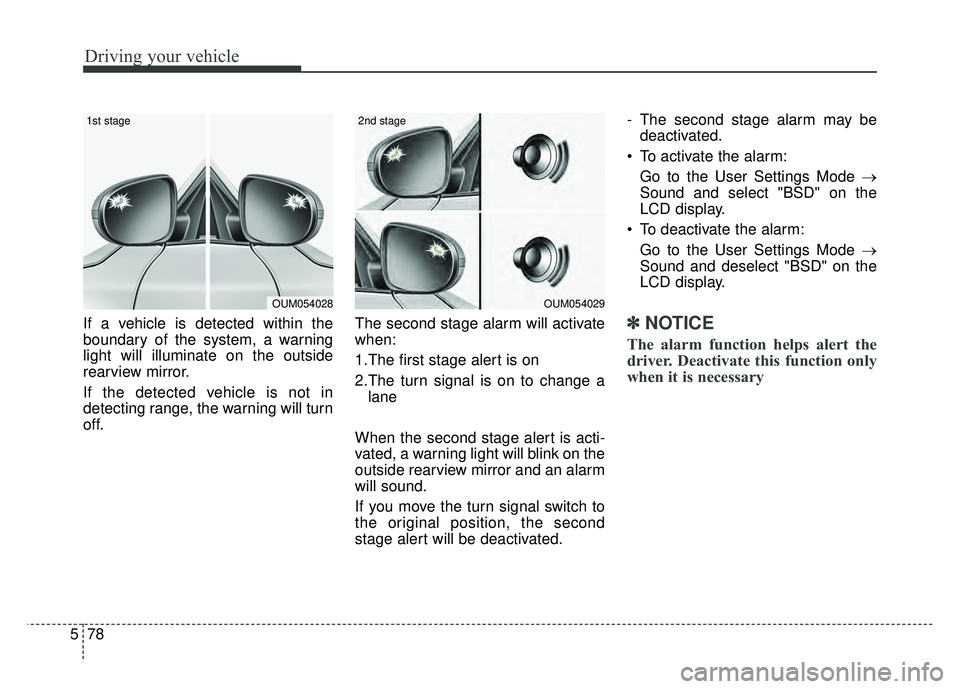
If a vehicle is detected within the
boundary of the system, a warning
light will illuminate on the outside
rearview mirror.
If the detected vehicle is not in
detecting range, the warning will turn
off. The second stage alarm will activate
when:
1.The first stage alert is on
2.The turn signal is on to change a
lane
When the second stage alert is acti-
vated, a warning light will blink on the
outside rearview mirror and an alarm
will sound.
If you move the turn signal switch to
the original position, the second
stage alert will be deactivated. - The second stage alarm may be
deactivated.
To activate the alarm: Go to the User Settings Mode →
Sound and select "BSD" on the
LCD display.
To deactivate the alarm: Go to the User Settings Mode →
Sound and deselect "BSD" on the
LCD display.✽ ✽
NOTICE
The alarm function helps alert the
driver. Deactivate this function only
when it is necessary
OUM054029
2nd stage
OUM054028
1st stage