cruise control KIA CADENZA 2017 Owner's Manual
[x] Cancel search | Manufacturer: KIA, Model Year: 2017, Model line: CADENZA, Model: KIA CADENZA 2017Pages: 500, PDF Size: 10.37 MB
Page 298 of 500
561
Driving your vehicle
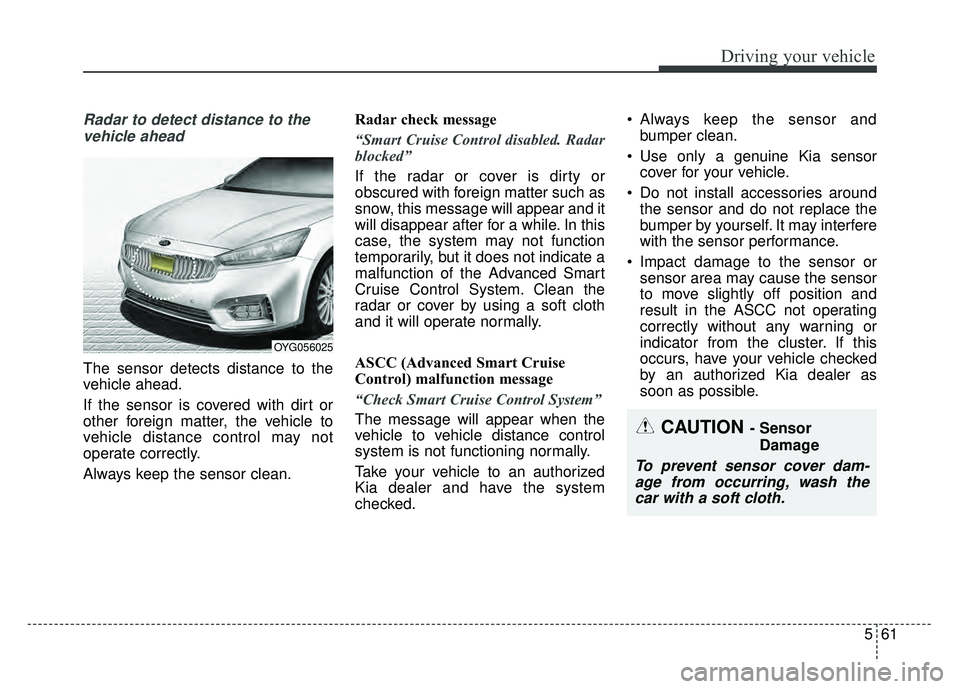
Radar to detect distance to thevehicle ahead
The sensor detects distance to the
vehicle ahead.
If the sensor is covered with dirt or
other foreign matter, the vehicle to
vehicle distance control may not
operate correctly.
Always keep the sensor clean. Radar check message
“Smart Cruise Control disabled. Radar
blocked”
If the radar or cover is dirty or
obscured with foreign matter such as
snow, this message will appear and it
will disappear after for a while. In this
case, the system may not function
temporarily, but it does not indicate a
malfunction of the Advanced Smart
Cruise Control System. Clean the
radar or cover by using a soft cloth
and it will operate normally.
ASCC (Advanced Smart Cruise
Control) malfunction message
“Check Smart Cruise Control System”
The message will appear when the
vehicle to vehicle distance control
system is not functioning normally.
Take your vehicle to an authorized
Kia dealer and have the system
checked. Always keep the sensor and
bumper clean.
Use only a genuine Kia sensor cover for your vehicle.
Do not install accessories around the sensor and do not replace the
bumper by yourself. It may interfere
with the sensor performance.
Impact damage to the sensor or sensor area may cause the sensor
to move slightly off position and
result in the ASCC not operating
correctly without any warning or
indicator from the cluster. If this
occurs, have your vehicle checked
by an authorized Kia dealer as
soon as possible.
OYG056025
CAUTION - Sensor
Damage
To prevent sensor cover dam-age from occurring, wash thecar with a soft cloth.
Page 299 of 500
Driving your vehicle
62
5
To adjust the sensitivity of
Advanced Smart Cruise Control
The sensitivity of vehicle speed when
following the front vehicle to maintain
the set distance can be adjusted. Go
to the User Settings Mode (Driving
Assist) and select SCC (Smart
Cruise Control). You may select one
of the three stages you prefer.
Slow:
Vehicle speed following the front
vehicle to maintain the set distance
is slower than normal speed.
Normal: Vehicle speed following the front
vehicle to maintain the set distance
is normal
Fast: Vehicle speed following the front
vehicle to maintain the set distance
is faster than normal speed.
✽ ✽ NOTICE
The system remembers the last
selected mode.
To convert to cruise control
mode:
The driver may choose to only use
the cruise control mode (speed con-
trol function) by doing as follows:
1.Turn the ASCC on (the cruise indi-
cator light will be on but the system
will not be activated).
2.Push the distance to distance switch for more than 2 seconds.
3.Choose between "Smart cruise control (SCC) mode" and "Cruise
control (CC) mode".
When using the cruise control mode,
you must manually assess the dis-
tance to other vehicles as the system
will not automatically brake to slow
down for other vehicles.
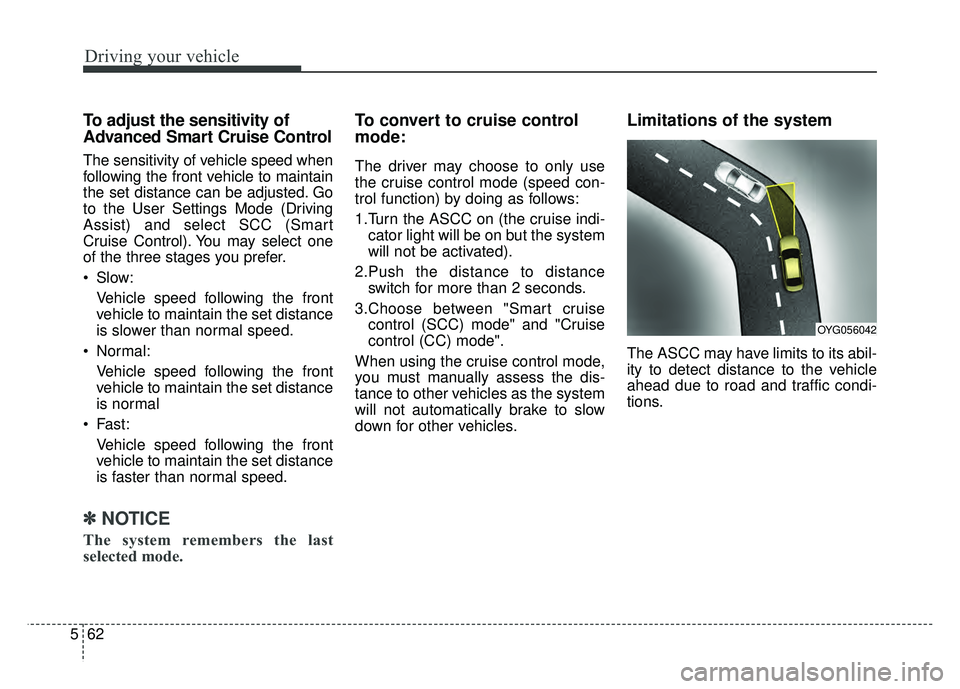
Limitations of the system
The ASCC may have limits to its abil-
ity to detect distance to the vehicle
ahead due to road and traffic condi-
tions.
OYG056042
Page 309 of 500
Driving your vehicle
72
5
DRIVE MODE Indicator Screen
The DRIVE MODE indicator screen
can be displayed by using the trip com-
puter button on the steering wheel.
DRIVE MODE indicator screen dis-
plays status of current drive mode.
DRIVE MODE button is located on
the lower part of the transmission
lever for selecting drive mode.
If drive mode is selected manually
by the user, the drive mode indica-
tor screen will show user-selected
drive mode. (COMFORT, ECO, or
SPORT)
If SMART MODE is selected by
DRIVE MODE button, the drive
mode indicator screen will show
current drive mode automatically
selected by SMART MODE sys-
tem. (SMART COMFORT, SMART
ECO, or SMART SPORT) When the trip computer mode is
selected to show DRIVE MODE
and the SMART MODE is in oper-
ation, an automatically selected
driving mode SMART ECO,
SMART COMFORT, or SMART
SPORT, will be selected on the
cluster's center.
And right below is the horizontal
driving style gauge which reflects
the driving style in real time.
If you drive carefully and slowly in SMART MODE, the left side of the
driving style gauge will illuminate,
and be automatically shifted to the
SMART ECO MODE.
When the driver accelerates more
frequently, the right side of the driv-
ing style gauge will fill up, and shift
to SMART COMFORT MODE.
In addition, if the rate of accelera-
tion and speed is high, drive mode
will change to SMART SPORT
MODE. If the auto cruise control function is
operated or the transmission is
shifted to manual mode while
SMART MODE is on, the SMART
MODE will stop temporarily, and
the DRIVE MODE will be displayed
as OFF. The driving style gauge
light will be turned off accordingly.
If the trip computer is not set to show DRIVE MODE indicator
screen, and you want to know the
on/off status of the SMART MODE,
simply check whether the letters
'SMART' is lighten up on the
screen or not (green - ECO MODE,
white - COMFORT MODE, red -
SPORT MODE).
Page 312 of 500
575
Driving your vehicle
Conditions which Limit SMARTMODE
In following conditions your vehicle will
temporarily stop the SMART Mode
and the indicator light will turn off.
When using the manual transmis- sion operation mode: If the
transaxle system is changed from
automatic to manual, your vehicle
will automatically stop the SMART
MODE.
If transmission operation is
changed from automatic to manu-
al, vehicle will reflect it and auto-
matically stop the SMART MODE.
When the Cruise Control system is turned on:
When the driver sets a target
cruise control speed, your vehicle
will automatically stop the SMART
MODE. (The SMART MODE will
stop not immediately after you
press the cruise control button, but
when the cruise control system
takes control of the vehicle speed.) If the temperature of the transaxle
oil is very high or low:
The SMART MODE control system
will operate in nearly all driving
conditions. But when the tempera-
ture of the transaxle oil is out of the
comfort range, the SMART MODE
system may become temporarily
unavailable.
Page 436 of 500
765
Maintenance
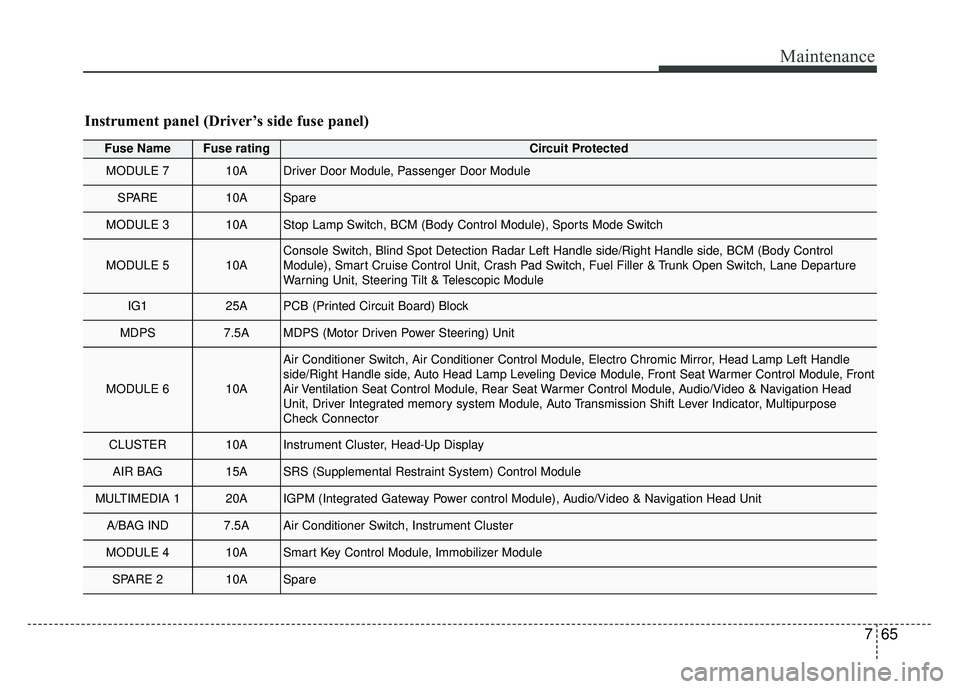
Fuse NameFuse ratingCircuit Protected
MODULE 710ADriver Door Module, Passenger Door Module
SPARE10ASpare
MODULE 310AStop Lamp Switch, BCM (Body Control Module), Sports Mode Switch
MODULE 510AConsole Switch, Blind Spot Detection Radar Left Handle side/Right Handle\
side, BCM (Body Control
Module), Smart Cruise Control Unit, Crash Pad Switch, Fuel Filler & Trunk Open Switch, Lane Departure
Warning Unit, Steering Tilt & Telescopic Module
IG125APCB (Printed Circuit Board) Block
MDPS7.5AMDPS (Motor Driven Power Steering) Unit
MODULE 610A
Air Conditioner Switch, Air Conditioner Control Module, Electro Chromic Mirror, Head Lamp Left Handle
side/Right Handle side, Auto Head Lamp Leveling Device Module, Front Seat Warmer Control Module, Front
Air Ventilation Seat Control Module, Rear Seat Warmer Control Module, Audio/Video & Navigation Head
Unit, Driver Integrated memory system Module, Auto Transmission Shift Lever Indicator, Multipurpose
Check Connector
CLUSTER10AInstrument Cluster, Head-Up Display
AIR BAG15ASRS (Supplemental Restraint System) Control Module
MULTIMEDIA 120AIGPM (Integrated Gateway Power control Module), Audio/Video & Navigation Head Unit
A/BAG IND7.5AAir Conditioner Switch, Instrument Cluster
MODULE 410ASmart Key Control Module, Immobilizer Module
SPARE 210ASpare
Instrument panel (Driver’s side fuse panel)
Page 442 of 500
771
Maintenance
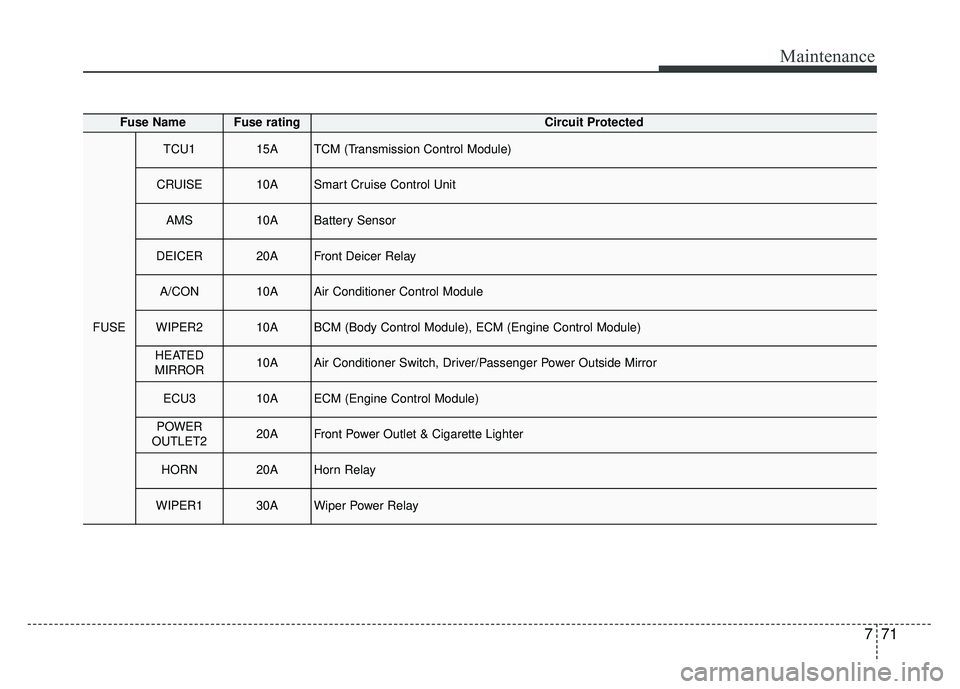
Fuse NameFuse ratingCircuit Protected
FUSE
TCU115ATCM (Transmission Control Module)
CRUISE10ASmart Cruise Control Unit
AMS10ABattery Sensor
DEICER20AFront Deicer Relay
A/CON10AAir Conditioner Control Module
WIPER210ABCM (Body Control Module), ECM (Engine Control Module)
HEATED
MIRROR10AAir Conditioner Switch, Driver/Passenger Power Outside Mirror
ECU310AECM (Engine Control Module)
POWER
OUTLET220AFront Power Outlet & Cigarette Lighter
HORN20AHorn Relay
WIPER130AWiper Power Relay
Page 487 of 500
Index
2I
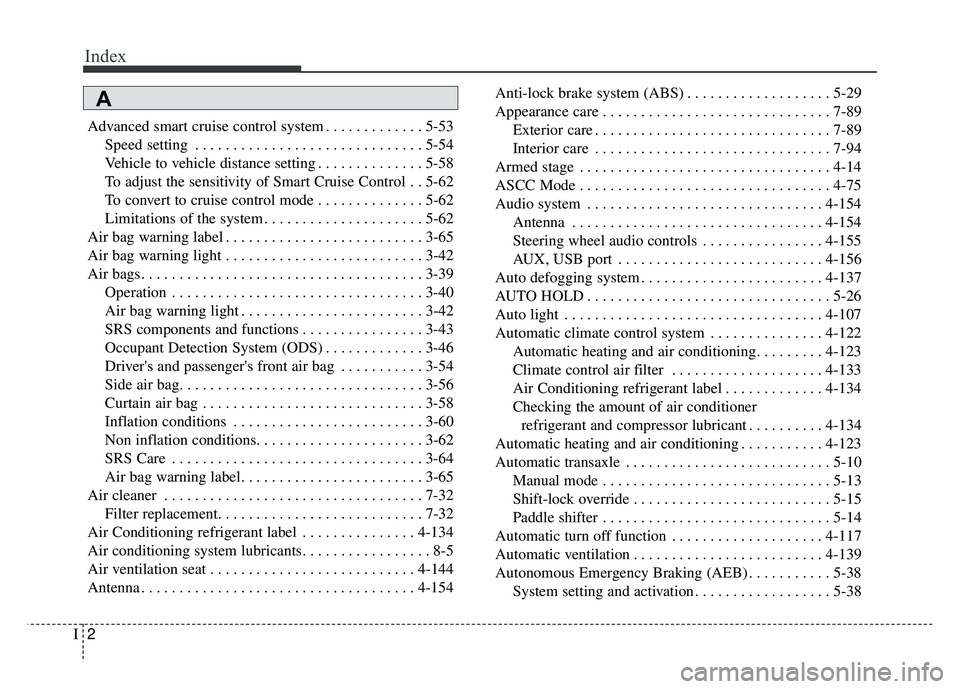
Advanced smart cruise control system . . . . . . . . . . . . . 5-53Speed setting . . . . . . . . . . . . . . . . . . . . . . . . . . . . . . 5-54
Vehicle to vehicle distance setting . . . . . . . . . . . . . . 5-58
To adjust the sensitivity of Smart Cruise Control . . 5-62
To convert to cruise control mode . . . . . . . . . . . . . . 5-62
Limitations of the system . . . . . . . . . . . . . . . . . . . . . 5-62
Air bag warning label . . . . . . . . . . . . . . . . . . . . . . . . . . 3-65
Air bag warning light . . . . . . . . . . . . . . . . . . . . . . . . . . 3-42
Air bags. . . . . . . . . . . . . . . . . . . . . . . . . . . . . . . . . . . . \
. 3-39 Operation . . . . . . . . . . . . . . . . . . . . . . . . . . . . . . . . . 3-40
Air bag warning light . . . . . . . . . . . . . . . . . . . . . . . . 3-42
SRS components and functions . . . . . . . . . . . . . . . . 3-43
Occupant Detection System (ODS) . . . . . . . . . . . . . 3-46
Driver's and passenger's front air bag . . . . . . . . . . . 3-54
Side air bag. . . . . . . . . . . . . . . . . . . . . . . . . . . . . . . . 3-56
Curtain air bag . . . . . . . . . . . . . . . . . . . . . . . . . . . . . 3-58
Inflation conditions . . . . . . . . . . . . . . . . . . . . . . . . . 3-60
Non inflation conditions. . . . . . . . . . . . . . . . . . . . . . 3-62
SRS Care . . . . . . . . . . . . . . . . . . . . . . . . . . . . . . . . . 3-64
Air bag warning label. . . . . . . . . . . . . . . . . . . . . . . . 3-65
Air cleaner . . . . . . . . . . . . . . . . . . . . . . . . . . . . . . . . . . 7-32\
Filter replacement. . . . . . . . . . . . . . . . . . . . . . . . . . . 7-32
Air Conditioning refrigerant label . . . . . . . . . . . . . . . 4-134
Air conditioning system lubricants. . . . . . . . . . . . . . . . . 8-5
Air ventilation seat . . . . . . . . . . . . . . . . . . . . . . . . . . . 4-144
Antenna . . . . . . . . . . . . . . . . . . . . . . . . . . . . . . . . . . . . \
4-154 Anti-lock brake system (ABS) . . . . . . . . . . . . . . . . . . . 5-29
Appearance care . . . . . . . . . . . . . . . . . . . . . . . . . . . . . . 7-89
Exterior care . . . . . . . . . . . . . . . . . . . . . . . . . . . . . . . 7-89
Interior care . . . . . . . . . . . . . . . . . . . . . . . . . . . . . . . 7-94
Armed stage . . . . . . . . . . . . . . . . . . . . . . . . . . . . . . . . . 4-14
ASCC Mode . . . . . . . . . . . . . . . . . . . . . . . . . . . . . . . . . 4-75
Audio system . . . . . . . . . . . . . . . . . . . . . . . . . . . . . . . 4-154 Antenna . . . . . . . . . . . . . . . . . . . . . . . . . . . . . . . . . 4-154
Steering wheel audio controls . . . . . . . . . . . . . . . . 4-155
AUX, USB port . . . . . . . . . . . . . . . . . . . . . . . . . . . 4-156
Auto defogging system . . . . . . . . . . . . . . . . . . . . . . . . 4-137
AUTO HOLD . . . . . . . . . . . . . . . . . . . . . . . . . . . . . . . . 5-26
Auto light . . . . . . . . . . . . . . . . . . . . . . . . . . . . . . . . . . 4-10\
7
Automatic climate control system . . . . . . . . . . . . . . . 4-122 Automatic heating and air conditioning. . . . . . . . . 4-123
Climate control air filter . . . . . . . . . . . . . . . . . . . . 4-133
Air Conditioning refrigerant label . . . . . . . . . . . . . 4-134
Checking the amount of air conditionerrefrigerant and compressor lubricant . . . . . . . . . . 4-134
Automatic heating and air conditioning . . . . . . . . . . . 4-123
Automatic transaxle . . . . . . . . . . . . . . . . . . . . . . . . . . . 5-10 Manual mode . . . . . . . . . . . . . . . . . . . . . . . . . . . . . . 5-13
Shift-lock override . . . . . . . . . . . . . . . . . . . . . . . . . . 5-15
Paddle shifter . . . . . . . . . . . . . . . . . . . . . . . . . . . . . . 5-14
Automatic turn off function . . . . . . . . . . . . . . . . . . . . 4-117
Automatic ventilation . . . . . . . . . . . . . . . . . . . . . . . . . 4-139
Autonomous Emergency Braking (AEB) . . . . . . . . . . . 5-38 System setting and activation . . . . . . . . . . . . . . . . . . 5-38
A
Page 489 of 500
Index
4I
Checking the amount of air conditioner refrigerantand compressor lubricant . . . . . . . . . . . . . . . . . . . . 4-134
Checking tire inflation pressure . . . . . . . . . . . . . . . . . . 7-44
Child restraint system . . . . . . . . . . . . . . . . . . . . . . . . . . 3-28 Selecting a Child Restraint System (CRS) . . . . . . . 3-29
Securing a child restraint with the LATCHanchors system . . . . . . . . . . . . . . . . . . . . . . . . . . . . 3-34
Securing a child restraint seat with "Tether Anchor" system. . . . . . . . . . . . . . . . . . . . . . . . . . . . . . . . . . . 3-\
35
Securing a child restraint with a lap belt or lap/shoulder belt . . . . . . . . . . . . . . . . . . . . . . . . . . . 3-36
Child-protector rear door lock . . . . . . . . . . . . . . . . . . . 4-19
Clean air . . . . . . . . . . . . . . . . . . . . . . . . . . . . . . . . . . . 4-\
139
Climate control air filter . . . . . . . . . . . . . . . . . . . 4-133,7-34 Filter inspection . . . . . . . . . . . . . . . . . . . . . . . . . . . . 7-34
Clock . . . . . . . . . . . . . . . . . . . . . . . . . . . . . . . . . . . . \
. . 4-152
Closing the sunroof. . . . . . . . . . . . . . . . . . . . . . . . . . . . 4-45
Clothes hanger . . . . . . . . . . . . . . . . . . . . . . . . . . . . . . 4-149
Combined instrument, see instrument cluster . . . . . . . 4-64
Compact spare tire . . . . . . . . . . . . . . . . . . . . . . . . . . . . 6-21
Consumer assistance . . . . . . . . . . . . . . . . . . . . . . . . . . . 8-10
Coolant . . . . . . . . . . . . . . . . . . . . . . . . . . . . . . . . . . . . \
. 7-26
Cooling fluid, see engine coolant . . . . . . . . . . . . . . . . . 7-26
Crankcase emission control system . . . . . . . . . . . . . . . 7-97
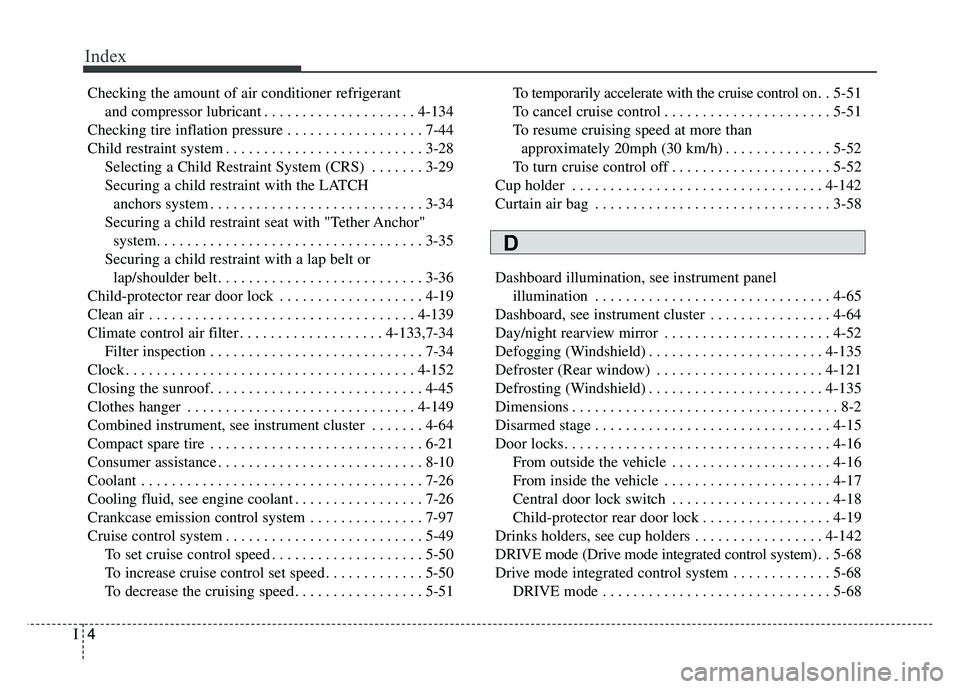
Cruise control system . . . . . . . . . . . . . . . . . . . . . . . . . . 5-49 To set cruise control speed . . . . . . . . . . . . . . . . . . . . 5-50
To increase cruise control set speed . . . . . . . . . . . . . 5-50
To decrease the cruising speed . . . . . . . . . . . . . . . . . 5-51 To temporarily accelerate with the cruise control on. .
5-51
To cancel cruise control . . . . . . . . . . . . . . . . . . . . . . 5-51
To resume cruising speed at more than approximately 20mph (30 km/h) . . . . . . . . . . . . . . 5-52
To turn cruise control off . . . . . . . . . . . . . . . . . . . . . 5-52
Cup holder . . . . . . . . . . . . . . . . . . . . . . . . . . . . . . . . . 4-142
Curtain air bag . . . . . . . . . . . . . . . . . . . . . . . . . . . . . . . 3-58
Dashboard illumination, see instrument panel illumination . . . . . . . . . . . . . . . . . . . . . . . . . . . . . . . 4-65
Dashboard, see instrument cluster . . . . . . . . . . . . . . . . 4-64
Day/night rearview mirror . . . . . . . . . . . . . . . . . . . . . . 4-52
Defogging (Windshield) . . . . . . . . . . . . . . . . . . . . . . . 4-135
Defroster (Rear window) . . . . . . . . . . . . . . . . . . . . . . 4-121
Defrosting (Windshield) . . . . . . . . . . . . . . . . . . . . . . . 4-135
Dimensions . . . . . . . . . . . . . . . . . . . . . . . . . . . . . . . . . . . 8-\
2
Disarmed stage . . . . . . . . . . . . . . . . . . . . . . . . . . . . . . . 4-15
Door locks. . . . . . . . . . . . . . . . . . . . . . . . . . . . . . . . . . . 4-\
16 From outside the vehicle . . . . . . . . . . . . . . . . . . . . . 4-16
From inside the vehicle . . . . . . . . . . . . . . . . . . . . . . 4-17
Central door lock switch . . . . . . . . . . . . . . . . . . . . . 4-18
Child-protector rear door lock . . . . . . . . . . . . . . . . . 4-19
Drinks holders, see cup holders . . . . . . . . . . . . . . . . . 4-142
DRIVE mode (Drive mode integrated control system) . . 5-68
Drive mode integrated control system . . . . . . . . . . . . . 5-68 DRIVE mode . . . . . . . . . . . . . . . . . . . . . . . . . . . . . . 5-68
D