ECO mode KIA CADENZA 2017 Owner's Guide
[x] Cancel search | Manufacturer: KIA, Model Year: 2017, Model line: CADENZA, Model: KIA CADENZA 2017Pages: 500, PDF Size: 10.37 MB
Page 308 of 500
571
Driving your vehicle
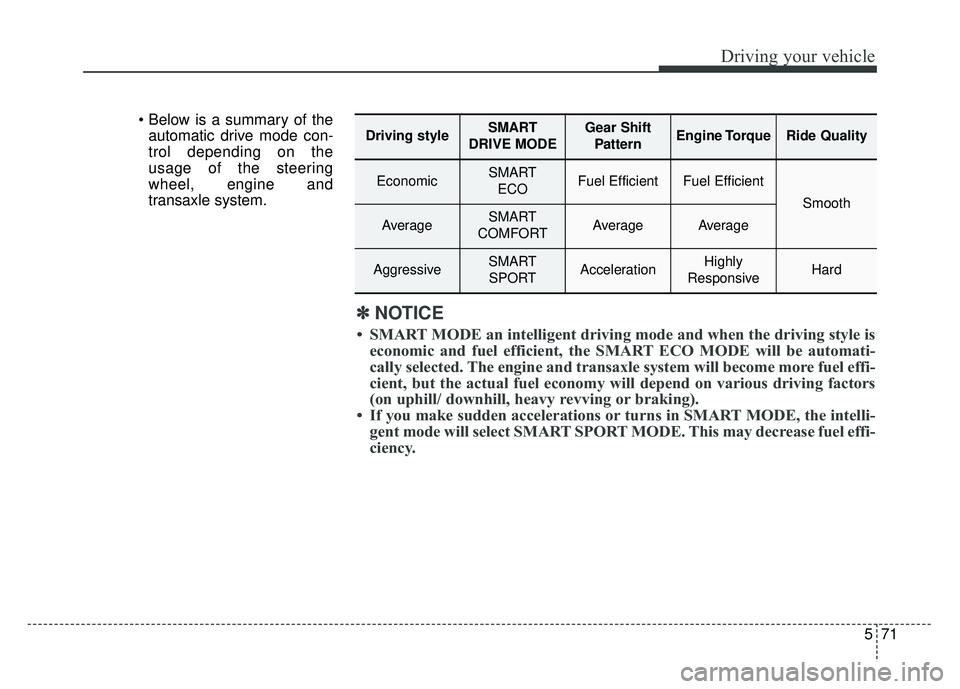
automatic drive mode con-
trol depending on the
usage of the steering
wheel, engine and
transaxle system.
Driving styleSMART
DRIVE MODEGear Shift PatternEngine TorqueRide Quality
EconomicSMART ECOFuel EfficientFuel Efficient
Smooth
AverageSMART
COMFORTAverageAverage
AggressiveSMART SPORTAccelerationHighly
ResponsiveHard
✽ ✽ NOTICE
• SMART MODE an intelligent driving mode and when the driving style is
economic and fuel efficient, the SMART ECO MODE will be automati-
cally selected. The engine and transaxle system will become more fuel effi-
cient, but the actual fuel economy will depend on various driving factor\
s
(on uphill/ downhill, heavy revving or braking).
• If you make sudden accelerations or turns in SMART MODE, the intelli- gent mode will select SMART SPORT MODE. This may decrease fuel effi-
ciency.
Page 309 of 500
Driving your vehicle
72
5
DRIVE MODE Indicator Screen
The DRIVE MODE indicator screen
can be displayed by using the trip com-
puter button on the steering wheel.
DRIVE MODE indicator screen dis-
plays status of current drive mode.
DRIVE MODE button is located on
the lower part of the transmission
lever for selecting drive mode.
If drive mode is selected manually
by the user, the drive mode indica-
tor screen will show user-selected
drive mode. (COMFORT, ECO, or
SPORT)
If SMART MODE is selected by
DRIVE MODE button, the drive
mode indicator screen will show
current drive mode automatically
selected by SMART MODE sys-
tem. (SMART COMFORT, SMART
ECO, or SMART SPORT) When the trip computer mode is
selected to show DRIVE MODE
and the SMART MODE is in oper-
ation, an automatically selected
driving mode SMART ECO,
SMART COMFORT, or SMART
SPORT, will be selected on the
cluster's center.
And right below is the horizontal
driving style gauge which reflects
the driving style in real time.
If you drive carefully and slowly in SMART MODE, the left side of the
driving style gauge will illuminate,
and be automatically shifted to the
SMART ECO MODE.
When the driver accelerates more
frequently, the right side of the driv-
ing style gauge will fill up, and shift
to SMART COMFORT MODE.
In addition, if the rate of accelera-
tion and speed is high, drive mode
will change to SMART SPORT
MODE. If the auto cruise control function is
operated or the transmission is
shifted to manual mode while
SMART MODE is on, the SMART
MODE will stop temporarily, and
the DRIVE MODE will be displayed
as OFF. The driving style gauge
light will be turned off accordingly.
If the trip computer is not set to show DRIVE MODE indicator
screen, and you want to know the
on/off status of the SMART MODE,
simply check whether the letters
'SMART' is lighten up on the
screen or not (green - ECO MODE,
white - COMFORT MODE, red -
SPORT MODE).
Page 310 of 500
573
Driving your vehicle
Driving Style Gauge
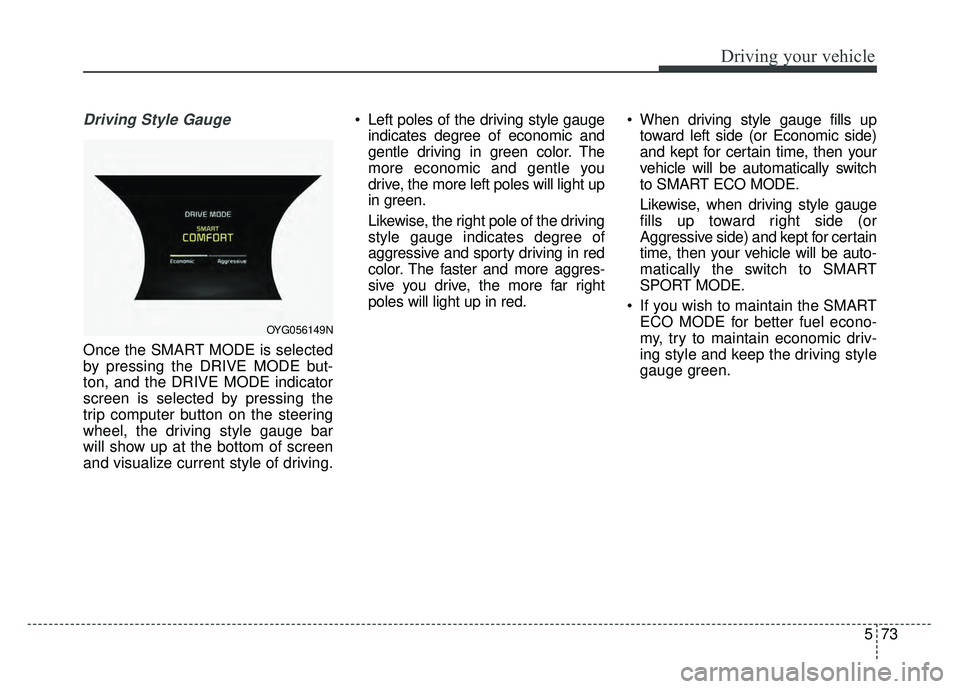
Once the SMART MODE is selected
by pressing the DRIVE MODE but-
ton, and the DRIVE MODE indicator
screen is selected by pressing the
trip computer button on the steering
wheel, the driving style gauge bar
will show up at the bottom of screen
and visualize current style of driving. Left poles of the driving style gauge
indicates degree of economic and
gentle driving in green color. The
more economic and gentle you
drive, the more left poles will light up
in green.
Likewise, the right pole of the driving
style gauge indicates degree of
aggressive and sporty driving in red
color. The faster and more aggres-
sive you drive, the more far right
poles will light up in red. When driving style gauge fills up
toward left side (or Economic side)
and kept for certain time, then your
vehicle will be automatically switch
to SMART ECO MODE.
Likewise, when driving style gauge
fills up toward right side (or
Aggressive side) and kept for certain
time, then your vehicle will be auto-
matically the switch to SMART
SPORT MODE.
If you wish to maintain the SMART ECO MODE for better fuel econo-
my, try to maintain economic driv-
ing style and keep the driving style
gauge green.
OYG056149N
Page 311 of 500
Driving your vehicle
74
5
Attributes of SMART MODE.
If the accelerator pedal is pressed
gently, your vehicle will recognize it
as a economic driving style. After
some time, the system will automat-
ically shift to SMART ECO MODE.
If you press the accelerator pedal frequently and heavily in SMART
ECO MODE, the system will auto-
matically shift to SMART COM-
FORT MODE.
Even when driving style has not changed from SMART ECO
MODE, if your vehicle is driven
uphill considerably, the system will
detect the gradient. Then, the
SMART system will automatically
change the setting to the SMART
COMFORT MODE temporarily.
Once your vehicle is out of the hilly
ground, your vehicle will automati-
cally return to the SMART ECO
MODE. The SMART system will recognize
sudden and repetitive acceleration or
steering as aggressive driving and
automatically turn to the SMART
SPORT MODE. Your vehicle will run
at a lower gear in SMART SPORT
MODE compared to those in
SMART COMFORT MODE.
The vehicle's start and stop
response rate will become faster.
When the SMART SPORT MODE is activated, and you take your feet
off the accelerator pedal, the vehi-
cle will remain in low gear and you
may sense engine brake. This is
due to necessary preparatory time
for the next acceleration and is
only comfort.
The SMART SPORT MODE is acti- vated only when very aggressive
and high speed is detected.
Therefore, in average driving
styles, the SMART system will
select either SMART ECO or
SMART COMFORT MODE. The artificial intelligence algorithm
will instantly calculate each driver's
style of driving. So if the driver is
changed to a different person, the
algorithm will measure accordingly.
Page 312 of 500
575
Driving your vehicle
Conditions which Limit SMARTMODE
In following conditions your vehicle will
temporarily stop the SMART Mode
and the indicator light will turn off.
When using the manual transmis- sion operation mode: If the
transaxle system is changed from
automatic to manual, your vehicle
will automatically stop the SMART
MODE.
If transmission operation is
changed from automatic to manu-
al, vehicle will reflect it and auto-
matically stop the SMART MODE.
When the Cruise Control system is turned on:
When the driver sets a target
cruise control speed, your vehicle
will automatically stop the SMART
MODE. (The SMART MODE will
stop not immediately after you
press the cruise control button, but
when the cruise control system
takes control of the vehicle speed.) If the temperature of the transaxle
oil is very high or low:
The SMART MODE control system
will operate in nearly all driving
conditions. But when the tempera-
ture of the transaxle oil is out of the
comfort range, the SMART MODE
system may become temporarily
unavailable.
Page 315 of 500
Driving your vehicle
78
5
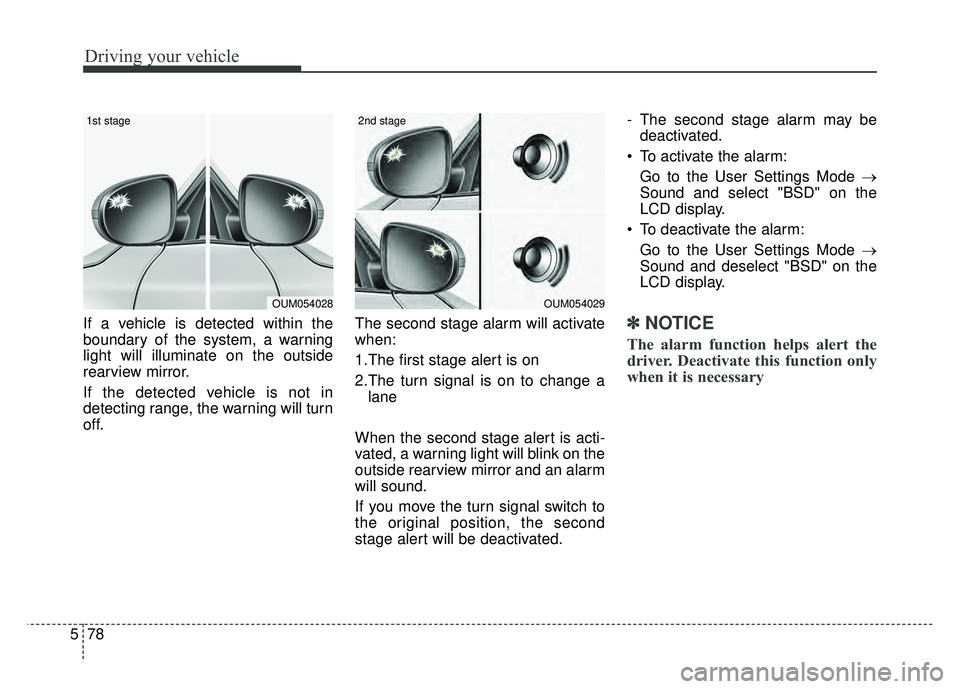
If a vehicle is detected within the
boundary of the system, a warning
light will illuminate on the outside
rearview mirror.
If the detected vehicle is not in
detecting range, the warning will turn
off. The second stage alarm will activate
when:
1.The first stage alert is on
2.The turn signal is on to change a
lane
When the second stage alert is acti-
vated, a warning light will blink on the
outside rearview mirror and an alarm
will sound.
If you move the turn signal switch to
the original position, the second
stage alert will be deactivated. - The second stage alarm may be
deactivated.
To activate the alarm: Go to the User Settings Mode →
Sound and select "BSD" on the
LCD display.
To deactivate the alarm: Go to the User Settings Mode →
Sound and deselect "BSD" on the
LCD display.✽ ✽
NOTICE
The alarm function helps alert the
driver. Deactivate this function only
when it is necessary
OUM054029
2nd stage
OUM054028
1st stage
Page 329 of 500

Driving your vehicle
92
5
Your vehicle's fuel economy depends
mainly on your style of driving, where
you drive and when you drive.
Each of these factors affects how
many miles (kilometers) you can get
from a gallon (liter) of fuel. To operate
your vehicle as economically as pos-
sible, use the following driving sug-
gestions to help save money in both
fuel and repairs:
Drive smoothly. Accelerate at a
moderate rate. Don't make "jack-
rabbit" starts or full-throttle shifts
and maintain a steady cruising
speed. Don't race between stop-
lights. Try to adjust your speed to
the traffic so you don't have to
change speeds unnecessarily.
Avoid heavy traffic whenever pos-
sible. Always maintain a safe dis-
tance from other vehicles so you
can avoid unnecessary braking.
This also reduces brake wear.
Drive at a moderate speed. The faster you drive, the more fuel your
vehicle uses. Driving at a moderate
speed, especially on the highway,
is one of the most effective ways to
reduce fuel consumption. Don't "ride" the brake pedal. This
can increase fuel consumption and
also increase wear on these com-
ponents. In addition, driving with
your foot resting on the brake pedal
may cause the brakes to overheat,
which reduces their effectiveness
and may lead to more serious con-
sequences.
Take care of your tires. Keep them inflated to the recommended pres-
sure. Incorrect inflation, either too
much or too little, results in unnec-
essary tire wear. Check the tire
pressures at least once a month.
Be sure that the wheels are aligned correctly. Improper align-
ment can result from hitting curbs
or driving too fast over irregular
surfaces. Poor alignment causes
faster tire wear and may also result
in other problems as well as
greater fuel consumption. Keep your vehicle in good condi-
tion. For better fuel economy and
reduced maintenance costs, main-
tain your vehicle in accordance
with the maintenance schedule in
chapter 7. If you drive your vehicle
in severe conditions, more frequent
maintenance is required (see
chapter 7 for details).
Keep your vehicle clean. For maxi- mum service, your vehicle should
be kept clean and free of corrosive
materials. It is especially important
that mud, dirt, ice, etc. not be
allowed to accumulate on the
underside of the vehicle. This extra
weight can result in increased fuel
consumption and also contribute to
corrosion.
Travel lightly. Don't carry unneces- sary weight in your vehicle. Weight
reduces fuel economy.
Don't let the engine idle longer than necessary. If you are waiting
(and not in traffic), turn off your
engine and restart only when
you're ready to go.
ECONOMICAL OPERATION
Page 426 of 500
755
Maintenance
All season tires
Kia specifies all season tires on
some models to provide good per-
formance for use all year round,
including snowy and icy road condi-
tions. All season tires are identified
by ALL SEASON and/or M+S (Mud
and Snow) on the tire sidewall. Snow
tires have better snow traction than
all season tires and may be more
appropriate in some areas.
Summer tires
Kia specifies summer tires on some
models to provide superior perform-
ance on dry roads. Summer tire per-
formance is substantially reduced in
snow and ice. Summer tires do not
have the tire traction rating M+S
(Mud and Snow) on the tire side wall.
If you plan to operate your vehicle in
snowy or icy conditions, Kia recom-
mends the use of snow tires or all
season tires on all four wheels.
Snow tires
If you equip your car with snow tires,
they should be the same size and
have the same load capacity as the
original tires. Snow tires should be
installed on all four wheels; other-
wise, poor handling may result.
Snow tires should carry 4 psi (28
kPa) more air pressure than the
pressure recommended for the stan-
dard tires on the tire label on the dri-
ver's side of the center pillar, or up to
the maximum pressure shown on the
tire sidewall, whichever is less.
Do not drive faster than 75 mph (120
km/h) when your vehicle is equipped
with snow tires.
Tire chains
Tire chains, if necessary, should be
installed on the front wheels.
Be sure that the chains are installed
in accordance with the manufactur-
er's instructions.
To minimize tire and chain wear, do
not continue to use tire chains when
they are no longer needed.
When driving on roads coveredwith snow or ice, drive at less than
20 mph (30 km/h).
Use the SAE “S” class or wire chains.
If you hear noise caused by chains contacting the body, retighten the
chain to avoid contact with the
vehicle body.
To prevent body damage, retighten the chains after driving 0.3~0.6
miles (0.5~1.0 km).
Do not use tire chains on vehicles equipped with aluminum wheels.
In unavoidable circumstances, use
a wire type chain.
Use wire chains less than 0.47 inches (12 mm) to prevent damage
to the chain’s connection.
Page 481 of 500
Specifications, Consumer information, Reporting safety defects
10
8
Roadside Assistance is provided on all new current
model year Kia Vehicles from the date the vehicle is deliv-
ered to the first retail buyer or otherwise put into use (in-
service date), whichever is earlier, for a period of 60
months or 60,000 miles, whichever is earlier, subject to
the terms, conditions and exclusions set forth in the Kia
Warranty and Consumer Information Manual applicable
to your model year vehicle.
KMA reserves the right to limit or deny services or other
benefits to any owner or driver when, in KMA's judgment,
the claims and/or service requests are excessive in fre-
quency or type of occurrence.
Toll free consumer assistance
Kia's toll-free Consumer Assistance hot line is staffed
from 5:00 AM to 6:00 PM PST, Monday through Friday
and is accessible by dialing 1-800-333-4Kia (4542).
For more information regarding assistance available,
please refer to your Kia Warranty & Consumer
Information Manual.
Emergency roadside assistance
Kia's toll free Roadside Assistance hot line is staffed 24
hours a day, 365 days a year and is accessible by dialing
1-800-333-4Kia (4542).
Please note that you must provide your Vehicle
Identification Number (VIN) to verify coverage at the time
of your call. The VIN can be found on the dash of your
vehicle on the driver’s side, on the door jamb of the dri-
ver’s door, your vehicle’s registration or proof of insur-
ance card.
Kia utilizes a network of over 30,000 roadside assistance
providers. Should you accidentally run out of fuel, require
a battery jump, or need help changing a tire, a Kia
Roadside Assistance Representative will dispatch some-
one to deliver a small quantity of gas, change a flat tire
with your inflated spare, or arrange a battery jump to
allow you to proceed to your destination. We have access
to a network of over 10,000 locksmiths to help you should
you become locked out of your Kia.
In the event that mechanical difficulty renders your vehi-
cle undriveable due to a warranty-related concern, Kia’s
Roadside Assistance Representative will arrange to
transport your vehicle to the nearest Kia dealer or to an
authorized Kia alternative service location.
CONSUMER ASSISTANCE (U.S. ONLY)
Page 490 of 500

I5
Index
ECO (Active ECO) mode. . . . . . . . . . . . . . . . . . . . . 5-69
SPORT mode . . . . . . . . . . . . . . . . . . . . . . . . . . . . . . 5-70
SMART mode . . . . . . . . . . . . . . . . . . . . . . . . . . . . . 5-70
Driver position memory system . . . . . . . . . . . . . . . . . . 3-10
Driver's and passenger's front air bag . . . . . . . . . . . . . . 3-54
Driving at night . . . . . . . . . . . . . . . . . . . . . . . . . . . . . . . 5-95
Driving in flooded areas . . . . . . . . . . . . . . . . . . . . . . . . 5-97
Driving in the rain. . . . . . . . . . . . . . . . . . . . . . . . . . . . . 5-96
Driving off-road . . . . . . . . . . . . . . . . . . . . . . . . . . . . . . 5-97
ECO mode (Drive mode integrated control system) . . 5-69
Economical operation . . . . . . . . . . . . . . . . . . . . . . . . . . 5-92
"Electric chromic mirror (ECM)with HomeLink
®
system and compass " . . . . . . . . . . . . . . . . . . . . . . . 4-53
Electric parking brake (EPB) . . . . . . . . . . . . . . . . . . . . 5-20
Electrical equipment . . . . . . . . . . . . . . . . . . . . . . . . . . . 8-13
Electronic power steering . . . . . . . . . . . . . . . . . . . . . . . 4-47
Electronic stability control (ESC) . . . . . . . . . . . . . . . . 5-31
Emergency fuel filler lid release. . . . . . . . . . . . . . . . . . 4-38
Emergency starting . . . . . . . . . . . . . . . . . . . . . . . . . . . . . 6-5 Jump starting . . . . . . . . . . . . . . . . . . . . . . . . . . . . . . . 6-5
Emergency while driving . . . . . . . . . . . . . . . . . . . . . . . . 6-3
Emission control system . . . . . . . . . . . . . . . . . . . . . . . . 7-97 Crankcase emission control system . . . . . . . . . . . . . 7-97
Evaporative emission control (including ORVR:Onboard Refueling Vapor Recovery) system. . . . . 7-97 Exhaust emission control system . . . . . . . . . . . . . . . 7-98
Engine . . . . . . . . . . . . . . . . . . . . . . . . . . . . . . . . . . . . \
. . . 8-2
Engine compartment . . . . . . . . . . . . . . . . . . . . . . . . 2-6, 7-3
Engine coolant . . . . . . . . . . . . . . . . . . . . . . . . . . . . . . . 7-26 Checking the coolant level . . . . . . . . . . . . . . . . . . . . 7-26
Changing the coolant . . . . . . . . . . . . . . . . . . . . . . . . 7-28
Engine Coolant Temperature Gauge. . . . . . . . . . . . . . . 4-67
Engine number . . . . . . . . . . . . . . . . . . . . . . . . . . . . . . . . 8-9
Engine oil . . . . . . . . . . . . . . . . . . . . . . . . . . . . . . . . . . . 7-\
24 Checking the engine oil level . . . . . . . . . . . . . . . . . . 7-24
Changing the engine oil and filter . . . . . . . . . . . . . . 7-25
Engine overheats . . . . . . . . . . . . . . . . . . . . . . . . . . . . . . . 6-7
Engine start/stop button . . . . . . . . . . . . . . . . . . . . . . . . . 5-6 Illuminated engine start/stop button. . . . . . . . . . . . . . 5-6
Engine start/stop button position . . . . . . . . . . . . . . . . 5-6
Starting the engine . . . . . . . . . . . . . . . . . . . . . . . . . . . 5-8
Engine start/stop button illumination . . . . . . . . . . . . . . . 5-6
Engine start/stop button position . . . . . . . . . . . . . . . . . . 5-6
Engine will not start . . . . . . . . . . . . . . . . . . . . . . . . . . . . 6-4
Evaporative emission control (including ORVR: Onboard Refueling Vapor Recovery) system . . . . . . 7-97
Exhaust emission control system . . . . . . . . . . . . . . . . . 7-98
Explanation of scheduled maintenance items . . . . . . . 7-20 Engine oil and filter . . . . . . . . . . . . . . . . . . . . . . . . . 7-20
Drive belts . . . . . . . . . . . . . . . . . . . . . . . . . . . . . . . . 7-20
Fuel filter (for gasoline) . . . . . . . . . . . . . . . . . . . . . . 7-20
Fuel lines, fuel hoses and connections . . . . . . . . . . . 7-20
Vapor hose and fuel filler cap . . . . . . . . . . . . . . . . . 7-20
E