lock operation KIA CADENZA 2017 Owners Manual
[x] Cancel search | Manufacturer: KIA, Model Year: 2017, Model line: CADENZA, Model: KIA CADENZA 2017Pages: 500, PDF Size: 10.37 MB
Page 82 of 500
Features of your vehicle
Smart key . . . . . . . . . . . . . . . . . . . . . . . . . . . . . . . . . 4-5
• Record your key number . . . . . . . . . . . . . . . . . . . . . . . 4-5
• Smart key functions . . . . . . . . . . . . . . . . . . . . . . . . . . . 4-5
• Remote keyless entry system operations . . . . . . . . . . . 4-8
• Transmitter precautions . . . . . . . . . . . . . . . . . . . . . . . . 4-9
• This device complies with Part 15 of the FCC rules . . . . . . . . . . . . . . . . . . . . . . . . . . . . . . . . . . . . \
. . 4-10
• Battery replacement . . . . . . . . . . . . . . . . . . . . . . . . . . 4-10
• Mechanical key operations . . . . . . . . . . . . . . . . . . . . . 4-11
• Restrictions in Handling Keys . . . . . . . . . . . . . . . . . . 4-12
• Immobilizer system . . . . . . . . . . . . . . . . . . . . . . . . . . . 4-12
• This device complies with Part 15 of the FCC rules . . . . . . . . . . . . . . . . . . . . . . . . . . . . . . . . . . . . \
. . 4-13
Theft-alarm system . . . . . . . . . . . . . . . . . . . . . . . . 4-14
• Armed stage . . . . . . . . . . . . . . . . . . . . . . . . . . . . . . . . . 4-14
• Theft-alarm stage . . . . . . . . . . . . . . . . . . . . . . . . . . . . 4-15
• Disarmed stage. . . . . . . . . . . . . . . . . . . . . . . . . . . . . . . 4-15
Door locks . . . . . . . . . . . . . . . . . . . . . . . . . . . . . . . . 4-16
• Operating door locks from outside the vehicle . . . . 4-16
• Operating door locks from inside the vehicle . . . . . . 4-17
• Impact sensing door unlock system . . . . . . . . . . . . . . 4-19
• Auto door lock/unlock feature . . . . . . . . . . . . . . . . . . 4-19
• Child-protector rear door lock. . . . . . . . . . . . . . . . . . 4-19
Trunk . . . . . . . . . . . . . . . . . . . . . . . . . . . . . . . . . . . . \
4-20
• Non-Powered Trunk . . . . . . . . . . . . . . . . . . . . . . . . . . 4-20
• Power Trunk . . . . . . . . . . . . . . . . . . . . . . . . . . . . . . . . 4-21
• Trunk Lid Control Button . . . . . . . . . . . . . . . . . . . . . 4-24
• Emergency Trunk Safety Release . . . . . . . . . . . . . . . 4-25
Smart trunk . . . . . . . . . . . . . . . . . . . . . . . . . . . . . . 4-27
Windows . . . . . . . . . . . . . . . . . . . . . . . . . . . . . . . . . 4-31
• Power windows . . . . . . . . . . . . . . . . . . . . . . . . . . . . . . 4-32
Hood. . . . . . . . . . . . . . . . . . . . . . . . . . . . . . . . . . . . \
. 4-35
• Opening the hood . . . . . . . . . . . . . . . . . . . . . . . . . . . . 4-35
• Closing the hood . . . . . . . . . . . . . . . . . . . . . . . . . . . . . 4-36
Fuel filler lid . . . . . . . . . . . . . . . . . . . . . . . . . . . . . . 4-37
• Opening the fuel filler lid . . . . . . . . . . . . . . . . . . . . . . 4-37
• Closing the fuel filler lid . . . . . . . . . . . . . . . . . . . . . . . 4-37
• Emergency fuel filler lid release . . . . . . . . . . . . . . . . 4-38
Panoramic sunroof . . . . . . . . . . . . . . . . . . . . . . . . . 4-41
• Sunroof open warning. . . . . . . . . . . . . . . . . . . . . . . . . 4-42
• Sunshade . . . . . . . . . . . . . . . . . . . . . . . . . . . . . . . . . . . 4-\
43
• Sliding the sunroof . . . . . . . . . . . . . . . . . . . . . . . . . . . 4-43
• Tilting the sunroof . . . . . . . . . . . . . . . . . . . . . . . . . . . . 4-45
• Closing the sunroof . . . . . . . . . . . . . . . . . . . . . . . . . . . 4-45
• Resetting the sunroof . . . . . . . . . . . . . . . . . . . . . . . . . 4-46
4
Page 88 of 500
47
Features of your vehicle
When Two press unlock function is
activated,
- If you press the driver's outsidedoor handle button, driver`s door
will unlock.
- If you press the driver's outside door handle button within four sec-
onds again, then all the doors will
unlock.
✽ ✽ NOTICE
You can activate or deactivate the
Two Press Unlock function. Refer to
“User settings” in this chapter.
Start-up
You can start the engine without
inserting the key.
❈ For detailed information refer to
“ENGINE START/STOP button” in
chapter 5.
Smart key precautions
If you lose your smart key, you will
not be able to start the engine. Tow
the vehicle, if necessary, and con-
tact an authorized Kia dealer.
A maximum of 2 smart keys can be registered to a single vehicle. If you
lose a smart key, you should imme-
diately take the vehicle and key to
your authorized Kia dealer to pro-
tect it from potential theft.
The smart key will not work if any of following occurs:
- The smart key is close to a radiotransmitter such as a radio sta-
tion or an airport which can inter-
fere with normal operation of the
smart key.
- The smart key near a mobile two- way radio system or a cellular
phone.
- Another vehicle’s smart key is being operated close to your
vehicle.
Page 89 of 500
Features of your vehicle
84
When the smart key does not work
correctly, open and close the door
with the mechanical key. If you
have a problem with the smart key,
contact an authorized Kia dealer.
If the smart key is in close proximi- ty to your cell phone or smart
phone, the signal from the smart
key could be blocked by normal
operation of your cell phone or
smart phone.
This is especially important when
the phone is active such as making
call, receiving calls, text messag-
ing, and/or sending/receiving
emails. Avoid placing the smart key
and your cell phone or smart
phone in the same pants or jacket
pocket and maintain adequate dis-
tance between the two devices.Remote keyless entry system
operations
Lock (1)
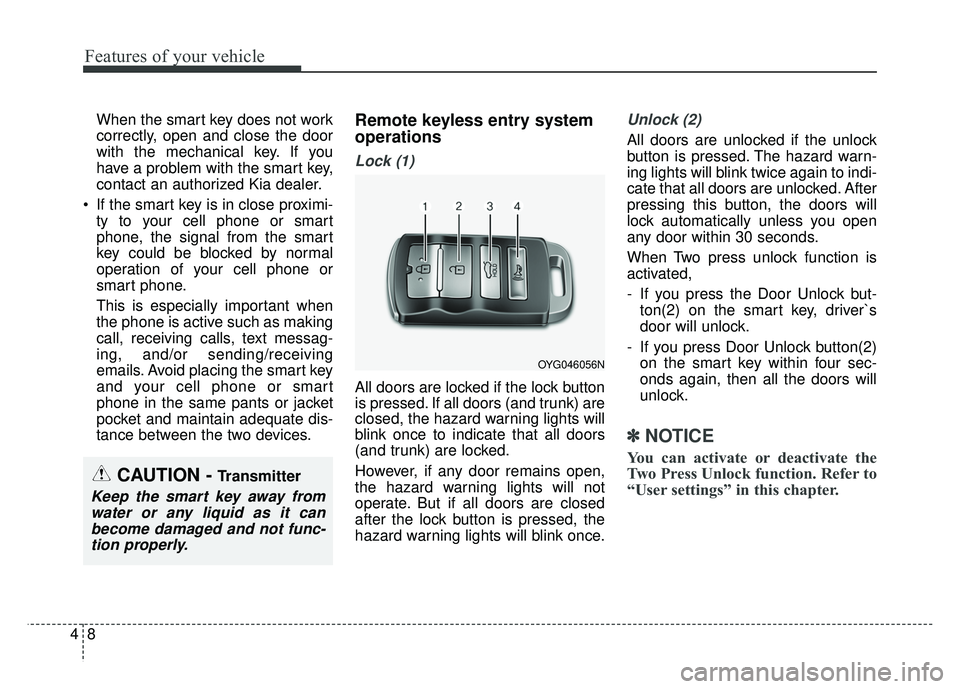
All doors are locked if the lock button
is pressed. If all doors (and trunk) are
closed, the hazard warning lights will
blink once to indicate that all doors
(and trunk) are locked.
However, if any door remains open,
the hazard warning lights will not
operate. But if all doors are closed
after the lock button is pressed, the
hazard warning lights will blink once.
Unlock (2)
All doors are unlocked if the unlock
button is pressed. The hazard warn-
ing lights will blink twice again to indi-
cate that all doors are unlocked. After
pressing this button, the doors will
lock automatically unless you open
any door within 30 seconds.
When Two press unlock function is
activated,
- If you press the Door Unlock but-ton(2) on the smart key, driver`s
door will unlock.
- If you press Door Unlock button(2) on the smart key within four sec-
onds again, then all the doors will
unlock.
✽ ✽ NOTICE
You can activate or deactivate the
Two Press Unlock function. Refer to
“User settings” in this chapter.
OYG046056N
CAUTION - Transmitter
Keep the smart key away from
water or any liquid as it canbecome damaged and not func-tion properly.
Page 90 of 500
49
Features of your vehicle
✽
✽NOTICE
If the keyless entry system is inoper-
ative due to exposure to water or liq-
uids, it will not be covered by your
manufacturer's vehicle warranty.
Trunk open (3)
The trunk is opened if the button is
pressed for more than 1 second.
Once the trunk is opened and then
closed, the trunk will lock automati-
cally.
Panic alarm (4)
The horn sounds and the hazard
warning lights blink for about 30 sec-
onds if this button is pressed for
more than 0.5 seconds. To stop the
horn and lights, press any button on
the transmitter.
Transmitter precautions
The smart key will not
work if any of following occurs:
You exceed the operating distance
limit (about 90 feet [30 m]).
The battery in the smart key is weak.
Other vehicles or objects may be blocking the signal.
The weather is extremely cold.
The smart key is close to a radio transmitter such as a radio station
or an airport which can interfere
with normal operation of the trans-
mitter.
When the smart key does not work
properly, open and close the door
with the smart key. If you have a
problem with the smart key, contact
an authorized Kia dealer.
Page 91 of 500

Features of your vehicle
10
4
If the transmitter is in close proxim-
ity to your cell phone or smart
phone, the signal from the trans-
mitter could be blocked by normal
operation of your cell phone or
smart phone. This is especially
important when the phone is active
such as making call, receiving
calls, text messaging, and/or send-
ing/receiving emails.
Avoid placing the transmitter and
your cell phone or smart phone in
the same pants or jacket pocket
and maintain adequate distance
between the two devices.This device complies with Part
15 of the FCC rules.
Operation is subject to the following
two conditions:
1. This device may not cause harmful interference, and
2. This device must accept any inter- ference received, including inter-
ference that may cause undesired
operation.
✽ ✽NOTICE
Changes or modifications not
expressly approved by the party
responsible for compliance could
void the user’s authority to operate
the equipment. If the keyless entry
system is inoperative due to changes
or modifications not expressly
approved by the party responsible
for compliance, it will not be cov-
ered by your manufacturer’s vehicle
warranty.
Battery replacement
A battery should last for several
years, but if the smart key is not
working properly, try replacing the
battery with a new one. If you are
unsure how to use or replace the
battery, contact an authorized Kia
dealer.
CAUTION - Transmitter
damage
Do not drop, wet or expose the
keyless entry system transmit-ter to heat or sunlight.
Page 92 of 500
411
Features of your vehicle
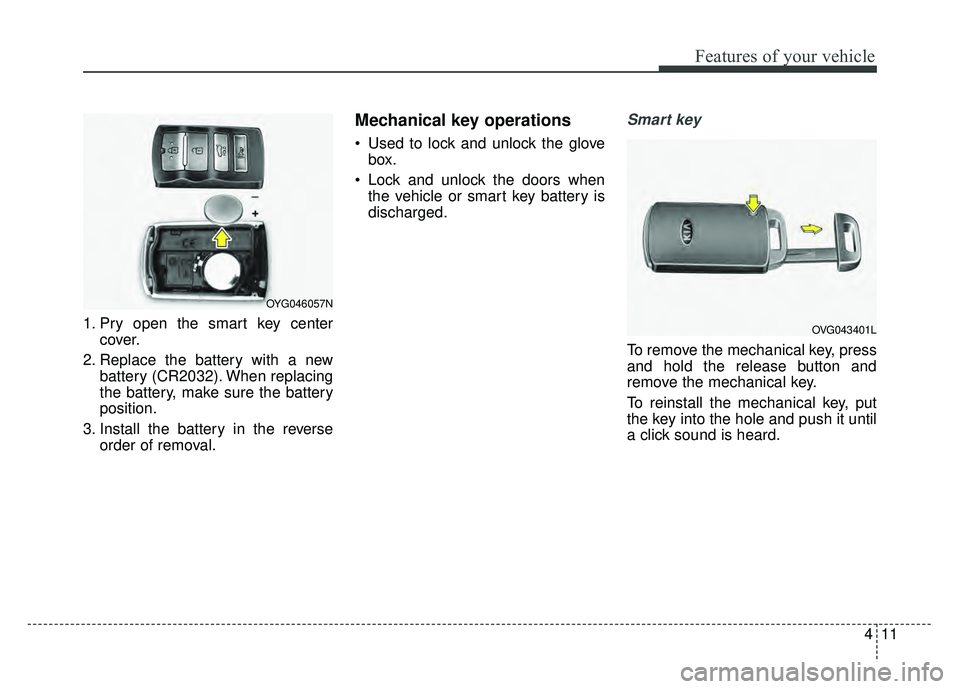
1. Pry open the smart key centercover.
2. Replace the battery with a new battery (CR2032). When replacing
the battery, make sure the battery
position.
3. Install the battery in the reverse order of removal.
Mechanical key operations
Used to lock and unlock the glovebox.
Lock and unlock the doors when the vehicle or smart key battery is
discharged.
Smart key
To remove the mechanical key, press
and hold the release button and
remove the mechanical key.
To reinstall the mechanical key, put
the key into the hole and push it until
a click sound is heard.
OYG046057N
OVG043401L
Page 104 of 500
423
Features of your vehicle
Power Trunk Non-Opening orClosing Conditions:
The power trunk will not open or close automatically, when the vehi-
cle is moving more than 1.8 mph (3
km/h).
The power trunk can be operated when the engine is not running.
However, the power trunk opera-
tion consumes large amounts of
vehicle electric power. To prevent
the battery from draining, do not
operate it excessively (e.g., more
than approximately 10 times
repeatedly).
Do not modify or repair any part of the power trunk by yourself. This
must be done by an authorized Kia
dealer.
Before jacking up the vehicle to change a tire or repair the vehicle,
open the power trunk. Do not oper-
ate the power trunk when the vehi-
cle is raised or this could cause the
power trunk to operate improperly. If there are obstacles such as
snow on the power trunk, it may
not open automatically. After
removing the obstacle, try to open
it again.
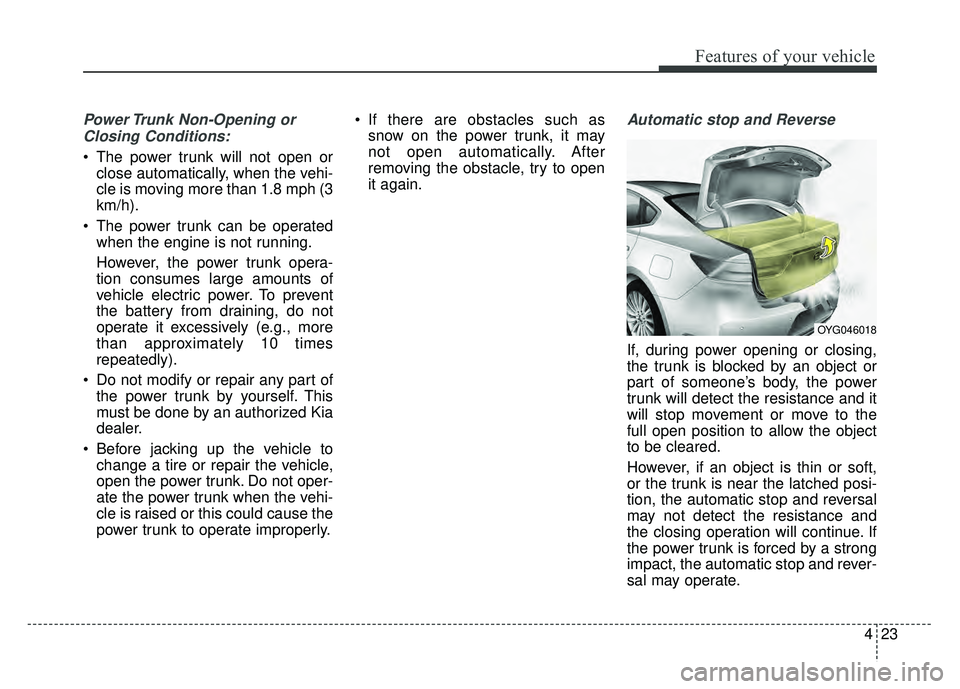
Automatic stop and Reverse
If, during power opening or closing,
the trunk is blocked by an object or
part of someone’s body, the power
trunk will detect the resistance and it
will stop movement or move to the
full open position to allow the object
to be cleared.
However, if an object is thin or soft,
or the trunk is near the latched posi-
tion, the automatic stop and reversal
may not detect the resistance and
the closing operation will continue. If
the power trunk is forced by a strong
impact, the automatic stop and rever-
sal may operate.
OYG046018
Page 105 of 500
Features of your vehicle
24
4
If the automatic stop and reverse fea-
ture operates more than twice during
one opening or closing operation, the
power trunk may stop at that posi-
tion.
If this occurs, close the trunk manu-
ally and operate the trunk automati-
cally again.To Reset the Power Trunk
If the battery has been discharged or
disconnected, or if the related fuse
has been replaced or disconnected,
reset the power trunk as follows:
1. Move the shift lever to the P (Park)
position.
2. Close the trunk manually.
If the power trunk doesn't work prop-
erly after performing the above pro-
cedure, have the system checked by
an authorized Kia dealer.
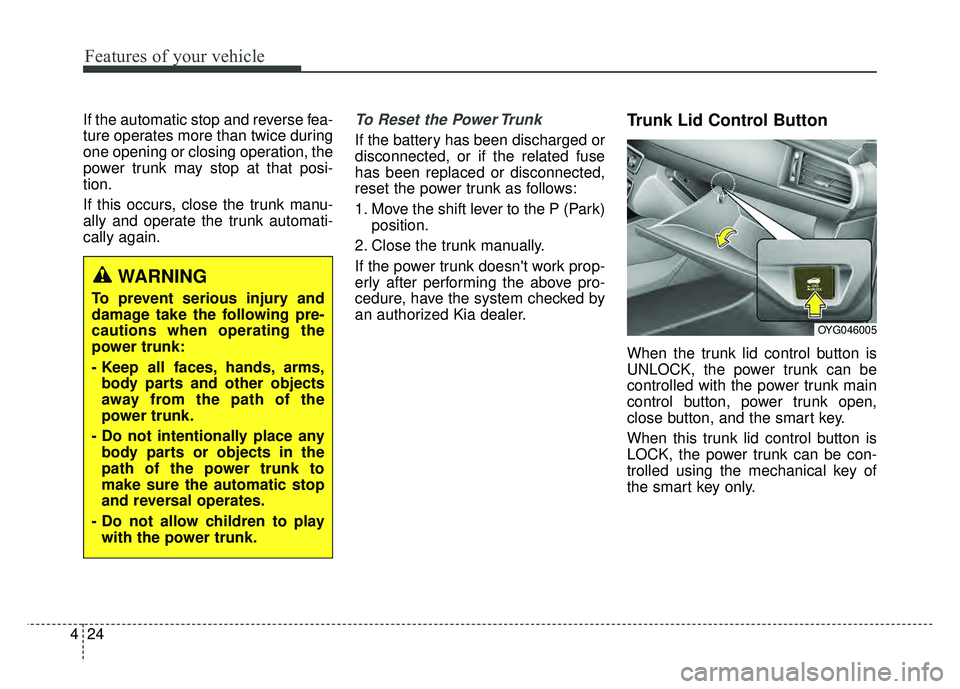
Trunk Lid Control Button
When the trunk lid control button is
UNLOCK, the power trunk can be
controlled with the power trunk main
control button, power trunk open,
close button, and the smart key.
When this trunk lid control button is
LOCK, the power trunk can be con-
trolled using the mechanical key of
the smart key only.
WARNING
To prevent serious injury and
damage take the following pre-
cautions when operating the
power trunk:
- Keep all faces, hands, arms, body parts and other objects
away from the path of the
power trunk.
- Do not intentionally place any body parts or objects in the
path of the power trunk to
make sure the automatic stop
and reversal operates.
- Do not allow children to play with the power trunk.
OYG046005
Page 111 of 500
Features of your vehicle
30
4
✽
✽
NOTICE
• If you press the door unlock but-
ton (2), the Smart Trunk function
will be deactivated temporarily.
But, if you do not open any door
for 30 seconds, the smart trunk
function will be activated again.
• If you press the trunk open button (3) for more than 1 second, the
trunk opens.
• If you press the door lock button (1) or trunk open button (3) when
the Smart Trunk function is not in
the Detect and Alert stage, the
smart trunk function will not be
deactivated.
• In case you have deactivated the Smart Trunk function by pressing
the smart key button and opened a
door, the smart trunk function can
be activated again by closing and
locking all doors.
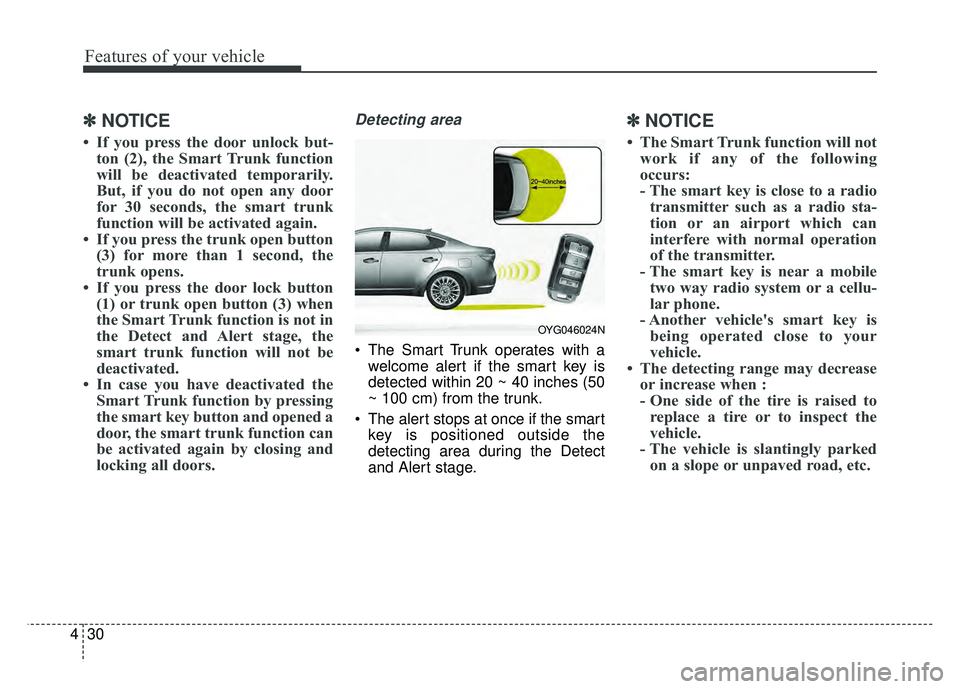
Detecting area
The Smart Trunk operates with a
welcome alert if the smart key is
detected within 20 ~ 40 inches (50
~ 100 cm) from the trunk.
The alert stops at once if the smart key is positioned outside the
detecting area during the Detect
and Alert stage.
✽ ✽ NOTICE
• The Smart Trunk function will not
work if any of the following
occurs:
- The smart key is close to a radiotransmitter such as a radio sta-
tion or an airport which can
interfere with normal operation
of the transmitter.
- The smart key is near a mobile two way radio system or a cellu-
lar phone.
- Another vehicle's smart key is being operated close to your
vehicle.
• The detecting range may decrease or increase when :
- One side of the tire is raised toreplace a tire or to inspect the
vehicle.
- The vehicle is slantingly parked on a slope or unpaved road, etc.
OYG046024N
Page 113 of 500
Features of your vehicle
32
4
Power windows
The Engine Start/Stop button must be
in the ON position for power windows
to operate. Each door has a power
window switch that controls the door’s
window. The driver has a power win-
dow lock switch which can block the
operation of rear passenger windows.
The power windows can be operated
for approximately 30 seconds after
engine is turned off. However, if the
front doors are opened, the power
windows cannot be operated even
within the 30 second period.
✽ ✽
NOTICE
While driving with the rear windows
down or with the sunroof (if
equipped) in an open (or partially
open) position, your vehicle may
demonstrate a wind buffeting or
pulsation noise. This noise is a nor-
mal occurrence and can be reduced
or eliminated by taking the follow-
ing actions. If the noise occurs with
one or both of the rear windows
down, partially lower both front
windows approximately one inch. If
you experience the noise with the
sunroof open, slightly reduce the
size of the sunroof opening.
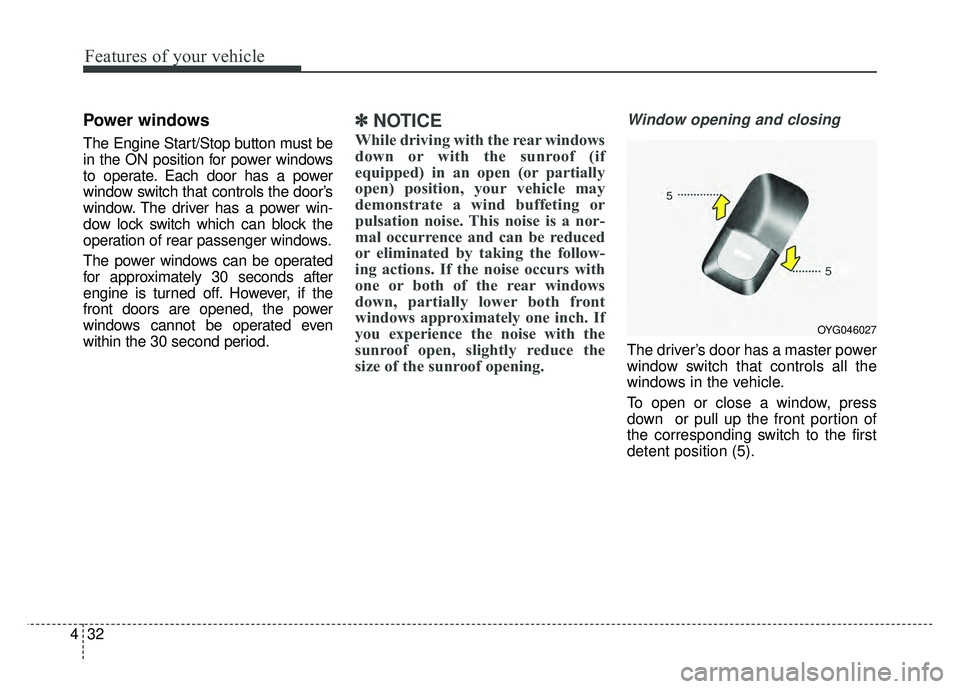
Window opening and closing
The driver’s door has a master power
window switch that controls all the
windows in the vehicle.
To open or close a window, press
down or pull up the front portion of
the corresponding switch to the first
detent position (5).
OYG046027