fuel KIA CADENZA 2019 Owner's Manual
[x] Cancel search | Manufacturer: KIA, Model Year: 2019, Model line: CADENZA, Model: KIA CADENZA 2019Pages: 518, PDF Size: 11.08 MB
Page 173 of 518
491
Features of your vehicle
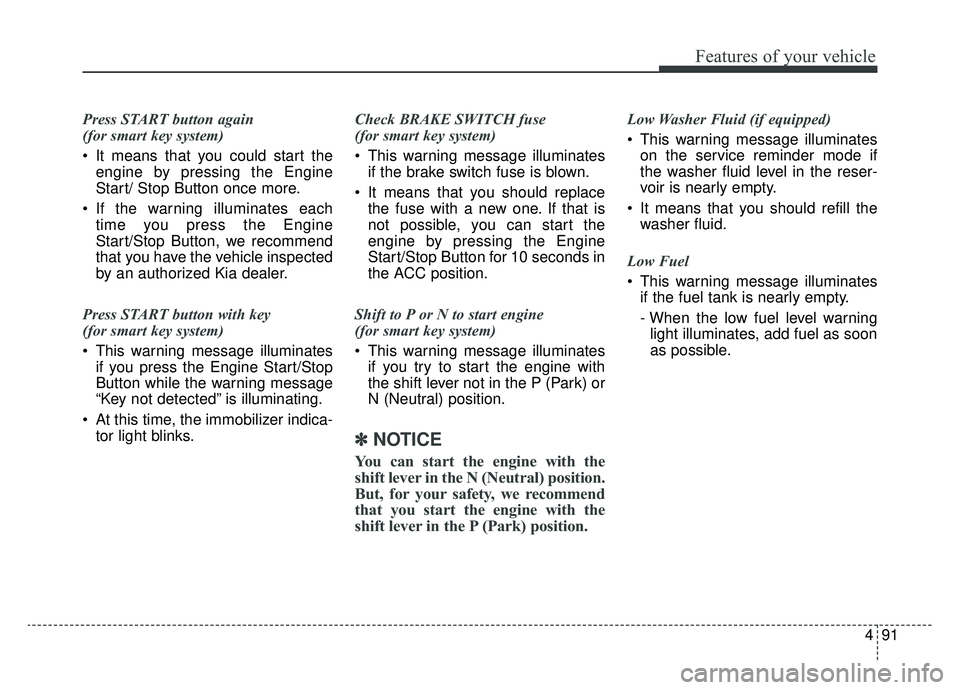
Press START button again
(for smart key system)
It means that you could start theengine by pressing the Engine
Start/ Stop Button once more.
If the warning illuminates each time you press the Engine
Start/Stop Button, we recommend
that you have the vehicle inspected
by an authorized Kia dealer.
Press START button with key
(for smart key system)
This warning message illuminates if you press the Engine Start/Stop
Button while the warning message
“Key not detected” is illuminating.
At this time, the immobilizer indica- tor light blinks. Check BRAKE SWITCH fuse
(for smart key system)
This warning message illuminates
if the brake switch fuse is blown.
It means that you should replace the fuse with a new one. If that is
not possible, you can start the
engine by pressing the Engine
Start/Stop Button for 10 seconds in
the ACC position.
Shift to P or N to start engine
(for smart key system)
This warning message illuminates if you try to start the engine with
the shift lever not in the P (Park) or
N (Neutral) position.
✽ ✽ NOTICE
You can start the engine with the
shift lever in the N (Neutral) position.
But, for your safety, we recommend
that you start the engine with the
shift lever in the P (Park) position.
Low Washer Fluid (if equipped)
This warning message illuminates
on the service reminder mode if
the washer fluid level in the reser-
voir is nearly empty.
It means that you should refill the washer fluid.
Low Fuel
This warning message illuminates if the fuel tank is nearly empty.
- When the low fuel level warning
light illuminates, add fuel as soon
as possible.
Page 178 of 518
Features of your vehicle
96
4
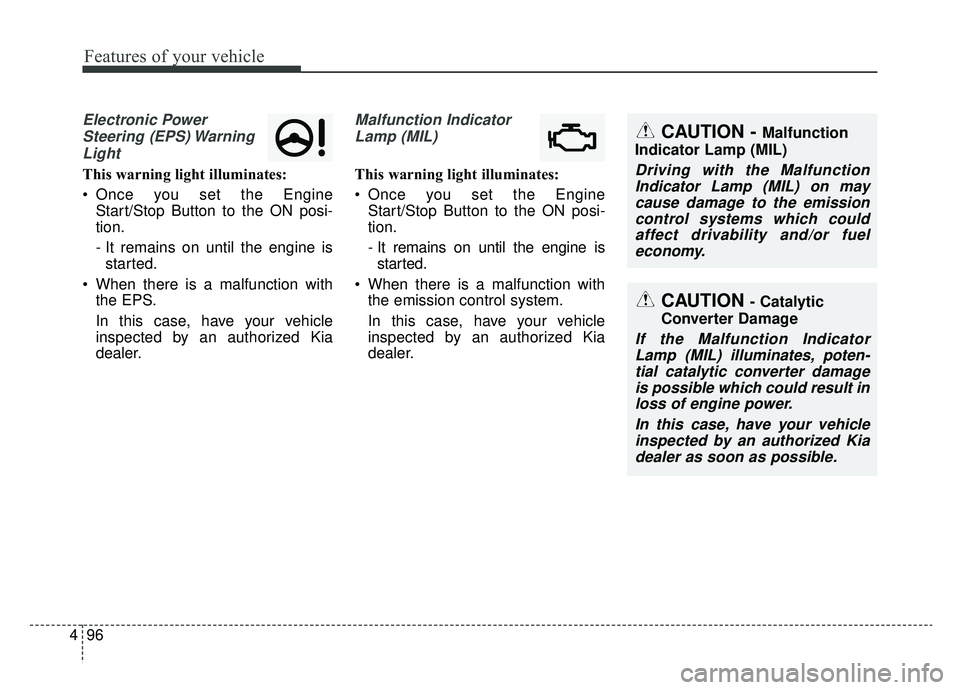
Electronic Power
Steering (EPS) WarningLight
This warning light illuminates:
Once you set the Engine Start/Stop Button to the ON posi-
tion.
- It remains on until the engine isstarted.
When there is a malfunction with the EPS.
In this case, have your vehicle
inspected by an authorized Kia
dealer.
Malfunction Indicator
Lamp (MIL)
This warning light illuminates:
Once you set the Engine Start/Stop Button to the ON posi-
tion.
- It remains on until the engine isstarted.
When there is a malfunction with the emission control system.
In this case, have your vehicle
inspected by an authorized Kia
dealer.
CAUTION - Catalytic
Converter Damage
If the Malfunction Indicator Lamp (MIL) illuminates, poten-tial catalytic converter damageis possible which could result inloss of engine power.
In this case, have your vehicleinspected by an authorized Kiadealer as soon as possible.
CAUTION - Malfunction
Indicator Lamp (MIL)
Driving with the Malfunction Indicator Lamp (MIL) on maycause damage to the emissioncontrol systems which couldaffect drivability and/or fueleconomy.
Page 188 of 518
Features of your vehicle
106
4
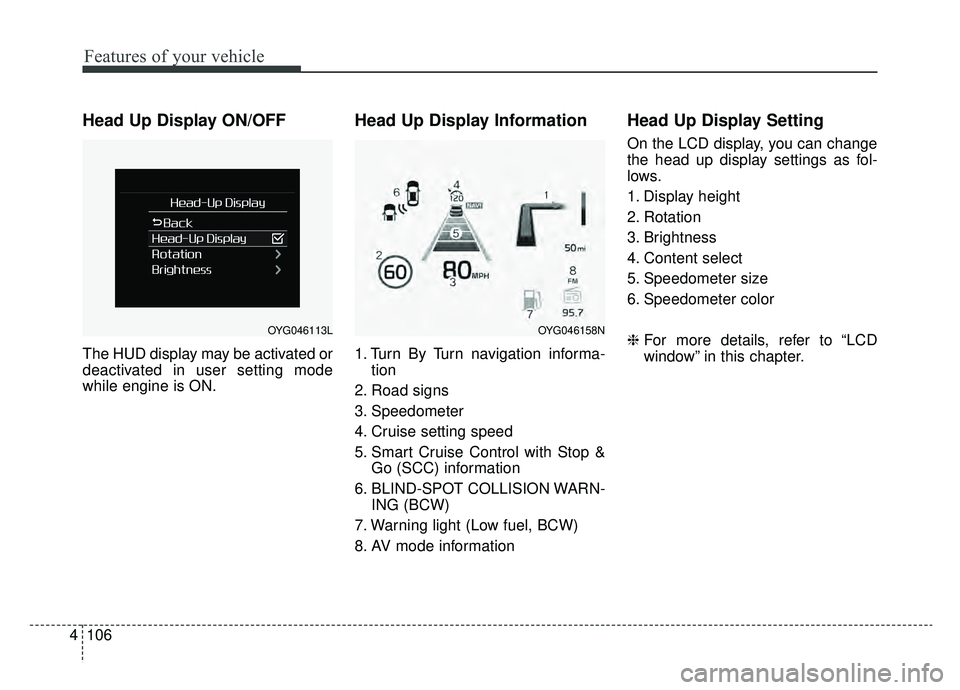
Head Up Display ON/OFF
The HUD display may be activated or
deactivated in user setting mode
while engine is ON.
Head Up Display Information
1. Turn By Turn navigation informa-
tion
2. Road signs
3. Speedometer
4. Cruise setting speed
5. Smart Cruise Control with Stop & Go (SCC) information
6. BLIND-SPOT COLLISION WARN- ING (BCW)
7. Warning light (Low fuel, BCW)
8. AV mode information
Head Up Display Setting
On the LCD display, you can change
the head up display settings as fol-
lows.
1. Display height
2. Rotation
3. Brightness
4. Content select
5. Speedometer size
6. Speedometer color
❈ For more details, refer to “LCD
window” in this chapter.
OYG046113LOYG046158N
Page 259 of 518
513
Driving your vehicle
D (Drive)
This is the normal forward driving
position. The transaxle will automati-
cally shift through an 8-gear
sequence, providing the best fuel
economy and power.
For extra power when passing anoth-
er vehicle or climbing grades,
depress the accelerator fully, at
which time the transaxle will auto-
matically downshift to the next lower
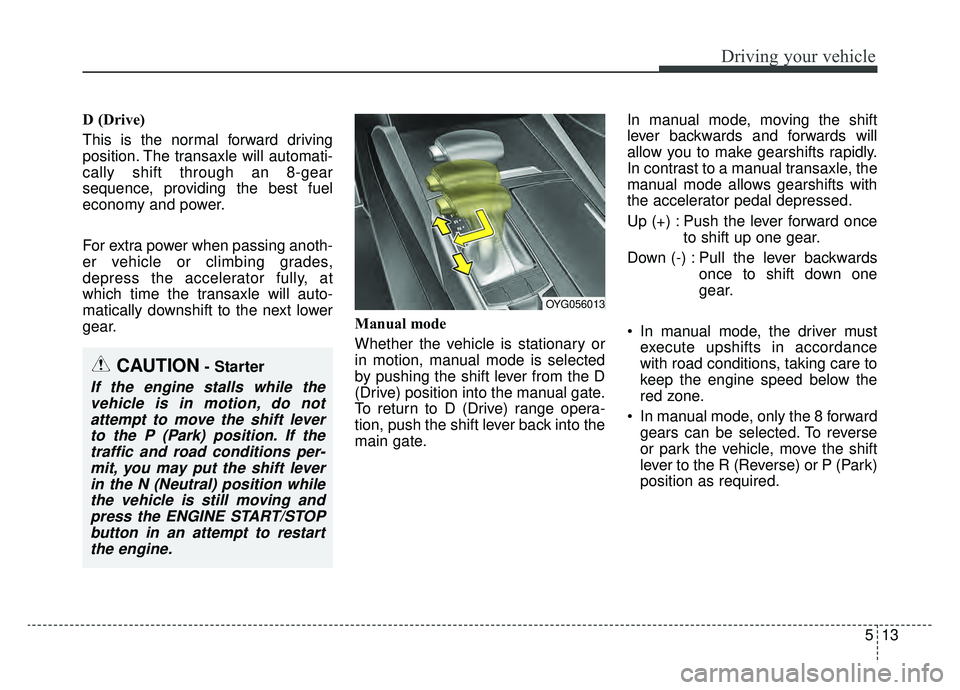
gear.Manual mode
Whether the vehicle is stationary or
in motion, manual mode is selected
by pushing the shift lever from the D
(Drive) position into the manual gate.
To return to D (Drive) range opera-
tion, push the shift lever back into the
main gate.In manual mode, moving the shift
lever backwards and forwards will
allow you to make gearshifts rapidly.
In contrast to a manual transaxle, the
manual mode allows gearshifts with
the accelerator pedal depressed.
Up (+) : Push the lever forward once
to shift up one gear.
Down (-) : Pull the lever backwards once to shift down one
gear.
In manual mode, the driver must execute upshifts in accordance
with road conditions, taking care to
keep the engine speed below the
red zone.
In manual mode, only the 8 forward gears can be selected. To reverse
or park the vehicle, move the shift
lever to the R (Reverse) or P (Park)
position as required.
OYG056013
CAUTION- Starter
If the engine stalls while thevehicle is in motion, do notattempt to move the shift leverto the P (Park) position. If thetraffic and road conditions per-mit, you may put the shift leverin the N (Neutral) position whilethe vehicle is still moving andpress the ENGINE START/STOPbutton in an attempt to restartthe engine.
Page 323 of 518
577
Driving your vehicle
ECO (ACTIVE ECO) MODE
enhances fuel efficiency
through eco control of
the engine and trans-
mission. The actual fuel
efficiency will depend on
personal driving style
and habits.
MODE button and
selecting ECO MODE
the green ECO indicator
light will illuminate.
ECO MODE Driving:
The vehicle engine and transmission
will operate in fuel economy oriented
mode.
ACTIVE ECO MODE system will
restrain fuel economy driving habits
that reduce, such as sudden starts
and accelerations, compared to the
COMFORT MODE.
Conditions that limit Active
ECO MODE:
Below are a list of conditions in which
ACTIVE ECO MODE will be limited.
When engine coolant temperature is low:
When temperature of the transaxle
oil is low, the ACTIVE ECO MODE
may become temporarily unavail-
able until the transaxle oil heats up
after vehicle ignition.
When in an uphill gradient: Since the ACTIVE ECO MODE
partially limits the engine torque,
ACTIVE ECO MODE may become
temporarily unavailable when more
torque is essential for going uphill.
When using the manual transmis- sion operation mode:
If transmission operation is
changed from automatic to manual,
the vehicle will reflect it and auto-
matically stop the ACTIVE ECO
MODE.
Page 324 of 518

Driving your vehicle
78
5
SPORT MODE
button is pressed and
the SPORT MODE is
selected, the SPORT
indicator (red) will illumi-
nate on the dashboard.
is activated, and the
Engine Start/Stop button
is turned off and on again,
drive mode will reset to
COMFORT MODE.
To turn on SPORT MODE, press DRIVE
MODE button again.
- After increasing speed and taking your foot off
the accelerator pedal, it
maintains the current
gear and RPM for a
short time even though
the accelerator pedal is
not depressed.
- Up-shift during accel- eration is delayed.
✽ ✽ NOTICE
In SPORT DRIVE MODE, the fuel
efficiency may decrease.
SMART MODE
SMART MODE is an intel-
ligent driving mode which
automatically selects the
most appropriate drive
mode by measuring
usage of steering wheel,
and accelerator pedal.
ton is pressed and the
SMART MODE is select-
ed, SMART indicator will
illuminate on the dash-
board.
MODE indicator light will
depend on the driving
style. If the driving style is
economic, average, and
speedy, the indicator light
will be green, white, and
red in respective order.
is activated, and the
Engine Start/Stop button
is turned off and on again,
your car will still maintain
the SMART MODE.
Page 325 of 518

579
Driving your vehicle
automatic drive mode con-
trol depending on the
usage of the steering
wheel, engine and
transaxle system.
Driving styleSMART
DRIVE MODEGear Shift PatternEngine Torque
EconomicSMART ECOFuel EfficientFuel Efficient
AverageSMART COMFORTAverageAverage
DynamicSMART SPORTAccelerationHighly Responsive
✽ ✽ NOTICE
• SMART MODE is an intelligent driving mode and when the driving style
is economic and fuel efficient, the SMART ECO MODE will be automat-
ically selected. The engine and transaxle system will become more fuel
efficient, but the actual fuel economy will depend on various driving fa\
c-
tors (on uphill/ downhill, heavy revving or braking).
• If you make sudden accelerations or turns in SMART MODE, the intelli- gent mode will select SMART SPORT MODE. This may decrease fuel effi-
ciency.
Page 327 of 518

581
Driving your vehicle
Driving Style Gauge
Once the SMART MODE is selected
by pressing the DRIVE MODE but-
ton, and the DRIVE MODE indicator
screen is selected by pressing the
trip computer button on the steering
wheel, the driving style gauge bar
will show up at the bottom of screen
and visualize current style of driving. Left poles of the driving style gauge
indicate economic driving in green
color. The more economically you
drive, the more the left poles will
light up in green.
Likewise, the right pole of the driving
style gauge indicates sporty driving
in red color. As the vehicle acceler-
ates, the gauge will move to the right
pole. If the driving style gauge fills up
toward left side (or Economic side)
and is maintained there for a certain
time, the vehicle will be automatical-
ly switch to SMART ECO MODE.
Likewise, when driving style gauge
fills up toward right side and is main-
tained there for a certain time, the
vehicle will be automatically switch
to SMART SPORT MODE.
If you wish to maintain the SMART ECO MODE for better fuel econo-
my, try to maintain economic driv-
ing style and keep the driving style
gauge green.
OYG056149N
Page 358 of 518
Driving your vehicle
112
5
Your vehicle's fuel economy depends
mainly on your style of driving, where
you drive and when you drive.
Each of these factors affects how
many miles (kilometers) you can get
from a gallon (liter) of fuel. To operate
your vehicle as economically as pos-
sible, use the following driving sug-
gestions to help save money in both
fuel and repairs:
Drive smoothly. Accelerate at a
moderate rate. Don't make "jack-
rabbit" starts or full-throttle shifts
and maintain a steady cruising
speed. Don't race between stop-
lights. Try to adjust your speed to
the traffic so you don't have to
change speeds unnecessarily.
Avoid heavy traffic whenever pos-
sible. Always maintain a safe dis-
tance from other vehicles so you
can avoid unnecessary braking.
This also reduces brake wear.
Drive at a moderate speed. The faster you drive, the more fuel your
vehicle uses. Driving at a moderate
speed, especially on the highway,
is one of the most effective ways to
reduce fuel consumption. Don't "ride" the brake pedal. This
can increase fuel consumption and
also increase wear on these com-
ponents. In addition, driving with
your foot resting on the brake pedal
may cause the brakes to overheat,
which reduces their effectiveness
and may lead to more serious con-
sequences.
Take care of your tires. Keep them inflated to the recommended pres-
sure. Incorrect inflation, either too
much or too little, results in unnec-
essary tire wear. Check the tire
pressures at least once a month.
Be sure that the wheels are aligned correctly. Improper align-
ment can result from hitting curbs
or driving too fast over irregular
surfaces. Poor alignment causes
faster tire wear and may also result
in other problems as well as
greater fuel consumption. Keep your vehicle in good condi-
tion. For better fuel economy and
reduced maintenance costs, main-
tain your vehicle in accordance
with the maintenance schedule in
chapter 7. If you drive your vehicle
in severe conditions, more frequent
maintenance is required (see
chapter 7 for details).
Keep your vehicle clean. For maxi- mum service, your vehicle should
be kept clean and free of corrosive
materials. It is especially important
that mud, dirt, ice, etc. not be
allowed to accumulate on the
underside of the vehicle. This extra
weight can result in increased fuel
consumption and also contribute to
corrosion.
Travel lightly. Don't carry unneces- sary weight in your vehicle. Weight
reduces fuel economy.
Don't let the engine idle longer than necessary. If you are waiting
(and not in traffic), turn off your
engine and restart only when
you're ready to go.
ECONOMICAL OPERATION
Page 359 of 518
5113
Driving your vehicle
Remember, your vehicle does notrequire extended warm-up. After
the engine has started, allow the
engine to run for 10 to 20 seconds
prior to placing the vehicle in gear.
In very cold weather, however, give
your engine a slightly longer warm-
up period.
Don't "lug" or "over-rev" the engine. Lugging is driving too slowly in a
very high gear resulting in engine
bucking. If this happens, shift to a
lower gear. Over-revving is racing
the engine beyond its safe limit.
This can be avoided by shifting at
the recommended speed. Use your air conditioning sparingly.
The air conditioning system is
operated by engine power so your
fuel economy is reduced when you
use it.
Open windows at high speeds can reduce fuel economy.
Fuel economy is less in crosswinds and headwinds. To help offset
some of this loss, slow down when
driving in these conditions.
Keeping a vehicle in good operating
condition is important both for econ-
omy and safety. Therefore, have an
authorized Kia dealer perform
scheduled inspections and mainte-
nance.
WARNING - Engine off
during motion
Never turn the engine off to
coast down hills or anytime the
vehicle is in motion. The power
steering and power brakes will
not function properly without the
engine running. In addition, turn-
ing off the ignition while driving
could lead to out of working
power driven steering wheel and
hard to control steering wheel.
Keep the engine on and down-
shift to an appropriate gear for
an engine braking effect.