warning KIA CADENZA 2019 Workshop Manual
[x] Cancel search | Manufacturer: KIA, Model Year: 2019, Model line: CADENZA, Model: KIA CADENZA 2019Pages: 518, PDF Size: 11.08 MB
Page 90 of 518

Features of your vehicle
84
If the smart key does not work cor-
rectly, you may lock and unlock the
door with the mechanical key. If
you have a problem with the smart
key, contact an authorized Kia
dealer.
If the smart key is in close proximi- ty to your cell phone or smart
phone, the signal from the smart
key could be blocked by normal
operation of your cell phone or
smart phone.
This is especially important when
the phone is active such as making
calls, receiving calls, text messag-
ing, and/or sending/receiving
emails. Avoid placing the smart key
and your cell phone or smart
phone in the same pants or jacket
pocket and maintain adequate dis-
tance between the two devices.Remote keyless entry system
operations
Lock (1)
All doors are locked if the lock button
is pressed. If all doors (and trunk) are
closed, the hazard warning lights will
blink once to indicate that all doors
(and trunk) are locked.
However, if any door remains open,
the hazard warning lights will not
operate. But if all doors are closed
after the lock button is pressed, the
hazard warning lights will blink once.
Unlock (2)
All doors can be unlocked if the
unlock button is pressed. The hazard
warning lights will blink twice again to
indicate that all doors are unlocked.
After pressing this button, the doors
will lock automatically unless you
open any door within 30 seconds.
When the Two Press Unlock function
is activated,
- If you press the Door Unlock but-ton(2) on the smart key, the driv-
er`s door will unlock.
- If you press Door Unlock button(2) on the smart key within four sec-
onds again, then all the doors will
unlock.
✽ ✽ NOTICE
You can activate or deactivate the
Two Press Unlock function. Refer to
“User settings” in this chapter.
OYG046056N
CAUTION - Transmitter
Keep the smart key away from
water or any liquid as it canbecome damaged and not func-tion properly.
Page 91 of 518
49
Features of your vehicle
✽ ✽NOTICE
If the keyless entry system is inoper-
ative due to exposure to water or liq-
uids, it will not be covered by your
manufacturer's vehicle warranty.
Trunk open (3)
The trunk is opened if the button is
pressed for more than 1 second.
Once the trunk is opened and then
closed, the trunk will lock automati-
cally.
Panic alarm (4)
The horn sounds and the hazard
warning lights blink for about 30 sec-
onds if this button is pressed for
more than 0.5 seconds. To stop the
horn and lights, press any button on
the transmitter.
Transmitter precautions
The smart key will not
work if any of following occurs:
You exceed the operating distance
limit (about 90 feet [30 m]).
The battery in the smart key is weak.
Other vehicles or objects may be blocking the signal.
The weather is extremely cold.
The smart key is close to a radio transmitter such as a radio station
or an airport which can interfere
with normal operation of the trans-
mitter.
If the smart key does not work cor-
rectly, you may lock and unlock the
door with the mechanical key. If you
have a problem with the smart key,
contact an authorized Kia dealer.
Page 96 of 518
Features of your vehicle
14
4
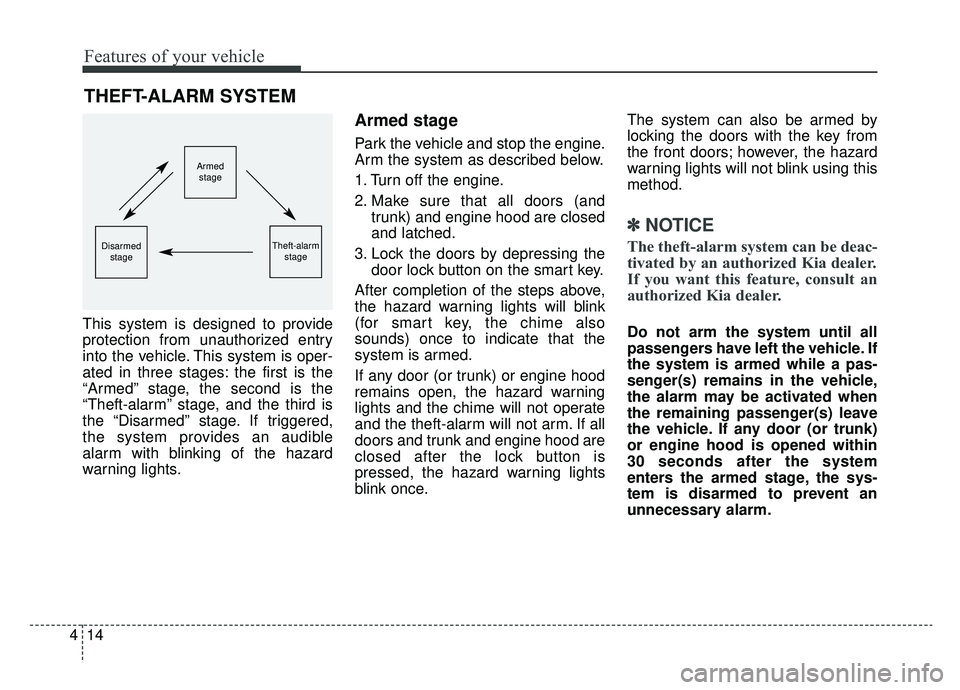
This system is designed to provide
protection from unauthorized entry
into the vehicle. This system is oper-
ated in three stages: the first is the
“Armed” stage, the second is the
“Theft-alarm” stage, and the third is
the “Disarmed” stage. If triggered,
the system provides an audible
alarm with blinking of the hazard
warning lights.
Armed stage
Park the vehicle and stop the engine.
Arm the system as described below.
1. Turn off the engine.
2. Make sure that all doors (and
trunk) and engine hood are closed
and latched.
3. Lock the doors by depressing the door lock button on the smart key.
After completion of the steps above,
the hazard warning lights will blink
(for smart key, the chime also
sounds) once to indicate that the
system is armed.
If any door (or trunk) or engine hood
remains open, the hazard warning
lights and the chime will not operate
and the theft-alarm will not arm. If all
doors and trunk and engine hood are
closed after the lock button is
pressed, the hazard warning lights
blink once. The system can also be armed by
locking the doors with the key from
the front doors; however, the hazard
warning lights will not blink using this
method.
✽ ✽
NOTICE
The theft-alarm system can be deac-
tivated by an authorized Kia dealer.
If you want this feature, consult an
authorized Kia dealer.
Do not arm the system until all
passengers have left the vehicle. If
the system is armed while a pas-
senger(s) remains in the vehicle,
the alarm may be activated when
the remaining passenger(s) leave
the vehicle. If any door (or trunk)
or engine hood is opened within
30 seconds after the system
enters the armed stage, the sys-
tem is disarmed to prevent an
unnecessary alarm.
THEFT-ALARM SYSTEM
Armed
stage
Theft-alarm stageDisarmedstage
Page 97 of 518
415
Features of your vehicle
Theft-alarm stage
The alarm will be activated if any of
the following occurs while the system
is armed.
A front or rear door is opened with-out using the smart key.
The trunk is opened without using the smart key.
The engine hood is opened.
The horn will sound and the hazard
warning lights will blink continuously
for approximately 27 seconds, and
repeat the horn 2 times unless the
system is disarmed. To turn off the
system, unlock the doors with the
smart key.
Disarmed stage
The system will be disarmed when
The doors (and trunk) are unlocked with the smart key.
After depressing the unlock button,
the hazard warning lights will blink
and the chime will sound twice (in
smart key) to indicate that the sys-
tem is disarmed.
After depressing the unlock button, if
any door (or trunk) is not opened
within 30 seconds, the system will be
rearmed.
Avoid trying to start the engine while the alarm is activated. The
vehicle starting motor is disabled
during the theft-alarm stage.
If the system is not disarmed with
the smart key, open the doors by
using the mechanical key and start
the engine by directly pressing the
engine Start/Stop button with the
smart key.
If you lose your keys, consult your authorized Kia dealer.
✽ ✽ NOTICE
Malfunctions caused by improper
alterations, adjustments or modifi-
cations to the theft-alarm system are
not covered by your vehicle manu-
facturer warranty.
CAUTION - Adjusting
alarm system
Do not change, alter or adjust the theft-alarm system becauseit could cause the theft-alarmsystem to malfunction.
Page 98 of 518
Features of your vehicle
16
4
DOOR LOCKS
Operating door locks from
outside the vehicle
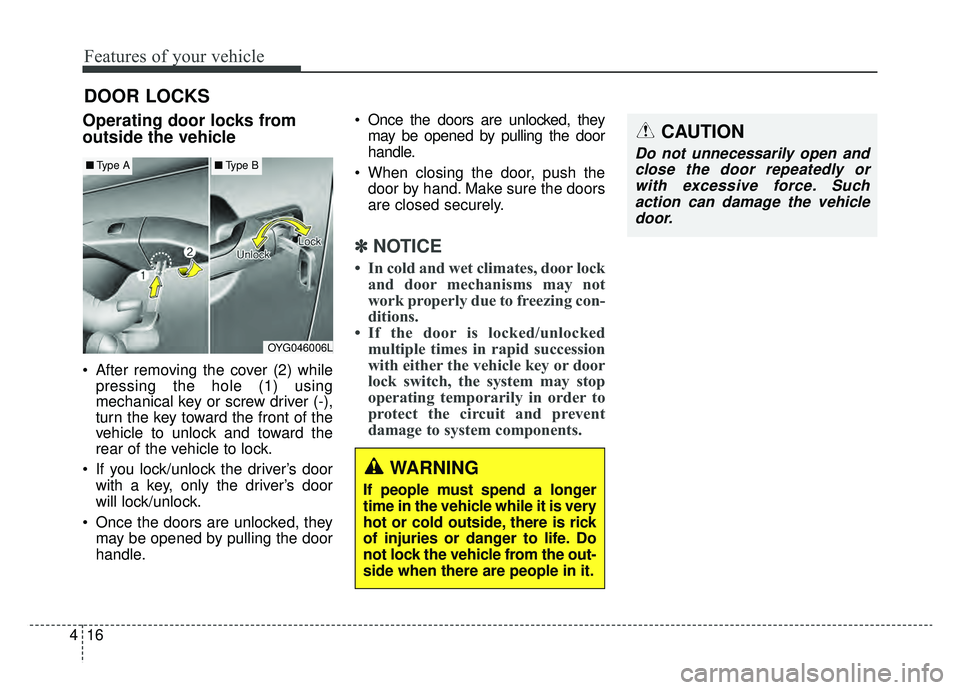
After removing the cover (2) while
pressing the hole (1) using
mechanical key or screw driver (-),
turn the key toward the front of the
vehicle to unlock and toward the
rear of the vehicle to lock.
If you lock/unlock the driver’s door with a key, only the driver’s door
will lock/unlock.
Once the doors are unlocked, they may be opened by pulling the door
handle. Once the doors are unlocked, they
may be opened by pulling the door
handle.
When closing the door, push the door by hand. Make sure the doors
are closed securely.
✽ ✽ NOTICE
• In cold and wet climates, door lock
and door mechanisms may not
work properly due to freezing con-
ditions.
• If the door is locked/unlocked multiple times in rapid succession
with either the vehicle key or door
lock switch, the system may stop
operating temporarily in order to
protect the circuit and prevent
damage to system components.
OYG046006L
■ Type A■Type B
CAUTION
Do not unnecessarily open and
close the door repeatedly orwith excessive force. Suchaction can damage the vehicledoor.
WARNING
If people must spend a longer
time in the vehicle while it is very
hot or cold outside, there is rick
of injuries or danger to life. Do
not lock the vehicle from the out-
side when there are people in it.
Page 100 of 518
Features of your vehicle
18
4
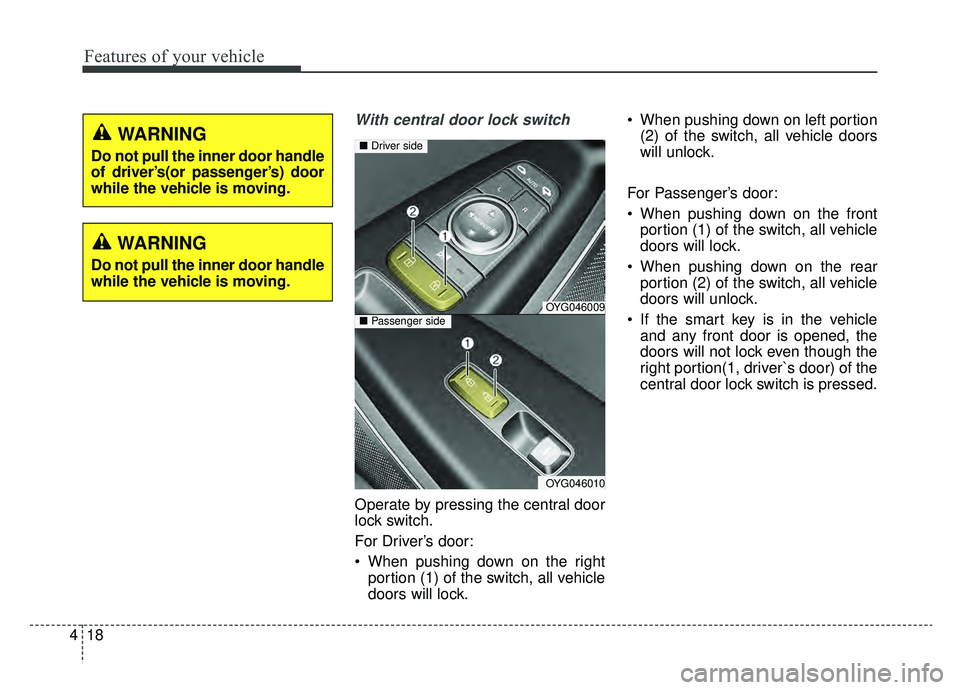
With central door lock switch
Operate by pressing the central door
lock switch.
For Driver’s door:
When pushing down on the right
portion (1) of the switch, all vehicle
doors will lock. When pushing down on left portion
(2) of the switch, all vehicle doors
will unlock.
For Passenger’s door:
When pushing down on the front portion (1) of the switch, all vehicle
doors will lock.
When pushing down on the rear portion (2) of the switch, all vehicle
doors will unlock.
If the smart key is in the vehicle and any front door is opened, the
doors will not lock even though the
right portion(1, driver`s door) of the
central door lock switch is pressed.
WARNING
Do not pull the inner door handle
while the vehicle is moving.
OYG046009
OYG046010
■ Driver side
■Passenger side
WARNING
Do not pull the inner door handle
of driver’s(or passenger’s) door
while the vehicle is moving.
Page 101 of 518
419
Features of your vehicle
Impact sensing door unlock
system
In the event of air bag deployment
resulting from a vehicle impact, all
doors will automatically unlock.
Auto door lock/unlock feature
All doors will automatically lockwhen the transaxle shift lever is
shifted out of P(Park).
All doors will automatically unlock when the transaxle shift lever is
shifted into P (Park).
✽ ✽ NOTICE
You can select some auto door
lock/unlock features in “User Settings”
For more information, refer to
“User Settings” in this chapter.
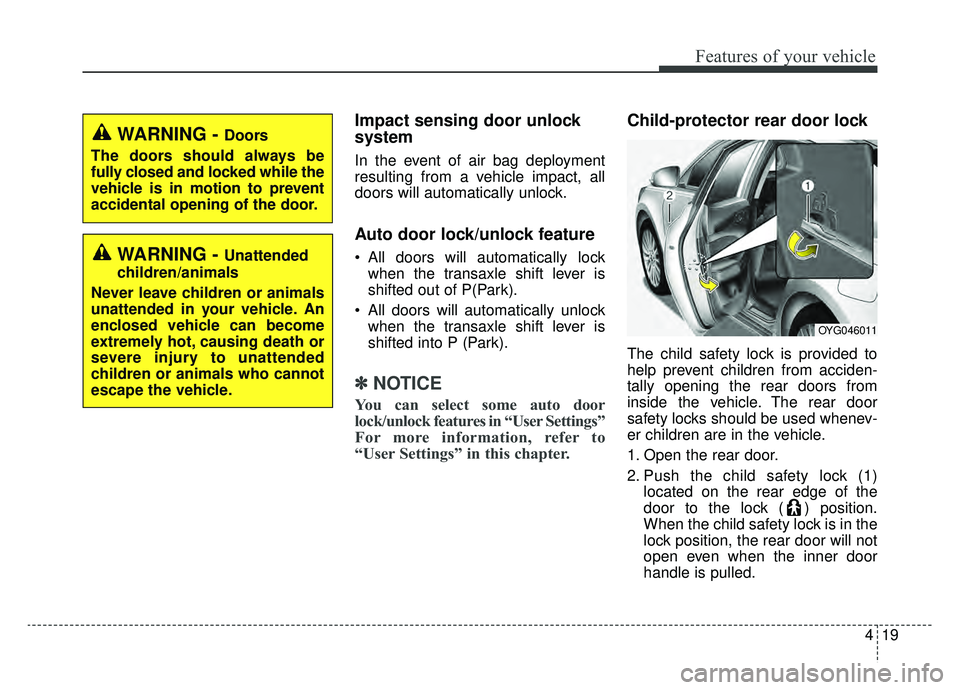
Child-protector rear door lock
The child safety lock is provided to
help prevent children from acciden-
tally opening the rear doors from
inside the vehicle. The rear door
safety locks should be used whenev-
er children are in the vehicle.
1. Open the rear door.
2. Push the child safety lock (1)
located on the rear edge of the
door to the lock ( ) position.
When the child safety lock is in the
lock position, the rear door will not
open even when the inner door
handle is pulled.
WARNING - Doors
The doors should always be
fully closed and locked while the
vehicle is in motion to prevent
accidental opening of the door.
WARNING - Unattended
children/animals
Never leave children or animals
unattended in your vehicle. An
enclosed vehicle can become
extremely hot, causing death or
severe injury to unattended
children or animals who cannot
escape the vehicle.
OYG046011
Page 102 of 518
Features of your vehicle
20
4
3. Close the rear door.
To open the rear door, pull the out-
side door handle (2).
Even though the doors may be
unlocked, the rear door will not open
by pulling the inner door handle until
the rear door child safety lock is
unlocked.
WARNING- Rear door
locks
Use the rear door safety locks
whenever children are in the
vehicle. If a child accidently
opens the rear doors while the
vehicle is moving, they may fall
out.
Page 103 of 518
421
Features of your vehicle
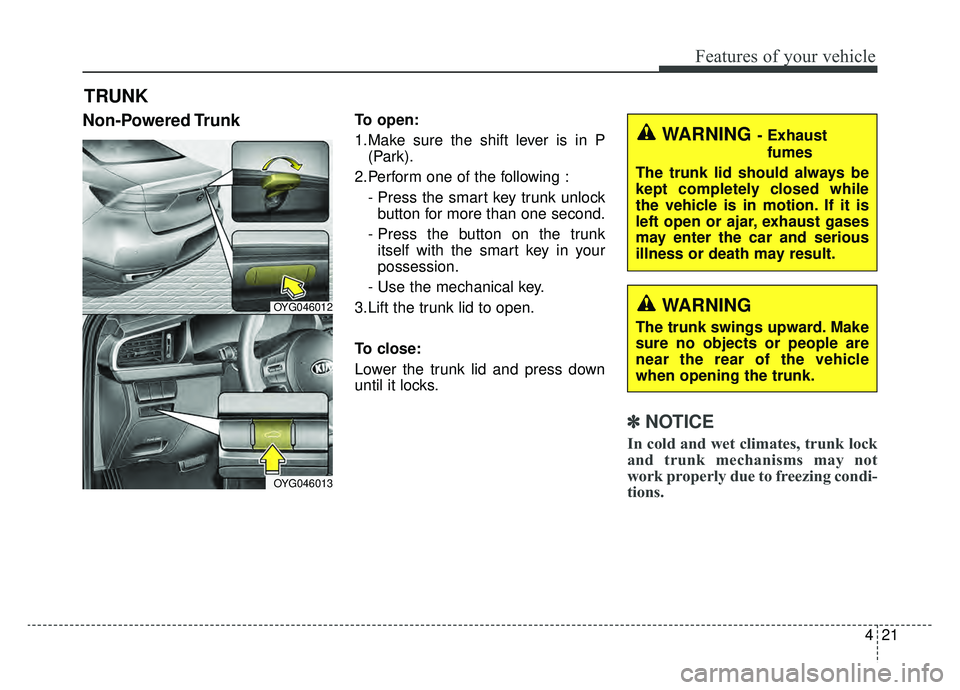
Non-Powered TrunkTo open:
1.Make sure the shift lever is in P(Park).
2.Perform one of the following : - Press the smart key trunk unlockbutton for more than one second.
- Press the button on the trunk itself with the smart key in your
possession.
- Use the mechanical key.
3.Lift the trunk lid to open.
To close:
Lower the trunk lid and press down
until it locks.
✽ ✽ NOTICE
In cold and wet climates, trunk lock
and trunk mechanisms may not
work properly due to freezing condi-
tions.
TRUNK
OYG046012
OYG046013
WARNING- Exhaust
fumes
The trunk lid should always be
kept completely closed while
the vehicle is in motion. If it is
left open or ajar, exhaust gases
may enter the car and serious
illness or death may result.
WARNING
The trunk swings upward. Make
sure no objects or people are
near the rear of the vehicle
when opening the trunk.
Page 105 of 518
423
Features of your vehicle
Closing the trunk
To close the power trunk, do one of
the following:
Push the close button of the powertrunk main button, until the power
trunk is closed securely. The chime
will sound twice.
Push the power trunk close button.
Push the power trunk lock button when all doors and engine hood
are closed with the smart key in
your possession. After closing, all
doors and trunk lock automatically.
✽ ✽ NOTICE
The power trunk lock button will
not work if you press the button
when:
- Any door is open.
- The engine start/stop button is not
in the OFF position.
- The smart key is in the vehicle.
Do not leave the power trunk open
for a long period of time. This may
drain the battery.
✽ ✽ NOTICE
In cold and wet climates, trunk lock
and trunk mechanisms may not
work properly due to freezing condi-
tions.
WARNING
Make sure there are no people
or objects around the trunk
before opening or closing the
power trunk. Wait until the trunk
is open fully and stopped
before loading or unloading
cargo from the vehicle.
CAUTION
Do not close or open the
power trunk manually. Thismay cause damage to thepower trunk. If it is necessaryto close or open the powertrunk manually when the bat-tery is drained or disconnect-ed, do not apply excessiveforce.
To prevent damage to the trunk lift cylinders and theattached hardware, alwaysclose the trunk before driving.